
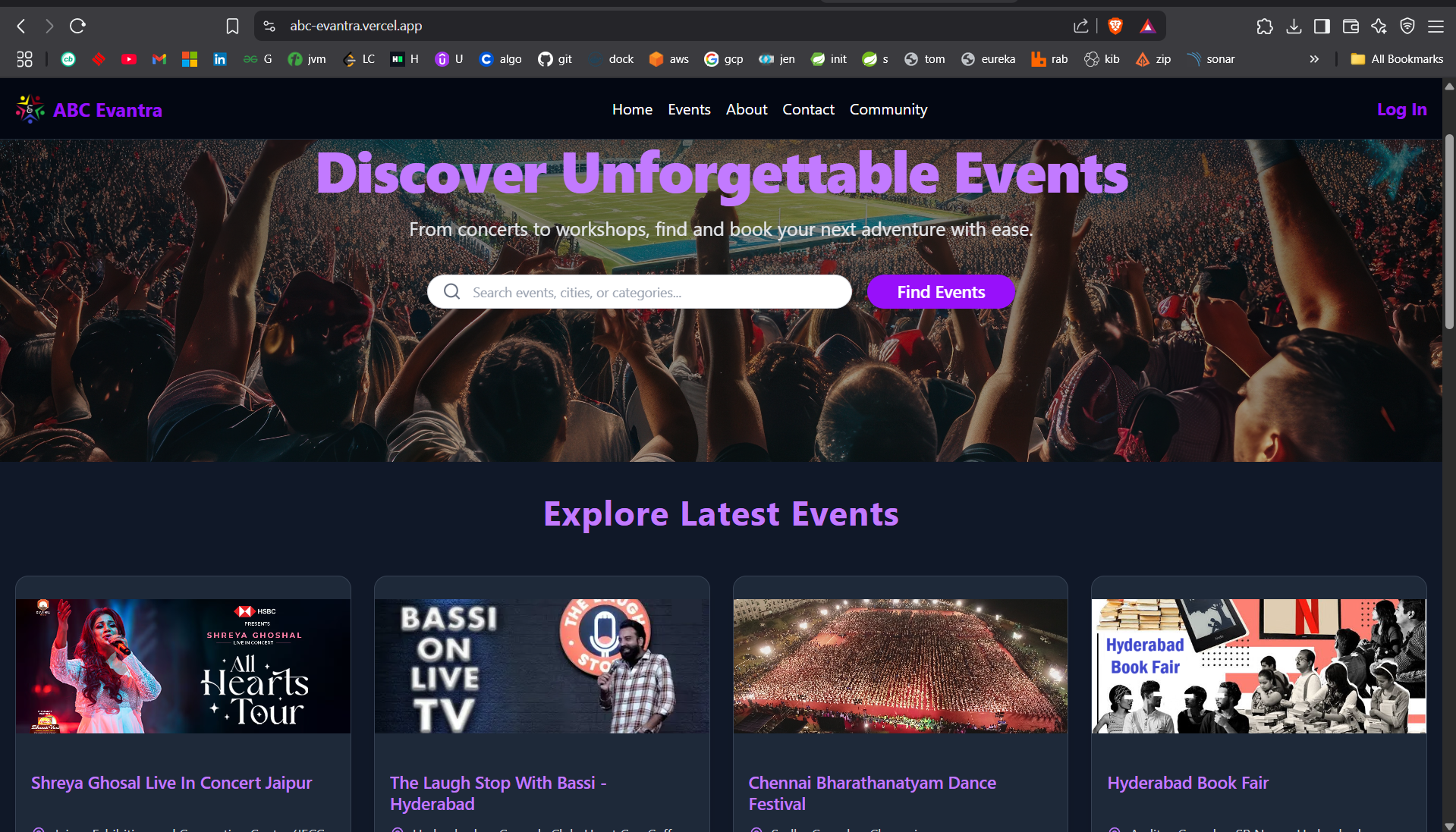
ABC Evantra is a full-stack web application for event ticket management, allowing users to browse, create, manage, and purchase event tickets. The platform supports three user roles: Attendees, Organizers, and Staff, with role-specific features such as ticket purchasing, event creation, and QR code validation. ABC-Evantra is a modern event ticketing platform that allows organizers to create events, sell tickets, and analyze performance, while attendees can browse and purchase tickets securely. Built with a Spring Boot backend and a React frontend, the platform leverages Keycloak for authentication and authorization, Razorpay for payments, NeonDB for PostgreSQL, and Chart.js for data visualizations. This repo has frontend source code.
---------------------------------------------------------------------------------------------------------------------------
USERNAME                    EMAIL                        PASSWORD                EXPECTED_ACTIONS
----------------------------------------------------------------------------------------------------------------------------
admin                       admin@email.com	            Password$123            administrator_of_Cloud_IAM
organizer	                organizer@yopmail.com	      Password$123            user_and_organizer_of_events
organizer2@yopmail.com      organizer2@yopmail.com	      Password$123            user_and_organizer_of_events
staff	                      staff@yopmail.com	         Password#123            user_and_staff_of_events
staff2@yopmail.com          staff2@yopmail.com           Password#123            user_and_staff_of_events
testuser	                   testuser@yopmail.com         Password#123            common_user_who_will_book_ticket_for_events
-----------------------------------------------------------------------------------------------------------------------------
Event Management: Organizers can create, update, and manage events with multiple ticket types. Ticket Purchasing: Attendees can purchase tickets securely using Razorpay, with limits (e.g., max 10 tickets per type per user). Organizer Analytics: Organizers can view detailed analytics, including total tickets sold, revenue, top-performing events, and revenue by ticket type, visualized with pie and bar charts. Profile Viewing: Users can view their profile information (name, email, phone) fetched from Keycloak. QR Code Tickets: Tickets include QR codes for validation. Role-Based Access: Supports ROLE_ATTENDEE, ROLE_ORGANIZER, and ROLE_STAFF with Keycloak-based security. Error Handling: User-friendly error messages for invalid actions (e.g., exceeding ticket limits).
Spring Boot: Core framework for REST APIs.
Spring Data JPA: Database access with Hibernate.
Keycloak (CLOUD_IAM): Authentication and authorization.
Razorpay: Payment gateway integration.
PostgreSQL: Relational database (configurable).
Lombok: Boilerplate code reduction.
React: UI library with TypeScript.
react-oidc-context: Keycloak integration for authentication.
Tailwind CSS: Styling framework.
Chart.js / react-chartjs-2: Data visualizations for analytics.
Lucide-React: Icon library.
- Add proper Loader with logo image rotating
- Ticket and event should come on reverse order(top, for easy access, better UI/UX).
- Build community as social network (post, like, comment, share, for all community members).
- Build it for generic currency (include dollar, euro, etc)
- Ensure it has internationalization (add multiple language)
- Use proper map navigation for location.
- Improve overall UI.
Java 17 or later
Node.js 18 or later
PostgreSQL (or your preferred database)
Keycloak server (configured with CLOUD_IAM)
Razorpay account (for payment processing)
Maven (for backend build)
npm or yarn (for frontend build)
1. Clone the Repository
   git clone https://github.com/your-username/abc-evantra.git
   cd abc-evantra

2. Backend Setup

### Configure Database:

Create a PostgreSQL database (e.g., abc_evantra_db).
Update src/main/resources/application.yml with your database credentials:spring:
datasource:
url: jdbc:postgresql://localhost:5432/abc_evantra_db
username: your-username
password: your-password
jpa:
hibernate:
ddl-auto: update

### Configure Keycloak (use Cloud_IAM which uses keycloak underlying (OR) spin keycloak in docker):
Set up a Keycloak realm (e.g., evantra-realm).
Create a client (e.g., abc-evantra-client) with:
Client type: OpenID Connect
Valid redirect URIs: http://localhost:5173/*
Web origins: http://localhost:5173

Add roles: ROLE_ATTENDEE, ROLE_ORGANIZER, ROLE_STAFF.
Map user attributes (e.g., phone_number) to JWT claims.
Update application.yml with Keycloak details:spring:
security:
oauth2:
resourceserver:
jwt:
issuer-uri: http://localhost:8080/realms/evantra-realm

### Configure Razorpay:
Obtain API keys from your Razorpay dashboard.
Add to application.yml:razorpay:
key-id: your-key-id
key-secret: your-key-secret

### Build and Run:
cd backend
mvn clean install
mvn spring-boot:run

The backend runs on http://localhost:8080.

3. Frontend Setup
Install Dependencies:
cd frontend
npm install --force (OR) npm i --legacy-peer-deps

## Configure Environment:
Create a .env file in the frontend directory:VITE_KEYCLOAK_URL=http://localhost:8080
VITE_KEYCLOAK_REALM=evantra-realm
VITE_KEYCLOAK_CLIENT_ID=abc-evantra-client
VITE_RAZORPAY_KEY_ID=your-razorpay-key-id
VITE_API_BASE_URL=http://localhost:8080/api/v1

## Run the Frontend:
npm run build
npm run dev

The frontend runs on http://localhost:5173.

4. Keycloak Configuration
Realm Setup: Ensure your Keycloak realm has the correct client and roles.
User Attributes: Map custom attributes (e.g., phone_number) to tokens:
In Keycloak Admin Console, go to Clients > abc-evantra-client > Mappers.
Create a mapper (e.g., phone_number) with:
Mapper Type: User Attribute
Token Claim Name: phone_number

Roles: Assign ROLE_ATTENDEE to attendees, ROLE_ORGANIZER to event organizers, and ROLE_STAFF as needed.

### Running the Application
Start Keycloak server (if not using CLOUD_IAM).
Start PostgreSQL database.
Run the backend (mvn spring-boot:run).
Run the frontend (npm run dev).
Access the app at http://localhost:5173.

### Example Usage
As an Attendee:
Log in with Keycloak.
Browse events at /events.
Purchase tickets at /events/:eventId/ticket-types/:ticketTypeId.

As an Organizer:
Log in with Keycloak (must have ROLE_ORGANIZER).
Create events at /dashboard/organizer/events.
View analytics at /dashboard/organizer/analytics.

Profile:
View profile at /dashboard/profile.
abc-evantra/
├── backend/
│   ├── src/main/java/org/aadi/abc_evantra/
│   │   ├── controllers/
│   │   ├── services/
│   │   ├── repositories/
│   │   ├── domain/
│   │   ├── exceptions/
│   │   └── util/
│   └── src/main/resources/
│       └── application.yml
├── frontend/
│   ├── src/
│   │   ├── components/
│   │   ├── pages/
│   │   ├── lib/
│   │   ├── domain/
│   │   └── hooks/
│   ├── .env
│   └── package.json
└── README.md
Fork the repository.
Create a feature branch (git checkout -b feature/your-feature).
Commit changes (git commit -m "Add your feature").
Push to the branch (git push origin feature/your-feature).
Open a pull request.
MIT License (or specify your preferred license).