Social Engineering TV
Insallation and configuration in Raspberry PI 4
CONFIGURATION
-
In Raspberry PI 4 install Raspbian OS.
-
Update Raspbian OS
-
Install Open Broadcaster Software.
-
File /boot/config.txt find and uncomment
nano /boot/config.txt

framebuffer_width=1280
framebuffer_height=720

[all]
gpu_mem=512
- Reboot
INSTALL WEB-SOCKET PLUGIN OBS
- Install last version of libasio-dev in my case version 1.18.1-1
wget http://ftp.us.debian.org/debian/pool/main/a/asio/libasio-dev_1.18.1-1_all.deb
dpkg -i libasio-dev_1.18.1-1_all.deb
- Download and Install obs-websocket plugin
git clone https://github.com/Palakis/obs-websocket.git
cd obs-websocket
cmake CmakeLists.txt
make
make install
- Copy file obs-websocket.so to path installed in Raspberry PI
cp /usr/local/lib/obs-plugins/obs-websocket.so /usr/lib/obs-plugins/obs-websocket.so
- Install library in python 3
pip3 install obs-ws-py
- When open OBS in GUI you can configure Port and Password for Web-Socket Plugin, same password and port must match in script setv, i use ip address 127.0.0.1 because the script is running in Raspberry PI
host = "127.0.0.1"
port = 4444
password = "changeme"
- reboot with capture card connected in USB 3 Port.
CAPTURE CARD AND AUDIO DETECTION
- Use list all display and capture cards
v4l2-ctl --list-devices
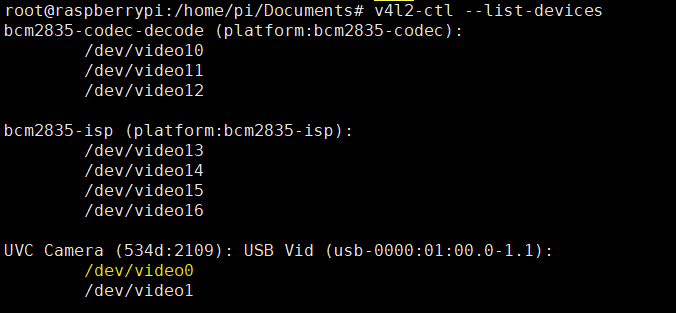
it detects /dev/video0
- In Raspbian OS with vnc session select audio input Digital Stereo that match with hdmi capture card.
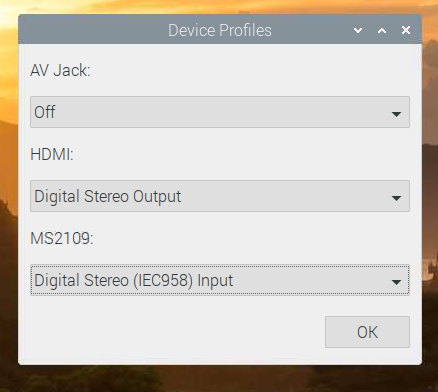
- in CLI change v4l2 configuration and run OBS
v4l2-ctl --set-fmt-video=width=1280,height=720
export DISPLAY=:0
MESA_GL_VERSION_OVERRIDE=3.3 obs
- Connect to Raspberry PI with SSH and run setv.py
root@raspberrypi:/home/pi/Documents# python3 setv.py
CONGRATULATIONS!!!
You can start to configure your scenes and collect victims like in Hollywood!!
EXAMPLES
In folder examples you can edit templates in gimp format
NETFLIX SPOOFING

CNN HOAX