
Music Bot for Discord
VectoBeat delivers premium audio playback, plan-aware control panel workflows, concierge/success pod tooling, and meticulous observability built on Python, discord.py, Lavalink v4, and a Next.js control panel.
















VectoBeat is a production-ready Discord music bot that emphasises audibility, runtime transparency, and administrative control. Lavalink powers audio transport and yt-dlp handles multi-source ingestion while the control panel enforces plan rules, queue sync, concierge/success pod workflows, and compliance exports.
|
|
|
* Spotify tracks are proxied via YouTube search unless a Spotify plugin is configured for your Lavalink node.
| Domain | Highlights |
|---|---|
| Playback | Randomised search results, queue autosync, manual scrubbing, replay, loop modes, volume control, auto-resume protection, Redis-backed playlists, history-aware autoplay |
| Queueing | Paginated queue view, move/remove/shuffle, queue metadata summary, up-next projections |
| Diagnostics | /status (latency, CPU, RAM, guild footprint), /lavalink node stats, /permissions check, /voiceinfo latency+perms |
| Control Panel & Ops | Queue sync + telemetry webhooks, plan-aware `/settings`, concierge/success pod lifecycle, compliance exports, regional routing |
| Branding | Config-driven logos, colours, author/footers across all embeds, with overrides per guild if required |
| Error Handling | User-facing exceptions routed to ephemeral embeds, logger visibility for unexpected faults |
|
|
High-level interaction map between Discord, the VectoBeat runtime, Lavalink, and upstream media sources.
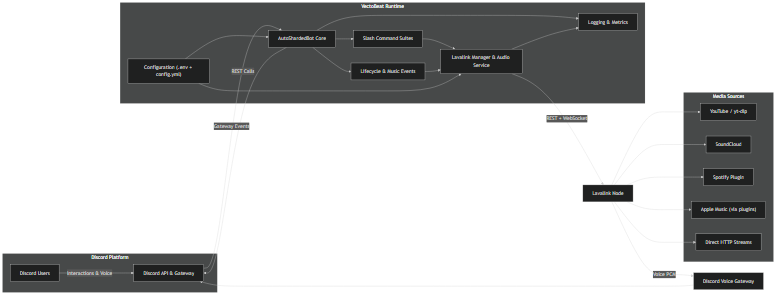
A prose + Mermaid breakdown of the data flow lives in docs/architecture.md (source: docs/system_architecture.mmd).
Regenerate the 4K system diagram with:
npx -y @mermaid-js/mermaid-cli -i docs/system_architecture.mmd -o assets/images/architecture.png -w 3840 -H 2160 -b transparent
For the full documentation index (deployment, ops, troubleshooting, and API guides), start at docs/README.md.
.env for bot + frontend; CI fails on stray env files.plan-capabilities.json and Prisma schema stay present when building images..env is gitignored. Rotate Discord/Stripe/SMTP keys if credentials leak.|
Copy Before publishing invites, swap the hero badge client IDs for your live bot. |
Bot: Frontend: |
Full stack with MySQL, Redis, Lavalink. |
Services: frontend 3050, bot status 3051, bot metrics 3052, Lavalink 2333, MySQL 3306, Redis 6379.
Compose builds from frontend/Dockerfile and bot/Dockerfile using the repo root as context; healthchecks restart until dependencies are ready.
Docs index, deployment, ops, and troubleshooting guides live under docs/.
Use /help in Discord for in-bot guidance. Categories below list every command with a short description (see docs/command_reference.md for the generated source).
| Category | Command | Description |
|---|---|---|
| Voice | /connect | Join caller’s voice channel (permission + node checks). |
/disconnect | Leave voice, destroy player, clear queue state. | |
/voiceinfo | Latency, queue length, active status, permission checklist. | |
| Playback | /play | Search/URL resolve (YouTube/SoundCloud/Spotify), enqueue, autoplay. |
/nowplaying | Live now-playing embed with progress. | |
/skip | Skip current track. | |
/stop | Stop playback and clear queue. | |
/pause | Pause playback. | |
/resume | Resume playback. | |
/volume | Set volume (0–200%). | |
/volume-info | Show current and default volume. | |
/loop | Toggle Off/Track/Queue loop modes. | |
/timeshift | Move to a timestamp within the current track (mm:ss). | |
/replay | Restart current track. | |
| Queue | /queue | Paginated queue with now-playing and up-next. |
/queueinfo | Queue summary (duration, loop, up-next). | |
/shuffle | Shuffle queued tracks (≥2). | |
/move | Reorder items by position. | |
/remove | Remove track by 1-based index. | |
/clear | Clear queued tracks. | |
| Playlists | /playlist save | Persist current queue as a named playlist. |
/playlist load | Load a saved playlist (append/replace). | |
/playlist list | List saved guild playlists. | |
/playlist delete | Remove a saved playlist. | |
/playlist sync | Attach an external URL to a saved playlist. | |
| Profiles | /profile show | Display default volume/autoplay/embed style. |
/profile set-volume | Persist default volume for the guild. | |
/profile set-autoplay | Toggle autoplay when queue finishes. | |
/profile set-announcement | Choose between rich embeds and minimal text. | |
| DJ Controls | /dj add-role | Grant DJ permissions to a role. |
/dj remove-role | Revoke DJ permissions from a role. | |
/dj clear | Open queue control by clearing DJ roles. | |
/dj show | Display configured DJ roles and actions. | |
| Diagnostics & Help | /ping | Gateway latency/uptime snapshot. |
/status | Latency p95, guild footprint, Lavalink stats, CPU/RAM. | |
/lavalink | Per-node stats (players, CPU, memory, frame deficit). | |
/guildinfo | Guild demographics and configuration. | |
/permissions | Audit bot channel permissions with remediation tips. | |
/botinfo | Application metadata and runtime. | |
/uptime | Formatted uptime with timestamps. | |
/help | Grouped list of available commands. | |
| Automation & Ops | /concierge request | File a concierge ticket for migrations/incidents (Growth+). |
/concierge usage | Show remaining concierge hours this cycle. | |
/concierge resolve | Staff: resolve a concierge ticket. | |
/success request | Submit a request to your success pod (Scale). | |
/success status | View recent success pod lifecycle updates. | |
/success contact | Show your account manager and escalation path. | |
/success acknowledge | Staff: acknowledge and assign a success pod request. | |
/success schedule | Staff: schedule a success pod session. | |
/success resolve | Staff: resolve a success pod request. | |
/success set-contact | Staff: update account manager contact info. | |
/settings queue-limit | Adjust queue cap (plan-aware). | |
/settings collaborative | Toggle collaborative queue (DJ/Manage perms enforced). | |
/scaling evaluate | Force an autoscaling evaluation. | |
/scaling status | Show scaling metrics and last signal. | |
/chaos run | Trigger a chaos experiment immediately. | |
/chaos status | Show recent chaos drills and schedule. | |
/compliance export | Download compliance-ready JSONL events (admins). |
|
|
- Capture
stdoutfor VectoBeat; enable log shipping in production (ELK, CloudWatch, etc.). - Monitor Lavalink metrics: player count, CPU, memory, frame deficit.
- Import the bundled Grafana dashboards in
docs/grafanafor shard latency, node health, and slash command throughput visualisations. - Enable the command analytics pipeline (
docs/analytics.md) to push anonymised slash usage into your data warehouse. - Wire the queue telemetry webhook (
docs/queue_telemetry.md) into your status site for real-time “now playing” indicators. - Keep the queue sync publisher healthy (
docs/queue_sync.md) so the control panel reflects live queues. - Long-running slash commands (e.g. playlist loading) now show live progress embeds so users know what’s happening.
- Regularly patch yt-dlp for source compatibility.
- Monitor Redis availability (
INFO/PING) if playlist persistence is enabled.
Enterprise customers rely on VectoBeat to demonstrate residency, threat mitigation, and secure coding practices. Two canonical documents now live under
docs/security:
- Threat Model (
docs/security/threat-model.md) – enumerates assets, attacker goals, trust boundaries, and mitigation strategies for secrets, automation, and residency. - Secure Coding Guidelines (
docs/security/secure-coding-guidelines.md) – covers encryption standards, secret rotation cadence, rate limiting rules, CSRF/CSP expectations, input validation, and incident-response hooks. - Privacy-by-Design Controls (
docs/security/privacy-controls.md) – documents retention policies, delete/export workflows, and localized consent notices embedded in the control panel. - Compliance Export Jobs (
docs/backend/compliance-export-jobs.md) – explains how scheduled/on-demand export jobs pull queue/moderation/billing data and deliver encrypted payloads via S3/SFTP. - Queue-Based Processing (
docs/backend/queue-processing.md) – covers Redis-backed job queues for analytics exports and embed override propagation, plus worker configuration. - Observability Metrics (
docs/observability/metrics.md) – enumerates shard load, Lavalink health, automation success, API error budgets, and concierge SLA metrics + alerting guidance.
Keep both artifacts in sync with your deployments. Any new surface (API route, slash command, or residency zone) must be reflected in the threat model and inherit the published secure coding rules.
Contributions are welcome! Please review CODE_OF_CONDUCT.md and the Contributing Guide, then follow the steps below.
- Fork the repository and clone your fork.
- Create a feature branch
git checkout -b feature/amazing-improvement. - Bot checks:
cd bot && python -m compileall src && pytest -q(plus../scripts/typecheck.shif pyright is installed). - Frontend checks:
cd frontend && npm run lint && npm run test:server-settings. - (Optional) Exercise queue scenarios via
python scripts/run_scenarios.py bot/tests/scenarios/basic_queue.yamlwhen touching playback logic. - Regenerate slash-command docs if commands change:
python scripts/generate_command_reference.py(seedocs/command_reference.md). - Update diagrams when
docs/system_architecture.mmdchanges:npx -y @mermaid-js/mermaid-cli -i docs/system_architecture.mmd -o assets/images/architecture.png -w 3840 -H 2160 -b transparent. - Spin up the sandbox via
docker compose up -d --build(seedocs/local_sandbox.md) to verify Lavalink/Redis/MySQL locally. - Submit a pull request describing the motivation, approach, and testing performed.
- Open issues for bugs or feature requests.
- Join the community Discord for live support and roadmap discussions.
- Star the repository to support the project’s visibility.
VectoBeat — engineered for premium audio experiences and operational clarity.