


An elegant desktop app to inventory, explore, and manage your storage devices. Built with Kotlin and JavaFX, Hard Drive Manager gives you a clear overview of disks and partitions, insightful charts, and handy export options — all in a fast, modern UI.
💡 This project is build in vibe-coding using AI coding models.
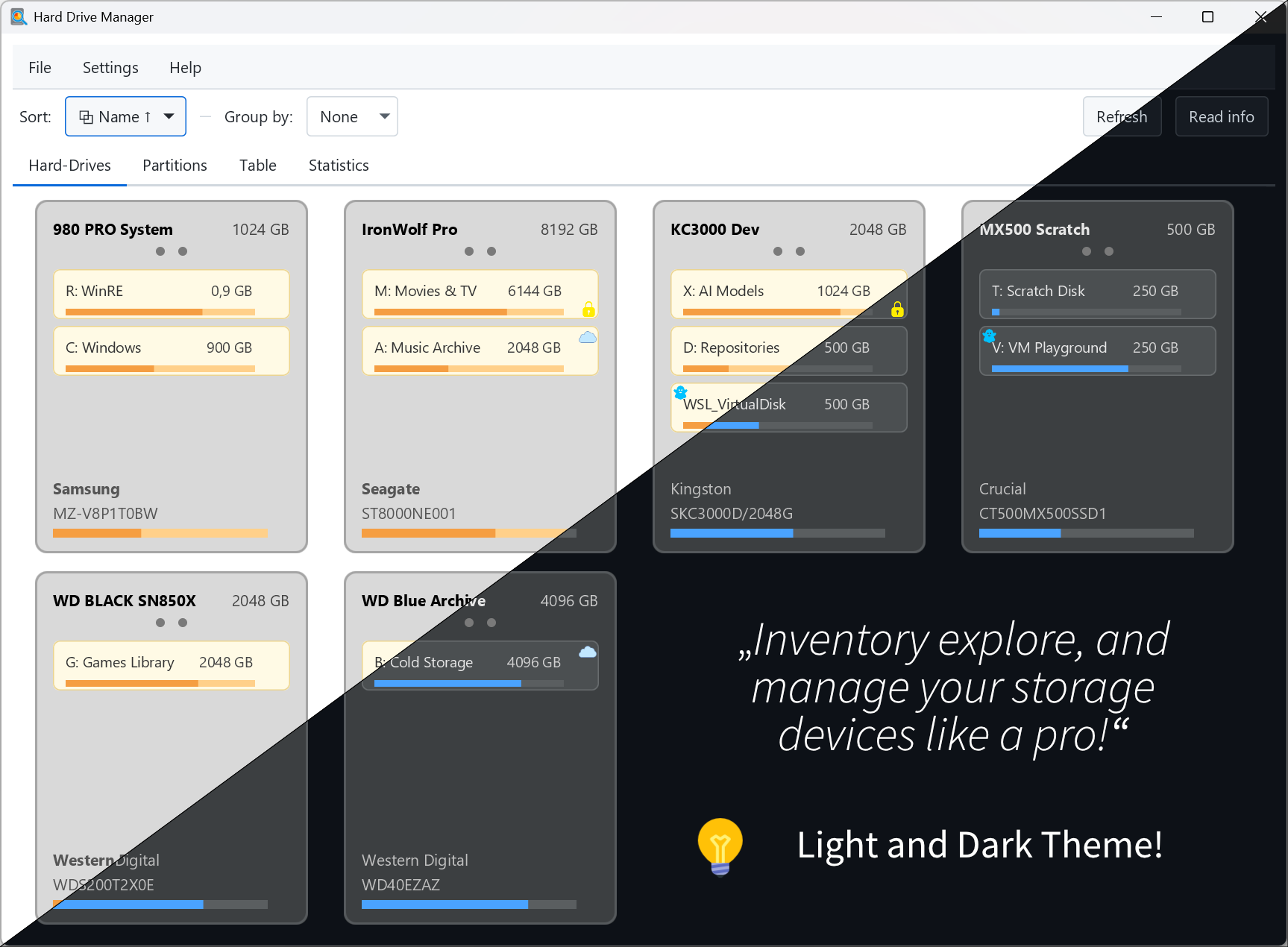
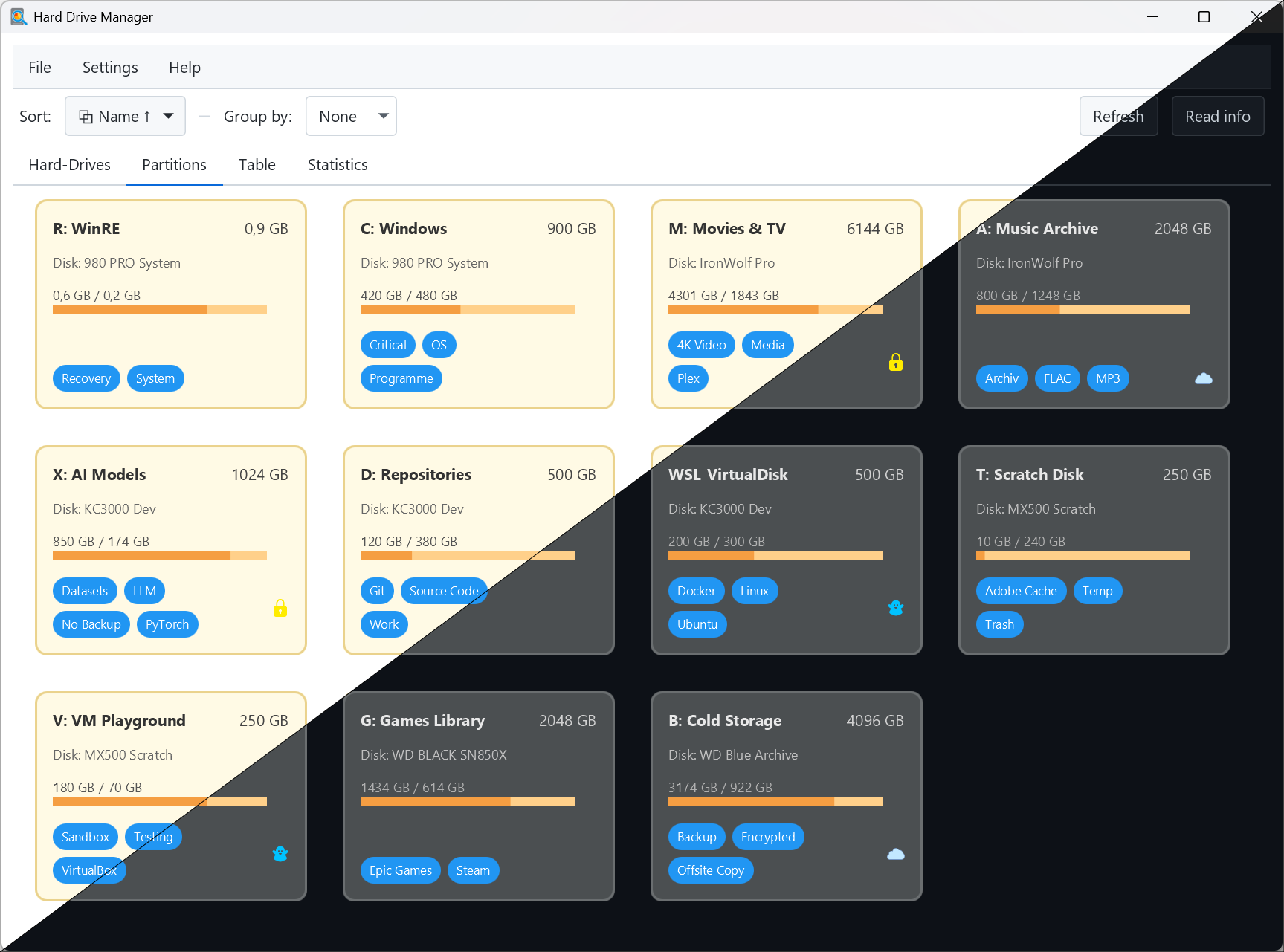
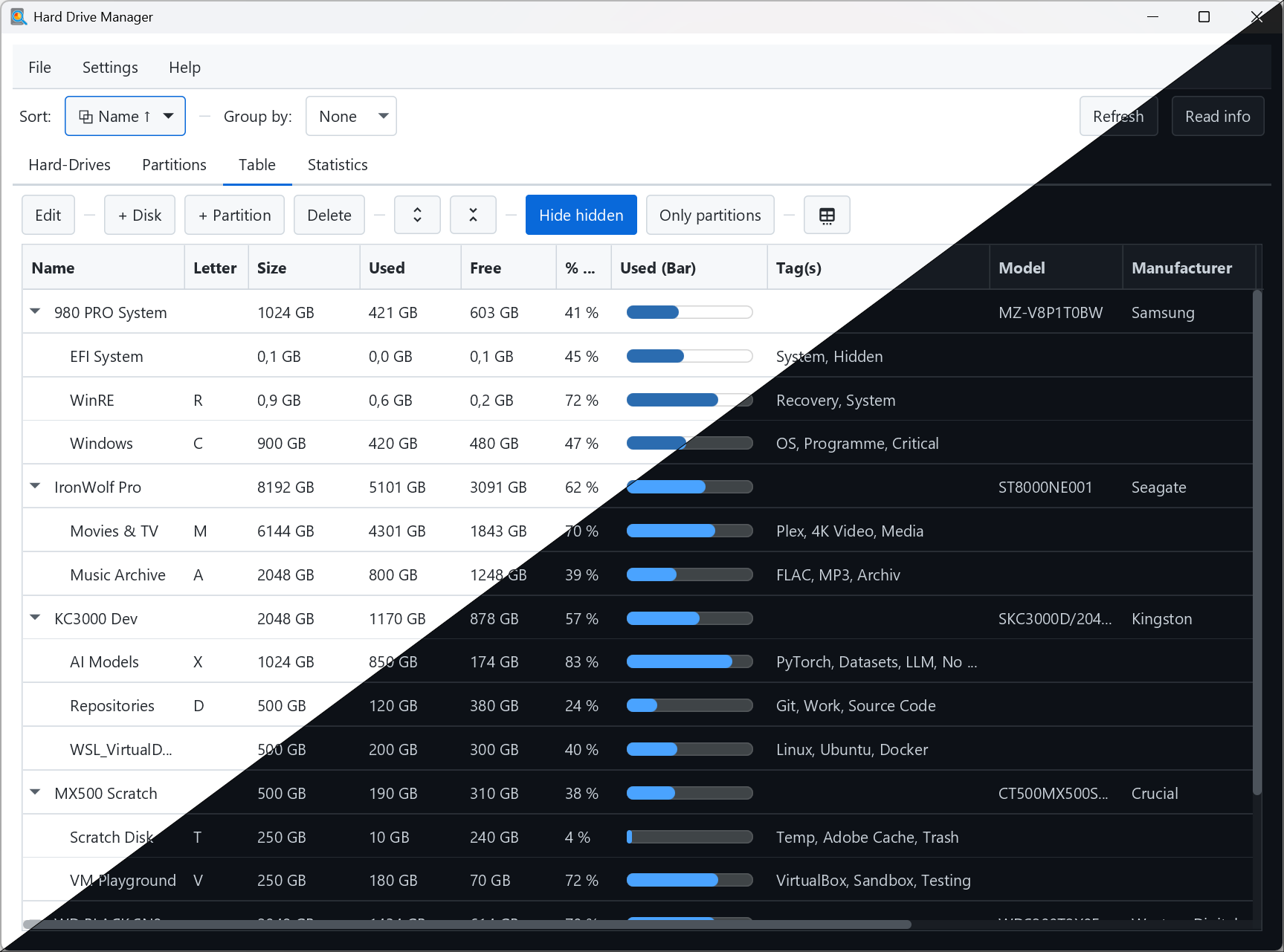
- Beautiful, responsive JavaFX UI with light and dark themes
- Two complementary views:
- Card view for a quick visual overview of disks/partitions
- Tree table view for compact, sortable details
- Statistics tab with instant pie charts (capacity by disk, partitions, tags, and more)
- Local SQLite database to persist your inventory and notes
- Import quick system information via OSHI (cross‑platform hardware info)
- Export your data:
- PNG export of the card overview
- CSV export of the table for spreadsheets/analysis
- Convenient toolbar actions: add disk/partition, delete, expand/collapse all
- Sorting, grouping, and equal card heights for tidy overviews
- Settings dialog with live theme preview and options:
- Light/Dark theme
- Language: English or German
- Choose a custom database file path
- Java (JDK) — the project is configured for JDK 24 via Gradle’s toolchain and will be provisioned automatically by Gradle if needed
- Internet access for Gradle to resolve dependencies on first run
On Windows PowerShell or any terminal:
git clone https://github.com/your-org/hard-drive-manager.git
cd hard-drive-manager
./gradlew run
On Windows you can also use:
gradlew.bat run
Gradle will download the toolchain, resolve dependencies, and launch the JavaFX application.
When running on recent JDKs, you may see warnings like:
WARNING: A restricted method in java.lang.System has been called
WARNING: java.lang.System::load has been called by com.sun.glass.utils.NativeLibLoader in module javafx.graphics
WARNING: Use --enable-native-access=javafx.graphics to avoid a warning for callers in this module

WARNING: java.lang.System::load has been called by org.sqlite.SQLiteJDBCLoader in an unnamed module
WARNING: Use --enable-native-access=ALL-UNNAMED to avoid a warning for callers in this module
This project already configures these VM options when launched via Gradle (see build.gradle.kts):
--enable-native-access=javafx.graphics
--enable-native-access=ALL-UNNAMED
If you run from your IDE instead of Gradle, set the same VM options in your Run Configuration.
- IntelliJ IDEA: Run/Debug Configurations → VM options:
--enable-native-access=javafx.graphics --enable-native-access=ALL-UNNAMED - Alternatively, set an environment variable before launching:
JDK_JAVA_OPTIONS="--enable-native-access=javafx.graphics --enable-native-access=ALL-UNNAMED"
You might also see a terminal deprecation warning from the JavaFX Marlin rasterizer regarding sun.misc.Unsafe::allocateMemory. This is an upstream JavaFX message and does not impact functionality. To suppress it, this project configures JavaFX/Prism Marlin to use on‑heap buffers (no Unsafe::allocateMemory) by default:
-Dprism.marlin.useOffHeap=false
This VM option is already applied when running via Gradle (see build.gradle.kts). If you run from your IDE, add it to your Run Configuration alongside the native‑access flags. The warning should then disappear. Future OpenJFX releases may remove the need for this flag.
./gradlew build
./gradlew packageInstaller
Artifacts will be placed under `build/`. You can also run tests (if present) with:
./gradlew test
## Configuration & data

- The application uses a local SQLite database to persist disks, partitions, and your metadata.
- You can change the database location at any time via Settings → Database path. The app stores the preference and will reopen the selected file on next start.
- Language and theme can be changed live in Settings; the dialog previews the theme instantly.

## Features in detail

- Disk and partition modeling with tags, sizes, and status indicators
- Grouping and sorting helpers to organize large inventories
- Expand/collapse convenience for the tree view
- Quick OSHI-based importers to prefill hardware details (volumes, disks, partitions)
- Internationalization (i18n) with English and German bundles
- Theme manager with a bundled dark stylesheet
- Exporters:
  - CSV exporter for table data
  - PNG exporter for the cards overview

## Tech stack

- Language: Kotlin (JVM)
- UI: JavaFX 23
- Persistence: SQLite (via JDBC)
- Hardware info: OSHI
- Build: Gradle Kotlin DSL

### Dependencies (from `build.gradle.kts`)

- org.jetbrains.kotlin:kotlin-stdlib
- org.xerial:sqlite-jdbc:3.46.0.0
- com.github.oshi:oshi-core:6.9.1
- JavaFX modules: `javafx.controls`, `javafx.graphics`, `javafx.swing`

## Project layout

- Application entry point: `de.tfr.tool.HardDriveManagerAppKt` (Gradle `application.mainClass`)
- UI: `de.tfr.tool.ui.*` (main view, theme, i18n, settings dialog)
- Persistence: `de.tfr.tool.persist.*` (database, repository)
- Model: `de.tfr.tool.model.*`
- Importers: `de.tfr.tool.quickinfo.*` (OSHI integration)
- Export: `de.tfr.tool.export.*` (CSV, PNG)

## License

MIT License

Copyright (c) 2025 The Hard Drive Manager contributors

Permission is hereby granted, free of charge, to any person obtaining a copy
of this software and associated documentation files (the "Software"), to deal
in the Software without restriction, including without limitation the rights
to use, copy, modify, merge, publish, distribute, sublicense, and/or sell
copies of the Software, and to permit persons to whom the Software is
furnished to do so, subject to the following conditions:

The above copyright notice and this permission notice shall be included in all
copies or substantial portions of the Software.

THE SOFTWARE IS PROVIDED "AS IS", WITHOUT WARRANTY OF ANY KIND, EXPRESS OR
IMPLIED, INCLUDING BUT NOT LIMITED TO THE WARRANTIES OF MERCHANTABILITY,
FITNESS FOR A PARTICULAR PURPOSE AND NONINFRINGEMENT. IN NO EVENT SHALL THE
AUTHORS OR COPYRIGHT HOLDERS BE LIABLE FOR ANY CLAIM, DAMAGES OR OTHER
LIABILITY, WHETHER IN AN ACTION OF CONTRACT, TORT OR OTHERWISE, ARISING FROM,
OUT OF OR IN CONNECTION WITH THE SOFTWARE OR THE USE OR OTHER DEALINGS IN THE
SOFTWARE.

## Acknowledgements

- OSHI — Java Operating System and Hardware Information
- SQLite JDBC Driver by xerial
- JavaFX and the OpenJFX community