The Employee Tracker provides business owners the ability to organize and manage their companies departments, employee roles, and employees.
- Installation Steps
- Usage
- Built With
- Credits
- Resources Used to Complete Project
- License
- Recording
- Screenshots of Application
Before using this application you must install Node.js.
After installing Node.js, open the integrated terminal in VS Code and run npm install. This will install all of the dependencies listed in the package.json file.
Installation Resources:
- Before beginning make sure you have completed the Installation Steps
- Open integrated terminal in VS Code and type
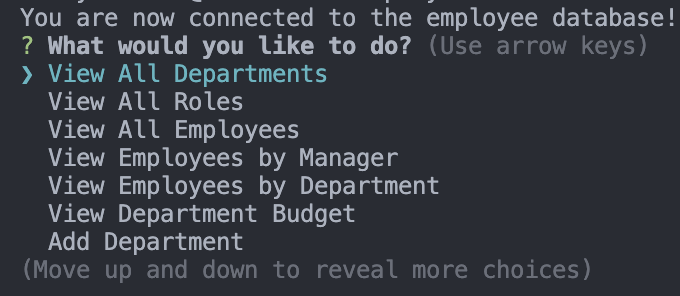
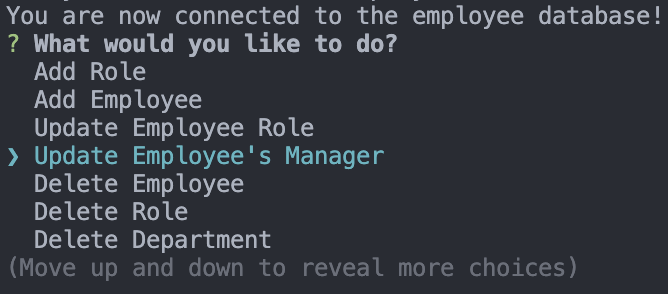
node index.jsto begin the application. - You will be prompted with the main menu containing the following options:
- View All Departments
- Allows the user to view all departments within the company.
- View All Roles
- Allows the user to view all roles within the company.
- View All Employees
- Allows the user to view all employees within the company.
- View Employees by Manager
- Allows the user to view all employees by selected manager.
- View Employees by Department
- Allows the user to view all employees by selected department.
- View Department Budget
- Allows the user to view the budget for each department.
- Add Department
- Allows the user to add a new department.
- Add Role
- Allows the user to add a new role to a chosen department.
- Add Employee
- Allows the user to add a new employee and assign a role to the employee.
- Update Employee Role
- Allows the user to update the role of a selected employee.
- Update Employee's Manager
- Allows the user to update the manager of a selected employee.
- Delete Employee
- Allows the user to delete an employee.
- Delete Role
- Allows the user to delete a role.
- Delete Department
- Allows the user to delete a department.
- Exit
- Allows the user to exit the database.
- View All Departments




- My husband for helping me understand MySql queries.
- Inquirer documentation
- npm console.table documentation
- npm MySql2 documentation
- MySQL Queries Traversy Cheat Sheet
- MySQL Documentation - Select Statements

Employee.Tracker.1.mp4