


A Windows desktop app that puts a Rekordbox 6 or 7 library back together when built in tools fail.
• Re-named a bunch of files?
• Moved a bunch of files?
• Re-encoded a bunch of files to MP3?
• Have your Hot Cues drifted off grid?
• Stuck manually relocating files for hours?
Rekordbox stores each track’s full file path in an encrypted database (master.db). Rename a file (or thousands, like i did), move a folder, or change a drive letter, and that path is the only thing that breaks. Cue points, loops, beat grids, playlists, and history stay on the track, because they belong to the track, not to the path. Good luck auto-relocating with the built-in tool, and spending literal days manually selecting files one by one wasn't on my to-do list, so i created this instead :)
Relinkbox finds the file again, or points a whole folder at its new location, and writes the new path back. It can also automatically bulk rename/update-track-names within rekordbox based on the actual artist - title; list music files the library has never seen, and snap cue points on 1 or 10000 that could've drifted from several reasons, like re-encoding from FLAC to mp3 (which i also did, hence this module)
I begun this project with almost zero coding experience after deciding that manually relinking songs one by one, by the thousands, wasn't on the table. Pioneer has yet to build a solution that actually works for this, so I spent under a day making an actual functioning one and have kept improving it since.
Relinkbox was built with good vibes and help from AI coding tools. Although I have decades of technical knowledge tinkering with software and hardware and employ common sense, the software, being a hobby project and in active development, might not be as polished as it could (and will) be. I'll do my best to take care of whatever arises as soon as i can; your feedback is essential to help me understand how to improve it.
No matter what, the software will never make a change that you can't revert, and will not break your library. My highest priority is the safety of our data; your library is treated as I treat my own.
It has tests, makes a backup before every change, and has been thoroughly tested on a real 14,000-track library, but it is a hobby project and comes with no warranty. Keep your backups.
Pick one from the latest release. You do not need Python or a terminal.
- Relinkbox.exe — one file. Download it and double-click it. The first start takes a few seconds longer while Windows unpacks it.
- Relinkbox.zip — unzip it, open the
Relinkboxfolder, and double-clickRelinkbox.exe. Starts faster. Leave that exe in the folder.
What you need either way:
- 64-bit Windows 10 or 11
- Rekordbox 6 or 7 (tested with 7.2)
- Rekordbox closed before you save changes. Scanning/all read operations works while rekordbox is open.
Until you choose one, Relinkbox looks for master.db in %APPDATA%\Pioneer\rekordbox. If yours lives somewhere else, use Choose database.... The database and the music folders you add are remembered the next time you open the app. Open folder jumps to the Rekordbox folder or to the backups folder next to it.
Rekordbox’s own relocate feature only lets you relink tracks one by one, or "auto relocate" searches your chosen foldeer for a file with an identical filename to the one stored in the database, nothing else. If you've tried tools like OneTagger, you'll know exactly what I'm talking about. Mass renaming thousands of files only to realise your rekordbox library is broken beyond belief without any tool to fix it.
I like coherency in my file system, and with that i want to keep a specific file naming system for my music. Once i learnt about tools like OneTagger i already had thousands of files that dearly needed a metadata fixup.

All four jobs on the main window only look until you confirm. A yellow banner appears while Rekordbox is running. Saving is refused until it is fully closed.

Looks through the music folders you added and proposes a file for every track whose path no longer exists. Tracks that already point at a real file are left alone. Streaming and cloud entries (SoundCloud, Beatport, and anything else stored as a link rather than a drive path) are skipped.
A review window then lists:
- Proposed matches, with the old path, the new file, how it was found, a confidence level, and any warning. High and medium confidence matches are ticked. Low confidence matches are left unticked. When several files fit about equally well, the row says “pick a file” and you choose from the list. Select recommended, Select all, and Select none are there if you want to change the ticks in one go.
- Still missing, the tracks no rule could place.
From that window you can export the full report or just the missing tracks as CSV (UTF-8, so Excel keeps accented names). Confirming asks once more, and tells you if any of the ticked rows are low confidence. A backup is made, the changes are written, and Relinkbox re-opens the database to check that each new path is actually there.

Use this when you already know the move, for example E:\Music is now F:\Music. Relinkbox reads the missing tracks and suggests the deepest folder that holds most of them. You set the old location (as Rekordbox stored it) and the new one. Every missing track under that old folder keeps its subfolders and filename, and the new path is only offered when that file is really there. The same review window opens before anything is saved.

Walks the same music folders and lists audio files with no library entry. Overlapping folders are counted once. These formats are included: MP3, FLAC, WAV, AIFF, M4A, AAC, MP4, ALAC, and OGG.
You can then:
- save an
.m3u8playlist and import it in Rekordbox with File > Import > Import Playlist - save a plain
.txtlist of paths - copy the files into another folder, either all together or with their subfolders kept
Existing files at the destination are left in place. Relinkbox does not add new files to the library in itself.

Rekordbox keeps its own file-name field, separate from the name of the file on disk. After a rename, the track can still display the old name even though the path is correct. This lists every local track where those two differ, shows the name in the library beside the name on disk, and updates the library name after you confirm. The file stays where it is.

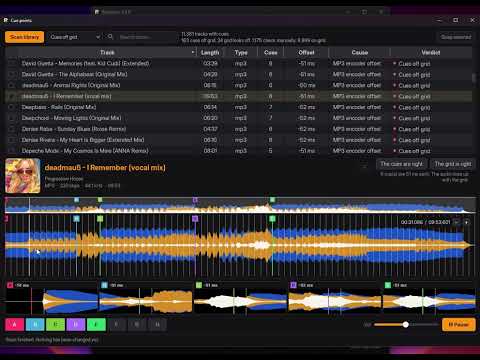
Opens in its own window. It reads the local analysis files Rekordbox already uses on this PC (the beat grid and the waveform) and compares every cue to the nearest beat. USB exports are never touched, and the analysis files themselves are only read. Cue changes are written only to the database.
The scan gives each track one of these verdicts:
| Verdict | What it means |
|---|---|
| On grid | Every cue is within 2 ms of a beat |
| Cues off grid | Several cues share one offset, and the drums line up with the grid. The known MP3 encoder delay counts too, even with no waveform. Ticked for snapping. |
| Grid looks off | The drums line up with the cues, so the grid may be the thing that's wrong |
| Check manually | Too few cues agree, the offset drifts, or the shift is too large to trust |
| No beat grid | There is no grid to compare against |
You can filter by verdict, search, and sort the list. Select a track to open it in the player: a whole-track strip, a zoomed waveform (Rekordbox’s 3-band waveform when a .2EX file exists), hot-cue pads A–H, memory cues, cover art when the file has it, and a volume control. Scroll to zoom, shift-drag to pan, drag to scrub, or click a cue to play from that point. The player can be collapsed.
If the picture is unclear, The cues are right or The grid is right overrides the verdict before you snap. Snap selected moves the matching cues onto the beat, and moves a loop’s end by the same amount. A backup is made first. VBR MP3 cues that store a byte position are left alone. Cue Manager does not rewrite the beat grid.
The rules behind a snap:
- Measure how far each cue sits from the nearest beat.
- Look for a shared offset of at least 3 cues, within 3 ms of each other, that does not drift along the track.
- Name the cause when it can. Re-encoding FLAC to MP3 often leaves cues early by 2257 samples (51 ms at 44.1 kHz, 47 ms at 48 kHz). That known offset is accepted at any BPM.
- Check the waveform to see whether the drum hits line up with the grid or with the cues.
- Leave cues that do not share the offset alone. Those were probably placed off the grid on purpose.
A shift with no known cause is only offered automatically when it is under 80 ms and under a quarter of a beat at that track’s tempo. Larger or mixed offsets stay in Check manually.
A relink updates the same records Rekordbox’s own relocate updates:
- the track path
- the original path, when it still matched the old one
- the file name Rekordbox displays
- the file type, when the extension changed (MP3, M4A/AAC, FLAC, WAV, AIFF)
- the file size
- the path stored inside the track’s local analysis files
An analysis file is left unchanged, with a warning, when it contains a section Relinkbox cannot rewrite. Saving would otherwise drop that section. If the database write fails, the change is rolled back and nothing from that save is kept.
Cue snaps write the cue’s time (and the loop end, when there is one) in the cue table and in the matching hot-cue bank. Display-name fixes write only the name field.
- Tracks whose file is still where Rekordbox says it is
- Streaming and cloud tracks
- Files already in the library, when you are only looking for untracked music
- Analysis files on USB exports
- The beat grid, waveform, tags, playlists, and play history
- Cue points that do not share the offset being snapped, including VBR MP3 cues stored as a byte position
- You see every change first. Each match shows how it was found, a confidence level, and notes.
- It won't guess. When several files could be the same track, for example two copies or a v1 and v2, you pick the right one.
- It warns you when a drive is not connected (maybe you only unplugged it), when the file type changed (re-analyze the track), when a file is much larger or smaller than before (check the cue points), when a file is already in your library as another track, and when the same file is proposed for more than one track.
- A backup before every change. Each save creates a timestamped folder in
Relinkbox backupsnext tomaster.db. It holds the database (and its-wal/-shm/-journalfiles when they exist),masterPlaylists6.xml, the analysis files that were about to be changed, and a CSV of every change (changes.csvfor paths and names,cue_changes.csvfor cue snaps). - Restore a backup puts that folder back. Your current library is backed up again first, so a restore can be undone. The list also includes older Relinkbox backup files and Rekordbox’s own
master.backup*.dbfiles. Those restore the database only. You can browse to a.dbfile if it is not in the list. - Rekordbox must be closed. Relinkbox checks and refuses to save while Rekordbox is running.
- It checks its work. After saving, it re-opens the database and confirms every change is there.
- Everything is logged in
%LOCALAPPDATA%\Relinkbox\logs. Use Open log folder in the app. The main window also keeps the last result: counts, skipped tracks, warnings, and each old path beside the new one.
For each missing track, Relinkbox tries these rules in order and stops at the first one that finds a file. The folder-move action above does not use this search. It rewrites the path directly.
| Rule | What it means | Confidence |
|---|---|---|
| Same name and size | Same filename, and the same size Rekordbox remembers | High |
| Same name, different size | Same filename, but the file changed size | Medium |
| Renamed, same size | Different filename, but exactly the same size | High if the names are at least 95% similar, Medium from 60%, otherwise Low |
| Same name, different file type | For example .mp3 became .flac |
Low |
| Similar name | Names at least 85% similar | Medium at 95% or more with the same file type (High if the size also matches), otherwise Low |
A few rules apply on top of that:
- Several candidates means you choose. If two or more files fit about equally well, the track is marked "pick a file" instead of guessing. Up to five candidates are shown. A file in a folder with the same name as the old one wins a tie.
- Changed numbers stay Low. If a number in the old name is missing from the new one ("v1" became "v2", "Part 1" became "Part 2"), it could be a different version, so it is never ticked automatically.
- WAV and AIFF need similar names. Uncompressed files of the same length have the same size, so for those, an identical size only counts if the names are at least 60% similar.
- Why size and not track length? File size comes free with the folder scan and is exact to the byte. Track length would mean opening every file, and Rekordbox only stores it to the second, so it can't tell tracks apart as well. Size has one catch: Rekordbox doesn't update it when you edit tags or artwork, so small differences are expected. When the size differs by 5% or more, the file may be a different encode or version, and Relinkbox tells you to check the cue points.
Folders that can't be read are skipped and listed in the log.
This is only if you are making the downloadable files yourself. People who download a release can skip this.
- Install Python 3.10 or newer (developed on 3.14) and tick Add python.exe to PATH.
- In this folder, open PowerShell:
python -m venv venv
.\venv\Scripts\Activate.ps1
python -m pip install -e ".[build]"
.\build_release.ps1
That writes release\Relinkbox.exe and release\Relinkbox.zip.
Same Python setup as above, then:
python -m venv venv
.\venv\Scripts\Activate.ps1
python -m pip install -e .
python -m relinkbox
Run the tests:
python -m pip install -e ".[dev]"
python -m pytestgit clone https://github.com/TALE5/relinkbox.git
cd relinkboxThen follow Develop from source, or Build the exe and the zip if you want the packages.
Relinkbox is free software under the GNU General Public License v3.0 or later. You can use, study, change, and share it. If you share a changed version, you share its source under the same license.
Relinkbox is built on these projects, and the downloadable exe and zip include them:
- pyrekordbox (MIT) — reads and writes the Rekordbox database and analysis files
- PySide6 / Qt for Python (LGPL-3.0) — the user interface. Source: code.qt.io
- RapidFuzz (MIT) — fast filename similarity
- SQLAlchemy (MIT) and sqlcipher3-wheels (zlib) — database access
- Their own dependencies, such as NumPy and psutil (BSD)
- Inter Display (SIL Open Font License 1.1) — the interface typeface. Regular and Bold are in
fonts/, and the license is OFL.txt
In the zip version the Qt libraries are separate files in the Relinkbox folder, so you can replace them with your own build. This project is not affiliated with AlphaTheta or Pioneer DJ. Rekordbox is their trademark.