Welcome to ExplainLLama, an AI-powered web application designed for Java bug fixing and explanation generation. This tool utilizes a dual decoder transformer model trained to analyze Java code bugs and generate detailed explanations for debugging assistance. The project provides both a backend API and a user-friendly frontend interface for seamless interactions.
🧑🎓 This project is developed as part of our Final Year Research Project. 🎓
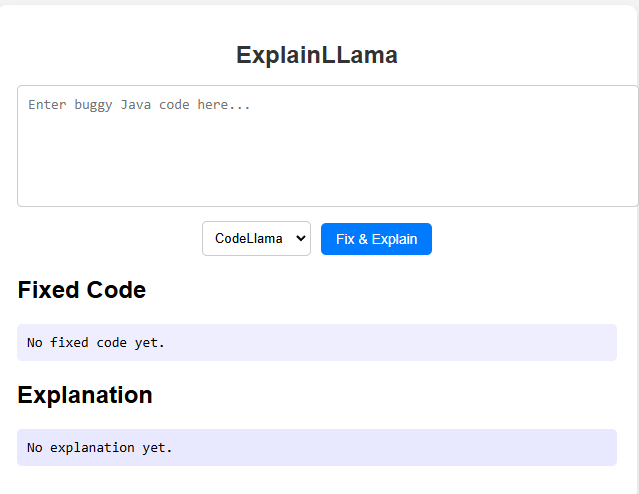
✅ Java Bug Fixing Assistance - Identify and fix Java code errors efficiently.
✅ AI-Powered Explanation Generation - Get detailed insights into why a bug occurs.
✅ Web-Based Interface - Easy-to-use UI for debugging and explanations.
✅ Robust Backend API - Efficient request handling and model interaction.
✅ Secure & Scalable - Built with best practices for security and performance.
Ensure you have the following installed before proceeding:
- 🐍 Python (>=3.8)
- 📦 pip (for managing dependencies)
- 🔹 Virtual environment (optional but recommended)
- 🖥 Node.js and npm (for frontend setup)
-
Clone the Repository
git clone https://github.com/your-repo/ExplainLLama_Web_App.git cd ExplainLLama_Web_App -
Create a Virtual Environment (Recommended)
python -m venv venv
source venv/bin/activate  # On Windows use: venv\Scripts\activate
-
Install Backend Dependencies
pip install -r requirements.txt
- Navigate to the Backend Directory
cd backend - Apply Migrations (Ensuring the database is up-to-date)
python manage.py migrate
- Start the Development Server
python manage.py runserver
- Navigate to the Frontend Directory
cd frontend - Install Dependencies
npm install
- Start the Frontend Server
npm start
This will start the frontend development server, and you can access the application at http://localhost:3000.
Copy .env_sample to .env and update necessary configurations:
cp .env_sample .envWe welcome contributions! 🎉 If you'd like to improve ExplainLLama, follow these steps:
- Fork the repository 🍴
- Create a new branch 🌿
- Make your changes ✍️
- Submit a pull request 📩
- 🧑💻 Suwan Sankaja - GitHub Profile
- 🧑💻 Gimhan Sandeeptha - GitHub Profile
- 🧑💻 Ruwan Ranasinghe - GitHub Profile
🚀 GitHub Organization: ExplainaCode Organization
📩 For issues or inquiries, reach out at: dev@suwansankaja.com`
🐙 GitHub Issues: Open an issue
💡 Thank you for using ExplainLLama! Happy coding! 🎉