This is the repository for paper "GenColor: Generative Color-Concept Association in Visual Design" (CHI 2025)
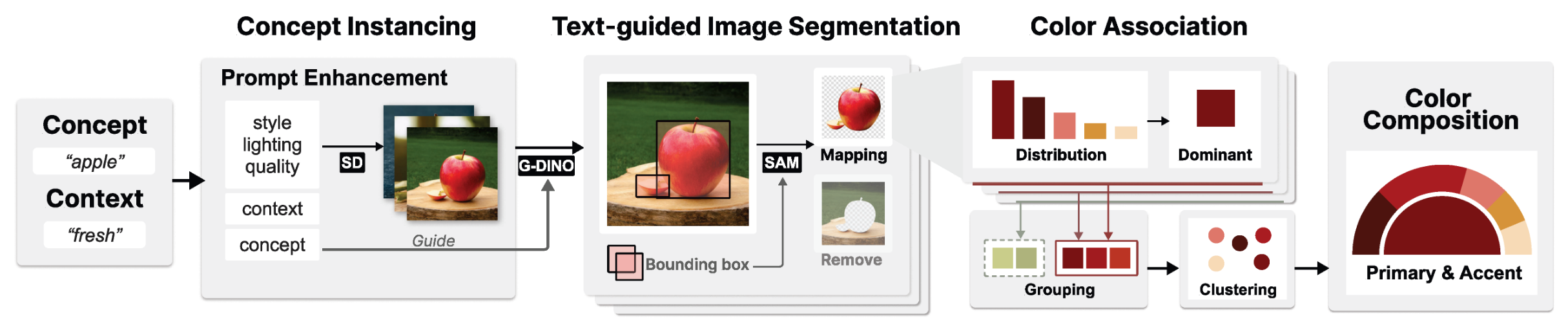
This project proposes a generative approach for semantic color association framework that mines semantically resonant colors through images generated by text-to-image models. This method addresses the limitations of traditional query-based image referencing approaches when handling uncommon concepts, as well as their vulnerability to unstable image referencing and varying image conditions.
Our framework comprises three stages:
- Concept Instancing: Produces generative samples using diffusion models
- Text-guided Image Segmentation: Identifies concept-relevant regions within the image
- Color Association: Extracts primary accompanied by accent colors
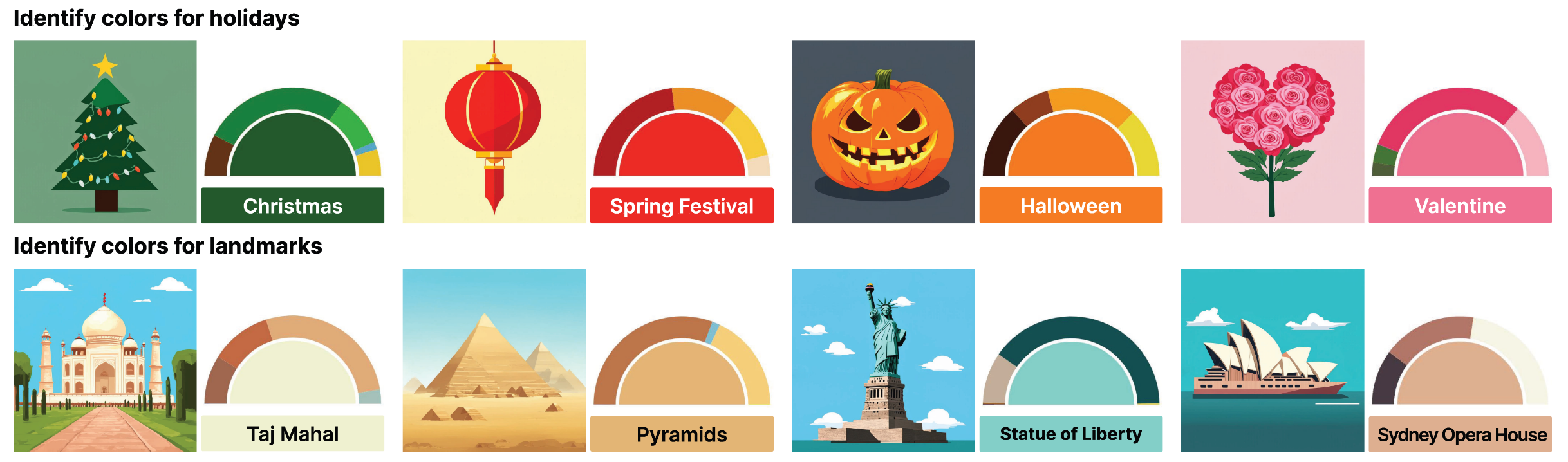
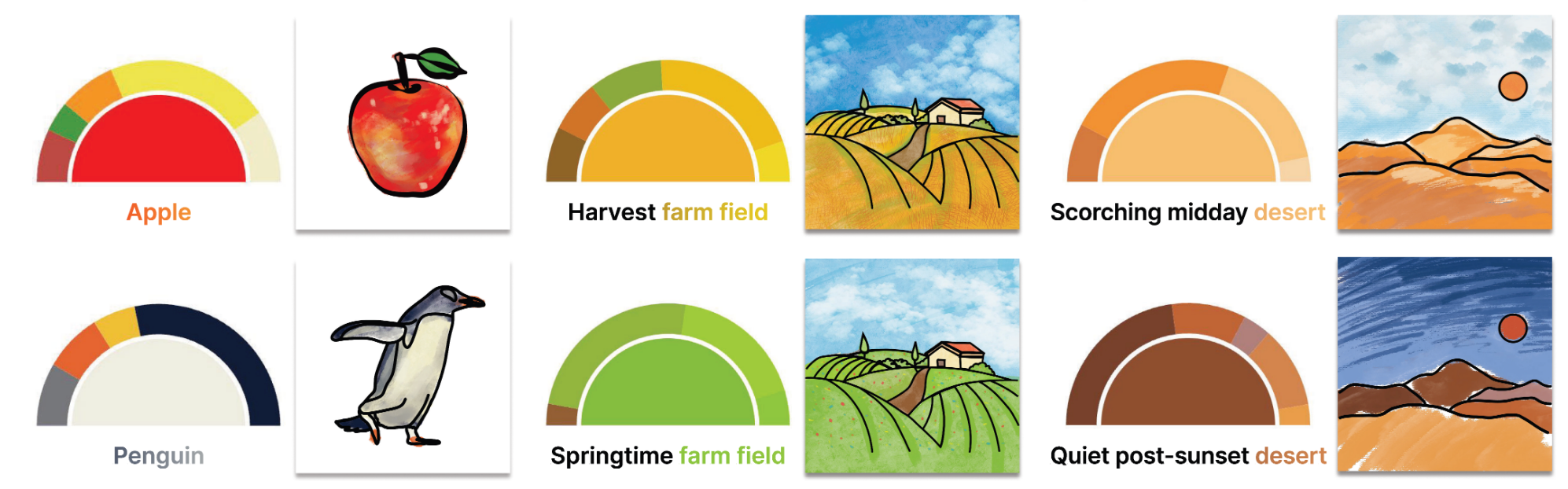
We demonstrate two application scenarios where our method can support designers in color-concept association tasks: identifying representative colors for design elements and clipart coloring.
GenColor-code/
├── backend/                    				   # Backend code
│   └── scripts/
│       ├── api/               						# API interfaces
│       ├── cases/             						# Test prompt files
│       ├── models/            						# Core processing modules
│       │   ├── Step1_image_generation.py
│       │   ├── Step2_segmentation.py
│       │   └── Step3_batch_color_extraction.py
│       ├── settings/          						# Configuration files and data
│       └── utils/             						# Utility functions
├── frontend/                  					# Frontend gallery display
│   ├── src/
│   │   ├── components/        						# Vue components
│   │   └── views/            						# Page views
│   └── public/              	 					# Static assets
└── README.md
# Create and activate conda environment
conda create -n gencolor python=3.9
conda activate gencolor# Navigate to backend folder
cd backend
# Install Python dependencies
pip install -r requirements.txt# Clone repositories
git clone https://github.com/IDEA-Research/GroundingDINO.git
git clone https://github.com/facebookresearch/segment-anything.git
# Install GroundingDINO - refer to their repo for detailed instructions
cd GroundingDINO
pip install -e .
# Install Segment Anything - refer to their repo for detailed instructions
cd ../segment-anything
pip install -e .For detailed installation instructions and troubleshooting, please refer to:
Make sure you have Node.js installed:
# Check if Node.js is installed
node --version
npm --version

# If not installed, download from: https://nodejs.org/cd frontend
npm installThe color processing pipeline requires running the following steps in sequence. Each step takes some time to complete, and you need to wait for the previous step to finish before starting the next one.
-
Step 1: Image Generation
Prerequisites: You need a Hugging Face account and token to use Stable Diffusion 3.
Please follow Hugging Face CLI Login Guide to setup authentication.
huggingface-cli login
# Enter your API key when prompted
cd backend/scripts/models
python Step1_image_generation.py
-
Step 2: Image Segmentation
python Step2_segmentation.py
-
Step 3: Color Extraction
python Step3_batch_color_extraction.py
The cases/ directory contains various test prompt files.
Launch the frontend display interface:
cd frontend
npm run serve
Visit http://localhost:8080 to view the results gallery.
If you find our work helpful for your research, please consider citing the following BibTeX entry.
@inproceedings{hou2025gencolor,
author = {Hou, Yihan and Zeng, Xingchen and Wang, Yusong and Yang, Manling and Chen, Xiaojiao and Zeng, Wei},
title = {GenColor: Generative Color-Concept Association in Visual Design},
year = {2025},
isbn = {9798400713941},
publisher = {Association for Computing Machinery},
address = {New York, NY, USA},
url = {https://doi.org/10.1145/3706598.3713418},
doi = {10.1145/3706598.3713418},
booktitle = {Proceedings of the 2025 CHI Conference on Human Factors in Computing Systems},
articleno = {544},
numpages = {19},
keywords = {Color-concept association, Visual design, Generative AI},
series = {CHI '25}
}