Github:https://github.com/Shad0wpf/DBScanner
在se55i0n的DBScanner脚本上做了部分修改,增加部分漏洞检测的准确性和检测方法。
自动扫描内网常见sql、no-sql数据库未授权访问漏洞及常规弱口令检测
- mysql(扫描root账号弱口令)
- mssql(扫描sa账号弱口令)
- oracle(扫描system/sys/scott等账号弱口令)
- postgresql(扫描postgres账号弱口令)
- redis(扫描弱口令及未授权访问)
- mongodb(扫描未授权访问)
- memcached(扫描未授权访问)
- elasticsearch(扫描未授权访问)
- hadoop(扫描未授权访问)
- zookeeper(扫描未授权访问)
- rsync(扫描未授权访问)
该脚本使用Python2运行
pip install -r requirements.txt
a. 安装cx_Oracle库
python -m pip install cx_Oracle --upgradeb. 安装Oracle Instant Client
i. Kali下使用apt安装
apt install oracle-instantclient-basicii. 手动安装
下载Oracle Instant Client,解压后将Oracle Instant Client目录加入环境变量。
mkdir -p /opt/oracle
cd /opt/oracle
unzip instantclient-basic-linux.x64-19.3.0.0.0dbru.zip

sudo sh -c "echo /opt/oracle/instantclient_19_3 > /etc/ld.so.conf.d/oracle-instantclient.conf"
sudo ldconfigSeafile:https://183.221.111.23:9001/d/1a912274e1974e978d41/
官网下载地址:https://www.oracle.com/database/technologies/instant-client/downloads.html
参考:https://oracle.github.io/odpi/doc/installation.html#macos
https://www.zhihu.com/question/19629769/answer/123755085
检测Zookeeper未授权访问,需安装Zookeeper客户端。
Ubuntu or Kali
sudo apt install zookeeper
或下载官方发布的压缩包文件,解压后使用,根据实际情况修改lib/exploit.py代码中客户端路径
压缩包文件同时提供对Linux和Windows的支持,Linux客户端文件zkCli.sh,Windows客户端文件zkCli.cmd 建议先测试zkCli是否能正常使用,否则引起漏报。 https://mirrors.tuna.tsinghua.edu.cn/apache/zookeeper/current/
zookeeper客户端Java报错处理 https://www.jianshu.com/p/9529249a26e7
需先安装postgresql-server-dev-x.x
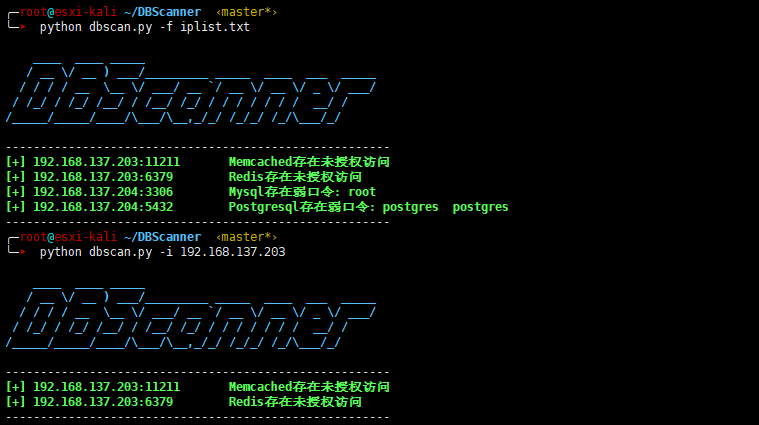
sudo apt install postgresql-server-dev-9.5python dbscan.py -f iplist.txt
or
python dbscan.py -i 192.168.1.0/24
  -h, --help  显示帮助文件
  -i IP       扫描IP或IP段
  -f FILE     IP清单文件
  -t THREAD   线程数(默认50)