


Transform any webpage into a fact-checking battleground with just a click
|
Select any text or image on any website and get immediate misinformation analysis powered by cutting-edge AI |
Learn about manipulative techniques used in fake content and develop critical thinking skills for digital literacy |
Receive fact-checking results promptly with confidence scores and detailed explanations |
🎪 Click to Explore Our Superpowers
- 🎯 One-Click Verification: Select → Click → Verify - It's that simple!
- 📸 Image Analysis: Upload or select images to detect deepfakes, manipulated photos, and visual misinformation
- 📝 Text Fact-Checking: Comprehensive analysis of claims, statistics, and statements
- 🎭 Manipulation Detection: Identifies emotional manipulation, logical fallacies, and propaganda techniques
- 📊 Confidence Scoring: Get percentage-based confidence levels for each verification
- 🔗 Evidence Linking: Direct access to credible sources and counter-evidence
- 🎨 Beautiful UI: Sleek, modern interface that doesn't interrupt your browsing
- 🌙 Dark/Light Mode: Seamlessly adapts to your browser theme
- 📱 Responsive Design: Works flawlessly across all screen sizes
- 🔒 Zero Data Storage: We don't store your browsing history or personal data
- 🌐 Secure Processing: All analysis happens through encrypted channels
- 👤 Anonymous Usage: No account required, complete privacy protection
Store releases coming soon! For now, enjoy early access with manual installation
# Step 1: Download the Extension Package
📦 Download the latest ZIP from our releases

# Step 2: Extract & Load
📁 Extract the ZIP file to your desired location

# Step 3: Load in Browser
🛡️ Load unpacked extension in your browser
📖 Detailed Installation Instructions
- Visit our Releases Page
- Download the latest
satyashield-extension.zip - Extract the ZIP file to a folder on your computer
- Open Chrome and go to
chrome://extensions/ - Enable "Developer mode" (toggle in top-right)
- Click "Load unpacked"
- Select the extracted extension folder
- Look for the 🛡️ SatyaShield icon in your toolbar
- Open Firefox and go to
about:debugging - Click "This Firefox" in the sidebar
- Click "Load Temporary Add-on"
- Navigate to the extension folder and select
manifest.json - The extension will be loaded temporarily
- Open Edge and go to
edge://extensions/ - Enable "Developer mode" (toggle in bottom-left)
- Click "Load unpacked"
- Select the extracted extension folder
- Find the 🛡️ icon in your extensions toolbar
- Chrome: Version 88 or higher
- Firefox: Version 78 or higher
- Edge: Version 88 or higher
- RAM: Minimum 4GB recommended
- Storage: 10MB free space
graph TD
    A[🖱️ User Selects Content] --> B[🛡️ SatyaShield Button Appears]
    B --> C[🚀 Click to Verify]
    C --> D[🔄 AI Processing Pipeline]
    D --> E[📊 Claims Extraction]
    D --> F[🔍 Evidence Gathering]
    D --> G[🧪 Manipulation Analysis]
    E --> H[✅ Final Verdict]
    F --> H
    G --> H
    H --> I[📋 Detailed Report]
    I --> J[🎓 Educational Insights]
- 🎯 Content Selection: Highlight any text or right-click any image
- 🤖 AI Analysis: Our advanced algorithms extract verifiable claims
- 🔍 Evidence Hunt: Parallel search across trusted sources and databases
- 🧠 Pattern Recognition: Detect emotional manipulation and logical fallacies
- 📊 Scoring: Generate confidence levels and comprehensive reports
- 🎓 Education: Learn why content might be misleading


Core AI Processing |

Main Website |

You Are Here! |

Mobile Verification |





🌟 Real-World Applications
- Verify election claims and political statements
- Detect manipulated political imagery
- Identify bias and propaganda techniques
- Combat medical misinformation
- Verify health claims and treatments
- Protect against dangerous health advice
- Detect investment scams and fraudulent schemes
- Verify financial news and market claims
- Protect against cryptocurrency fraud
- Fact-check breaking news stories
- Identify clickbait and sensationalism
- Verify social media viral content
- Verify academic claims and statistics
- Check historical facts and scientific data
- Ensure reliable sources for research
👨💻 For Developers & Contributors
# Ensure you have these installed
- Node.js (v16 or higher)
- npm or yarn
- Git
- A modern code editor# Clone the repository
git clone https://github.com/Satya-Shield/Browser-Extension.git
cd Browser-Extension
# Install dependencies
npm install
# Build for development
npm run watch
# Build for production
npm run build
# Run tests
npm testBrowser-Extension/
├── 📂 dist/
├── 📂 public/
│ ├── 📂 assets/
│ │ └── 📂 images/
│ │ └── 📄 logo.png
│ └── 📄 manifest.json
├── 📂 src/
│ └── 📄 content.ts
├── 📄 vite.config.json
└── 📄 package.json
| Browser | Version | Status | Download |
|---|---|---|---|
 |
88+ | ✅ Fully Supported | Install |
 |
78+ | ✅ Fully Supported | Install |
 |
88+ | ✅ Fully Supported | Install |
 |
14+ | 🔄 Coming Soon | TBA |
 |
74+ | 🔄 Coming Soon | TBA |
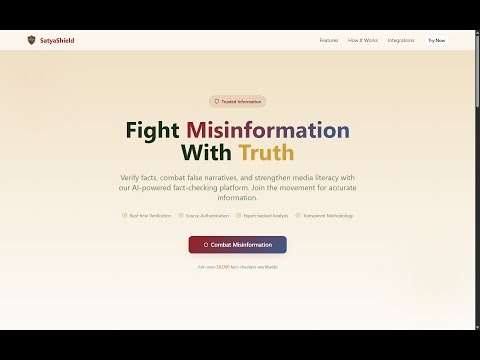
Click above to watch our 2-minute demo showcasing the extension's capabilities
|
Visit our main website for comprehensive analysis
|
Verify content directly through WhatsApp
|


🔧 Common Issues & Solutions
- Refresh the page and try again
- Check if the extension is enabled in browser settings
- Ensure you have the latest version installed
- Make sure you've selected text or right-clicked an image
- Check if the website allows extension interactions
- Try refreshing the page
- Use our WhatsApp bot: +1 (555) 148-2620
- Visit our mobile-optimized website instead
We welcome contributors of all skill levels. Every contribution makes the internet safer.
- 🐛 Bug Reports: Help us identify and fix issues
- 💡 Feature Requests: Suggest new capabilities
- 🔧 Code Contributions: Submit pull requests
- 📚 Documentation: Improve our guides and tutorials
- 🌍 Translations: Help us reach more users globally
- 🎨 Design: Enhance our visual elements
# Fork the repository
git fork https://github.com/Satya-Shield/Browser-Extension

# Create a feature branch
git checkout -b feature/amazing-new-feature

# Make your changes and commit
git commit -m "Add amazing new feature"

# Push to your fork
git push origin feature/amazing-new-feature

# Create a Pull Request
# We'll review and merge quickly!This project is licensed under the MIT License - see the LICENSE file for details.



Made with 💖 by the SatyaShield Team | Fighting Misinformation One Click at a Time
🌟 If this extension helped you identify fake news, please star our repository!
"In a world full of misinformation, be someone's source of truth."
© 2025 SatyaShield. All rights reserved.