


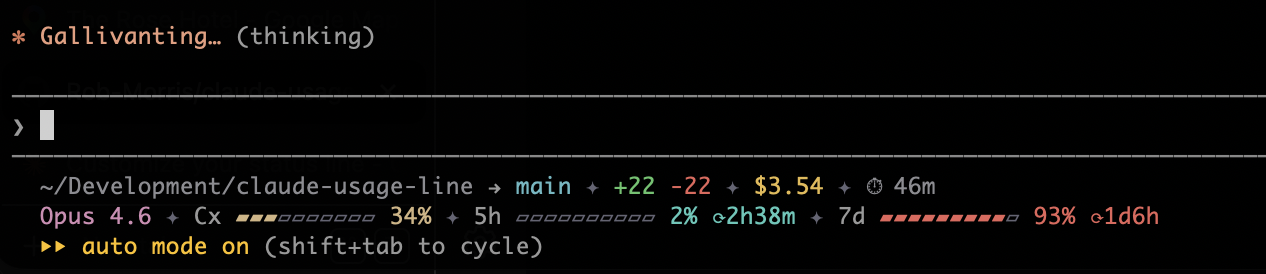
Cross-platform Claude Code statusline — session context, 5-hour & 7-day rate limits, git branch, diff stats, cost, and duration. Zero runtime dependencies, no jq required.
Forked from canack/claude-usage-line. Props to Engin Açıkgöz. Chosen from a crowded field for its zero runtime dependencies, strong security posture, and well-structured (clean, thorough, transparent) TypeScript
Full output (when Claude Code sends extended data):
~/dev/project → main • +123 -45 • $0.50 • ⏱ 12m
Opus 4.6 • Cx █████░░░ 62% • 5h ████░░░░ 48% ⟳3h28m • 7d █████░░░ 63% ⟳22h30m
Minimal output (backward compatible — only context_window provided):
Cx █████░░░ 62% • 5h ████░░░░ 48% ⟳3h28m • 7d █████░░░ 63% ⟳22h30m
- Node.js ≥ 18
- Claude Code with statusline support
- Claude.ai Pro/Max subscription — required for rate limit data (5h / 7d bars). Session bar works without it.
npm install -g @robmorris/claude-usage-line
claude-usage-line setup
With a theme:
claude-usage-line setup --theme dark-contrastSetup writes a direct "<node>" "<path-to-cli.js>" command into ~/.claude/settings.json, so each statusline refresh costs a single Node process.
Or manually add to ~/.claude/settings.json (requires the global install above):
{
  "statusLine": {
    "type": "command",
    "command": "claude-usage-line"
  }
}
With a theme and custom bar style:
{
  "statusLine": {
    "type": "command",
    "command": "claude-usage-line --theme dark-contrast --style dot"
  }
}
Restart Claude Code and the statusline appears. Setup also copies an editable theme file to ~/.claude/statusline-theme.json.
Warning
Don't use npx as the statusline command. Claude Code re-runs the statusline command on every update — as often as every 300 ms — and npx boots the entire npm CLI (and can hit the npm registry) on each run, which can pin a CPU core. Earlier versions of this README recommended npx here; if your settings still use it, re-run claude-usage-line setup and it will migrate your command (keeping any flags) automatically.
Note
Setup writes absolute paths, so the command is pinned to the Node version it was set up with. If the statusline goes blank after upgrading or removing a Node version (common with nvm), re-run claude-usage-line setup. The same applies if you ran setup via npx without installing globally: the recorded path lives in npm's cache, which npm can evict — setup warns when run that way.
Claude Code                      claude-usage-line
    │                                   │
    │  stdin: {                         │
    │    "context_window": {...},        │
    │    "cwd": "/path",                │
    │    "model": {"display_name":".."},│
    │    "cost": {...},                 │
    │    "rate_limits": {...}           │
    │  }                                │
    ├──────────────────────────────────▶│
    │                                   ├─▶ Load theme (--theme + user file)
    │                                   ├─▶ Cache rate limits / read cached
    │                                   ├─▶ Detect git branch (if cwd given)
    │                                   │
    │  stdout: ANSI statusline          │
    │◀──────────────────────────────────┤
The tool accepts these fields via stdin JSON:
| Field | Required | Description |
|---|---|---|
context_window.used_percentage |
Yes | Session context usage % |
cwd |
No | Working directory → enables git branch detection |
workspace.git_worktree |
No | Git worktree name shown on line 1 |
model.display_name |
No | Model name shown on line 2 |
effort.level |
No | Reasoning effort shown next to model (low/medium/high/xhigh/max) |
cost.total_lines_added |
No | Lines added (green) |
cost.total_lines_removed |
No | Lines removed (red) |
cost.total_cost_usd |
No | Session cost in USD |
cost.total_duration_ms |
No | Session duration |
rate_limits.five_hour.used_percentage |
No | 5-hour rolling window usage % |
rate_limits.five_hour.resets_at |
No | Reset time (Unix epoch seconds) |
rate_limits.seven_day.used_percentage |
No | 7-day rolling window usage % |
rate_limits.seven_day.resets_at |
No | Reset time (Unix epoch seconds) |
When cwd, workspace.git_worktree, model, or effort is present → 2-line output. Otherwise → single-line (backward compatible).
Rate limit data is provided by Claude Code via stdin. The rate_limits fields are only present for Claude.ai Pro/Max subscribers — bars show 0% and -- without a qualifying subscription. Rate limit data is cached locally so new sessions display the last known values until fresh data arrives. Cached values expire when their reset window passes.
| Style | Preview | Width |
|---|---|---|
classic (default) |
█████░░░ |
8 |
dot |
●●●●●○○○ |
8 |
braille |
⣿⣿⣿⣿⣿⣀⣀⣀ |
8 |
block |
▰▰▰▰▰▰▱▱▱▱ |
10 |
ascii |
#####----- |
10 |
square |
▪▪▪▪▪····· |
10 |
pipe |
┃┃┃┃┃╌╌╌ |
8 |
Themes bundle colors, bar style, and hidden fields into a single file. Use --theme to select a shipped theme, or edit ~/.claude/statusline-theme.json for full customization.
| Theme | Description |
|---|---|
default |
Standard 16-color theme — works in any terminal |
dark-contrast |
Truecolor, dark — high-contrast palette with wider bars |
dark-muted |
Truecolor, dark — split-complementary with rose identity, cool grey structure, warm amber/coral status |
dark-vivid |
Truecolor, dark — triadic violet/orange/cyan, high saturation, bold and energetic |
dark-vintage |
Truecolor, dark — monochromatic warm, all colours between gold and burnt sienna |
dark-rainbow |
Truecolor, dark — every element its own hue, maximum colour variety at consistent brightness |
light-muted |
Truecolor, light — same muted palette darkened for white backgrounds |
light-vivid |
Truecolor, light — same triadic energy adapted for light backgrounds |
light-vintage |
Truecolor, light — warm monochromatic with neutral grey structure for contrast |
light-rainbow |
Truecolor, light — full spectrum, high saturation tuned for readability on white |
Select a shipped theme:
{
  "statusLine": {
    "type": "command",
    "command": "claude-usage-line --theme dark-contrast"
  }
}
Or set it up automatically:
claude-usage-line setup --theme dark-contrast~/.claude/statusline-theme.json is your personal override layer. It's created on first setup (a copy of your chosen theme) and always takes precedence over shipped themes.
Edit any key to customize:
{
  "style": {
    "filled": "▰",
    "empty": "▱",
    "width": 10,
    "separator": "•",
    "resetIcon": "⟳"
  },
  "colors": {
    "context": "magenta",
    "five_hour": "cyan",
    "seven_day": "green",
    "cwd": "blue",
    "branch": "green",
    "model": "magenta",
    "cost": "yellow",
    "diff_add": "green",
    "diff_remove": "red",
    "duration": "blue",
    "dim": "bright_black",
    "warn": "yellow",
    "danger": "red"
  },
  "hide": ["cost", "duration"]
}| Format | Example | Notes |
|---|---|---|
| Named | "red", "bright_cyan" |
16 standard terminal colors |
| 256-color | "256:208" |
xterm-256 palette index |
| RGB | "rgb:180,140,255" |
Truecolor — requires terminal support |
| Raw ANSI | "\x1b[38;5;208m" |
Escape sequences (also \e, \033) |
context, five_hour, seven_day, cwd, branch, worktree, model, effort, cost, diff_add, diff_remove, duration, five_hour_reset, seven_day_reset, dim, warn, danger
worktree and effort are unset by default: worktree inherits the branch color and effort inherits the model color. Set them explicitly to give each its own color.
Each bar changes color at thresholds: < 50% uses the base color, ≥ 50% uses warn, ≥ 80% uses danger.
styles.ts defaults → --theme file → ~/.claude/statusline-theme.json → --style flag → --sep flag
--themesets both style and colors from a shipped preset- User theme file (
~/.claude/statusline-theme.json) overrides on top — user always wins --styleoverrides bar characters/separator (but not colors) when explicitly passed--sepoverrides the separator character
echo '{"context_window":{"used_percentage":62}}' | claude-usage-line --json{
"model": null,
"effort": null,
"cwd": null,
"git_branch": null,
"git_worktree": null,
"session": { "utilization_pct": 62, "resets_at": null, "remaining": "--" },
"five_hour": { "utilization_pct": 48, "resets_at": "2026-02-26T14:00:00Z", "remaining": "3h28m" },
"seven_day": { "utilization_pct": 63, "resets_at": "2026-02-28T00:00:00Z", "remaining": "22h30m" },
"diff": { "added": 0, "removed": 0 },
"cost_usd": null,
"duration_min": null
}Usage: claude-usage-line [options]
claude-usage-line setup [--theme <name>] [--force]
Options:
--theme <name> Use a shipped theme (e.g. dark-contrast)
--style <name> Bar style (classic, dot, braille, block, ascii, square, pipe)
--hide <fields> Hide fields (comma-separated): cost,diff,duration,model,effort,cwd,branch,worktree
--sep <name> Separator: bullet (default), pipe, dot, diamond, arrow, star
--json Output JSON
--help Show help
--version Show version
Setup options:
--theme <name> Include --theme in the statusline command and copy that theme file
--force Overwrite existing settings and theme file
Hide parts of the output using --hide or the hide key in your theme file:
{
  "statusLine": {
    "type": "command",
    "command": "claude-usage-line --hide cost,duration"
  }
}
Or in ~/.claude/statusline-theme.json:
{
  "hide": ["cost", "duration"]
}
Theme and CLI hide fields are combined (union of both). Available fields: cost, diff, duration, model, effort, cwd, branch, worktree
npm run typecheck
npm test
echo '{"context_window":{"used_percentage":62}}' | node dist/cli.js
echo '{"cwd":"/tmp","model":{"display_name":"Opus 4.6"},"context_window":{"used_percentage":85},"cost":{"total_lines_added":42,"total_lines_removed":10,"total_cost_usd":1.23,"total_duration_ms":3720000}}' | node dist/cli.js
echo '{"context_window":{"used_percentage":55}}' | node dist/cli.js --theme dark-contrast
echo '{"context_window":{"used_percentage":55}}' | node dist/cli.js --theme dark-contrast --style asciiMIT