- Download the .sb3 file from the repo
- Go to https://turbowarp.org/editor
- Click "File" and then "Load from your computer"
- Load the .sb3 file
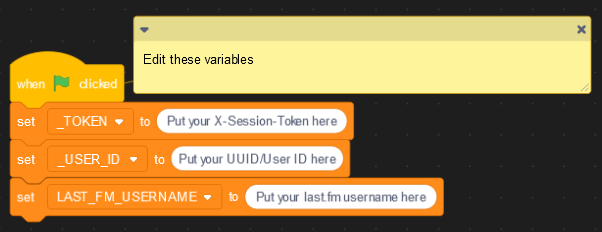
- Find this block of code (shown below) and change the variables to their corresponding values
- Click the green flag
-
Notifications
You must be signed in to change notification settings - Fork 0
Displays your current last.fm scrobble on your Revolt status.
License
RiSKCodes/revolt.fm
Folders and files
| Name | Name | Last commit message | Last commit date | |
|---|---|---|---|---|
Repository files navigation
About
Displays your current last.fm scrobble on your Revolt status.
Resources
License
Stars
Watchers
Forks
Releases
No releases published