

A rich, dark-themed web UI for interacting with the Genesis physics simulation engine — built for robotics researchers, game developers, and anyone interested in real-time physics simulation.
Works in full live mode with Genesis installed, or in demo mode without it.
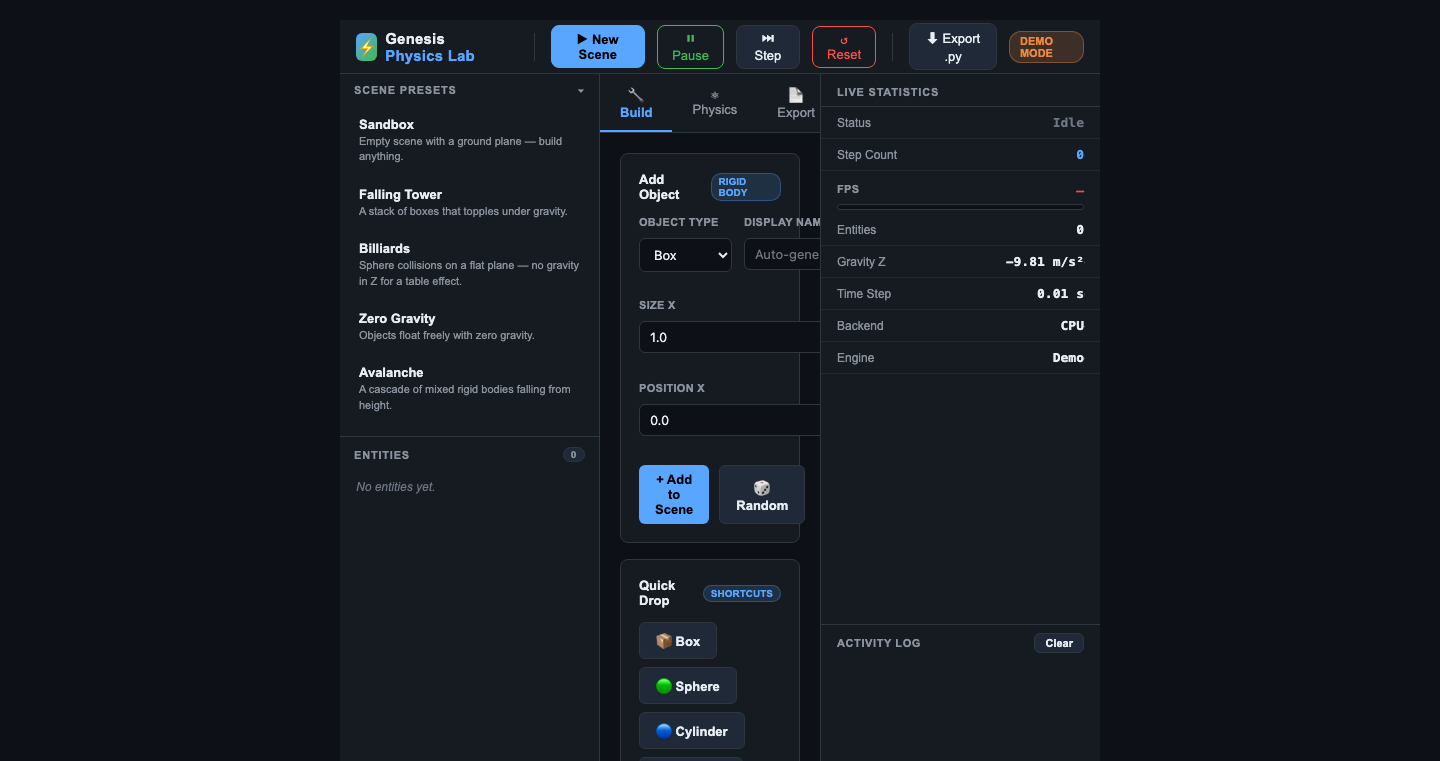
| Feature | Description |
|---|---|
| 🎬 Scene Presets | One-click load of curated scenes: Falling Tower, Billiards, Zero-G Sandbox, Avalanche |
| 📦 Object Builder | Add Box, Sphere, Cylinder, or Capsule with full param control |
| 🎲 Quick Drop | Randomised single-object drop or full tower stacks |
| ⚛ Physics Controls | Live gravity presets (Earth, Moon, Mars, Zero-G, Reversed) + per-axis control |
| 📋 Python Export | One-click export of the current scene as a runnable Genesis .py script |
| 📊 Live Stats | Real-time FPS, step counter, entity list, backend info |
| 🗒 Activity Log | Per-action timestamped log with clear button |
| 🌐 Demo Mode | Runs fully without Genesis installed — great for rapid prototyping |
| 🌙 Dark Theme | Polished dark UI inspired by GitHub and VS Code |
git clone https://github.com/RhythrosaLabs/genesis-physics-lab
cd genesis-physics-lab
pip install -r requirements.txt
python app.py
Open http://localhost:8080 in your browser. The UI runs in DEMO MODE badge — all controls work and the exported Python script is valid Genesis code.
Install Genesis following the official instructions, then:
pip install -r requirements.txt
python app.py
The badge switches to LIVE and the viewer window opens alongside the browser UI.
Click ▶ New Scene in the top bar. Optionally pick a Scene Preset from the left sidebar first.
- Go to the 🔧 Build tab
- Choose object type, set dimensions and position
- Click + Add to Scene
Or use Quick Drop buttons for instant randomised drops.
Go to the ⚛ Physics tab. Hit a planet button or type custom X/Y/Z gravity values.
Click 📄 Export tab (or ⬇ Export .py in the top bar) to generate, copy, or download a complete standalone Python script.
The Flask backend exposes a REST API you can call from any client:
| Method | Endpoint | Description |
|---|---|---|
| POST | /api/scene/create |
Create a new scene |
| POST | /api/scene/reset |
Reset scene state |
| POST | /api/scene/pause |
Toggle pause/resume |
| POST | /api/scene/step |
Advance one step (when paused) |
| GET | /api/scene/status |
Live stats JSON |
| POST | /api/scene/gravity |
Update gravity vector {"gravity":[x,y,z]} |
| GET | /api/presets |
List available presets |
| POST | /api/presets/<id> |
Load a preset by ID |
| GET | /api/entities |
List all entities in the scene |
| POST | /api/entities |
Add an entity {"type":"box","params":{...}} |
| DELETE | /api/entities/<id> |
Remove an entity by ID |
| GET | /api/export/python |
Get current scene as Python script |
| GET | /api/log |
Recent activity log entries |
| POST | /api/log/clear |
Clear the log |
| Preset | Description |
|---|---|
sandbox |
Empty ground plane — build anything |
falling_tower |
Stack of boxes + wrecking ball sphere |
billiards |
Sphere rack on a near-flat surface |
zero_gravity |
Mixed rigid bodies in zero-G |
avalanche |
8 random rocks falling from height |
- Backend: Python · Flask · Flask-CORS
- Physics Engine: Genesis (optional)
- Frontend: Vanilla JS, CSS Custom Properties — zero dependencies
MIT — do whatever you want with this. Attribution appreciated.
Built on top of the Genesis physics engine by Genesis-Embodied-AI.
If you find this useful, consider supporting via PayPal
🌐 Portfolio: rhythrosalabs.github.io (more apps, music and sound design)