This repository contains the Vagrant files required to run the virtual lab environment used in the DNCS course.
        +-----------------------------------------------------+
        |                                                     |
        |                                                     |eth0
        +--+--+                +------------+             +------------+
        |     |                |            |             |            |
        |     |            eth0|            |eth2     eth2|            |
        |     +----------------+  router-1  +-------------+  router-2  |
        |     |                |            |             |            |
        |     |                |            |             |            |
        |  M  |                +------------+             +------------+
        |  A  |                      |eth1                       |eth1
        |  N  |                      |                           |
        |  A  |                      |                           |
        |  G  |                      |                     +-----+----+
        |  E  |                      |eth1                 |          |
        |  M  |            +-------------------+           |          |
        |  E  |        eth0|                   |           |  host-c  |
        |  N  +------------+      SWITCH       |           |          |
        |  T  |            |                   |           |          |
        |     |            +-------------------+           +----------+
        |  V  |               |eth2         |eth3                |eth0
        |  A  |               |             |                    |
        |  G  |               |             |                    |
        |  R  |               |eth1         |eth1                |
        |  A  |        +----------+     +----------+             |
        |  N  |        |          |     |          |             |
        |  T  |    eth0|          |     |          |             |
        |     +--------+  host-a  |     |  host-b  |             |
        |     |        |          |     |          |             |
        |     |        |          |     |          |             |
        ++-+--+        +----------+     +----------+             |
        | |                              |eth0                   |
        | |                              |                       |
        | +------------------------------+                       |
        |                                                        |
        |                                                        |
        +--------------------------------------------------------+
- Python 3
- 10GB disk storage
- 2GB free RAM
- Virtualbox
- Vagrant (https://www.vagrantup.com)
- Internet
- Install Virtualbox and Vagrant
- Clone this repository
git clone https://github.com/fabrizio-granelli/dncs-lab - You should be able to launch the lab from within the cloned repo folder.
cd dncs-lab
[~/dncs-lab] vagrant up
Once you launch the vagrant script, it may take a while for the entire topology to become available.
- Verify the status of the 4 VMs
[dncs-lab]$ vagrant status
Current machine states:

router                    running (virtualbox)
switch                    running (virtualbox)
host-a                    running (virtualbox)
host-b                    running (virtualbox)
- Once all the VMs are running verify you can log into all of them:
vagrant ssh routervagrant ssh switchvagrant ssh host-avagrant ssh host-bvagrant ssh host-c
This section describes the assignment, its requirements and the tasks the student has to complete. The assignment consists in a simple piece of design work that students have to carry out to satisfy the requirements described below. The assignment deliverable consists of a Github repository containing:
- the code necessary for the infrastructure to be replicated and instantiated
- an updated README.md file where design decisions and experimental results are illustrated
- an updated answers.yml file containing the details of your project
- Hosts 1-a and 1-b are in two subnets (Hosts-A and Hosts-B) that must be able to scale up to respectively 315 and 214 usable addresses
- Host 2-c is in a subnet (Hub) that needs to accommodate up to 344 usable addresses
- Host 2-c must run a docker image (dustnic82/nginx-test) which implements a web-server that must be reachable from Host-1-a and Host-1-b
- No dynamic routing can be used
- Routes must be as generic as possible
- The lab setup must be portable and executed just by launching the
vagrant upcommand
- Fork the Github repository: https://github.com/fabrizio-granelli/dncs-lab
- Clone the repository
- Run the initiator script (dncs-init). The script generates a custom
answers.ymlfile and updates the Readme.md file with specific details automatically generated by the script itself. This can be done just once in case the work is being carried out by a group of (<=2) engineers, using the name of the 'squad lead'. - Implement the design by integrating the necessary commands into the VM startup scripts (create more if necessary)
- Modify the Vagrantfile (if necessary)
- Document the design by expanding this readme file
- Fill the
answers.ymlfile where required (make sure that is committed and pushed to your repository) - Commit the changes and push to your own repository
- Notify the examiner (fabrizio.granelli@unitn.it) that work is complete specifying the Github repository, First Name, Last Name and Matriculation number. This needs to happen at least 7 days prior an exam registration date.
- https://rogerdudler.github.io/git-guide/
- http://therandomsecurityguy.com/openvswitch-cheat-sheet/
- https://www.cyberciti.biz/faq/howto-linux-configuring-default-route-with-ipcommand/
- https://www.vagrantup.com/intro/getting-started/
- 315 usable adresses for host-A
- 214 usable adresses for host-B
- 344 usable adresses for host-C
- host-C must run a Docker image reachable by host-A and host-B
- use only static routes as generic as possible
There are 4 different subnets:
- between router-1 and router-2
require only 2 ip addresses, we use the subnet 10.1.1.0/30
| NETWORK INTERFACE | DEVICE | IP ADDRESS |
|---|---|---|
| enp0s9 | router-1 | 10.1.1.1/30 |
| enp0s9 | router-2 | 10.1.1.2/30 |
- between router-1 and host-a
need to manage 315 ip addresses, we use the subnet 192.168.2.0/23
| NETWORK INTERFACE | DEVICE | IP ADDRESS |
|---|---|---|
| enp0s8.2 | router-1 | 192.168.2.1/23 |
| enp0s8 | host-a | 192.168.2.2/23 |
and create a VLAN with tag "2"
- between router-1 and host-b
need to manage 214 ip addresses, we use the subnet 192.168.1.0/24
| NETWORK INTERFACE | DEVICE | IP ADDRESS |
|---|---|---|
| enp0s8.3 | router-1 | 192.168.1.1/24 |
| enp0s8 | host-b | 192.168.1.2/24 |
and create a VLAN with tag "3"
- between router-2 and host-c
need to manage 344 ip addresses, we use the subnet 192.168.4.0/23
| NETWORK INTERFACE | DEVICE | IP ADDRESS |
|---|---|---|
| enp0s8 | router-2 | 192.168.4.1/23 |
| enp0s8 | host-c | 192.168.4.2/23 |
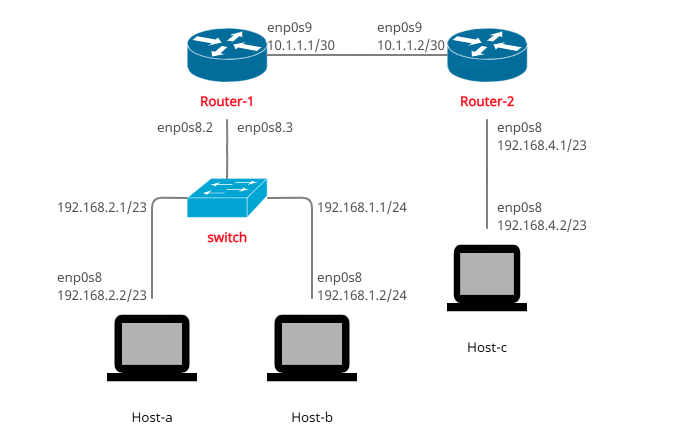
The commands used to configure the network are listed and explained below:
-
assign an IP address to a specifc interface
sudo ip addr add [ip] dev [interface] -
set the interface in the "up" status
sudo ip link set dev [interface] up -
enable IPv4 forwarding
sudo sysctl -w net.ipv4.ip_forward=1 -
redirect the traffic from a subnet to an IP address
sudo ip route add [subnets addresses] via [ip] -
create a VLAN and assign a tag
sudo ip link add link [interface] name [VLAN] type vlan id [tag] -
create a bridge and assign the VLAN tag to the interfaces
ovs-vsctl add-br switch ovs-vsctl add-port switch [interface] ovs-vsctl add-port switch [interface] tag="[tag]" -
install docker and test docker image and run them
  apt update
  apt -y install docker.io
  systemctl start docker
  systemctl enable docker
  docker pull dustnic82/nginx-test
  docker run -p 80:80 -d dustnic82/nginx-test
The Vagrant file must be modified in order to run the devices we implemented by specifying the path to the relative shell script. In addition the host-c memory must be increased from 256 MB to 512 MB because it has to run a Docker image (dustnic82/nginx-test).
    config.vm.define "host-c" do |hostc|
    hostc.vm.box = "ubuntu/bionic64"
    hostc.vm.hostname = "host-c"
    hostc.vm.network "private_network", virtualbox__intnet: "broadcast_router-south-2", auto_config: false
    hostc.vm.provision "shell", path: "host-c.sh"
    hostc.vm.provider "virtualbox" do |vb|
    vb.memory = 512
    end
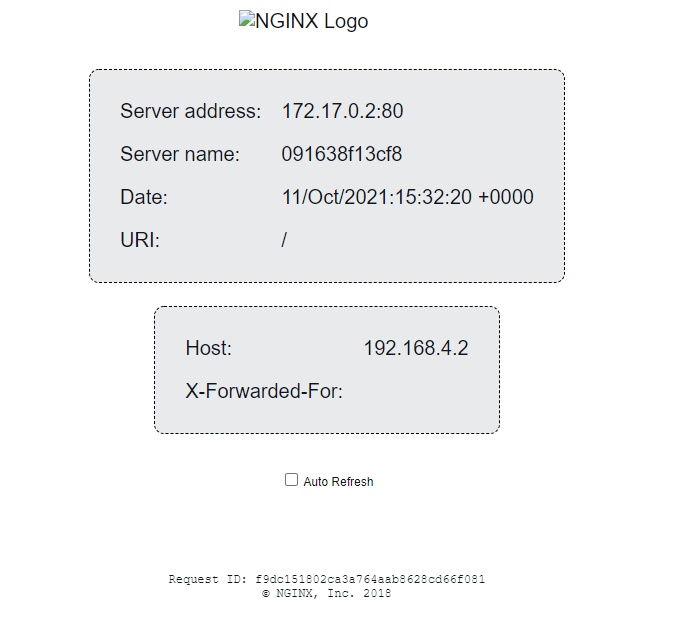
First we create the network with the command 'vagrant up', then we can log in each VM via 'vagrant ssh [VM-name]' and check the reachability of the other VMs with command 'ping -c3 [url]'. By logging in either host-a or host-b and making a request to host-c with the command 'curl 192.168.4.2' we receive the following HTML file:
<!DOCTYPE html>
<html>
<head>
<title>Hello World</title>
<link href="data:image/png;base64,iVBORw0KGgoAAAANSUhEUgAAAEAAAABACAYAAACqaXHeAAAGPElEQVR42u1bDUyUdRj/iwpolMlcbZqtXFnNsuSCez/OIMg1V7SFONuaU8P1MWy1lcPUyhK1uVbKcXfvy6GikTGKCmpEyoejJipouUBcgsinhwUKKKJ8PD3vnzsxuLv35Q644+Ue9mwH3P3f5/d7n6/3/3+OEJ/4xCc+8YQYtQuJwB0kIp+JrzUTB7iJuweBf4baTlJ5oCqw11C/JHp+tnqBb1ngT4z8WgReTUGbWCBGq0qvKRFcHf4eT/ZFBKoLvMBGIbhiYkaQIjcAfLAK+D8z9YhjxMgsVUGc84+gyx9AYD0khXcMfLCmUBL68HMZ+PnHxyFw3Uwi8B8hgJYh7j4c7c8PV5CEbUTUzBoHcU78iIl/FYFXWmPaNeC3q4mz5YcqJPI1JGKql2Z3hkcjD5EUznmcu6qiNT+Y2CPEoH3Wm4A/QERWQFe9QQ0caeCDlSZJrht1HxG0D3sOuCEiCA1aj4ZY3Ipzl8LiVtn8hxi5zRgWM8YYPBODF/9zxOLcVRVs+YGtwFzxCs1Bo9y+avBiOTQeUzwI3F5+kOwxsXkkmWNHHrjUokqtqtSyysW5gUHV4mtmZEHSdRkl+aELvcFIRN397gPPXD4ZgbxJW1S5OJdA60MgUAyHu1KfAz+pfCUtwr+HuQc8ORQ1jK4ZgGsTvcY5uQP5oYkY2HfcK5sGLpS6l1xZQwNn7Xkedp3OgMrWC1DX0Qwnms/A1rK9cF9atNVo18DP/3o5fF99BGo7LFDRWgMJJQaYQv/PyOcHySP0TITrBIhYb+WSHLrlNGEx5NeXgj2paW8C5rs46h3Dc3kt3G2Ogr9aqoes+f5RvbL1aJ5iXnKnxkfIEoB3N/zHeHAmF9ovwryvYvC9TysnICkEonPX212vvOU8+As6eS+QCDAw0aNLABq6LO8DkJMSSznMMEfScFFGwCJYXbDV7lq17RYIQu+QTYpjRUBM3gZQIt+cOwyTpWRpYBQRsKrgU4ceNS4JkCSxLI1+ZsIS0NvXB6sLE/tL5EQkQJKOm52YON9y7glqJkCSOqzrD6Uvc1wZ1EBA07V/IafmN4ckHG+ugJkSEHuVQQ0ENFy9BLP3R0NR4ymHJGRWFWBnZ6fPVwMBF9EDgrD2z0USqtoaHJKw49SBoZ2dWggIxmcEsvspYLLi4PKNDrvv68OfuKLt/68MqiJAan4Q0IpDm6G7r8fue692X4fI7PiByqA6AqygNh0XHIaClDOkpz9aGVRJABo8CTP+3sqfHZJQeqkSgvHZn+xaqEICKAlhECSGO60MWdVF4IcesDL/ExUSYN3okCrD31fqHZLwcWkq5owPVUoA3UcIgdBv10BrV7vdz3b39kBhw0kVE2BNirG/bqRghyPqIcBKQkKJcVgE1LQ1wR3S5ooqCDBKlSEUzGdyFBNwvq1RTQT0b4BOF5+BgoayCUqAtTLMSXsRzl6uHX8EONoUtXS2KCfAusOsyVwFLV1tznNAuzflAGxb+R/esGuodDcD0bUVbYLelhRf/mWD08ogdYtTjNwYbIsrORhBIwJMPOTWHh1i6Lriz107FUKviivcZvfp8WZvN8TmbVS2rtsHI8mMtn9gSe50KAz79yWw8490OGYpp8lsTUGictd3EA6PHVwB20+mYUNURo/aMs4dhqjsdcoOWGxH5yYu0g0P0EzFBd7DxZoVHY7aHmWtB6VunwhLB6P0gFULk6zhJnvnBw5HW9D9N5GkpQEjMBcQOg+JMBNxjMZgHISawvGZHiKw+0mybv5ozP0txgvk07AQvWxAoh98sXsur3RmwMStxIud9fiIzMAIXTV6yNqxHaH7gg1GA7bgxVvHfEjq1hAl10ZM/A46gO0x0bOPoiHpSEDvsMZhXVVbVRL4TLz2E140EK1dgsnnd9mBaHcmwuigJHeCGLkXvHNaNHOBP4J/HYmoGbGwsJU1ka0nAvM2ht40758ZNmvvRRJ24l3roMa7MxVq4jpRdyMRc8bh9wR0TyIRWdR9hzNXaJs3Ftif6KDWuBcBH0hErky2bNraV5E9jcBjiapE1ExHkO8iEY1OvjLTjAkugezh7ySqFUPoXHTtZAR7ncY4rRrYYgtcCtGHPUgmjEhPmiKXjXc/l4g6HfGJT3ziEw/If86JzB/YMku9AAAAAElFTkSuQmCC" rel="icon" type="image/png" />
<style>
body {
margin: 0px;
font: 20px 'RobotoRegular', Arial, sans-serif;
font-weight: 100;
height: 100%;
color: #0f1419;
}
div.info {
display: table;
background: #e8eaec;
padding: 20px 20px 20px 20px;
border: 1px dashed black;
border-radius: 10px;
margin: 0px auto auto auto;
}
div.info p {
display: table-row;
margin: 5px auto auto auto;
}
div.info p span {
display: table-cell;
padding: 10px;
}
img {
width: 176px;
margin: 36px auto 36px auto;
display:block;
}
div.smaller p span {
color: #3D5266;
}
h1, h2 {
font-weight: 100;
}
div.check {
padding: 0px 0px 0px 0px;
display: table;
margin: 36px auto auto auto;
font: 12px 'RobotoRegular', Arial, sans-serif;
}
#footer {
position: fixed;
bottom: 36px;
width: 100%;
}
#center {
width: 400px;
margin: 0 auto;
font: 12px Courier;
}
</style>
<script>
var ref;
function checkRefresh(){
if (document.cookie == "refresh=1") {
document.getElementById("check").checked = true;
ref = setTimeout(function(){location.reload();}, 1000);
} else {
}
}
function changeCookie() {
if (document.getElementById("check").checked) {
document.cookie = "refresh=1";
ref = setTimeout(function(){location.reload();}, 1000);
} else {
document.cookie = "refresh=0";
clearTimeout(ref);
}
}
</script>
</head>
<body onload="checkRefresh();">
<img alt="NGINX Logo" src="http://d37h62yn5lrxxl.cloudfront.net/assets/nginx.png"/>
<div class="info">
<p><span>Server address:</span> <span>172.17.0.2:80</span></p>
<p><span>Server name:</span> <span>091638f13cf8</span></p>
<p class="smaller"><span>Date:</span> <span>11/Oct/2021:15:32:20 +0000</span></p>
<p class="smaller"><span>URI:</span> <span>/</span></p>
</div>
<br>
<div class="info">
<p class="smaller"><span>Host:</span> <span>192.168.4.2</span></p>
<p class="smaller"><span>X-Forwarded-For:</span> <span></span></p>
</div>
<div class="check"><input type="checkbox" id="check" onchange="changeCookie()"> Auto Refresh</div>
<div id="footer">
<div id="center" align="center">
Request ID: f9dc151802ca3a764aab8628cd66f081<br/>
© NGINX, Inc. 2018
</div>
</div>
</body>
</html>
And here's the rendering: