Skip to content

Send code to terminal by Ctrl + ENTER but don't run #820

Closed as not planned

Description

@Yunuuuu

Describe the bug
When I send code to terminal by Ctrl + ENTER, it just send code but don't run code, and we should move focus to terminal and input ENTER manually to run the code.

To Reproduce
Steps to reproduce the behavior:

  1. create a terminal
  2. run this code below:
library(IlluminaHumanMethylation450kanno.ilmn12.hg19)  
## sorry for this, I have tried other code which don't rely on any package data to reproduce this problem but it failed.
## this package is from bioconductor
## so we should install it by  BiocManager::install("IlluminaHumanMethylation450kanno.ilmn12.hg19")

library(tidyverse)

After loading packages, try this code below several times, the frequency of problem is almost 1/2, so it won't be hard to reproduce this problems

probe_with_one_more_gene <- Other$UCSC_RefGene_Name %>%
  purrr::map(~ unique(str_split(., pattern = ";")[[1]])) %>%
  purrr::map_lgl(
    ~ length(.) >= 2
  ) %>%
  { # nolint
    rownames(Other)[.]
  }
  1. See error (it seems vscode-r just run code before line rownames(Other)[.] and after code wasn't run, as we could see a character + after the line rownames(Other)[.] which indicates the line before should have been run.)
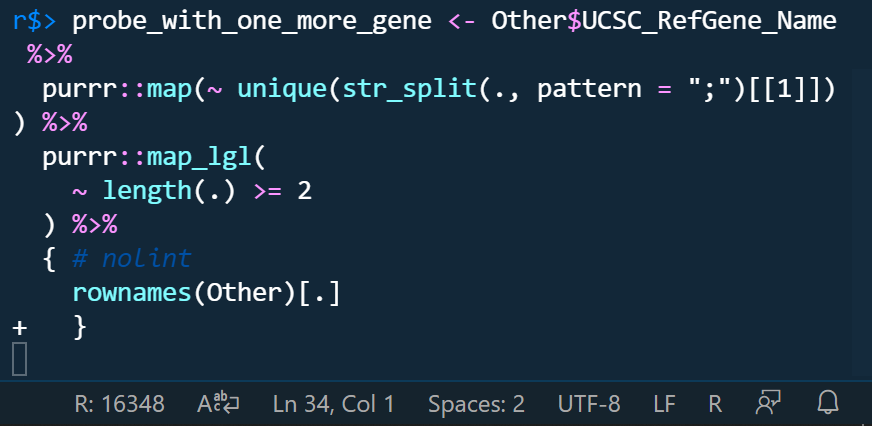
    image

if we don't run it manully, we can even delete code like this.
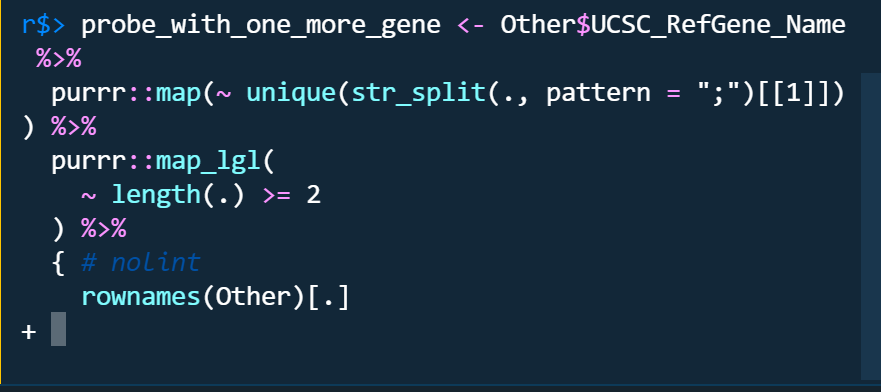
image

The problems only occured in radian terminal no matter I turn on or off r.bracketedPaste setting. the code run by raw r terminal is like this which looks like raw r terminal run code line by line as indicated by the character +.
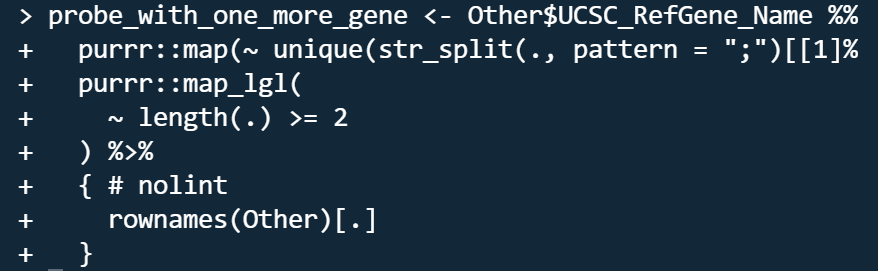
image

Do you want to fix by self? (We hope your help!)

Yes, I want to be helpful.

(If yes,) what kind of help do you want? (e.g. Which file should I fix, Survey (related documents)

(If related)setting.json

    "[r]": {
        "editor.rulers": [
            80 
        ],
        "editor.wordWrap": "bounded",
        "editor.wordSeparators": "`~!@#%$^&*()-=+[{]}\\|;:'\",<>/?",
        "rewrap.autoWrap.enabled": true,
        "rewrap.wrappingColumn": 80,
        "rewrap.doubleSentenceSpacing": true
    },
    "r.alwaysUseActiveTerminal": true,
    // "r.bracketedPaste": true,
    "r.rpath.windows": "C:\\Yun\\R\\R-4.1.1\\bin\\x64\\R.exe",
    "r.rterm.windows": "C:\\Users\\****\\AppData\\Local\\Programs\\Python\\Python39\\Scripts\\radian.exe",
    // "r.rterm.windows": "C:\\Yun\\R\\R-4.1.1\\bin\\x64\\Rterm.exe",
    "r.rterm.option": [
        "--no-save",
        "--no-restore",
        "--local-history",
        "--r-binary=C:\\Yun\\R\\R-4.1.1\\bin\\x64\\R.exe"
    ],
    "r.plot.useHttpgd": true,
    "r.session.levelOfObjectDetail": "Detailed",
    "r.session.objectLengthLimit": 100,
    "r.session.viewers.viewColumn": {
        "plot": "Active",
        "viewer": "Active",
        "view": "Active",
        "helpPanel": "Active"
    }

Expected behavior
Run code directly when sending code by typing Ctrl + ENTER

Environment (please complete the following information):

  • OS: Windows 19042.1237
  • VSCode Version: 1.61.0
  • R Version: 4.1.1
  • vscode-R version: v2.3.1

Additional context
If we could run code line by line like raw r terminal when sending code?

Activity

  1. renkun-ken commented on Oct 12, 2021

    @renkun-ken
    Member

    I tried sending your code to R without bracket paste mode and sending it to radian with bracket paste mode. Both work as expected.

  2. Yunuuuu commented on Oct 12, 2021

    @Yunuuuu
    Author

    Thanks for your quickly reply, I came across it one time in every two times run of this code:

    probe_with_one_more_gene <- Other$UCSC_RefGene_Name %>%
      purrr::map(~ unique(str_split(., pattern = ";")[[1]])) %>%
      purrr::map_lgl(
        ~ length(.) >= 2
      ) %>%
      { # nolint
        rownames(Other)[.]
      }
    

    I don't know what's the matter, it agains

    image

  3. renkun-ken commented on Oct 12, 2021

    @renkun-ken
    Member

    Do you select the code and send it or put the cursor in the beginning of the code and send it?

  4. Yunuuuu commented on Oct 12, 2021

    @Yunuuuu
    Author

    I just put the cursor in the beginning of the code sometimes in the median of the first line of the code block and type Ctrl + ENTER

  5. renkun-ken commented on Oct 12, 2021

    @renkun-ken
    Member

    What if you remove # nolint and try again?

  6. Yunuuuu commented on Oct 12, 2021

    @Yunuuuu
    Author

    Thanks for your help, it remains here

    image

    and I can delete code after character +.
    image

  7. Yunuuuu commented on Oct 12, 2021

    @Yunuuuu
    Author

    I move the curly braces to the last line or remove it, it remains here:

    image

    image

  8. renkun-ken commented on Oct 12, 2021

    @renkun-ken
    Member

    Looks like it is a Windows-specific issue where radian vscode terminal does not support bracket paste mode (is it still true today?). It does not occur on macOS and Linux.

    @randy3k Maybe it is because radian does not handle such expressions well on Windows?

  9. renkun-ken commented on Oct 12, 2021

    @renkun-ken
    Member

    What if you select the code and send it?

  10. Yunuuuu commented on Oct 12, 2021

    @Yunuuuu
    Author

    It remains here and I can delete code after character +

    image

    image

    image

  11. Yunuuuu commented on Oct 12, 2021

    @Yunuuuu
    Author

    here is my .radian_profile:

    # Do not copy the whole configuration, just specify what you need!
    # see https://help.farbox.com/pygments.html
    # for a list of supported color schemes, default scheme is "native"
    options(radian.color_scheme = "monokai")
    
    # either  `"emacs"` (default) or `"vi"`.
    # options(radian.editing_mode = "emacs")
    
    # indent continuation lines
    # turn this off if you want to copy code without the extra indentation;
    # but it leads to less elegent layout
    options(radian.indent_lines = FALSE)
    
    # auto match brackets and quotes
    options(radian.auto_match = FALSE)
    
    # highlight matching bracket
    options(radian.highlight_matching_bracket = FALSE)
    
    # auto indentation for new line and curly braces
    options(radian.auto_indentation = TRUE)
    options(radian.tab_size = 4)
    
    # pop up completion while typing
    options(radian.complete_while_typing = TRUE)
    # the minimum length of prefix to trigger auto completions
    options(radian.completion_prefix_length = 1)
    # timeout in seconds to cancel completion if it takes too long
    # set it to 0 to disable it
    options(radian.completion_timeout = 0.05)
    # add spaces around equals in function argument completion
    options(radian.completion_adding_spaces_around_equals = TRUE)
    
    # automatically adjust R buffer size based on terminal width
    options(radian.auto_width = TRUE)
    
    # insert new line between prompts
    options(radian.insert_new_line = TRUE)
    
    # the filename that local history is stored, this file would be used instead of
    # `radian.global_history_file` if it exists in the current working directory
    options(radian.local_history_file = ".radian_history")
    
    # allows user defined shortcuts, these keys should be escaped when send through the terminal.
    # In the following example, `esc` + `-` sends `<-` and `esc` + `m` sends `%>%`.
    # Note that in some terminals, you could mark `alt` as `escape` so you could use `alt` + `-` instead.
    options(radian.escape_key_map = list(
        list(key = "-", value = " <- "),
        list(key = "m", value = " %>% ")
    ))
    
  12. Yunuuuu commented on Oct 12, 2021

    @Yunuuuu
    Author

    I have tried to use windows terminal:wt which support bracket paste mode, although it need open another window, it may remain convenient with windows terminal:wt quake mode. However, vscode can only send code to the vscode integrated terminal instead of a outer terminal . I can config windows terminal:wt by this setting:

        "r.alwaysUseActiveTerminal": true,
         "r.bracketedPaste": true,
        "r.rpath.windows": "C:\\Yun\\R\\R-4.1.1\\bin\\x64\\R.exe",
        "r.rterm.windows": "C:\\Users\\yunyu\\AppData\\Local\\Microsoft\\WindowsApps\\wt.exe",
        "r.rterm.option": [
             "-w",
            "_quake",
            "new-tab",
            "C:\\Users\\yunyu\\AppData\\Local\\Programs\\Python\\Python39\\Scripts\\radian.exe",
            "--no-save",
            "--no-restore",
            "--local-history",
            "--r-binary=C:\\Yun\\R\\R-4.1.1\\bin\\x64\\R.exe"
        ],
        "r.plot.useHttpgd": true,
        "r.session.levelOfObjectDetail": "Detailed",
        "r.session.objectLengthLimit": 100,
        "r.session.viewers.viewColumn": {
            "plot": "Active",
            "viewer": "Active",
            "view": "Active",
            "helpPanel": "Active"
        }
    
  13. randy3k commented on Oct 12, 2021

    @randy3k
    Member

    Normally, hitting enter on radian would execute the input unless there is a syntax error. If the input is incomplete, radian will insert a new line after the code instead.

    However, something unexpected occurred to @Yunuuuu. The + prompt means that at some point radian thinks that the code is executable and passes the input to R, but it really is not. Hence, the + prompt is shown.

    I imagine it may be a synchronization issue when a lot of text is "streamed" to R at the same time.

  14. randy3k commented on Oct 12, 2021

    @randy3k
    Member

    @Yunuuuu
    What happens if you just copy and paste the code to the radian console on vscode terminal?

  15. 20 remaining items

  16. Yunuuuu commented on Dec 29, 2021

    @Yunuuuu
    Author

    Hi, @randy3k and @renkun-ken , can radian or vscode-r extension provide a command for running code and we can define it in cooperation with vscode-r's command r.runSelection in windows since the ENTER code (like \u000D or \u000A) send from vscode is just explained by radian as next line? If these, we can just define a specific keyboard instead moving the focus to the terminal and running the code manually.

    Several problems concerning these have been raised, this problem is common in windows.

  17. Yunuuuu commented on Dec 29, 2021

    @Yunuuuu
    Author

    I'm not sure whether the vscode command workbench.action.terminal.sendSequence with a argument "\u000D" is just like we type ENTER in terminal directly? If this is true, it indicatesradian cannot deal with ENTER type correctly in windows? I don't know how to test these.

  18. randy3k commented on Dec 29, 2021

    @randy3k
    Member

    As far as I know, from radian's perspective, sending \u000D is the correct way to send "Enter" to radian.
    I just realized I have never asked, what version of radian are you using?

  19. Yunuuuu commented on Dec 29, 2021

    @Yunuuuu
    Author
    radian version: 0.5.12
    python version: 3.9.7
    
  20. Yunuuuu commented on Dec 29, 2021

    @Yunuuuu
    Author

    I have updated to the latest version (0.5.13), the problem remains here.

  21. Yunuuuu commented on Dec 29, 2021

    @Yunuuuu
    Author

    It seems following operation would just be explained as Next Line when we send this command with r.runSelection simultaneously and meanwhile the code implemented by r.runSelection don't run effectively:

                   {
                        "command": "workbench.action.terminal.sendSequence",
                        "args": { "text": "\u000D" }
                    }
    
  22. Yunuuuu commented on Dec 30, 2021

    @Yunuuuu
    Author

    I finally found a nice way to use vscode-r with radian in windows. I Just post it here in case some windows users may have been confused of the conjunction of the both (vscode-r and radian).

    Problems and solutions are as follows:

    The first one:

    Problem 1: there will be exceeding brackets occasionally when we sending code to the terminal.
    Solution 1: turn off the option radian.auto_match of radian in the .radian_profile

    The second one:

    Problem 2: The code sending to radian terminal from the editor by inputting ENTER + CTRL will not be run, which we need implement it manually in the terminal panel by inputting ENTER.
    Solution 2: Firstly, we should install another extension (multi-command), then, override the ENTER + CTRL keyboard with following keybindings setting in vscode:

        // send code for R
        {
            "key": "ctrl+enter",
            "command": "extension.multiCommand.execute",
            "when": "editorLangId == r || editorLangId == rmd && editorTextFocus",
            "args": {
                "interval": 20, // this is needed to execute following both command asynchronousely, otherwise, the problem would remain here
                "sequence": [
                    "r.runSelection", 
                    {
                        "command": "workbench.action.terminal.sendSequence",
                        "args": { "text": "\u000D" }
                    }
                ]
            }
        },
        {
            "key": "ctrl+enter",
            "command": "-r.runSelection",
            "when": "editorTextFocus && editorLangId == 'r'"
        },
        {
            "key": "ctrl+enter",
            "command": "-r.runSelection",
            "when": "editorTextFocus && editorLangId == 'rmd'"
        }


    Finally, we need turn off the option r.bracketedPaste of vscode-r, which is opposite to what is suggested in the vscode-r manual. I have tried several times which confirmed that above setting would only work by turning off this option.

  23. D3SL commented on Jul 18, 2022

    @D3SL

    Finally, we need turn off the option r.bracketedPaste of vscode-r, which is opposite to what is suggested in the vscode-r manual. I have tried several times which confirmed that above setting would only work by turning off this option.

    I've been giving this a shot for a while and at least for me it doesn't seem to be a working fix. I don't seem to get the extraneous characters at the end of things anymore but large ctrl+enter blocks will still "break" part way through and turn into colorless unformatted input, and I still have to switch focus to the console and manually hit enter quite often.

  24. JosephineRoper commented on Feb 27, 2023

    @JosephineRoper

    I was also still having this problem (as per @D3SL - no extra characters after that fix, but often the code won't be ENTER-ed). This is a bit of a kludgy fix, but I modified the keybinding above to include an extra enter. This means about half the time, a superfluous enter is sent and I get a blank line in the terminal after my output, but for me that's ok, much better than the previous situation.

    // send code for R from https://github.com/REditorSupport/vscode-R/issues/820
    {
    "key": "ctrl+enter",
    "command": "extension.multiCommand.execute",
    "when": "editorLangId == r || editorLangId == rmd && editorTextFocus",
    "args": {
        "interval": 20, // this is needed to execute following both command asynchronousely, otherwise, the problem would remain here
        "sequence": [
            "r.runSelection", 
            {
                "command": "workbench.action.terminal.sendSequence",
                "args": { "text": "\u000D" }
            }, 
            {
                "command": "workbench.action.terminal.sendSequence",
                "args": { "text": "\u000D" }
            }
        ]
    }
    },
    {
    
    "key": "ctrl+enter",
    "command": "-r.runSelection",
    "when": "editorTextFocus && editorLangId == 'r'"
    },
    {
    
    "key": "ctrl+enter",
    "command": "-r.runSelection",
    "when": "editorTextFocus && editorLangId == 'rmd'"
    }
    
  25. JGBSilva commented on May 18, 2023

    @JGBSilva

    I'm still having this issue, even after trying the radian.auto_match fix. My issue at the moment is not even it adding it in the end of the block of code in the terminal. Now it seems to add random } in the middle of the code, causing it to break and spitting errrs like: "Error: unexpected '}' in "}"", but at least it seems to auto-run the code when using Ctrl+Enter.

    Looking at the code inputed in the terminal, it seems the code block is being split at some random point and that causes the error. As you can see in this picture, the code was running and then it stopped, gave the error, and continued in a new command input.

    image

  26. kendonB commented on Aug 23, 2023

    @kendonB

    I have a similar problem, after attempting the solution here

    My command is long - could be why

    urban_rural <- read_sf("data/boundaries/statsnzstatistical-area-1-higher-geographies-2018-generalised-SHP/statistical-area-1-higher-geographies-2018-generalised.shp")
    
  27. MEpiVet commented on Jun 18, 2024

    @MEpiVet

    Just adding the quarto keybindings to the above solutions; I personally didnt need the double enter. But did need the .radian_profile fix and no bracketed paste in settings

    //FIX FOR RADIAN ISSUE from https://github.com/REditorSupport/vscode-R/issues/820
        {
            "key": "ctrl+enter",
            "command": "extension.multiCommand.execute",
            "when": "editorTextFocus && editorLangId =~ r|rmd/",
            "args": {
                "interval": 20, // this is needed to execute following both command asynchronousely, otherwise, the problem would remain here
                "sequence": [
                    "r.runSelection", 
                    {
                        "command": "workbench.action.terminal.sendSequence",
                        "args": { "text": "\u000D" }
                    }//, 
                    // {
                    //     "command": "workbench.action.terminal.sendSequence",
                    //     "args": { "text": "\u000D" }
                    // }
                ]
            }
        },
        {
            "key": "ctrl+enter",
            "command": "extension.multiCommand.execute",
            "when": "(editorTextFocus && !findInputFocussed && !replaceInputFocussed && editorLangId == 'quarto')||activeCustomEditorId == 'quarto.visualEditor'",
            "args": {
                "interval": 20, // this is needed to execute following both command asynchronousely, otherwise, the problem would remain here
                "sequence": [
                    "quarto.runCurrent", 
                    {
                        "command": "workbench.action.terminal.sendSequence",
                        "args": { "text": "\u000D" }
                    }
                ]
            }
        },
        {
            "key": "ctrl+shift+enter",
            "command": "extension.multiCommand.execute",
            "when": "(editorTextFocus && !findInputFocussed && !replaceInputFocussed && editorLangId == 'quarto')||activeCustomEditorId == 'quarto.visualEditor'",
            "args": {
                "interval": 20,
                "sequence": [
                    "quarto.runCurrentCell",
                    {
                        "command": "workbench.action.terminal.sendSequence",
                        "args": { "text": "\u000D" }
                    }
                ]
            }
        },
        {
            "key": "alt+enter",
            "command": "extension.multiCommand.execute",
            "when": "(editorTextFocus && !findInputFocussed && !replaceInputFocussed && editorLangId == 'quarto')||activeCustomEditorId == 'quarto.visualEditor'",
            "args": {
                "interval": 20,
                "sequence": [
                    "quarto.runSelection",
                    {
                        "command": "workbench.action.terminal.sendSequence",
                        "args": { "text": "\u000D" }
                    }
                ]
            }
        },
        {
            "key": "ctrl+alt+p",
            "command": "extension.multiCommand.execute",
            "when": "(editorTextFocus && !findInputFocussed && !replaceInputFocussed && editorLangId == 'quarto')||activeCustomEditorId == 'quarto.visualEditor'",
            "args": {
                "interval": 20,
                "sequence": [
                    "quarto.runPreviousCell",
                    {
                        "command": "workbench.action.terminal.sendSequence",
                        "args": { "text": "\u000D" }
                    }
                ]
            }
        },
        {
            "key": "ctrl+alt+n",
            "command": "extension.multiCommand.execute",
            "when": "(editorTextFocus && !findInputFocussed && !replaceInputFocussed && editorLangId == 'quarto')||activeCustomEditorId == 'quarto.visualEditor'",
            "args": {
                "interval": 20,
                "sequence": [
                    "quarto.runNextCell",
                    {
                        "command": "workbench.action.terminal.sendSequence",
                        "args": { "text": "\u000D" }
                    }
                ]
            }
        },
        {
            "key": "ctrl+alt+r",
            "command": "extension.multiCommand.execute",
            "when": "(editorTextFocus && !findInputFocussed && !replaceInputFocussed && editorLangId == 'quarto')||activeCustomEditorId == 'quarto.visualEditor'",
            "args": {
                "interval": 20,
                "sequence": [
                    "quarto.runAllCells",
                    {
                        "command": "workbench.action.terminal.sendSequence",
                        "args": { "text": "\u000D" }
                    }
                ]
            }
        },
        {
            "key": "ctrl+enter",
            "command": "-r.runSelection",
            "when": "editorTextFocus && editorLangId =~ r|rmd/"
        }
    
  28. ThomasSoeiro commented on Sep 26, 2026

    @ThomasSoeiro
    Collaborator

    Can you reproduce with vscode-r 3.0.0-rc.0 and Arf? Note that radian is no longer under active development.

    Related to #1390 and #1090?

    @eitsupi @Fred-Wu @grantmcdermott Close as obsolete?

  29. eitsupi commented on Sep 26, 2026

    @eitsupi
    Member

    This is outdated, so I'm closing it.
    Please let me know if you continue to experience problems.

Sign up for free to join this conversation on GitHub. Already have an account? Sign in to comment

Metadata

Metadata

Assignees

No one assigned

    Labels

    Type

    No type

    Projects

    No projects

      Milestone

      No milestone

      Relationships

      None yet

      Development

      No branches or pull requests

      Issue actions