BookMyDoc is a web-based doctor appointment system designed to streamline medical consultation scheduling. It allows patients to book appointments with doctors, receive updates, and leverage machine learning for disease prediction based on symptoms.
- Live Demo: BookMyDoc - Live [Backend deployed on Render free tier, may take a moment to load initially]
- User Authentication: Secure login and signup using JWT with cookie expiration.
- Doctor & Patient Selection: Users can register as either a doctor or a patient.
- Appointment Management:
- Doctors can view patient details (name, date, email, status: pending, confirmed, completed, or canceled).
- Patients can request appointments and receive notifications.
- Calendar view with different status colors for easy tracking.
- Email Notifications: Patients receive an email when a doctor confirms or cancels an appointment. The email includes the appointment status and a QR code for verification.
- Verification Appointment:
- Patients receive an email with the approval or cancellation status and a QR code.
- When both the doctor and patient meet, the doctor scans the QR code to verify the appointment.
- Doctor Review:
- Patients receive an email link to rate their experience with a star rating and comments.
- Reviews help future patients make informed decisions and assist doctors in improving service quality.
- Disease Prediction:
- Three machine learning models implemented:
- General Disease Prediction:
- Uses symptoms to predict diseases.
- Trained on 377 symptoms and 200 diseases.
- Implements Logistic Regression with an 86% accuracy score.
- Diabetes Prediction For Women:
- Uses patient details such as BMI, insulin, glucose levels, and pregnancy history.
- Determines if a patient is diabetic (positive or negative result).
- Implements AdaBoost with a 79% accuracy score.
- Stroke Prediction:
- Uses features like gender, age, work type, and various health parameters.
- Predicts whether a user is at risk of stroke.
- Implements Gradient Boosting with a 91% accuracy score.
- General Disease Prediction:
- Three machine learning models implemented:
- Website Demo Video (Youtube link):
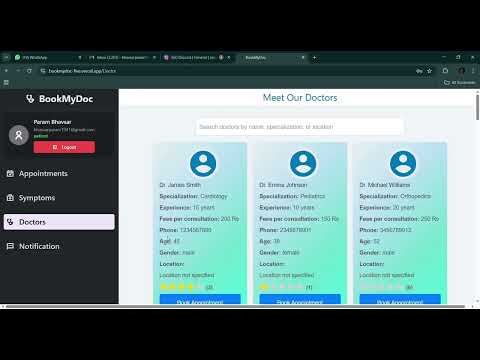
- HTML, CSS, Tailwind CSS - Styling and UI components.
- React.js - Dynamic frontend framework for an interactive UI.
- Deployed on Vercel.
- Node.js & Express.js - Server-side development.
- MongoDB (Atlas) - NoSQL database for storing user and appointment data.
- JWT - Secure authentication and session management.
- Deployed on Render.
- Python & Flask - API integration for disease prediction.
- Scikit-learn - Used for training and implementing ML models.
- Models Implemented:
- Logistic Regression: General disease prediction.
- AdaBoost: Diabetes prediction for women.
- Gradient Boosting: Stroke prediction.
- Deployed on Render.
-
User Registration & Login
- Sign up as a doctor or patient.
- Authentication is handled using JWT for security.
-
Appointment Booking & Management
- Patients browse and request appointments with doctors.
- Doctors can accept or decline appointment requests.
- Status updates (Pending, Confirmed, Completed, Canceled) are reflected in real time.
- Calendar view displays appointment statuses for easy tracking.
-
Verification Appointment
- Patients receive an email with the approval or cancellation status and a QR code.
- When both the doctor and patient meet, the doctor scans the QR code to verify the appointment.
-
Disease Prediction
- The main feature is disease prediction using symptoms.
- Additionally, we have separate models for Diabetes Prediction (for women) and Stroke Prediction.
-
Clone the repository:
git clone https://github.com/ParamPS25/DoctorAppointmentSystem.git cd DoctorAppointmentSystem -
Set up Environment variables
Create a .env file in the frontend directory with the following variables:Create a .env file in the backend directory with the following variables:VITE_ML_DOC_API = http://localhost:5000 VITE_NODE_DOC_API = http://localhost:8080
MONGO_URI = mongodb+srv://username:password@your-cluster.mongodb.net/your-database
PORT = 8080
JWT_ACCESS_SECRET = your_jwt_access_secret_key
JWT_REFRESH_SECRET = your_jwt_refresh_secret_key
JWT_EXPIRES_IN = 1h
COOKIE_EXPIRES_IN = 24
MAIL_PASS = your_email_app_password
FRONTEND_URL=http://localhost:5173
-
Install dependencies for the frontend:
cd frontend npm install npm run dev -
Install dependencies for the backend:
cd backend npm install npm run dev -
Run the machine learning backend:
cd ml-backend pip install -r requirements.txt python app.py -
Using Conda for ML Backend (Alternative Setup):
 cd ml-backend
 conda create -n doc_env python=3.8 -y
 conda activate doc_env
 pip install -r requirements.txt
 python app.py
- Param Bhavasar - Backend Development
- Purv Patel - Frontend Development
- Prit Patel - Frontend Development
- Prince Patel - Machine Learning
- This project is licensed under the MIT License.