This program is designed to represent logical expressions using an object-oriented approach in Java. The expressions can then be simplified, nandified or norified using the methods provided in the class.
This diagram describes the relationship between the classes. The val and var classes repressent the values and variables that can be a part of an expression, there are binary expressions that get two expressions and unary expressions that get one expression.

In the simplify method I implemented this simplifications, each expression has its own simplify implementation and it also calls it recursively on the sub-expressions.
-
x & 1 = x
-
x & 0 = 0
-
x & x = x
-
x | 1 = 1
-
x | 0 = x
-
x | x = x
-
x ^ 1 = ~(x)
-
x ^ 0 = x
-
x ^ x = 0
-
x A 1 = ~(x)
-
x A 0 = 1
-
x A x = ~(x)
-
x V 1 = 0
-
x V 0 = ~(x)
-
x V x = ~(x)
-
x # x = 1
-
an expression without variables evaluates to its result. ((T & T) | F) ^ T => F.
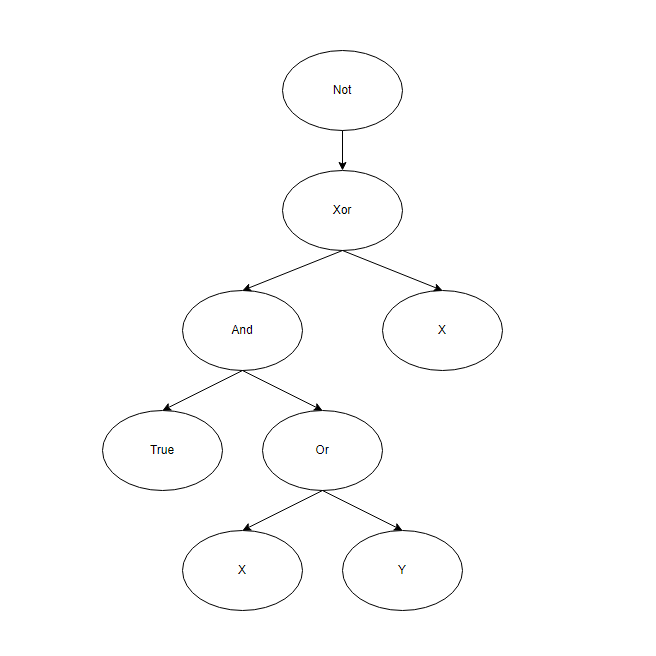
lets have a look at this logical expression:
~((T & (x | y))^x)
Where T is a value of "True", the ~,|,&,^, symbols denotes the "not","or","and" and "xor" operators respectively, and x and y are variables. In our implementation, to create this expression we will do:
Expression e = new Not(
                  new Xor(
                     new And(
                        new Val(true),
                        new Or(
                           new Var("x"),
                           new Var("y")
                        )
                     ),
                     new Var("x")
                  )
               );
This logical expression can be repressented by this tree:

In this run example I created this expression: z A (x & (T | y)).
Then, I assigned x variable with False value,y with True, and z with False. I used the evaluate method to evaluate the expression.
Afterwards I printed the Nandify and Norify result of the expressions.
And at last I used the simplify method and printed the result
To use this program, you will need to have a Java Development Kit (JDK) installed on your computer. Once you have installed the JDK, you can compile and run the program using a command prompt or terminal window.
- first lets download the files from the repo using :
git clone https://github.com/OzAmoyal/Logical-Expression-Evaluator.git
- In order to compile and run i use Apache Ant, please download it from here and then open your terminal in the folder of the cloned project and insert:
ant run
Oz Amoyal