This project is a KNN (K-Nearest Neighbors) classifier implemented as a server and client that works on TCP sockets with multi-client support using threads. The classifier takes in a file of classified vectors and a file of test vectors, and can be configured to use a specific K and distance function. The classifier can then classify the test vectors and send the classified vectors either to the screen dialog or to a specified file.
K-nearest neighbors (KNN) is a supervised machine learning algorithm that can be used for classification or regression. In the case of classification, the algorithm finds the K data points in the training dataset that are closest to the new data point, and then assigns the new data point to the class that those K data points belong to. Transmission Control Protocol (TCP) is a standard that defines how to establish and maintain a network conversation by which applications can exchange data. TCP is a connection-oriented protocol, which means a connection is established and maintained until the applications at each end have finished exchanging messages.
The KNN server and client system is implemented using TCP sockets with multi-client support using threads. The server listens on a specified port for incoming connections from clients, and spawns a new thread for each connected client. The clients can then send commands to the server, which are dispatched to the appropriate handlers.
The system is structured using a number of classes, each responsible for a specific aspect of the implementation. The Classifier class performs the KNN classification on the input vectors, using a specified K and distance function. The Server class handles incoming client connections and dispatches commands to the appropriate handlers. The Client class communicates with the server over TCP sockets, sending commands and receiving responses.
The system supports a number of commands, including classify for performing the KNN classification, print for printing the contents of a file to the screen, upload for uploading a file to the server, settings for displaying or changing the current settings, and exit for exiting the client.
In the server we Created a CLI class that manages all the data from the server, it gets a DefaultIO object which is an abstract class, and it uses it to communicate, this way we created a SocketIO class that implements it and that way we communicated with a Tcp socket. in the beggining we used the terminal to pass the messages so we also implemented a StandartIO class that uses the terminal to get the data. The CLI also has a Classfier object member, at first it need to train his classifier with data he gets from the IO, and afterwards he can use this trained classifier to classify his test vectors (which he also got from the user). We used the Command Design Pattern to create and control all the commands. each Command Object has a description and an excecute method (each command has a different one).
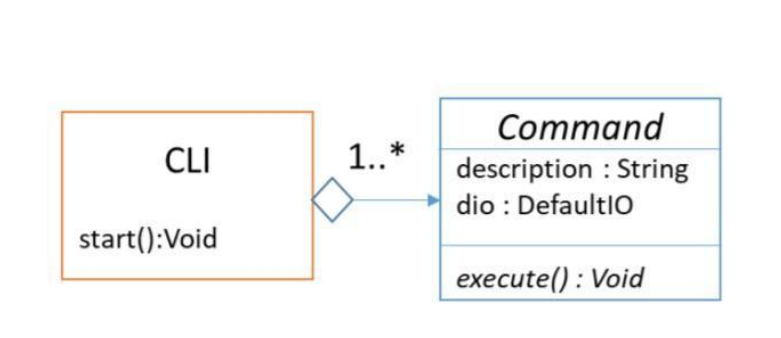
The CLI object has a list of all of his Commands and in each time he writes his menu to the IO he prints all of his Commands description and this way he gets an input from the IO and calls the matching Command excecute method.

For Each client That creates a TCP Connection in the server a new Thread opens with the handleClient method that gets the clients socket as an argument, and in this thread a new CLI object is created and handles the Client. By doing so we can support up to 5 clients at a a time because the client handling is happening on a different thread, and the main thread returns to accept a new connection from other clients.
in this example we loaded a dataset that contains iris flower types and its test vectors , reconfigured the KNN algorithm settings to K=7 and distance metric to by Manhattan Distance. than we classified the test vectors and printed the classifications, at the end we downloaded the classifications.


To get started with this project, you will need to clone the repository to your local machine. You will also need to have C++11 or higher and a linux machine.
- Clone the repository to your local machine using Git.
- Navigate to the project directory.
- Run
maketo build the project. - run a server and a client:
run a server :
./server.out <port>Where is the port number that the server will listen on for incoming connections. run a client :
./client.out <host> <port>Where is the hostname or IP address of the server, and is the port number that the server is listening on.
Once the client is connected to the server, the server will send instructions to the client for what actions to perform.
The available instructions are:
-
upload: Instructs the client to upload an classified data file to train the server and then an unclassified test file.
-
settings: Display the current algorithm settings, including the K value and distance function, and change it if you want, pressing enter will return to the main menu. The options for Distance Metric calculation in the algorithm settings are :
- AUC - Euclidian Distance
- MAN - Manhattan Distance
- CHB - Chebyshev Distance
- CAN - Canberra Distance
- MIN - Minkowski Distance
-
classify: Instructs the server to classify the test vectors using the specified K and distance function.
-
print: Sends the client the results of the classifications.
-
download: Instructs the client to specify a path and downloads there the classified results file from the server.
-
exit: Close the connection with the server and close the program.
if the given K is bigger than the dataset, the returned output will be according to the number of vectors in the dataset instead
This project was created as part of a programming assignment in Advanced Programming 1 Course by the instruction of Dr. Hemi Leibowitz.