
This project has been (kindly) abandoned. As long as dependencies haven't received major updates, continuing use via the main.py should still work quite well.
Please don't use the BINARIES for this project, as these will now be broken.
I do not condone any acts of piracy, please only download your own peices, or use this software for troubleshooting! ;)
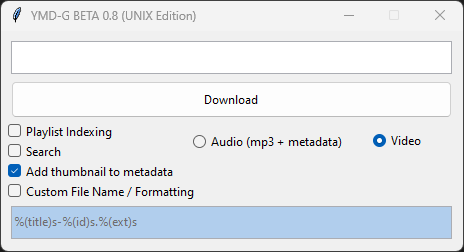
Youtube Music Downloader GUI (YMD-GUI or YMDG) is a python program that uses the yt-dlp library for downloading Youtube media at high quality and speeds. The program is primarily made for Music, for it fetches metadata such as Artist, Title, Album, etc in MP3 format, but can also download Videos at high quality in WebM format. YMDG can mass download an infinite amount of URLs at once, and can also download playlists.
First, clone the YMDG git repo.
git clone https://github.com/OofySimpsonV3/ymd-guiAfter that, make sure you have the correct dependencies installed. Make sure you have the following installed:
- Python 3.X
- FFMPEG
These can be installed using most package managers (APT, Pacman, DNF, etc)
Once you have done that, install the python dependencies that are required for the script.
pip install -U yt-dlp tk This command will install the yt-dlp library and the tk (Tkinter) library, which provides the GUI.
You can now run the script!
python main.pyIf you are a Windows user and would like to use YMD, you're simplest option would be to download one of the pre-built binaries. The executable file for YMD can be downloaded here!
Just download the ZIP file, extract it, and run YMD.exe.
If you are wanting to run the python script without downloading the prebuilt-binary for windows (ymd.EXE), this is what you would want to do: First, make sure you have FFMPEG installed. FFMPEG can be a bit tricky to download, but there are many tutorials for downloading and installing FFMPEG. Make sure you install FFMPEG and have FFMPEG added to PATH.
Once you have FFMPEG installed, make sure you have Python installed (obviously). Make sure you have Python 3.X downloaded (preferably Python 3.10 or 3.11).
You can now run the main.py file. Simple double click on the file, or open it in CMD:
python main.pyDone! :D
Pull requests are welcome. For major changes, please open an issue first to discuss what you would like to change.
Please make sure to update tests as appropriate.