



This tutorial examines the interaction between NGSI-LD and JSON-LD @context files. The @context files
generated in the previous tutorial are used as the
underlying data model for inputting context data and context information is queries and read back in different formats.
The tutorial uses cUrl commands throughout, but is also available as Postman documentation


- このチュートリアルは日本語でもご覧いただけます。
Details
- Working with
@contextfiles - Prerequisites
- Architecture
- Start Up
- Creating NGSI-LD data entities.
- Prerequisites
- Querying Context Data
- Obtain entity data by FQN Type
- Obtain entity data by ID
- Obtain entity data by type
- Filter context data by comparing the values of an attribute
- Using an alternative
@context - Filter context data by comparing the values of an attribute in an Array
- Filter context data by comparing the values of a sub-attribute
- Filter context data by querying metadata
- Filter context data by comparing the values of a geo:json attribute
“Some quotations are greatly improved by lack of context.”
― John Wyndham, The Midwich Cuckoos
From the previous tutorial we have generated two
@context files defining the context data entities which will be offered in our simple Smart Farm Management System.
This means that we have defined an agreed set of unique IDs (URNs or URLs) for all the data entities and every single
attribute within those entities so that other external applications will be able to programmatically understand the data
held within our broker.
For example, the attribute address is within our smart application is defined as follows:
"@context": {
    "schema": "https://schema.org/",
    "address": "schema:address"
}
Which means that every address attribute follows the definition as defined by schema.org:
https://schema.org/address :
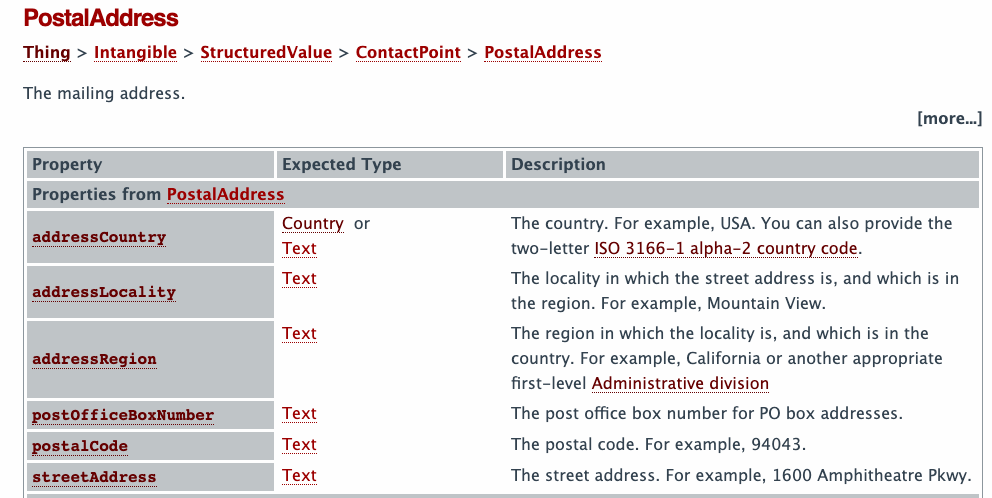
A program written by a third party would therefore be able to extract information such the fact an address attribute
holds a JSON object with a sub-attribute containing the streetAddress by referring to the full
schema.org JSON-LD schema
{
  "@id": "http://schema.org/streetAddress",
  "@type": "rdf:Property",
  "http://schema.org/domainIncludes": {
    "@id": "http://schema.org/PostalAddress"
  },
  "http://schema.org/rangeIncludes": {
    "@id": "http://schema.org/Text"
  },
  "rdfs:comment": "The street address. For example, 1600 Amphitheatre Pkwy.",
  "rdfs:label": "streetAddress"
}
This is the JSON-LD programmatic syntax allowing computers to extract meaningful data. The attribute
address.streetAddress is a street directly without the need for human intervention.
Imagine the case where a company is contracting agricultural labourers. The farmer will need to be billed for the work done. If such a system is built on JSON-LD, it does not matter if the farmer's Farm Management Information System assigns different names to the attributes of the billing address provided that the farmer and contractor can agree on the well-defined URNs for each attribute as JSON-LD can easily translate between the two formats using common expansion and compaction algorithms.
NGSI-LD is a formally structured extended subset of JSON-LD. Therefore NGSI-LD offers all the
interoperability and flexibility of JSON-LD itself. It also defines its own core @context which cannot be
overridden for NGSI-LD operations. This means that NGSI-LD users agree to a common well-defined set of rules for
structuring their data, and then supplement this with the rest of the JSON-LD specification.
Whilst interacting directly with NGSI-LD interface of the context broker the additional NGSI-LD rules must be respected. However after the data has been extracted it is possible to loosen this requirement and pass the results to third parties as JSON-LD.
This tutorial is a simple introduction to the rules and restrictions behind NGSI-LD and will create some NGSI-LD entities and then extract the data in different formats. The two main data formats are normalized and key-value-pairs. Data returned in the normalised format respects the NGSI-LD rules and may be used directly by another context broker (or any other component offering an NGSI-LD interface). Data returned in the key-value-pairs format is by definition not NGSI-LD.
During content negotiation, NGSI-LD offers data in one of three formats, these effect the structure of the payload body.
Accept: application/json- the response is in JSON formatAccept: application/ld+json- the response is in JSON-LD formatAccept: application/geo+json- the response is in GeoJSON or GeoJSON-LD format
The major difference between JSON format and JSON-LD format, is that if JSON-LD format is chosen, then the
@context is found as an additional attribute within the body of the response. If the JSON only format is used the
@context is passed as an additional Link Header element and is not found in the response body.
Similarly when sending NGSI-LD data to the context broker, an application may choose to send a payload including an
additional @context attribute (in which case Content-Type: application/ld+json) or the application may send NGSI-LD
data without an additional @context attribute (in which case Content-Type: application/json and the Link header
must also be present).
The GeoJSON format is only used when querying a context broker for existing data and returns the context in a format suitable for GIS systems. It is a recent addition to the NGSI-LD specification and therefore will not be discussed further here.
To keep things simple all components will be run using Docker. Docker is a container technology which allows to different components isolated into their respective environments.
- To install Docker on Windows follow the instructions here
- To install Docker on Mac follow the instructions here
- To install Docker on Linux follow the instructions here
Docker Compose is a tool for defining and running multi-container Docker applications. A YAML file is used configure the required services for the application. This means all container services can be brought up in a single command. Docker Compose is installed by default as part of Docker for Windows and Docker for Mac, however Linux users will need to follow the instructions found here
We will start up our services using a simple bash script. Windows users should download cygwin to provide a command-line functionality similar to a Linux distribution on Windows.
The demo application will send and receive NGSI-LD calls to a compliant context broker. Since the standardized NGSI-LD interface is available across multiple context brokers, so we only need to pick one - for example the Orion Context Broker. The application will therefore only make use of one FIWARE component.
Currently, the Orion Context Broker relies on open source MongoDB technology to keep persistence of the context data it holds.
To promote interoperability of data exchange, NGSI-LD context brokers explicitly expose a
JSON-LD @context file to define the data held within the
context entities. This defines a unique URI for every entity type and every attribute so that other services outside of
the NGSI domain are able to pick and choose the names of their data structures. Every @context file must be available
on the network. In our case the tutorial application will be used to host a series of static files.
Therefore, the architecture will consist of three elements:
- The Orion Context Broker which will receive requests using NGSI-LD
- The underlying MongoDB database :
- Used by the Orion Context Broker to hold context data information such as data entities, subscriptions and registrations
- An HTTP Web-Server which offers static
@contextfiles defining the context entities within the system. - The Tutorial Application does the following:
Since all interactions between the three elements are initiated by HTTP requests, the elements can be containerized and run from exposed ports.
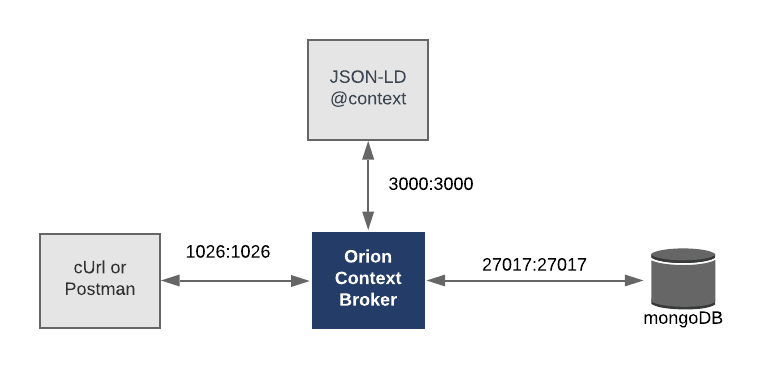
The necessary configuration information can be seen in the services section of the associated orion-ld.yml file:
orion:
    image: fiware/orion-ld
    hostname: orion
    container_name: fiware-orion
    depends_on:
        - mongo-db
    networks:
        - default
    ports:
        - "1026:1026"
    command: -dbhost mongo-db -logLevel DEBUG
    healthcheck:
test: curl --fail -s http://orion:1026/version || exit 1mongo-db:
image: mongo:4.2
hostname: mongo-db
container_name: db-mongo
expose:
- "27017"
ports:
- "27017:27017"
networks:
- defaultld-context:
image: httpd:alpine
hostname: context
container_name: fiware-ld-context
ports:
- "3004:80"All containers are residing on the same network - the Orion Context Broker is listening on Port 1026 and MongoDB is
listening on the default port 27017 and the httpd web server is offering @context files on port 80. All containers
are also exposing ports externally - this is purely for the tutorial access - so that cUrl or Postman can access them
without being part of the same network. The command-line initialization should be self explanatory.
All services can be initialised from the command-line by running the services Bash script provided within the repository. Please clone the repository and create the necessary images by running the commands as shown:
git clone https://github.com/FIWARE/tutorials.Getting-Started.git
cd tutorials.Getting-Started
git checkout NGSI-LD

./services orion|scorpio|stellio
Note: If you want to clean up and start over again you can do so with the following command:
./services stop
This tutorial creates some initial farm building entities to be used by the Farm Management system.
Once the services have started up, and before interacting with the context broker itself, it is useful to check that the necessary prerequisites are in place.
Three @context files have been generated and hosted on the tutorial application. They serve different roles.
-
ngsi-context.jsonld-The NGSI-LD@contextserves to define all attributes when sending data to the context broker or retrieving data in normalized format. This@contextmust be used for all NGSI-LD to NGSI-LD interactions -
The JSON-LD
@contextcan be used when querying the data and returning key-values data. Responses are JSON or JSON-LD and the data can be easily ingested and processed further by the receiving application.json-context.jsonldis a richer JSON-LD definition of the attributes of the data models.alternate-context.jsonldis an alternative JSON-LD definition of the attributes of the data models used by a third-party (the German sub-contractor of farm labourers). Internally their billing application used different short names for attributes. Their@contextfile reflects the agreed mapping between attribute names.
The full data model description for a Building entity as used in this tutorial can be found here it is based on the standard Smart Data Models definition. A Swagger Specification of the same model is also available, and would be use to generate code stubs in a full application.
As usual, you can check if the Orion Context Broker is running by making an HTTP request to the exposed port:
curl -X GET \
'http://localhost:1026/version'The response will look similar to the following:
{
    "orion": {
        "version": "1.15.0-next",
        "uptime": "0 d, 3 h, 1 m, 51 s",
        "git_hash": "af440c6e316075266094c2a5f3f4e4f8e3bb0668",
        "compile_time": "Tue Jul 16 15:46:18 UTC 2019",
        "compiled_by": "root",
        "compiled_in": "51b4d802385a",
        "release_date": "Tue Jul 16 15:46:18 UTC 2019",
        "doc": "https://fiware-orion.readthedocs.org/en/master/"
    }
}
The format of the version response has not changed. The release_date must be 16th July 2019 or later to be able to
work with the requests defined below.
New context data entities can be created by making a POST request to the /ngsi-ld/v1/entities endpoint and supply an
@context along with structured NGSI-LD data.
Note: This entity is being created using the default normalized NGSI-LD format, which is the Gold Standard for data exchange between context brokers. NGSI-LD supports two lossless data formats normalized and concise.
In concise format, the addition of
"type": "Property"is implied for each attribute with avalue. However in normalized format, the redundancy of adding thetypeis useful for receiving microservices to be able to understand the difference between context data attributes and links between data entities (which are defined using"type": "Relationship") and are discussed in a later tutorialThere are also several subtypes of Property available:
"type": "GeoProperty"for Geographic information"type": "LanguageProperty"for Multi-language Strings"type": "VocabProperty"for enumerated valuesMore details can be found in later tutorials.
curl -iX POST 'http://localhost:1026/ngsi-ld/v1/entities/' \
-H 'Content-Type: application/ld+json' \
--data-raw '{
    "id": "urn:ngsi-ld:Building:farm001",
    "type": "Building",
    "category": {
        "type": "Property",
        "value": ["farm"]
    },
    "address": {
        "type": "Property",
        "value": {
            "streetAddress": "Großer Stern 1",
            "addressRegion": "Berlin",
            "addressLocality": "Tiergarten",
            "postalCode": "10557"
        },
        "verified": {
            "type": "Property",
            "value": true
        }
    },
    "location": {
        "type": "GeoProperty",
        "value": {
             "type": "Point",
             "coordinates": [13.3505, 52.5144]
        }
    },
    "name": {
        "type": "Property",
        "value": "Victory Farm"
    },
    "@context": "http://context/ngsi-context.jsonld"
}'
The first request will take some time, as the context broker must navigate and load all of the files mentioned in the
@context.
Since the Content-Type: application/ld+json the @context is supplied in the body of the request. As with all
NGSI-LD interactions, the core NGSI-LD @context
(https://uri.etsi.org/ngsi-ld/v1/ngsi-ld-core-context-v1.3.jsonld)
is implicitly included as well.
This means that the actual @context is:
{
    "@context": [
        "http://context/ngsi-context.jsonld",
        "https://uri.etsi.org/ngsi-ld/v1/ngsi-ld-core-context-v1.3.jsonld"
    ]
}
with the core @context being processed last and therefore overriding any terms previously defined with the same
@id.
Each subsequent entity must have a unique id for the given type
curl -iX POST 'http://localhost:1026/ngsi-ld/v1/entities/' \
-H 'Content-Type: application/json' \
-H 'Link: <http://context/ngsi-context.jsonld>; rel="http://www.w3.org/ns/json-ld#context"; type="application/ld+json"' \
--d '{
    "id": "urn:ngsi-ld:Building:barn002",
    "type": "Building",
    "category": {
        "type": "Property",
        "value": ["barn"]
    },
    "address": {
        "type": "Property",
        "value": {
            "streetAddress": "Straße des 17. Juni",
            "addressRegion": "Berlin",
            "addressLocality": "Tiergarten",
            "postalCode": "10557"
        },
        "verified": {
            "type": "Property",
            "value": true
        }
    },
     "location": {
        "type": "GeoProperty",
        "value": {
             "type": "Point",
              "coordinates": [13.3698, 52.5163]
        }
    },
    "name": {
        "type": "Property",
        "value": "Big Red Barn"
    }
}'
In this second case the Content-Type: application/json so the @context is supplied in the associated Link header
of the request and not in the payload body.
The core @context supplies the vocabulary for creating NGSI-LD data entities. Attributes such as id and type (
which should be familiar to anyone who has used NGSI v2) are mapped to the standard JSON-LD @id and @type
keywords. The type should refer to an included
data model, in this case Building is being used as a short name for the included URN
https://uri.fiware.org/ns/dataModels#Building. Thereafter each property is defined as a JSON element containing two
attributes, a type and a value.
The type of a property attribute must be one of the following:
"GeoProperty":"http://uri.etsi.org/ngsi-ld/GeoProperty"for locations. Locations should be specified as Longitude-Latitude pairs in GeoJSON format. The preferred name for the primary location attribute islocation"Property":"http://uri.etsi.org/ngsi-ld/Property"- for everything else.- For time-based values,
"Property"shall be used as well, but the property value should be Date, Time or DateTime strings encoded in the ISO 8601 format - e.g.YYYY-MM-DDThh:mm:ssZ
Note: that for simplicity, this data entity has no relationships defined. Relationships must be given the
type=Relationship. Relationships will be discussed in a subsequent tutorial.
Properties-of-Properties is the NGSI-LD equivalent of metadata (i.e. "data about data"), it is use to describe properties of the attribute value itself like accuracy, provider, or the units to be used. Some built-in metadata attributes already exist and these names are reserved:
createdAt(type: DateTime): attribute creation date as an ISO 8601 string.modifiedAt(type: DateTime): attribute modification date as an ISO 8601 string.
Additionally observedAt, datasetId and instanceId may optionally be added in some cases, and location,
observationSpace and operationSpace have special meaning for Geoproperties.
In the examples given above, one element of metadata (i.e. a property-of-a-property) can be found within the address
attribute. a verified flag indicates whether the address has been confirmed. The commonest property-of-a-property is
unitCode which should be used to hold the UN/CEFACT
Common Codes for Units of Measurement.
A consuming application can now request context data by making NGSI-LD HTTP requests to the Orion Context Broker. The existing NGSI-LD interface enables us to make complex queries and filter results and retrieve data with FQNs or with short names.
This example returns the data of all Building entities within the context data The type parameter is mandatory for
NGSI-LD and is used to filter the response. The Accept HTTP header is needed to retrieve JSON-LD content in the response
body.
curl -G -X GET \
  'http://localhost:1026/ngsi-ld/v1/entities' \
  -H 'Accept: application/ld+json' \
-d 'type=https://uri.fiware.org/ns/dataModels%23Building'Since no explicit @context was sent in the request, the response returns the Core @context by default
(https://uri.etsi.org/ngsi-ld/v1/ngsi-ld-core-context-v1.3.jsonld) and all attributes are expanded whenever possible.
id,type,locationandnameare defined in the core context and are not expanded.addresshas been mapped tohttp://schema.org/addresscategoryhas been mapped tohttps://uri.fiware.org/ns/dataModels#category
Note that if an attribute has not been associated to an FQN when the entity was created, the short name will always be displayed.
[
    {
        "@context": "https://uri.etsi.org/ngsi-ld/v1/ngsi-ld-core-context-v1.3.jsonld",
        "id": "urn:ngsi-ld:Building:farm001",
        "type": "https://uri.fiware.org/ns/dataModels#Building",
        "https://schema.org/address": {
            "type": "Property",
            "value": {
                "streetAddress": "Großer Stern 1",
                "addressRegion": "Berlin",
                "addressLocality": "Tiergarten",
                "postalCode": "10557"
            },
            "verified": {
                "type": "Property",
                "value": true
            }
        },
        "name": {
            "type": "Property",
            "value": "Victory Farm"
        },
        "https://uri.fiware.org/ns/dataModels#category": {
            "type": "Property",
            "value": "farm"
        },
        "location": {
            "type": "GeoProperty",
            "value": {
                "type": "Point",
                "coordinates": [
                    13.3505,
                    52.5144
                ]
            }
        }
    },
    {
        "@context": "https://uri.etsi.org/ngsi-ld/v1/ngsi-ld-core-context-v1.3.jsonld",
        "id": "urn:ngsi-ld:Building:barn002",
        "type": "https://uri.fiware.org/ns/dataModels#Building",
        "https://schema.org/address": {
            "type": "Property",
            "value": {
                "streetAddress": "Straße des 17. Juni",
                "addressRegion": "Berlin",
                "addressLocality": "Tiergarten",
                "postalCode": "10557"
            },
            "verified": {
                "type": "Property",
                "value": true
            }
        },
        "name": {
            "type": "Property",
            "value": "Big Red Barn"
        },
        "https://uri.fiware.org/ns/dataModels#category": {
            "type": "Property",
            "value": "barn"
        },
        "location": {
            "type": "GeoProperty",
            "value": {
                "type": "Point",
                "coordinates": [
                    13.3698,
                    52.5163
                ]
            }
        }
    }
]This example returns the data of urn:ngsi-ld:Building:farm001. The NGSI-LD @context is supplied as a
Link header to define the entities returned. The ngsi-context.jsonld
@context file is just supplying short names for every attribute.
The full link header syntax can be seen below:
Link: <https://fiware.github.io/data-models/context.jsonld>; rel="http://www.w3.org/ns/json-ld#context"; type="application/ld+json
The standard HTTP Link header allows metadata (in this case the @context) to be passed in without actually touching
the resource in question. In the case of NGSI-LD, the metadata is a file in application/ld+json format.
curl -L -X GET 'http://localhost:1026/ngsi-ld/v1/entities/urn:ngsi-ld:Building:farm001' \
-H 'Accept: application/ld+json' \
-H 'Link: <http://context/ngsi-context.jsonld>; rel="http://www.w3.org/ns/json-ld#context"; type="application/ld+json"'Because an @context file was supplied in the request, short names now are returned throughout the response. This
reduces the size of the payload and makes the data easier to manipulate.
Note that the inclusion of the core @context is always implied. It would be also possible to include both @context
files explicitly as element in the array of @context sent. The response is normalized NGSI-LD and therefore valid
JSON-LD as well, and the @context can be used by the receiving program for JSON-LD operations.
{
    "@context": "http://context/ngsi-context.jsonld",
    "id": "urn:ngsi-ld:Building:farm001",
    "type": "Building",
    "category": {
        "type": "Property",
        "value": "farm"
    },
    "address": {
        "type": "Property",
        "value": {
            "streetAddress": "Großer Stern 1",
            "addressRegion": "Berlin",
            "addressLocality": "Tiergarten",
            "postalCode": "10557"
        },
        "verified": {
            "type": "Property",
            "value": true
        }
    },
    "location": {
        "type": "GeoProperty",
        "value": {
            "type": "Point",
            "coordinates": [
                13.3505,
                52.5144
            ]
        }
    },
    "name": {
        "type": "Property",
        "value": "Victory Farm"
    }
}When filtering by type, a Link header must be supplied to associate the short
form type="Building" with the FQN https://uri.fiware.org/ns/dataModels/Building.
If a reference to the supplied data is supplied, it is possible to return short name data and limit responses to a
specific type of data. For example, the request below returns the data of all Building entities within the context
data. Use of the type parameter limits the response to Building entities only, use of the options=keyValues query
parameter reduces the response down to standard JSON-LD.
curl -G -X GET \
    'http://localhost:1026/ngsi-ld/v1/entities' \
-H 'Link: <http://context/ngsi-context.jsonld>; rel="http://www.w3.org/ns/json-ld#context"; type="application/ld+json"' \
-H 'Accept: application/ld+json' \
    -d 'type=Building' \
-d 'options=keyValues'Because of the use of the options=keyValues, the response consists of JSON only without the attribute definitions
type="Property" or any properties-of-properties elements. You can see that Link header from the request has been
used as the @context returned in the response.
[
    {
        "@context": "http://context/ngsi-context.jsonld",
        "id": "urn:ngsi-ld:Building:farm001",
        "type": "Building",
        "address": {
            "streetAddress": "Großer Stern 1",
            "addressRegion": "Berlin",
            "addressLocality": "Tiergarten",
            "postalCode": "10557"
        },
        "name": "Victory Farm",
        "category": "farm",
        "location": {
            "type": "Point",
            "coordinates": [
                13.3505,
                52.5144
            ]
        }
    },
    {
        "@context": "http://context/ngsi-context.jsonld",
        "id": "urn:ngsi-ld:Building:barn002",
        "type": "Building",
        "address": {
            "streetAddress": "Straße des 17. Juni",
            "addressRegion": "Berlin",
            "addressLocality": "Tiergarten",
            "postalCode": "10557"
        },
        "name": "Big Red Barn",
        "category": "barn",
        "location": {
            "type": "Point",
            "coordinates": [
                13.3698,
                52.5163
            ]
        }
    }
]This example returns all Building entities with the name attribute Big Red Barn. Filtering can be done using the
q parameter - if a string has spaces in it, it can be URL encoded and held within double quote characters " = %22.
Since options=keyValues is sent, this will effect the structure of the payload and we will need to supply a different
@context file - json-context.jsonld
curl -G -X GET \
  'http://localhost:1026/ngsi-ld/v1/entities/' \
-H 'Link: <http://context/json-context.jsonld>; rel="http://www.w3.org/ns/json-ld#context"; type="application/ld+json"' \
-H 'Accept: application/ld+json' \
    -d 'type=Building' \
    -d 'q=name==%22Big%20Red%20Barn%22' \
-d 'options=keyValues'The use of the Link header and the options=keyValues parameter reduces the response to short form key-values
JSON-LD as shown:
[
    {
        "@context": "http://context/json-context.jsonld",
        "id": "urn:ngsi-ld:Building:barn002",
        "type": "Building",
        "address": {
            "streetAddress": "Straße des 17. Juni",
            "addressRegion": "Berlin",
            "addressLocality": "Tiergarten",
            "postalCode": "10557"
        },
        "name": "Big Red Barn",
        "category": "barn",
        "location": {
            "type": "Point",
            "coordinates": [
                13.3698,
                52.5163
            ]
        }
    }
]
This JSON-LD is no longer NGSI-LD (since the type and value elements have been removed) and the @context
used reflects this. The json-context.jsonld file does not merely define the attribute names, it also includes
additional JSON-LD information within it such as the following:
{
    "barn": "https://wiki.openstreetmap.org/wiki/Tag:building%3Dbarn",
    "category": {
        "@id": "https://uri.fiware.org/ns/dataModels#category",
        "@type": "@vocab"
    }
}
This indicates the category in this JSON-LD response holds an enumerated value (@vocab) and that the value
barn is defined by a full URL. This differs compared to the ngsi-context.jsonld @context file where all we can say
is that there is an attribute with the full URL https://uri.fiware.org/ns/dataModels#category, because in a
normalized NGSI-LD response the category attribute would hold a JSON object (with a type and value) not a
string.
The simple NGSI-LD @context is merely a mechanism for mapping URNs. It is therefore possible to retrieve the same
data using a different set of short names.
The alternate-context.jsonld maps the names of various attributes to their equivalents in German. If it is supplied in
the request a query can be made using alternate short names (e.g. type=Building becomes type=Gebäude)
curl -G -X GET \
    'http://localhost:1026/ngsi-ld/v1/entities/' \
-H 'Link: <http://context/alternate-context.jsonld>; rel="http://www.w3.org/ns/json-ld#context"; type="application/ld+json"' \
-H 'Accept: application/ld+json' \
    -d 'type=Geb%C3%A4ude' \
    -d 'q=name==%22Big%20Red%20Barn%22' \
-d 'options=keyValues'The response is returned in JSON-LD format with short form attribute names (addresse, kategorie) which correspond to
the short names provided in the alternate context. Note that core context terms (id, type etc.) cannot be overridden
directly but would require an additional JSON-LD expansion/compaction operation.
[
    {
        "@context": "http://context/alternate-context.jsonld",
        "id": "urn:ngsi-ld:Building:barn002",
        "type": "Gebäude",
        "adresse": {
            "streetAddress": "Straße des 17. Juni",
            "addressRegion": "Berlin",
            "addressLocality": "Tiergarten",
            "postalCode": "10557"
        },
        "name": "Big Red Barn",
        "kategorie": "barn",
        "location": {
            "type": "Point",
            "coordinates": [
                13.3698,
                52.5163
            ]
        }
    }
]
It should also be noted that the sub-attributes of the addresse have also not been amended, since address =
addresse = http://schema.org/address and this definition defines the sub-attributes.
Within the standard Building model, the category attribute refers to an array of strings. This example returns all
Building entities with a category attribute which contains either commercial or office strings. Filtering can be
done using the q parameter, comma separating the acceptable values.
curl -G -X GET \
    'http://localhost:1026/ngsi-ld/v1/entities/' \
-H 'Link: <http://context/nsgi-context.jsonld>; rel="http://www.w3.org/ns/json-ld#context"; type="application/ld+json"' \
-H 'Accept: application/ld+json' \
    -d 'type=Building' \
    -d 'q=category==%22barn%22,%22farm_auxiliary%22' \
-d 'options=keyValues'The response is returned in JSON-LD format with short form attribute names:
[
    {
        "@context": "http://context/ngsi-context.jsonld",
        "id": "urn:ngsi-ld:Building:barn002",
        "type": "Building",
        "address": {
            "streetAddress": "Straße des 17. Juni",
            "addressRegion": "Berlin",
            "addressLocality": "Tiergarten",
            "postalCode": "10557"
        },
        "name": "Big Red Barn",
        "category": "barn",
        "location": {
            "type": "Point",
            "coordinates": [
                13.3698,
                52.5163
            ]
        }
    }
]This example returns all stores found in the Tiergarten District.
Filtering can be done using the q parameter - sub-attributes are annotated using the bracket syntax e.g.
q=address[addressLocality]=="Tiergarten".
curl -L -X GET 'http://localhost:1026/ngsi-ld/v1/entities/' \
-H 'Link: <http://context/json-context.jsonld>; rel="http://www.w3.org/ns/json-ld#context"; type="application/ld+json"' \
-H 'Accept: application/ld+json' \
    -d 'type=Building' \
    -d 'q=address%5BaddressLocality%5D==%22Tiergarten%22' \
-d 'options=keyValues'Use of the Link header and the options=keyValues parameter reduces the response to JSON-LD.
[
    {
        "@context": "http://context/json-context.jsonld",
        "id": "urn:ngsi-ld:Building:farm001",
        "type": "Building",
        "address": {
            "streetAddress": "Großer Stern 1",
            "addressRegion": "Berlin",
            "addressLocality": "Tiergarten",
            "postalCode": "10557"
        },
        "name": "Victory Farm",
        "category": "farm",
        "location": {
            "type": "Point",
            "coordinates": [
                13.3505,
                52.5144
            ]
        }
    },
    {
        "@context": "http://context/json-context.jsonld",
        "id": "urn:ngsi-ld:Building:barn002",
        "type": "Building",
        "address": {
            "streetAddress": "Straße des 17. Juni",
            "addressRegion": "Berlin",
            "addressLocality": "Tiergarten",
            "postalCode": "10557"
        },
        "name": "Big Red Barn",
        "category": "barn",
        "location": {
            "type": "Point",
            "coordinates": [
                13.3698,
                52.5163
            ]
        }
    }
]This example returns the data of all Building entities with a verified address. The verified attribute is an example
of a Property-of-a-Property
Metadata queries (i.e. Properties of Properties) are annotated using the dot syntax e.g. q=address.verified==true.
curl -G -X GET \
    'http://localhost:1026/ngsi-ld/v1/entities' \
    -H 'Link: <http://context/json-context.jsonld>; rel="http://www.w3.org/ns/json-ld#context; rel="http://www.w3.org/ns/json-ld#context"; type="application/ld+json"' \
    -H 'Accept: application/json' \
    -d 'type=Building' \
    -d 'q=address.verified==true' \
-d 'options=keyValues'Because of the use of the options=keyValues together with the Accept HTTP header (application/json), the response
consists of JSON only without the attribute type and metadata elements.
[
    {
        "id": "urn:ngsi-ld:Building:farm001",
        "type": "Building",
        "address": {
            "streetAddress": "Großer Stern 1",
            "addressRegion": "Berlin",
            "addressLocality": "Tiergarten",
            "postalCode": "10557"
        },
        "name": "Victory Farm",
        "category": "farm",
        "location": {
            "type": "Point",
            "coordinates": [13.3505, 52.5144]
        }
    },
    {
        "id": "urn:ngsi-ld:Building:barn002",
        "type": "Building",
        "address": {
            "streetAddress": "Straße des 17. Juni",
            "addressRegion": "Berlin",
            "addressLocality": "Tiergarten",
            "postalCode": "10557"
        },
        "name": "Big Red Barn",
        "category": "barn",
        "location": {
            "type": "Point",
            "coordinates": [13.3698, 52.5163]
        }
    }
]
Note that the @context element has not been lost. It is still returned in the form of a Link header in the response.
This example returns all buildings within 800m the Brandenburg Gate in Berlin (52.5162N 13.3777W). To make a
geo-query request, three parameters must be specified, geometry, coordinates and georel.
The coordinates parameter is represented in geoJSON including the square
brackets.
Note that by default the geo-query will be applied to the location attribute, as this is default specified in NGSI-LD.
If another attribute is to be used, an additional geoproperty parameter is required.
curl -G -X GET \
  'http://localhost:1026/ngsi-ld/v1/entities' \
  -H 'Link: <https://fiware.github.io/data-models/context.jsonld>; rel="http://www.w3.org/ns/json-ld#context"; type="application/ld+json"' \
  -H 'Accept: application/json' \
  -d 'type=Building' \
  -d 'geometry=Point' \
  -d 'coordinates=%5B13.3777,52.5162%5D' \
  -d 'georel=near;maxDistance==800' \
-d 'options=keyValues'Because of the use of the options=keyValues together with the Accept HTTP header (application/json), the response
consists of JSON only without the attribute type and metadata elements.
[
    {
        "id": "urn:ngsi-ld:Building:barn002",
        "type": "Building",
        "address": {
            "streetAddress": "Straße des 17. Juni",
            "addressRegion": "Berlin",
            "addressLocality": "Tiergarten",
            "postalCode": "10557"
        },
        "name": "Big Red Barn",
        "category": "barn",
        "location": {
            "type": "Point",
            "coordinates": [13.3698, 52.5163]
        }
    }
]Want to learn how to add more complexity to your application by adding advanced features? You can find out by reading the other tutorials in this series
MIT © 2020-2023 FIWARE Foundation e.V.