
Framework-agnostic oversized pointing cursor with Vue and React adapters.
Repository: github.com/MurzNN/js-pointing-cursor
- Curved, human-like
moveTo(coords or CSS selector) - Follow mode, dangling aim, click press + radiating burst
- Bundled arrow / pointer / hand SVG shapes
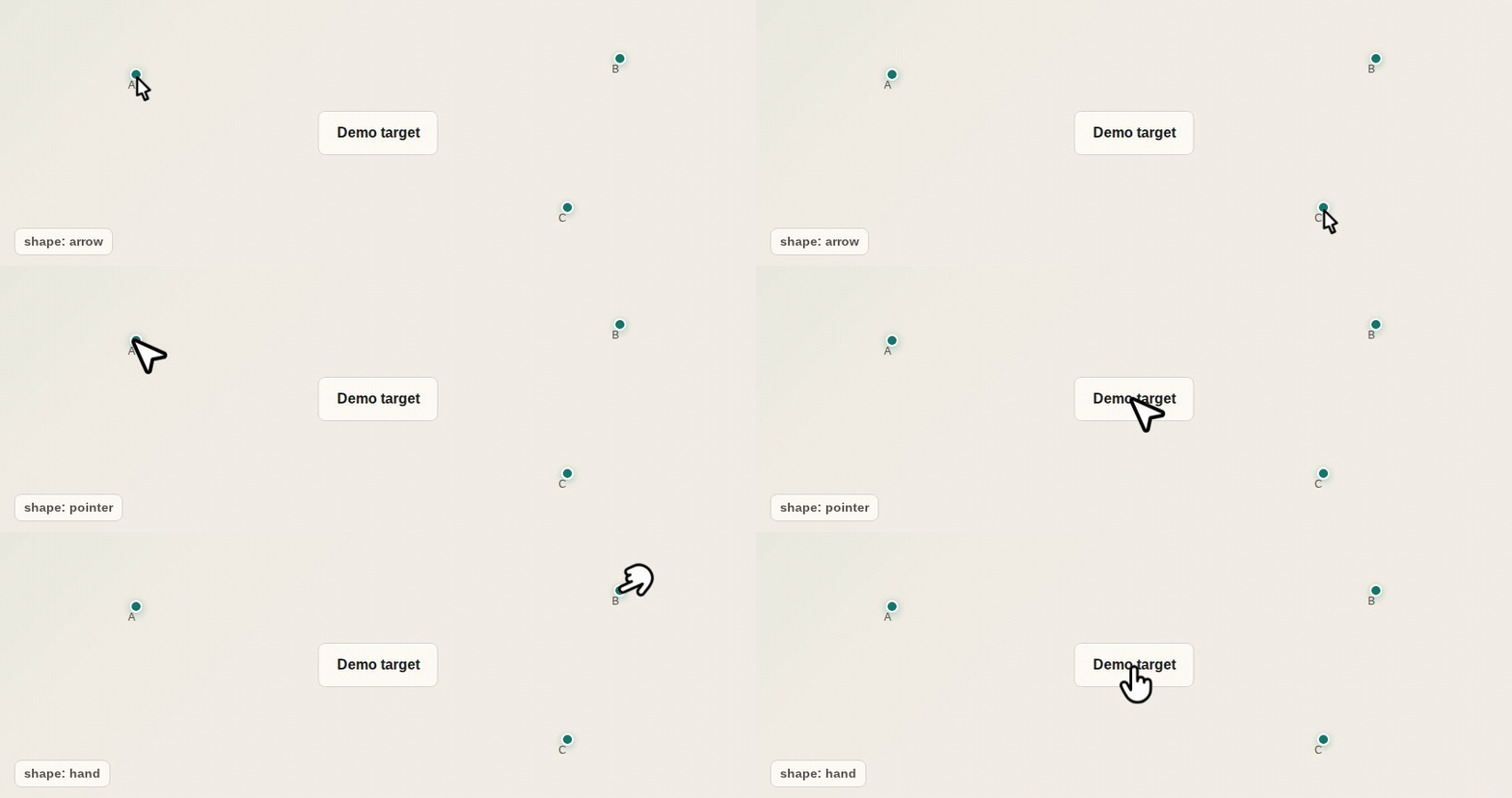
Interactive demos: Vue playground | React playground
| Package | Role |
|---|---|
js-pointing-cursor |
Core controller (no framework) |
vue-pointing-cursor |
Vue 3 component |
react-pointing-cursor |
React component |
pnpm add vue-pointing-cursor
# or
pnpm add react-pointing-cursor
Core alone (headless / custom UI):
pnpm add js-pointing-cursorFrom the GitHub registry (copies sources into components/ui/pointing-cursor):
pnpm dlx shadcn-vue@latest add MurzNN/js-pointing-cursor/vue-pointing-cursorimport { PointingCursor } from '@/components/ui/pointing-cursor'Or point components.json at the hosted registry on GitHub Pages:
{
  "registries": {
    "@pointing-cursor": "https://murznn.github.io/js-pointing-cursor/r/{name}.json"
  }
}
pnpm dlx shadcn-vue@latest add @pointing-cursor/vue-pointing-cursorFrom the GitHub registry (copies sources into components/ui/pointing-cursor):
pnpm dlx shadcn@latest add MurzNN/js-pointing-cursor/react-pointing-cursorimport { PointingCursor } from '@/components/ui/pointing-cursor'Or with a hosted registry entry (same Pages /r base as Vue):
{
  "registries": {
    "@pointing-cursor": "https://murznn.github.io/js-pointing-cursor/r/{name}.json"
  }
}
pnpm dlx shadcn@latest add @pointing-cursor/react-pointing-cursorPrefer the npm packages when you want a dependency instead of vendored source. Registry installs are best for apps already using the shadcn / shadcn-vue workflow.
<script setup lang="ts">
import { ref } from 'vue'
import { PointingCursor } from 'vue-pointing-cursor'

const cursor = ref<InstanceType<typeof PointingCursor> | null>(null)
</script>

<template>
  <PointingCursor ref="cursor" shape="arrow" />
  <button type="button" @click="cursor?.moveTo(120, 180)">Move</button>
</template>import { useRef } from 'react'
import { PointingCursor, type PointingCursorHandle } from 'react-pointing-cursor'
export function Demo() {
const cursor = useRef<PointingCursorHandle>(null)
return (
<>
<PointingCursor ref={cursor} shape="arrow" />
<button type="button" onClick={() => void cursor.current?.moveTo(120, 180)}>
Move
</button>
</>
)
}Pass a CSS selector (or an Element) instead of coordinates — the cursor moves to the center of the matched element’s bounding box:
// Vue
await cursor.value?.moveTo('#submit')
await cursor.value?.moveTo('.card button.primary')

// React
await cursor.current?.moveTo('#submit')
await cursor.current?.moveTo('[data-testid="demo-button"]')
Options work the same as with coordinates:
await cursor.value?.moveTo('#submit', { animate: false })
await cursor.value?.moveTo('#submit', { duration: 800 })The component paints shapes with two CSS variables (defaults match a classic white cursor with a black outline):
| Variable | Prop | Default | Role |
|---|---|---|---|
--pointing-cursor-fill |
fill |
#ffffff |
Interior / body |
--pointing-cursor-stroke |
stroke |
#000000 |
Outline |
Always declare fallbacks in the SVG so the shape still looks correct if the variables are unset:
fill="var(--pointing-cursor-fill, #ffffff)"
stroke="var(--pointing-cursor-stroke, #000000)"One closed path: interior via fill, outline via stroke (bake stroke-width into the SVG; there is no runtime stroke-width prop).
<svg viewBox="0 0 24 24" xmlns="http://www.w3.org/2000/svg" aria-hidden="true">
  <path
    d="…"
    fill="var(--pointing-cursor-fill, #ffffff)"
    stroke="var(--pointing-cursor-stroke, #000000)"
    stroke-width="2"
    stroke-linejoin="round"
    stroke-linecap="round"
  />
</svg>Many icon SVGs fake a stroke with an outer path + inner hole (fill-rule="evenodd"). To theme them:
- Draw the outer silhouette with
fill="var(--pointing-cursor-fill, #ffffff)"(interior). - On top, draw the full evenodd path (outer + inner) with
fill="var(--pointing-cursor-stroke, #000000)"(outline ring).
<svg viewBox="0 0 32 32" xmlns="http://www.w3.org/2000/svg" aria-hidden="true">
  <!-- Interior -->
  <path d="M…Z" fill="var(--pointing-cursor-fill, #ffffff)" />
  <!-- Outline ring (outer + inner hole) -->
  <path
    fill-rule="evenodd"
    d="M…Z M…Z"
    fill="var(--pointing-cursor-stroke, #000000)"
  />
</svg>
Do not hard-code #000 / #fff (or currentColor) on themed paths — those won’t follow the fill / stroke props. Tip of the cursor should sit near the hotspot for your shape (see SHAPE_HOTSPOTS in core).
Replace a bundled shape via the default slot (Vue) / children render prop (React), or swap the SVG strings in SHAPE_SVGS after a shadcn install. When editing files under packages/core/src/shapes/, run pnpm shapes:sync so adapters pick up the change.
pnpm install
pnpm dev:vue          # Vue playground
pnpm dev:react        # React playground
pnpm test
pnpm build
pnpm build:playground
Monorepo layout: packages/{core,vue,react}, demo/playground-{vue,react}.
Package READMEs on npm are generated from this file via
pnpm readme:packages. Visible regions:<!-- pkg:all|omit -->…<!-- /pkg:… -->. Hidden package-only blocks (whole comment, must not contain-->):<!-- pkg:vue|react|core…-->.
vue-pointing-cursor and react-pointing-cursor publish from GitHub Actions via npm Trusted Publishing (OIDC). Workflow file: .github/workflows/publish.yml.
pnpm release          # patch bump, refresh package READMEs, commit, tag, push
pnpm release minor    # or: major | 0.2.0
pnpm release --dry-run
pnpm release --no-push   # local commit + tag only
Pushing a v* tag runs tests, builds, and publishes both packages. The trusted-publisher workflow filename on npmjs.com must be exactly publish.yml.
MIT