Gravity Agent for k8s is a multi-cloud and multi-region deployment tool. It enables easy replication of applications, low-code CI/CD setup on top of ArgoCD.
- Add the
gravity.yamlfile to the root of your repository. - Make the changes as per your app
You can use the following example as a template:
metadata:
  name: nodejs-app
spec:
  branch:
    - name: main
      approval: manual
    - name: development
      approval: automatic
  aws:
    repository:
      - name: nodejs-app-east
        regions:
          - us-east-1
        branch: main
        valueFile:
          source: s3
          bucket: gravity-app-prod-values
If you are using Github to store the values file, you can use the following example to setup the repository:
metadata:
  name: nodejs-app
spec:
  branch:
    - name: main
      approval: manual
    - name: development
      approval: automatic
  aws:
    repository:
      - name: nodejs-app-east
        regions:
          - us-east-1
        branch: main
        valueFile:
source: git-
Update Github Action workflow with name as
Deployand only run CI, tests and any business logic to generate values file (such as secrets, no need to manage docker images) -
You can also add
pre-deployscripts to run any commands before the deployment (such as linting, testing, etc.)
metadata:
  name: mono-repo-js
spec:
  branch:
    - name: main
      approval: manual
    - name: development
      approval: automatic
    - name: feat-.*
      approval: automatic
  preDeploy:
    - name: run dummy script
      command: bash ./dummy.sh
  aws:
    repository:
      - name: mono-repo-js-east
        regions:
          - us-east-1
        branch: main
        valueFile:
source: git- Update the
values.yamlfile with the required values
global:
  namespace: "gravity-cloud"
  storageClass: "standard"

components:
  gravityAgent:
    deployment:
      name: gravity-ci-cd-agent
      replicas: 1
      image:
        repository: gravitycloud/gravity-ci-cd-agent
        tag: latest
        pullPolicy: Always
      resources:
        requests:
          memory: "512Mi"
          cpu: "512m"
        limits:
          memory: "8192Mi"
          cpu: "4000m"
      env:
        GRAVITY_API_KEY: ""
        GRAVITY_WEBSOCKET_URL: ""
        GRAVITY_API_URL: ""
        ENV: "production"
        NAMESPACE: "gravity-cloud"
        GITHUB_TOKEN: ""
        GITHUB_REPOSITORIES: ""
        GIT_BRANCHES_ALLOWED: ""
        GITHUB_JOB_NAME: ""
        AWS_ACCESS_KEY_ID: ""
        AWS_SECRET_ACCESS_KEY: ""
        AWS_ACCOUNT_ID: ""
        POSTGRES_HOST: "postgres-gravity-service"
        POSTGRES_USER: ""
        POSTGRES_PASSWORD: ""
        POSTGRES_DB: ""
        POSTGRES_PORT: "5432"
        REDIS_HOST: "redis-gravity-service"
        REDIS_PORT: "6379"
        REDIS_PASSWORD: ""
        SLACK_WEBHOOK_URL: ""
        ARGOCD_URL: ""
        ARGOCD_TOKEN: ""
        DOCKER_REGISTRY_URL: ""
        DOCKER_REGISTRY_PORT: "5000"
    service:
      name: gravity-agent-service
      type: ClusterIP
      port: 8080
      targetPort: 8080

  postgres:
    deployment:
      name: postgres-gravity
      replicas: 1
      image:
        repository: postgres
        tag: latest
        pullPolicy: IfNotPresent
      resources:
        requests:
          memory: "1Gi"
          cpu: "500m"
        limits:
          memory: "2Gi"
          cpu: "1000m"
      env:
        POSTGRES_DB: ""
        POSTGRES_USER: ""
        POSTGRES_PASSWORD: ""
    service:
      name: postgres-gravity-service
      type: ClusterIP
      port: 5432
      targetPort: 5432

  redis:
    deployment:
      name: redis-gravity
      replicas: 1
      image:
        repository: redis
        tag: latest
        pullPolicy: IfNotPresent
      command:
        - "/bin/sh"
        - "-c"
        - "redis-server --requirepass $(REDIS_PASSWORD)"
      resources:
        requests:
          memory: "256Mi"
          cpu: "250m"
        limits:
          memory: "512Mi"
          cpu: "500m"
      env:
        REDIS_PASSWORD: ""
    service:
      name: redis-gravity-service
      type: ClusterIP
      port: 6379
      targetPort: 6379

  dockerregistry:
    deployment:
      name: gravity-docker-registry
      replicas: 1
      image:
        repository: registry
        tag: "2"
        pullPolicy: IfNotPresent
      resources:
        requests:
          memory: "512Mi"
          cpu: "512m"
        limits:
          memory: "4096Mi"
          cpu: "4000m"
      env:
        REGISTRY_STORAGE_DELETE_ENABLED: "true"
    service:
      name: gravity-docker-registry
      type: ClusterIP
      port: 5000
      targetPort: 5000

# RBAC Configuration
rbac:
  serviceAccount:
    name: gravity-job-agent-sa
    create: true
  clusterRole:
    name: gravity-job-agent-role
    rules:
      - apiGroups: [""]
        resources: ["pods", "pods/log", "pods/exec", "services", "secrets", "configmaps", "persistentvolumeclaims", "serviceaccounts"]
        verbs: ["get", "list", "watch", "create", "update", "patch", "delete"]
      - apiGroups: [""]
        resources: ["secrets", "events", "namespaces"]
        verbs: ["get", "list", "watch"]
      - apiGroups: ["apps"]
        resources: ["deployments", "statefulsets", "replicasets"]
        verbs: ["get", "list", "watch", "create", "update", "patch", "delete"]
      - apiGroups: ["batch"]
        resources: ["jobs", "jobs/status"]
        verbs: ["get", "list", "watch", "create", "update", "patch", "delete"]
      - apiGroups: ["networking.k8s.io"]
        resources: ["ingresses", "networkpolicies"]
        verbs: ["get", "list", "watch", "create", "update", "patch", "delete"]
      - apiGroups: ["rbac.authorization.k8s.io"]
        resources: ["roles", "rolebindings"]
        verbs: ["get", "list", "watch", "create", "update", "patch", "delete"]
      - apiGroups: ["policy"]
        resources: ["podsecuritypolicies", "poddisruptionbudgets"]
        verbs: ["get", "list", "watch", "create", "update", "patch", "delete"]
      - apiGroups: ["argoproj.io"]
        resources: ["applications"]
        verbs: ["get", "list", "watch", "create", "update", "patch", "delete"]
  clusterRoleBinding:
    name: gravity-job-agent-rolebinding

persistence:
  postgres:
    name: postgres-gravity-pvc
    size: "1Gi"
    accessMode: ReadWriteOnce
  redis:
    name: redis-gravity-pvc
    size: "1Gi"
    accessMode: ReadWriteOnce
  agent:
    name: agent-gravity-pvc
    size: "20Gi"
    accessMode: ReadWriteOnce
-
Add the helm repo
helm repo add gravity-cloud https://gravitycloudai.github.io/gravity-k8s-ci-cd-agent -
Update the helm repo
helm repo update -
Install the chart
helm upgrade --install gravity-k8s-ci-cd-agent gravity-cloud/gravity-ci-cd-agent -f ./chart/values.yaml -n gravity-cloud --create-namespace -
Check the deployment
kubectl get pods -n gravity-cloud

-
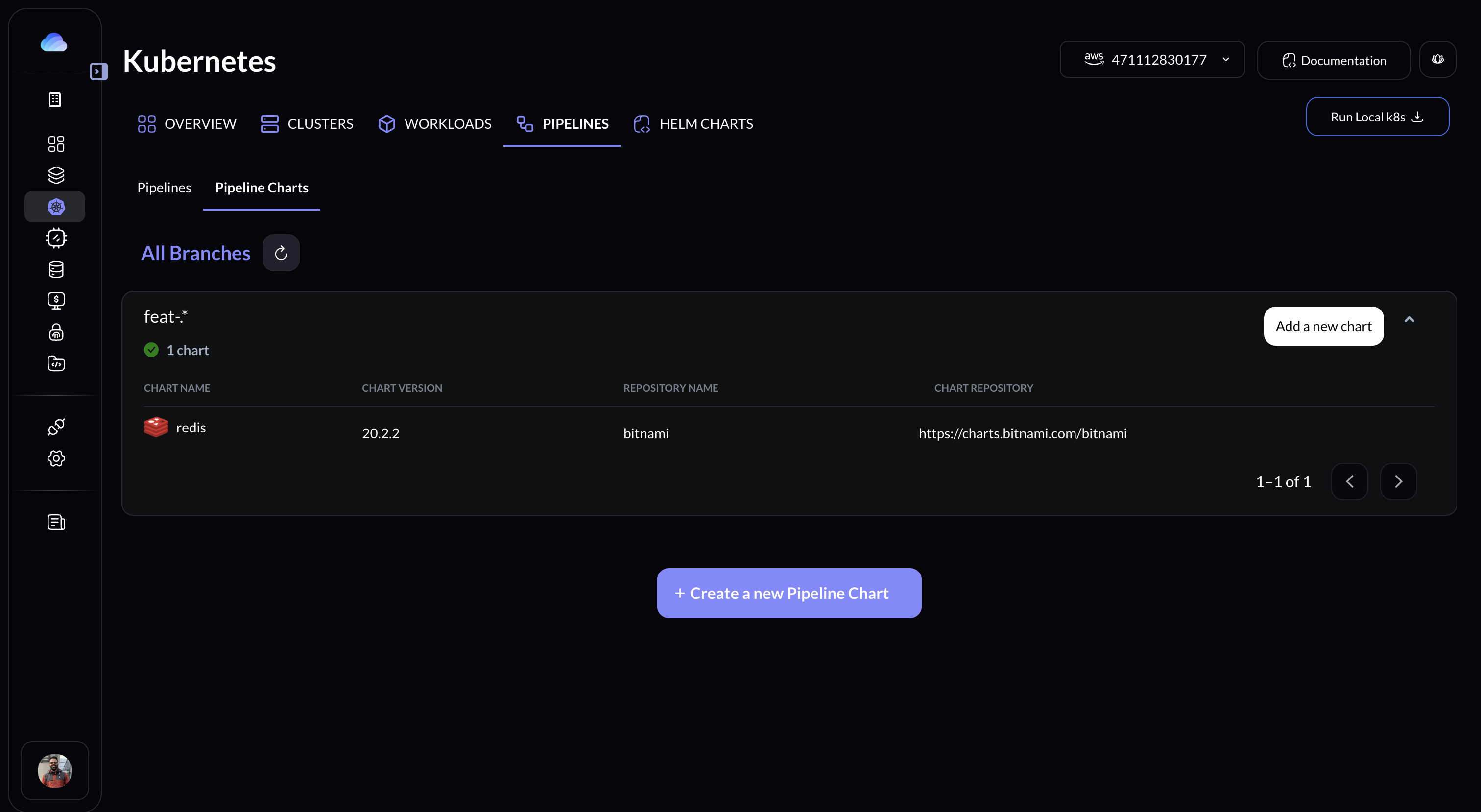
Logon to Gravity UI and go to Kubernetes -> Pipelines -> Pipeline Charts OR visit Console Here
-
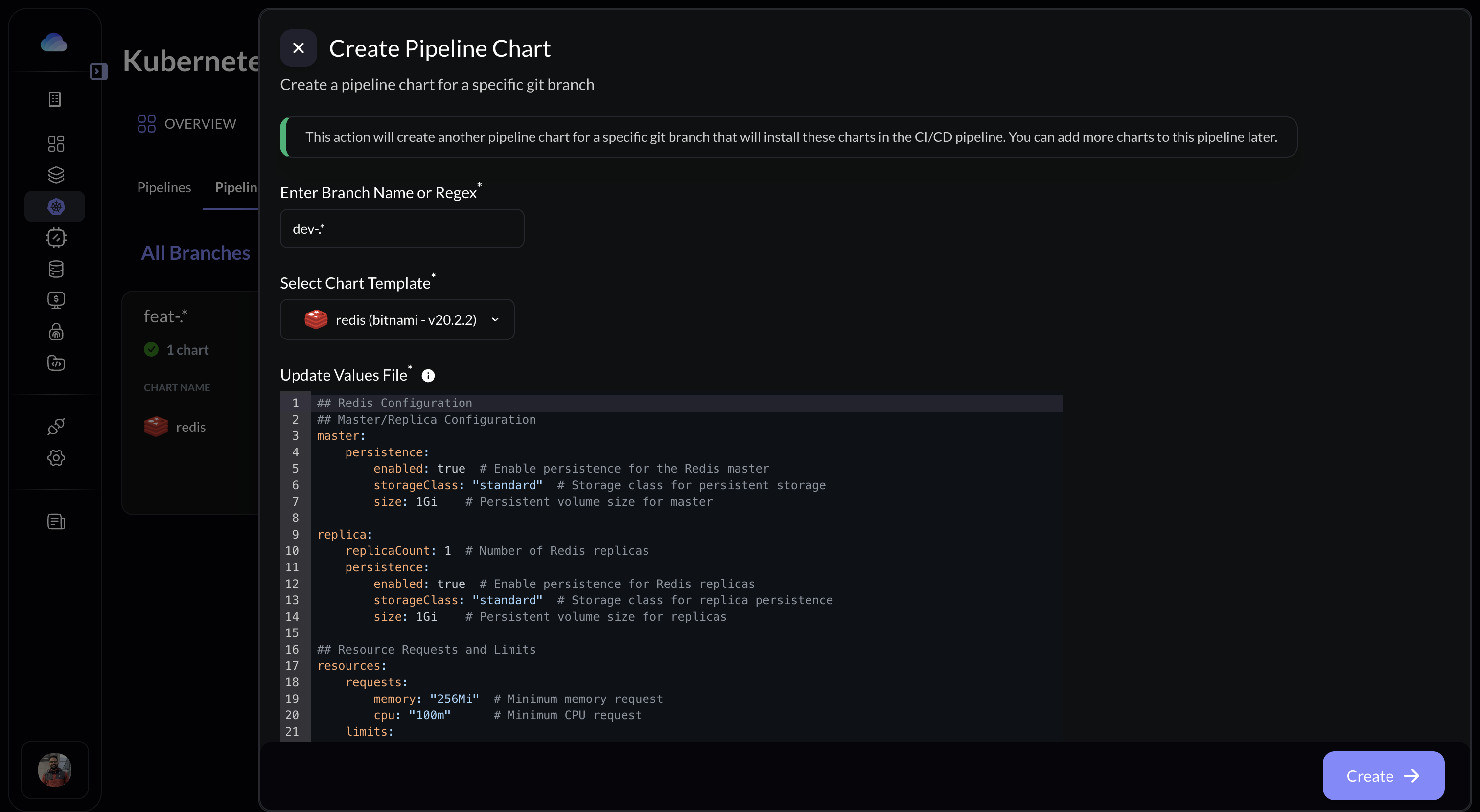
Click on Create a new Pipeline Chart
-
Select the pre-defined chart and edit the values file as per your requirement
-
Once added, the agent will automatically sync the changes and deploy the helm chart to the respective environment when the new branch is created or updated.
-
Upon the deletion of the branch, the agent will delete the helm chart from the respective environment.
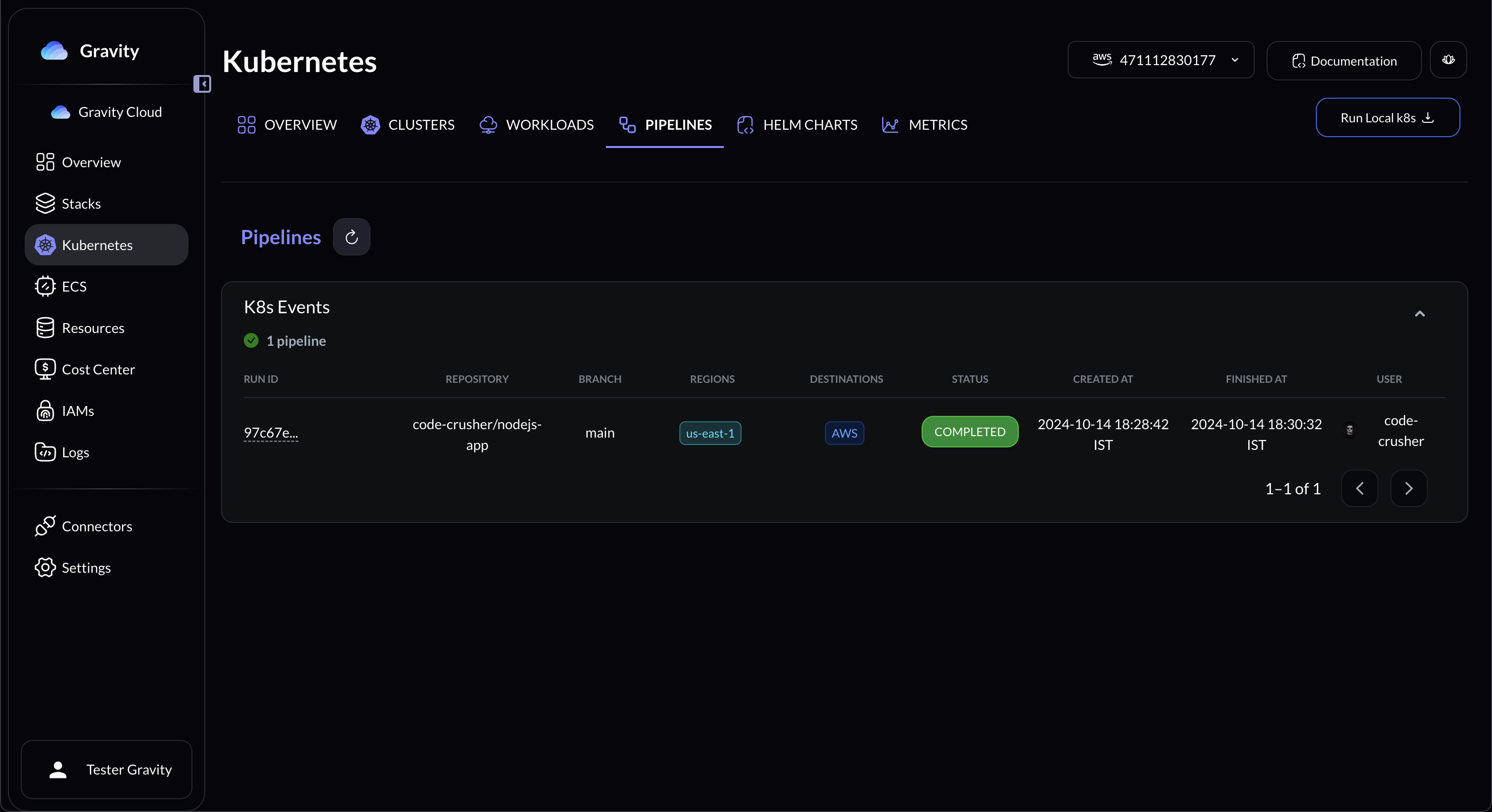
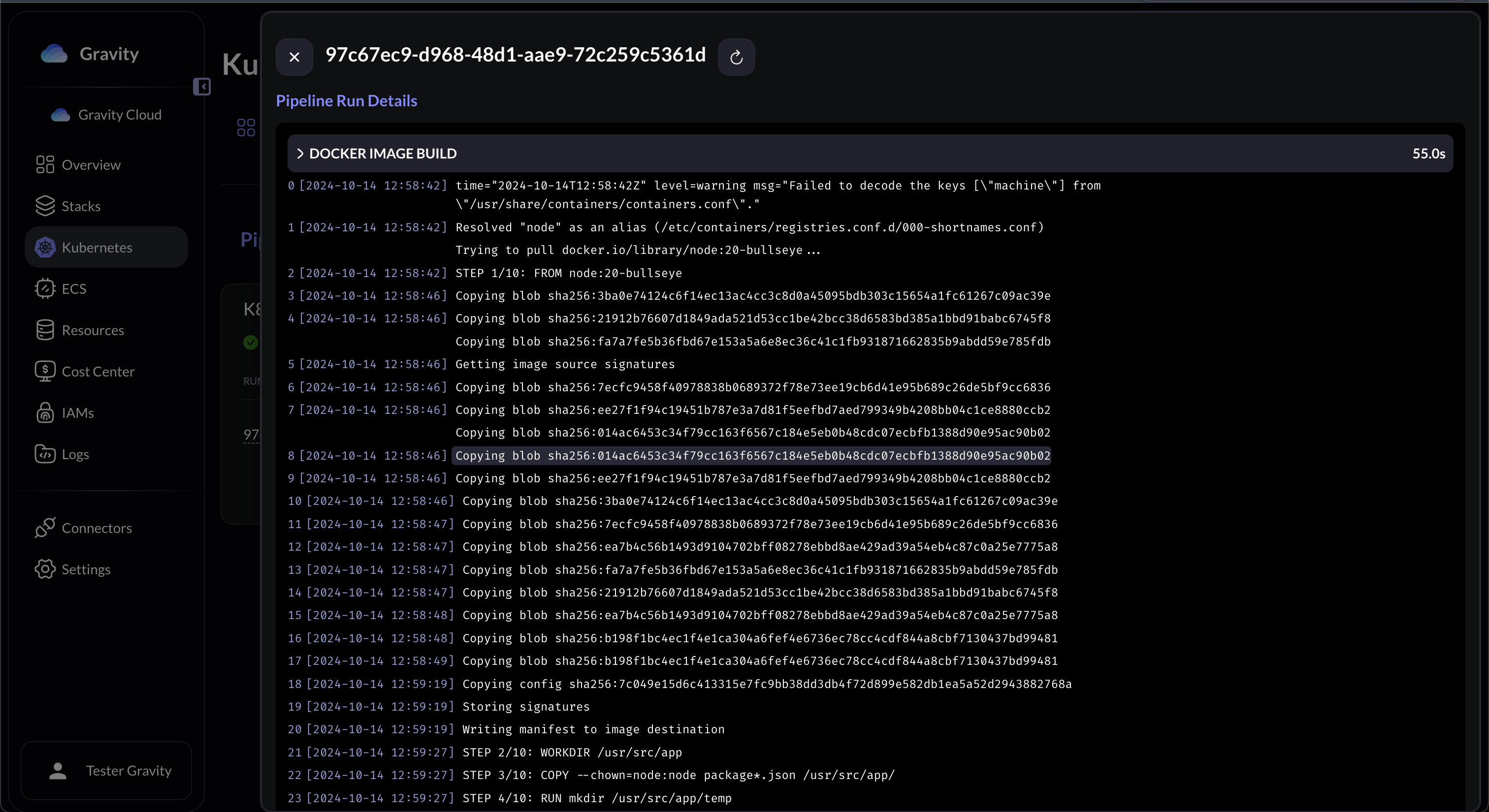
- The agent syncs with the repository and checks if there are any new CI actions completed.
- It then check the postgress database for the status of the deployment action (if completed previously, pending or failed)
- Upon finding the need for a new deployment, it creates a Kubernetes Job for that deployment.
- The K8s job will generate the Docker image (along with cache stored in local docker registry), and then iterates through the cloud accounts, regions while tagging and pushin them into the repositories.
- It will go and update the Values file in your git or Update the S3 values file along with the ArgoCD manifest file.
- In the whole workflow, Slack notifications can be setup as per your requirement.
- In the whole workflow, you can sync the deployment process with Gravity UI also.
- Docker Hub: https://hub.docker.com/r/gravitycloud/gravity-ci-cd-agent
- Website: https://gravitycloud.ai
- Discord: https://discord.gg/fJU5DvanU3