webqqircd类似于bitlbee,在WebQQ(SmartQQ)和IRC间建起桥梁,可以使用IRC客户端收发消息。大部分代码来自wechatircd,为适配QQ做了一些修改。
           IRC              WebSocket                 HTTPS
IRC client --- webqqircd.py --------- browser        ----- wx.qq.com
                                      modified mq.js
修改WebQQ(http://w.qq.com用的JS,通过WebSocket把信息发送到服务端,服务端兼做IRC服务端,把IRC客户端的命令通过WebSocket传送到网页版JS执行。未实现IRC客户端,因此无法把QQ群/讨论组的消息转发到另一个IRC服务器(打通两个群的bot)。
- WebQQ不支持发送图片,也无法获悉别人发送了图片
- 消息发送后不知道成功与否,
mq.model.chat中sendMsg(h)的onSuccess为空函数 - 无法获知群/讨论组信息变化(如成员变化等)
mq.model.chat中addGroup(x)只判断群/讨论组存在与否,不判断信息变化 - 看不到WebQQ会话内新加入的群/讨论组友的消息
- 没有办法区分
<和<等
需要Python 3.5或以上,支持async/await语法
pip install -r requirements.txt安装依赖
yaourt -S webqqircd-git。会在/etc/webqqircd/下生成自签名证书。- 把
/etc/webqqircd/cert.pem导入到浏览器(见下文) systemctl start webqqircd会运行/usr/bin/webqqircd --http-cert /etc/webqqircd/cert.pem --http-key /etc/webqqircd/key.pem --http-root /usr/share/webqqircd
IRC服务器默认监听127.0.0.1:6668 (IRC)和127.0.0.1:9002 (HTTPS + WebSocket over TLS)。
如果你在非本机运行,建议配置IRC over TLS,设置IRC connection password:/usr/bin/webqqircd --http-cert /etc/webqqircd/cert.pem --http-key /etc/webqqircd/key.pem --http-root /usr/share/webqqircd --irc-cert /path/to/irc.key --irc-key /path/to/irc.cert --irc-password yourpassword
可以把HTTPS私钥证书用作IRC over TLS私钥证书。使用WeeChat的话,如果觉得让WeeChat信任证书比较麻烦(gnutls会检查hostname),可以用:
set irc.server.qq.ssl on`
set irc.server.qq.ssl_verify off
set irc.server.qq.password yourpassword`
openssl req -newkey rsa:2048 -nodes -keyout key.pem -x509 -out cert.pem -subj '/CN=127.0.0.1' -days 9999创建密钥与证书。- 把
cert.pem导入浏览器,见下文 ./webqqircd.py --http-cert cert.pem --http-key key.pem
Chrome/Chromium
- 访问
chrome://settings/certificates,导入cert.pem,在Authorities标签页选择该证书,Edit->Trust this certificate for identifying websites. - 安装Switcheroo Redirector扩展,把http://pub.idqqimg.com/smartqq/js/mq.js?t=20161220重定向至https://127.0.0.1:9002/mq.js。
Firefox
- 安装Redirector扩展,重定向js,设置
Applies to: Main window (address bar), Scripts。 - 访问重定向后的js URL,报告Your connection is not secure,Advanced->Add Exception->Confirm Security Exception
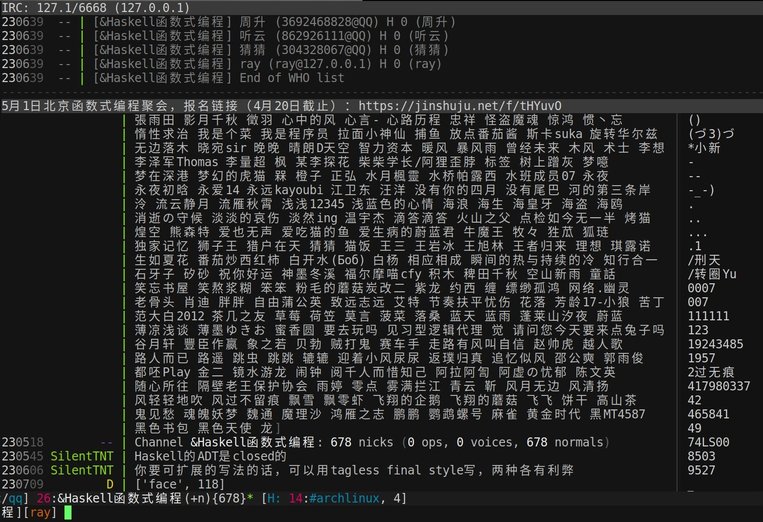
- 运行
webqqircd.py - 访问http://w.qq.com,修改后
mq.js会向服务器发起WebSocket连接 - IRC客户端连接127.1:6668(weechat的话使用
/server add qq 127.1/6668),会自动加入+qqchannel
在+qq发信并不会群发,只是为了方便查看有哪些朋友。
在+qq channel可以执行一些命令:
help,帮助status [pattern],已获取的QQ朋友、群/讨论组列表,支持 pattern 参数用来筛选满足 pattern 的结果,目前仅支持子串查询。如要查询所有群/讨论组,由于群/讨论组由&开头,所以可以执行status &。eval $password $expr: 如果运行时带上了--password $password选项,这里可以eval,方便调试,比如eval $password client.webqq_users
- Join mode. There are three modes, the default is
--join auto: join the channel upon receiving the first message. The other two are--join all: join all the channels;--join manual: no automatic join. - Groups that should not join automatically. This feature supplements join mode.
--ignore 'fo[o]' bar, do not auto join chatrooms whose channel name(generated from DisplayName) matches regexfo[o]orbar--ignore-display-name 'fo[o]' bar, do not auto join chatrooms whose DisplayName matches regexfo[o]orbar
- HTTP/WebSocket related options
--http-cert cert.pem, TLS certificate for HTTPS/WebSocket. You may concatenate certificate+key, specify a single PEM file and omit--http-key. Use HTTP if neither --http-cert nor --http-key is specified.--http-key key.pem, TLS key for HTTPS/WebSocket.--http-listen 127.1 ::1, change HTTPS/WebSocket listen address to127.1and::1, overriding--listen.--http-port 9000, change HTTPS/WebSocket listen port to 9000.--http-root ., the root directory to serveinjector.js.
-l 127.0.0.1, change IRC/HTTP/WebSocket listen address to127.0.0.1.- IRC related options
--irc-cert cert.pem, TLS certificate for IRC over TLS. You may concatenate certificate+key, specify a single PEM file and omit--irc-key. Use plain IRC if neither --irc-cert nor --irc-key is specified.--irc-key key.pem, TLS key for IRC over TLS.--irc-listen 127.1 ::1, change IRC listen address to127.1and::1, overriding--listen.--irc-password pass, set the connection password topass.--irc-port 6667, IRC server listen port.
- Server side log
--logger-ignore '&test0' '&test1', list of ignored regex, do not log contacts/groups whose names match--logger-mask '/tmp/webqq/$channel/%Y-%m-%d.log', format of log filenames--logger-time-format %H:%M, time format of server side log
- 标准IRC channel名以
#开头 - QQ群/讨论组名以
&开头。SpecialChannel#update - 联系人带有mode
+v(voice, 通常显示为前缀+)。SpecialChannel#update_detail
server-time extension from IRC version 3.1, 3.2. webqqircd.py includes the timestamp (obtained from JavaScript) in messages to tell IRC clients that the message happened at the given time. See http://ircv3.net/irc/. Seehttp://ircv3.net/software/clients.html for Client support of IRCv3.
Configuration for WeeChat:
/set irc.server_default.capabilities "account-notify,away-notify,cap-notify,multi-prefix,server-time,znc.in/server-time-iso,znc.in/self-message"
Supported IRC commands:
/cap, supported capabilities./dcc send $nick/$channel $filename, send image or file。This feature borrows the command/dcc sendwhich is well supported in IRC clients. See https://en.wikipedia.org/wiki/Direct_Client-to-Client#DCC_SEND./list, list groups./names, update nicks in the channel./part $channel, no longer receive messages from the channel. It just borrows the command/partand it will not leave the group./query $nick, open a chat window with$nick./who $channel, see the member list.
Multi-line messages:
!m line0\nline1
原始文件mq.js在Chrome DevTools里格式化后得到orig/mq.pretty.js,可以用diff -u orig/mq.pretty.js mq.js查看改动。
修改的地方都有//@标注,结合diff,方便WebQQ更新后重新应用这些修改。增加的代码中大多数地方都用try catch保护,出错则consoleerr(ex.stack)。
目前的改动如下:
创建到服务端的WebSocket连接,若onerror则自动重连。监听onmessage,收到的消息为服务端发来的控制命令:send_text_message等。
获取所有联系人(朋友、订阅号、群/讨论组),deliveredContact记录投递到服务端的联系人,deliveredContact记录同处一群/讨论组的非直接联系人。
每隔一段时间把未投递过的联系人发送到服务端。
原有代码会更新未读标记数及声音提醒,现在改为若成功发送到服务端则不再提醒,以免浏览器的这个标签页造成干扰。
当前只有一个文件webqqircd.py,从miniircd抄了很多代码,后来自己又搬了好多RFC上的用不到的东西……
.
├── Web                      HTTP(s)/WebSocket server
├── Server                   IRC server
├── Channel
│   ├── StandardChannel      `#`开头的IRC channel
│   ├── StatusChannel        `+qq`,查看控制当前QQ会话
│   └── SpecialChannel       QQ群/讨论组对应的channel,仅该客户端可见
├── (User)
│   ├── Client               IRC客户端连接
│   ├── SpecialUser          QQ用户对应的user,仅该客户端可见
├── (IRCCommands)
│   ├── UnregisteredCommands 注册前可用命令:NICK USER QUIT
│   ├── RegisteredCommands   注册后可用命令