Skip to content

Adopt TypeScript for core package#1877

Merged
ryoarmanda merged 4 commits intoMarkBind:masterfrom
ryoarmanda:adopt-typescript
Apr 20, 2022
Merged

Adopt TypeScript for core package#1877
ryoarmanda merged 4 commits intoMarkBind:masterfrom
ryoarmanda:adopt-typescript

Conversation

@ryoarmanda
Copy link
Contributor

@ryoarmanda ryoarmanda commented Apr 5, 2022

What is the purpose of this pull request?

  • Documentation update
  • Bug fix
  • Feature addition or enhancement
  • Code maintenance
  • Others, please explain: Project development upgrade

First phase of #1421

Overview of changes:
(Edited as of 17/04)
Some of the .js code files in core have been renamed as .ts files and adapted into TypeScript as a starter.

See the documentation on migrating to TypeScript: https://deploy-preview-1877--markbind-master.netlify.app/devguide/migratingtotypescript

Workflow of core and by extension the whole project are slightly changed:

  • Development
    • Three new scripts are added in root, npm run build:backend to build the TypeScript files, npm run clean to remove built files, and npm run dev to start the development environment which builds the files and automatically rebuilds on changes
    • IDEs like WebStorm, VSCode, natively supports rebuild on change too, so developers who use those IDEs can sidestep npm run dev.
    • Three new scripts are added in core, npm run build to build the TypeScript files, npm run clean to remove built files, and npm run prepare which is explained in Installation and Publishing below
  • Installation
    • A new lifecycle script prepare is added in core which does npm run build and automatically runs as part of installation of the package (npm run setup).
  • Debugging
    • Builds will emit sourcemaps (.js.map) which provides the ability to directly debug .ts files (e.g. put breakpoints, etc)
  • Linting
    • New package typescript-eslint is integrated to eslint to enable lint on .ts files
    • npm run lint now lints .ts files
  • Testing
    • New package ts-jest is integrated to jest to perform direct unit tests to .ts files without the need to manually build them
    • However, functional tests with cli will require for the files to be built first
  • Publishing
    • Builds will emit declaration files (.d.ts) and their maps (.d.ts.map) for type-checking and definitions support across projects
    • The lifecycle prepare script in core will automatically run as part of publishing of the package (lerna publish)

Anything you'd like to highlight / discuss:

  • Comments on the approach taken are appreciated.

Testing instructions:
Setup test: npm run setup should compile the TypeScript files.
Development test: npm run test should be fine.
Development usage test (with linked markbind-cli): Any markbind commands should be fine.

Proposed commit message: (wrap lines at 72 characters)
Adopt TypeScript for core package

The dynamic typing nature of JavaScript can create avenues for subtle
bugs during runtime related to parameter types. Strict typing system,
like TypeScript, can address such cases and benefit development of
MarkBind.

Let's introduce TypeScript to the core package to improve the quality
and security of our codebase. Furthermore, let's adapt starter files
to TypeScript as an example, and document on the steps to migrate other
files to TypeScript for developers.


Checklist: ☑️

  • Updated the documentation for feature additions and enhancements
  • Added tests for bug fixes or features
  • Linked all related issues
  • No unrelated changes

Copy link
Contributor

@ang-zeyu ang-zeyu left a comment

Choose a reason for hiding this comment

The reason will be displayed to describe this comment to others. Learn more.

Nice work on this huge environment change 👍, just a brief look:


Some files are not yet duplicated to .ts, would like some assistance on whether we should do it or keep it as-is:

Ditto on the 2nd.

As for the other files, I'm thinking - as long as we've adopted it from somewhere considerably in its original code style, we keep it as is for now, since we may need to cross-refer the original external implementation. (e.g. convert HighlightRule but not double-delimiter.js)

As for the "midway" ones like markdown-it/index.js which are more subjective, I'm leaning toward converting them for now as type annotations may be helpful for development.

Publishing requires an additional manual build step because the build returns an error exit code (due to the files not adopting the type system yet), meaning we can't put this as a part of the npm lifecycle methods (it will abort as error). Added documentation on projectManagement.md for this.

👍

@ryoarmanda
Copy link
Contributor Author

ryoarmanda commented Apr 6, 2022

@jonahtanjz @ang-zeyu I found a way to suppress the error exit code when running the build, so now I can put the build script as part of the npm's lifecycle scripts, but it's admittedly quite hacky (just string the command with exit 0 haha). It will run in both npm install (which is invoked by our npm run setup) and npm publish, so there should be no manual builds needed in both setting up and publishing. I'm not entirely happy of the workaround, but I think it's the best we can do in the middle of migration.

However, it still outputs a ton of TypeScript error logs as part of the job (see the npm run setup log in the latest commit's checks). I was thinking to pipe output to null to discard it, but seems there is no easy cross-platform way to do it (in Windows we use NUL, Linux we use /dev/null, etc)...

@jonahtanjz
Copy link
Contributor

I found a way to suppress the error exit code when running the build, so now I can put the build script as part of the npm's lifecycle scripts, but it's admittedly quite hacky (just string the command with exit 0 haha)

Will this suppress legitimate errors from typescript as well (e.g some files failed to compile)? If it does, the developer doing the release may not be aware of the errors and broken/missing files may get published? Not sure if this is a potential issue?

@ryoarmanda
Copy link
Contributor Author

ryoarmanda commented Apr 7, 2022

Will this suppress legitimate errors from typescript as well (e.g some files failed to compile)? If it does, the developer doing the release may not be aware of the errors and broken/missing files may get published? Not sure if this is a potential issue?

Good concern. I just found out that even if you write a broken .ts file, the compiler will still compile it to .js, but the error will be carried to the compiled file.

const test: string = [].map(x => ;     // compiled as "const test = [].map(x => ;"

To guard against publishing compiled files that have these errors, I think we can chain the lifecycle scripts with npm run test for safety. (As an aside, given that we have some manual steps in our current publish workflow, I think we can enhance lerna publish to add safety lifecycle scripts when running it to catch any things that might have gone past us, and maybe add a script to do a dry-run of the publish too)


For context, the reason why I went with the hack is that our checks fail when core is not yet compiled (see the checks for 94b09a). There are several places that I might insert the build script in, I choose to put it as an npm lifecycle script as it's a "two birds one stone" solution, prepare runs on both npm install and npm publish (refer here). But on either choice, the checks would still fail as the build would give a non-zero exit code. Suppressing the exit code may be necessary. This suppression is temporary, we will take it off when we have fully adopted the type system. Personally, I think we should keep the publishing to a minimum when we are still migrating.

@ryoarmanda
Copy link
Contributor Author

ryoarmanda commented Apr 11, 2022

@ang-zeyu @jonahtanjz I have adapted to the new strategy as outlined in #1877 (comment). This way, the hack to suppress error exit code is not required. However, this strategy brings a problem about keeping the file history.

To retain the file history of the .js in the .ts, we must keep the Git similarity index between the two to be above some threshold (default is 50%), or else it will be regarded as deleting the .js and adding the .ts, breaking the history (StackOverflow ref). When we do renaming + fixing, it will make the similarity index go down and possible for the latter to happen, especially on very small files (see src/errors/index.ts) and files who have changes across most of its lines no matter how trivial like decreasing indentation (see src/utils/fsUtil.ts). Not everything will be like that, for example src/utils/delay.js keeps the change listed as a renaming.

The answer in the StackOverflow ref above is to rename first, then commit, then change. I tried just that for my working branch (e.g. cf88527 then 31c6412), however in this PR I think it is now compared against master instead, so the totality of the two commits will still make the file be regarded as a deletion and addition. Unless, we rename the files first, merge it to master, then fix it, which brings us back to the old strategy 😅

In my opinion, I think it is better to stick to the new strategy, but not sure whether this is agreeable to us. Any thoughts?

(Edit: I think I can work around all this and adopt a balanced migration that can introduce types and keep the similarity index high, but no guarantees all files can be done this way, e.g. src/errors/index.ts losing history is unavoidable due to the small amount of lines)

@jonahtanjz
Copy link
Contributor

jonahtanjz commented Apr 11, 2022

In my opinion, I think it is better to stick to the new strategy, but not sure whether this is agreeable to us. Any thoughts?

From what I am seeing, most of these files that you've mentioned don't have a lot of commit history (except for packages/core/src/utils/fsUtil.js). I am thinking it's fine for the these files to be added/deleted as we won't lose too much information.

@ang-zeyu
Copy link
Contributor

Would this work?

  • commit A - do the renaming
  • commit B - do the changes

Was going to suggest some commit organisation for large PRs like this near the end so you don't have to use a fixup workflow, might make sense it to do it now perhaps. Something like this:

  • Dependency setup (tsconfig, package.json, ......)
  • Rename ts starter files
  • Adapt ts starter files
  • Adapt / add test dependencies and some starter test files
  • Development docs

@ang-zeyu
Copy link
Contributor

Btw, I remember seeing a comment about converting cli a while back but can't seem to find it anymore. Suggested @core to keep the scope small for now but if it makes things easier to convert everything, please go for it 💪

@ryoarmanda
Copy link
Contributor Author

Would this work?

  • commit A - do the renaming
  • commit B - do the changes

Sorry, can you clarify about this? Not sure which this is targeted to (in the working branch / target branch). I mentioned that splitting the rename and changes into separate commits can still retain the history in the working branch, but when diffed to the target branch, the history is lost.

Assuming you mean those commits are in the target branch, it could be possible. I just tried to play around in my code playground, I noticed that the history is lost only when using the squash strategy. When merged with a normal merge commit, the history is retained in the target branch.

I think the key here is that we must keep those two commits separate in the target branch. I guess this calls for a multi-commit PR with a normal merge commit? I might need to get this organized if that's the case.

  • Dependency setup (tsconfig, package.json, ......)
  • Rename ts starter files
  • Adapt ts starter files
  • Adapt / add test dependencies and some starter test files
  • Development docs

👍 This structure is a good start. Should I follow the rename-adapt commits for the test files as well (assuming we also want to retain the history for test files)? Or I can also put the renaming of test files on the same commit as the renaming of code files?

Also just to confirm, I would structure this through soft reset and commits, but then I have to force push to here, right? Or do I need to create another PR for the clean one?

@ryoarmanda
Copy link
Contributor Author

Btw, I remember seeing a comment about converting cli a while back but can't seem to find it anymore. Suggested @core to keep the scope small for now but if it makes things easier to convert everything, please go for it 💪

Oh yeah, I deleted it and wanted to put it as an edit of a comment but forgot to 😅 I think the cli can be done in a different PR, I imagine it would need more work to get it working too.

@ang-zeyu
Copy link
Contributor

ang-zeyu commented Apr 12, 2022

Sorry, can you clarify about this? Not sure which this is targeted to (in the working branch / target branch). I mentioned that splitting the rename and changes into separate commits can still retain the history in the working branch, but when diffed to the target branch, the history is lost.

Assuming you mean those commits are in the target branch, it could be possible. I just tried to play around in my code playground, I noticed that the history is lost only when using the squash strategy. When merged with a normal merge commit, the history is retained in the target branch.

No, I missed this part.

I think the key here is that we must keep those two commits separate in the target branch. I guess this calls for a multi-commit PR with a normal merge commit? I might need to get this organized if that's the case.

Not getting this part with the above though, would a merge commit be subject to the same issue if so? 👀 (working -> target)

Should I follow the rename-adapt commits for the test files as well (assuming we also want to retain the history for test files)? Or I can also put the renaming of test files on the same commit as the renaming of code files?

Feel free to try it out. Anything reasonable and clear enough (not too much in one commit) is fine : )

example merge commit PR if needed:
#1534

Also just to confirm, I would structure this through soft reset and commits, but then I have to force push to here, right? Or do I need to create another PR for the clean one?

Yup. I've bumped the relevant "guide" from last year in telegram as well if you need it. (note the part on fixups too)

@ryoarmanda
Copy link
Contributor Author

ryoarmanda commented Apr 14, 2022

Not getting this part with the above though, would a merge commit be subject to the same issue if so? 👀 (working -> target)

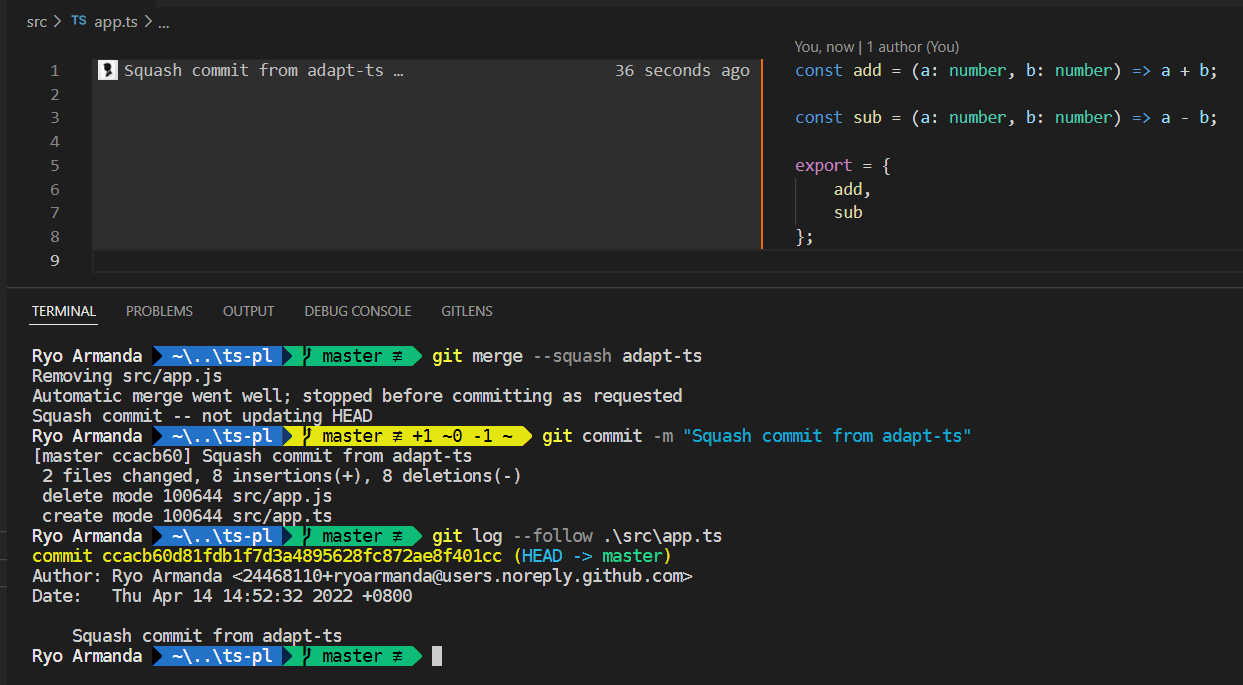
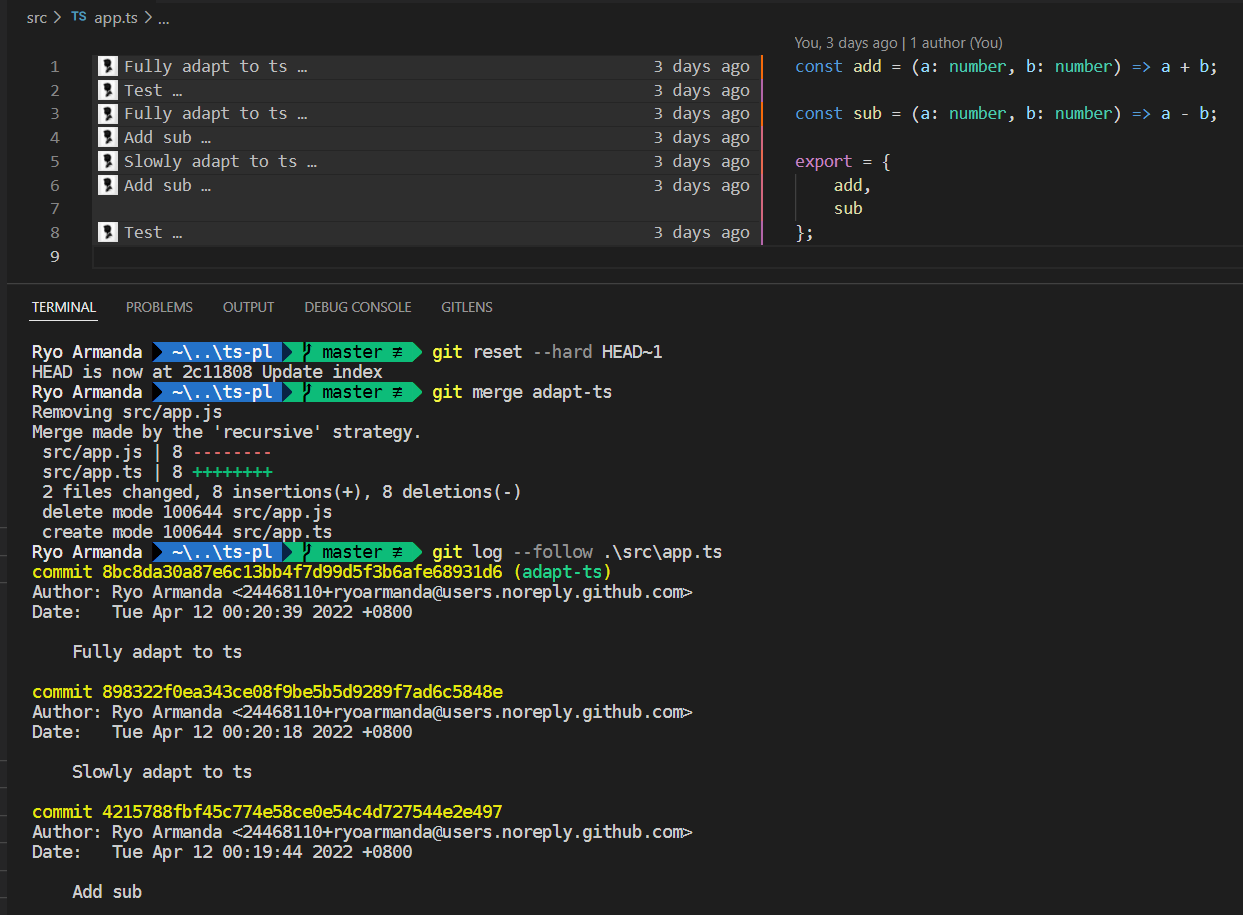
I found out that it's not the case, that is the history is retained when the separate commits are merged with a merge commit. Here's a small demo I cooked up, where I tried to do both strategies.

The file history in the working branch is like so ("Slowly adapt..." is the renaming commit, "Fully adapt..." is the fix commit, and the rest is history from master):

image

If I merge this branch to master with a squash commit, the history is lost (see the blame and git log --follow):

image

While if I merge it with a merge commit, the history is retained (see the blame and git log --follow):

image

@ang-zeyu
Copy link
Contributor

I found out that it's not the case, that is the history is retained when the separate commits are merged with a merge commit. Here's a small demo I cooked up, where I tried to do both strategies.

Thanks for testing 👍, ok let's go for that then.

Fyi I was suggesting merge commit (otherwise no point in structuring the commits here). Though, still not too sure on it (rename-threshold note below)

There are a couple of alternatives we can try if that (github merge) fails too -- reverting the merge and do it manually:

  • rebase (without squash) - not as neat as a merge commit, but should preserve history
  • git merge -X rename-threshold Y (though, haven't researched rename-threshold heavily)

Hopefully github's merge commit is sufficient. :-)

@ryoarmanda ryoarmanda force-pushed the adopt-typescript branch 2 times, most recently from 6da0221 to e3fbd4f Compare April 16, 2022 07:51
Copy link
Contributor

@ang-zeyu ang-zeyu left a comment

Choose a reason for hiding this comment

The reason will be displayed to describe this comment to others. Learn more.

Nice work organizing the commits, a breeze to read through 👍

Just in case the "guide" is unclear: you can deliver the changes using "fixups" in this way for a reviewer

E.g. if "add initial typescript support" and "add typescript migration and development docs" had comments,

Add initial typescript support
Rename starter files to TypeScript
Adapt starter files to TypeScript
Add TypeScript migration and development docs
# Add these 2 commits
Fixup: Add initial typescript support
Fixup: Add TypeScript migration and development docs

Once the fixups are reviewed again, you can use git's fixup feature or interactive rebase (my personal preference) to squash them back into 4 commits.

@ryoarmanda ryoarmanda force-pushed the adopt-typescript branch 2 times, most recently from 8466ce9 to 7d5ca85 Compare April 16, 2022 16:25
@ryoarmanda
Copy link
Contributor Author

Thanks for the weekend reviewing @ang-zeyu 🙇 I pushed some WIP stuff earlier haha. Some parts of the docs and the scripts are a little bit different now as I discovered more quirks along the way. Feel free to do another read through, and I will check out your comments in the meantime.

Copy link
Contributor

@ang-zeyu ang-zeyu left a comment

Choose a reason for hiding this comment

The reason will be displayed to describe this comment to others. Learn more.

wording nits:

Copy link
Contributor

@jonahtanjz jonahtanjz left a comment

Choose a reason for hiding this comment

The reason will be displayed to describe this comment to others. Learn more.

Couple of suggested changes

@ryoarmanda
Copy link
Contributor Author

ryoarmanda commented Apr 18, 2022

I'd like to ask for advice about the migration specifics:

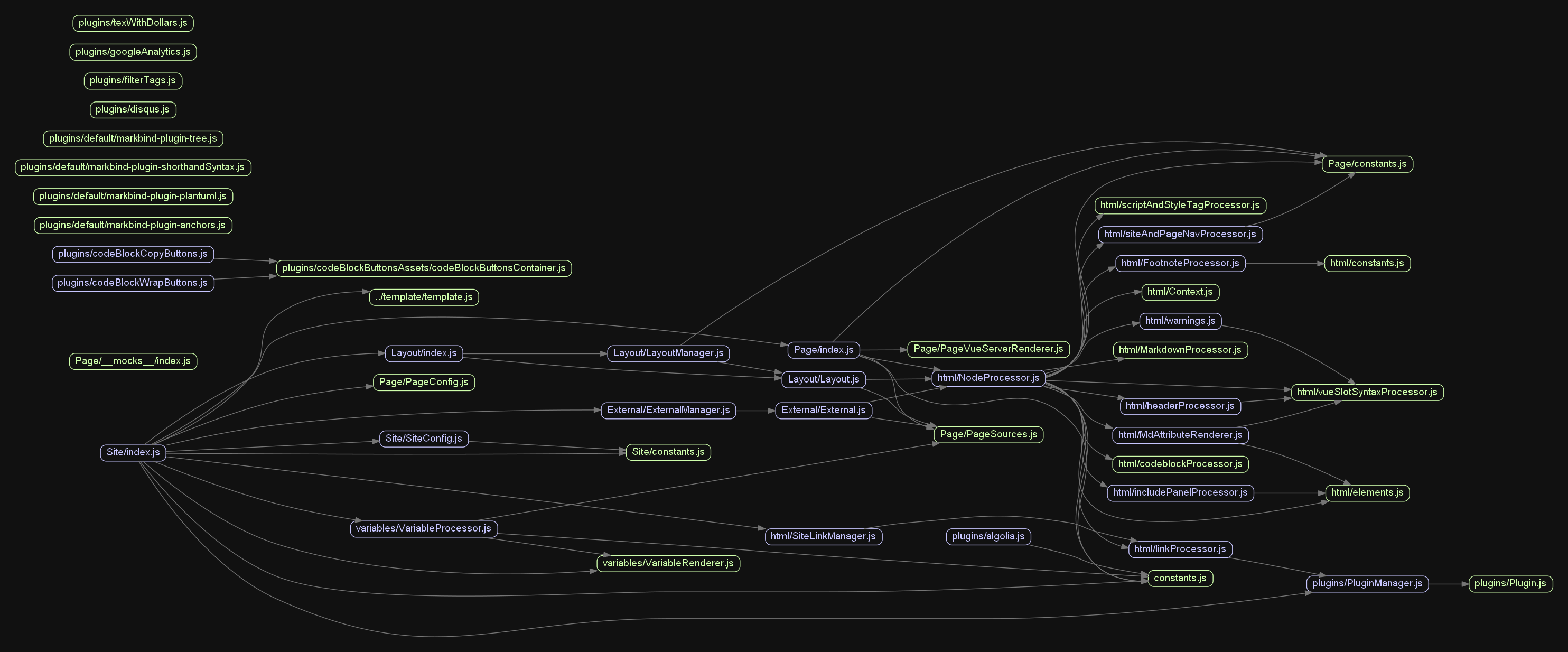
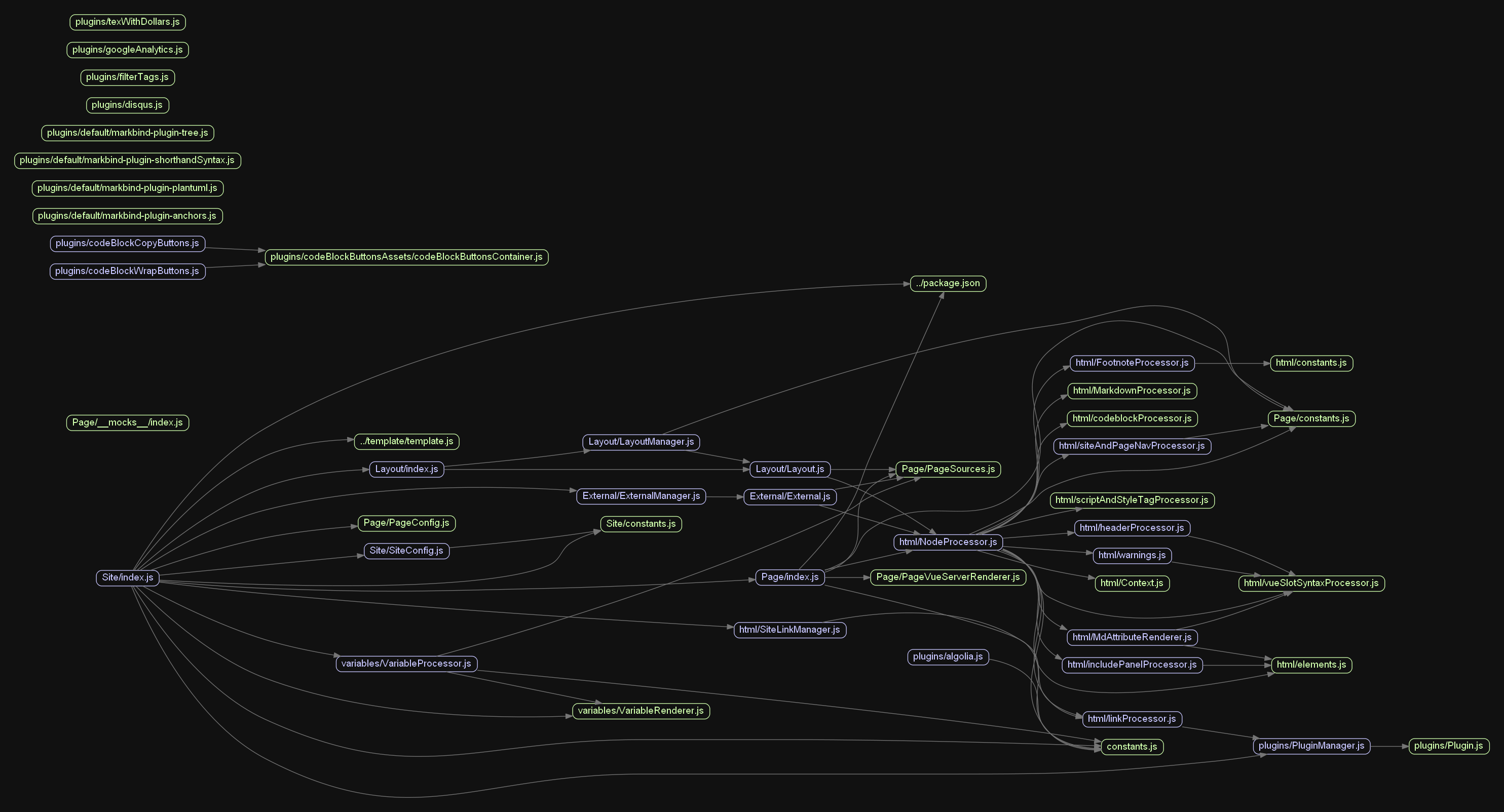
  • (Managing) Should the migration be done in-order or free-to-pick? It would be easier to migrate things in topological order so we don't have to spend time guessing types from other files that we haven't migrated yet (which could also be hard at times like for complex objects), but it might take longer time as now we have a bottleneck (have to migrate x first before y).

As a reference, here's our internal dependency graph for core at the current point in this PR (only js files, leaving out lib, patches, and plugins edit: plugins should be included as well). It's a huge image so you can click on it and zoom on it. If going for topological order, the green ones are available files to migrate immediately after this PR.

test

  • (Adapting) Some types from external libraries often have optional properties declared, like for htmlparser2's nodes the name property is actually optional (i.e. could be undefined). Right now we just use node.name in many of our functions as if it's a defined property. When adapting to TypeScript, this will cause many errors. To fix it, we have three choices:
    1. Have type validation on every function call (the most secure way, but leads to repeated checks)
    2. Have validation on a high-level call, then assert that the properties are non-null (the easiest way, but is not good for security)
    3. (Just thought of this) Devs selectively remove the optional condition on properties which we have validated are non-null with some TypeScript magic. Not sure on this.

Copy link
Contributor

@ang-zeyu ang-zeyu left a comment

Choose a reason for hiding this comment

The reason will be displayed to describe this comment to others. Learn more.

on the first commit 300dbcf

@ang-zeyu
Copy link
Contributor

No comments on the second fixup, nice work with tailoring all the linting configurations 👍

@ang-zeyu
Copy link
Contributor

I'd like to ask for advice about the migration specifics:

  • (Managing) Should the migration be done in-order or free-to-pick? It would be easier to migrate things in topological order so we don't have to spend time guessing types from other files that we haven't migrated yet (which could also be hard at times like for complex objects), but it might take longer time as now we have a bottleneck (have to migrate x first before y).

Agreed. Though, I don't really have a preference on enforcing this. It might become apparent to anyone who tries to do some conversion that we should proceed in topological order. There might also be better ways at this we can't think of right now 🤔

As a reference, here's our internal dependency graph for core at the current point in this PR (only js files, leaving out lib, patches, and plugins edit: plugins should be included as well). It's a huge image so you can click on it and zoom on it. If going for topological order, the green ones are available files to migrate immediately after this PR.

test

  • (Adapting) Some types from external libraries often have optional properties declared, like for htmlparser2's nodes the name property is actually optional (i.e. could be undefined). Right now we just use node.name in many of our functions as if it's a defined property. When adapting to TypeScript, this will cause many errors. To fix it, we have three choices:

    1. Have type validation on every function call (the most secure way, but leads to repeated checks)
    2. Have validation on a high-level call, then assert that the properties are non-null (the easiest way, but is not good for security)
    3. (Just thought of this) Devs selectively remove the optional condition on properties which we have validated are non-null with some TypeScript magic. Not sure on this.

Right now we just use node.name in many of our functions as if it's a defined property.

I think one of the main motivations for adopting typescript is avoiding mistakes from this.

I'm favouring something along options 1 & 3 as such, to deal with this on a case-by-case basis.

// e.g.
const x = node.name as string; // forcibly "recast"

I think we might figure out better solutions as we go along in other conversion PRs though, I can't really say for sure right now.

One alternative worth sharing (but likely not applicable in this case) I came across in my previous internship was to override @types declarations in a custom .d.ts file. However, in that case, we had full, logical verification that the property was always going to be defined for our use cases. Something that might be an option too. (depends on the issue)

@ryoarmanda
Copy link
Contributor Author

Have fixed the wording nits @ang-zeyu , also updated tsconfig as I found out that npm run dev was a bit faulty just now.

Copy link
Contributor

@ang-zeyu ang-zeyu left a comment

Choose a reason for hiding this comment

The reason will be displayed to describe this comment to others. Learn more.

Lgtm 👍

Let's squash the fixups in and rebase this over the latest commit on the main branch (so it goes in "immediately after" - just to keep things neat)

@ang-zeyu
Copy link
Contributor

You can it merge in after if @jonahtanjz has nothing else to add : )

@ang-zeyu ang-zeyu requested a review from jonahtanjz April 20, 2022 05:50
Copy link
Contributor

@jonahtanjz jonahtanjz left a comment

Choose a reason for hiding this comment

The reason will be displayed to describe this comment to others. Learn more.

Nice work @ryoarmanda 👍

LGTM :)

@ryoarmanda ryoarmanda force-pushed the adopt-typescript branch 2 times, most recently from a34f5c9 to 662fe14 Compare April 20, 2022 07:41
@jonahtanjz jonahtanjz added this to the 4.0 milestone Apr 20, 2022
@ryoarmanda
Copy link
Contributor Author

Okay, will do the merge tonight. Will update on the merge results on whether we need rename-threshold (cc @ang-zeyu)

@ryoarmanda ryoarmanda merged commit d81eaee into MarkBind:master Apr 20, 2022
@ryoarmanda
Copy link
Contributor Author

ryoarmanda commented Apr 20, 2022

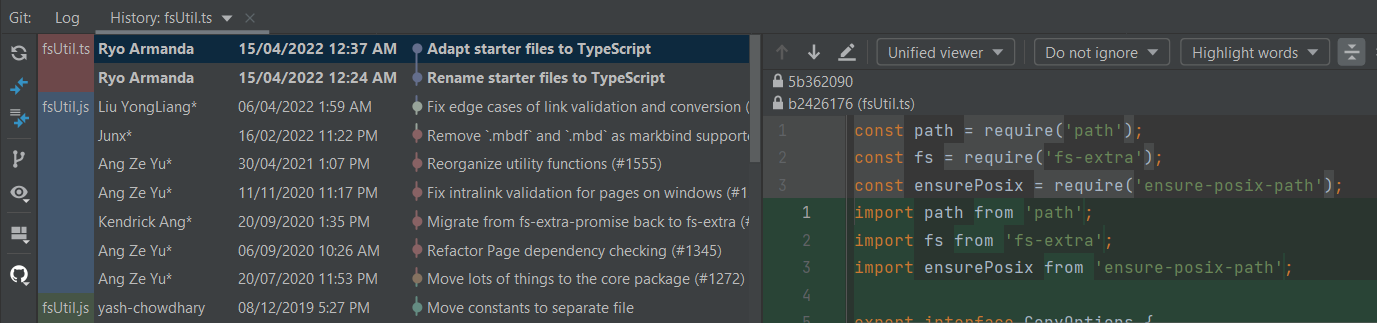
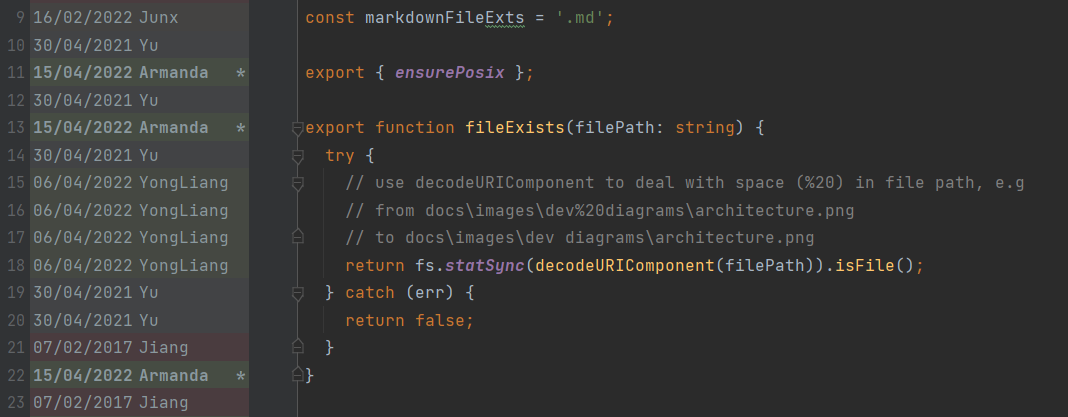
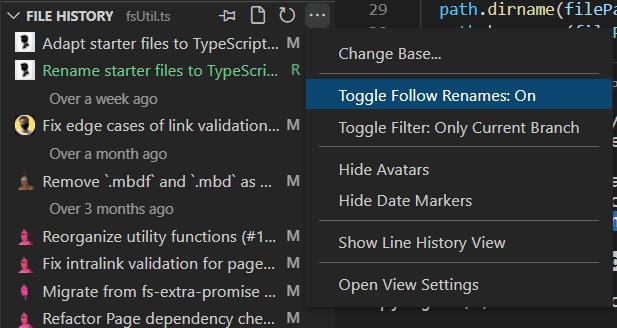
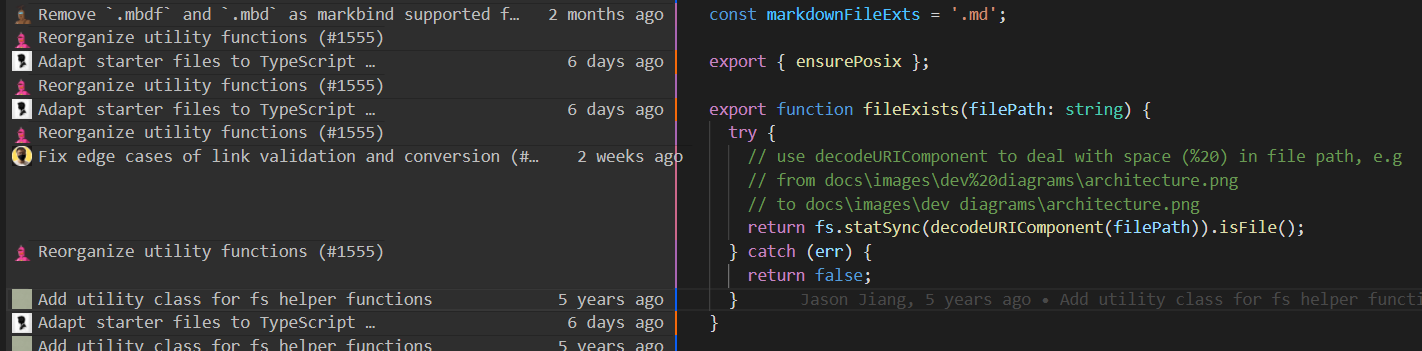
@ang-zeyu To report: I believe the merge process is working well, but the matter of displaying the history differs from the situations below. GitHub history does not follow renames by design, WebStorm's history and annotate follow the rename out of the box, and VS Code (+ GitLens)'s has to modify some settings in order to follow renames and ignore whitespaces.

Here it is in WebStorm checking fsUtil's history and annotate (it is one of the adapted files that receives substantial line changes):

image

image

In VS Code (+ GitLens):

image

(still not sure how to configure the annotate Edit: found it, set to ignore whitespace in blame, that's how WebStorm does it):

image

And in GitHub:

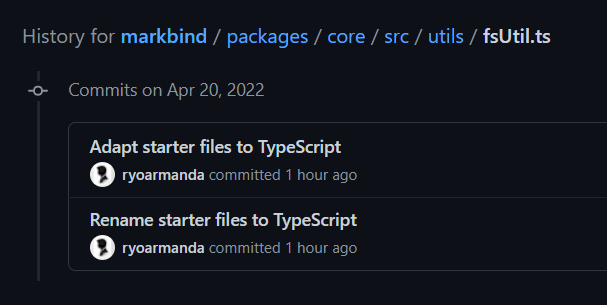
image

(GitHub's situation is unavoidable for now, the follow renames has been requested since 2009 and hasn't seen the light since... discussion tracker)

@ang-zeyu
Copy link
Contributor

Thanks for investigating @ryoarmanda, this is new to me as well.

I think not much we can do here since it depends on the git client involved. (unavoidable for github; for vscode since its a preference, we can leave it up to individual developers)

Noticed as well with cli git show --diff-merges=on --summary d81eaee1 that certain files are not detected as renames. (though its ok with git log -- filename, up until the rename commit at least (--follow required for beyond that)).

Other git clients:

  • gitkraken - ok by default
  • sourcetree - same situation with cli (also has a "--follow" option)

For later merges, we could try a manual merge with --rename-threshold option mentioned earlier to see if it fixes the "git show issue". I think its ok to leave the current merge as-is since its a small offending number (3) of small files, and there's already work done over it from other PRs.

Sign up for free to join this conversation on GitHub. Already have an account? Sign in to comment

Labels

None yet

Projects

None yet

Development

Successfully merging this pull request may close these issues.

3 participants