Add dark style for fenced code blocks#1355
Conversation


| <link rel="stylesheet" href="../markbind/glyphicons/css/bootstrap-glyphicons.min.css"> | ||
| <link rel="stylesheet" href="../markbind/css/octicons.css"> | ||
| <link rel="stylesheet" href="../markbind/css/github.min.css"> | ||
| <link rel="stylesheet" href="../markbind/css/vs2015.min.css"> |

There was a problem hiding this comment.
hmm, does this mean no light mode? =\
To clarify, what I meant is to use the light styles (github.min.css) during printing when dark mode is on (default) and under normal operation if dark mode is off (provide some way to toggle off dark mode)
e.g.
in site.json, maybe add a style key
{
  style: {
    codeTheme: "light" // implicitly dark by default
  }
}
the problem shifts to us needing to provide the whole 'light' styling inside the rule.
regarding your earlier comment on duplication as well, you could try the not print operator https://developer.mozilla.org/en-US/docs/Web/CSS/Media_Queries/Using_media_queries for the dark mode styles
There was a problem hiding this comment.
Oh I thought you want to set it as default (like the only one) as well from what I read on the issue 😅 I'll add the toggle on site.json
 ryoarmanda
changed the title
ryoarmanda
changed the title
docs/userGuide/siteJsonFile.md
Outdated
| "faviconPath": "myfavicon.png", | ||
| "titlePrefix": "FooBar Dev Docs", | ||
| "theme": "bootswatch-cerulean", | ||
| "highlightStyle": "light", |
There was a problem hiding this comment.
should we do
style: {
  codeTheme: "..."
  theme: ... // later pr
}
instead? so we can move theme inside there later on since there's now multiple style properties
There was a problem hiding this comment.
highlightStyle sounds a little like the highlight text style we have, https://deploy-preview-1355--markbind-master.netlify.app/userguide/formattingcontents#text-styles, should we change this to something more explicit?
There was a problem hiding this comment.
style looks more apt to consolidate all the style configurations for the site (I don't know how it will be in the future, we only have two style properties so far). I'll introduce that property, and also rename highlightStyle to codeTheme.
There was a problem hiding this comment.
Also, a quick question, what do you think should happen when authors write a wrong option to codeTheme (e.g. "qwerty")? Should MarkBind halt or let it quietly discard the option and continue to use the default?
There was a problem hiding this comment.
hmm haven't thought of validating site.json before, my preference here is to logger.warn the user softly and fall back to the dark theme since style isn't critical
for other properties like baseUrl that are we could throw exceptions (in a later pr perhaps)
There was a problem hiding this comment.
if you're interested, you could add validation for all applicable properties together in a later pr as well, and just leave this one be for now :-)
packages/core/src/Page/index.js
Outdated
| } | ||
|
|
||
| adjustHighlightStyle() { | ||
| const $ = cheerio.load(this.content); |
There was a problem hiding this comment.
hmm, parsing the entire document for this seems pretty expensive (its current liberal use is also our main performance bottleneck); let's try to to move it to the main html processing area in ComponentParser
| <link rel="stylesheet" href="markbind/glyphicons/css/bootstrap-glyphicons.min.css"> | ||
| <link rel="stylesheet" href="markbind/css/octicons.css"> | ||
| <link rel="stylesheet" href="markbind/css/github.min.css"> | ||
| <link rel="stylesheet" href="markbind/css/vs2015.min.css"> |
There was a problem hiding this comment.
nice, swapping the entire style sheet out should be more printer friendly
| } | ||
|
|
||
| pre > code.hl-dark { | ||
| background: #1e1e1e; |
There was a problem hiding this comment.
I have no comments about the vs2015 theme choice, maybe we can get @damithc's opinion though
the background here does seem a little too dark though, propose: #333333 (lightness +8%) if its not just me =P
There was a problem hiding this comment.
the line number and heading background to be brightened as well
https://deploy-preview-1355--markbind-master.netlify.app/userguide/formattingcontents#syntax-coloring
https://deploy-preview-1355--markbind-master.netlify.app/userguide/formattingcontents#heading
There was a problem hiding this comment.
Ah the background is actually identical to the default theme in VS Code so personally I've grown accustomed to it haha, the line numbering color is also similar. But #333333 is also not bad as an alternative. Would like to know what @damithc prefers as well

There was a problem hiding this comment.
What are my choices? I don't mind going with a scheme used by another popular tool.
There was a problem hiding this comment.
@damithc The theme choices are available on Highlight.js' demo here https://highlightjs.org/static/demo/ (there are loads of it, light and dark). The dark theme implemented in this PR is Vs 2015, but it's just my pick as it is very similar to VS Code which I'm very familiar with. You can check how it looks like on the links @ang-zeyu posted above.
Also, if you're okay with it, are you also okay with the current background color (re: #1e1e1e or #333333)?
There was a problem hiding this comment.

Like this image? (current) It is already slighty darker than the code text
There was a problem hiding this comment.
Like this image? (current) It is already slighty darker than the code text
Yes, that works. I thought the same color is being used (I saw something like that earlier in the thread).
There was a problem hiding this comment.
ahhh no that was my original suggestion to @ryoarmanda
Hmm, now that you mention it, editors do stylize the line numbers to be a bit darker than normal text.
lets go with this instead, as you guys mentioned the line numbers shouldn't receive too much attention
There was a problem hiding this comment.
Okay then, we'll use that color for the line numbers, thanks all 👍
Edit: oh wait, that is the original color! It's the same as the light style 😅
There was a problem hiding this comment.
Edit: oh wait, that is the original color! It's the same as the light style 😅
yes, we went full circle 😅

|
I found a complication. Because the asset provided for Highlight.js styling is universal for all code highlighting in the site, inline code is also stylized that way. This causes unexpected presentation like this:
In light of this, should we also present inline code in dark theme, or should we reserve the theming only for the code blocks? If we choose the former, it's easier to act on (only need to adjust CSS for the inline code, will likely need to introduce a little bit of padding), but I don't know if this would be desirable to you guys. If we choose the latter, then the bad news is that I'd need to scrap the current approach of swapping the CSS according to theme (as we need two separate stylings happening at once now), and probably just pasting the whole dark theme CSS (<100 lines, with some slight selector adjustment) onto our MarkBind CSS. |
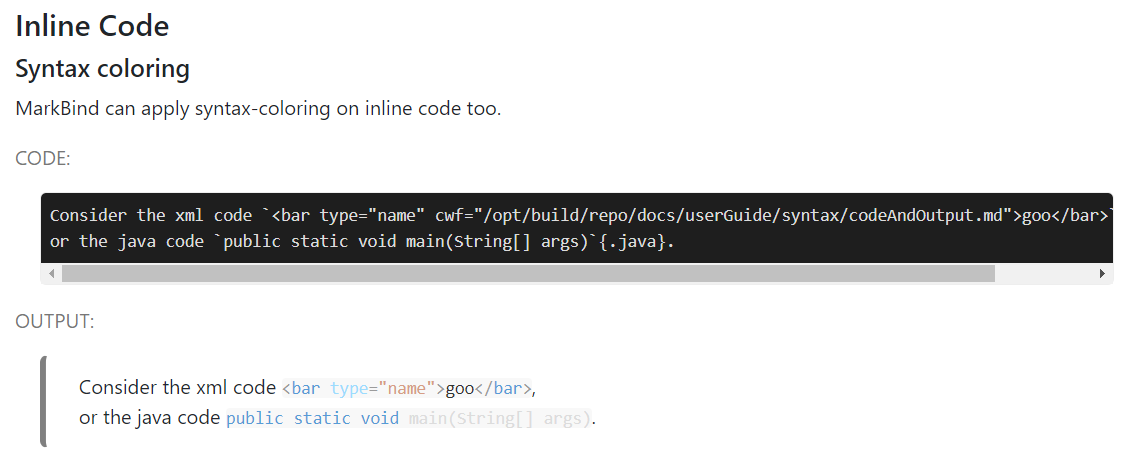

The former should be more consistent, maybe to distinguish it you could use a slightly lighter background color than code blocks (like the subtle difference in the current light style) |
| } | ||
|
|
||
| code > span.highlighted { | ||
| code > span.highlighted-light { |
There was a problem hiding this comment.
actually, since you already havemutually exclusive stylesheets, how about moving all code related styles into github.min.css / vs2015.css (renaming appropriately and preserving license notices)?
should be easier to implement than requiring separate classes for light / dark
There was a problem hiding this comment.
Good idea, I'll try to move the theme-specific styling to their respective CSS files, but some will be kept in markbind.css for identical things like layouting and common colors (if any) so that it can be shared by both.
I'll also keep the license but add something like (slightly modified for MarkBind) to preserve credits

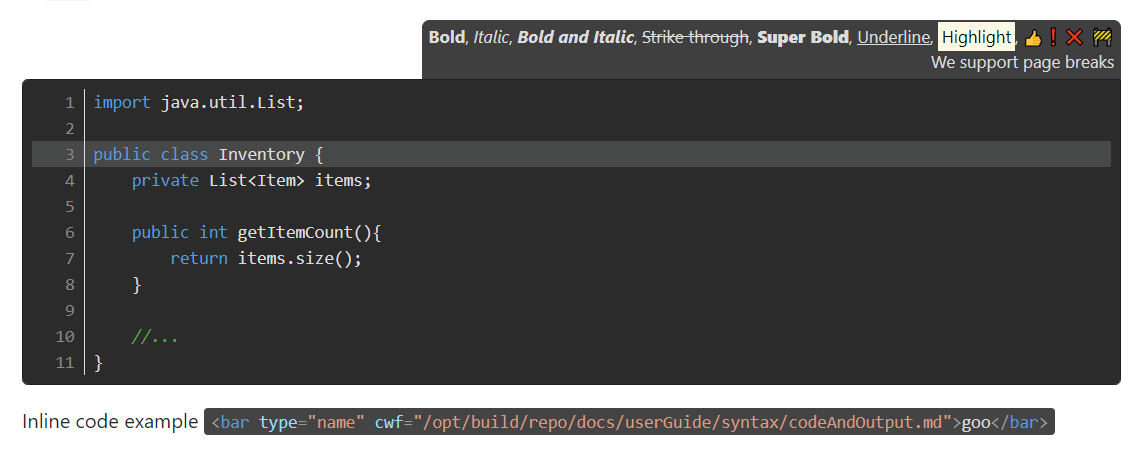
I agree. If possible, apply it for both types. |
|
The heading background looks great 👍 Are there specific languages in which the inline code styling would apply only? some regressions with the light style too: |

|
The inline styling do appear on the Netlify. Though it only applies to syntax-colored variant of inline code.
I'll handle the regression in a minute |
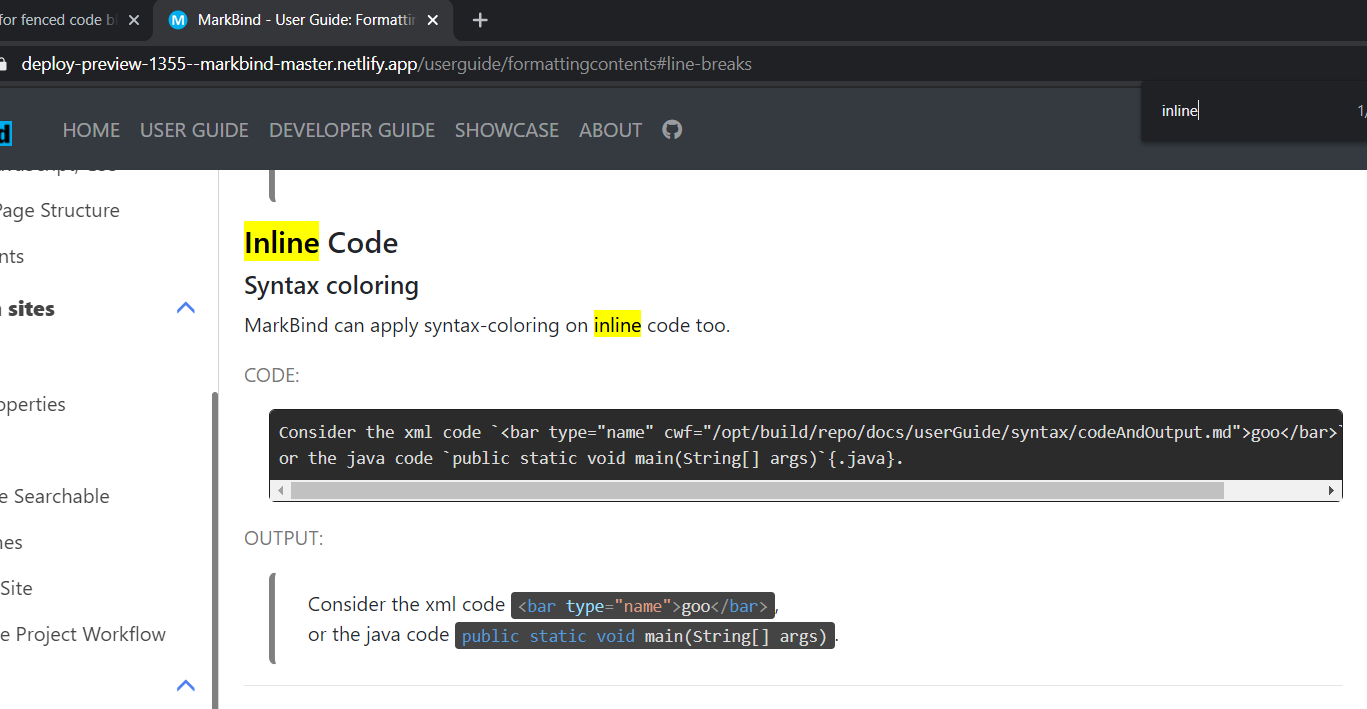
it applies only when you specify a language; per the code here https://github.com/MarkBind/markbind/blob/master/packages/core/src/lib/markdown-it/index.js |
Let's keep it consistent! A little strange for it to go back and forth between light / dark =X |
As the |
| @@ -1 +1 @@ | |||
| .hljs{display:block;overflow-x:auto;padding:0.5em;color:#333;background:#f8f8f8}.hljs-comment,.hljs-quote{color:#998;font-style:italic}.hljs-keyword,.hljs-selector-tag,.hljs-subst{color:#333;font-weight:bold}.hljs-number,.hljs-literal,.hljs-variable,.hljs-template-variable,.hljs-tag .hljs-attr{color:#008080}.hljs-string,.hljs-doctag{color:#d14}.hljs-title,.hljs-section,.hljs-selector-id{color:#900;font-weight:bold}.hljs-subst{font-weight:normal}.hljs-type,.hljs-class .hljs-title{color:#458;font-weight:bold}.hljs-tag,.hljs-name,.hljs-attribute{color:#000080;font-weight:normal}.hljs-regexp,.hljs-link{color:#009926}.hljs-symbol,.hljs-bullet{color:#990073}.hljs-built_in,.hljs-builtin-name{color:#0086b3}.hljs-meta{color:#999;font-weight:bold}.hljs-deletion{background:#fdd}.hljs-addition{background:#dfd}.hljs-emphasis{font-style:italic}.hljs-strong{font-weight:bold} No newline at end of file | |||
| .hljs{display:block;overflow-x:auto;padding:.5em;color:#333;background:#f8f8ff}.hljs-comment,.hljs-quote{color:#998;font-style:italic}.hljs-keyword,.hljs-selector-tag,.hljs-subst{color:#333;font-weight:700}.hljs-literal,.hljs-number,.hljs-tag .hljs-attr,.hljs-template-variable,.hljs-variable{color:teal}.hljs-doctag,.hljs-string{color:#d14}.hljs-section,.hljs-selector-id,.hljs-title{color:#900;font-weight:700}.hljs-subst{font-weight:400}.hljs-class .hljs-title,.hljs-type{color:#458;font-weight:700}.hljs-attribute,.hljs-name,.hljs-tag{color:navy;font-weight:400}.hljs-link,.hljs-regexp{color:#009926}.hljs-bullet,.hljs-symbol{color:#990073}.hljs-built_in,.hljs-builtin-name{color:#0086b3}.hljs-meta{color:#999;font-weight:700}.hljs-deletion{background:#fdd}.hljs-addition{background:#dfd}.hljs-emphasis{font-style:italic}.hljs-strong{font-weight:700}.hljs>span.highlighted{background:#e6e6fa}.hljs.inline{background:#f8f8f8}.hljs:not(.inline){border:1px solid #c8c8c8;border:1px solid rgba(200,200,200,.3)}.code-block-heading{background:#f2f2ff;color:#8787a5} | |||
There was a problem hiding this comment.
pink highlight is missing:

let's rename these files as well #1355 (comment), since they contain custom styles now too.
There was a problem hiding this comment.
wondering if we should separate and format our styles as well
I believe the extra whitespace is hardly an issue over being able to figure out which are our custom additions
There was a problem hiding this comment.
I have to add a no-lang class here to detect this. Okay then.
There was a problem hiding this comment.
wondering if we should separate and format our styles as well
I agree, it would be easier to read. How about we move these CSS files into core-web/src/styles folder instead, so that it's now alongside markbind.css? Reason is that we have already customized it, so it's not purely a third-party asset anymore, like the ones in the current asset folder. We can deem it as a part of our core-web assets (with proper crediting to the original author of the theme of course).
I think if we do that, and (if I'm not wrong) webpack will build all CSS inside that folder, then we can just store the un-minified version of it, and we'll pick and choose which one to include during copyCoreWebAsset in Site/index.js. That way, we can make the CSS readable on development end while still providing the minified version on deployment. Not sure if my understanding is correct on this, but what do you think?
There was a problem hiding this comment.
I have to add a
no-langclass here to detect this. Okay then.
okay
alternatively you could do [class="hljs inline"], but I don't there's much of an issue in either case
How about we move these CSS files into core-web/src/styles folder instead, so that it's now alongside markbind.css?
Yes that'd be really nice, your understanding is correct too. (also you get the hot reload package when modifying the styles)
The issue at the moment is that there is no webpack configuration-compilation going at site-building time, which requires some amount of groundwork to implement. (currently its only updated at every release)
I'm ok if you want to take this route, but it'll likely take a substantial amount of time to do; Leaving it as assets for the moment may be a more feasible approach
We also have another issue #903 which definitely requires this (configuring webpack compilation at site building time)
There was a problem hiding this comment.
Hmm, I see. Well, let's put a pin on this and revisit in the future when the webpack configuration is able to set this up.
Pushing the latest changes now.
| token.attrJoin('style', `counter-reset: line ${startFromZeroBased};`); | ||
| } | ||
|
|
There was a problem hiding this comment.
let's keep unrelated changes to another PR (our custom renderers should probably be moved to entirely separate linted file)
There was a problem hiding this comment.
Are you referring to the whitespace changes here? Looks like WebStorm fixed it out automatically for some reason. Let's see if I can re-add these back
| + hljs.highlight(lang, token.content, true).value | ||
| + '</code>'; | ||
| } else { | ||
| token.attrSet('class', `${inlineClass}`); |
| @@ -0,0 +1 @@ | |||
| .hljs{display:block;overflow-x:auto;padding:.5em;color:#333;background:#f8f8ff}.hljs-comment,.hljs-quote{color:#998;font-style:italic}.hljs-keyword,.hljs-selector-tag,.hljs-subst{color:#333;font-weight:700}.hljs-literal,.hljs-number,.hljs-tag .hljs-attr,.hljs-template-variable,.hljs-variable{color:teal}.hljs-doctag,.hljs-string{color:#d14}.hljs-section,.hljs-selector-id,.hljs-title{color:#900;font-weight:700}.hljs-subst{font-weight:400}.hljs-class .hljs-title,.hljs-type{color:#458;font-weight:700}.hljs-attribute,.hljs-name,.hljs-tag{color:navy;font-weight:400}.hljs-link,.hljs-regexp{color:#009926}.hljs-bullet,.hljs-symbol{color:#990073}.hljs-built_in,.hljs-builtin-name{color:#0086b3}.hljs-meta{color:#999;font-weight:700}.hljs-deletion{background:#fdd}.hljs-addition{background:#dfd}.hljs-emphasis{font-style:italic}.hljs-strong{font-weight:700}.hljs>span.highlighted{background:#e6e6fa}.hljs.inline{background:#f8f8f8}.hljs.inline.no-lang{color:#e83e8c}.hljs:not(.inline){border:1px solid #c8c8c8;border:1px solid rgba(200,200,200,.3)}.code-block-heading{background:#f2f2ff;color:#8787a5} | |||
There was a problem hiding this comment.
ok looks good functional wise
let's clealy break off our custom styles as well to facilitate future changes
There was a problem hiding this comment.
Ok, I think I'll break it off to another line (but still in minified form), and add a short comment to indicate these are MarkBind-customized styles


Markdown code is always presented on a light background.

Let's provide a dark style for this, and provide user configuration to
specify which styles to use.
3 participants


What is the purpose of this pull request? (put "X" next to an item, remove the rest)
• [x] Enhancement to an existing feature
Resolves #1219
What is the rationale for this request?
Fenced code blocks are presented with a light style. It would be better to include dark style as well, and provide user to toggle between the two (with dark style being the default).
What changes did you make? (Give an overview)
vs2015.min.cssfrom Highlight.jssite.jsonconfighighlightStyleto indicate which style the fenced code blocks should be presented. The default is"dark".githuborvs2015depending on the value insite.jsonProvide some example code that this change will affect:
Preview of the new dark mode style:
Is there anything you'd like reviewers to focus on?
N/A
Testing instructions:
npm run test(to test) ormarkbind serve -d(to view the site)Proposed commit message: (wrap lines at 72 characters)
Code fences are presented on a light background, and it is the only
style available.
Let's provide a dark style for the code block presentation and provide
user configuration to specify which styles to use.