Conversation


|
could use some opinions here 😁 @damithc @acjh @marvinchin |

Looks nice. The questions feature has value in terms of nicer presentation. It can have even more value if we separate check from show answer so that the reader can try multiple times. Can add a reset button too. I'm not sure if the quiz feature has enough value to make it worth the cost. One can always list the questions one after the other to form a quiz. Adding up the correct answers doesn't add a lot of value unless the quizzes are long. Side note: In my current use of MarkBind I use LumiNUS for all my quiz needs. The questions I currently have in my MarkBind sites were added before I moved to using LumiNUS for quizzes. Hence, my low enthusiasm for this feature (wouldn't want to spend resources on a feature I'm not going to use much). Perhaps we strengthen the question feature but put the quiz feature on hold for now? |
Cost in terms of maintainability? I separated how a In terms of client side rendering performance it would actually improve it as opposed to listing the questions one after the other, as the dom and virtual dom for unseen questions is not rendered.
These functions are provided in the quiz already, I avoided putting in
This is just imo though, it's highly subjective to individual learning styles. I'm not opposed to having it as an opt-in thing like
Yup the aim isn't to replace fully fledged learning platforms with a backend, but simply to provide a more interactive experience, as well as
If it helps, my intended use case for the quiz component was somewhat of the following:
|
Yes, plus the effort needed to go from here to production., which could be a lot.
As this is self-study mode without any oversight from instructor, we have to assume the reader will choose whatever works for her. We simply provide all the possibilities. The reader choose correctly, we reveal everything. If the answer is wrong, the reader can try again or give up and ask for the answer. I don't think there is any downside of giving that choice to the reader. |
Just need some snapshot tests and it should be good to go. Also any other minor design / feature tweaks and additions.
Presentation wise there may be value in having a clean ui, especially if the page is already heavy Also for mcq questions, you very quickly exhaust all the possible options (even if you're not intending to brute force out the answer) by just clicking For checkbox questions, I feel that it quickly becomes a tiresome guessing game if we don't show which option(s) were correct / wrong, since there are 2^n possible answers. If we show which option(s) were correct / wrong, it leads to inconsistent behaviour with mcq questions, and also it is pointless - because unchecked answers can be correct we need to show whether all options were correct / wrong. ( How about just having it for How it looks from some in browser edits:
|
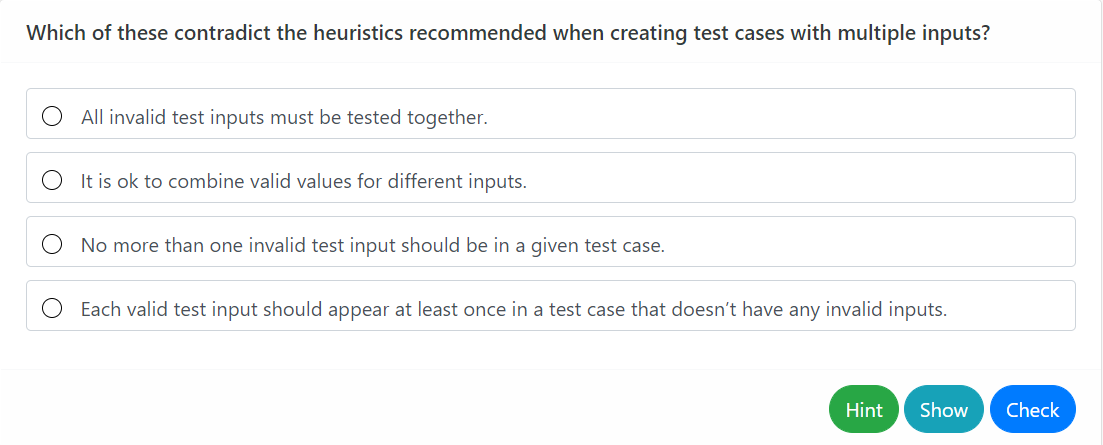
|
Consider this analogy: Scenario 1:
Scenario 2:
The value of this process comes from the student thinking about the question and trying to find the answer. This is why teachers don't give answers right away and instead try to guide the student towards the answer by giving more and more hints. The answer itself is less important than the attempts to get at the answer. The more attempts the better. Of course this doesn't work if the student is randomly answering without thinking about it. In that case might as well give away the answer. Consider these buttons:
The reader can choose scenario 1 or 2 by clicking on one of the two buttons. This is something the old version cannot do. Having said that, I'm fine with the current version too as it behaves the same way as existing questions and look nicer. Try not to break the legacy syntax because I might not have time to migrate to the new syntax right away. |
On second thought, that probably has more priority than trying to make the behaviour consistent from an author standpoint, or minor feature duplication. To reconfirm what you meant (the or a2. Mcq questions - b1. Checkbox questions - or b2. Checkbox questions - c. Text questions - When Is there a better naming for
The only weird part currently would be the addition of the On syntax, would it be better to just have |
|
Haven't looked at the syntax yet. Let's nail down the behavior first. a1, to allow the reader to give up up after checking text questions can have keywords that should be in the answer and a separate explanation, which means it too can have both buttons. What do you think of this alternative? Only a |
yup
good idea, this would make the initial UI more consistent with questions in quizzes as well. I'm ok with
|
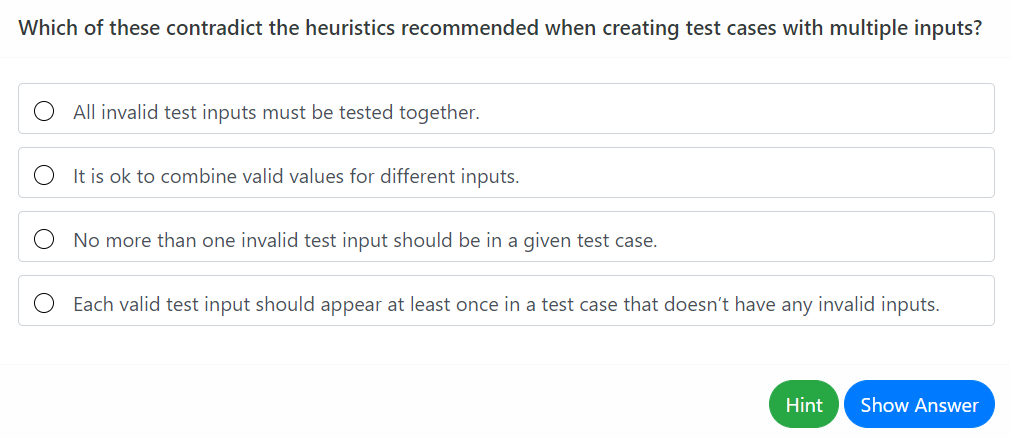
Yes, button transition better.
Sure. |
|
On a separate matter, is it smoother to make the hint appear just above the button rather than far away from the button? Less travelling for the eye. |
like this? works too.
|
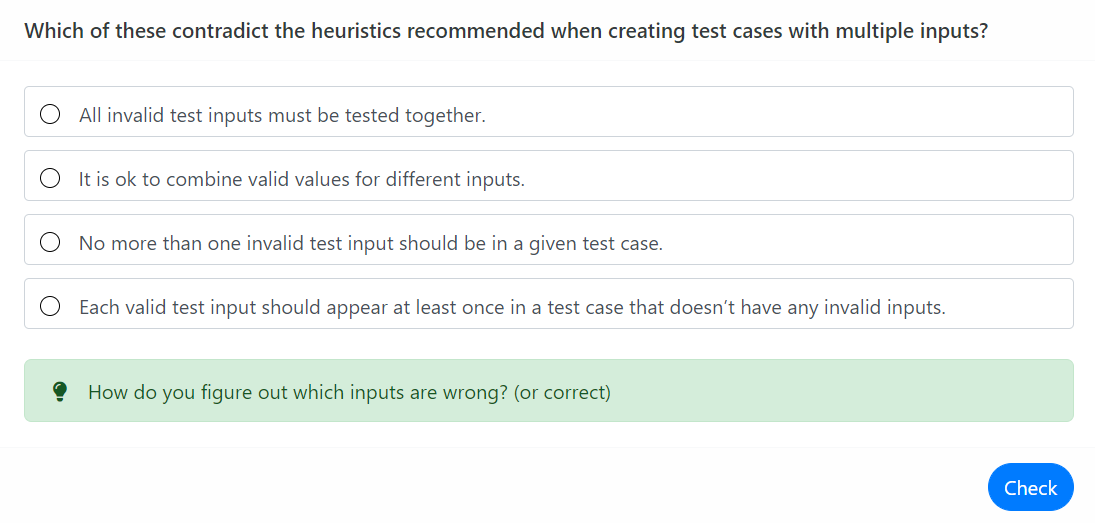
Yes, let's do that then. |
|
Regarding the syntax, possible to avoid introducing a |
|
the old eventual deprecation of all If preferred I could use it in the examples for now still instead, to avoid inconsistency with the other components |
I see. I guess we'll use the slot syntax for now until we changeover to # syntax later. |
|
Made the changes, I also changed Placing The downside would be needing to manually format the question everytime, ie., results in a really plain question text (unless you format it manually with markdown or put it into
|
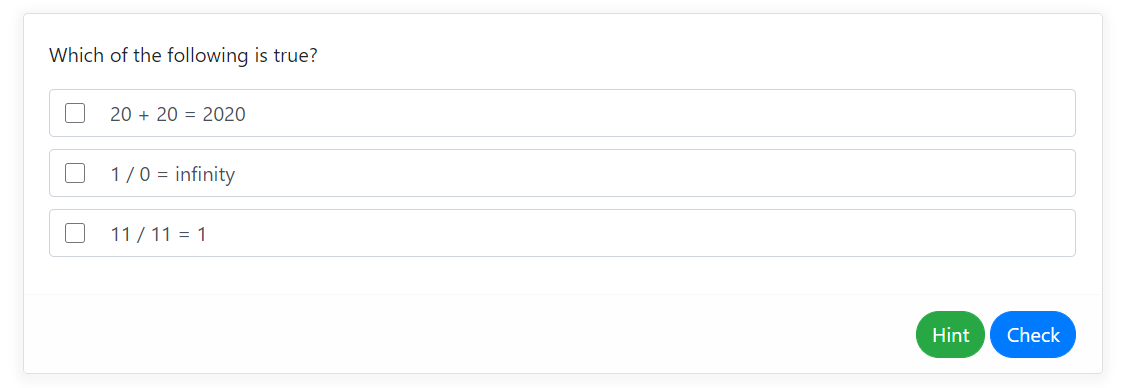
Yes, I think it's fine. It's actually better to let the author format the question in any way rather than force a specific format. Bolding the question by default is not appropriate in some cases e.g., when the questions is very long. Pros and cons of using simpler tags |
For
all of which allows markdown like our other components? |
Do you mean these can be specified as either properties (supports inline markdown) or using the slot syntax (if block markdown is needed)? Like this? |
Yup much like most other components |
Sounds fair. In the documentation, give a simple example first (i.e., using props) and mention that slot syntax can be used too (with a smaller example). Otherwise the syntax can appear too verbose at first glance. Alternatively, use slot syntax only for one option of the example. |
 ang-zeyu
force-pushed
the
question-component-revamp
branch
2 times, most recently
from
ang-zeyu
force-pushed
the
question-component-revamp
branch
2 times, most recently
from
5233255 to
cab592a
Compare
|
Done, features and behaviour should be more or less locked down. Also added tests for transforming the mentioned attributes into slots. In the meantime, any comments / suggestions on the docs are welcome 😄 |

 damithc
left a comment
damithc
left a comment
damithc
left a comment
There was a problem hiding this comment.
Added some comments for the documentation.
docs/userGuide/syntax/questions.mbdf
Outdated
| :pizza: :pizza: :pizza: :pizza: :pizza: :pizza: :pizza: | ||
|
|
||
| </template> | ||
| </question> |
There was a problem hiding this comment.
Any mention of whether all keywords need to match?
There was a problem hiding this comment.
added a mention, there's a threshold option to configure it as well
There was a problem hiding this comment.
I forgot to mention the checking algorithm, currently it just does case normalization + a naive substring search, so if you have a keyword xx, yxxy would also match.
Not sure if it should be more restrictive:
- splitting by whitespace + case normalization
- remove leading + trailing punctuation only:
\[](){}&|\'\"<>#:;~_^=\\-‑+*/\\\‘’“”,。《》…—‐•\ - then checking each token against the keyword
So far I can't really think of a use case that has leading and trailing punctuations, but to be safe, we could also provide an exact prop that skips step 2.
What do you think?
There was a problem hiding this comment.
This is not easy to do -- not sure if we should even try. Validation of text questions is not going to be that useful for most cases. Given the risk of false negatives (as well as false positives), as an author I'm likely to just give the answer in the explanation and let the reader figure out.
Something related: It can be misleading to mark answer as correct when no keywords are specified. The reader might think the answer was validated when it was not.
There was a problem hiding this comment.
I'm likely to just give the answer in the explanation and let the reader figure out.
I suspect this would be the majority use case as well, for questions that have long answers. Hence it's somewhat ok for the matching to be naive.
I was thinking more of mathematical / numerical questions with a single definite text answer, which the current algorithm may break (imagine a keywords="1.99" and the answer provided is 1.999 -- still correct by substring matching). Using the 1,2,3 above would fix this, but also makse the checking for long answers slightly stricter.
I'm not sure if we should advertise text questions as supporting mathematical / numerical questions as such, or defer it entirely to another pr and just use substring matching here 😮
It can be misleading to mark answer as correct when no keywords are specified. The reader might think the answer was validated when it was not.
fixed. it will still count toward the score in quizzes though.
There was a problem hiding this comment.
I'm not quite sure. 'Works for most cases' isn't very reassuring. We need to specify precisely the class of answers that works 100% and inform users to use the feature only for that class. We can't expect authors to experiment trial-and-error to find out whether to use the feature for each question.
For example, something like the following is safe:
The validation works only if the expected answer is a precise phrase e.g., an equation (case insensitive, white space variations ignored)
Anything else that works 100%? If there is, we can add it to the above.
Supporting percentage matches is problematic because not rewriting and rewriting can both match the keyword rewriting.
There was a problem hiding this comment.
The validation works only if the expected answer is a precise phrase e.g., an equation (case insensitive, white space variations ignored)
this dosen't work actually, in either algorithm, it's not the intended case
I'm not sure if we should advertise text questions as supporting mathematical / numerical questions as such, or defer it entirely to another pr and just use substring matching here 😮
I think we should defer those types of questions to another type of question, with a smaller input box.
I intend for the matching to be only correct 80-90% of the time. It's difficult by nature to match this 100% like you mentioned, and to reach 99% of matches we likely need some other complex language processing which is out of scope. There's also the show button as a fallback so readers can always view the answer.
I was wondering if a simple substring match that matches potentially more things but also risks more false positives (xx -> yxxy) would be better or a slightly more restrictive one with tokenization and punctuation removal as mentioned above as such would be better in achieving that 80-90%, but,
having just realised there's also the issue of non whitespace tokenized languages 😱, I think we could just stick with the former.
There was a problem hiding this comment.
to further clarify I intend to add something like that to the docs:
Warning: Keywords are validated by simply looking for the keyword as a pattern in the user's answer!
This works well for some cases but not all. (and then a popover giving one good and one bad example)
ang-zeyu
force-pushed
the
question-component-revamp
branch
from
6471525 to
284a9b0
Compare
ang-zeyu
changed the title
ang-zeyu
force-pushed
the
question-component-revamp
branch
from
284a9b0 to
1f2c47b
Compare
|
Added tests, and resolved the above documentation nits. @damithc anymore comments about the documentation? I'll give the tests one more look tonight before merging this if not, then I think we can get started with the release 😄 @marvinchin |
ang-zeyu
force-pushed
the
question-component-revamp
branch
from
1f2c47b to
def7e6b
Compare
| Question answer. <md>:pencil:</md> | ||
| </div> | ||
| <!-- Insert markdown into the header and hint using the respective attributes --> | ||
| <question ... header="Which of the following is correct? (**Header**)" hint="Think out of the box! :fas-box:"> |
There was a problem hiding this comment.
Should this be an mcq question instead?
There was a problem hiding this comment.
I made this checkbox for the purposes of the later more elaborate example with slots (Challenge: Try to get all the options correct in your first try!).
changed ... -> type="checkbox"
There was a problem hiding this comment.
In that question, the question itself can be rephrased to fit a check-box type. The current question is an equation that can only have one answer. Hence, the reader will wonder why we are using check boxes.
There was a problem hiding this comment.
not sure I follow, isn't the snippet above the same question with two answers?:
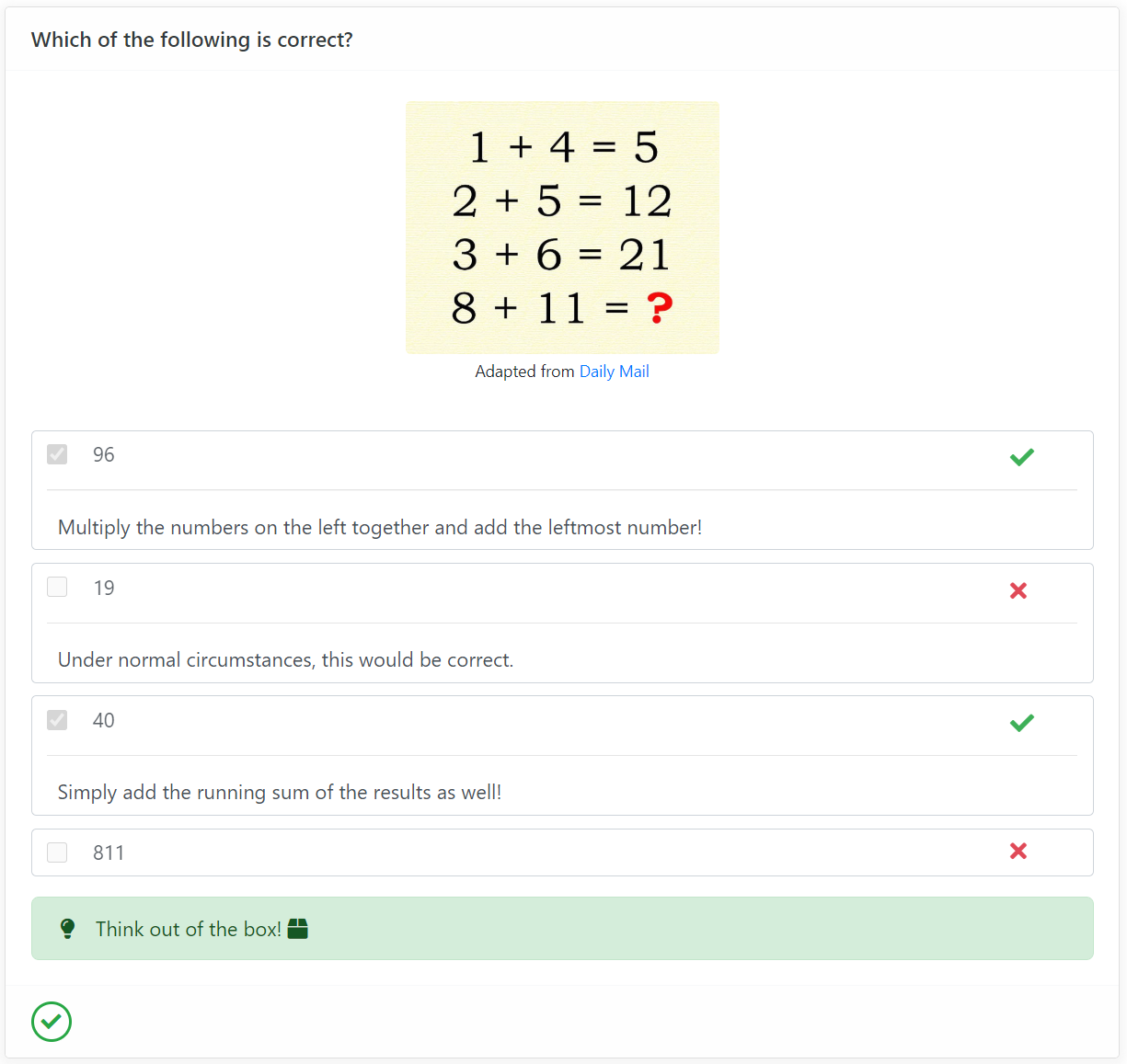
There was a problem hiding this comment.
My bad. I didn't read the question closely. In fact, I read the last line only and thought it's a simple addition question for primary kids.
| header | `String` | `''` | The markup to insert into the question header. The header is omitted if this is not provided. | ||
| header | Slot | empty | Functions similar to the `header` option, and overrides it if both are present. | ||
| hint | `String` | `''` | The content to display in the hint box. | ||
| hint | Slot | empty | Functions similar to the `hint` option, and overrides it if both are present. |
There was a problem hiding this comment.
I think we should some other way to indicate which attributes support the alternative slot syntax, rather than add one row for each. e.g., use a header[s]
There was a problem hiding this comment.
hmm, I was thinking we should actually introduce slots upfront in the components section and not all the way below in advanced tips and tricks, since they are widely used in the examples. (don't think we should forward reference in user guides). How about cleaning and standardising this in that PR?
There was a problem hiding this comment.
No need for forward reference. e.g., we can make it a modal/popover. Define in one place and <include> everywhere needed. No matter where the reader encounters it first, the definition is just a hover/click away.
There was a problem hiding this comment.
Sounds good. I'll add it in a pr after the one fixing the rest of the comments here
| <template slot="hint"> | ||
| How do you figure out which inputs are wrong? (or correct) | ||
| </template> | ||
| </question></variable> |
There was a problem hiding this comment.
We don't use template anywhere else. Why not <div slot="...">?
There was a problem hiding this comment.
updated, note that it introduces an additional wrapper <div> though.
perhaps we could build a shorthand syntax feature for <template slot="xx"> -> <t slot="xx>? (noting that vue 3.0 already shortens slot="xx" to #xx
| Question answer. <md>:pencil:</md> | ||
| </div> | ||
| <!-- Insert markdown into the header and hint using the respective attributes --> | ||
| <question ... header="Which of the following is correct? (**Header**)" hint="Think out of the box! :fas-box:"> |
There was a problem hiding this comment.
Alternatively, the intro section can simply give an example of each question type without code?
There was a problem hiding this comment.
It feels a little repetitive as questions are pretty big

2 participants


What is the purpose of this pull request? (put "X" next to an item, remove the rest)
• [x] New feature
• [x] Enhancement to an existing feature
Resolves #1184
What is the rationale for this request?
Total redesign / rewrite of question components, while preserving backward compatibility (though somewhat awkwardly since questions are always marked as 'correct').
External libraries: Suprisingly there aren't any ready made vue quiz components that suits our requirements (though an abundance of tutorials), also backwards syntax compatibility is a must
What changes did you make? (Give an overview)
Added various
<question type="">s:hasInput)Added
<quiz>, which strings multiple<question>s togetherto be done: (WIP)
vue.min.jsaren't updated here as well so ci fails for now)Is there anything you'd like reviewers to focus on?
Testing instructions:
npm run build:componentson this branch thenmarkbind sto play around with itProposed commit message: (wrap lines at 72 characters)
Revamp question component
Question components serve as a thin syntax wrapper on top of panel
components, and don't provide any form of answer checking.
Let's rewrite and redesign the question component, using bootstrap
cards as the design basis.
Let's also provide 3 types of questions - mcq, checkbox and text, which
allow for simple answer checking.
Educational websites may also want to build mini quizzes consisting of
multiple questions.
Let's provide the quiz component for this, which can string multiple
questions together with a simple scoring mechanism.