Hawkeye - Localization with LiDAR, GNSS/INS and ortho image map
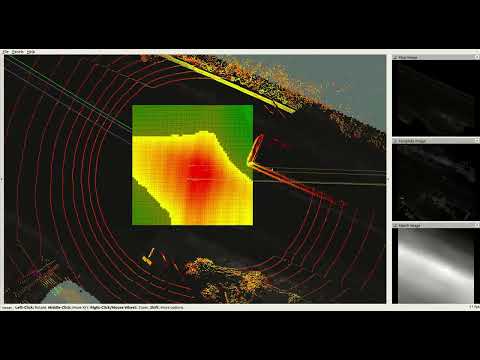
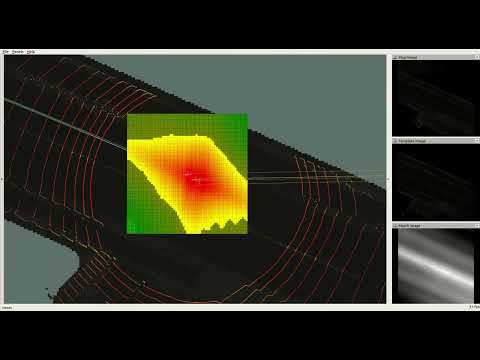
Demo Video (with Ground Segmentation)
Hawkeye and the config file for the sample are updated. To use the updated Hawkeye, please re-download the config file.
This is a limited re-implementation of this method. This estimates the pose with LiDAR, Eagleye and ortho image map without Millimeter Wave Radar. This implementation is extended to accommodate cases where GNSS/INS(Eagleye) errors accumulate for some reason.
This method corrects GNSS/INS position by maching the reflection intensity between the ground and a pre-made map. Only the x and y coordinates are corrected. The roll, the pitch and the yaw of GNSS/INS is not corrected and the z coordinate is ignored. The paper also uses Millimeter Wave Radar and the map of it as same as reflection intensity by LiDAR, but it is not implemented.
- A histogram filter centered on the GNSS/INSS position is used. The GNSS/INS pose is corrected by the center of gravity in the histogram.
- A map of the ground reflection intensity around the vehicle is generated from the accumulated LiDAR observations.
- This filter and map are of the same resolution and orientation as the pre-made map, independent of the vehicle orientation.
- The histogram is updated by the results of template matching between the runtime map and the pre-made map.
- Please see this paper for details.
As an extension, the center of the histogram optionally shifts when the estimated position is far from the center of the histogram. The histogram points newly made at the center shift are initialized by the nearby point. This can be invalid by setting the parameter CENTER_SHIFT_THRESHOLD or center_shift_threshold zero.
Ubuntu 18.04 - with ROS melodic
You can download the following sample files from here. Download all files and unzip ortho_image.zip.
This sample does not perform ground segmentation of LiDAR point cloud. To increase accuracy, place a ground segmentation node (not implemented in this repository) between the LiDAR driver and Hawkeye.
- Clone this repository.
mkdir -p hawkeye_ws/src
cd hawkeye_ws/src
git clone https://github.com/MapIV/hawkeye.git
- Clone Eagleye. We tested with the commit 9ca1c91af97cb22ab81c2f3eb1d412247bbc56f0.
git clone --recursive https://github.com/MapIV/eagleye.git
git clone https://github.com/MapIV/rtklib_ros_bridge.git
git clone https://github.com/MapIV/nmea_comms.git
git clone https://github.com/MapIV/nmea_ros_bridge.git
git clone https://github.com/MapIV/gnss_compass_ros.git
-
Install MapIV's fork of RTKLIB by following the README of Eagleye.
-
Clone Hesai LiDAR driver.
git clone https://github.com/MapIV/hesai_pandar.git
- Download ROS dependencies and build.
cd ..
rosdep install --from-paths src --ignore-src -r -y
catkin_make -DCMAKE_BUILD_TYPE=Release
- Launch Roscore.
roscore
- Play rosbag file.
cd <SAMPLE_DIRECTORY>
rosparam set use_sim_time true
rosbag play --clock rosbag/2021-05-18-13-37-24_0.bag
- Launch sample.launch.
roslaunch hawkeye sample.launch sample_dir:="<SAMPLE_DIRECTORY>"
$ rosrun hawkeye hawkeye_rt <ORTHOMAP_INFO> <YAML_FILE> <LIDAR_TOPIC_NAME> \
        [-e <ERROR_RATE>] \
        [-d <COEFF_DIMIMISH>] \
        [-w <COEFF_WEIGHT>] \
        [-n <COEFF_NEGATIVE>] \
        [-g <COEFF_GAIN>] \
        [-a <ACCUMULATION_COUNT>] \
        [-A <ACCUMULATION_LENGTH>] \
        [-s <CENTER_SHIFT_THRESHOLD>] \
        [-c|-C] \
        [-o]
This works with eagleye_rt.launch and eagleye_fix2pose.launch. /eagleye/pose and /eagleye/fix are subscribed.
-
ORTHOMAP_INFO: An orthomap file. For more information, See README of orthomap_viewer. -
YAML_FILE: A configuration YAML file. See this example. -
LIDAR_TOPIC_NAME: A topic name for LiDAR data. The topic type must be sensor_msgs/PointCloud2. The points should be classified by whether they are ground or not and be only the points of ground. If they are not classified, it may be less accuracy. - Some optional parameters overwrite the corresponding configurations in
YAML_FILE. The explanations of the parameters are on the expample yaml file.-
ERROR_RATEanderror_rate:$\alpha$ in the paper -
COEFF_DIMIMISHandcoeff_diminish:$\beta$ in the paper -
COEFF_WEIGHTandcoeff_weight:$k$ in the paper -
COEFF_NEGATIVEandcoeff_negative:$b$ in the paper -
COEFF_GAINandcoeff_gain:$g$ in the paper -
ACCUMULATION_COUNTandlidar_accumulate/max_count: The threshold count of LiDAR accumulation -
ACCUMULATION_LENGTHandlidar_accumulate/max_length: The threshold length of LiDAR accumulation -
CENTER_SHIFT_THRESHOLDandcenter_shift_threshold: The threshold distance for the shift of the histogram center -
hawkeye/edge_copy_shiftcan be overwritten by-c(true) or-C(false): If true, The histogram points newly made are initialized by the nearby point. Otherwise, those are initialized by zero.
-
- Small overhead
-o: This option stops publishing some topics for visualization.
- Console
- Estimated pose relative to the center of the map
- x, y and yaw
- Elapsed time for each step
- The whole step time and the mean are also calculated.
Essentialtime means the time without I/O and process for visualization.
- The whole step time and the mean are also calculated.
- Estimated pose relative to the center of the map
- Topic for RVIZ
- Static TF by tf2
local_mapfrommap: The center of the map
- TF by tf2 and trajectory(nav_msgs/Path)
raw_tfandraw_pathfromlocal_map: The Eagleye pose synchronized to the estimated poseestimatedandestimated_pathfromlocal_map: The estimated posehistogram_centerandhistogram_center_pathfromlocal_map: The center of the histogramhistogram_peakandhistogram_peak_pathfromlocal_map: The average pose of the histogrammatch_peakandmatch_peak_pathfromlocal_map: The average pose of the match result
ortho_map(nav_msgs/OccupancyGrid): Grayscale map around the estimated pose- This is not published very often but takes much time to publish. The time increases and the frequency decrease with the size of each ortho image.
point_cloud(sensor_msgs/PointCloud2): LiDAR point cloud- Only the points of the last LiDAR data.
histogram(visualization_msgs/MarkerArray): The histogram filter- It is gradated from red to green.
- Points not used for average estimation are darker than used ones.
- Grayscale images(sensor_msgs/Image)
template_imagesubmap_imagematch_image: The result of the maching between the above two images.
- Static TF by tf2
Another extention for the method. Only the initialization of the shifted histogram is different. In this implementation, The histogram points newly made at the center shift are initialized by zero and the histogram is weighted by the accumulated time.
$ rosrun hawkeye hawkeye_rt_ws <ORTHOMAP_INFO> <YAML_FILE> <LIDAR_TOPIC_NAME> \
        [-e <ERROR_RATE>] \
        [-d <COEFF_DIMIMISH>] \
        [-w <COEFF_WEIGHT>] \
        [-n <COEFF_NEGATIVE>] \
        [-g <COEFF_GAIN>] \
        [-a <ACCUMULATION_COUNT>] \
        [-A <ACCUMULATION_LENGTH>] \
        [-s <CENTER_SHIFT_THRESHOLD>] \
        [-H <HISTOGRAM_WEIGHT>] \
        [-o]
hawkeye/edge_copy_shift is invalid and HISTOGRAM_WEIGHT and histogram_weight are valid. This parameter means how the newly created histograms are weighted by the accumulated time. The detail is on the expample yaml file.
A grayscale image weight_image(sensor_msgs/Image) is puplished additionaly. This image shows the accumulated time.
- D Hirano, K Yoneda, R Yanase, A Mohammad, N Suganuma, "LiDAR and Radar Sensor Fusion for Localizing Autonomous Vehicles", Transactions of Society of Automotive Engineers of Japan 51(5) 824-829, 2020 Link
Hawkeye is provided under the BSD 3-Clause License.
If you have further question, email to map4@tier4.jp.