


LosslessCut is a popular, free, and open-source video editing software designed for fast and lossless cutting and trimming of video and audio files. Unlike traditional video editors that require lengthy re-encoding, LosslessCut works by simply copying the video and audio streams, which means it performs operations in seconds without any loss of quality.
With LosslessCut, users can efficiently:
- Cut and trim videos with frame-accurate precision.
- Merge multiple segments from the same file without quality degradation.
- Extract parts of videos or audio tracks quickly.
- Work with a wide variety of formats, including MP4, MOV, MKV, AVI, and more.
Its intuitive interface and powerful backend (using FFmpeg) make it a favorite tool for content creators, video archivists, and anyone who needs to edit videos quickly without the wait for rendering. LosslessCut is perfect for tasks like removing commercials, trimming streams, or creating short clips from longer recordings.
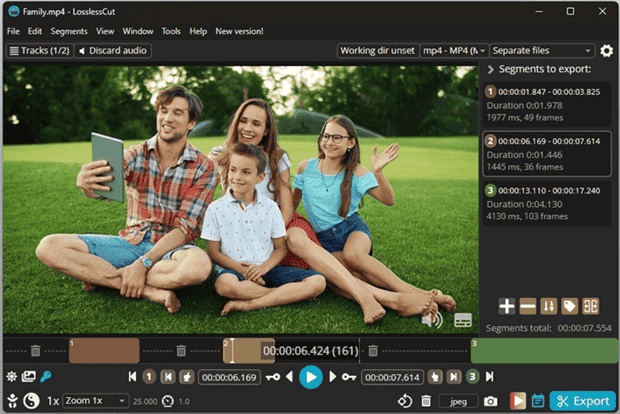
| Feature | Description |
|---|---|
| ✂️ Lossless Cutting | Cut and trim videos without re-encoding, preserving 100% original quality. |
| ⚡ Lightning Fast | Operations are performed in seconds by copying data streams directly. |
| 🎞 Frame-Accurate | Precise cutting down to the individual frame. |
| 🔗 Lossless Merging | Merge multiple clips from the same source file without quality loss. |
| 📁 Wide Format Support | Supports MP4, MOV, MKV, AVI, MP3, AAC, and many other formats. |
| 🖥 Simple UI | Clean and user-friendly interface, easy for beginners and pros. |
| 🆓 Free & Open Source | Completely free to use, with an active community on GitHub. |
| 💻 Cross-Platform | Available for Windows, macOS, and Linux. |
- Improved MKV and MP4 compatibility.
- Enhanced timeline navigation and seeking.
- New keyboard shortcuts for faster editing.
- Better support for high-resolution and high-frame-rate videos.
- UI/UX improvements for a smoother workflow.
- Content Creators – Quickly trim streams, remove mistakes, or cut highlights.
- Video Archivists – Efficiently segment long recordings without quality loss.
- Casual Users – Simple cutting and merging of personal videos.
- Professionals – Fast preliminary edits before full production.
- Download LosslessCut from the official GitHub releases page.
- Install and launch the application.
- Drag and drop your video file into the LosslessCut window.
- Set your cut points on the timeline.
- Export your trimmed video instantly with no waiting.
| Parameter | Requirement |
|---|---|
| OS | Windows 10/11, macOS 10.13+, or Linux |
| Processor | 1.6 GHz Intel/AMD or higher (64-bit) |
| RAM | 2 GB (4 GB recommended) |
| Storage | 200 MB free space |
| Other | FFmpeg libraries (included in the download) |
lossless cut • losslesscut download • lossless video cutter • lossless video editing • lossless video trimmer • fast video cutter • open source video editor • ffmpeg video cutter • cut video without quality loss • losslesscut software • losslesscut windows • losslesscut mac • losslesscut linux • video editing tool • free video cutter • mkv cutter • mp4 cutter • trim video quickly • lossless merge videos • content creator tools