
Persistent memory, auto-generated skills, and scheduled automation for Claude Code CLI — powered by OpenClaw.
Your Claude Max subscription gives you Claude Code CLI. FlipClaw gives it a brain that persists across sessions, learns from every conversation, and runs tasks while you sleep.
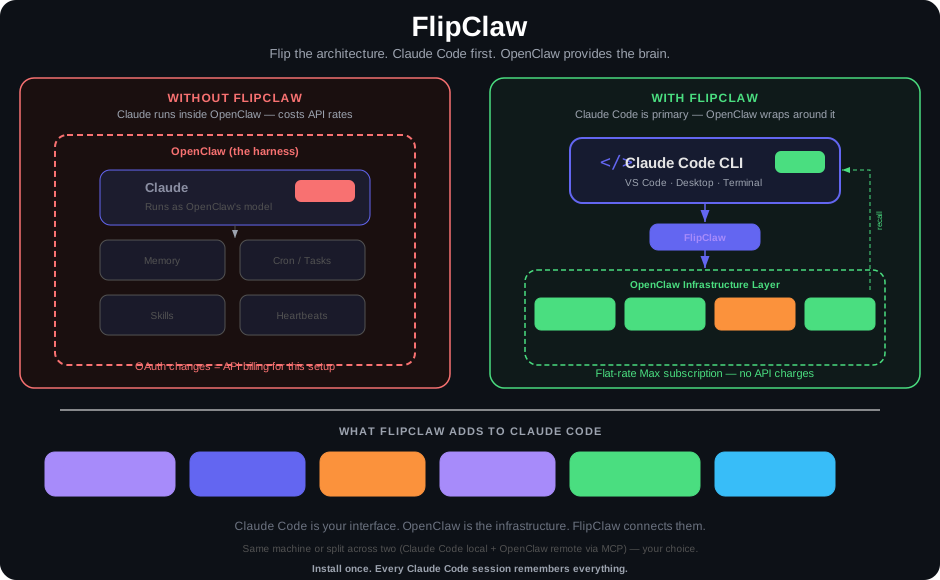
Click the diagram to view full size
If you're running Claude through a third-party harness like OpenClaw, Anthropic's recent OAuth changes mean those conversations now cost API rates or extra usage billing. Your flat-rate Max subscription no longer covers it.
But Claude Code CLI still works on Max. It's not just the best coding AI — it's the best agentic AI interface available, period. VS Code, Claude Code Desktop, or the terminal. Included in your subscription, no API metering.
The catch? Claude Code has no memory. Every session starts from zero — no recall of your infrastructure, no awareness of decisions you've already made, and no automations.
Instead of putting Claude Code inside OpenClaw as its model, FlipClaw flips it — Claude Code is now the primary interface, and OpenClaw wraps around it to provide the persistent infrastructure.
FlipClaw flips the architecture. Claude Code CLI is now the primary interface. OpenClaw wraps around it to provide persistent memory, scheduled automation, heartbeats, and 24/7 capabilities — but you're working fully inside Claude Code. VS Code, Claude Code Desktop, CLI terminal — wherever you prefer.
This is Claude Code first. OpenClaw isn't the harness running Claude anymore. It's the infrastructure layer that gives Claude Code superpowers it doesn't have natively. Your conversations, your coding, your daily work — all happening in Claude Code on your Max subscription. OpenClaw provides the memory brain, the cron jobs, the skill library, and the remote access layer around it.
What you get:
- Persistent memory that survives across sessions — shared between Claude Code and your OpenClaw agent. Same brain, doesn't matter which interface you use.
- Auto-skill capture — when you do something complex, the system automatically generates a reusable skill document so next time Claude already knows the procedure
- Dreaming — nightly consolidation that deduplicates facts, promotes important knowledge, and detects patterns across your sessions
- Memory Wiki — a browsable, backlinked knowledge vault
- Cron jobs, heartbeats, and scheduled tasks via OpenClaw, accessible from Claude Code
- Remote access via Telegram — multi-session Claude Code from your phone, not limited to Anthropic's single QR-code session (pair with claude-telegram-relay)
- Flexible deployment — Claude Code and OpenClaw on the same machine (local, server, or VPS) for the tightest integration, or split across two machines with the MCP server connection. Same shared memory either way.
- Self-service updates — one-command updater with full snapshot backups, dry-run preview, post-update validation, and automatic rollback on failure. Stay current without re-running the installer.
All on your existing Claude Max subscription. No API charges.
Claude Code CLI                    OpenClaw Agent
(Max subscription)                 (any model)
      |                                |
      v                                v
 SessionEnd Hook                 agent_end event
      |                                |
      v                                v
 claude-code-bridge.py           memory-bridge plugin
      |                                |
      +----> Shared Memory <-----------+
             |
             v
      memory/daily-logs
      memory/structured-files
      skills/auto-captured
             |
             v
      Dreaming (nightly)
      ┌─────────────────┐
      │ Dedup & merge    │
      │ Promote → MEMORY │
      │ Patterns → DREAMS│
      └─────────────────┘
             |
             v
      Memory Wiki (browsable)
      Semantic Search (Gemini)
Three-layer capture ensures nothing is lost:
- Every turn — Facts extracted continuously during your session
- Session end — Full transcript saved, skills evaluated
- Crash sweep — Catches sessions that ended abnormally
- OpenClaw 2026.4.9 or later — required for memory-core Dreaming, memory-wiki, and continuation-skip. Install with
npm install -g openclaw. The installer verifies this before making any changes. - Claude Code CLI installed (uses your Claude Max subscription, no API charges)
- Python 3.10+ and Node.js 18+
Two API keys are needed. Both go into your agent's openclaw.json under env.vars. Neither is billed through Anthropic — Claude Code itself still uses your Max subscription.
| Key | Purpose | Cost | Where to get it |
|---|---|---|---|
| OpenAI API key | Fact extraction (GPT-5.4 Nano) and auto-skill capture (GPT-5.4 Mini) | Pennies per day for typical use | platform.openai.com/api-keys |
| Gemini API key | Hybrid semantic search — vector embeddings via gemini-embedding-001. Required for memory-core's full search quality; falls back to keyword-only without it. |
Free tier is sufficient for most workloads | aistudio.google.com/apikey |
Add them to your openclaw.json:
{
  "env": {
    "vars": {
      "OPENAI_API_KEY": "sk-proj-...",
      "GEMINI_API_KEY": "AIza...",
      "GOOGLE_AI_API_KEY": "AIza..."
    }
  }
}
Or pass the Gemini key directly to the installer: bash install.sh ... --gemini-key "AIza..."
Why both
GEMINI_API_KEYandGOOGLE_AI_API_KEY? Different parts of OpenClaw look for different variable names. Set both to the same value to avoid "provider: none" errors.
Before running the installer, make sure you have:
-
openclaw --versionprints2026.4.9or newer -
claude --versionworks (Claude Code CLI installed) -
python3 --version≥ 3.10 -
node --version≥ 18 - Your agent workspace directory exists and contains an
openclaw.json - Your OpenClaw gateway is running (PM2 or direct) — optional but recommended, the installer can still run without it
- OpenAI API key added to
openclaw.jsonenv.vars - Gemini API key added to
openclaw.jsonenv.vars (or ready to pass via--gemini-key)
git clone https://github.com/bbesner/flipclaw.git
cd flipclaw

# Full install (memory system + Claude Code hooks)
bash install.sh \
  --agent-name "MyAgent" \
  --workspace /home/user/agent \
  --port 3050

# Restart your OpenClaw gateway
pm2 restart my-agent-gatewaybash /home/user/agent/scripts/claude-code-update-check.shThen start a Claude Code session, do some work, end it, and check:
# See captured session
ls /home/user/agent/agents/claude-code/sessions/

# See extracted facts in today's log
cat /home/user/agent/memory/$(date +%Y-%m-%d).md

# Search memory
cd /home/user/agent && openclaw memory search "what I worked on today"| Component | Purpose |
|---|---|
| incremental-memory-capture.py | Per-turn fact extraction → daily logs (GPT-5.4 Nano) |
| memory-bridge extension | OpenClaw plugin that triggers capture on every agent turn |
| auto-skill-capture extension | Auto-generates reusable skill documents from sessions |
| memory-core Dreaming | Built-in consolidation, dedup, and MEMORY.md promotion |
| Memory Wiki | Bridge-mode organized knowledge vault |
| Semantic search | Gemini hybrid search (70% vector + 30% keyword) |
| continuation-skip | Token savings on continuation sessions |
| Component | Purpose |
|---|---|
| claude-code-bridge.py | Session-end capture — saves transcript, triggers skill extraction |
| claude-code-turn-capture.py | Per-turn capture via Stop hook — extracts facts after every response |
| claude-code-sweep.py | Catches sessions hooks missed (crashes, force-kills) |
| claude-code-update-check.sh | 11-point health check including OpenClaw and FlipClaw version checks |
| flipclaw-update.sh | Self-service updater with snapshot backups and rollback support |
| lockutil.py | Prevents concurrent write corruption |
| CLAUDE.md | Instructions that make Claude Code use the shared memory |
| MCP server (optional) | Remote memory access: search, read, write tools |
| Installer | What it does | When to use |
|---|---|---|
install-memory.sh |
Memory pipeline + Dreaming + Wiki + search | Fresh agent setup |
install-claude-code.sh |
Claude Code hooks + bridge + sweep + health | Agent already has memory |
install.sh |
Both in sequence | Full setup from scratch |
- MEMORY.md — Curated core knowledge, always loaded into context
- memory/*.md — Structured reference files by topic (infrastructure, people, decisions, etc.)
- memory/YYYY-MM-DD.md — Daily logs with captured facts
- memory/dreaming/ — Consolidation reports from Dreaming phases
- DREAMS.md — Human-readable dreaming diary and pattern insights
- wiki/ — Organized knowledge vault (Memory Wiki, bridge mode)
- skills/*/SKILL.md — Auto-captured and hand-crafted procedures
- sessions/*.jsonl — Full searchable session archive
Memory-core Dreaming runs nightly and replaces manual curation:
- Light phase — Deduplicates and consolidates recent daily facts
- Deep phase — Promotes well-recalled facts to MEMORY.md based on recall frequency
- REM phase — Detects patterns across recent facts, generates narrative insights
The system watches completed sessions and automatically generates reusable skill documents:
- Gate 1 (heuristics) — Filters trivial sessions (minimum tool calls, user turns, complexity)
- Gate 2 (LLM classification) — Evaluates whether the session contains a reusable procedure
- Deduplication — Checks against ALL existing skills to avoid duplicates
- Generation — Creates SKILL.md with steps, prerequisites, verification, pitfalls
- Safety — Hand-crafted skills are never overwritten; updates go to
_suggested-update.md
┌─────────────────────────────────────────────┐
│              Shared Memory                   │
│                                             │
│  MEMORY.md ← Dreaming promotes here         │
│  memory/*.md ← Structured knowledge         │
│  skills/*/SKILL.md ← Procedures             │
│  Semantic Index ← Gemini hybrid search      │
│                                             │
├─────────────┬───────────────────────────────┤
│ Claude Code │     OpenClaw Agent            │
│ CLI writes  │     writes & reads            │
│ & reads     │     cron jobs run here        │
│             │     heartbeats run here       │
│             │     Dreaming runs here        │
└─────────────┴───────────────────────────────┘
Both interfaces contribute to and retrieve from the same memory. Facts from Claude Code sessions are tagged [src:claude-code] for provenance.
⚠️ Experimental — partially implemented in v3.2.1. The installer scaffolds per-user session directories, Unix group permissions, and separate Claude Code home directories for each team member. However, the runtime capture scripts currently write all sessions toagents/claude-code/sessions/regardless of which user ran them, so per-user session isolation and source tagging ([src:claude-code-employee1]) are not yet working as documented. Full multi-tenant support is planned for v3.3.0. For now, multi-user mode is safe to install but behaves identically to single-user mode at the session-capture level.
The intended model: one OpenClaw agent serves multiple team members, each with their own Claude Code CLI on the same server. Three employees could each run claude from their own Linux account and contribute to the same shared knowledge base.
bash install.sh \
  --agent-name "TeamAgent" \
  --workspace /home/user/agent \
  --port 3050 \
  --user employee1 \
  --shared \
  --claude-home /home/employee1/.claude

# Repeat for each employee with their own --user and --claude-home
What currently works:
- Shared workspace with Unix group permissions (
--shared) - Separate Claude Code config directories per Linux user (
--claude-home) - Per-user session directory creation under
agents/claude-code-<user>/ - Shared access to the same memory, skills, and wiki
What's not yet wired up:
- Runtime isolation of sessions by user (all sessions currently go into
agents/claude-code/sessions/) - Per-user source tagging on extracted facts (all facts tagged
[src:claude-code]) - Per-user session sweep directory scanning
Track v3.3.0 for full multi-tenant support.
For Claude Code on a different machine:
bash install.sh --agent-name "MyAgent" --workspace /path --port 3050 --with-mcpAvailable MCP tools: memory_search, memory_read, skill_list, skill_read, memory_grep, memory_candidate, session_submit, session_flag
Pair with claude-telegram-relay for remote multi-session Claude Code access from your phone. Send messages from Telegram, get Claude Code responses — with full memory integration.
| Role | Default Model | Provider |
|---|---|---|
| Fact extraction | gpt-5.4-nano | OpenAI |
| Skill classification | gpt-5.4-mini | OpenAI |
| Skill generation | gpt-5.4-mini | OpenAI |
| Embeddings | gemini-embedding-001 |
Default: daily at 4 AM (configurable in openclaw.json):
{
  "dreaming": {
    "enabled": true,
    "frequency": "0 4 * * *",
    "timezone": "America/New_York"
  }
}FlipClaw ships a self-service updater. Once you've installed v3.2.0+, staying current is one command:
# Check if an update is available
bash ~/myagent/scripts/flipclaw-update.sh --check

# Preview what would change
bash ~/myagent/scripts/flipclaw-update.sh --dry-run

# Apply the update
bash ~/myagent/scripts/flipclaw-update.sh

# List available backups
bash ~/myagent/scripts/flipclaw-update.sh --list-backups

# Roll back to the previous version
bash ~/myagent/scripts/flipclaw-update.sh --rollback

# Pin to a specific version (downgrade or reinstall)
bash ~/myagent/scripts/flipclaw-update.sh --version 3.3.0
What the updater does:
- Verifies OpenClaw is at the minimum required version
- Reads your saved install params (
.flipclaw-install.json) — no flags to remember - Downloads the latest toolkit from GitHub (with automatic retry on transient failures)
- Creates a full snapshot under
.flipclaw-backups/v{old-version}-{timestamp}/including scripts, extensions, state files, andopenclaw.json - Re-applies each script template with your original values (workspace path, agent name, models, etc.)
- Updates
.toolkit-versionand.flipclaw-install.json(including update history) - Validates the update — runs Python and shell syntax checks on all installed scripts. If anything broke, prompts to automatically roll back.
- Clears the update-available flag
Automatic rollback on failure: If post-update validation detects broken scripts (syntax errors, missing files), the updater offers to immediately restore the backup it just created. No manual recovery needed.
Update history is tracked in .flipclaw-install.json — every update logs {from, to, at, openclaw_version, trigger}. Useful for debugging if you need to figure out what changed when.
Backup retention — The updater keeps your 10 most recent backups and automatically prunes older ones. Each backup includes everything needed to restore: scripts, extensions, state files, and a metadata file recording when/why it was made.
What the updater never touches:
memory/files — your knowledge base is never modifiedMEMORY.md— preservedopenclaw.json— not touched (but snapshotted into backups for safety)CLAUDE.md— not touched- Prompt templates (
curate-memory-prompt.md,index-daily-logs-prompt.md) — if you've modified them, the new version is saved as.newalongside the original so you can review and merge manually
Version notifications are surfaced automatically. The health check script (claude-code-update-check.sh) runs every 6 hours via cron and checks GitHub for a newer VERSION file. When one is found, it prints a warning with the update command and writes /tmp/flipclaw-update-available as a flag.
Upgrading from v3.0.0 / v3.1.0 (before the updater existed): re-run the installer with your original flags and --skip-openclaw, then the updater will be installed for future use:
git clone https://github.com/bbesner/flipclaw.git flipclaw-new
bash flipclaw-new/install.sh \
  --agent-name "YourAgent" \
  --workspace /path/to/your/agent \
  --port YOUR_PORT \
  --skip-openclaw
See CHANGELOG.md for what changes between versions.
| Platform | Status |
|---|---|
| Linux (Ubuntu/Debian) | Fully supported |
| macOS | Fully supported |
| Windows WSL | Supported |
Hit a snag during install or after your first dreaming run? Check:
- docs/TROUBLESHOOTING.md — Symptom → diagnosis → fix for every issue we've seen in real-world installs.
- docs/KNOWN-ISSUES.md — Upstream OpenClaw bugs that affect FlipClaw, with workarounds that ship with the toolkit.
Common symptoms and quick fixes:
| Symptom | Most likely cause | Fix |
|---|---|---|
openclaw memory status shows Provider: none |
Gemini API key missing | Add GEMINI_API_KEY to openclaw.json env.vars |
memory-core: plugin disabled in gateway logs |
Memory slot not set or plugin allow list excludes it | Re-run v3.2.1+ installer — pre-flight auto-fixes this |
| Dreaming never runs nightly | OpenClaw 2026.4.x reconciler bug | v3.2.1+ ships ensure-dreaming-cron.sh workaround automatically |
Invalid config: Unrecognized key "primary" |
Legacy auth config field | v3.2.1+ installer auto-sanitizes |
Bridge import synced 0 artifacts in wiki |
Upstream OpenClaw bug | Use openclaw wiki ingest <file> for manual imports |
Duplicate plugin id detected warnings |
Old openclaw-mem0 extension directory |
v3.2.1+ installer auto-moves conflicting directories aside |
- Codex CLI integration (architecture supports it — contributions welcome)
- Aider integration
- Web-based memory browser
- Improved skill deduplication
- Memory export/import between agents
MIT — use it however you want.
See CONTRIBUTING.md for guidelines.
Built by Brad Besner at Ultraweb Labs. If this toolkit saves you time, give it a star and tell a friend.