










)
)




The Open Source app Petals aims to help its users to either quit weed, reduce usage or simply know how much they're using.





For an ad free experience download the app from other release channels.
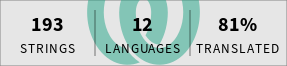
Petals welcomes community contributions for translations! To contribute translations, please follow these guidelines:
- ✨ New Languages: If you are adding a new language, translations must be 100% complete before submission.
⚠️ Minimum Completion: Translations that fall below 60% completion will be removed to maintain quality.- 🤝 Contribution Methods:
- 🌍 Non-programmers are encouraged to collaborate via Weblate.
- 🖥️ Programmers may contribute translations via pull requests directly on GitHub.
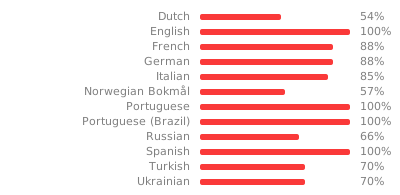
Translations are hosted at Weblate. You can contribute to your language here.


You can assemble both debug and release versions of the app for different variants (F-Droid, Playstore, GitHub) using the corresponding Gradle tasks. Here's how to do that:
- F-Droid:
./gradlew assembleFdroidDebug - PlayStore:
./gradlew assemblePlaystoreDebug - GitHub:
./gradlew assembleGithubDebug
For the release version, you must first decrypt secrets using git secret reveal. The release version can be assembled
as follows:
- F-Droid:
./gradlew assembleFdroidRelease - PlayStore:
./gradlew assemblePlaystoreRelease - GitHub:
./gradlew assembleGithubRelease
Both badges above link to the workflow that produces them. Coverage is measured on every push to
main; mutation testing runs weekly, or on demand from the Actions tab.
Kover measures line coverage of the JVM unit tests.
Composables, generated SQLDelight code, BuildConfig and library code Kotlin inlined into our
classes are excluded, since none of them are exercised by unit tests or ours to test.
./gradlew koverHtmlReportwrites a browsable report toapp/build/reports/kover/html./gradlew printLineCoverageprints the single number the badge is built from
Coverage says a line ran; it does not say a test would notice if the line were wrong. PIT answers that by changing the compiled bytecode and checking whether the suite fails. A surviving mutant is a line no assertion cares about.
PIT runs the Kotest engine directly through kotest-extensions-pitest and is scoped to the
fdroidDebug variant, with the same exclusions Kover uses.
./gradlew pitestwrites a report toapp/build/reports/pitest/index.html./gradlew printTestStrengthprints the single number the badge is built from./gradlew printMutationScoreprints the same thing counting untested code too
The badge reports test strength, not the raw mutation score: of the mutants a test actually executed, how many did it catch. Mutants in code no test reaches are left out on purpose, because that gap is what the Coverage badge next to it already measures. A low mutation score beside a high test strength means untested code; a low test strength means the tests that exist do not assert enough.
A full run takes around 13 minutes, so it is scheduled weekly rather than run per merge, and is never part of the pull request checks.
Specs must be named *Test: PIT is pointed at that glob, and a spec named anything else would be
skipped without failing anything. verifySpecNaming enforces it as part of the pitest task.
The Keystore, Keystore Properties, and Google Play deploy json files are included in the repository using git secret. The current secret owners are:
-
Leonardo Colman Lopes
- Fingerprint
B3A5 9909 9ECC 4DB4 FD40 896F 7706 1922 C587 2792 - Original Author
- Fingerprint
-
GitHub Actions
- Fingerprint
882E 409C 71F4 565B 1698 B947 A992 5FF4 75B3 5E07 - Auto-publishing signed app to GitHub
- Expires on 2027-04-05
- Available on environment secret
GPG_KEY
- Fingerprint
Release to all our channels is made automatically after a tag is released. The workflow responsible for doing this is release.main.kts.
- Decrypt all git secrets
- Run
./gradlew bundlePlaystoreRelease - Publish to playstore by running
cd fastlane && bundle config path vendor/bundle && bundle install --jobs 4 --retry 3 && bundle exec fastlane playstore
F-Droid builds automatically from the repository whenever a new tag is published. The definitions for how to build the app are in F-Droid's data repository. If modifications are required, the place to change is there.
- Decrypt all git secrets
- Run
./gradlew assembleGithubRelease