Transform Conversations into Actionable Insights Instantly






Vortex is a *Meeting Transcript Analysis * powered by *Streamlit, **NLP pipelines, and a *hybrid AI agent. It allows you to upload a meeting transcript (JSON format) and explore insights such as:
- Speaker contributions (who talked the most, speaking turns, time distribution).
- Keyword analysis (frequency, mentions, timelines, word clouds).
- Sentiment (line charts, heatmaps, distributions).
- Conversation dynamics (flow graphs, interruptions, networks).
The system is designed as a hybrid LLM + deterministic pipeline model:
- ✅ Deterministic Path → For common meeting insights, mapped to pre-coded visualizations.
- ⚡ Generative Path → For custom or unusual queries, LLM generates code dynamically.
This ensures reliability for standard tasks but also flexibility for exploratory analysis.
-
Upload meeting transcript JSON (local MVP, no cloud storage).
-
Preprocessing pipeline for:
- Parsing transcript into DataFrame.
- Extracting keywords, relations, NER.
- Sentiment analysis (utterance-level + trends).
- Conversation stats.
-
Pre-built visualizations:
- Bar, pie, line, heatmap, network, word cloud, Gantt-style timeline.
-
Interactive LLM Agent:
- Maps queries to known intents (speaker_contribution_bar, keyword_frequency, etc.).
- Falls back to generative visualization code for new queries.
-
Extendable — add new pipeline functions, visualizations, or intents easily.
| Feature | Type of Visualization | Demo Image |
|---|---|---|
| Speaker Contribution | Bar Chart | 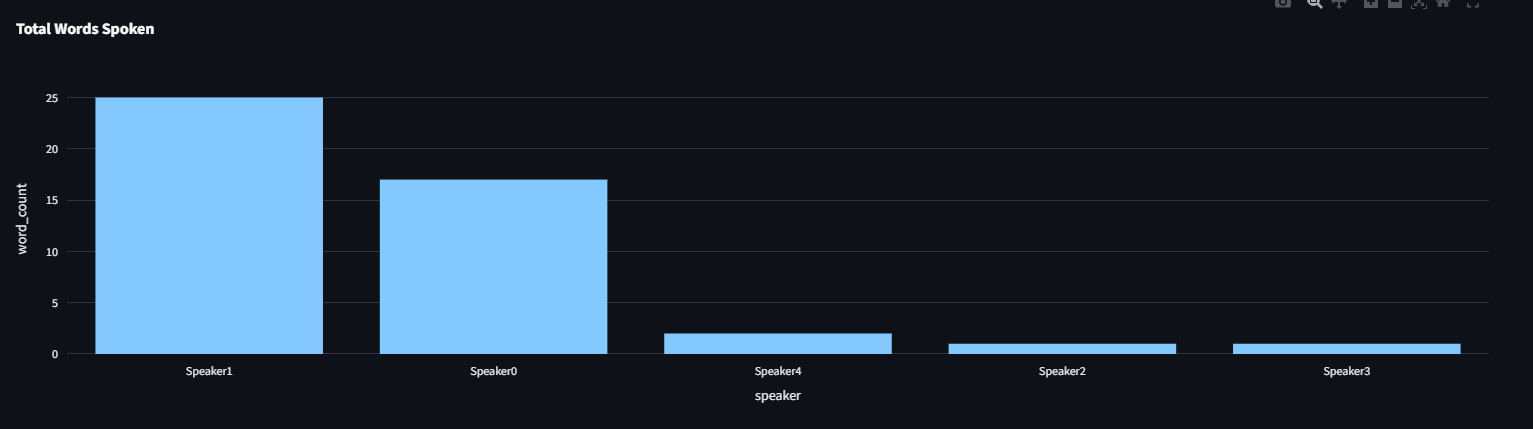 |
| Sentiment Trend | Line Chart | 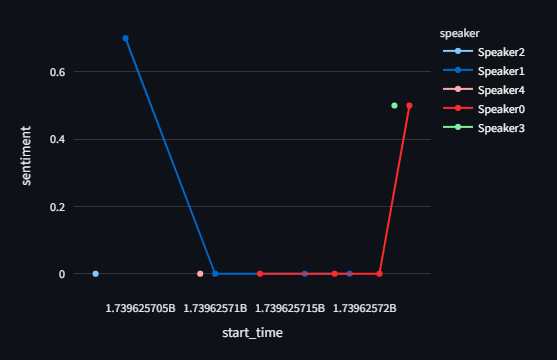 |
| Conversation Flow | Network | 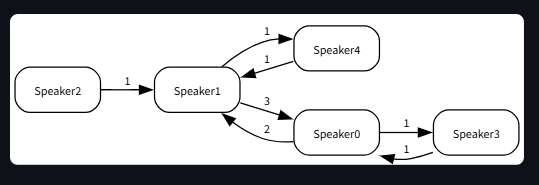 |
| Interaction Network | NetworkX Graph | 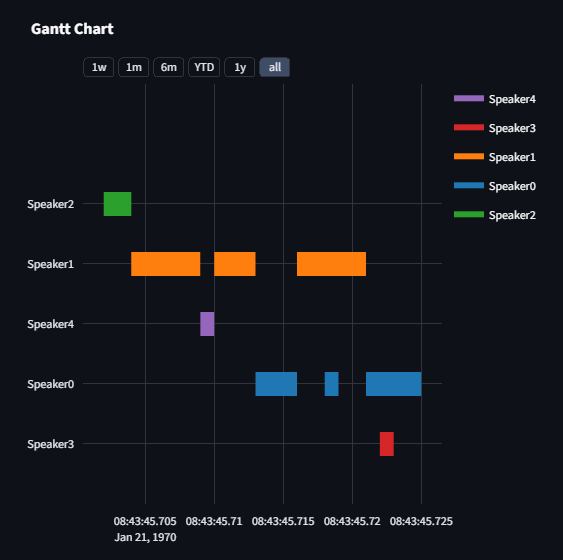 |
transcript-ai-agent/ │ ├── backend/ │ ├── pipeline.py # Data processing & enrichment │ ├── visualization.py # Pre-coded visualizations │ └── agent.py # Intent classification & hybrid agent │ ├── app/ │ └── main.py # Streamlit frontend │ ├── requirements.txt # Python dependencies ├── .env # API key (Gemini/OpenRouter) └── README.md # Documentation
bash git clone https://github.com/yourusername/transcript-ai-agent.git cd transcript-ai-agent
bash python -m venv venv source venv/bin/activate # Mac/Linux venv\Scripts\activate # Windows
bash pip install -r requirements.txt
Create a .env file:
env
GEMINI_API_KEY=your_gemini_key_here
OPENROUTER_API_KEY=your_openrouter_key_here
bash streamlit run app.py
The transcript must be a JSON file with utterances. Example:
json [ { "speaker": "Alice", "start_time": 0, "end_time": 5, "text": "Welcome everyone to the project kickoff meeting." }, ]
- parse_transcript → Load JSON → DataFrame.
- enrich_transcript → Add keywords, sentiment, NER, relations.
- compute_sentiment_trends → Speaker-level mood shifts.
- compute_stats → Aggregate stats (word counts, durations, etc.).
👉 This ensures every transcript is normalized before visualization.
-
Classify intent:
- Maps query → predefined INTENTS.
- If no match → "generative".
-
Run deterministic path:
- Executes visualization function directly.
-
Run generative path:
- Uses LLM to generate new Streamlit + Plotly code dynamically.
- Code is validated and executed in sandbox.
👉 Hybrid design = safe defaults + flexibility.
- Contribution (bar/pie).
- Speaking time (seconds).
- Number of speaking turns.
- Utterance length distribution.
- Questions asked per speaker.
- Keyword frequency.
- Keyword timeline.
- Sentiment trend (line).
- Conversation flow (Graphviz).
- Conversation timeline (Gantt).
- Speaker interaction network.
- Frontend: Streamlit
- Visualization: Plotly, Matplotlib, Seaborn, WordCloud, Graphviz, NetworkX
- NLP: spaCy (relations, NER), sentiment analysis
- LLM API: Gemini / OpenRouter
- Backend: Python (pandas, regex, heuristics)
- Query → maps to fixed function.
- Always produces stable, correct charts.
- Example: "Who talked the most?" → speaker_contribution_bar.
- If query doesn’t match → ask LLM to write code.
- Sandbox executes custom visualization code.
- Example: "Show me a bubble chart of sentiment vs word count."
👉 This ensures MVP is both robust and flexible.
- Mohit Gunani Mohit Harjani Soham Labhshetwar 🎯 (Project creator)
MIT License. Free to use and modify.