ChronographWatch - Initial submission#174
Conversation


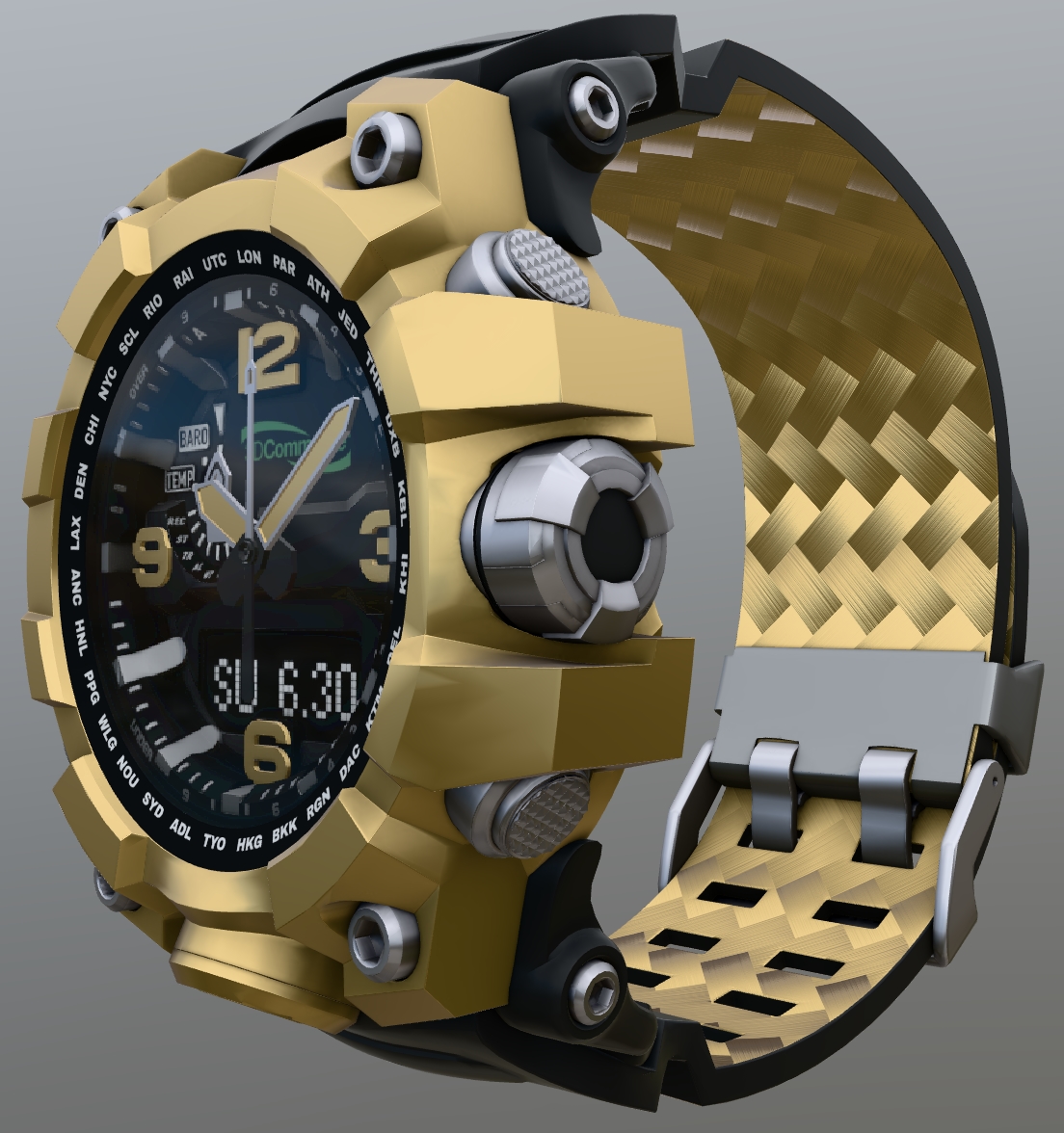
The fourth of four assets commissioned by the 3D Commerce working group, representing a wrist watch with four material variants and an animated second hand.
 echadwick-artist
changed the title
echadwick-artist
changed the title

|
Note to myself: Estimate, based on the current size of the animation data, how much space a 12-hour animation would take 😎 |

By using the interactivity extension, this animation could run infinitely without taking any space (not counting a few JSON nodes, of course). |
|
Yeah, I also thought about that. But assume that this is not in the scope and not the intention behind this asset. (Something like this could be a nice test for interactivity, when this becomes relevant. Now... let's talk about "daylight saving time".... 😬 ) |

|
Haha I did set this up with interactivity in mind, as the "hour" and "minute" hands are separate meshes, with sensical names and pivots. Live demo in the glTF Sample Viewer: https://github.khronos.org/glTF-Sample-Viewer-Release/?model=https://raw.GithubUserContent.com/KhronosGroup/glTF-Sample-Assets/c8c04d56566a51d3a6a9304820d7a3fc3b410f13/Models/ChronographWatch/glTF-Binary/ChronographWatch.glb Some feedback I received from others:
|


It might be worth clarifying what this refers to. The reason for that blocky appearance might be that they are behind glass. So may not be an issue of the model itself, but maybe of the sample viewer...? A quick comparison: In Sample Viewer:
Pretty strong aliasing... In three.js:
Rather the opposite: It looks a bit blurry (like "a bit aliased, just blurred")... In babylon.js:
Looks "cleanest", in that regard, subjectively... The point is: Maybe that comment referred to that screenshot. I could imagine that people might describe that somewhat blocky appearance as "the hands having low resolution"... |


 bghgary
left a comment
bghgary
left a comment
bghgary
left a comment
There was a problem hiding this comment.
Some minor comments. Looks good to me otherwise.
|
|
||
| To customize the watch for glTF use, the Blender and Mudmaster logo meshes were removed, then the Khronos Group and 3D Commerce and DGG logos were applied as textures. The 3D Commerce logo was set up to be baked along with the rest of the meshes comprising the watch face, into one cohesive texture set (see below for details about using the Remesher). | ||
|
|
||
| The Khronos Group and DGG logos were created as cropped textures, which didn't stristly match the dimensions of the meshes. Instead, the UV was set to roughly fit the meshes, and the glTF texture Samplers were set to use the wrap mode `ClampToEdge`. This allows the texture to be applied to the whole surface, then to use [KHR_texture_transform](https://github.com/KhronosGroup/glTF/tree/main/extensions/2.0/Khronos/KHR_texture_transform#khr_texture_transform) for precise placement, and the colors of the edge pixels will simply repeat out to the edges of the material for a seamless decal. |
There was a problem hiding this comment.
| The Khronos Group and DGG logos were created as cropped textures, which didn't stristly match the dimensions of the meshes. Instead, the UV was set to roughly fit the meshes, and the glTF texture Samplers were set to use the wrap mode `ClampToEdge`. This allows the texture to be applied to the whole surface, then to use [KHR_texture_transform](https://github.com/KhronosGroup/glTF/tree/main/extensions/2.0/Khronos/KHR_texture_transform#khr_texture_transform) for precise placement, and the colors of the edge pixels will simply repeat out to the edges of the material for a seamless decal. | |
| The Khronos Group and DGG logos were created as cropped textures, which didn't strictly match the dimensions of the meshes. Instead, the UV was set to roughly fit the meshes, and the glTF texture samplers were set to use the wrap mode `ClampToEdge`. This allows the texture to be applied to the whole surface, then to use [KHR_texture_transform](https://github.com/KhronosGroup/glTF/tree/main/extensions/2.0/Khronos/KHR_texture_transform#khr_texture_transform) for precise placement, and the colors of the edge pixels will simply repeat out to the edges of the material for a seamless decal. |
|  | ||
| <br/>_The texture samplers, showing the wrapS and wrapT values for `ClampToEdge`._ | ||
|
|
||
| The values for the various wrapmodes can be found online, for example [here on microsoft.com](https://learn.microsoft.com/en-us/dotnet/api/microsoft.mixedreality.toolkit.utilities.gltf.schema.gltfwrapmode). |
There was a problem hiding this comment.
| The values for the various wrapmodes can be found online, for example [here on microsoft.com](https://learn.microsoft.com/en-us/dotnet/api/microsoft.mixedreality.toolkit.utilities.gltf.schema.gltfwrapmode). | |
| The values for the various wrap modes can be found online, for example [here on microsoft.com](https://learn.microsoft.com/en-us/dotnet/api/microsoft.mixedreality.toolkit.utilities.gltf.schema.gltfwrapmode). |

I don't know how the sample viewer works for transmission, but if it's anything like Babylon's implementation, the transmission layer is rendered to a separate render target texture. The resolution of this texture greatly impacts how blocky the result. For Babylon.js, this texture defaults to 1024. You can tweak the value by putting this into the browser console. Doing the following, for example, will make the sandbox super blocky.
You can make this super high like 4096 and it will be much less aliased, but it will also eat a lot of texture memory. I'm not sure this is the difference, but maybe? |


|
It certainly looks similar in terms of the blockiness. (Not knowing anything about how the transmission is implemented, I considered that the glass may have some texture with low resolution, but then thought: nah, that doesn't make sense. The render target thing sounds plausible, though). The main point was: This is (apparently/likely) not an issue with the model or its geometry. So if that complaint was indeed about the blocky appearance of the 'hands', then it could/should be raised in the glTF-Sample-Viewer repo (and might even be trivial to fix, if it's just about setting a higher resolution somewhere...) |

|
I think it’s simply that the geometry itself is blocky, and there’s also no ambient occlusion for the hands (because they move, well at least potentially). I’ll ask the commenter what they meant. As a test, I imported the finished glTF into 3ds Max to edit the UVs and normals, but after a re-export I’m seeing 999+ Validator errors, missing occlusion maps, etc. Ugh. I’ll try editing in Blender. |
Created KTX2 and WebP compressed-texture versions.
Small spelling fixes in readme.

Spelling fixes by bghgary

Co-authored-by: Gary Hsu <bghgary@users.noreply.github.com>

|
Looks great! I only noticed one small typo (amd instead of and) in "The model was imported into Blender for optimization, amd the" I also wanted to mention that blender ships with a glTF Variants add-on that can manage the variants and assign the original with a button press instead of needed to edit the json directly. I'd recommend keeping the section as-is, but with a note to this link as an alternative: https://docs.blender.org/manual/en/latest/addons/import_export/scene_gltf2.html#gltf-variants |
* Re-normalized the PNG normal map.
* Added a normal map normalization tool & info in the readme.
* Fixed a small typo in the Optimization section.
* Added info about variant editing tools.
* Added a section on Texture Compression with screenshots.
* Reduced PNGs to 8bits where possible.
* Repacked a new binary GLB to include the optimized PNGs.
Small edits to improve readability, and use consistent tenses.


6 participants


The fourth of four assets commissioned by the 3D Commerce working group, representing a wrist watch with four material variants and an animated second hand.
I would love a review of the asset and the readme.
One thing remaining to do is to create a more highly-compressed version of the asset, with WebP textures, and Quantization or MeshOpt or Draco for the geometry and animation.