


A powerful Chrome extension that seamlessly integrates Google NotebookLM into your browsing workflow. Instantly summarize webpages, specific links, or selected text with a single click and smart automation.

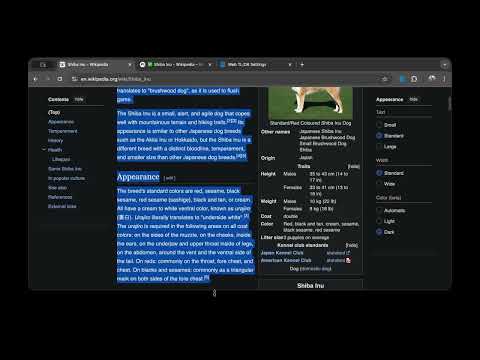
- 🚀 One-Click Summarization: Instantly summarize the current page via the extension icon.
- 🖱️ Context Menu Integration:
- Right-click any page to "Summarize this page".
- Right-click any link to "Summarize link" (no need to open it first).
- Select text, right-click, and choose "Summarize selection".
- 🤖 Smart Automation:
- Automatically opens NotebookLM, imports content, and submits your default prompt (e.g., "TL;DR").
- 📢 Visual Feedback:
- Toast Notifications: Real-time status updates (Importing, Generating, Success).
- Dynamic Tab Titles: Monitor progress via emojis (⏳, ✨, ✅) directly on the tab bar.
- ⚙️ Configurable: Customize your default prompt and preferred tab focus behavior.
- 🌍 Multilingual: Support for 8 locales (English, Japanese, Chinese, French, German, Spanish, Portuguese).
- Manifest V3: The latest Chrome Extension standard.
- JavaScript (ES6+): Core logic and automation.
- Chrome Extension APIs:
tabs,contextMenus,storage,runtime,i18n. - CSS3: Modern, non-intrusive toast notifications.
.
├── _locales/               # i18n localization files (8 languages)
├── assets/                 # Promotional images and GIFs
├── icons/                  # Extension icons for various sizes
├── background.js           # Background service worker (Context menus)
├── controller.js           # Content script for NotebookLM automation
├── manifest.json           # Extension configuration
├── options.html/js         # Settings page
├── PRIVACY.md              # Privacy Policy
└── README.md               # You are here!
- Trigger: User initiates a summary via icon or context menu.
- Transfer: The extension captures the URL or selected text and opens
notebooklm.google.com. - Automation:
controller.jswaits for the UI to be ready, injects the content, and submits the prompt. - Monitoring: The extension tracks the generation status and updates the tab title and toast notifications accordingly.
- Install from the Chrome Web Store.
- Click "Add to Chrome".
- Clone this repository.
- Go to
chrome://extensions/and enable Developer mode. - Click Load unpacked and select this directory.
Contributions are welcome! Whether it's a bug report, feature suggestion, or a pull request:
- Fork the repo.
- Create a feature branch (
git checkout -b feature/amazing-feature). - Commit your changes (
git commit -m 'feature: add amazing feature'). - Push to the branch (
git push origin feature/amazing-feature). - Open a Pull Request.
We value your privacy. This extension runs locally and does not collect, store, or transmit your data to any third parties other than Google NotebookLM itself. See PRIVACY.md for details.
Distributed under the MIT License. See LICENSE for more information.
If you find this project useful, please give it a ⭐ to show your support!