Implementing a bloom effect on CPU for learning purposes.

As can be seen from the diagram below, we start by downsampling the original image multiple times while storing them in a list. then we take the smallest image and upsample it to be the same size as the previous (larger) image aka the image that has been downsampled one less time. Now that we have two images of the same size (e.g. 256x256 and 256x256) we mix them together. Here we use a simple lerp with alpha=0.2. We continue until we get the final image.

A few notes:
- Bilinear tap is retrieving the bilinear interpolation of the 4 closest pixels around a target point (x, y). x and y are float values between 0-1 but we need to find their 4 nearest pixels and blend their values based on their distance to (x,y). See
Line 36 in 560ed06
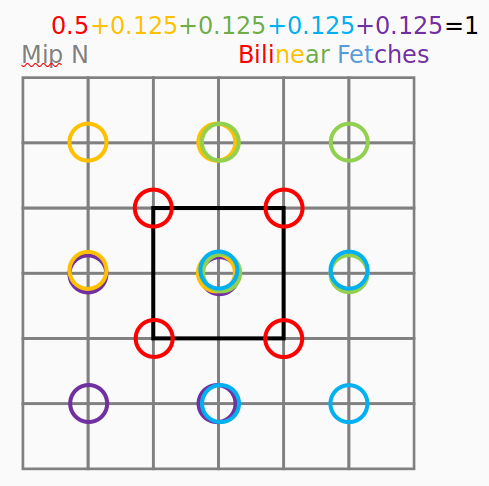
- Downsampling is done by calculating the weighted sum of bilinear taps at 13 predefined points each with predefined weights. See
Line 124 in 560ed06
- Upsampling is done similarly but using 9 points with predefined weights. See
Line 76 in 560ed06
- The blending of downsampled and upsampled images look like this:
B-E are downsampled versions of the original image (A)
then upsampling:

E' = E
D' = lerp(D, E', 0.2)
C' = lerp(C, D', 0.2)
B' = lerp(B, C', 0.2)
A' = lerp(A, B', 0.2)

A' is the result


Measured on an Intel i7-12700 CPU
| Implementation | time | fps |
|---|---|---|
| Python | 39.5 secs | 0.025 fps |
| C++ (Debug) | 2.7 secs | 0.37 fps |
| C++ (Release) | 0.68 secs | 1.47 fps |
| C++ (Improved) | 0.11 secs | 9 fps |
| C++ (Multithread 8t) | 0.032 secs | 31 fps |
| OpenGL | ? secs | ? fps |
Note: Change ${SRC_DIR} in CMakeLists.txt to compile other versions of the code.
I tried different approaches to improve performance, here I list them for future reference. (CPU: i7-4930k)
| Technique | Time | Speedup |
|---|---|---|
| Baseline | 3.05 secs | 1x |
| Flat vector instead of 3D vector | 1.30 secs | 2.3x |
| Inline the GetPixel and SetPixel | 1.08 secs | 2.82x |
| Flat Lerp instead of 3D Lerp | 1.06 secs | 2.87x |
| Arithmetic Optimisations in BilinearTap | 0.98 secs | 3.11x |
| static const double arrays instead of vectors for weights | 0.94 secs | 3.24x |
| Avoid divisions in the inner-loop | 0.87 secs | 3.50x |
| std::move and emplace_back | 0.81 secs | 3.76x |
| Claude's version | 0.72 secs | 4.23x |
| OpenMP Multithread with 10 threads (Claude) | 0.16 secs | 19x |
This improved the performance from 3.05 secs to 1.30 secs per 1024x1024 image.
From
std::vector<std::vector<std::vector<double>>> pixels;double GetPixel(int x, int y, int channel) const{
return data[y][x][channel];
}
void SetPixel(int x, int y, int channel, double value) {
data[y][x][channel] = value;
}To
std::vector<double> pixels;double GetPixel(int x, int y, int channel) const{
return data[y * width + x * channels + channel];
}
void SetPixel(int x, int y, int channel, double value) {
data[y * width + x * channels + channel] = value;
}GetPixel and SetPixel are called very often, let's reduce the number of function calls.
This improved the performance from 1.30 secs to 1.08 secs per 1024x1024 image.
This didn't help that much.
From
MyImage Lerp(const MyImage& a, const MyImage& b, double t) {
    MyImage result(a.width, a.height, a.channels);
    for (int i = 0; i < a.height; ++i) {
        for (int j = 0; j < a.width; ++j) {
            for (int ch = 0; ch < a.channels; ++ch) {
                result.SetPixel(j, i, ch, a.GetPixel(j, i, ch) * (1.0 - t) + b.GetPixel(j, i, ch) * t);
            }
        }
    }
    return result;
}
To
MyImage Lerp(const MyImage& a, const MyImage& b, double t) {
    MyImage result(a.width, a.height, a.channels);
    for(int i=0; i<a.data.size(); ++i) {
        result.data[i] = a.data[i] * (1.0 - t) + b.data[i] * t;
    }
    return result;
}Reducing the number of multiplications and also fetching data for the four pixels directly from memory.
This improved the performance from 1.06 secs to 0.98 secs per 1024x1024 image.
Refer to BilinearTap() for more details.
Used static const double arrays instead of std::vector for weights.
This improved the performance from 0.98 secs to 0.94 secs per 1024x1024 image.
Avoid divisions in the inner-loop by pre-computing the inverse of new_w and new_h.
This improved the performance from 0.94 secs to 0.88 secs per 1024x1024 image.
Claude recommended a few other optimizations, including:
- Using
std::moveinstead of copying - Using
std::vector::emplace_backinstead ofstd::vector::push_back
This improved the performance from 0.88 secs to 0.80 secs per 1024x1024 image.
Claude wrote a version of the code with OpenMP multithreading. for this image-size (1024x1024) and i7-12700(16pt + 4et), 8 threads gave the best performance.
