




This tutorial introduces the concept of Verifiable Credentials and Distributed Identifiers, and how to apply them to Data Spaces. The tutorial explains how issuers generate credentials for their recipients and how the holder of a credential can in turn issue a verifiable presentation supporting their claims. These practical examples will help to explain the roles of the various components of a data space connector as defined in a later tutorial.
The tutorial demonstrates examples of interactions using a GUI, as well cUrl commands used to generate credentials using a REST API
Details
Reagan: “But the importance of this treaty transcends numbers. We have listened to the wisdom in an old Russian maxim. And I'm sure you're familiar with it, Mr. General Secretary, though my pronunciation may give you difficulty. The maxim is: доверяй, но проверяй - trust, but verify.”
Gorbachev: “You repeat that at every meeting.“
Reagan: “I like it.”
― Remarks on Signing the Intermediate-Range Nuclear Forces Treaty
Verifiable credentials are the digital equivalent of something like a membership card or a drivers license. They are a representation of some sort of ownership or rights that a user claims to hold. Verifiable credentials follow an international W3C standard and are cryptographically secure, so they can be checked much like in the real world.
The idea behind verifiable credentials is that they can be issued and verfied by anyone - that is that there is no centralised owner of all of the information. This contrasts with the standard OAuth2 Authorization Code Grant flow which relies on a user logging in somewhere to prove who they are.
For example in the physical world, when a tourist enters new a country, they typcially need to pass through border control, where they are asked to provide a valid identity document or passport. The border guard needs to check both that the passport is real, and that the passport actually belongs to the tourist himself. Other requirements may also need to be met, maybe a specific visa or vaccination certificate is required.
Now, the tourist's passport has been provided by their own national government, so the border guard, as well as checking that the photo matches the recipient, is implicitly checking that a document provided by a third party is real, without necessarily directly contacting the country concerned.
With Verifiable credentials, a check for the validity of the document can be made based on the some sort of agreed cryptographic proof, the decoded document holds the claimed rights and also connects directly to both the subject of the credential (similar to the passport photograph) and the identity of the issuer (similar to the origin country of origin the passport itself). In both cases this identity needs to resolve to a unique ID, where the ID has been pre-generated by the owner.
Decentralised Identifiers are a mechanism to create verifiable, persistent identifiers
without the need to defer to a central authority. A digital identifier consists of a URN made up of several sections,
each separated by a colon. They start with the namespace did , followed by a decentralised identifier method (such as
web or ethr, key). The method defines how the rest of the identifier can be decoded and resolved. For example the
term did:web refers to a method for creating decentralized identifiers
that are hosted on a publicly accessible web domain, did:ethr is used by
Etherium-based identities and a
did:key holds an encoded public key. the remaining sections of the URN will
resolve to allow a verifier to check if the identity has been used correctly.
For example did:web:fiware.github.io:tutorials.Step-by-Step:alice is referring to a document found at
https://fiware.github.io/tutorials.Step-by-Step/alice/did.json
{
    "@context": ["https://www.w3.org/ns/did/v1", "https://w3id.org/security/suites/jws-2020/v1"],
    "id": "did:web:fiware.github.io:tutorials.Step-by-Step:alice",
    "verificationMethod": [
        {
            "id": "did:fiware.github.io:tutorials.Step-by-Step:alice#owner",
            "type": "JsonWebKey2020",
            "controller": "did:web:fiware.github.io:tutorials.Step-by-Step:alice",
            "publicKeyJwk": {
                "kty": "EC",
                "crv": "secp256k1",
                "x": "Nd3DeQ7G/1pTeYM6viWK6plbSD9E7cA9C2ONG9qG3CQ=",
                "y": "LuMt0dFWni1/fs/VqfjNOHAZT3PWGxKU8kUlLffGtjM="
            }
        }
    ],
    "authentication": ["did:web:fiware.github.io:tutorials.Step-by-Step:alice#owner"],
    "assertionMethod": ["did:web:fiware.github.io:tutorials.Step-by-Step:alice#owner"]
}
Which in turn is a JSON-LD document which holds a list of verification methods which can be used to valid the id. In
this case JsonWebKey2020 refers to a JSON Web Signature
For the purpose of this tutorial, we will take the demo Farm Management Information System (FMIS) from the previous tutorial, and alter access to the vet's context broker. Remember that within our data space we effectively have three context brokers owned by the Farmer, a Vet and a Contract labourer respectively.
- The default tenant which holds Building data and is used for collating data from all systems
- The
farmertenant which holds Animal, Device and AgriParcel information - The
contractortenant holds Animal data about animals needing additional care. - The
vettenant which holds Animal data about new-born animals
Within the data space, the Vet wishes to restrict access to her data to legitimate users only:
- Those who have bought access to her data, who are accredited users of Vets Mart
- Animal welfare officers who are legally alloweed access who are accredited by the national Government
This tutorial will not complete the enforcement of access rules, but will show how accredited users would be able to demonstrate that they are legitimately from those organisations and hold a specific role.
Therefore the overall architecture will consist of the following elements:
- The Orion Context Broker which will send and receive requests
using
NGSI-LD.
This is split into the following systems, each running on their own tenant:
- The default tenant
- The
farmertenant - The
contractortenant - The
vettenant
- The FIWARE IoT Agent for UltraLight 2.0 which will receive southbound requests using NGSI-LD and convert them to UltraLight 2.0 commands for the devices
- The underlying MongoDB database :
- Used by the Orion Context Broker to hold context data information such as data entities, subscriptions and registrations
- Used by the IoT Agent to hold device information such as device URLs and Keys
- An HTTP Web-Server which offers static
@contextfiles defining the context entities within the system. - The Tutorial Application does the following:
- Acts as set of dummy agricultural IoT devices using the UltraLight 2.0 protocol running over HTTP.
- Displays a running Farm Management Information System (FMIS)
In addition, our Vet will be protected via a dummy data space connector, the data space connector is spoofing the role of a VC Verifier . it in turn connects to some other FIWARE Data Space components:
- A FIWARE Credentials Configuration Service to hold the location of services it should trust
- A FIWARE Trusted Issuers List which returns the list of trusted roles for each issuer's credentials
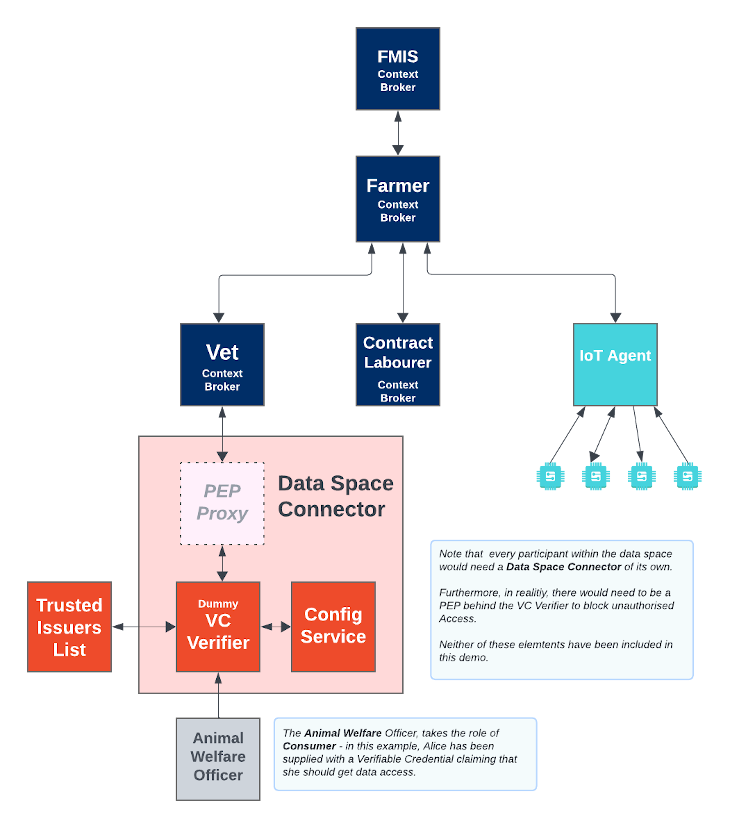
Since all interactions between the elements are initiated by HTTP requests, the entities can be containerized and run from exposed ports.
All services can be initialised from the command-line by running the services Bash script provided within the repository. Please clone the repository and create the necessary images by running the commands as shown:
git clone https://github.com/FIWARE/tutorials.Verifiable-Credentials.git
cd tutorials.Linked-Data
git checkout NGSI-LD

./services orion|scorpio|stellio
Note
If you want to clean up and start over again you can do so with the following command:
./services stop
Unencoded in plain text, a verifiable credential, could be a claim to be anything. A verifiable credential will
typically be a snippet of JSON-LD, with the type: VerifiableCredential - in the example below, the Animal Welfare
department wants to issue a Data Access Claim to Alice. The details of the role for Data Access are the
claim. Since Animal Welfare is creating the credential, they are the issuer, and Alice is the subject. The
issuer signs the credential with their private key.
The private key used for signing the credential should not be shared, but for this tutorial,
0b6366519a40eb4f384f7f84cf8bb716683ad1af8adbe60e59fe24ba042e396a is used for all users throughout the requests, since
the associated public key is the one that has been stored on the public web as a
decentralised identifier. The necessary information
can be generated using a script as shown.
import crypto from "crypto";
import elliptic from "elliptic";

// Request a 32 byte key
const size = parseInt(process.argv.slice(2)[0]) || 32;
const randomString = crypto.randomBytes(size).toString("hex");
const key = randomString;

console.log(`Key (hex): ${key}`); // 0b6366519a40eb4f384 etc.

// Calculate the `secp256k1` curve and build the public key
const ec = new elliptic.ec("secp256k1");
const prv = ec.keyFromPrivate(key, "hex");
const pub = prv.getPublic();
console.log(`Public (hex): ${prv.getPublic("hex")}`);
console.log(`x (hex): ${pub.x.toBuffer().toString("hex")}`);
console.log(`y (hex): ${pub.y.toBuffer().toString("hex")}`);
console.log(`x (base64): ${pub.x.toBuffer().toString("base64")}`);
console.log(`y (base64): ${pub.y.toBuffer().toString("base64")}`);
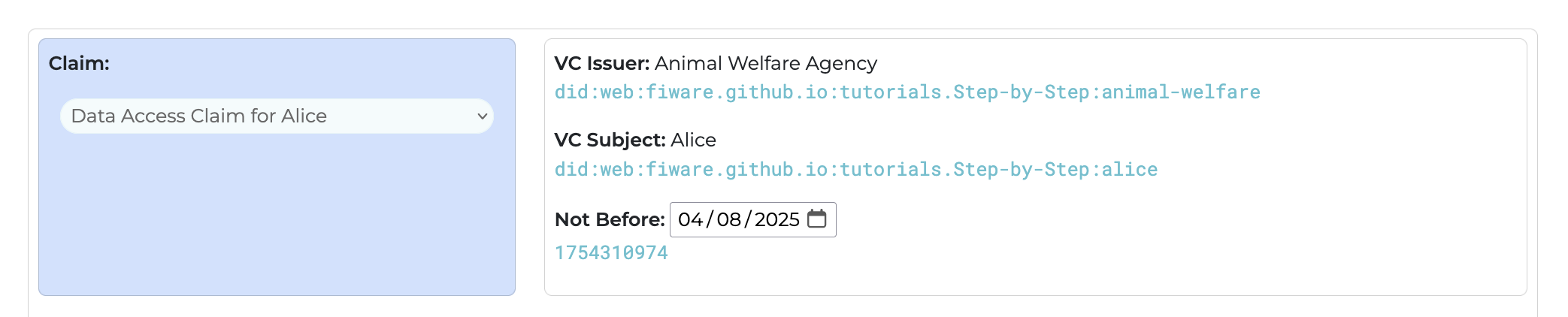
console.log(`-- kty: EC, crv: secp256k1`);Since Alice works for the Animal Welfare department, she needs to have a verfiable credential to prove she works there to access the Vet's context broker.
The Animal Welfare department did:web:fiware.github.io:tutorials.Step-by-Step:animal-welfare therefore issues
Alice did:web:fiware.github.io:tutorials.Step-by-Step:alice a verifiable with an Access Claim. This can be
signed using a private key. Credentials using the fixed private key
0b6366519a40eb4f384f7f84cf8bb716683ad1af8adbe60e59fe24ba042e396a can be generated from the tutorial application at
http://localhost:3000/credentials
The three-letter claims iss, nbf, exp, sub come from RFC 7519, and can
include nbf - not before and exp - expiry date to limit a validity of a claim.
curl -L 'localhost:3000/vc/generate' \
-H 'Content-Type: application/json' \
-H 'Cookie: connect.sid=s%3AOb1s0q9UDOLwtLPs_xLMxP0aYTRD9wZQ.z5sNCOJ0IStsgf1f4C5AoDhtWZXVmjz7bmZiz2Ywi7k' \
--data-raw '{
    "key": "0b6366519a40eb4f384f7f84cf8bb716683ad1af8adbe60e59fe24ba042e396a",
    "iss": "did:web:fiware.github.io:tutorials.Step-by-Step:animal-welfare",
    "sub": "did:web:fiware.github.io:tutorials.Step-by-Step:alice",
    "nbf": 1754060243,
    "vc": {
        "@context": [
            "https://www.w3.org/2018/credentials/v1",
            "https://fiware.github.io/tutorials.Step-by-Step/credentials.jsonld"
        ],
        "type": [
            "VerifiableCredential",
            "OperatorCredential"
        ],
        "credentialSubject": {
            "firstName": "Alice",
            "lastName": "User",
            "eMail": "alice@test.com",
            "roles": [
                "OPERATOR"
            ]
        }
    }
}'The response is a JWT token which is handed to Alice - this the equivalent of receiving an Employee Badge
{
    "jwt": "eyJhbGciOiJFUzI1NksiLCJ0eXAiOiJKV1QifQ.eyJ2YyI6eyJAY29udGV4dCI6WyJodHRwczovL3d3dy53My5vcmcvMjAxOC9jcmVkZW50aWFscy92MSIsImh0dHBzOi8vZml3YXJlLmdpdGh1Yi5pby90dXRvcmlhbHMuU3RlcC1ieS1TdGVwL2NyZWRlbnRpYWxzLmpzb25sZCJdLCJ0eXBlIjpbIlZlcmlmaWFibGVDcmVkZW50aWFsIiwiT3BlcmF0b3JDcmVkZW50aWFsIl0sImNyZWRlbnRpYWxTdWJqZWN0Ijp7ImZpcnN0TmFtZSI6IkFsaWNlIiwibGFzdE5hbWUiOiJVc2VyIiwiZU1haWwiOiJhbGljZUB0ZXN0LmNvbSIsInJvbGVzIjpbIk9QRVJBVE9SIl19fSwic3ViIjoiZGlkOndlYjpmaXdhcmUuZ2l0aHViLmlvOnR1dG9yaWFscy5TdGVwLWJ5LVN0ZXA6YWxpY2UiLCJuYmYiOjE3NTQwNjAyNDMsImlzcyI6ImRpZDp3ZWI6Zml3YXJlLmdpdGh1Yi5pbzp0dXRvcmlhbHMuU3RlcC1ieS1TdGVwOmFuaW1hbC13ZWxmYXJlIn0.YEoJtrpuR-bxDk-Y8yV0FPcCjtHkczq17vt4_iUV2D-kSbkAFjqkcAj5Vph48O4OeESI8GxoRZRH_yP-oat5hg"
}When going to the Vet, Alice is challenged if she really does work for Animal Welfare, she needs to present
one or more credential in a Verifiable Presentation. Each credential takes the form of a JWT token. In this case the
issuer iss is Alice herself, and she is also the subject matter sub. Usually these presentations have an exp
in the near future to stop potential man-in-the-middle attacks.

curl -L 'localhost:3000/vp/generate' \
-H 'Content-Type: application/json' \
-H 'Cookie: connect.sid=s%3AOb1s0q9UDOLwtLPs_xLMxP0aYTRD9wZQ.z5sNCOJ0IStsgf1f4C5AoDhtWZXVmjz7bmZiz2Ywi7k' \
--data-raw '{
    "iss": "did:web:fiware.github.io:tutorials.Step-by-Step:alice",
    "sub": "did:web:fiware.github.io:tutorials.Step-by-Step:alice",
    "payload": {
        "@context": [
            "https://www.w3.org/2018/credentials/v1"
        ],
        "type": [
            "VerifiablePresentation"
        ],
        "verifiableCredential": [
            "eyJhbGciOiJFUzI1NksiLCJ0eXAiOiJKV1QifQ.eyJ2YyI6eyJAY29udGV4dCI6WyJodHRwczovL3d3dy53My5vcmcvMjAxOC9jcmVkZW50aWFscy92MSIsImh0dHBzOi8vZml3YXJlLmdpdGh1Yi5pby90dXRvcmlhbHMuU3RlcC1ieS1TdGVwL2NyZWRlbnRpYWxzLmpzb25sZCJdLCJ0eXBlIjpbIlZlcmlmaWFibGVDcmVkZW50aWFsIiwiT3BlcmF0b3JDcmVkZW50aWFsIl0sImNyZWRlbnRpYWxTdWJqZWN0Ijp7ImZpcnN0TmFtZSI6IkFsaWNlIiwibGFzdE5hbWUiOiJVc2VyIiwiZU1haWwiOiJhbGljZUB0ZXN0LmNvbSIsInJvbGVzIjpbIk9QRVJBVE9SIl19fSwic3ViIjoiZGlkOndlYjpmaXdhcmUuZ2l0aHViLmlvOnR1dG9yaWFscy5TdGVwLWJ5LVN0ZXA6YWxpY2UiLCJuYmYiOjE3NTQwNjAyNDMsImlzcyI6ImRpZDp3ZWI6Zml3YXJlLmdpdGh1Yi5pbzp0dXRvcmlhbHMuU3RlcC1ieS1TdGVwOmFuaW1hbC13ZWxmYXJlIn0.YEoJtrpuR-bxDk-Y8yV0FPcCjtHkczq17vt4_iUV2D-kSbkAFjqkcAj5Vph48O4OeESI8GxoRZRH_yP-oat5hg"
        ]
    }
}'The response is yet another JWT token.
{
    "jwt": "eyJhbGciOiJFUzI1NksiLCJ0eXAiOiJKV1QifQ.eyJ2cCI6eyJAY29udGV4dCI6WyJodHRwczovL3d3dy53My5vcmcvMjAxOC9jcmVkZW50aWFscy92MSJdLCJ0eXBlIjpbIlZlcmlmaWFibGVQcmVzZW50YXRpb24iXSwidmVyaWZpYWJsZUNyZWRlbnRpYWwiOlsiZXlKaGJHY2lPaUpGVXpJMU5rc2lMQ0owZVhBaU9pSktWMVFpZlEuZXlKMll5STZleUpBWTI5dWRHVjRkQ0k2V3lKb2RIUndjem92TDNkM2R5NTNNeTV2Y21jdk1qQXhPQzlqY21Wa1pXNTBhV0ZzY3k5Mk1TSXNJbWgwZEhCek9pOHZabWwzWVhKbExtZHBkR2gxWWk1cGJ5OTBkWFJ2Y21saGJITXVVM1JsY0MxaWVTMVRkR1Z3TDJOeVpXUmxiblJwWVd4ekxtcHpiMjVzWkNKZExDSjBlWEJsSWpwYklsWmxjbWxtYVdGaWJHVkRjbVZrWlc1MGFXRnNJaXdpVDNCbGNtRjBiM0pEY21Wa1pXNTBhV0ZzSWwwc0ltTnlaV1JsYm5ScFlXeFRkV0pxWldOMElqcDdJbVpwY25OMFRtRnRaU0k2SWtGc2FXTmxJaXdpYkdGemRFNWhiV1VpT2lKVmMyVnlJaXdpWlUxaGFXd2lPaUpoYkdsalpVQjBaWE4wTG1OdmJTSXNJbkp2YkdWeklqcGJJazlRUlZKQlZFOVNJbDE5ZlN3aWMzVmlJam9pWkdsa09uZGxZanBtYVhkaGNtVXVaMmwwYUhWaUxtbHZPblIxZEc5eWFXRnNjeTVUZEdWd0xXSjVMVk4wWlhBNllXeHBZMlVpTENKdVltWWlPakUzTlRRd05qQXlORE1zSW1semN5STZJbVJwWkRwM1pXSTZabWwzWVhKbExtZHBkR2gxWWk1cGJ6cDBkWFJ2Y21saGJITXVVM1JsY0MxaWVTMVRkR1Z3T21GdWFXMWhiQzEzWld4bVlYSmxJbjAuWUVvSnRycHVSLWJ4RGstWTh5VjBGUGNDanRIa2N6cTE3dnQ0X2lVVjJELWtTYmtBRmpxa2NBajVWcGg0OE80T2VFU0k4R3hvUlpSSF95UC1vYXQ1aGciXX0sImlzcyI6ImRpZDp3ZWI6Zml3YXJlLmdpdGh1Yi5pbzp0dXRvcmlhbHMuU3RlcC1ieS1TdGVwOmFsaWNlIn0.6_wuCNurZV5zawDKsPfJEEqWcmTpoTMG7r58HxAKJUkQB2bkRza2C7UoWOFu7DgHqDx9moSrQqrQ0n1Yp9JDDA"
}On receiving a Verifiable Presentation, the Vet must first check that this really is a presentation from Alice about Alice, and that it holds a Verifiable Presentation which in turn holds one or more claims.
curl -L 'localhost:3000/vp/verify' \
-H 'Content-Type: application/json' \
-d '{
    "jwt": "eyJhbGciOiJFUzI1NksiLCJ0eXAiOiJKV1QifQ.eyJ2cCI6eyJAY29udGV4dCI6WyJodHRwczovL3d3dy53My5vcmcvMjAxOC9jcmVkZW50aWFscy92MSJdLCJ0eXBlIjpbIlZlcmlmaWFibGVQcmVzZW50YXRpb24iXSwidmVyaWZpYWJsZUNyZWRlbnRpYWwiOlsiZXlKaGJHY2lPaUpGVXpJMU5rc2lMQ0owZVhBaU9pSktWMVFpZlEuZXlKMll5STZleUpBWTI5dWRHVjRkQ0k2V3lKb2RIUndjem92TDNkM2R5NTNNeTV2Y21jdk1qQXhPQzlqY21Wa1pXNTBhV0ZzY3k5Mk1TSXNJbWgwZEhCek9pOHZabWwzWVhKbExtZHBkR2gxWWk1cGJ5OTBkWFJ2Y21saGJITXVVM1JsY0MxaWVTMVRkR1Z3TDJOeVpXUmxiblJwWVd4ekxtcHpiMjVzWkNKZExDSjBlWEJsSWpwYklsWmxjbWxtYVdGaWJHVkRjbVZrWlc1MGFXRnNJaXdpVDNCbGNtRjBiM0pEY21Wa1pXNTBhV0ZzSWwwc0ltTnlaV1JsYm5ScFlXeFRkV0pxWldOMElqcDdJbVpwY25OMFRtRnRaU0k2SWtGc2FXTmxJaXdpYkdGemRFNWhiV1VpT2lKVmMyVnlJaXdpWlUxaGFXd2lPaUpoYkdsalpVQjBaWE4wTG1OdmJTSXNJbkp2YkdWeklqcGJJazlRUlZKQlZFOVNJbDE5ZlN3aWMzVmlJam9pWkdsa09uZGxZanBtYVhkaGNtVXVaMmwwYUhWaUxtbHZPblIxZEc5eWFXRnNjeTVUZEdWd0xXSjVMVk4wWlhBNllXeHBZMlVpTENKdVltWWlPakUzTlRRd05qQXlORE1zSW1semN5STZJbVJwWkRwM1pXSTZabWwzWVhKbExtZHBkR2gxWWk1cGJ6cDBkWFJ2Y21saGJITXVVM1JsY0MxaWVTMVRkR1Z3T21GdWFXMWhiQzEzWld4bVlYSmxJbjAuWUVvSnRycHVSLWJ4RGstWTh5VjBGUGNDanRIa2N6cTE3dnQ0X2lVVjJELWtTYmtBRmpxa2NBajVWcGg0OE80T2VFU0k4R3hvUlpSSF95UC1vYXQ1aGciXX0sImlzcyI6ImRpZDp3ZWI6Zml3YXJlLmdpdGh1Yi5pbzp0dXRvcmlhbHMuU3RlcC1ieS1TdGVwOmFsaWNlIn0.6_wuCNurZV5zawDKsPfJEEqWcmTpoTMG7r58HxAKJUkQB2bkRza2C7UoWOFu7DgHqDx9moSrQqrQ0n1Yp9JDDA"
}'The verifier checks that the signed JWT ending ...JDDA matches with the public key found at
https://fiware.github.io/tutorials.Step-by-Step/alice/did.json,
in other words, that the presentation really came from Alice - the Verfiable Presentation holds one claim - another
JWT ending -oat5hg
{
    "verified": true,
    "payload": {
        "vp": {
            "@context": ["https://www.w3.org/2018/credentials/v1"],
            "type": ["VerifiablePresentation"],
            "verifiableCredential": [
                "eyJhbGciOiJFUzI1NksiLCJ0eXAiOiJKV1QifQ.eyJ2YyI6eyJAY29udGV4dCI6WyJodHRwczovL3d3dy53My5vcmcvMjAxOC9jcmVkZW50aWFscy92MSIsImh0dHBzOi8vZml3YXJlLmdpdGh1Yi5pby90dXRvcmlhbHMuU3RlcC1ieS1TdGVwL2NyZWRlbnRpYWxzLmpzb25sZCJdLCJ0eXBlIjpbIlZlcmlmaWFibGVDcmVkZW50aWFsIiwiT3BlcmF0b3JDcmVkZW50aWFsIl0sImNyZWRlbnRpYWxTdWJqZWN0Ijp7ImZpcnN0TmFtZSI6IkFsaWNlIiwibGFzdE5hbWUiOiJVc2VyIiwiZU1haWwiOiJhbGljZUB0ZXN0LmNvbSIsInJvbGVzIjpbIk9QRVJBVE9SIl19fSwic3ViIjoiZGlkOndlYjpmaXdhcmUuZ2l0aHViLmlvOnR1dG9yaWFscy5TdGVwLWJ5LVN0ZXA6YWxpY2UiLCJuYmYiOjE3NTQwNjAyNDMsImlzcyI6ImRpZDp3ZWI6Zml3YXJlLmdpdGh1Yi5pbzp0dXRvcmlhbHMuU3RlcC1ieS1TdGVwOmFuaW1hbC13ZWxmYXJlIn0.YEoJtrpuR-bxDk-Y8yV0FPcCjtHkczq17vt4_iUV2D-kSbkAFjqkcAj5Vph48O4OeESI8GxoRZRH_yP-oat5hg"
            ]
        },
        "iss": "did:web:fiware.github.io:tutorials.Step-by-Step:alice"
    },
    "didResolutionResult": {
        "didDocument": {
            "@context": ["https://www.w3.org/ns/did/v1", "https://w3id.org/security/suites/jws-2020/v1"],
            "id": "did:web:fiware.github.io:tutorials.Step-by-Step:alice",
            "verificationMethod": [
                {
                    "id": "did:fiware.github.io:tutorials.Step-by-Step:alice#owner",
                    "type": "JsonWebKey2020",
                    "controller": "did:web:fiware.github.io:tutorials.Step-by-Step:alice",
                    "publicKeyJwk": {
                        "kty": "EC",
                        "crv": "secp256k1",
                        "x": "Nd3DeQ7G/1pTeYM6viWK6plbSD9E7cA9C2ONG9qG3CQ=",
                        "y": "LuMt0dFWni1/fs/VqfjNOHAZT3PWGxKU8kUlLffGtjM="
                    }
                }
            ],
            "authentication": ["did:web:fiware.github.io:tutorials.Step-by-Step:alice#owner"],
            "assertionMethod": ["did:web:fiware.github.io:tutorials.Step-by-Step:alice#owner"]
        },
        "didDocumentMetadata": {},
        "didResolutionMetadata": {
            "contentType": "application/did+ld+json"
        }
    },
    "issuer": "did:web:fiware.github.io:tutorials.Step-by-Step:alice",
    "signer": {
        "id": "did:fiware.github.io:tutorials.Step-by-Step:alice#owner",
        "type": "JsonWebKey2020",
        "controller": "did:web:fiware.github.io:tutorials.Step-by-Step:alice",
        "publicKeyJwk": {
            "kty": "EC",
            "crv": "secp256k1",
            "x": "Nd3DeQ7G/1pTeYM6viWK6plbSD9E7cA9C2ONG9qG3CQ=",
            "y": "LuMt0dFWni1/fs/VqfjNOHAZT3PWGxKU8kUlLffGtjM="
        }
    },
    "jwt": "eyJhbGciOiJFUzI1NksiLCJ0eXAiOiJKV1QifQ.eyJ2cCI6eyJAY29udGV4dCI6WyJodHRwczovL3d3dy53My5vcmcvMjAxOC9jcmVkZW50aWFscy92MSJdLCJ0eXBlIjpbIlZlcmlmaWFibGVQcmVzZW50YXRpb24iXSwidmVyaWZpYWJsZUNyZWRlbnRpYWwiOlsiZXlKaGJHY2lPaUpGVXpJMU5rc2lMQ0owZVhBaU9pSktWMVFpZlEuZXlKMll5STZleUpBWTI5dWRHVjRkQ0k2V3lKb2RIUndjem92TDNkM2R5NTNNeTV2Y21jdk1qQXhPQzlqY21Wa1pXNTBhV0ZzY3k5Mk1TSXNJbWgwZEhCek9pOHZabWwzWVhKbExtZHBkR2gxWWk1cGJ5OTBkWFJ2Y21saGJITXVVM1JsY0MxaWVTMVRkR1Z3TDJOeVpXUmxiblJwWVd4ekxtcHpiMjVzWkNKZExDSjBlWEJsSWpwYklsWmxjbWxtYVdGaWJHVkRjbVZrWlc1MGFXRnNJaXdpVDNCbGNtRjBiM0pEY21Wa1pXNTBhV0ZzSWwwc0ltTnlaV1JsYm5ScFlXeFRkV0pxWldOMElqcDdJbVpwY25OMFRtRnRaU0k2SWtGc2FXTmxJaXdpYkdGemRFNWhiV1VpT2lKVmMyVnlJaXdpWlUxaGFXd2lPaUpoYkdsalpVQjBaWE4wTG1OdmJTSXNJbkp2YkdWeklqcGJJazlRUlZKQlZFOVNJbDE5ZlN3aWMzVmlJam9pWkdsa09uZGxZanBtYVhkaGNtVXVaMmwwYUhWaUxtbHZPblIxZEc5eWFXRnNjeTVUZEdWd0xXSjVMVk4wWlhBNllXeHBZMlVpTENKdVltWWlPakUzTlRRd05qQXlORE1zSW1semN5STZJbVJwWkRwM1pXSTZabWwzWVhKbExtZHBkR2gxWWk1cGJ6cDBkWFJ2Y21saGJITXVVM1JsY0MxaWVTMVRkR1Z3T21GdWFXMWhiQzEzWld4bVlYSmxJbjAuWUVvSnRycHVSLWJ4RGstWTh5VjBGUGNDanRIa2N6cTE3dnQ0X2lVVjJELWtTYmtBRmpxa2NBajVWcGg0OE80T2VFU0k4R3hvUlpSSF95UC1vYXQ1aGciXX0sImlzcyI6ImRpZDp3ZWI6Zml3YXJlLmdpdGh1Yi5pbzp0dXRvcmlhbHMuU3RlcC1ieS1TdGVwOmFsaWNlIn0.6_wuCNurZV5zawDKsPfJEEqWcmTpoTMG7r58HxAKJUkQB2bkRza2C7UoWOFu7DgHqDx9moSrQqrQ0n1Yp9JDDA",
    "policies": {},
    "verifiablePresentation": {
        "verifiableCredential": [
            {
                "credentialSubject": {
                    "firstName": "Alice",
                    "lastName": "User",
                    "eMail": "alice@test.com",
                    "roles": ["OPERATOR"],
                    "id": "did:web:fiware.github.io:tutorials.Step-by-Step:alice"
                },
                "issuer": {
                    "id": "did:web:fiware.github.io:tutorials.Step-by-Step:animal-welfare"
                },
                "type": ["VerifiableCredential", "OperatorCredential"],
                "@context": [
                    "https://www.w3.org/2018/credentials/v1",
                    "https://fiware.github.io/tutorials.Step-by-Step/credentials.jsonld"
                ],
                "issuanceDate": "2025-08-01T14:57:23.000Z",
                "proof": {
                    "type": "JwtProof2020",
                    "jwt": "eyJhbGciOiJFUzI1NksiLCJ0eXAiOiJKV1QifQ.eyJ2YyI6eyJAY29udGV4dCI6WyJodHRwczovL3d3dy53My5vcmcvMjAxOC9jcmVkZW50aWFscy92MSIsImh0dHBzOi8vZml3YXJlLmdpdGh1Yi5pby90dXRvcmlhbHMuU3RlcC1ieS1TdGVwL2NyZWRlbnRpYWxzLmpzb25sZCJdLCJ0eXBlIjpbIlZlcmlmaWFibGVDcmVkZW50aWFsIiwiT3BlcmF0b3JDcmVkZW50aWFsIl0sImNyZWRlbnRpYWxTdWJqZWN0Ijp7ImZpcnN0TmFtZSI6IkFsaWNlIiwibGFzdE5hbWUiOiJVc2VyIiwiZU1haWwiOiJhbGljZUB0ZXN0LmNvbSIsInJvbGVzIjpbIk9QRVJBVE9SIl19fSwic3ViIjoiZGlkOndlYjpmaXdhcmUuZ2l0aHViLmlvOnR1dG9yaWFscy5TdGVwLWJ5LVN0ZXA6YWxpY2UiLCJuYmYiOjE3NTQwNjAyNDMsImlzcyI6ImRpZDp3ZWI6Zml3YXJlLmdpdGh1Yi5pbzp0dXRvcmlhbHMuU3RlcC1ieS1TdGVwOmFuaW1hbC13ZWxmYXJlIn0.YEoJtrpuR-bxDk-Y8yV0FPcCjtHkczq17vt4_iUV2D-kSbkAFjqkcAj5Vph48O4OeESI8GxoRZRH_yP-oat5hg"
                }
            }
        ],
        "holder": "did:web:fiware.github.io:tutorials.Step-by-Step:alice",
        "type": ["VerifiablePresentation"],
        "@context": ["https://www.w3.org/2018/credentials/v1"],
        "proof": {
            "type": "JwtProof2020",
            "jwt": "eyJhbGciOiJFUzI1NksiLCJ0eXAiOiJKV1QifQ.eyJ2cCI6eyJAY29udGV4dCI6WyJodHRwczovL3d3dy53My5vcmcvMjAxOC9jcmVkZW50aWFscy92MSJdLCJ0eXBlIjpbIlZlcmlmaWFibGVQcmVzZW50YXRpb24iXSwidmVyaWZpYWJsZUNyZWRlbnRpYWwiOlsiZXlKaGJHY2lPaUpGVXpJMU5rc2lMQ0owZVhBaU9pSktWMVFpZlEuZXlKMll5STZleUpBWTI5dWRHVjRkQ0k2V3lKb2RIUndjem92TDNkM2R5NTNNeTV2Y21jdk1qQXhPQzlqY21Wa1pXNTBhV0ZzY3k5Mk1TSXNJbWgwZEhCek9pOHZabWwzWVhKbExtZHBkR2gxWWk1cGJ5OTBkWFJ2Y21saGJITXVVM1JsY0MxaWVTMVRkR1Z3TDJOeVpXUmxiblJwWVd4ekxtcHpiMjVzWkNKZExDSjBlWEJsSWpwYklsWmxjbWxtYVdGaWJHVkRjbVZrWlc1MGFXRnNJaXdpVDNCbGNtRjBiM0pEY21Wa1pXNTBhV0ZzSWwwc0ltTnlaV1JsYm5ScFlXeFRkV0pxWldOMElqcDdJbVpwY25OMFRtRnRaU0k2SWtGc2FXTmxJaXdpYkdGemRFNWhiV1VpT2lKVmMyVnlJaXdpWlUxaGFXd2lPaUpoYkdsalpVQjBaWE4wTG1OdmJTSXNJbkp2YkdWeklqcGJJazlRUlZKQlZFOVNJbDE5ZlN3aWMzVmlJam9pWkdsa09uZGxZanBtYVhkaGNtVXVaMmwwYUhWaUxtbHZPblIxZEc5eWFXRnNjeTVUZEdWd0xXSjVMVk4wWlhBNllXeHBZMlVpTENKdVltWWlPakUzTlRRd05qQXlORE1zSW1semN5STZJbVJwWkRwM1pXSTZabWwzWVhKbExtZHBkR2gxWWk1cGJ6cDBkWFJ2Y21saGJITXVVM1JsY0MxaWVTMVRkR1Z3T21GdWFXMWhiQzEzWld4bVlYSmxJbjAuWUVvSnRycHVSLWJ4RGstWTh5VjBGUGNDanRIa2N6cTE3dnQ0X2lVVjJELWtTYmtBRmpxa2NBajVWcGg0OE80T2VFU0k4R3hvUlpSSF95UC1vYXQ1aGciXX0sImlzcyI6ImRpZDp3ZWI6Zml3YXJlLmdpdGh1Yi5pbzp0dXRvcmlhbHMuU3RlcC1ieS1TdGVwOmFsaWNlIn0.6_wuCNurZV5zawDKsPfJEEqWcmTpoTMG7r58HxAKJUkQB2bkRza2C7UoWOFu7DgHqDx9moSrQqrQ0n1Yp9JDDA"
        }
    }
}The JWT ending -oat5hg is Verfiable Credential which can also be decoded and verified. In this case we can see that we
have a credential which was issued and signed by Animal Welfare -
did:web:fiware.github.io:tutorials.Step-by-Step:animal-welfare and the subject was
did:web:fiware.github.io:tutorials.Step-by-Step:alice
curl -L 'localhost:3000/vc/verify' \
-H 'Content-Type: application/json' \
-H 'Cookie: connect.sid=s%3AskU1U3VI7mOAriJ7wd1-nV7DrfPNhOir.dVTi9sdMEtEv2Jlh5kACZvffzr%2FpDi5qmeGUotw38bc' \
-d '{
    "jwt": "eyJhbGciOiJFUzI1NksiLCJ0eXAiOiJKV1QifQ.eyJ2YyI6eyJAY29udGV4dCI6WyJodHRwczovL3d3dy53My5vcmcvMjAxOC9jcmVkZW50aWFscy92MSIsImh0dHBzOi8vZml3YXJlLmdpdGh1Yi5pby90dXRvcmlhbHMuU3RlcC1ieS1TdGVwL2NyZWRlbnRpYWxzLmpzb25sZCJdLCJ0eXBlIjpbIlZlcmlmaWFibGVDcmVkZW50aWFsIiwiT3BlcmF0b3JDcmVkZW50aWFsIl0sImNyZWRlbnRpYWxTdWJqZWN0Ijp7ImZpcnN0TmFtZSI6IkFsaWNlIiwibGFzdE5hbWUiOiJVc2VyIiwiZU1haWwiOiJhbGljZUB0ZXN0LmNvbSIsInJvbGVzIjpbIk9QRVJBVE9SIl19fSwic3ViIjoiZGlkOndlYjpmaXdhcmUuZ2l0aHViLmlvOnR1dG9yaWFscy5TdGVwLWJ5LVN0ZXA6YWxpY2UiLCJuYmYiOjE3NTQwNjAyNDMsImlzcyI6ImRpZDp3ZWI6Zml3YXJlLmdpdGh1Yi5pbzp0dXRvcmlhbHMuU3RlcC1ieS1TdGVwOmFuaW1hbC13ZWxmYXJlIn0.YEoJtrpuR-bxDk-Y8yV0FPcCjtHkczq17vt4_iUV2D-kSbkAFjqkcAj5Vph48O4OeESI8GxoRZRH_yP-oat5hg"
}'{
"verified": true,
"payload": {
"vc": {
"@context": [
"https://www.w3.org/2018/credentials/v1",
"https://fiware.github.io/tutorials.Step-by-Step/credentials.jsonld"
],
"type": ["VerifiableCredential", "OperatorCredential"],
"credentialSubject": {
"firstName": "Alice",
"lastName": "User",
"eMail": "alice@test.com",
"roles": ["OPERATOR"]
}
},
"sub": "did:web:fiware.github.io:tutorials.Step-by-Step:alice",
"nbf": 1754060243,
"iss": "did:web:fiware.github.io:tutorials.Step-by-Step:animal-welfare"
},
"didResolutionResult": {
"didDocument": {
"@context": ["https://www.w3.org/ns/did/v1", "https://w3id.org/security/suites/jws-2020/v1"],
"id": "did:web:fiware.github.io:tutorials.Step-by-Step:animal-welfare",
"verificationMethod": [
{
"id": "did:fiware.github.io:tutorials.Step-by-Step:animal-welfare#owner",
"type": "JsonWebKey2020",
"controller": "did:web:fiware.github.io:tutorials.Step-by-Step:animal-welfare",
"publicKeyJwk": {
"kty": "EC",
"crv": "secp256k1",
"x": "Nd3DeQ7G/1pTeYM6viWK6plbSD9E7cA9C2ONG9qG3CQ=",
"y": "LuMt0dFWni1/fs/VqfjNOHAZT3PWGxKU8kUlLffGtjM="
}
}
],
"authentication": ["did:web:fiware.github.io:tutorials.Step-by-Step:animal-welfare#owner"],
"assertionMethod": ["did:web:fiware.github.io:tutorials.Step-by-Step:animal-welfare#owner"]
},
"didDocumentMetadata": {},
"didResolutionMetadata": {
"contentType": "application/did+ld+json"
}
},
"issuer": "did:web:fiware.github.io:tutorials.Step-by-Step:animal-welfare",
"signer": {
"id": "did:fiware.github.io:tutorials.Step-by-Step:animal-welfare#owner",
"type": "JsonWebKey2020",
"controller": "did:web:fiware.github.io:tutorials.Step-by-Step:animal-welfare",
"publicKeyJwk": {
"kty": "EC",
"crv": "secp256k1",
"x": "Nd3DeQ7G/1pTeYM6viWK6plbSD9E7cA9C2ONG9qG3CQ=",
"y": "LuMt0dFWni1/fs/VqfjNOHAZT3PWGxKU8kUlLffGtjM="
}
},
"jwt": "eyJhbGciOiJFUzI1NksiLCJ0eXAiOiJKV1QifQ.eyJ2YyI6eyJAY29udGV4dCI6WyJodHRwczovL3d3dy53My5vcmcvMjAxOC9jcmVkZW50aWFscy92MSIsImh0dHBzOi8vZml3YXJlLmdpdGh1Yi5pby90dXRvcmlhbHMuU3RlcC1ieS1TdGVwL2NyZWRlbnRpYWxzLmpzb25sZCJdLCJ0eXBlIjpbIlZlcmlmaWFibGVDcmVkZW50aWFsIiwiT3BlcmF0b3JDcmVkZW50aWFsIl0sImNyZWRlbnRpYWxTdWJqZWN0Ijp7ImZpcnN0TmFtZSI6IkFsaWNlIiwibGFzdE5hbWUiOiJVc2VyIiwiZU1haWwiOiJhbGljZUB0ZXN0LmNvbSIsInJvbGVzIjpbIk9QRVJBVE9SIl19fSwic3ViIjoiZGlkOndlYjpmaXdhcmUuZ2l0aHViLmlvOnR1dG9yaWFscy5TdGVwLWJ5LVN0ZXA6YWxpY2UiLCJuYmYiOjE3NTQwNjAyNDMsImlzcyI6ImRpZDp3ZWI6Zml3YXJlLmdpdGh1Yi5pbzp0dXRvcmlhbHMuU3RlcC1ieS1TdGVwOmFuaW1hbC13ZWxmYXJlIn0.YEoJtrpuR-bxDk-Y8yV0FPcCjtHkczq17vt4_iUV2D-kSbkAFjqkcAj5Vph48O4OeESI8GxoRZRH_yP-oat5hg",
"policies": {},
"verifiableCredential": {
"credentialSubject": {
"firstName": "Alice",
"lastName": "User",
"eMail": "alice@test.com",
"roles": ["OPERATOR"],
"id": "did:web:fiware.github.io:tutorials.Step-by-Step:alice"
},
"issuer": {
"id": "did:web:fiware.github.io:tutorials.Step-by-Step:animal-welfare"
},
"type": ["VerifiableCredential", "OperatorCredential"],
"@context": [
"https://www.w3.org/2018/credentials/v1",
"https://fiware.github.io/tutorials.Step-by-Step/credentials.jsonld"
],
"issuanceDate": "2025-08-01T14:57:23.000Z",
"proof": {
"type": "JwtProof2020",
"jwt": "eyJhbGciOiJFUzI1NksiLCJ0eXAiOiJKV1QifQ.eyJ2YyI6eyJAY29udGV4dCI6WyJodHRwczovL3d3dy53My5vcmcvMjAxOC9jcmVkZW50aWFscy92MSIsImh0dHBzOi8vZml3YXJlLmdpdGh1Yi5pby90dXRvcmlhbHMuU3RlcC1ieS1TdGVwL2NyZWRlbnRpYWxzLmpzb25sZCJdLCJ0eXBlIjpbIlZlcmlmaWFibGVDcmVkZW50aWFsIiwiT3BlcmF0b3JDcmVkZW50aWFsIl0sImNyZWRlbnRpYWxTdWJqZWN0Ijp7ImZpcnN0TmFtZSI6IkFsaWNlIiwibGFzdE5hbWUiOiJVc2VyIiwiZU1haWwiOiJhbGljZUB0ZXN0LmNvbSIsInJvbGVzIjpbIk9QRVJBVE9SIl19fSwic3ViIjoiZGlkOndlYjpmaXdhcmUuZ2l0aHViLmlvOnR1dG9yaWFscy5TdGVwLWJ5LVN0ZXA6YWxpY2UiLCJuYmYiOjE3NTQwNjAyNDMsImlzcyI6ImRpZDp3ZWI6Zml3YXJlLmdpdGh1Yi5pbzp0dXRvcmlhbHMuU3RlcC1ieS1TdGVwOmFuaW1hbC13ZWxmYXJlIn0.YEoJtrpuR-bxDk-Y8yV0FPcCjtHkczq17vt4_iUV2D-kSbkAFjqkcAj5Vph48O4OeESI8GxoRZRH_yP-oat5hg"
}
}
}Now that Alice has been given a Verifiable credential, she can use it to claim the role of Operator within the Data
Space and gain Access to the Vetenary Records. A First attempt to access the records without holding a token results in
an error, indicating that the verifier is present on port 1030
curl -L 'localhost:1030/ngsi-ld/v1/entities?local=true' \
-H 'Link: <http://context/ngsi-context.jsonld>; rel="http://www.w3.org/ns/json-ld#context"; type="application/ld+json"The response is a 401 - Unauthorized error code with the following response
{
    "type": "urn:dx:as:MissingAuthenticationToken",
    "title": "Unauthorized",
    "detail": "message"
}The Verifiable Credential is added as a Bearer token to the Authorization header. The bearer token is a JWT which is then decoded and verified - if the content of the Bearer token does not match the claimed issuer, then the token is rejected.
curl -L 'localhost:1030/ngsi-ld/v1/entities?local=true' \
-H 'Link: <http://context/ngsi-context.jsonld>; rel="http://www.w3.org/ns/json-ld#context"; type="application/ld+json"' \
-H 'Authorization: Bearer eyJhbGciOiJFUzI1NksiLCJ0eXAiOiJKV1QifQ.eyJ2cCI6eyJAY29udGV4dCI6WyJodHRwczovL3d3dy53My5vcmcvMjAxOC9jcmVkZW50aWFscy92MSJdLCJ0eXBlIjpbIlZlcmlmaWFibGVQcmVzZW50YXRpb24iXSwidmVyaWZpYWJsZUNyZWRlbnRpYWwiOlsiZXlKaGJHY2lPaUpGVXpJMU5rc2lMQ0owZVhBaU9pSktWMVFpZlEuZXlKMll5STZleUpBWTI5dWRHVjRkQ0k2V3lKb2RIUndjem92TDNkM2R5NTNNeTV2Y21jdk1qQXhPQzlqY21Wa1pXNTBhV0ZzY3k5Mk1TSXNJbWgwZEhCek9pOHZabWwzWVhKbExtZHBkR2gxWWk1cGJ5OTBkWFJ2Y21saGJITXVVM1JsY0MxaWVTMVRkR1Z3TDJOeVpXUmxiblJwWVd4ekxtcHpiMjVzWkNKZExDSjBlWEJsSWpwYklsWmxjbWxtYVdGaWJHVkRjbVZrWlc1MGFXRnNJaXdpUkhKcGRtVnljMHhwWTJWdWMyVWlYU3dpWTNKbFpHVnVkR2xoYkZOMVltcGxZM1FpT25zaWFXUWlPaUoxY200NlpISnBkbVZ5Y3kxc2FXTmxibk5sT21Gc2FXTmxPakF3TVNJc0ltNWhiV1VpT2lKQmJHbGpaU0lzSW1SaGRHVlBaa0pwY25Sb0lqb2lNVGs0TkMwd09TMHhOeUlzSW5Cc1lXTmxUMlpDYVhKMGFDSTZJa0psY214cGJpSXNJbVJoZEdWUFprbHpjM1ZsSWpvaU1qQXdOeTB3TVMwd09TSXNJbVJoZEdWUFprVjRjR2x5ZVNJNklqSXdNemN0TURFdE1Ea2lMQ0pwYzNOMWFXNW5RWFYwYUc5eWFYUjVJam9pUkZaTVFTSXNJbXhwWTJWdWMyVk9kVzFpWlhJaU9pSkJURWxEUlRFeU16UTFXRmc1U1Vvek5TSXNJblpsYUdsamJHVkRZWFJsWjI5eWFXVnpJanBiSWtJaUxDSkNNU0lzSWtNaVhYMTlMQ0p6ZFdJaU9pSmthV1E2ZDJWaU9tWnBkMkZ5WlM1bmFYUm9kV0l1YVc4NmRIVjBiM0pwWVd4ekxsTjBaWEF0WW5rdFUzUmxjRHBoYkdsalpTSXNJbTVpWmlJNmJuVnNiQ3dpYVhOeklqb2laR2xrT25kbFlqcG1hWGRoY21VdVoybDBhSFZpTG1sdk9uUjFkRzl5YVdGc2N5NVRkR1Z3TFdKNUxWTjBaWEE2WjI5MkluMC5peUxJaG5Bd3ZzbU90QnVXd3Jid0FSRXVPY0plblZYeUNVQ1dlNk1qakl6NDJqNi1XcVhseE05bk1xV25QeXQwVG92MGFSeTBqSG5KVUFPRVU0TjlaUSJdfSwiaXNzIjoiZGlkOndlYjpmaXdhcmUuZ2l0aHViLmlvOnR1dG9yaWFscy5TdGVwLWJ5LVN0ZXA6Z292In0.PTHHUoGjAT9n_DQukoxYCVZ0o9yjZJGiTBWQ3kI9QxdO1D-TkbBdBRfhzo4-ezRnW4BFpKkse1fsdb_FymtgCw' \
-H 'Cookie: connect.sid=s%3AfQyNTuX_bUcm7dPusUIRHehr0myIcchy.DvjkMq2W94uKRAIAtCjrz5ZCB52ulI8jB2rMbiWnvwc'
{
    "type": "urn:dx:as:InvalidAuthenticationToken",
    "title": "Unauthorized",
    "detail": "invalid_signature: no matching public key found"
}
In the case of a rejected credentila The response is a 401 - Unauthorized error code with the following response.
Note that a real Credential Verifier would not only check that all the claimed issuers of credentials had really signed
each verifiable credential, but also ensure that the exp and nbf are also in range.
With a proper Verifiable Presentation, the Animal records can be accessed:
curl -L 'localhost:1030/ngsi-ld/v1/entities?local=true' \
-H 'Link: <http://context/ngsi-context.jsonld>; rel="http://www.w3.org/ns/json-ld#context"; type="application/ld+json"' \
-H 'Authorization: Bearer eyJhbGciOiJFUzI1NksiLCJ0eXAiOiJKV1QifQ.eyJ2cCI6eyJAY29udGV4dCI6WyJodHRwczovL3d3dy53My5vcmcvMjAxOC9jcmVkZW50aWFscy92MSJdLCJ0eXBlIjpbIlZlcmlmaWFibGVQcmVzZW50YXRpb24iXSwidmVyaWZpYWJsZUNyZWRlbnRpYWwiOlsiZXlKaGJHY2lPaUpGVXpJMU5rc2lMQ0owZVhBaU9pSktWMVFpZlEuZXlKMll5STZleUpBWTI5dWRHVjRkQ0k2V3lKb2RIUndjem92TDNkM2R5NTNNeTV2Y21jdk1qQXhPQzlqY21Wa1pXNTBhV0ZzY3k5Mk1TSXNJbWgwZEhCek9pOHZabWwzWVhKbExtZHBkR2gxWWk1cGJ5OTBkWFJ2Y21saGJITXVVM1JsY0MxaWVTMVRkR1Z3TDJOeVpXUmxiblJwWVd4ekxtcHpiMjVzWkNKZExDSjBlWEJsSWpwYklsWmxjbWxtYVdGaWJHVkRjbVZrWlc1MGFXRnNJaXdpVDNCbGNtRjBiM0pEY21Wa1pXNTBhV0ZzSWwwc0ltTnlaV1JsYm5ScFlXeFRkV0pxWldOMElqcDdJbVpwY25OMFRtRnRaU0k2SWtGc2FXTmxJaXdpYkdGemRFNWhiV1VpT2lKVmMyVnlJaXdpWlUxaGFXd2lPaUpoYkdsalpVQjBaWE4wTG1OdmJTSXNJbkp2YkdWeklqcGJJazlRUlZKQlZFOVNJbDE5ZlN3aWMzVmlJam9pWkdsa09uZGxZanBtYVhkaGNtVXVaMmwwYUhWaUxtbHZPblIxZEc5eWFXRnNjeTVUZEdWd0xXSjVMVk4wWlhBNllXeHBZMlVpTENKdVltWWlPakUzTlRRd05qQXlORE1zSW1semN5STZJbVJwWkRwM1pXSTZabWwzWVhKbExtZHBkR2gxWWk1cGJ6cDBkWFJ2Y21saGJITXVVM1JsY0MxaWVTMVRkR1Z3T21GdWFXMWhiQzEzWld4bVlYSmxJbjAuWUVvSnRycHVSLWJ4RGstWTh5VjBGUGNDanRIa2N6cTE3dnQ0X2lVVjJELWtTYmtBRmpxa2NBajVWcGg0OE80T2VFU0k4R3hvUlpSSF95UC1vYXQ1aGciXX0sImlzcyI6ImRpZDp3ZWI6Zml3YXJlLmdpdGh1Yi5pbzp0dXRvcmlhbHMuU3RlcC1ieS1TdGVwOmFsaWNlIn0.6_wuCNurZV5zawDKsPfJEEqWcmTpoTMG7r58HxAKJUkQB2bkRza2C7UoWOFu7DgHqDx9moSrQqrQ0n1Yp9JDDA'
[
    {
        "id": "urn:ngsi-ld:Animal:cow006",
        "type": "Animal",
        "fedWith": { "type": "Property", "value": "Oats"},
        "species": { "type": "Property", "value": "dairy cattle"},
        "name": { "type": "Property", "value": "Twilight"},
        "sex": { "type": "VocabProperty", "vocab": "Female"},
        "phenologicalCondition": { "type": "VocabProperty", "vocab": "femaleAdult"},
        "healthCondition": {
            "type": "VocabProperty",
            "vocab": "healthy",
            "observedAt": "2024-02-02T15:00:00.000Z"
        },
        "reproductiveCondition": {
           "type": "VocabProperty",
            "vocab": "noStatus",
            "observedAt": "2024-02-02T15:00:00.000Z"
        }
    },
    ... etc
]
The response contains a series of Animal records, however checking the output within the
Verifiable Presentation Monitor at http://localhost:3000/vp/monitor, you will find
the following output:
OperatorCredential issued by did:web:fiware.github.io:tutorials.Step-by-Step:animal-welfare was NOT TRUSTED
This is because in reality, a further check is required. Not only must the Verifiable Credential be signed by the issuer, but the issuer must be a valid issuer of credentials within the data space. The way that a verifier checks this, is that it must contact a trusted issuers list. The location of this list is defined within the configuration service associated to the Verifiable Credentials verifier.
The configuration service is running on port 8081, a listing of valid issuers for the vet can be found by making a service request.
curl -L 'localhost:8081/service/vet'{
"id": "vet",
"defaultOidcScope": "default",
"oidcScopes": {
"default": {
"credentials": [
{
"type": "VerifiableCredential",
"trustedParticipantsLists": [],
"trustedIssuersLists": ["http://trusted-issuers-list:8080"],
"holderVerification": {
"enabled": false,
"claim": "subject"
},
"requireCompliance": false,
"jwtInclusion": {
"enabled": true,
"fullInclusion": false,
"claimsToInclude": []
}
}
],
"presentationDefinition": {
"id": null,
"input_descriptors": null
},
"flatClaims": false
}
}
}The response indicates that VerifiableCredentials can be checked against the trusted issuers list found at
http://trusted-issuers-list:8080
The trusted issuers list is usually maintained by the operator of the data space. It holds information about who is a valid user, and what sort of actions that issuer is allowed to generate, A trusted issuers list can be found running on port 8080 - initially there are no valid issuers available.
curl -L 'localhost:8080/v4/issuers'{
"self": "/v4/issuers/",
"items": [],
"total": 0,
"pageSize": 0,
"links": null
}To Add a trusted issuer, make a POST request to the /issuer endpoint. You can see here that the issuer is
did:web:fiware.github.io:tutorials.Step-by-Step:animal-welfare and that organisation is allowed to Create
OperatorCredentials with two separate roles - OPERATOR and VISITOR
curl -L 'localhost:8080/issuer' \
-H 'Content-Type: application/json' \
-d '{
  "did": "did:web:fiware.github.io:tutorials.Step-by-Step:animal-welfare",
  "credentials": [
    {
      "validFor": {
        "from": "2017-07-21T17:32:28Z",
        "to": "2023-07-21T17:32:28Z"
      },
      "credentialsType": "OperatorCredential",
      "claims": [
        {
          "name": "roles",
          "allowedValues": [
            "OPERATOR",
            "VISITOR"
          ]
        }
      ]
    }
  ]
}'This trusted issuers list is able to retrieve issuer rights in two different formats. Initially we shall retrieve
plain-text issuer information by making a GET request to the
/issuer/did:web:fiware.github.io:tutorials.Step-by-Step:animal-welfare endpoint
curl -L 'localhost:8080/issuer/did:web:fiware.github.io:tutorials.Step-by-Step:animal-welfare'The response can be seen below
{
    "did": "did:web:fiware.github.io:tutorials.Step-by-Step:animal-welfare",
    "credentials": [
        {
            "credentialsType": "OperatorCredential",
            "claims": [
                {
                    "name": "roles",
                    "allowedValues": ["OPERATOR", "VISITOR"]
                }
            ]
        }
    ]
}The trusted issuers list is able to retrieve issuer data in EBSI compatible format
curl -L 'localhost:8080/v4/issuers/did:web:fiware.github.io:tutorials.Step-by-Step:animal-welfare'The response can be seen below, where the hash and body are the sha256 hash of the payload body, and a base64
encoded string respectively.
{
    "did": "did:web:fiware.github.io:tutorials.Step-by-Step:animal-welfare",
    "attributes": [
        {
            "hash": "LIayBgwZ84KzjTIe9bHQfKE1/NRJIhPHrWE3NUiwuBI=",
            "body": "eyJjcmVkZW50aWFsc1R5cGUiOiJPcGVyYXRvckNyZWRlbnRpYWwiLCJjbGFpbXMiOlt7Im5hbWUiOiJyb2xlcyIsImFsbG93ZWRWYWx1ZXMiOlsiT1BFUkFUT1IiLCJWSVNJVE9SIl19XX0=",
            "issuerType": "Undefined"
        }
    ]
}
Now, with a proper Verifiable Presentation, the Animal records can be accessed:
curl -L 'localhost:1030/ngsi-ld/v1/entities?local=true' \
-H 'Link: <http://context/ngsi-context.jsonld>; rel="http://www.w3.org/ns/json-ld#context"; type="application/ld+json"' \
-H 'Authorization: Bearer eyJhbGciOiJFUzI1NksiLCJ0eXAiOiJKV1QifQ.eyJ2cCI6eyJAY29udGV4dCI6WyJodHRwczovL3d3dy53My5vcmcvMjAxOC9jcmVkZW50aWFscy92MSJdLCJ0eXBlIjpbIlZlcmlmaWFibGVQcmVzZW50YXRpb24iXSwidmVyaWZpYWJsZUNyZWRlbnRpYWwiOlsiZXlKaGJHY2lPaUpGVXpJMU5rc2lMQ0owZVhBaU9pSktWMVFpZlEuZXlKMll5STZleUpBWTI5dWRHVjRkQ0k2V3lKb2RIUndjem92TDNkM2R5NTNNeTV2Y21jdk1qQXhPQzlqY21Wa1pXNTBhV0ZzY3k5Mk1TSXNJbWgwZEhCek9pOHZabWwzWVhKbExtZHBkR2gxWWk1cGJ5OTBkWFJ2Y21saGJITXVVM1JsY0MxaWVTMVRkR1Z3TDJOeVpXUmxiblJwWVd4ekxtcHpiMjVzWkNKZExDSjBlWEJsSWpwYklsWmxjbWxtYVdGaWJHVkRjbVZrWlc1MGFXRnNJaXdpVDNCbGNtRjBiM0pEY21Wa1pXNTBhV0ZzSWwwc0ltTnlaV1JsYm5ScFlXeFRkV0pxWldOMElqcDdJbVpwY25OMFRtRnRaU0k2SWtGc2FXTmxJaXdpYkdGemRFNWhiV1VpT2lKVmMyVnlJaXdpWlUxaGFXd2lPaUpoYkdsalpVQjBaWE4wTG1OdmJTSXNJbkp2YkdWeklqcGJJazlRUlZKQlZFOVNJbDE5ZlN3aWMzVmlJam9pWkdsa09uZGxZanBtYVhkaGNtVXVaMmwwYUhWaUxtbHZPblIxZEc5eWFXRnNjeTVUZEdWd0xXSjVMVk4wWlhBNllXeHBZMlVpTENKdVltWWlPakUzTlRRd05qQXlORE1zSW1semN5STZJbVJwWkRwM1pXSTZabWwzWVhKbExtZHBkR2gxWWk1cGJ6cDBkWFJ2Y21saGJITXVVM1JsY0MxaWVTMVRkR1Z3T21GdWFXMWhiQzEzWld4bVlYSmxJbjAuWUVvSnRycHVSLWJ4RGstWTh5VjBGUGNDanRIa2N6cTE3dnQ0X2lVVjJELWtTYmtBRmpxa2NBajVWcGg0OE80T2VFU0k4R3hvUlpSSF95UC1vYXQ1aGciXX0sImlzcyI6ImRpZDp3ZWI6Zml3YXJlLmdpdGh1Yi5pbzp0dXRvcmlhbHMuU3RlcC1ieS1TdGVwOmFsaWNlIn0.6_wuCNurZV5zawDKsPfJEEqWcmTpoTMG7r58HxAKJUkQB2bkRza2C7UoWOFu7DgHqDx9moSrQqrQ0n1Yp9JDDA'
[
    {
        "id": "urn:ngsi-ld:Animal:cow006",
        "type": "Animal",
        "fedWith": { "type": "Property", "value": "Oats"},
        "species": { "type": "Property", "value": "dairy cattle"},
        "name": { "type": "Property", "value": "Twilight"},
        "sex": { "type": "VocabProperty", "vocab": "Female"},
        "phenologicalCondition": { "type": "VocabProperty", "vocab": "femaleAdult"},
        "healthCondition": {
            "type": "VocabProperty",
            "vocab": "healthy",
            "observedAt": "2024-02-02T15:00:00.000Z"
        },
        "reproductiveCondition": {
           "type": "VocabProperty",
            "vocab": "noStatus",
            "observedAt": "2024-02-02T15:00:00.000Z"
        }
    },
    ... etc
]
The response contains a series of Animal records, and checking the output within the
Verifiable Presentation Monitor at http://localhost:3000/vp/monitor, you will find
the following output:
The following claims were made [{"name":"roles","allowedValues":["VISITOR","OPERATOR"]}]

{
  "firstName": "Alice",
  "lastName": "User",
  "eMail": "alice@test.com",
  "roles": [
    "OPERATOR"
  ],
  "id": "did:web:fiware.github.io:tutorials.Step-by-Step:alice"
}
As you can see the role:OPERATOR is indeed a valid setting for
did:web:fiware.github.io:tutorials.Step-by-Step:animal-welfare to create. Matching these values would allow a real
data space connector to permit or deny access using their PEP.
Want to learn how to add more complexity to your application by adding advanced features? You can find out by reading the other tutorials in this series
MIT © 2025-2026 FIWARE Foundation e.V.