


This tutorial teaches NGSI-LD users about how to create and manage context data subscriptions. The tutorial builds on the entities and Smart Farm application created in the previous examples to enable users to understand the NGSI-LD Subscribe/Notify paradigm and how to use NGSI subscriptions within their own code.
The tutorial refers to devices and actions made within the browser combined with cUrl commands. The cUrl commands are also available as Postman documentation.


- このチュートリアルは日本語でもご覧いただけます。
Details
'Another sandwich!' said the King.
'There's nothing but hay left now,' the Messenger said, peeping into the bag.
'Hay, then,' the King murmured in a faint whisper.
Alice was glad to see that it revived him a good deal. 'There's nothing like eating hay when you're faint,' he remarked to her, as he munched away.
— Lewis Carroll (Through the Looking-Glass and What Alice Found There)
Within the FIWARE platform, an entity represents the state of a physical or conceptual object which exists in the real world. Every smart solution needs to know the current state of these object at any given moment in time.
The context of each of these entities is constantly changing. For example, within the smart farm example, the context will change as animals and vehicles move, soil dries out, tasks are allocated on the farm and completed and so on. For a smart solution based on IoT sensor data, this issue is even more pressing as the system will constantly be reacting to changes in the real world.
Until now all the operations we have used to change the state of the system have been synchronous - changes have been made by directly by a user or application and they have been informed of the result. The Orion Context Broker offers also an asynchronous notification mechanism - applications can subscribe to changes of context information so that they can be informed when something happens. This means the application does not need to continuously poll or repeat query requests.
Use of the subscription mechanism will therefore reduce both the volume of requests and amount of data being passed between components within the system. This reduction in network traffic will improve the overall responsiveness.
The relationship between our entities is defined as shown:
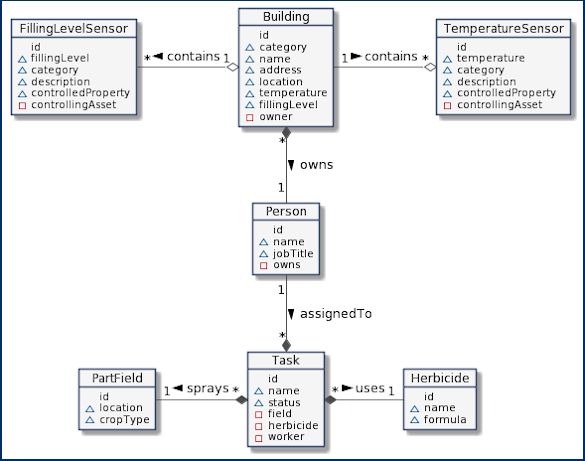
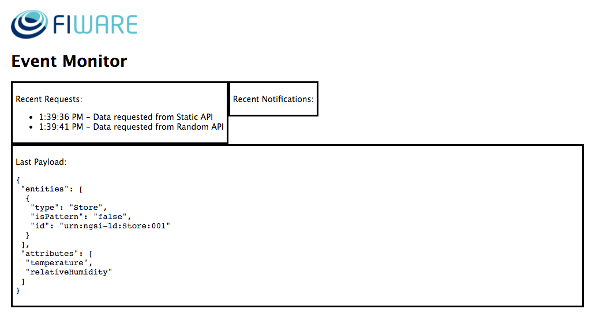
In a previous tutorial, a simple Node.js Express application was created. This tutorial will use the monitor page to watch the status of recent requests, and the devices page to alter the machines on the farm. Once the services are running these pages can be accessed from the following URLs:
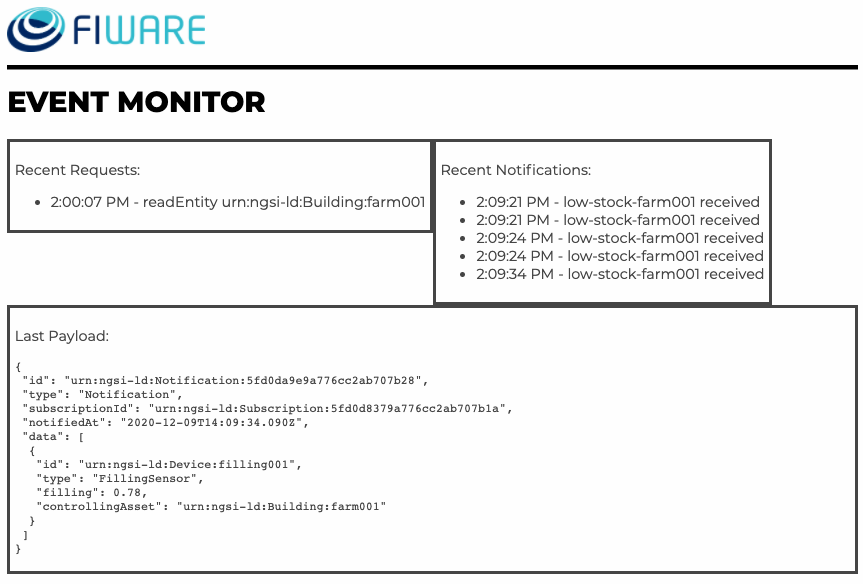
The event monitor can be found at: http://localhost:3000/app/monitor
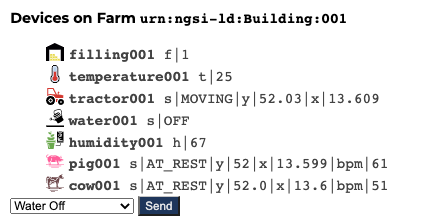
For the purpose of this tutorial, a series of dummy agricultural IoT devices have been created, which will be attached
to the context broker. Details of the architecture and protocol used can be found in the
IoT Sensors tutorial The state of each device can be
seen on the UltraLight device monitor web page found at: http://localhost:3000/device/monitor
This application will make use of two FIWARE components - the Orion-LD Context Brokerand the IoT Agent for UltraLight 2.0. Usage of any NGSI-LD Context Broker is sufficient for an application to qualify as “Powered by FIWARE”.
Currently, the Orion-LD Context Broker relies on open source MongoDB technology to keep persistence of the context data it holds. To request context data from external sources, a simple Context Provider NGSI proxy has also been added. To visualize and interact with the Context we will add a simple Express Frontend application
Therefore, the architecture will consist of four elements:
- The Orion Context Broker which will receive requests using NGSI-LD
- The FIWARE IoT Agent for UltraLight 2.0 which will receive southbound requests using NGSI-LD and convert them to UltraLight 2.0 commands for the devices
- The underlying MongoDB database:
- Used by the Orion Context Broker to hold context data information such as data entities, subscriptions and registrations
- An HTTP Web-Server which offers static
@contextfiles defining the context entities within the system. - The Tutorial Application does the following:
- Acts as set of dummy agricultural IoT devices using the UltraLight 2.0 protocol running over HTTP.
Since all interactions between the elements are initiated by HTTP requests, the entities can be containerized and run from exposed ports.
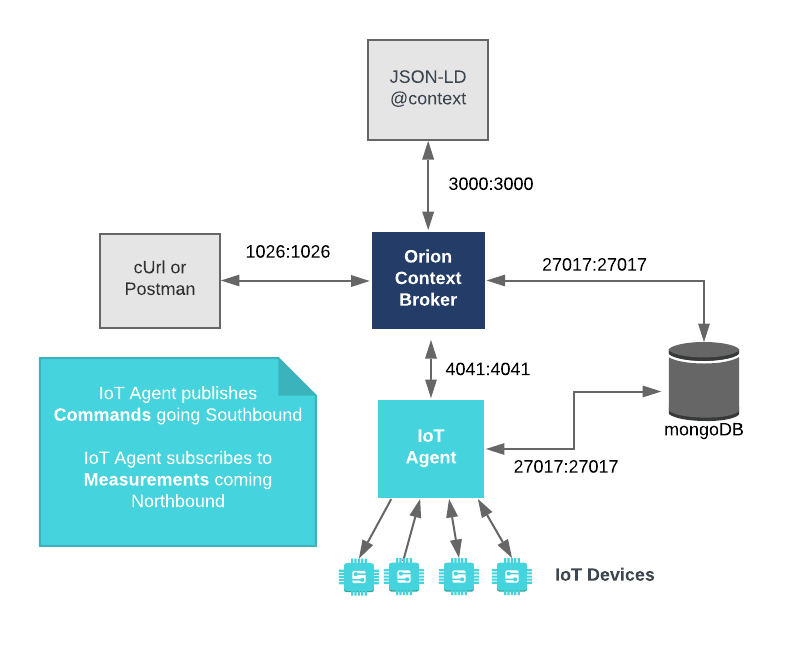
The necessary configuration information can be seen in the services section of the associated docker-compose.yml file.
It has been described in a previous tutorial.
To keep things simple both components will be run using Docker. Docker is a container technology which allows to different components isolated into their respective environments.
- To install Docker on Windows follow the instructions here
- To install Docker on Mac follow the instructions here
- To install Docker on Linux follow the instructions here
Docker Compose is a tool for defining and running multi-container Docker applications. A YAML file is used configure the required services for the application. This means all container services can be brought up in a single command. Docker Compose is installed by default as part of Docker for Windows and Docker for Mac, however Linux users will need to follow the instructions found here
You can check your current Docker and Docker Compose versions using the following commands:
docker-compose -v
docker version
Please ensure that you are using Docker version 24.0.x or higher and Docker Compose 2.24.x or higher and upgrade if necessary.
We will start up our services using a simple bash script. Windows users should download the Windows Subsystem for Linux to provide a command-line functionality similar to a Linux distribution on Windows.
All services can be initialized from the command-line by running the bash script provided within the repository. Please clone the repository and create the necessary images by running the commands as shown:
git clone https://github.com/FIWARE/tutorials.Subscriptions.git
cd tutorials.Subscriptions
git checkout NGSI-LD

./services create;
./services [orion|scorpio|stellio]
This command will also import seed data from the previous Farm Management Information System example on startup, and provision a series of dummy devices on the farm.
[!NOTE] If you want to clean up and start over again you can do so with the following command:
./services stop
To follow the tutorial correctly please ensure you have the follow two pages available on separate tabs in your browser before you enter any cUrl commands.
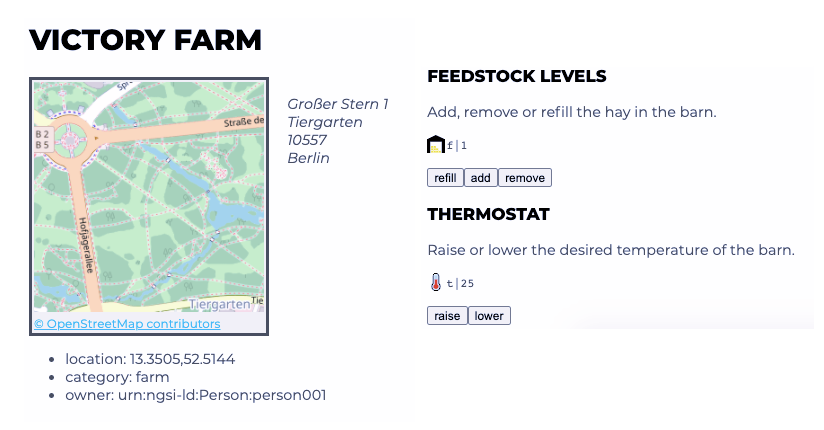
Details of various buildings around the farm can be found in the tutorial application. Open
http://localhost:3000/app/farm/urn:ngsi-ld:Building:farm001 to display a building with an associated filling sensor
and thermostat.
The event monitor can be found at: http://localhost:3000/app/monitor.
Within the Farm Management Information System, imagine that the farmer wants a contractor to refill his barn with hay when the level has reduced below a set level. It would be possible to set up the system so that the contractor was constantly polling for new information, however hay is not removed very frequently so this would be a waste of resources and create a lot of unnecessary data traffic.
The alternative is to create a subscription which will POST a payload to a "well-known" URL whenever a value has
changed. A new subscription can be added by making a POST request to the /ngsi-ld/v1/subscriptions/ endpoint as shown
below:
curl -L -X POST \
  'http://localhost:1026/ngsi-ld/v1/subscriptions/' \
-H 'Content-Type: application/ld+json' \
-H 'NGSILD-Tenant: openiot' \
--data-raw '{
  "description": "Notify me of low feedstock on Farm:001",
  "type": "Subscription",
  "entities": [{"type": "FillingLevelSensor"}],
  "watchedAttributes": ["filling"],
  "q": "filling>0.6;filling<0.8;controlledAsset==%22urn:ngsi-ld:Building:farm001%22",
  "notification": {
    "attributes": ["filling", "controlledAsset"],
    "format": "keyValues",
    "endpoint": {
      "uri": "http://tutorial:3000/subscription/low-stock-farm001",
      "accept": "application/json"
    }
  },
   "@context": "http://context/user-context.jsonld"
}'
The body of the POST request consists of two parts, the first section of the request (consisting of entities, type,
watchedAttributes and q)states that the subscription will be checked whenever the filling attribute of a
FillingLevelSensor entity is altered. This is further refined by the q parameter so that the actual subscription
is only fired for any FillingLevelSensor entity linked to the Building urn:ngsi-ld:Building:farm001 and only
when the filling attribute drops below 0.8
The notification section of the body states that once the conditions of the subscription have been met, a POST request
containing all affected FillingLevelSensor entities will be sent to the URL
http://tutorial:3000/subscription/low-stock-farm001 which is handled by the contractor's own system.
It should be noted that the subscription is using the NGSILD-Tenant header because the IoT Devices have been
provisioned using a separate tenant to the buildings for now. Tenants allow for context data to be distributed across
separate databases and allow multiple application clients to access the same context broker but keep their own data sets
apart.
Go to the Device Monitor http://localhost:3000/app/farm/urn:ngsi-ld:Building:farm001 and start removing hay from the
barn. Nothing happens until the barn is half-empty, then a request is sent to subscription/low-stock-farm001 as shown:
{
    "id": "urn:ngsi-ld:Notification:5fd0f3824eb81930c97005d8",
    "type": "Notification",
    "subscriptionId": "urn:ngsi-ld:Subscription:5fd0ee554eb81930c97005c1",
    "notifiedAt": "2020-12-09T15:55:46.520Z",
    "data": [
        {
            "id": "urn:ngsi-ld:Device:filling001",
            "type": "FillingLevelSensor",
            "controlledAsset": "urn:ngsi-ld:Building:farm001",
            "filling": 0.59
        }
    ]
}
Code within the Farm Management Information System handles received the POST request as shown:
const NOTIFY_ATTRIBUTES = ["controlledAsset", "type", "filling", "humidity", "temperature"];

router.post("/subscription/:type", (req, res) => {
    monitor("notify", req.params.type + " received", req.body);
    _.forEach(req.body.data, (item) => {
        broadcastEvents(req, item, NOTIFY_ATTRIBUTES);
    });
    res.status(204).send();
});

function broadcastEvents(req, item, types) {
    const message = req.params.type + " received";
    _.forEach(types, (type) => {
        if (item[type]) {
            req.app.get("io").emit(item[type], message);
        }
    });
}
This business logic emits socket I/O events to any registered parties (such as the contractor who will then refill the barn.)
This second subscription will fire when the filling level is between 0.6 and 0.4. The format attribute has been
altered to inform the subscriber using NGSI-LD normalized format.
curl -L -X POST \
  'http://localhost:1026/ngsi-ld/v1/subscriptions/' \
-H 'Content-Type: application/ld+json' \
-H 'NGSILD-Tenant: openiot' \
--data-raw '{
  "description": "Notify me of low feedstock on Farm:001",
  "type": "Subscription",
  "entities": [{"type": "FillingLevelSensor"}],
  "watchedAttributes": ["filling"],
  "q": "filling>0.4;filling<0.6;controlledAsset==%22urn:ngsi-ld:Building:farm001%22",
  "notification": {
    "attributes": ["filling", "controlledAsset"],
    "format": "normalized",
    "endpoint": {
      "uri": "http://tutorial:3000/subscription/low-stock-farm001-ngsild",
      "accept": "application/json"
    }
  },
   "@context": "http://context/user-context.jsonld"
}'When a low-stock-farm001-ngsild event is fired, the response is as shown:
{
    "id": "urn:ngsi-ld:Notification:5fd0fa684eb81930c97005f3",
    "type": "Notification",
    "subscriptionId": "urn:ngsi-ld:Subscription:5fd0f69b4eb81930c97005db",
    "notifiedAt": "2020-12-09T16:25:12.193Z",
    "data": [
        {
            "id": "urn:ngsi-ld:Device:filling001",
            "type": "FillingLevelSensor",
            "filling": {
                "type": "Property",
                "value": 0.25,
                "unitCode": "C62",
                "observedAt": "2020-12-09T16:25:12.000Z"
            },
            "controlledAsset": {
                "type": "Relationship",
                "object": "urn:ngsi-ld:Building:farm001",
                "observedAt": "2020-12-09T16:25:12.000Z"
            }
        }
    ]
}
Because the accept attribute has been set to application/json, the @context is sent as a Link header rather than
an attribute within the payload body.
Context brokers may offer additional custom payload formats (typically prefixed with an x-). The Orion-LD broker
offers a backward compatible NGSI-v2 payload option for legacy systems.
This third subscription will fire when the filling level is below 0.4. The format attribute has been altered to
inform the subscriber using NGSI-v2 normalized format.
curl -L -X POST \
  'http://localhost:1026/ngsi-ld/v1/subscriptions/' \
-H 'Content-Type: application/ld+json' \
-H 'NGSILD-Tenant: openiot' \
--data-raw '{
  "description": "Notify me of low feedstock on Farm:001",
  "type": "Subscription",
  "entities": [{"type": "FillingLevelSensor"}],
  "watchedAttributes": ["filling"],
  "q": "filling<0.4;controlledAsset==%22urn:ngsi-ld:Building:farm001%22",
  "notification": {
    "attributes": ["filling", "controlledAsset"],
    "format": "x-ngsiv2-normalized",
    "endpoint": {
      "uri": "http://tutorial:3000/subscription/low-stock-farm001-ngsiv2",
      "accept": "application/json"
    }
  },
   "@context": "http://context/user-context.jsonld"
}'When a low-stock-farm001-ngsiv2 event is fired, the response is a normalzed NGSI-v2 payload as shown:
{
    "subscriptionId": "urn:ngsi-ld:Subscription:5fd1f31e8b9b83697b855a5d",
    "data": [
        {
            "id": "urn:ngsi-ld:Device:filling001",
            "type": "https://uri.etsi.org/ngsi-ld/default-context/FillingLevelSensor",
            "https://w3id.org/saref#fillingLevel": {
                "type": "Property",
                "value": 0.33,
                "metadata": {
                    "unitCode": "C62",
                    "accuracy": {
                        "type": "Property",
                        "value": 0.05
                    },
                    "observedAt": "2020-12-10T10:11:57.000Z"
                }
            },
            "https://uri.etsi.org/ngsi-ld/default-context/controlledAsset": {
                "type": "Relationship",
                "value": "urn:ngsi-ld:Building:farm001",
                "metadata": {
                    "observedAt": "2020-12-10T10:11:57.000Z"
                }
            }
        }
    ]
}
As can be seen, by default the attributes are returned using URN long names. It is also possible to request that the Orion-LD context broker pre-applies a compaction operation to the payload.
x-nsgiv2-keyValues- Key-value pairs with URN attribute namesx-nsgiv2-keyValues-compacted- Key-value pairs with short name attribute aliasesx-ngsiv2-normalized- NGSI-v2 normalized payload with URN attribute namesx-ngsiv2-normalized-compacted- NGSI-v2 normalized payload pairs with short name attribute aliases
The set of available custom formats will vary between Context Brokers.
"MQTT is a publish-subscribe-based messaging protocol used in the internet of Things. It works on top of the TCP/IP protocol, and is designed for connections with remote locations where a "small code footprint" is required or the network bandwidth is limited. The goal is to provide a protocol, which is bandwidth-efficient and uses little battery power."1 NGSI-LD Context brokers can send notifications via MQTT just as easily as sending them via HTTP.
This keyValues subscription will fire when the filling level is between 0.4 and 0.2. The endpoint attribute has
been altered to use the MQTT protocol
curl -L -X POST \
  'http://localhost:1026/ngsi-ld/v1/subscriptions/' \
-H 'Content-Type: application/ld+json' \
-H 'NGSILD-Tenant: openiot' \
--data-raw '{
  "description": "Notify me of low feedstock on Farm:001",
  "type": "Subscription",
  "entities": [{"type": "FillingLevelSensor"}],
  "watchedAttributes": ["filling"],
  "q": "filling>0.2;filling<0.4;controlledAsset==%22urn:ngsi-ld:Building:farm001%22",
  "notification": {
    "attributes": ["filling", "controlledAsset"],
    "format": "keyValues",
    "endpoint": {
      "uri": "mqtt://mosquitto:1883/entities",
      "accept": "application/json",
      "notifierInfo": [
        {
          "key": "MQTT-QoS",
          "value": "1"
        }
      ]
    }
  },
   "@context": "http://context/user-context.jsonld"
}'To check that the lines of communication are open, we can subscribe to a given topic, and see that we are able to receive something when a message is published.
Open a new terminal, and create a new running mqtt-subscriber Docker container as follows:
docker run -it --rm --name mqtt-subscriber \
  --network fiware_default efrecon/mqtt-client sub -h mosquitto -t "/#"
The terminal will then be ready to receive events
The CRUD operations for subscriptions map on to the expected HTTP verbs under the /ngsi-ld/v1/subscriptions/
endpoint.
- Create - HTTP POST
- Read - HTTP GET
- Update - HTTP PATCH
- Delete - HTTP DELETE
The <subscription-id> is auto generated when the subscription is created and returned in Header of the POST response
to be used by the other operation thereafter.
This example creates a new subscription. The subscription will fire an asynchronous notification to a URL whenever the context is changed and the conditions of the subscription - Any Changes to Product prices - are met.
New subscriptions can be added by making a POST request to the /ngsi-ld/v1/subscriptions/ endpoint.
The subject section of the request states that the subscription will be fired whenever the price attribute of any Product entity is altered.
The notification section of the body states that a POST request containing all affected entities will be sent to the
http://tutorial:3000/subscription/price-change endpoint.
curl -L -X POST \
  'http://localhost:1026/ngsi-ld/v1/subscriptions/' \
-H 'Content-Type: application/ld+json' \
--data-raw '{
  "description": "Notify me of all product price changes",
  "type": "Subscription",
  "entities": [{"type": "Product"}],
  "watchedAttributes": ["price"],
  "notification": {
    "format": "keyValues",
    "endpoint": {
      "uri": "http://tutorial:3000/subscription/price-change",
      "accept": "application/json"
    }
  },
   "@context": "http://context/user-context.jsonld"
}'This example deletes the Subscription with id=urn:ngsi-ld:Subscription:5fd228838b9b83697b855a72 from the context.
Subscriptions can be deleted by making a DELETE request to the /ngsi-ld/v1/subscriptions/<subscription-id> endpoint.
curl -X DELETE \
--url 'http://localhost:1026/ngsi-ld/v1/subscriptions/urn:ngsi-ld:Subscription:5fd228838b9b83697b855a72'This example amends an existing subscription with the ID urn:ngsi-ld:Subscription:5fd228838b9b83697b855a72 and updates
the notification URL.
Subscriptions can be updated making a PATCH request to the /ngsi-ld/v1/subscriptions/<subscription-id> endpoint.
curl -iX PATCH \
  --url 'http://localhost:1026/ngsi-ld/v1/subscriptions/urn:ngsi-ld:Subscription:5fd228838b9b83697b855a72' \
  --header 'content-type: application/json' \
  --data '{
  "notification": {
    "format": "normalized",
    "endpoint": {
      "uri": "http://tutorial:3000/subscription/price-change",
      "accept": "application/json"
    }
  }
}'This example lists all subscriptions by making a GET request to the /ngsi-ld/v1/subscriptions/ endpoint. The list of
subscriptions is limited to the tenant defined by the NGSILD-Tenant header (or the default tenant if the
NGSILD-Tenant header is not sent)
The notification section of each subscription will also include the last time the conditions of the subscription were met, and whether associated the POST action was successful.
curl -X GET \
--url 'http://localhost:1026/ngsi-ld/v1/subscriptions/This example obtains the full details of a subscription with a given ID.
The response includes additional details in the notification section showing the last time the conditions of the subscription were met, and whether associated the POST action was successful.
Subscription details can be read by making a GET request to the /ngsi-ld/v1/subscriptions/<subscription-id> endpoint.
curl -X GET \
--url 'http://localhost:1026/ngsi-ld/v1/subscriptions/urn:ngsi-ld:Subscription:5aead3361587e1918de90aba'Want to learn how to add more complexity to your application by adding advanced features? You can find out by reading the other tutorials in this series
MIT © 2020-2025 FIWARE Foundation e.V.
- Wikipedia: MQTT - a central communication point (known as the MQTT broker) which is in charge of dispatching all messages between services