
VP Project by Ardian Abazi, Egzon Iseini & Mladen Tasevski
Due to the way the game-saving mechanisms were implemented and auto-saving works, the project has a serious bug that occurs when starting the game for the first time ever, it would return an exception and not run at all.
Game was implemented in such a way that it would auto-save any progress when closing it, and load it automatically when starting it. The save file would be located in the %appdata% folder. If this file was missing, the game wouldn't start. And the only time when that file will be missing is, if the game was never run on that computer.
Reason for this is that we are calling a method, which in turn calls an object method to re-set the object. However on a fresh run, this object will always be NULL. In order to fix it, just alter line 250 of Form1.cs as such:
//Find the following code in line 250 of Form1.cs
_balls.Terminate();

//Include a null check before calling the method
if(_balls != null) _balls.Terminate();BBTan (FINKI) - is an attempt to recreate the widely famous and popular BBTAN game, whose popularity is especially noticeable on mobile devices. We felt that the re-implementation of this game would be an ideal project as it covers the more important aspects of the Visual Programming course, especially painting using Windows Forms.
In the following sections of this documentation we have outlined some of the most important problems of the project and its implementation. For anything else, the demo of the game and the source code can be checked.
The game of BBTan (FINKI) was implemented in a fixed size window with an 9:16 aspect ratio. The window is of fixed size to make the implementation easier and to assure that the game will be playable on most modern screens.
The main view of the application features three distinct windows:
- The top navigation bar, which includes options such as "New Game" - to start a brand new game of BBTan, "Fast Forward" - speeds up the game etc.
- The main window which includes the game and gameplay itself.
- The bottom status bar, which shows the current score and also any power up you might have active.
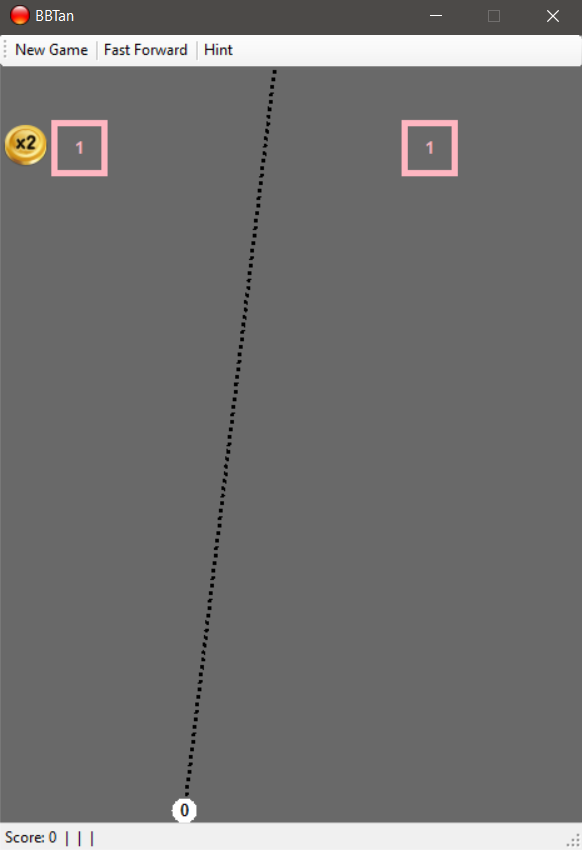
Not every detail from the original game of BBTAN was implemented fully. We took the liberty of retaining only the main aspects of the game and altering everything else as we saw fit for this project. Hence one main aspect of the game that was altered were the power ups, as we implemented different powerups than the original in order to make the whole experience more entertaining and glitch free.
The game-play is very simple and straight forward:
A new game starts with the score set to 0. In the game you have a "launch" from which a sequence of balls is launched from (in the above picture, the white circle on the bottom of the window). The launchpad is set to a random horizontal position (its vertical position remains always in the same place).
A new row of blocks is generated in each round. In the beginning there is only one row. At random spots in the window at specified row, either a square block with a predetermined amount of HP (Health Points) is spawned or a power up (ellipse shape).
At every round the rows go down by one level, while on top a new row is generated (same procedure as above).
The objective of the game is to destroy each and every square block, for as long as possible. The mouse is used on the main window to launch a series of balls (initially just one ball is launched per round) and hit the different square blocks. If no damage multiplier is active, the ball hitting a square causes -1HP damage to the square. If the square reaches 0, it is thereby destroyed.
The balls are launched in the direction of the mouse click. Initially only a single ball is launched in the direction of the click and goes on until it reaches the bottom where it is destroyed. If there are more balls in the launchpad, each and every one of them launch at the direction of the mouse click and their path may vary. When all the balls is destroyed i.e. the last one reaches the bottom, the round ends. The launchpad position moves to the place where the first ball fell, the power ups for that round are cleared and the rows go down by one level.
If the first row (most bottom one) reaches the end of the screen (i.e. launchpad), the game is lost.
The whole game is mainly composed of two types of elements, namely blocks and balls. Blocks are targets that need to be destroyed, which makes them the main objective of the game and balls are the "weapons" with which the destruction is made. To achieve this we had to come up with the following packages and classes:
Blockspackage contains:BlockSquareBlockPowerUpsRow
Ballspackage containsBallBallsBallStart
Constantsclass
Block is an abstract class from which SquareBlock and PowerUps inherit. The reason behind Block being abstract is that we can have different sort of blocks depending on shape or even functionality, for instance we could have SquareBlocks and TriangularBlocks yet both would need some sort of drawing going on and both would need some sort of "hit mechanism" and so on.
[Serializable]
public abstract class Block
{
    public float X { get; set; }
    public float Y { get; set; }
    public Color Color { get; set; }
    public int HP { get; set; }
    public bool exists; // whether the block still exists, will be used for drawing later
    protected bool WasHitRecently;

    /// <remarks>
    /// Color is determined according to HP
    /// </remarks>
    public Block(float X, float Y, int HP)
    {
        this.Y = Y;
        this.X = X;
        this.exists = true;
        Color = Color.Red;
        this.HP = HP;
    }

    /// <summary>
    /// Method to draw the block
    /// </summary>
    public abstract void Draw(Graphics g);

    /// <summary>
    /// Method to find the distance between block and point provided as arg
    /// </summary>
    /// <returns>Distance as float</returns>
    protected float GetDistance(float X, float Y)
    {
        return (float)Math.Sqrt((this.X - X) * (this.X - X) + (this.Y - Y) * (this.Y - Y));

    }

    /// <summary>
    /// Callback method when block is hit
    /// </summary>
    /// <param name="amount">Ball power</param>
    /// <returns>Consequence of hit depending on type of block</returns>
    public abstract int WasHit(int amount = 1);

    /// <summary>
    /// Internal method invoked when block is hit
    /// It should decrease the HP by the amount provided as arg
    /// Default val is 1
    /// </summary>
    protected void DeductHP(int amount = 1)
    {
        if (HP <= 0)
        {
            exists = false;
        }
        WasHitRecently = true;
    }
}
PowerUps is a special type of block which adds an interesting aspect to the game.
The game has 5 power ups that serve temporary buffs to elements of the game-play. They appear randomly during the game-play in place of normal blocks. When a launched ball goes through the power up, it is picked up and will be automatically activated in the next round. Power ups stack up, hence multiple unique power ups or same type of power ups might be active at the same time at a given round. The power ups are as following:
- (+1) power up - adds a ball to the launchpad. Initially in a new game the launchpad starts with only one ball, hence it can only launch one ball per round. When this power up is picked up, the amount of balls a launchpad can launch is increased by one. This power up lasts till the end of the game i.e. does not disappear when round ends as other power ups.
- (Coin) power up i.e. Score Multiplier - when this power up is picked up, in the next round the score multiplier increases by one (initially its always 1). This means that instead of getting one score per -1HP damage of a square block, with this power up active, the score received is 1HP damage * Score Multiplier ex. if you had a score multiplier of 3 (picked up 3 power-ups of this type on the previous round), instead of score 1 you'd get 1 * 3 = 3 score.
- (2x Damage) power up i.e. Damage Multiplier - picking up this power up buffs in the next round the HP damage done to a block by x amounts. If your initial HP damage per block is 1 (default) and you have Damage Multiplier x3, for every square block the damage done to it by a ball would be -1HP damage * 3 = -3HP damage .
- (2x Balls) power up i.e. Balls Multiplier - having this power up active in a round means that the launchpad will launch x times the balls at the given round. If you have 10 balls in the launchpad (from previously acquiring 9 (+1) ball power ups) and a Ball Multiplier x2, in the given/next round instead of 10 balls the launchpad will contain 10 balls * 2 = 20 balls.
- (FINKI) power up i.e. Secret Level - due to time constraints not implemented. The idea was for this power up to be super rare. Its main objective would be to remove all the square blocks in the level and replace them with new ones in the shape of the FINKI logo (IO). This would be useful if the rows are almost at the bottom an this power up was picked up as it would reset the level to something a bit easier. Game-play would continue as normal.
The main purpose of a block class is to hold a row of blocks, it does so by storing each block in a List<>. Other than this it is responsible for calling the Draw() method of each block, generating new blocks. The generation of blocks is done in the GenerateRow() method. This method also determines the amount of blocks that will be present in each row, it achieves this in a random fashion using the built-in Random class. The probability of appearance of each block can be altered and set to a desired value which in turn, would essentially set the game difficulty.
The Ball class is simply used to draw each ball, keep track of its movement and be responsible for collision detection between Ball and Block including the consequences of such an occasion (changing direction of the ball's movement and deducting HP from each hit block).
The idea behind the collision function used in this class is the following, having the location of the ball let it be denoted by point O and radius R and given a block denoted by points A, B, C and D starting from the top left corner and going clockwise, we can detect whether a collision happened and in which side it happened in the following way.
let d1 = distance(O, segment(A, B))
let d2 = distance(O, segment(B, C))
let d3 = distance(O, segment(C, D))
let d4 = distance(O, segment(D, A))
if d1 is less than R
	top side was hit
else if d2 is less than R
	right side was hit
else if d3 is less than R
	bottom side was hit
else if d4 is less than R
	left side was hit
The distance function used above could be very simply implemented using the well known mathematical formulas for distance between point and line. Other than this the ball class also has information about the X and Y velocity that is calculated from the provided starting and clicked points, and are changed in case of collisions with either blocks or sides.
The purpose of Balls is very similar to that of Row it simply wraps all the available balls and provides an easier to use interface for the application classes. In addition to these functionalities, the Balls class offers methods to start moving the balls and checking whether all balls are out of play.
BallStart on the other hand is a helper class which implements some functions used for calculations, mainly of movement points.
The constants class as the name suggests it is used for storing the constants which are used throughout the application, such as the block size, ball radius etc. Constants is a sealed class with private constructor, so its values cannot be altered in any way.
The whole game is put together on the main Form of this project. We divided the code of the main form into 3 logical parts member variables, form methods and helper methods.
Member variables obviously include every needed object to make the game work, such as rows, balls etc.
Form methods are all the event handler methods, such as MouseMove and Paint, and the helper methods are simply there to make this whole thing a bit less messy.
Among the most important helper methods we can distinguish the methods used for serialization, namely, OpenPreviousGame() and SaveGame(). Serialization in this application is fully automated, what we mean by this is that there is no need for the user to click a save button or something of that kind, whenever the user exits the game, serialization is performed automatically without the user knowing at all. The same holds for deserialization, whenever the game is started it checks for previously saved games, if such a game exists it loads it, if it does not it generates a new one.