Iranian ALPR task using YOLOV3 (Pytorch) on Raspberry-Pi 4
according to last project in github repo about detecting iranian license-plate detection(LPD) using yolov3 in Repo, we decide to employ that on Raspberri-Pi 4 to illustrate the functionality of LPD on real world. moreover, we provide a structure of deep learning algorithm trained before and tested on different types of License-Plate(LP) in images to investigate the being real-time of our system. in below, see our raspberry pi :
Media3.be.cautted.mp4
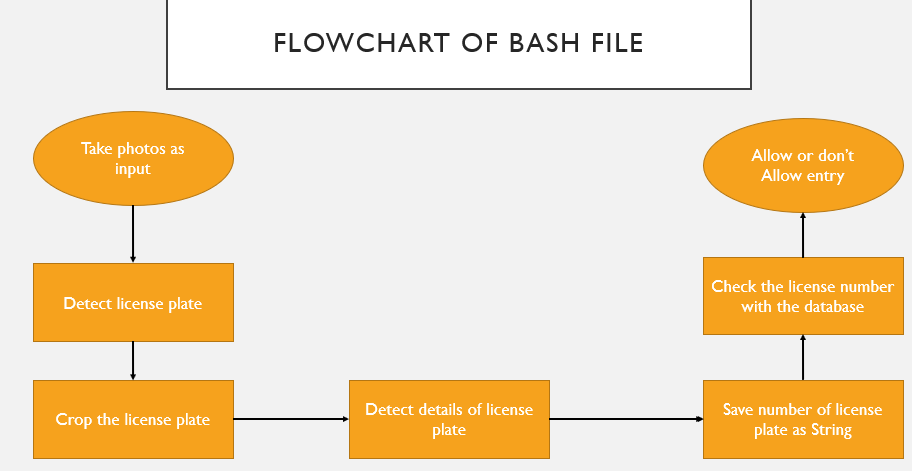
basis on architecture, the raspberri-Pi receive input image containing a vehicle, then using first YOLOv3 algorithm to detect the possible LP in it, after that, since we will have the coordinates of LPs which lead to crop from region and passed to another YOLOv3 algorithm to earn possible characters in LP. finally, we use the characters in ordinary numbers to search it in our Query datebase. if the LP number in the list, the green LED will be starting to trun on (it means allow) else the red LED will be turned on (it means not allow).
- Raspberry-pi 4B (Hardware)
you see the architecture of raspberry 4 and its different pins for using input/output task. furthermore, for using in
pythonwe need importGPIOpackage to use their functions, for instanc, we setpin #24as output to turn onLED.


- install Raspbian (OS on Hardware)
due to use of raspberry Pi, you will be needing an
OSlike a (windows) to employ its properties and features on it,so by using this install link you can install your environment. see the results of configuration, in below figure:

- following packages are needed to set our configuration for employing the
yolov3algorithm and animage processingstep:
command for installing : pip install <package name>
numpy
matplotlib
pycocotools
tqdm
Pillow
declxml==0.9.1
Notice : for installing opencv, use this link and
yorch >= 1.3by.whlfiles in below :

- Test Procedure
in the below fiure, you see the structure of main folder which cause the ALPR implementation. following files

output directory : the results of first yolov3 for LP detection
output1 directory : the results of second yolov3 for CR recognition
utils directory : packages and fuctions used in yolov3 algorithms
convertedlp.weights : weights (before trained) for LP detection
convertedch.weights : weights (before trained) for CR recognition
crop.py : code for cropping detected LPs from image
detect.py : main code using yolov3 strucrue for detecting objects
LED.py : using python packages for accessing LED on raspberry Pi
models.py : the structure of yolov3 neural network (activatation fuction, upsampling fuction, ...)
objectlp.names : labels in LP detection
objecttochar.names : labels in CR detection
output.py : instructions for reading characters from detected LPs and turning on LEDs basis on our LPs number
test.jpg : input image
test2.jpg : cropped LPs as an input for second yolov3
yolov3-1cls.cfg : configuration file for designing the layers in LP yolov3 neural network
yolov3-1clstochar.cfg : configuration file for designing the layers in CR yolov3 neural network
test.sh : bash script file
- summarization
for running all of above mentioned as an unique structure, we gather all oof them together in bash script file as
test.sh. in primary step, we set a input imagetest.jpgin the directory ,then we run bash file to employ all of instructions sequentially (by order). in the first line we use an instruction for implementing LP yolov3 that it extract possibe LPs and their coordinations in image as a.txtfile inoutputdirectory. in seconde instruction,crop.pyused to extract LPs from input image inoutputdirectory, and then a third line employ a seconde yolov3 for detecting possible characters and their coordinations (.txtfile) in LPs and save the results inoutput1directory. in finally step, usingoutput.pycode for reading LP number.
- write
./test.shto run bash file, and see the results as below (there is an aexample when the LP is not in Query database) :
# instructions in bash file
#! /bin/bash
python3 detect.py --source test.jpg --weights convertedlp.weights --cfg yolov3-1cls.cfg --names objectlp.names --img-size 416 --output ./output1/

python3 crop.py --img test.jpg --txt ./output1/test.jpg.txt

python3 detect.py --source test2.jpg --weights convertedch.weights --cfg yolov3-1clstochar.cfg --names objecttochar.names --img-size 416

python3 output.py --path ./output/test2.jpg.txt
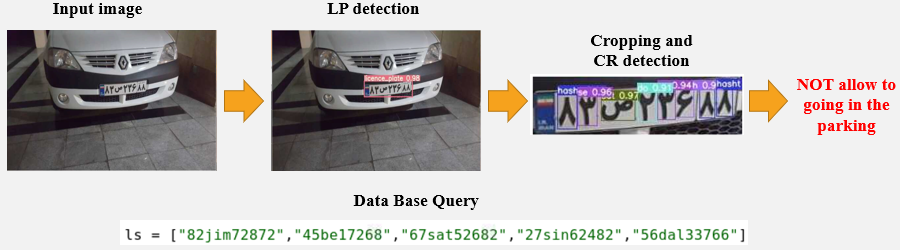
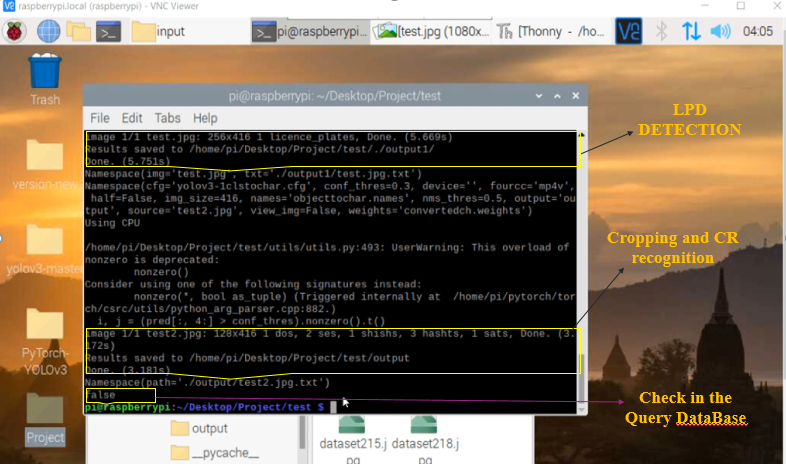
you see, the LED show red light in it, when we have not LP number is
lslist :
Media1.mp4
otherwise, the LED show green light while you have the LP in
lslist :
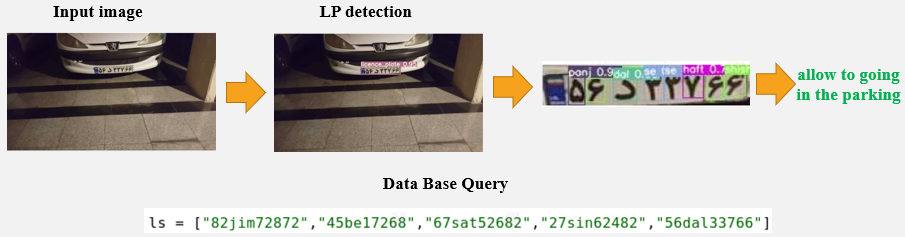
Media2.mp4
this project was done by me
behnoud shafizadehand my co-workersehsan ramzaniandnavid pourhadiin the kharazmi university lab, supervised byDR.Farshad EshghiandDR.Manoochehr KelarEstaghi,so the full source of code and dataset in this project are out authority and related tokharazmi university of tehran,so if you would like to contiribute with our group and access to out document,please contact with our emails :behnud.shafizadeh@gmail.com,e.rmz@yahoo.com, andnpourhadi1998@gmail.com,thanks for your consideration.