





A customizable infinite canvas dashboard with integrated Model Context Protocol (MCP) server support
Features • Quick Start • Documentation • Contributing • License
Canvas MCP Client is an open-source, self-hostable dashboard application built around an infinite, zoomable, and pannable canvas. It provides a unified interface for interacting with multiple MCP (Model Context Protocol) servers through a flexible, widget-based system.
Why Canvas MCP Client?
- 🎨 Infinite Canvas: Organize your workspace spatially with unlimited zoom and pan capabilities
- 🧩 Modular Widgets: Use 12+ pre-built widgets or create your own custom components
- 🛠️ No-code Widget Builder: Use the widget builder to create your own widgets without coding
- 🤖 MCP Integration: Seamlessly connect to multiple MCP servers using the FastMCP library
- 🔌 AI-Powered: Configure multiple AI providers (OpenAI, Anthropic, Ollama, Google) for enhanced functionality
- 🎭 Template System: Save and share widget and dashboard configurations
- 🐳 Easy Deployment: One-command Docker setup or manual installation
- 🔒 Privacy-First: All data stays on your infrastructure, no external dependencies
Perfect for AI power users, developers, content creators, and anyone who wants a customizable workspace for managing AI tools and services.
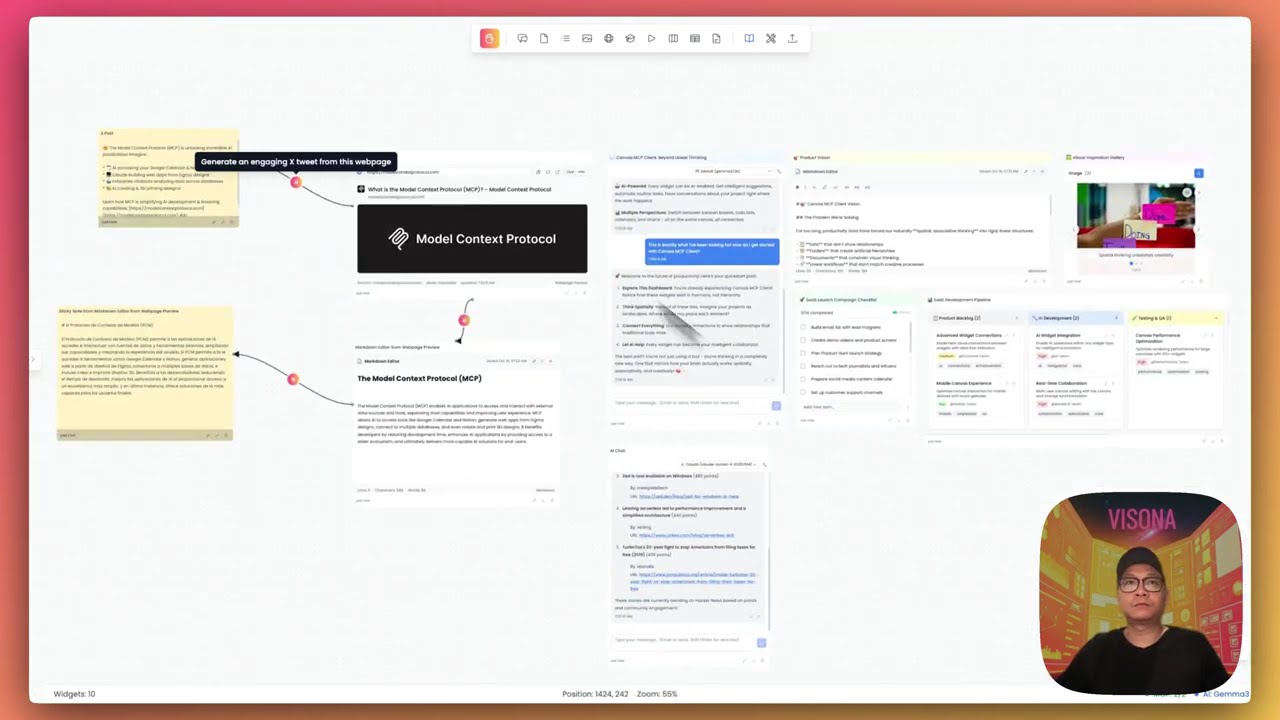
Click to watch the Canvas MCP Client demo video
-
🎨 Infinite Canvas Interface
- Smooth zooming and panning
- Grid snap and alignment tools
- Persistent viewport state
- Responsive and optimized rendering
-
🧩 Rich Widget System (12+ widgets)
- 📝 Sticky Notes - Quick notes and reminders
- ✅ To-Do Lists - Task management with checkboxes
- 💬 AI Chat - Integrated LLM conversations
- 🖼️ Image Display - Visual content display
- 🃏 Flash Cards - Learning and memorization
- 🎬 Video Player - Media playback
- 📊 Kanban Board - Project management
- 📈 Spreadsheet - Data tables and organization
- 📄 Markdown Editor - Formatted documentation
- 🌐 Webpage Preview - Embedded web content
- 🌍 World Clock - Multiple timezone display
- ☁️ Weather Widget - Live weather information
-
🔌 MCP Server Management
- Configure multiple MCP server connections
- Support for stdio, HTTP, and SSE transport protocols
- Real-time connection status monitoring
- Import/export server configurations
-
🤖 AI LLM Configuration
- Multiple AI provider support (OpenAI, Anthropic, Ollama, Google)
- Configurable model parameters
- Secure credential storage
- Custom API endpoints
-
📦 Template System
- Save widgets as reusable templates
- Export/import dashboard configurations
- Share templates with the community
- Template library with preview
-
🎨 Customization
- Light and dark themes
- Widget color and shape customization
- Flexible layout options
- Drag-and-drop interface
-
💾 Data Persistence
- Automatic saving
- Local SQLite storage (PostgreSQL ready)
- Session recovery
- Backup and restore capabilities
- Docker & Docker Compose (Recommended) OR
- Node.js 18+ and Python 3.10+ (Manual setup)
The fastest way to get started:
# Clone the repository
git clone https://github.com/n00bvn/CanvasMCPClient.git
cd CanvasMCPClient

# Start the application
docker-compose up -d

# Access the application
open http://localhost:3031
The application will be available at:
- Frontend: http://localhost:3031
- Backend API: http://localhost:8081
- API Docs: http://localhost:8081/docs
Click to expand manual setup instructions
# Navigate to backend directory
cd backend

# Create and activate virtual environment
python -m venv venv
source venv/bin/activate  # On Windows: venv\Scripts\activate

# Install dependencies
pip install -r requirements.txt

# Create data directory
mkdir -p data

# Set environment variables
export DATABASE_URL="sqlite:///./data/canvas_mcp.db"
export CORS_ORIGINS="http://localhost:3031,http://127.0.0.1:3031"
export SECRET_KEY="your-secret-key-here"

# Start the backend
uvicorn main:app --reload --host 0.0.0.0 --port 8081# Navigate to frontend directory (in a new terminal)
cd frontend
# Install dependencies
npm install
# Set environment variables
export NEXT_PUBLIC_API_URL="http://localhost:8081"
# Start the frontend
npm run devThe application will be available at http://localhost:3031
-
Configure MCP Servers (Optional)
- Click the "MCP Servers" button in the sidebar
- Add your MCP server configurations
- Test connections
-
Set Up AI Providers (Optional)
- Click "AI Config" in the sidebar
- Add API keys for your preferred providers (OpenAI, Anthropic, etc.)
- Configure default models
-
Create Your First Dashboard
- Click "New Dashboard" in the left panel
- Add widgets from the toolbar
- Drag, resize, and customize to your liking
-
Explore Features
- Try different widget types
- Save templates for reuse
- Export and share your dashboards
- Contributing Guide - How to contribute to the project
- Database Guide - Database schema and migrations
- Security Policy - Security guidelines and reporting
Canvas MCP Client is built with modern, proven technologies:
- Framework: Next.js 15 with React 19
- Language: TypeScript
- Styling: Tailwind CSS
- State Management: Redux Toolkit
- UI Components: Custom components with Heroicons
- Canvas Rendering: HTML5 Canvas with optimized performance
- Framework: FastAPI (Python 3.10+)
- Database: SQLite (development) / PostgreSQL (production ready)
- ORM: SQLAlchemy with Alembic migrations
- MCP Integration: FastMCP library
- API Documentation: Auto-generated OpenAPI/Swagger docs
- Containerization: Docker & Docker Compose
- Web Server: Uvicorn (development) / Gunicorn (production)
- Reverse Proxy: Nginx (optional, for production)
We welcome contributions from the community! Whether you're fixing bugs, adding features, improving documentation, or creating new widgets, your help is appreciated.
Ways to contribute:
- 🐛 Report bugs and issues
- 💡 Suggest new features or widgets
- 📝 Improve documentation
- 🔧 Submit pull requests
- 🎨 Share widget and dashboard templates
- ⭐ Star the repository and spread the word
Get started:
- Read our Contributing Guide
- Check out open issues
- Join the discussion in GitHub Discussions
Before submitting a PR:
# Auto-fix formatting issues
./lint-fix.sh

# Check all linting rules
./lint.sh
See Linting Setup for detailed information.
Please read our Code of Conduct before contributing.
Security is a top priority. If you discover a security vulnerability, please follow our Security Policy to report it responsibly.
Security Features:
- Encrypted credential storage
- Local-first data architecture
- No telemetry or external data transmission
- Secure MCP server connections
- Regular dependency updates
- Remote MCP servers with oAuth support
- Integrate with OpenAI apps
- Attach custom prompt to widgets
- Support image and video generation AI models
- Add more built-in widgets like Calendar, Music Player, Charts, etc.
- Add more utitlities like Text, Shapes, etc.
- Add custom data sources to widgets (webhook, REST API, etc.)
- Canvas dashboard history and undo/redo
- Enhance Widget Builder for more advanced widgets
- Support web scraping and deep research capabilities
- Mobile responsive design improvements
- Enhanced AI integration capabilities
- Performance optimizations for large dashboards
- Import/export improvements
- Real-time collaboration features
- Accessibility enhancements (WCAG 2.1 compliance)
See the open issues for a full list of proposed features and known issues.
Canvas MCP Client is actively maintained and in stable development. We follow semantic versioning and maintain a CHANGELOG for all releases.
Current Version: 1.0.0 Status: Stable - Ready for self-hosting Last Updated: October 2025
- Built with FastMCP for MCP server integration
- Inspired by infinite canvas tools like Miro, Figma, and Obsidian Canvas
- Icons by Heroicons
- Community contributors and testers
This project is licensed under the MIT License - see the LICENSE file for details.
- Issues: GitHub Issues
- Discussions: GitHub Discussions
- Documentation: Project Wiki
- Discord community: Discord Community
- Follow us: @VisonaHQ | @thaw_tran
If you find Canvas MCP Client useful, please consider giving it a star! ⭐
Made with ❤️ by VISONA and the open source community