The XML template for Blogger/Blogspot: http://bluetext.in/

BlueTEXT.in XML template.
Blogspot (Blogger) Templates for https://www.bluetext.in/ 













This Template is designed to wrok with Google's blog platform Blogger.com.
How to install a template?
- Download the template
- Go to your blog template section (Dashboard → Template → "Backup / Restore" button)
- Backup your previous template ("Download full template" button)
- Choose the template.xml file and upload it
- You are awesome 👏
Start asking questions...I'll put the frequent ones here.
This project requires a lot of work and often expensive items for testing. Please consider a safe, secure and highly appreciated donation via the PayPal link below or via the Ko-Fi sponsor link at the top of the page.
BlueTEXT.in Premium
Premium Blogger Template
BlueTEXT.in is a Blogger theme (2nd Generation of Materia X) inspired by Google Ma…
Free Download Theme View Demo * Click the Free Download Theme button to view Pricing Details.

Theme Name : BlueTEXT.in Premium Theme Type : Blogger Version : 1.0.7 Terakhir Update : Today License : Universal
BlueTEXT.in is a Blogger theme (2nd Generation of Materia X) inspired by Google Material Design. BlueTEXT.in is very suitable for use in Personal niche Blogs and Magazines (Including, news, travel, hobbies, lifestyle, etc.).
Why BlueTEXT.in? There are rarely blogs that have a Material Design theme and have complete features. Therefore, this theme is here so that it can be different from other themes.
Easy to customize, you don't have to touch the code. BlueTEXT.in is very easy to customize. Install the theme, set the look you like in the Theme Editor and Materia X is ready to go. If there are problems, we are ready to help you.

Enjoy easy-to-use features
Layout Attractive Layout view. 
Theme Designer There are various options in Theme Designer, and you can set them easily.

Custom Widgets There are many Custom Widgets that you can use.

Score GT-Metrix GTMetrix final score (Without Using all Custom Widgets)

Data Structure Google Structured Data Testing yang Valid.

Rich Result Valid and Perfect Rich Result.

Overview "BlueTEXT.in Premium" Blogger Template
Blogger Templates
"BlueTEXT.in Premium" is a template specifically for bloggers.
Responsive Layout
"BlueTEXT.in Premium" is very responsive, meaning it supports all screen types and sizes.
Theme Designer
You can adjust the appearance through the Theme Designer in Blogger and "BlueTEXT.in Premium" really supports it.
Easy Installation
The installation process is easy, you can go directly to the Backup Theme without errors.
Multilingual
"BlueTEXT.in Premium" can automatically translate the language on the Blog, the available languages are English and Indonesian.
Multi-Niche
"BlueTEXT.in Premium" can be used for blogs/websites that have various types of niches.
Cross-Browser Compatible
"BlueTEXT.in Premium" really supports all types of browsers such as Chrome, Firefox, Opera, to Internet Explorer.
SEO Friendly
The theme you use has an impact on SEO and "BlueTEXT.in Premium" is very SEO friendly.
Paket "BlueTEXT.in Premium" Blogger Template
Endorsement
We provide item support via Whatsapp, Facebook, and Telegram chat as well as Email.
Documentation
There is complete documentation on the "BlueTEXT.in Premium" Blogger Template that you can use.
Update
You will get an update of "BlueTEXT.in Premium" Blogger Template (If Available).
Affiliate
Anyone who Downloads this theme can download it now for free.
Get BlueTEXT.in Premium for For Free Please Support us by Donating !.
Free Download the "BlueTEXT.in Premium" Theme Now!
BlueTEXT.in is a Blogger theme (2nd Generation of Materia X) inspired by Google Ma… Free Download Now
*Donations can be made in Local Bank Transfer, Paypal, Dana, Ovo, and Jenius.
Access your blog Layout > and click on the Edit Icon > in the Topbar Menu gadget.
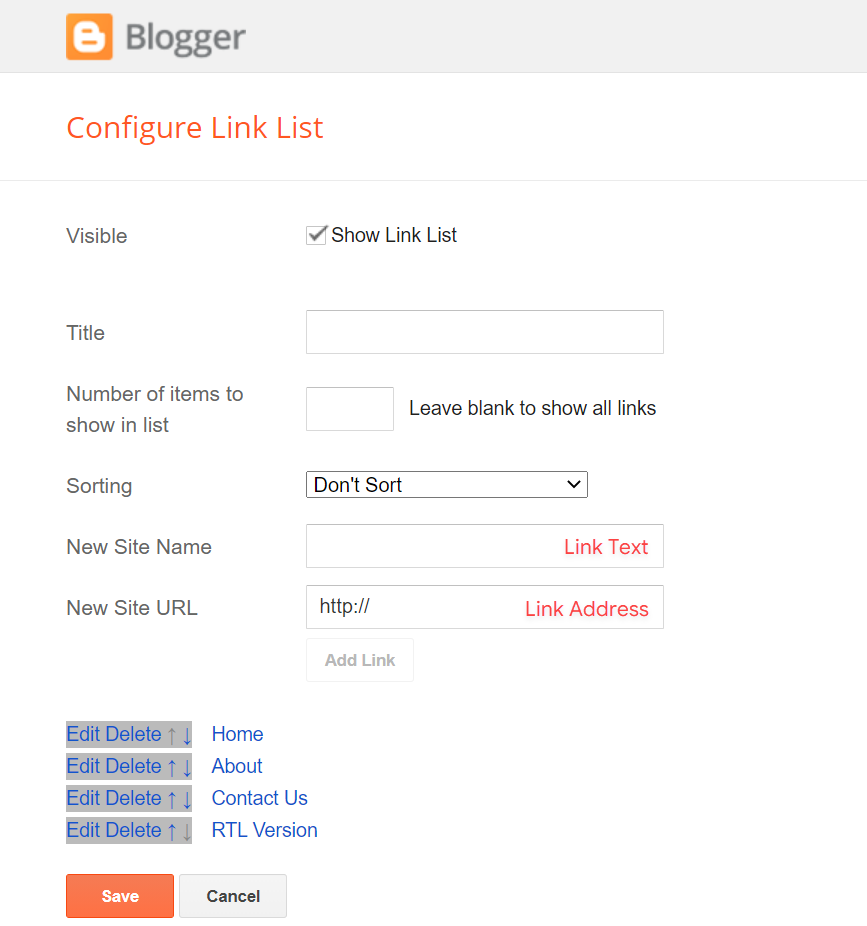
Access your blog Layout > and click on the Edit Icon > in the Topbar Icons gadget.
Supported Icons: blogger, apple, amazon, microsoft, facebook, facebook-f, twitter, rss, youtube, skype, stumbleupon, tumblr, vk, stack-overflow, github, linkedin, dribbble, soundcloud, behance, digg, instagram, pinterest, pinterest-p, twitch, steam, delicious, codepen, flipboard, reddit, whatsapp, telegram, messenger, snapchat, email, discord, quora, share, external-link
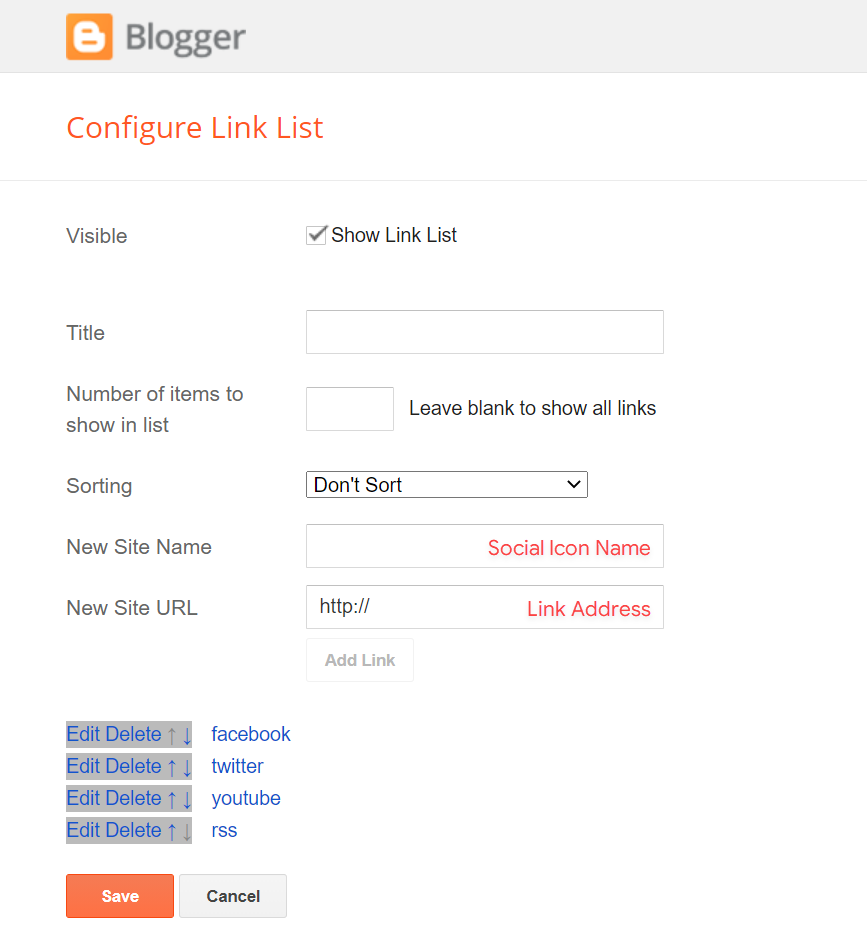
Access your blog Layout > and click on the Edit Icon > in the Header Logo (Header) gadget.
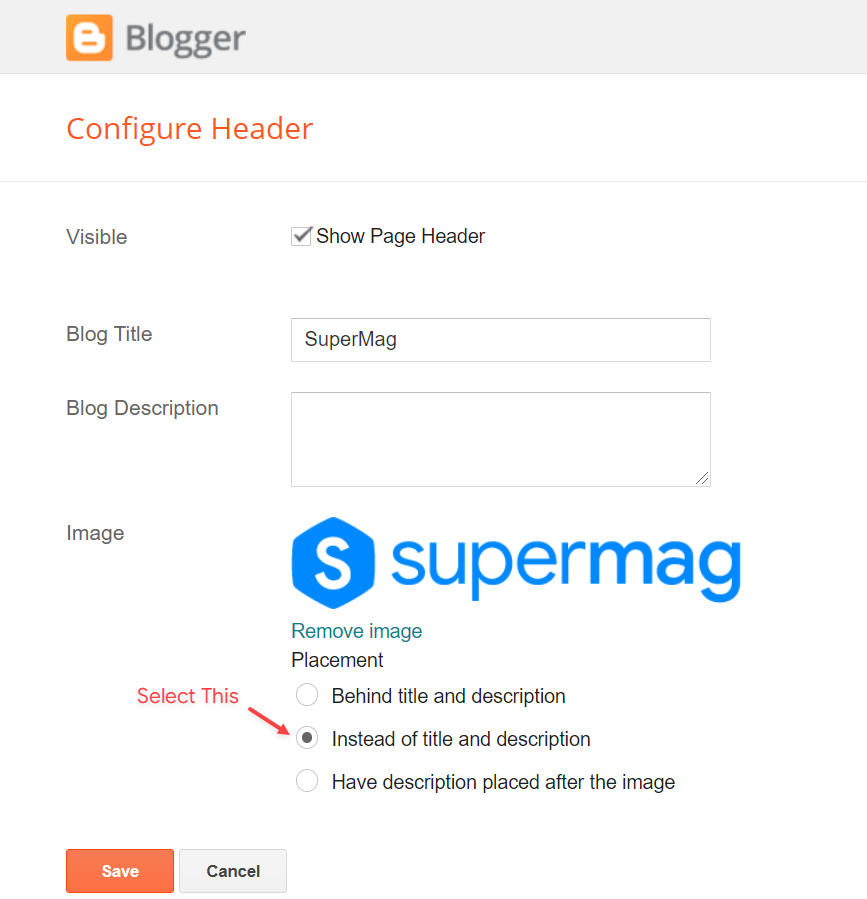
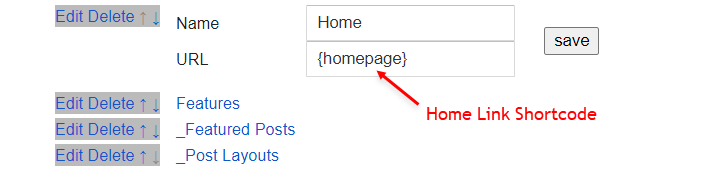
Access your blog Layout > and click on the Edit Icon > in the Header Menu gadget.
Homepage Link Example: Add the text and in the site url field add {homepage}
Normal Link Example: Features
SubLink Level 1 Example: _Level 1 "Before the Title add 1 underscore"
SubLink Level 2 Example: __Level 2 "Before the Title add 2 underscore"
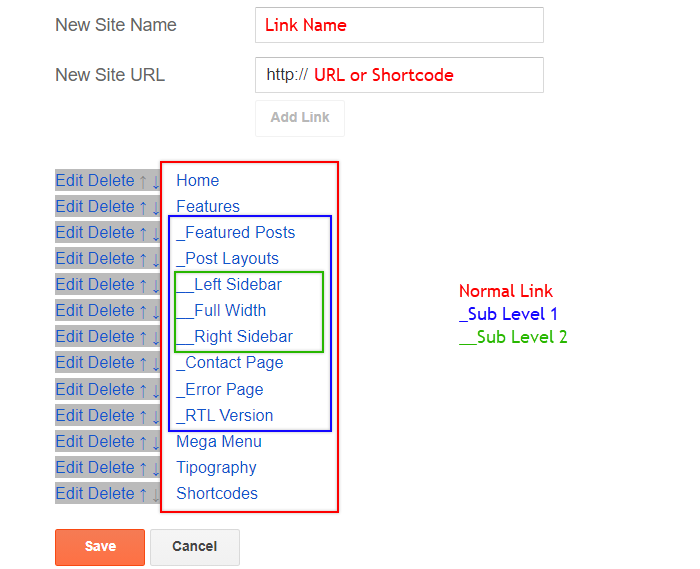
ALERT: Level 2 Links must be between or below level 1 links.
Shortcode: {getMega} $label={Your Label}
Shortcode Label: label or recent
What are Label?

Shortcode Example: {getMega} $label={Marketing}
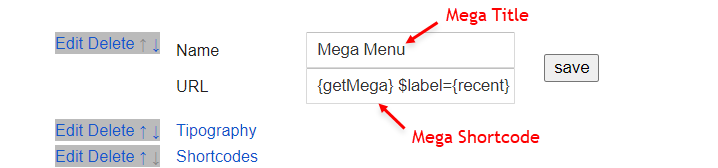
SAVING: After adding all the desired links and organizing them in the correct position, click on the Save Button.
Access your blog Layout > and click on the Add a Gadget > HTML/JavaScript, Image or AdSense > in the section Header ADS.
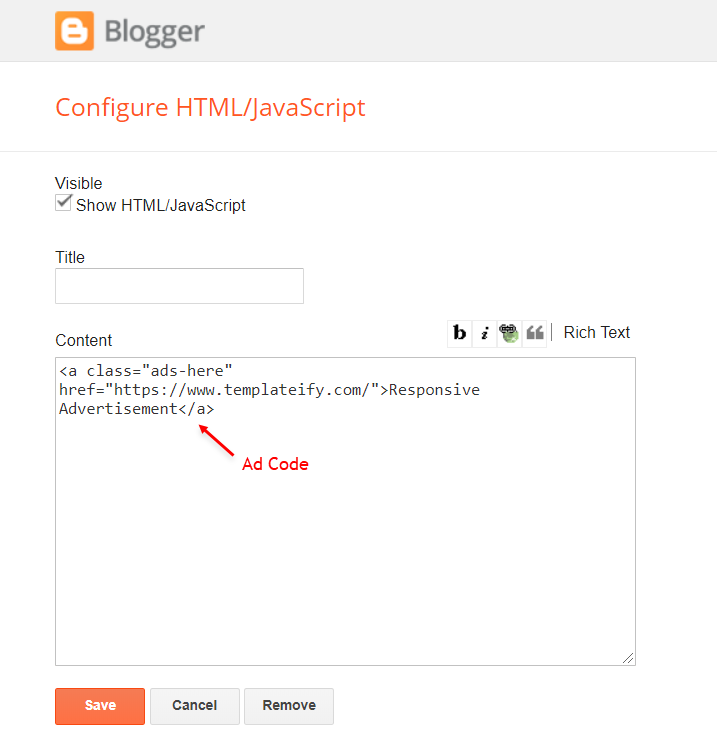
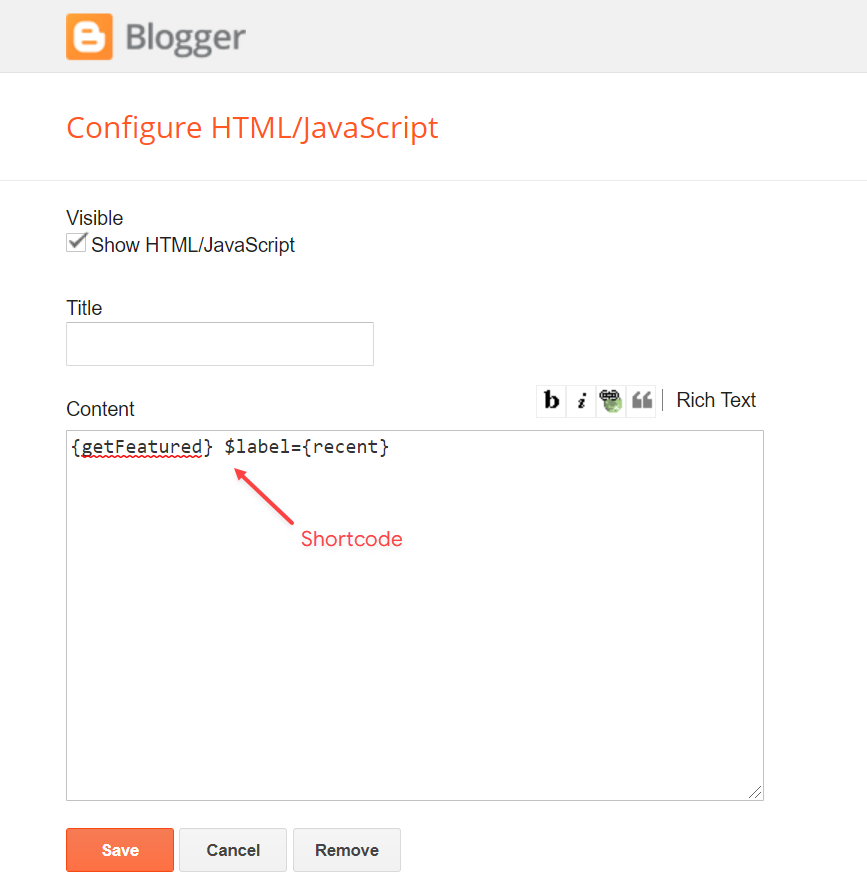
Access your blog Layout > and click on the Add a Gadget > HTML/JavaScript or Popular Posts > in the Featured Posts section.
Shortcode: {getFeatured} $label={Your Label}
Shortcode Label: label or recent
Shortcode Example: {getFeatured} $label={Apple}

Access your blog Layout > and click on the Add a Gadget > HTML/JavaScript or Popular Posts > in the Trending Posts section.
Shortcode: {getTrending} $results={Number of Results} $label={Your Label}
Shortcode Label: label or recent
Shortcode Example: {getTrending} $results={6} $label={Apple}

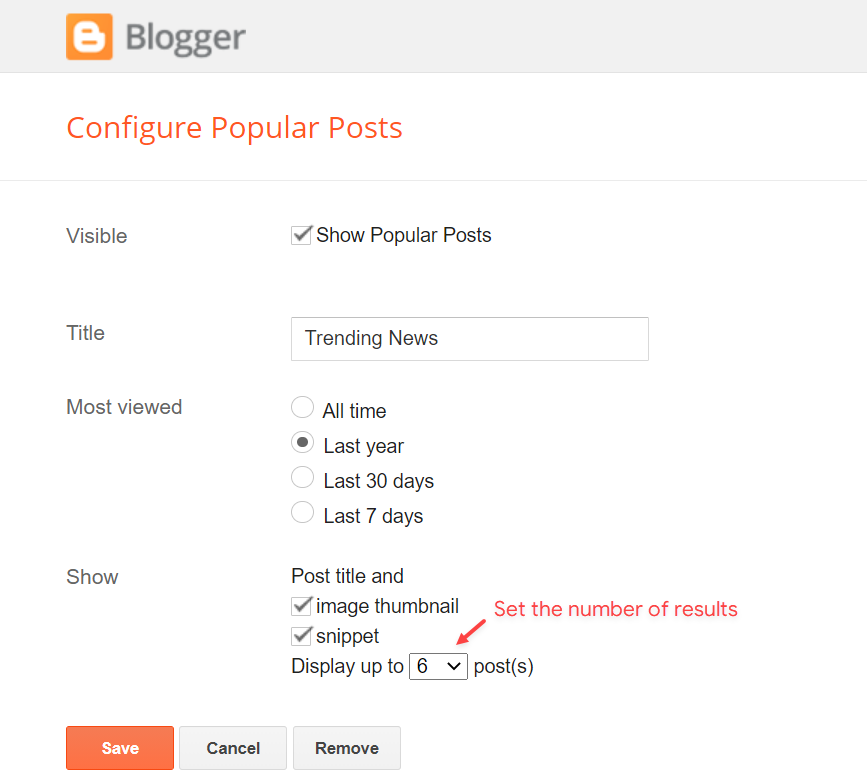
Access your blog Layout > and click on the Add a Gadget > HTML/JavaScript, Image or AdSense > in the section Home ADS.
Access your blog Layout > and click on the Edit Icon > in the Main Posts/Blog Posts gadget.
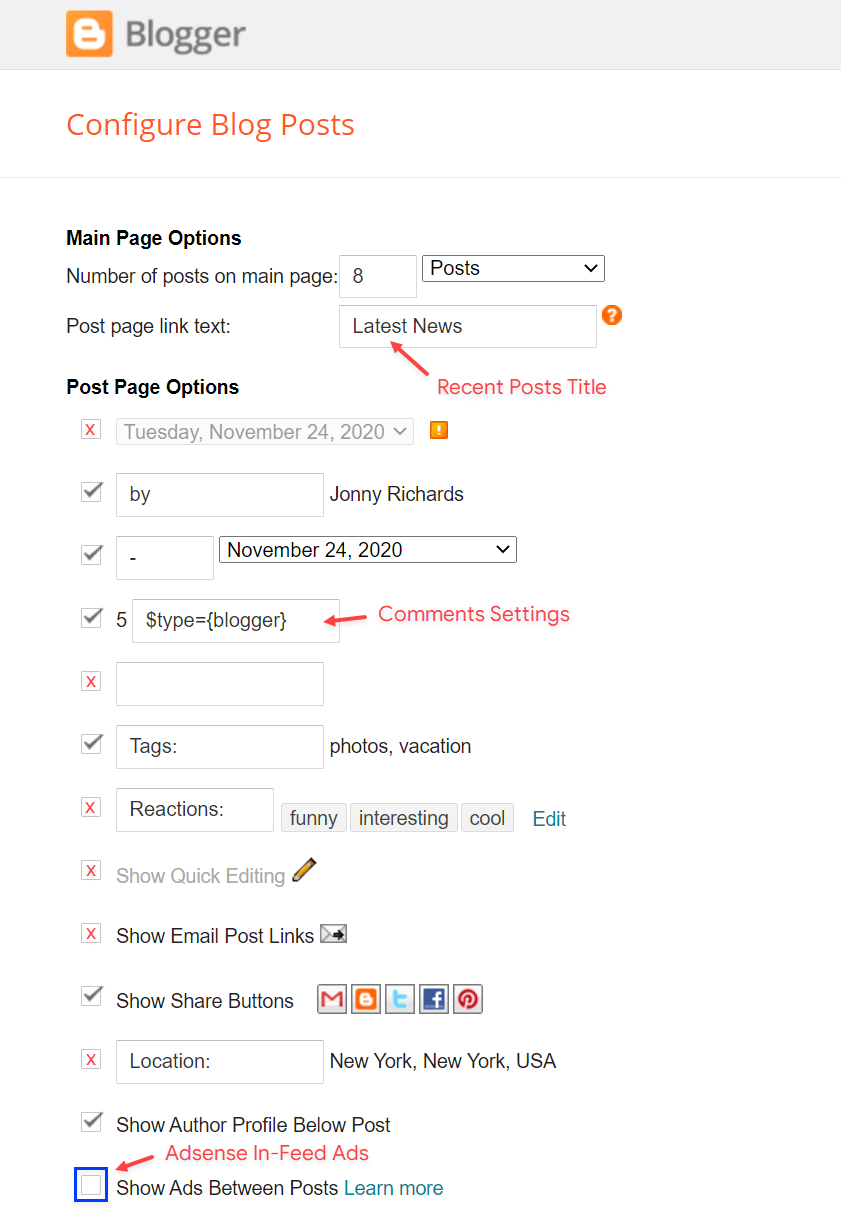
The comment settings are intuitive like never seen before. The new shortcodes should be added in > Layout > Blog Posts > Comments Field.
Blogger Shortcode: $type={blogger}
Disqus Shortcode: $type={disqus} $shortname={templateify-comments}
Custom Disqus Shortcode: $type={disqus} $shortname={Your Shortname}
Facebook Shortcode: $type={facebook}
For facebook comments to work correctly, you need to configure the facebook SDK.
This function is available for posts and pages and can be added easily via shortcode.
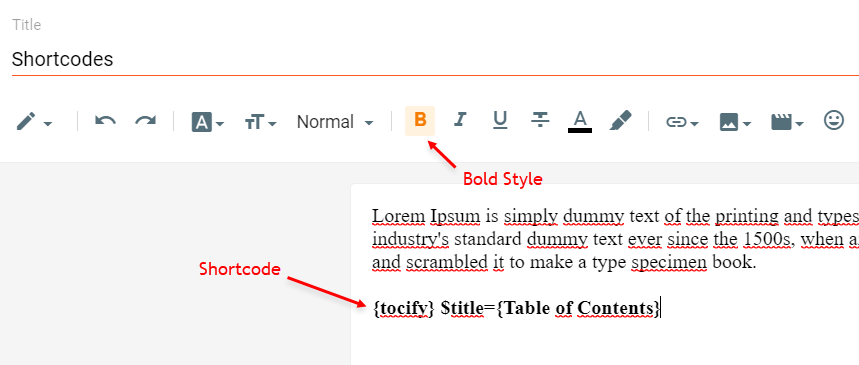
Shortcode: {tocify} $title={Table of Contents}
NOTE: After adding a Shortcode apply the Bold style.
Access your blog Layout > and click on the Add a Gadget > HTML/JavaScript, Image or AdSense > in the sections Post ADS 1 ( before content ) and Post ADS 2 ( after content ).
Sortcode ADS 1: $ads={1}
Sortcode ADS 2: $ads={2}
NOTE: After adding a Shortcode apply the Bold style. Example: $ads={2}
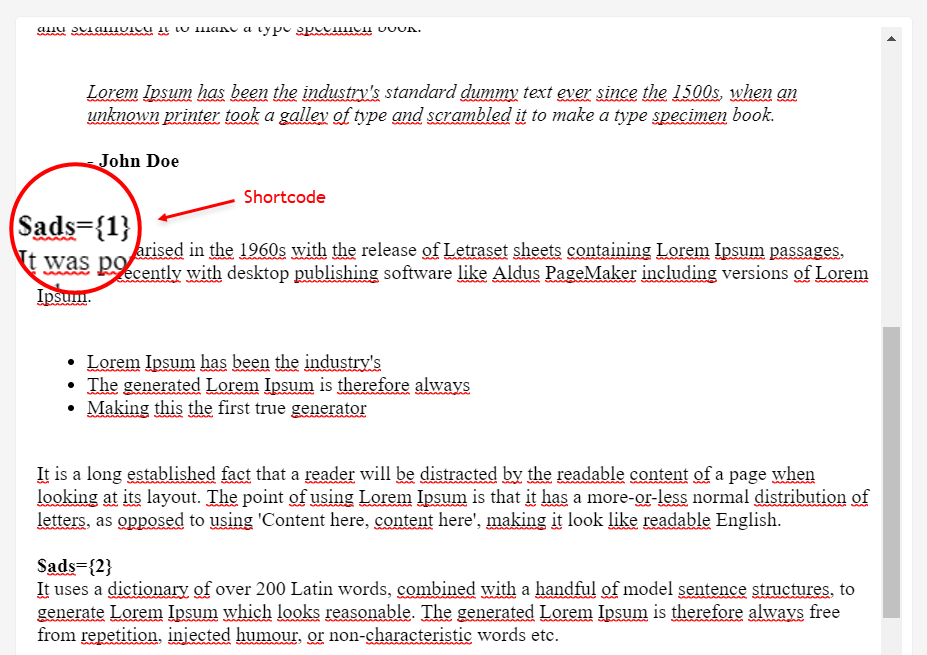
IMPORTANT: The ad will only appear if you have inserted in the section, if you want to hide just remove check to not display or remove the gadget.
The widget receives the blogger profile informations automatically, As long as your profile is marked as public. The icons are displayed if there are links in the introduction.
Supported Icons: blogger, apple, amazon, microsoft, facebook, facebook-f, twitter, rss, youtube, skype, stumbleupon, tumblr, vk, stack-overflow, github, linkedin, dribbble, soundcloud, behance, digg, instagram, pinterest, pinterest-p, twitch, steam, delicious, codepen, flipboard, reddit, whatsapp, telegram, messenger, snapchat, email, discord, quora, share, external-link
Blogger Settings: Go to https://www.blogger.com/edit-profile.g
Find for Additional Information > Introduction > and add your description with HTML links.
HTML Link: Icon Name
HTML Link Example: facebook

IMPORTANT: The "Introduction" is required for the author box to be displayed! But the links are not required.
Access your blog Layout > and click on the Edit Icon > in the Related Posts gadget.
Shortcode: $results={Number of Results}
Shortcode Example: $results={3}
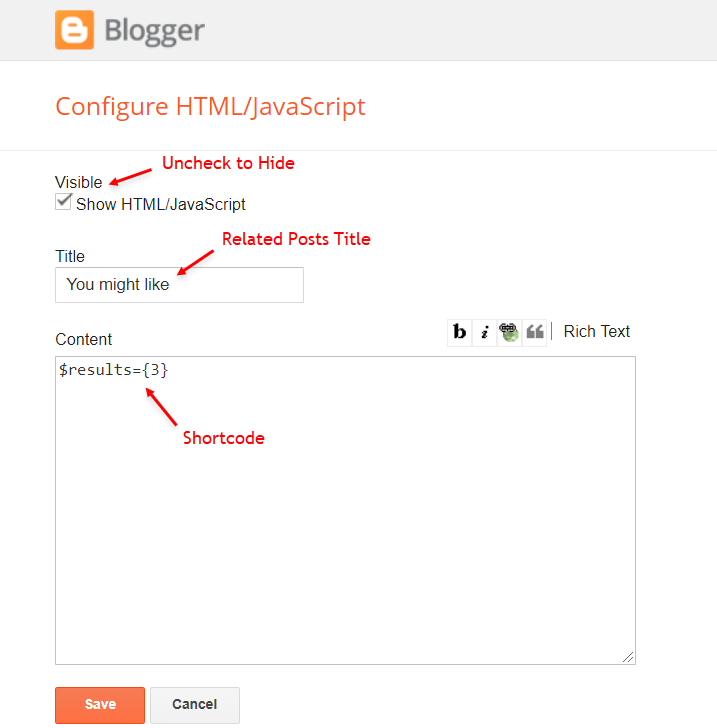
Access your blog Layout > and click on the Add a Gadget > HTML/JavaScript, Image or AdSense > in the section Post ADS 3.
The advanced settings of the Follow By Email form are now more intuitive and can be changed directly in the gadget.
Shortcode: $title={Gadget Title} $text={Custom Text}
Shortcode Example: $title={Follow by Email} $text={Subscribe to our mailing list to get the new updates!}
Shortcode is optional: To display the gadget in the default settings, remove the shortcode from the title field.
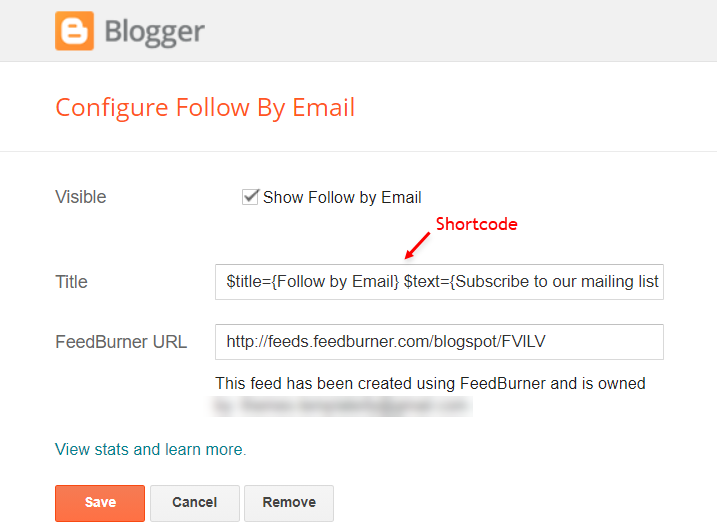
Access your blog Layout > and click on the Add a Gadget > Link List > in the Sidebar section.
Supported Icons: blogger, apple, amazon, microsoft, facebook, facebook-f, twitter, rss, youtube, skype, stumbleupon, tumblr, vk, stack-overflow, github, linkedin, dribbble, soundcloud, behance, digg, instagram, pinterest, pinterest-p, twitch, steam, delicious, codepen, flipboard, reddit, whatsapp, telegram, messenger, snapchat, email, discord, quora, share, external-link
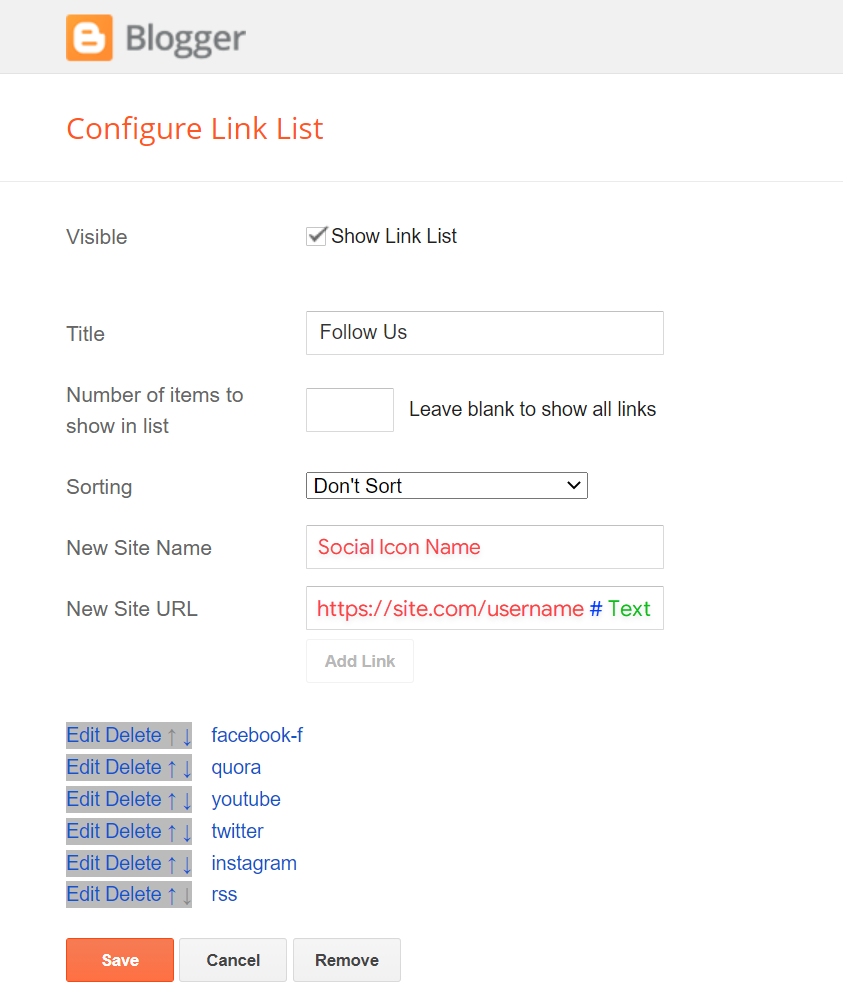
Access your blog Layout > and click on the Add a Gadget > HTML/JavaScript > in the Sidebar section.
Shortcode: {getWidget} $results={Number of Results} $label={Your Label}
Shortcode Label: label, recent or comments
Shortcode Example: {getWidget} $results={3} $label={SEO Tools}

Access your blog Layout > and click on the Add a Gadget > HTML/JavaScript > in the Sidebar sections.
NOTE: To add the Page Plugin, you will need to install the facebook SDK on your blog, how to install it by clicking here.
<div class="fb-page" data-href="YOUR FACEBOOK PAGE URL" data-width="500" data-small-header="false" data-adapt-container-width="true" data-hide-cover="false" data-show-facepile="true" data-lazy="true"></div>
INFO: Replace "data-href" content with your facebook page address, and click save
Access your blog Layout > and click on the Add a Gadget > HTML/JavaScript, Image or AdSense > in the section Footer ADS.
Access your blog Layout > and click on the Edit Icon > in the About Section gadgets.
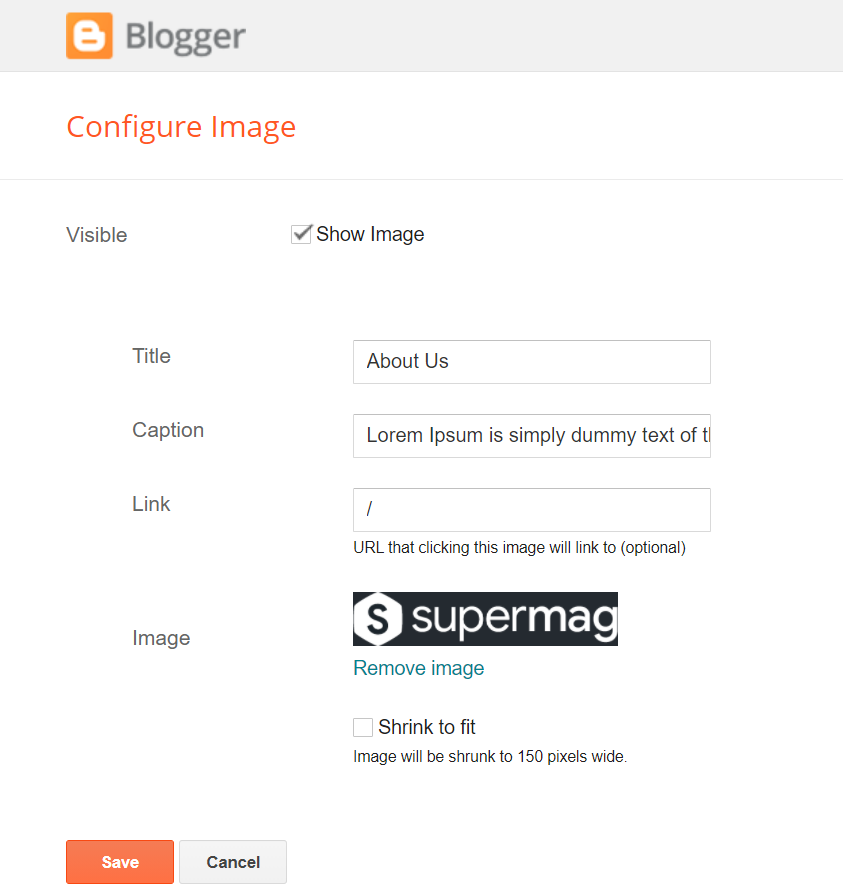
Supported Icons: blogger, apple, amazon, microsoft, facebook, facebook-f, twitter, rss, youtube, skype, stumbleupon, tumblr, vk, stack-overflow, github, linkedin, dribbble, soundcloud, behance, digg, instagram, pinterest, pinterest-p, twitch, steam, delicious, codepen, flipboard, reddit, whatsapp, telegram, messenger, snapchat, email, discord, quora, share, external-link
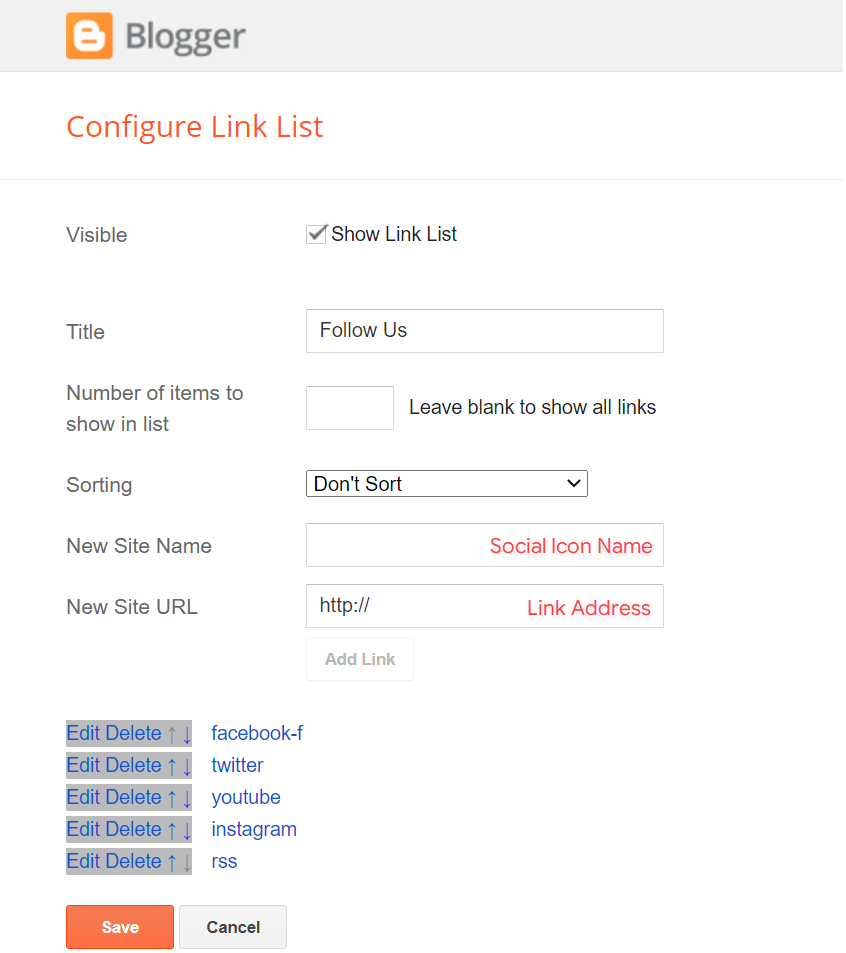
Access your blog Layout > and click on the Edit Icon > in the Footer Copyright gadget.

Access your blog Layout > and click on the Edit Icon > in the Footer Menu gadget.
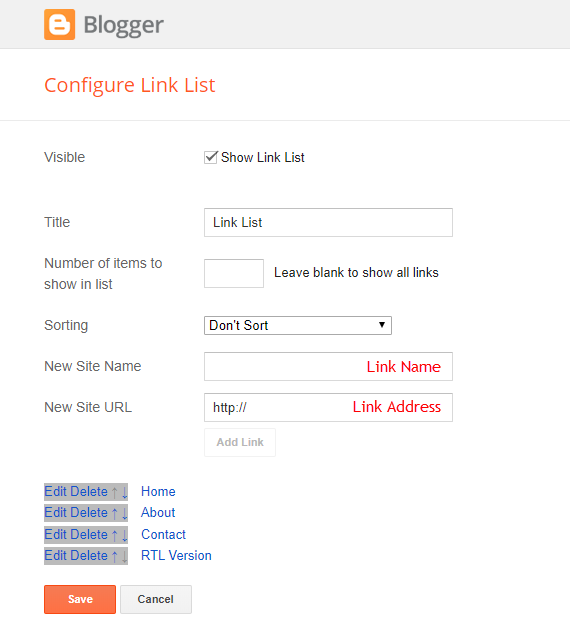
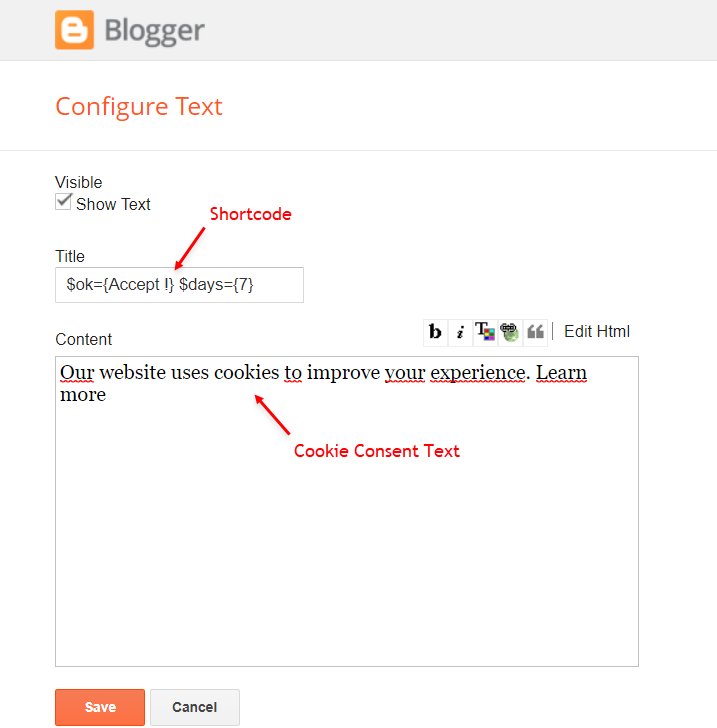
Access your blog Layout > and click on the Edit Icon > in the Cookie Consent gadget.
Shortcode: $ok={Button Text} $days={Expires Days}
Shortcode Example: $ok={Accept !} $days={7}
Access your blog Settings > and go to Site Feed.
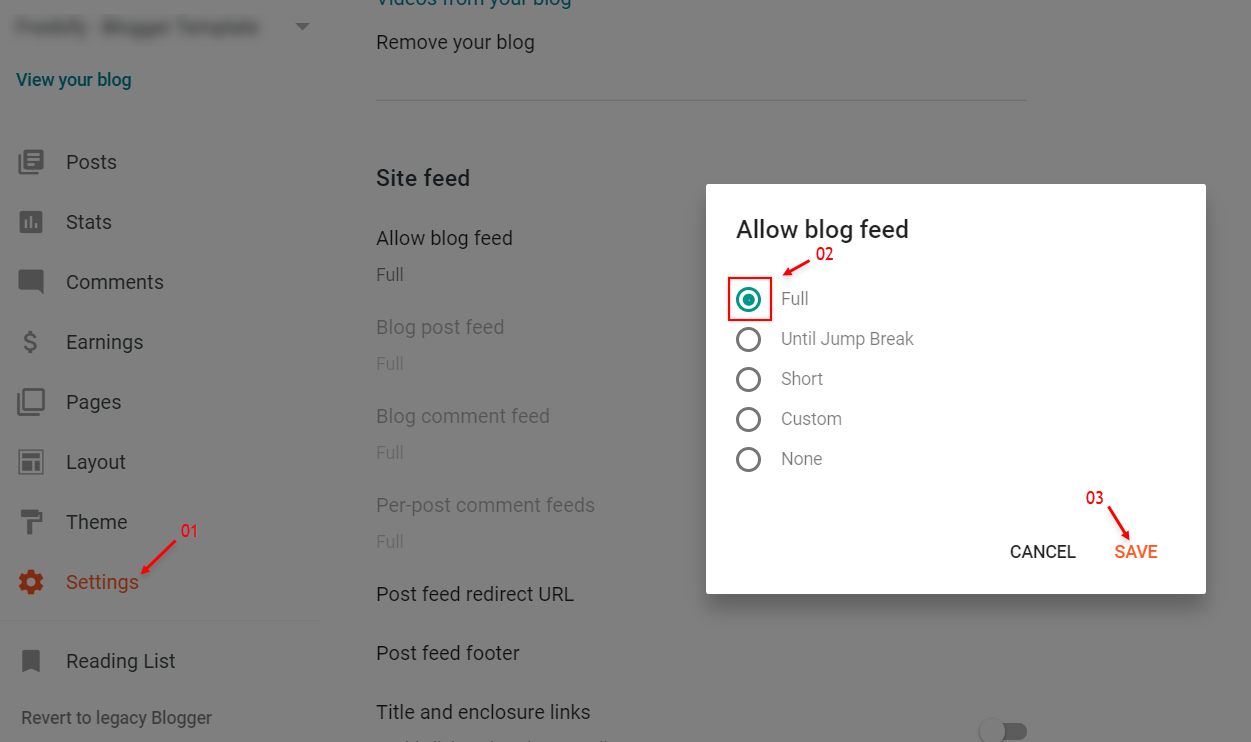
IMPORTANT: For Mega Menu, Featured Posts, Trending Posts, Related Posts, Recent Comments Gadget and Others work normally, you must configure the site feed to "Full".
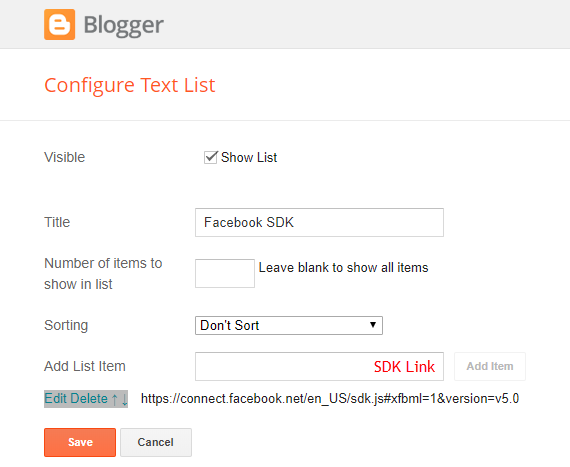
The Page Plugin as well as facebook comments only work if you have the Facebook SDK installed on your theme. See below for the steps to acquire and install the Facebook SDK.
Step 01: Go to https://developers.facebook.com/docs/plugins/page-plugin/ and click on Get Code button and copy the SDK Script.

https://connect.facebook.net/en_US/sdk.js#xfbml=1&version=v8.0
Access your blog Layout > and click on the Edit Icon > in the Theme Options > Facebook SDK gadget.
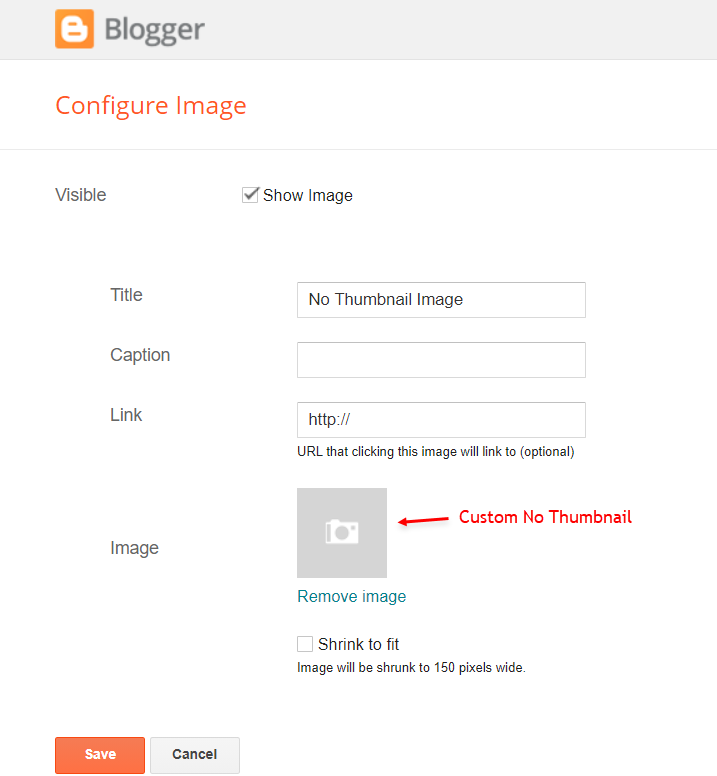
Access your blog Layout > and click on the Edit Icon > in the Theme Options > No Thumbnail Image gadget.
Access your blog Theme > and click on the Customize button > and find Background and Advanced options. Available customizations: Theme Options, Widths, Fonts, Backgrounds, Colors and more.
Background Image Size Cover: 0 is false and 1 is true. This option will adjust the image to the screen size. (Do not use this option if you intend to use a small image that will be repeated)
Native Dark Mode: 0 is false and 1 is true. Left Sidebar: 0 is false and 1 is true.
Full Width: 0 is false and 1 is true.
Post Breadcrumbs: 0 is false and 1 is true.
Comments Count: 0 is false and 1 is true.
Post Navigation: 0 is false and 1 is true.