Skip to content

Conversation

@prestonmasseyblake
Copy link
Contributor

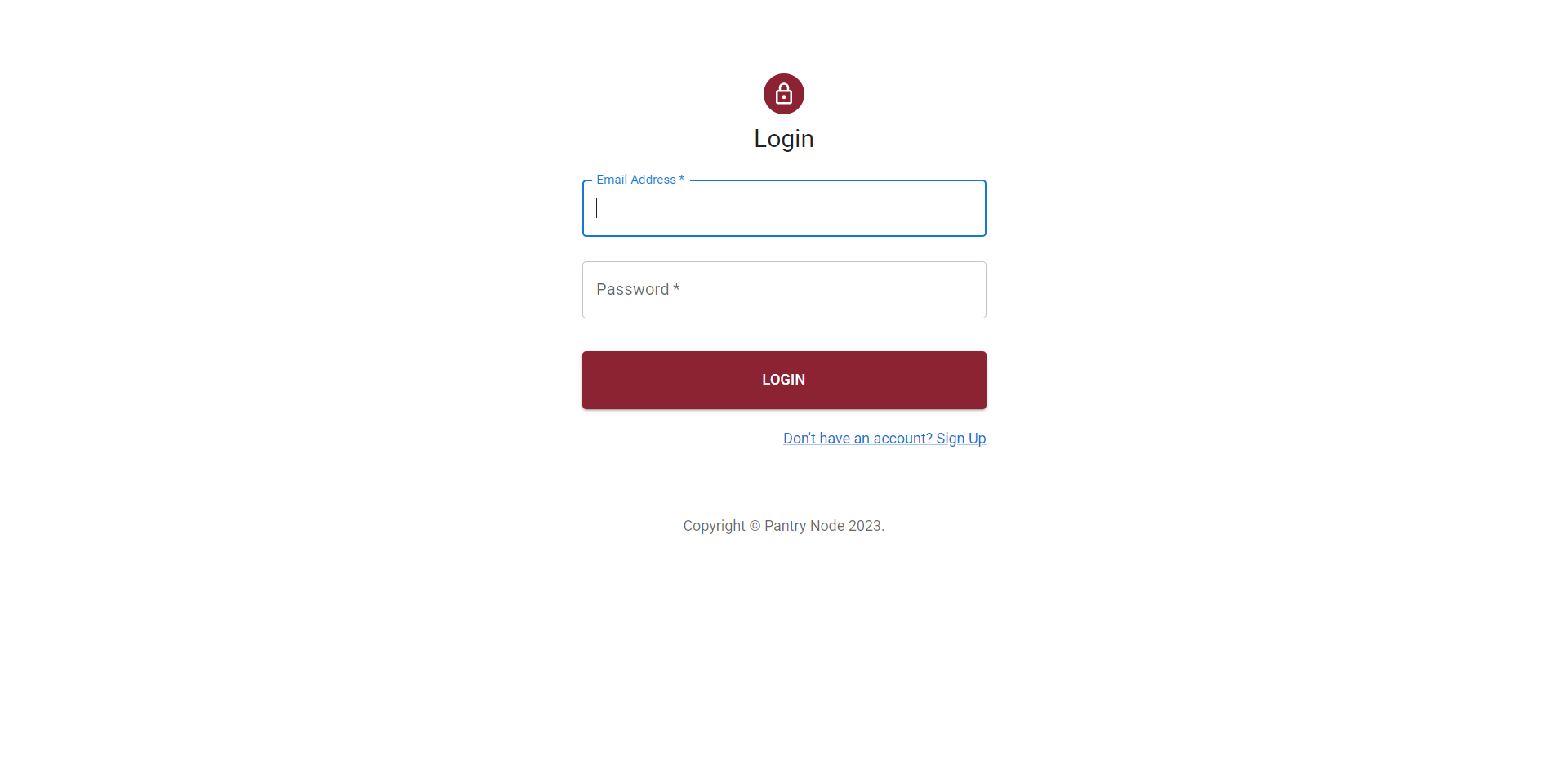
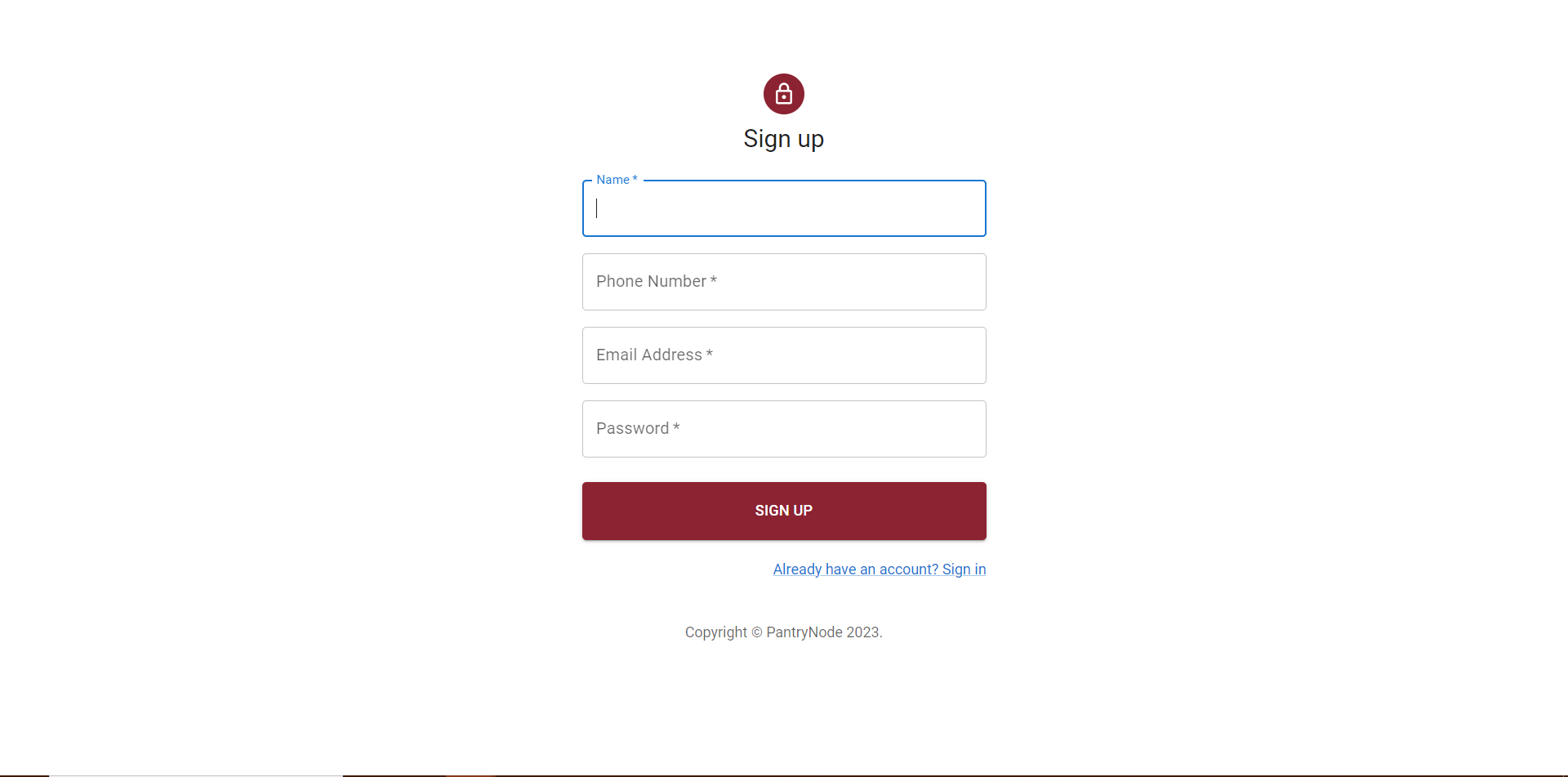
This pull request adds the sign up and login pages to the project, addressing issue #66. Users can now create new accounts and log in to access the features of the application functionality needs to be implemented by backend team now it just pushes you to homepage. This will enhance the user experience and increase the functionality of the project. The new pages are designed to be user-friendly and intuitive, with clear instructions and error messages to guide users through the process. By adding these essential features, we can improve the overall usability and accessibility of the application.

See FIGMA for what the designs look like

@hardikpatil
Copy link
Contributor

hardikpatil commented Mar 28, 2023

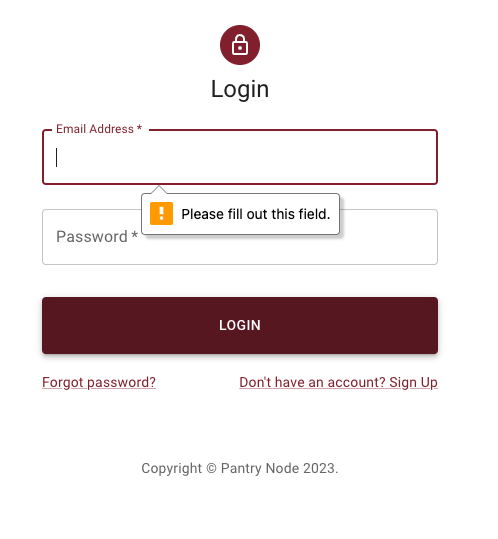
Validation? required field validations ain't working on my end.

Copy link
Contributor

@AbhinavReddy-Dev AbhinavReddy-Dev left a comment

Choose a reason for hiding this comment

The reason will be displayed to describe this comment to others. Learn more.

Also the validations are not completely working including empty fields and formats.

Comment on lines 17 to 28
function Copyright(props: any) {
return (
<div>
login
<Button onClick={() => navigate("/")}> Submit</Button>
</div>
<Typography variant="body2" color="text.secondary" align="center" {...props}>
{'Copyright © '}

Pantry Node
{' '}
{new Date().getFullYear()}
{'.'}
</Typography>
);
};
}
Copy link
Contributor

Choose a reason for hiding this comment

The reason will be displayed to describe this comment to others. Learn more.

Can we have this component in a separate file under Components folder since we are using it twice again in signup page?

Copy link
Contributor Author

Choose a reason for hiding this comment

The reason will be displayed to describe this comment to others. Learn more.

Sure that is something can be done later I wanted to get this merged today so we could talk to the backend team about having them then provide the endpoints for authentication.

Copy link
Contributor Author

Choose a reason for hiding this comment

The reason will be displayed to describe this comment to others. Learn more.

I did this one

Copy link
Contributor Author

Choose a reason for hiding this comment

The reason will be displayed to describe this comment to others. Learn more.

I did all of these approve this

);
}

const theme = createTheme();
Copy link
Contributor

Choose a reason for hiding this comment

The reason will be displayed to describe this comment to others. Learn more.

Please check the src/index.tsx file, we already have a theme provider wrapped around the whole app.

Copy link
Contributor Author

Choose a reason for hiding this comment

The reason will be displayed to describe this comment to others. Learn more.

okay I can reference the theme. The home page isn't following correct color codes?

Copy link
Contributor Author

Choose a reason for hiding this comment

The reason will be displayed to describe this comment to others. Learn more.

I did all of these approve this

</Link> */}
</Grid>
<Grid item>
<Link href="/signup" variant="body2">
Copy link
Contributor

Choose a reason for hiding this comment

The reason will be displayed to describe this comment to others. Learn more.

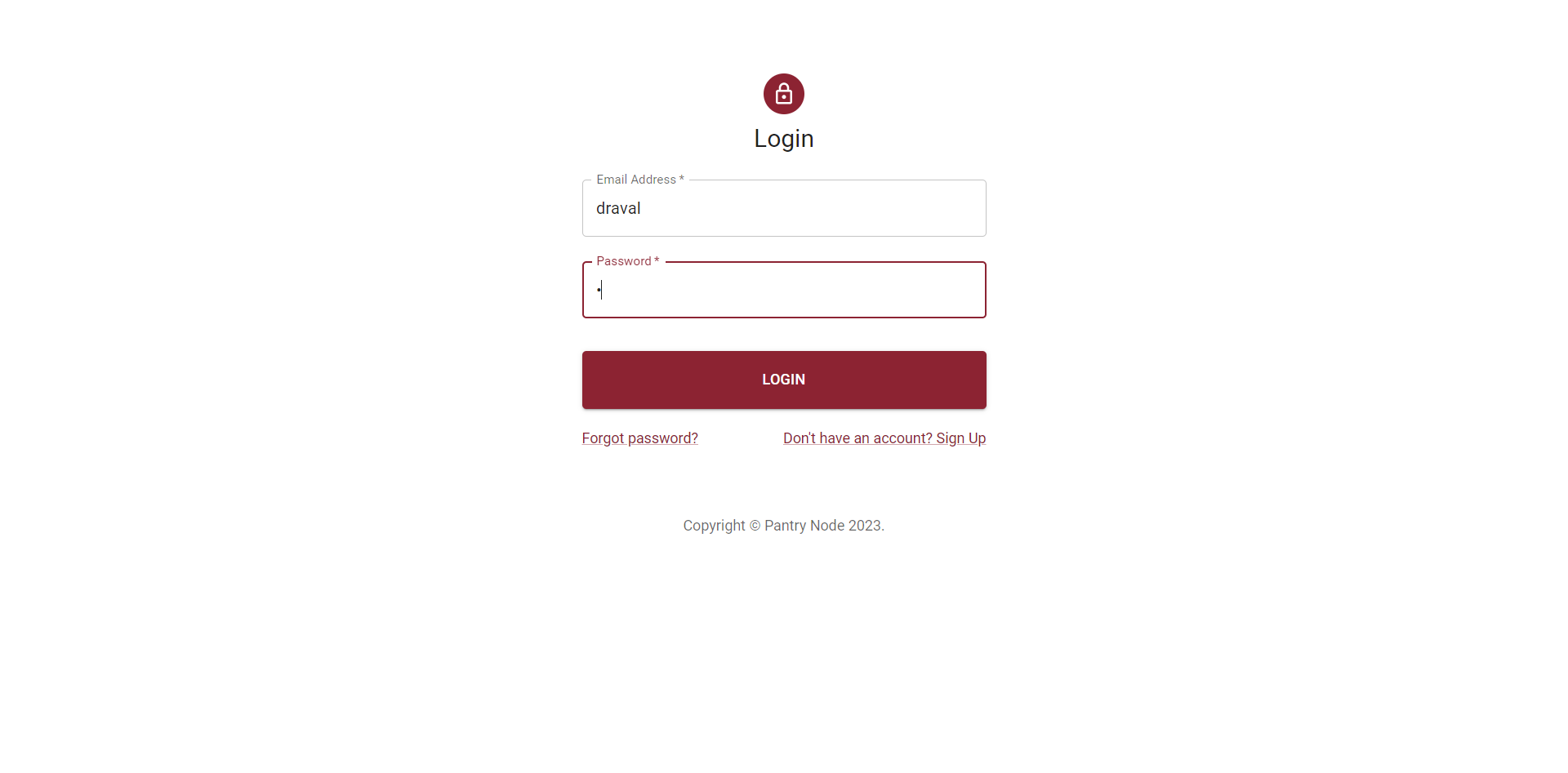
Is it possible to have another link for 'forgot password?'?

Copy link
Contributor Author

Choose a reason for hiding this comment

The reason will be displayed to describe this comment to others. Learn more.

its there it is just commented out because I don't want the people to focus on how to have session with Token I want the focus being on getting the Login Workflow Correct and Talking to the backend team.

Copy link
Contributor Author

Choose a reason for hiding this comment

The reason will be displayed to describe this comment to others. Learn more.

I did all of these approve this


const theme = createTheme();

export default function SignUp() {
Copy link
Contributor

Choose a reason for hiding this comment

The reason will be displayed to describe this comment to others. Learn more.

Have you given a thought about switching between the components of 'Login', 'Signup', and 'ForgotPassowrd'? under a single page based on the user selection?

Copy link
Contributor Author

Choose a reason for hiding this comment

The reason will be displayed to describe this comment to others. Learn more.

I did all of these approve this

@DevangRaval1
Copy link
Contributor

DevangRaval1 commented Mar 28, 2023

Review66

Review67

The Pages work and navigate to the home page on submit.

@AbhinavReddy-Dev
Copy link
Contributor

AbhinavReddy-Dev commented Mar 28, 2023

Review66

Review67

The Pages work and navigate to the home page on submit.

Yes, the UI navigation works as expected.

@hardikpatil
Copy link
Contributor

hardikpatil commented Mar 28, 2023

Review66
Review67
The Pages work and navigate to the home page on submit.

Yes, the UI navigation works as expected.

Also, according to latest model I checked, we would required separate fields for first name and last name @AbhinavReddy-Dev @prestonmasseyblake . Address we can add later Profile update page future issue.

@AbhinavReddy-Dev
Copy link
Contributor

@prestonmasseyblake Everything else looks good to me! Just some minor updates before we can merge it tonight.

@hardikpatil
Copy link
Contributor

@prestonmasseyblake Everything else looks good to me! Just some minor updates before we can merge it tonight.

Validations still ain't working on my codespace :/ @AbhinavReddy-Dev

@AbhinavReddy-Dev
Copy link
Contributor

AbhinavReddy-Dev commented Mar 30, 2023

@prestonmasseyblake Everything else looks good to me! Just some minor updates before we can merge it tonight.

Validations still ain't working on my codespace :/ @AbhinavReddy-Dev

Screenshot 2023-03-29 at 11 51 33 PM
Delete the old one and create a new one.

@AbhinavReddy-Dev
Copy link
Contributor

@prestonmasseyblake Everything else looks good to me! Just some minor updates before we can merge it tonight.

Validations still ain't working on my codespace :/ @AbhinavReddy-Dev

I do see that the email format is not working as expected, after review by @DevangRaval1 .

@DevangRaval1
Copy link
Contributor

Review5

Email format and password format validations not working

@DevangRaval1
Copy link
Contributor

Review5

Email format and password format validations not working

Also, the phone number validation not working as expected

@hardikpatil
Copy link
Contributor

@prestonmasseyblake Everything else looks good to me! Just some minor updates before we can merge it tonight.

Validations still ain't working on my codespace :/ @AbhinavReddy-Dev

Screenshot 2023-03-29 at 11 51 33 PM Delete the old one and create a new one.

Oh I see yeah, thanks. Validations works now!

@hardikpatil
Copy link
Contributor

As per schema is in main docs/[Foodbank ER Diagram.png]

Review66
Review67
The Pages work and navigate to the home page on submit.

Yes, the UI navigation works as expected.

Also, according to latest model I checked, we would required separate fields for first name and last name @AbhinavReddy-Dev @prestonmasseyblake . Address we can add later Profile update page future issue.

As per docs/Foodbank ER Diagram.png schema, @prestonmasseyblake change the placeholder name to as Username to avoid ambiguity. First Name and Last Name we can later put it in Profile Update View to update additional information, if that remains in scope.

@hardikpatil hardikpatil removed the request for review from Anoushka444 March 30, 2023 07:19
@hardikpatil hardikpatil requested review from AbhinavReddy-Dev, briswells and decoles and removed request for arshiya19 March 30, 2023 07:19
@briswells
Copy link
Contributor

Can we place try and avoid doing work in personal forks. This should be done in a feature branch so users don't need to clone a new repo to review, it messing with issues tracking, referencing changes, etc.

@prestonmasseyblake
Copy link
Contributor Author

Why don't we get this merged and open up a new issue for the email, phone and password, validation.

@prestonmasseyblake
Copy link
Contributor Author

I can do that but I would like this to be merged so the other teams can see what the login, signup look like and start working on the authentication part in terms of the backend and thinking about how they are going to implement forgot password. I can write the validation functions later today or tomorrow. Pull requests should not be dozens of commits.

@AbhinavReddy-Dev
Copy link
Contributor

Can we place try and avoid doing work in personal forks. This should be done in a feature branch so users don't need to clone a new repo to review, it messing with issues tracking, referencing changes, etc.

We tend to develop on the personal_branch then squash and merge into frontend branch and in the end create a pull request once confirmed by the peers.

@briswells
Copy link
Contributor

Can we place try and avoid doing work in personal forks. This should be done in a feature branch so users don't need to clone a new repo to review, it messing with issues tracking, referencing changes, etc.

We tend to develop on the personal_branch then squash and merge into frontend branch and in the end create a pull request once confirmed by the peers.

That sounds great. This PR doesn't seem to be following those practices though.

DevangRaval1
DevangRaval1 previously approved these changes Mar 30, 2023
@hardikpatil
Copy link
Contributor

Can we place try and avoid doing work in personal forks. This should be done in a feature branch so users don't need to clone a new repo to review, it messing with issues tracking, referencing changes, etc.

We tend to develop on the personal_branch then squash and merge into frontend branch and in the end create a pull request once confirmed by the peers.

so for the feature branches, should we checkout from frontend or main ?

@AbhinavReddy-Dev
Copy link
Contributor

Can we place try and avoid doing work in personal forks. This should be done in a feature branch so users don't need to clone a new repo to review, it messing with issues tracking, referencing changes, etc.

We tend to develop on the personal_branch then squash and merge into frontend branch and in the end create a pull request once confirmed by the peers.

so for the feature branches, should we checkout from frontend or main ?

Where ever you checkout from, merge it into 'frontend' initially by creating a pull request to check for any changes necessary and then finally create a pull request to main. We would like to keep the main branch clean from all trivial commits.

@hardikpatil
Copy link
Contributor

hardikpatil commented Mar 30, 2023

Can we place try and avoid doing work in personal forks. This should be done in a feature branch so users don't need to clone a new repo to review, it messing with issues tracking, referencing changes, etc.

We tend to develop on the personal_branch then squash and merge into frontend branch and in the end create a pull request once confirmed by the peers.

so for the feature branches, should we checkout from frontend or main ?

Where ever you checkout from, merge it into 'frontend' initially by creating a pull request to check for any changes necessary and then finally create a pull request to main. We would like to keep the main branch clean from all trivial commits.

so basically following steps involved, correct if I miss anything @AbhinavReddy-Dev

  1. pull from main,
  2. checkout from main,
  3. pull from frontend,
  4. merge with feature branch
  5. **** do some work ****
  6. push feature to the main

@AbhinavReddy-Dev
Copy link
Contributor

Can we place try and avoid doing work in personal forks. This should be done in a feature branch so users don't need to clone a new repo to review, it messing with issues tracking, referencing changes, etc.

We tend to develop on the personal_branch then squash and merge into frontend branch and in the end create a pull request once confirmed by the peers.

so for the feature branches, should we checkout from frontend or main ?

Where ever you checkout from, merge it into 'frontend' initially by creating a pull request to check for any changes necessary and then finally create a pull request to main. We would like to keep the main branch clean from all trivial commits.

so basically following steps involved, correct if I miss anything @AbhinavReddy-Dev

  1. pull from main,
  2. checkout from main,
  3. pull from frontend,
  4. merge with feature branch
  5. **** do some work ****
  6. push feature to the main

You got it 60-70% correct.

  1. Check if frontend is up to date with main.
  2. Checkout new feature_branch from frontend.
  3. Develop in feature_branch.
  4. Create a pull request from feature_branch to frontend and request for a review before squash and merge.
  5. Create a pull request from frontend to main for rebase and merge.

If anyone has a better approach please let us know here.

@hardikpatil
Copy link
Contributor

Can we place try and avoid doing work in personal forks. This should be done in a feature branch so users don't need to clone a new repo to review, it messing with issues tracking, referencing changes, etc.

We tend to develop on the personal_branch then squash and merge into frontend branch and in the end create a pull request once confirmed by the peers.

so for the feature branches, should we checkout from frontend or main ?

Where ever you checkout from, merge it into 'frontend' initially by creating a pull request to check for any changes necessary and then finally create a pull request to main. We would like to keep the main branch clean from all trivial commits.

so basically following steps involved, correct if I miss anything @AbhinavReddy-Dev

  1. pull from main,
  2. checkout from main,
  3. pull from frontend,
  4. merge with feature branch
  5. **** do some work ****
  6. push feature to the main

You got it 60-70% correct.

  1. Check if frontend is up to date with main.
  2. Checkout new feature_branch from frontend.
  3. Develop in feature_branch.
  4. Create a pull request from feature_branch to frontend and request for a review before squash and merge.
  5. Create a pull request from frontend to main for rebase and merge.

If anyone has a better approach please let us know here.

gotcha! So, what should we do with this PR? I suppose, for now we can make exceptional for this pr, merging with main and then merge. main with the frontend branch.
For future feature_branches we can start implementing the above steps

@hardikpatil
Copy link
Contributor

Can we place try and avoid doing work in personal forks. This should be done in a feature branch so users don't need to clone a new repo to review, it messing with issues tracking, referencing changes, etc.

We tend to develop on the personal_branch then squash and merge into frontend branch and in the end create a pull request once confirmed by the peers.

so for the feature branches, should we checkout from frontend or main ?

Where ever you checkout from, merge it into 'frontend' initially by creating a pull request to check for any changes necessary and then finally create a pull request to main. We would like to keep the main branch clean from all trivial commits.

so basically following steps involved, correct if I miss anything @AbhinavReddy-Dev

  1. pull from main,
  2. checkout from main,
  3. pull from frontend,
  4. merge with feature branch
  5. **** do some work ****
  6. push feature to the main

You got it 60-70% correct.

  1. Check if frontend is up to date with main.
  2. Checkout new feature_branch from frontend.
  3. Develop in feature_branch.
  4. Create a pull request from feature_branch to frontend and request for a review before squash and merge.
  5. Create a pull request from frontend to main for rebase and merge.

If anyone has a better approach please let us know here.

gotcha! So, what should we do with this PR? I suppose, for now we can make exceptional for this pr, merging with main and then merge. main with the frontend branch. For future feature_branches we can start implementing the above steps

@AbhinavReddy-Dev or we can actually change the base here. Should we do that? from main to frontend .

@briswells
Copy link
Contributor

Can we place try and avoid doing work in personal forks. This should be done in a feature branch so users don't need to clone a new repo to review, it messing with issues tracking, referencing changes, etc.

We tend to develop on the personal_branch then squash and merge into frontend branch and in the end create a pull request once confirmed by the peers.

so for the feature branches, should we checkout from frontend or main ?

Where ever you checkout from, merge it into 'frontend' initially by creating a pull request to check for any changes necessary and then finally create a pull request to main. We would like to keep the main branch clean from all trivial commits.

so basically following steps involved, correct if I miss anything @AbhinavReddy-Dev

  1. pull from main,
  2. checkout from main,
  3. pull from frontend,
  4. merge with feature branch
  5. **** do some work ****
  6. push feature to the main

You got it 60-70% correct.

1. Check if `frontend` is up to date with `main`.

2. Checkout new `feature_branch` from `frontend`.

3. Develop in `feature_branch`.

4. Create a pull request from `feature_branch` to `frontend` and request for a review before squash and merge.

5. Create a pull request from `frontend` to `main` for rebase and merge.

If anyone has a better approach please let us know here.

That looks great to me, people just need to remember that if you are using a fork there would be an additional step of pushing local for changes to

Can we place try and avoid doing work in personal forks. This should be done in a feature branch so users don't need to clone a new repo to review, it messing with issues tracking, referencing changes, etc.

We tend to develop on the personal_branch then squash and merge into frontend branch and in the end create a pull request once confirmed by the peers.

so for the feature branches, should we checkout from frontend or main ?

Where ever you checkout from, merge it into 'frontend' initially by creating a pull request to check for any changes necessary and then finally create a pull request to main. We would like to keep the main branch clean from all trivial commits.

so basically following steps involved, correct if I miss anything @AbhinavReddy-Dev

  1. pull from main,
  2. checkout from main,
  3. pull from frontend,
  4. merge with feature branch
  5. **** do some work ****
  6. push feature to the main

You got it 60-70% correct.

  1. Check if frontend is up to date with main.
  2. Checkout new feature_branch from frontend.
  3. Develop in feature_branch.
  4. Create a pull request from feature_branch to frontend and request for a review before squash and merge.
  5. Create a pull request from frontend to main for rebase and merge.

If anyone has a better approach please let us know here.

gotcha! So, what should we do with this PR? I suppose, for now we can make exceptional for this pr, merging with main and then merge. main with the frontend branch. For future feature_branches we can start implementing the above steps

Can we place try and avoid doing work in personal forks. This should be done in a feature branch so users don't need to clone a new repo to review, it messing with issues tracking, referencing changes, etc.

We tend to develop on the personal_branch then squash and merge into frontend branch and in the end create a pull request once confirmed by the peers.

so for the feature branches, should we checkout from frontend or main ?

Where ever you checkout from, merge it into 'frontend' initially by creating a pull request to check for any changes necessary and then finally create a pull request to main. We would like to keep the main branch clean from all trivial commits.

so basically following steps involved, correct if I miss anything @AbhinavReddy-Dev

  1. pull from main,
  2. checkout from main,
  3. pull from frontend,
  4. merge with feature branch
  5. **** do some work ****
  6. push feature to the main

You got it 60-70% correct.

  1. Check if frontend is up to date with main.
  2. Checkout new feature_branch from frontend.
  3. Develop in feature_branch.
  4. Create a pull request from feature_branch to frontend and request for a review before squash and merge.
  5. Create a pull request from frontend to main for rebase and merge.

If anyone has a better approach please let us know here.

gotcha! So, what should we do with this PR? I suppose, for now we can make exceptional for this pr, merging with main and then merge. main with the frontend branch. For future feature_branches we can start implementing the above steps

@AbhinavReddy-Dev or we can actually change the base here. Should we do that? from main to frontend .

I think all PR's to main need to come from repo feature branches not forks, so this PR should be canceled and recreated from a feature branch in our shared repo. We should avoid doing work in forks if at all possible and keep everything as a feature branches so anyone can see what commits are going on without needing to find a different repo.

@DevangRaval1 DevangRaval1 self-requested a review March 30, 2023 20:06
@DevangRaval1
Copy link
Contributor

Can we place try and avoid doing work in personal forks. This should be done in a feature branch so users don't need to clone a new repo to review, it messing with issues tracking, referencing changes, etc.

We tend to develop on the personal_branch then squash and merge into frontend branch and in the end create a pull request once confirmed by the peers.

so for the feature branches, should we checkout from frontend or main ?

Where ever you checkout from, merge it into 'frontend' initially by creating a pull request to check for any changes necessary and then finally create a pull request to main. We would like to keep the main branch clean from all trivial commits.

so basically following steps involved, correct if I miss anything @AbhinavReddy-Dev

  1. pull from main,
  2. checkout from main,
  3. pull from frontend,
  4. merge with feature branch
  5. **** do some work ****
  6. push feature to the main

You got it 60-70% correct.

1. Check if `frontend` is up to date with `main`.

2. Checkout new `feature_branch` from `frontend`.

3. Develop in `feature_branch`.

4. Create a pull request from `feature_branch` to `frontend` and request for a review before squash and merge.

5. Create a pull request from `frontend` to `main` for rebase and merge.

If anyone has a better approach please let us know here.

That looks great to me, people just need to remember that if you are using a fork there would be an additional step of pushing local for changes to

Can we place try and avoid doing work in personal forks. This should be done in a feature branch so users don't need to clone a new repo to review, it messing with issues tracking, referencing changes, etc.

We tend to develop on the personal_branch then squash and merge into frontend branch and in the end create a pull request once confirmed by the peers.

so for the feature branches, should we checkout from frontend or main ?

Where ever you checkout from, merge it into 'frontend' initially by creating a pull request to check for any changes necessary and then finally create a pull request to main. We would like to keep the main branch clean from all trivial commits.

so basically following steps involved, correct if I miss anything @AbhinavReddy-Dev

  1. pull from main,
  2. checkout from main,
  3. pull from frontend,
  4. merge with feature branch
  5. **** do some work ****
  6. push feature to the main

You got it 60-70% correct.

  1. Check if frontend is up to date with main.
  2. Checkout new feature_branch from frontend.
  3. Develop in feature_branch.
  4. Create a pull request from feature_branch to frontend and request for a review before squash and merge.
  5. Create a pull request from frontend to main for rebase and merge.

If anyone has a better approach please let us know here.

gotcha! So, what should we do with this PR? I suppose, for now we can make exceptional for this pr, merging with main and then merge. main with the frontend branch. For future feature_branches we can start implementing the above steps

Can we place try and avoid doing work in personal forks. This should be done in a feature branch so users don't need to clone a new repo to review, it messing with issues tracking, referencing changes, etc.

We tend to develop on the personal_branch then squash and merge into frontend branch and in the end create a pull request once confirmed by the peers.

so for the feature branches, should we checkout from frontend or main ?

Where ever you checkout from, merge it into 'frontend' initially by creating a pull request to check for any changes necessary and then finally create a pull request to main. We would like to keep the main branch clean from all trivial commits.

so basically following steps involved, correct if I miss anything @AbhinavReddy-Dev

  1. pull from main,
  2. checkout from main,
  3. pull from frontend,
  4. merge with feature branch
  5. **** do some work ****
  6. push feature to the main

You got it 60-70% correct.

  1. Check if frontend is up to date with main.
  2. Checkout new feature_branch from frontend.
  3. Develop in feature_branch.
  4. Create a pull request from feature_branch to frontend and request for a review before squash and merge.
  5. Create a pull request from frontend to main for rebase and merge.

If anyone has a better approach please let us know here.

gotcha! So, what should we do with this PR? I suppose, for now we can make exceptional for this pr, merging with main and then merge. main with the frontend branch. For future feature_branches we can start implementing the above steps

@AbhinavReddy-Dev or we can actually change the base here. Should we do that? from main to frontend .

I think all PR's to main need to come from repo feature branches not forks, so this PR should be canceled and recreated from a feature branch in our shared repo. We should avoid doing work in forks if at all possible and keep everything as a feature branches so anyone can see what commits are going on without needing to find a different repo.

ok makes sense

@hardikpatil
Copy link
Contributor

Can we place try and avoid doing work in personal forks. This should be done in a feature branch so users don't need to clone a new repo to review, it messing with issues tracking, referencing changes, etc.

We tend to develop on the personal_branch then squash and merge into frontend branch and in the end create a pull request once confirmed by the peers.

so for the feature branches, should we checkout from frontend or main ?

Where ever you checkout from, merge it into 'frontend' initially by creating a pull request to check for any changes necessary and then finally create a pull request to main. We would like to keep the main branch clean from all trivial commits.

so basically following steps involved, correct if I miss anything @AbhinavReddy-Dev

  1. pull from main,
  2. checkout from main,
  3. pull from frontend,
  4. merge with feature branch
  5. **** do some work ****
  6. push feature to the main

You got it 60-70% correct.

1. Check if `frontend` is up to date with `main`.

2. Checkout new `feature_branch` from `frontend`.

3. Develop in `feature_branch`.

4. Create a pull request from `feature_branch` to `frontend` and request for a review before squash and merge.

5. Create a pull request from `frontend` to `main` for rebase and merge.

If anyone has a better approach please let us know here.

That looks great to me, people just need to remember that if you are using a fork there would be an additional step of pushing local for changes to

Can we place try and avoid doing work in personal forks. This should be done in a feature branch so users don't need to clone a new repo to review, it messing with issues tracking, referencing changes, etc.

We tend to develop on the personal_branch then squash and merge into frontend branch and in the end create a pull request once confirmed by the peers.

so for the feature branches, should we checkout from frontend or main ?

Where ever you checkout from, merge it into 'frontend' initially by creating a pull request to check for any changes necessary and then finally create a pull request to main. We would like to keep the main branch clean from all trivial commits.

so basically following steps involved, correct if I miss anything @AbhinavReddy-Dev

  1. pull from main,
  2. checkout from main,
  3. pull from frontend,
  4. merge with feature branch
  5. **** do some work ****
  6. push feature to the main

You got it 60-70% correct.

  1. Check if frontend is up to date with main.
  2. Checkout new feature_branch from frontend.
  3. Develop in feature_branch.
  4. Create a pull request from feature_branch to frontend and request for a review before squash and merge.
  5. Create a pull request from frontend to main for rebase and merge.

If anyone has a better approach please let us know here.

gotcha! So, what should we do with this PR? I suppose, for now we can make exceptional for this pr, merging with main and then merge. main with the frontend branch. For future feature_branches we can start implementing the above steps

Can we place try and avoid doing work in personal forks. This should be done in a feature branch so users don't need to clone a new repo to review, it messing with issues tracking, referencing changes, etc.

We tend to develop on the personal_branch then squash and merge into frontend branch and in the end create a pull request once confirmed by the peers.

so for the feature branches, should we checkout from frontend or main ?

Where ever you checkout from, merge it into 'frontend' initially by creating a pull request to check for any changes necessary and then finally create a pull request to main. We would like to keep the main branch clean from all trivial commits.

so basically following steps involved, correct if I miss anything @AbhinavReddy-Dev

  1. pull from main,
  2. checkout from main,
  3. pull from frontend,
  4. merge with feature branch
  5. **** do some work ****
  6. push feature to the main

You got it 60-70% correct.

  1. Check if frontend is up to date with main.
  2. Checkout new feature_branch from frontend.
  3. Develop in feature_branch.
  4. Create a pull request from feature_branch to frontend and request for a review before squash and merge.
  5. Create a pull request from frontend to main for rebase and merge.

If anyone has a better approach please let us know here.

gotcha! So, what should we do with this PR? I suppose, for now we can make exceptional for this pr, merging with main and then merge. main with the frontend branch. For future feature_branches we can start implementing the above steps

@AbhinavReddy-Dev or we can actually change the base here. Should we do that? from main to frontend .

I think all PR's to main need to come from repo feature branches not forks, so this PR should be canceled and recreated from a feature branch in our shared repo. We should avoid doing work in forks if at all possible and keep everything as a feature branches so anyone can see what commits are going on without needing to find a different repo.

And we had discussed this one
#38

Can we place try and avoid doing work in personal forks. This should be done in a feature branch so users don't need to clone a new repo to review, it messing with issues tracking, referencing changes, etc.

We tend to develop on the personal_branch then squash and merge into frontend branch and in the end create a pull request once confirmed by the peers.

so for the feature branches, should we checkout from frontend or main ?

Where ever you checkout from, merge it into 'frontend' initially by creating a pull request to check for any changes necessary and then finally create a pull request to main. We would like to keep the main branch clean from all trivial commits.

so basically following steps involved, correct if I miss anything @AbhinavReddy-Dev

  1. pull from main,
  2. checkout from main,
  3. pull from frontend,
  4. merge with feature branch
  5. **** do some work ****
  6. push feature to the main

You got it 60-70% correct.

1. Check if `frontend` is up to date with `main`.

2. Checkout new `feature_branch` from `frontend`.

3. Develop in `feature_branch`.

4. Create a pull request from `feature_branch` to `frontend` and request for a review before squash and merge.

5. Create a pull request from `frontend` to `main` for rebase and merge.

If anyone has a better approach please let us know here.

That looks great to me, people just need to remember that if you are using a fork there would be an additional step of pushing local for changes to

Can we place try and avoid doing work in personal forks. This should be done in a feature branch so users don't need to clone a new repo to review, it messing with issues tracking, referencing changes, etc.

We tend to develop on the personal_branch then squash and merge into frontend branch and in the end create a pull request once confirmed by the peers.

so for the feature branches, should we checkout from frontend or main ?

Where ever you checkout from, merge it into 'frontend' initially by creating a pull request to check for any changes necessary and then finally create a pull request to main. We would like to keep the main branch clean from all trivial commits.

so basically following steps involved, correct if I miss anything @AbhinavReddy-Dev

  1. pull from main,
  2. checkout from main,
  3. pull from frontend,
  4. merge with feature branch
  5. **** do some work ****
  6. push feature to the main

You got it 60-70% correct.

  1. Check if frontend is up to date with main.
  2. Checkout new feature_branch from frontend.
  3. Develop in feature_branch.
  4. Create a pull request from feature_branch to frontend and request for a review before squash and merge.
  5. Create a pull request from frontend to main for rebase and merge.

If anyone has a better approach please let us know here.

gotcha! So, what should we do with this PR? I suppose, for now we can make exceptional for this pr, merging with main and then merge. main with the frontend branch. For future feature_branches we can start implementing the above steps

Can we place try and avoid doing work in personal forks. This should be done in a feature branch so users don't need to clone a new repo to review, it messing with issues tracking, referencing changes, etc.

We tend to develop on the personal_branch then squash and merge into frontend branch and in the end create a pull request once confirmed by the peers.

so for the feature branches, should we checkout from frontend or main ?

Where ever you checkout from, merge it into 'frontend' initially by creating a pull request to check for any changes necessary and then finally create a pull request to main. We would like to keep the main branch clean from all trivial commits.

so basically following steps involved, correct if I miss anything @AbhinavReddy-Dev

  1. pull from main,
  2. checkout from main,
  3. pull from frontend,
  4. merge with feature branch
  5. **** do some work ****
  6. push feature to the main

You got it 60-70% correct.

  1. Check if frontend is up to date with main.
  2. Checkout new feature_branch from frontend.
  3. Develop in feature_branch.
  4. Create a pull request from feature_branch to frontend and request for a review before squash and merge.
  5. Create a pull request from frontend to main for rebase and merge.

If anyone has a better approach please let us know here.

gotcha! So, what should we do with this PR? I suppose, for now we can make exceptional for this pr, merging with main and then merge. main with the frontend branch. For future feature_branches we can start implementing the above steps

@AbhinavReddy-Dev or we can actually change the base here. Should we do that? from main to frontend .

I think all PR's to main need to come from repo feature branches not forks, so this PR should be canceled and recreated from a feature branch in our shared repo. We should avoid doing work in forks if at all possible and keep everything as a feature branches so anyone can see what commits are going on without needing to find a different repo.

Yeah and we did discuss this in #38 that not to use forks.

@AbhinavReddy-Dev
Copy link
Contributor

Can we place try and avoid doing work in personal forks. This should be done in a feature branch so users don't need to clone a new repo to review, it messing with issues tracking, referencing changes, etc.

We tend to develop on the personal_branch then squash and merge into frontend branch and in the end create a pull request once confirmed by the peers.

so for the feature branches, should we checkout from frontend or main ?

Where ever you checkout from, merge it into 'frontend' initially by creating a pull request to check for any changes necessary and then finally create a pull request to main. We would like to keep the main branch clean from all trivial commits.

so basically following steps involved, correct if I miss anything @AbhinavReddy-Dev

  1. pull from main,
  2. checkout from main,
  3. pull from frontend,
  4. merge with feature branch
  5. **** do some work ****
  6. push feature to the main

You got it 60-70% correct.

  1. Check if frontend is up to date with main.
  2. Checkout new feature_branch from frontend.
  3. Develop in feature_branch.
  4. Create a pull request from feature_branch to frontend and request for a review before squash and merge.
  5. Create a pull request from frontend to main for rebase and merge.

If anyone has a better approach please let us know here.

gotcha! So, what should we do with this PR? I suppose, for now we can make exceptional for this pr, merging with main and then merge. main with the frontend branch. For future feature_branches we can start implementing the above steps

@AbhinavReddy-Dev or we can actually change the base here. Should we do that? from main to frontend .

Yeah, we can then merge it into main with a pull request, that should solve the issue of forks. @prestonmasseyblake What do you say? We can then merge it with a proper pull request following the practice for this repo.

@AbhinavReddy-Dev AbhinavReddy-Dev removed their request for review March 30, 2023 20:11
@DevangRaval1 DevangRaval1 dismissed their stale review March 30, 2023 20:14

Need to make a new pr

@hardikpatil hardikpatil requested a review from Jooms March 30, 2023 20:46
Copy link
Contributor

@parthpandey1 parthpandey1 left a comment

Choose a reason for hiding this comment

The reason will be displayed to describe this comment to others. Learn more.

LGTM

@hardikpatil hardikpatil merged commit 3cdee28 into ChicoState:main Mar 31, 2023
@hardikpatil hardikpatil added UI Concerns UI presentation feature New feature or request labels Mar 31, 2023
Sign up for free to join this conversation on GitHub. Already have an account? Sign in to comment

Labels

feature New feature or request UI Concerns UI presentation

Projects

None yet

Development

Successfully merging this pull request may close these issues.

6 participants