Self-hosted project storage and sharing platform — Own your files, control your data, and share projects securely with direct download links.
Want to deploy your own instance? Follow the Setup Guide → for step-by-step instructions, or use the one-click deploy button above.
TL;DR:
- Create a Neon database
- Create Vercel Blob storage → Copy token
- Set environment variables in
.env.local - Run
bun run setupto initialize database → Deploy to Vercel
Projects Explorer is a self-hosted file management system that lets you upload, organize, and share projects with anyone. Unlike third-party services, you own the storage infrastructure—meaning your files can't be taken away, deprecated, or rug-pulled.
- 🗂️ Project Organization — Group files into projects with nested folder structures
- 🏷️ Category System — Organize projects with customizable color-coded categories
- 📤 Multi-File Upload — Drag-and-drop uploads with folder structure preservation
- 🔗 Public Sharing — Generate shareable links for any file (no account required to download)
- 🔒 Admin Authentication — Password-protected dashboard for uploads and management
- 📱 Responsive Design — Works seamlessly on desktop and mobile devices
- 🌐 Deployed URL Tracking — Link projects to their live deployments
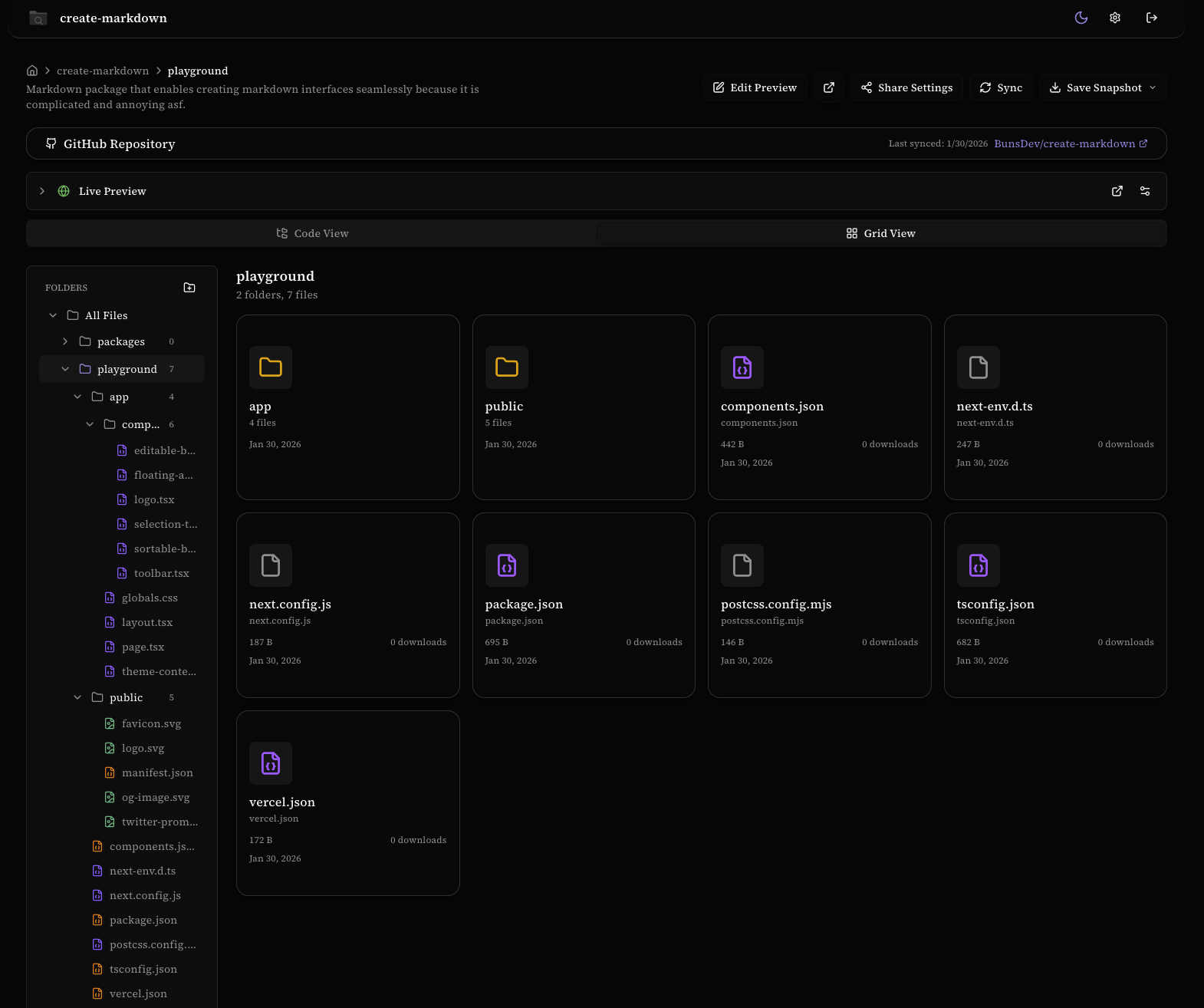
Browse your files in a clean card-based layout with folder icons, file sizes, and download counts at a glance.
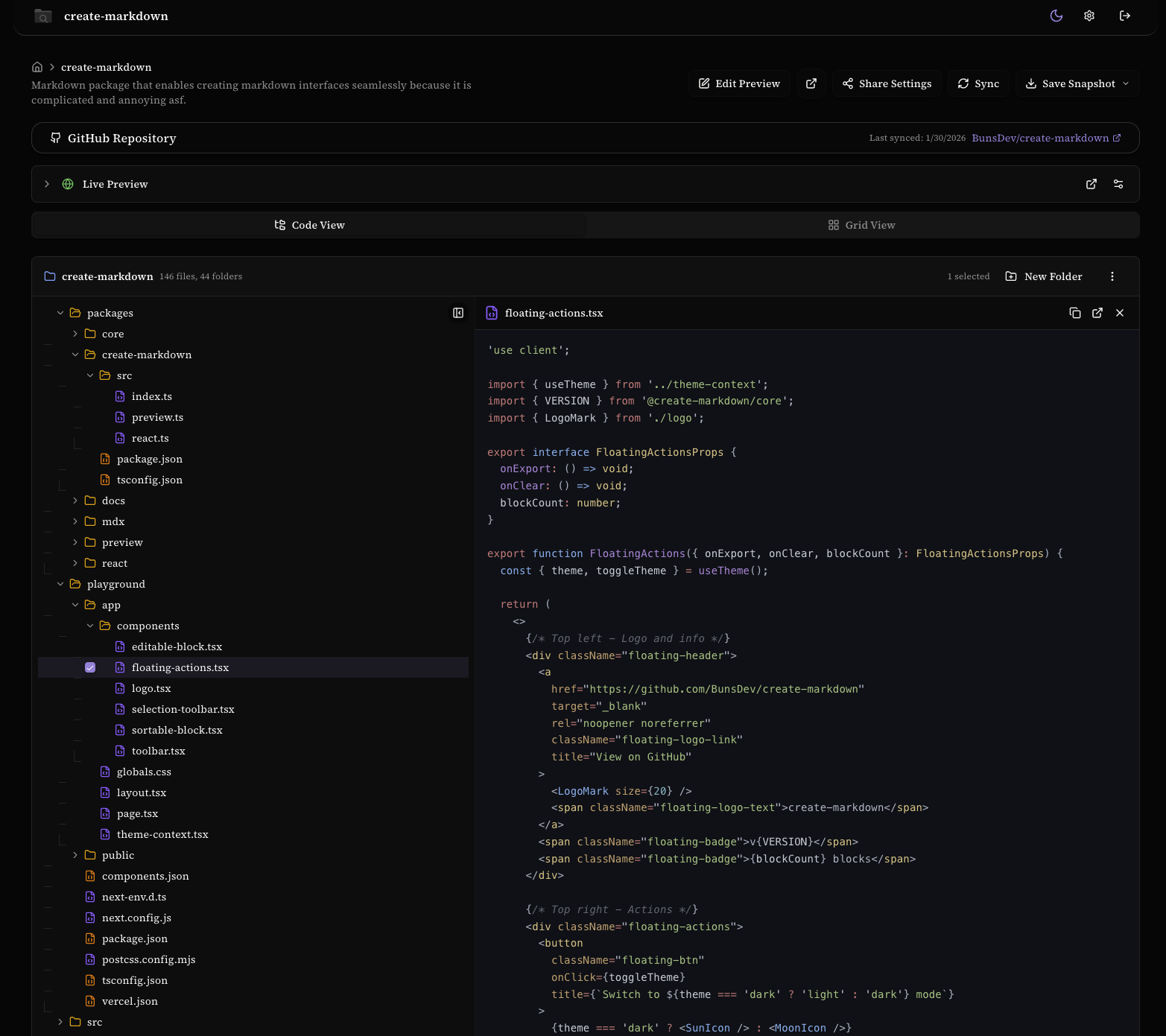
View source files directly in the browser with full syntax highlighting. Navigate through your project's folder structure and preview code without downloading.
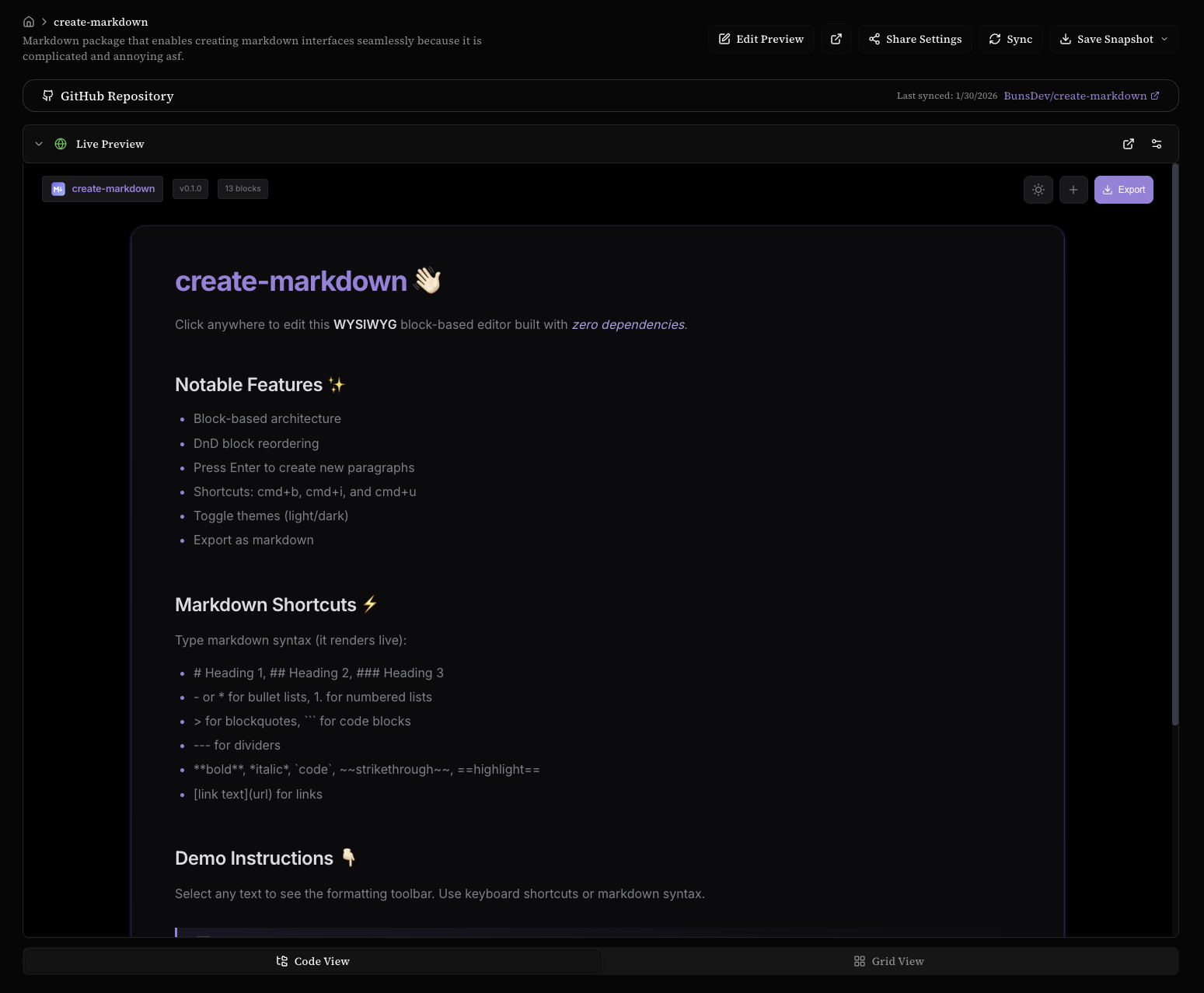
Preview deployed web applications directly within the dashboard. Connect your GitHub repository and see your project running live alongside the code.
| Technology | Purpose |
|---|---|
| Next.js 16 | React framework with App Router |
| React 19 | UI library |
| Drizzle ORM | Type-safe SQL ORM |
| Neon | Serverless PostgreSQL database |
| Vercel Blob | File storage |
| Tailwind CSS 4 | Styling |
| shadcn/ui | UI components |
┌─────────────────────────────────────────────────────────────────┐
│                         Client Browser                          │
└─────────────────────────────────────────────────────────────────┘
                                  │
                                  ▼
┌─────────────────────────────────────────────────────────────────┐
│                      Next.js App (Vercel)                       │
│  ┌───────────────┐  ┌───────────────┐  ┌───────────────┐       │
│  │   App Router  │  │ Server Actions│  │   API Routes  │       │
│  │   (pages)     │  │   (actions)   │  │   (share)     │       │
│  └───────────────┘  └───────────────┘  └───────────────┘       │
│                              │                                   │
│                     ┌────────┴────────┐                         │
│                     │   Drizzle ORM   │                         │
│                     └─────────────────┘                         │
└─────────────────────────────────────────────────────────────────┘
              │                               │
              ▼                               ▼
┌─────────────────────────┐     ┌─────────────────────────┐
│   Neon PostgreSQL       │     │     Vercel Blob         │
│   ┌─────────────────┐   │     │   ┌─────────────────┐   │
│   │ • projects      │   │     │   │ File Storage    │   │
│   │ • folders       │   │     │   │ (up to 10MB     │   │
│   │ • files         │   │     │   │  per file)      │   │
│   │ • categories    │   │     │   └─────────────────┘   │
│   │ • sessions      │   │     │                         │
│   │ • download_logs │   │     │                         │
│   └─────────────────┘   │     │                         │
└─────────────────────────┘     └─────────────────────────┘
┌──────────────────────────────────────────────────────────────┐
│                        Upload Flow                            │
├──────────────────────────────────────────────────────────────┤
│                                                               │
│  1. Admin logs in with password                               │
│     └──▶ Session token stored in cookie + database           │
│                                                               │
│  2. Upload file via dashboard                                 │
│     └──▶ File validated (type, size ≤ 10MB)                  │
│         └──▶ Uploaded to Vercel Blob                         │
│             └──▶ Metadata stored in Neon (PostgreSQL)        │
│                                                               │
│  3. Share with public_id link                                 │
│     └──▶ /share/[publicId] → Direct file download            │
│                                                               │
└──────────────────────────────────────────────────────────────┘
Before deploying, ensure you have:
- Node.js 18+ or Bun installed
- A Neon account (free tier available)
- A Vercel account (free tier available)
Create a .env.local file in the project root (see .env.example for reference):
| Variable | Description | Where to Get It |
|---|---|---|
DATABASE_URL |
Neon PostgreSQL connection string | Neon Console → Project → Connection Details → Copy "Connection string" |
ADMIN_PASSWORD |
Password for admin dashboard login | Choose a strong password (min 12 characters recommended) |
BLOB_READ_WRITE_TOKEN |
Vercel Blob storage token | Vercel Dashboard → Project → Storage → Create Blob Store → Copy token |
- Go to console.neon.tech
- Create a new project (or use existing)
- Click Connection Details in the sidebar
- Copy the Connection string (starts with
postgresql://)
postgresql://user:password@ep-xxx.region.aws.neon.tech/dbname?sslmode=require
💡 Tip: Use the "Pooled connection" for production to handle more concurrent connections.
Choose a secure password for your admin login. This is what you'll use to access the dashboard.
# Generate a secure password (macOS/Linux)
openssl rand -base64 32- Go to your Vercel Dashboard
- Select your project (or create one first)
- Navigate to Storage tab
- Click Create Database → Select Blob
- Copy the
BLOB_READ_WRITE_TOKENfrom the environment variables
This project uses Drizzle ORM for type-safe database operations. After setting up your Neon database, run the setup script to create all required tables:
# Push schema to database (recommended for development)
bun run setup
# or
npm run setup| Command | Description |
|---|---|
bun run setup |
Push schema to database (creates/updates tables) |
bun run db:push |
Same as setup - push schema changes |
bun run db:generate |
Generate migration files from schema changes |
bun run db:migrate |
Run pending migrations |
bun run db:studio |
Open Drizzle Studio (database GUI) |
Note: The
bun run setupcommand requiresDATABASE_URLto be set in your.envor.env.localfile.
The database schema is defined in lib/schema.ts using Drizzle ORM:
// Example: Projects table definition
export const projects = pgTable("projects", {
  id: uuid("id").primaryKey().defaultRandom(),
  name: varchar("name", { length: 255 }).notNull(),
  slug: varchar("slug", { length: 255 }).notNull().unique(),
  description: text("description"),
  deployedUrl: text("deployed_url"),
  categoryId: uuid("category_id").references(() => categories.id),
  createdAt: timestamp("created_at", { withTimezone: true }).defaultNow(),
  updatedAt: timestamp("updated_at", { withTimezone: true }).defaultNow(),
});┌─────────────────┐ ┌─────────────────┐
│ projects │ │ categories │
├─────────────────┤ ├─────────────────┤
│ id (PK) │──┐ │ id (PK) │
│ name │ │ │ name │
│ slug │ │ │ color │
│ description │ │ │ is_default │
│ deployed_url │ │ └─────────────────┘
│ category_id (FK)│──┼──────────────▲
└─────────────────┘ │ │
│ │ │
▼ │ │
┌─────────────────┐ │ ┌─────────────────┐
│ folders │ │ │ sessions │
├─────────────────┤ │ ├─────────────────┤
│ id (PK) │ │ │ id (PK) │
│ project_id (FK) │◀─┘ │ token │
│ parent_id (FK) │──┐ │ expires_at │
│ name │ │ └─────────────────┘
└─────────────────┘ │
▲ │
│ │
│ │
▼ │
┌─────────────────┐ │
│ files │ │
├─────────────────┤ │
│ id (PK) │ │
│ public_id │ │
│ title │ │
│ project_id (FK) │◀─┘
│ folder_id (FK) │──┐
│ blob_url │ │
│ file_size │ │
│ mime_type │ │
│ download_count │ │
└─────────────────┘ │
│ │
▼ │
┌─────────────────┐ │
│ download_logs │ │
├─────────────────┤ │
│ id (PK) │ │
│ file_id (FK) │──┘
│ ip_address │
│ user_agent │
│ downloaded_at │
└─────────────────┘
# 1. Install dependencies
bun install          # or: npm install

# 2. Copy environment template and fill in your values
cp .env.example .env.local

# 3. Run database setup (creates all tables via Drizzle)
bun run setup        # or: npm run setup

# 4. Start development server
bun dev              # or: npm run dev
The app will be available at http://localhost:3000
npm install
npm run setup        # Initialize database
npm run devbun install
bun run setup # Initialize database
bun dev- Hot Reload: Next.js automatically reloads when you save files
- Admin Login: Go to
/loginand use yourADMIN_PASSWORD - Database GUI: Run
bun run db:studioto open Drizzle Studio, or use Neon's built-in SQL Editor - Type Safety: Drizzle provides full TypeScript inference for all database queries
When you need to modify the database schema:
- Edit
lib/schema.tswith your changes - Run
bun run db:pushto apply changes (development) - Or use migrations for production:
bun run db:generate  # Generate migration SQL
bun run db:migrate   # Apply migrations
- Fork or clone this repository
git clone https://github.com/BunsDev/projects-explorer.git
cd projects-explorer- Install Vercel CLI
npm i -g vercel- Deploy
vercel- Add environment variables
# Add each variable
vercel env add DATABASE_URL
vercel env add ADMIN_PASSWORD
vercel env add BLOB_READ_WRITE_TOKEN- Redeploy with environment variables
vercel --prod- Run database setup:
bun run setup(or push schema via Drizzle) - Test admin login at
your-domain.vercel.app/login - Upload a test file to verify Blob storage works
- Test public sharing link functionality
- (Optional) Add custom domain in Vercel settings
projects-explorer/
├── app/                      # Next.js App Router
│   ├── dashboard/            # Admin dashboard
│   │   ├── actions.ts        # Server actions (CRUD operations)
│   │   ├── page.tsx          # Dashboard home
│   │   ├── projects/         # Project detail pages
│   │   └── upload/           # Upload page
│   ├── login/                # Authentication
│   ├── setup/                # Developer setup guide
│   ├── share/                # Public file sharing API
│   ├── layout.tsx            # Root layout
│   └── page.tsx              # Landing page
├── components/               # React components
│   ├── ui/                   # shadcn/ui components
│   ├── file-manager.tsx      # File management UI
│   ├── project-list.tsx      # Projects grid/list
│   └── ...                   # Other components
├── lib/                      # Utilities
│   ├── auth.ts               # Authentication helpers
│   ├── db.ts                 # Drizzle database client
│   ├── schema.ts             # Drizzle schema definitions
│   └── utils.ts              # General utilities
├── drizzle/                  # Generated migrations (if using)
├── drizzle.config.ts         # Drizzle configuration
├── scripts/                  # Legacy database scripts
│   └── setup.sql             # Raw SQL schema (reference)
├── public/                   # Static assets
├── styles/                   # Styles
│   └── globals.css           # Global styles
└── .env.example              # Environment template
Projects Explorer supports a wide variety of file types:
| Category | Extensions |
|---|---|
| Archives | .zip, .tar, .gz, .7z |
| Documents | .pdf, .doc, .docx, .txt, .md, .mdx |
| Images | .png, .jpg, .jpeg, .gif, .svg, .webp, .ico, .heic, .heif |
| Code | .js, .jsx, .ts, .tsx, .mjs, .cjs, .vue, .svelte |
| Styles | .css, .scss, .sass, .less |
| Data | .json, .xml, .csv, .yaml, .yml, .toml, .sql |
| Config | .env, .gitignore, .npmrc, .nvmrc, .lock |
| Scripts | .sh, .bash, .zsh |
Maximum file size: 10MB per file
- Password Authentication: Simple but effective—no email/OAuth complexity
- Session Management: Secure tokens stored server-side with 7-day expiry
- File Validation: Magic byte verification for binary files prevents disguised uploads
- HTTPS Only: Secure cookies in production
- No Client-Side Secrets: All sensitive operations happen server-side
- Type-Safe Queries: Drizzle ORM prevents SQL injection by design
"Database connection failed"
- Verify your
DATABASE_URLis correct and includes?sslmode=require - Check if your Neon project is active (free tier projects pause after inactivity)
"Upload failed"
- Ensure
BLOB_READ_WRITE_TOKENis set correctly - Check file size (must be ≤ 10MB)
- Verify file type is supported
"Invalid password"
- Double-check your
ADMIN_PASSWORDenvironment variable - Passwords are case-sensitive
Build errors after deployment
- Clear Vercel build cache: Project Settings → General → "Clear Build Cache"
- Ensure all environment variables are set for production
Schema mismatch errors
- Run
bun run db:pushto sync your schema with the database - For production, use migrations:
bun run db:generate && bun run db:migrate
Contributions are welcome! Please feel free to submit a Pull Request.
- Fork the repository
- Create your feature branch (
git checkout -b feature/amazing-feature) - Commit your changes (
git commit -m 'Add amazing feature') - Push to the branch (
git push origin feature/amazing-feature) - Open a Pull Request
This project is licensed under the MIT License - see the LICENSE file for details.
Made with ❤️ by BunsDev