Repository navigation
BounShell GUI doesn't scale well on not standard DPI settings #4

Description

Workaround: I've had reports that running Show-BsGuiElements in PowerShell instead of the ISE works well. (Thanks Sean)
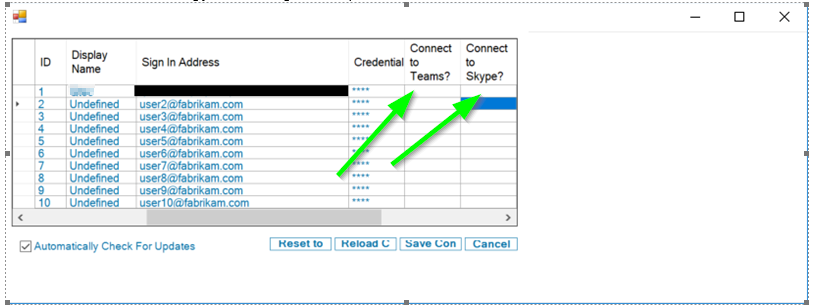
Due to the way that WinForms scales the GUI, the checkboxes for each connection type are not displayed thus cant be selected.
I need a better way to test and deal with this.
This screenshot is taken from a machine with 175% DPI scaling.
Note the warped fonts on buttons, and the missing check boxes (indicated by arrows)
Activity
Atreidae commentedon Jan 14, 2019
Interim fix in the devel fork.
forces font rendering to pixel based.
Changing
[System.Drawing.GraphicsUnit]::Pointto
[System.Drawing.GraphicsUnit]::PixelAtreidae commentedon May 6, 2019
Long term fix is to re-write the gui. needed for sharepoint support anyway. Will come after 1.x release
Atreidae commentedon May 21, 2019
I've had reports that running Show-BsGuiElements in PowerShell instead of the ISE works well. (Thanks Sean)
Atreidae commentedon Sep 25, 2019
The new WPF GUI addresses this.