Repository navigation
Many issues on Gateway/Client #38
Description

Describe the bug
When utilizing Material UI in JetBrains Gateway, Material UI generates a Fatal Error
To Reproduce
- Install JetBrains Gateway on a Server
- Connect to the server, choose PHP Storm at the Editor
- Install Material UI and try to register it.
Expected Behavior
Would expect the theme to work as it does under PHP Storm running locally.
Environment
JetBrains Client 2021.3 EAP
Build #JBC-213.5744.38, built on November 11, 2021
PhpStorm EAP User
Expiration date: December 11, 2021
Runtime version: 11.0.13+7-b1751.19 amd64
VM: OpenJDK 64-Bit Server VM by JetBrains s.r.o.
Windows 10 10.0
GC: G1 Young Generation, G1 Old Generation
Memory: 1500M
Cores: 8
Registry:
ide.balloon.shadow.size=0
rdclient.backend.actionHandlers=false
Non-Bundled Plugins:
com.tabnine.TabNine (0.5.3)
com.smartapplications.stormsections (1.2.0)
com.mallowigi (50.2.0)
com.chrisrm.idea.MaterialThemeUI (6.10.0)
It should contain:
- OS (Windows, Linux, Mac)
- IntelliJ Product + version (IDEA, RubyMine...)
- Plugin version
- If needed a list of enabled plugins -->
Screenshots
Stack Trace:
java.util.concurrent.CompletionException: java.lang.RuntimeException: java.lang.NoClassDefFoundError: com/intellij/history/integration/ui/views/RevisionsList$MyCellRenderer
at java.base/java.util.concurrent.CompletableFuture.encodeThrowable(CompletableFuture.java:314)
at java.base/java.util.concurrent.CompletableFuture.completeThrowable(CompletableFuture.java:319)
at java.base/java.util.concurrent.CompletableFuture$UniRun.tryFire(CompletableFuture.java:787)
at java.base/java.util.concurrent.CompletableFuture.postComplete(CompletableFuture.java:506)
at java.base/java.util.concurrent.CompletableFuture$AsyncRun.run(CompletableFuture.java:1742)
at java.base/java.util.concurrent.CompletableFuture$AsyncRun.exec(CompletableFuture.java:1728)
at java.base/java.util.concurrent.ForkJoinTask.doExec(ForkJoinTask.java:290)
at java.base/java.util.concurrent.ForkJoinPool$WorkQueue.topLevelExec(ForkJoinPool.java:1020)
at java.base/java.util.concurrent.ForkJoinPool.scan(ForkJoinPool.java:1656)
at java.base/java.util.concurrent.ForkJoinPool.runWorker(ForkJoinPool.java:1594)
at java.base/java.util.concurrent.ForkJoinWorkerThread.run(ForkJoinWorkerThread.java:183)
Caused by: java.lang.RuntimeException: java.lang.NoClassDefFoundError: com/intellij/history/integration/ui/views/RevisionsList$MyCellRenderer
at com.intellij.openapi.application.impl.LaterInvocator.invokeAndWait(LaterInvocator.java:157)
at com.intellij.openapi.application.impl.ApplicationImpl.invokeAndWait(ApplicationImpl.java:450)
at com.mallowigi.idea.MTLafComponent.initComponent(MTLafComponent.java:122)
at com.mallowigi.idea.MTLafComponent.appFrameCreated(MTLafComponent.java:73)
at com.intellij.util.messages.impl.MessageBusImpl.invokeMethod(MessageBusImpl.java:645)
at com.intellij.util.messages.impl.MessageBusImpl.invokeListener(MessageBusImpl.java:624)
at com.intellij.util.messages.impl.MessageBusImpl.deliverMessage(MessageBusImpl.java:417)
at com.intellij.util.messages.impl.MessageBusImpl.pumpWaitingBuses(MessageBusImpl.java:390)
at com.intellij.util.messages.impl.MessageBusImpl.pumpMessages(MessageBusImpl.java:372)
at com.intellij.util.messages.impl.MessageBusImpl.access$200(MessageBusImpl.java:33)
at com.intellij.util.messages.impl.MessageBusImpl$MessagePublisher.invoke(MessageBusImpl.java:179)
at com.sun.proxy.$Proxy32.appFrameCreated(Unknown Source)
at com.intellij.idea.IdeStarter.openProjectIfNeeded(IdeStarter.kt:101)
at com.intellij.idea.IdeStarter.main(IdeStarter.kt:80)
at com.jetbrains.thinclient.ThinClientStarter.main(ThinClientStarter.kt:66)
at com.intellij.idea.ApplicationLoader$startApp$3.run(ApplicationLoader.kt:190)
at java.base/java.util.concurrent.CompletableFuture$UniRun.tryFire(CompletableFuture.java:783)
... 8 more
Caused by: java.lang.NoClassDefFoundError: com/intellij/history/integration/ui/views/RevisionsList$MyCellRenderer
at com.mallowigi.idea.UIReplacer.patchLocalHistory(UIReplacer.java:178)
at com.mallowigi.idea.UIReplacer.patchUI(UIReplacer.java:94)
at com.mallowigi.idea.MTThemeManager.activate(MTThemeManager.java:393)
at com.mallowigi.idea.MTThemeManager.activateLAF(MTThemeManager.java:334)
at com.mallowigi.idea.MTThemeManager.activateLAF(MTThemeManager.java:354)
at com.mallowigi.idea.MTLafComponent.activateLaf(MTLafComponent.java:100)
at com.mallowigi.idea.MTLafComponent.lambda$initComponent$0(MTLafComponent.java:122)
at com.intellij.openapi.application.TransactionGuardImpl.runWithWritingAllowed(TransactionGuardImpl.java:214)
at com.intellij.openapi.application.TransactionGuardImpl.access$200(TransactionGuardImpl.java:21)
at com.intellij.openapi.application.TransactionGuardImpl$2.run(TransactionGuardImpl.java:196)
at com.intellij.openapi.application.impl.ApplicationImpl.runIntendedWriteActionOnCurrentThread(ApplicationImpl.java:805)
at com.intellij.openapi.application.impl.ApplicationImpl.lambda$invokeAndWait$7(ApplicationImpl.java:450)
at com.intellij.openapi.application.impl.LaterInvocator$1.run(LaterInvocator.java:134)
at com.intellij.openapi.application.impl.FlushQueue.doRun(FlushQueue.java:82)
at com.intellij.openapi.application.impl.FlushQueue.runNextEvent(FlushQueue.java:131)
at com.intellij.openapi.application.impl.FlushQueue.flushNow(FlushQueue.java:47)
at com.intellij.openapi.application.impl.FlushQueue$FlushNow.run(FlushQueue.java:187)
at java.desktop/java.awt.event.InvocationEvent.dispatch(InvocationEvent.java:313)
at java.desktop/java.awt.EventQueue.dispatchEventImpl(EventQueue.java:776)
at java.desktop/java.awt.EventQueue$4.run(EventQueue.java:727)
at java.desktop/java.awt.EventQueue$4.run(EventQueue.java:721)
at java.base/java.security.AccessController.doPrivileged(Native Method)
at java.base/java.security.ProtectionDomain$JavaSecurityAccessImpl.doIntersectionPrivilege(ProtectionDomain.java:85)
at java.desktop/java.awt.EventQueue.dispatchEvent(EventQueue.java:746)
at com.intellij.ide.IdeEventQueue.defaultDispatchEvent(IdeEventQueue.java:891)
at com.intellij.ide.IdeEventQueue._dispatchEvent(IdeEventQueue.java:760)
at com.intellij.ide.IdeEventQueue.lambda$dispatchEvent$6(IdeEventQueue.java:447)
at com.intellij.openapi.progress.impl.CoreProgressManager.computePrioritized(CoreProgressManager.java:818)
at com.intellij.ide.IdeEventQueue.lambda$dispatchEvent$7(IdeEventQueue.java:446)
at com.intellij.openapi.application.impl.ApplicationImpl.runIntendedWriteActionOnCurrentThread(ApplicationImpl.java:805)
at com.intellij.ide.IdeEventQueue.dispatchEvent(IdeEventQueue.java:492)
at java.desktop/java.awt.EventDispatchThread.pumpOneEventForFilters(EventDispatchThread.java:203)
at java.desktop/java.awt.EventDispatchThread.pumpEventsForFilter(EventDispatchThread.java:124)
at java.desktop/java.awt.EventDispatchThread.pumpEventsForHierarchy(EventDispatchThread.java:113)
at java.desktop/java.awt.EventDispatchThread.pumpEvents(EventDispatchThread.java:109)
at java.desktop/java.awt.EventDispatchThread.pumpEvents(EventDispatchThread.java:101)
at java.desktop/java.awt.EventDispatchThread.run(EventDispatchThread.java:90)
Caused by: java.lang.ClassNotFoundException: com.intellij.history.integration.ui.views.RevisionsList$MyCellRenderer PluginClassLoader(plugin=PluginDescriptor(name=Material Theme UI, id=com.chrisrm.idea.MaterialThemeUI, descriptorPath=plugin.xml, path=~\AppData\Roaming\JetBrains\JetBrainsClient213.5744.38\plugins\Material Theme UI, version=6.10.0, package=null, isBundled=false), packagePrefix=null, instanceId=7, state=active)
at com.intellij.ide.plugins.cl.PluginClassLoader.loadClass(PluginClassLoader.java:235)
at java.base/java.lang.ClassLoader.loadClass(ClassLoader.java:522)
... 37 more
Activity
[-]Exception in Plugin[/-][+]Exception in JetBrains Gateway[/+]mallowigi commentedon Nov 22, 2021
I've released the fix under the GATEWAY channel (https://plugins.jetbrains.com/plugin/8006-material-theme-ui/versions/gateway)
I'm waiting for an answer from JetBrains to figure out how to distribute a version to the JetBrains Gateway only, currently it targets all products and takes priority over the main release, and I don't want that.
In the meantime please manually download the fix there.
apporto-bobby commentedon Nov 29, 2021
Thank you! Although it seems to have fixed some of the issues, it unfortunately still doesn't allow me to utilize my license as it never prompts for me to activate and I'm unable to get the benefits of the paid license. Not sure if I'm missing something, but it still doesn't seem to be working "completely" correctly.
mallowigi commentedon Nov 29, 2021
Grimthorr commentedon Feb 3, 2022
@mallowigi This still seems to be an issue, especially when using JetBrains Client (the IDE linked to Gateway). When using the "Activate License" menu item, a "Restart IDE" window immediately pops up without prompting for license details, effectively rendering it impossible to activate Material Theme in JetBrains Gateway.
mallowigi commentedon Feb 3, 2022
Grimthorr commentedon Feb 3, 2022
The built-in "Register" menu item under Help doesn't list Material Theme UI as an option for me even though it is installed locally:
mallowigi commentedon Feb 3, 2022
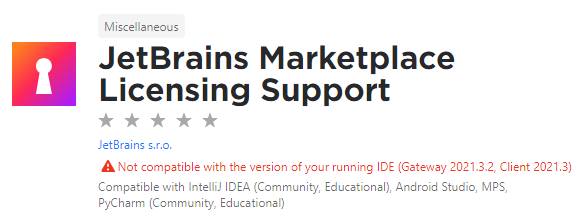
That's weird. Maybe you need the https://plugins.jetbrains.com/plugin/13407-jetbrains-marketplace-licensing-support plugin?
Grimthorr commentedon Feb 3, 2022
There does seem to be some weird quirks with Gateway/Client; this is one of a few hurdles I've faced so far!
No joy with the support plugin though as it's only supported with limited IDEs:
5 remaining items
[-]Exception in JetBrains Gateway[/-][+]Many issues on Gateway/Client[/+]Grimthorr commentedon Feb 3, 2022
I installed the plugin locally rather than "on host", so it seems like the "Register" window is only showing plugins from the host (which is why you see the host's IDE at the top rather than the local Client). It definitely feels like Gateway/Client is way to buggy for release!
mallowigi commentedon Feb 3, 2022
The paid features have no use on the non-connected client, but after being connected you should be able to see the material theme features on the client (stuff like the Project Frame or the Compact Settings, but the Project View Settings/Tabs/Custom Theme isnt)
rademacher-p commentedon May 11, 2022
@mallowigi I'm trying to install the Gateway version, but am getting an error "Requires build 214.* or older but the current build is JBC-221.5080.212". I'm running on v2022.1 - is this supported? Thanks!
DevGary commentedon Jul 12, 2022
I have the same issue as @Grimthorr
I have Material Theme installed on "Jetbrains Client 2021.3" that Code With Me uses but I cannot activate it. The client doesn't have access to "Jetbrains Marketplace Licensing Support" in the plugin menu. I tried manually downloading the plugin that is for "IntelliJ IDEA Community". However, even after installing it, I still cannot activate. When I try to activate, it says a window will pop up once I close settings. A popup does show up, but it is asking me to restart the IDE. Upon doing that nothing happens.
The "Register Plugins" menu is grayed out in client. If I try open it via "Actions" search, nothing happens.
The Marketplace Licensing plugin does not list support for Code With Me Guest.
@mallowigi
mallowigi commentedon Jul 12, 2022
As a rule of thumb I think the plugin will not be available for Gateway/CodeWithMe. The transparency for making plugins available with the JetBrains client is almost non-existent, as most plugins should work out of the box, but because the plugin is such a complicated one, it doesn't.
I suggest you to use the Material Theme Lite in such instances.
DevGary commentedon Jul 12, 2022
Are you talking about the Material Theme plugin not working or the Licensing Plugin? Because other than the licensing part, I haven't really seen any indications that the Material plugin doesn't work. As I mentioned, I think the problem is with the Jetbrains Marketpalce Licensing plugin itself not supporting Gateway/CodeWithMe. I'll file a ticket to JetBrains to see if they can add support.
In the mean time, is there any way you can make it so Material Theme bypasses licensing requirements when installed on Gateway/CodeWithMe client?
mallowigi commentedon Jul 12, 2022
I'll take a look when I'll have time
michabbb commentedon Mar 27, 2023
@mallowigi today I faced the same problem, no matter what I do, it's impossible to let the plugin know that a license exists.
When you are logged into your jetbrains account, you are able to download a license file from the list of paid plugins, it explicit says "for offline usage", but I have no idea how to use that. Maybe there is a chance you can make use of that file and offer another additional way of telling your plugin that a license exists. Maybe a form where you can paste that license string into.??
mallowigi commentedon Apr 22, 2023
after two years of pondering I decided to close this issue. Use Material Theme Lite when working on Gateway.