
A no-code scientific computing environment for solving forward and inverse problems with physics-informed neural networks — from setting up the equations to training, error analysis, and visualization.


Three of the 65 built-in examples — Schrödinger in 1D, Allen-Cahn in 2D and heat in 3D — trained and animated in PINNStudio. Click one to see its setup and results.
 1D —
1D — (x, t) — Schrödinger
|
 2D —
2D — (x, y, t) — Allen-Cahn (Wight & Zhao)
|
 3D —
3D — (x, y, z, t) — Heat
|
Website · Install · Quick Start · Examples · Your Own Problem · Discussions · Citation
Table of contents
PINNStudio is a scientific computing environment for solving differential equations with physics-informed neural networks (PINNs) and related scientific machine learning methods, without writing any code. You describe the problem — the equations, the domain, the boundary and initial conditions, the network and how it should be trained — and PINNStudio trains the model, tracks it while it runs, and gives back the solution, its error against reference data, plots and animations, and the trained model ready to reload.
Setting up a PINN by hand means writing a new script for every problem: the residual of the equations through automatic differentiation, the sampling of collocation points, the weighting of the loss terms, the optimizer schedule, and then the plotting and error analysis afterwards. Each of these is easy to get subtly wrong. PINNStudio puts all of it into one place, so researchers and students in science and engineering — including those new to scientific computing or machine learning — can spend their time on the physics of their problem rather than on the code around it.
What it can solve
- Forward and inverse problems: solve a known equation, or learn unknown coefficients or whole unknown fields from measured data.
- ODEs and PDEs in 1D, 2D and 3D, steady or time-dependent, including coupled multi-output systems, integro-differential and fractional equations, typed in a readable form such as
du_t + u*du_x - 0.01/pi*du_xx. - Many kinds of domains — intervals, rectangles, disks, polygons, cuboids, spheres, and custom shapes combined from them (e.g. a domain with a hole) — with Dirichlet, Neumann, Robin, periodic and point-data conditions, or conditions imposed exactly through the network output.
How it trains
- Multi-phase training (e.g. Adam followed by L-BFGS) with learning-rate schedules and loss weights per phase.
- Adaptive methods: residual-based adaptive refinement (RAR), which adds points where the error is largest; time-adaptive training, which marches through time in steps, each starting from the previous one (transfer learning); initial-condition-guided pre-training. The Loss weights page adds automatic weighting (per-point residual weights, RBA or SA-PINN, which concentrate training where the equation is worst satisfied, and causal training) and exact constraints (an initial condition built into the network, and exact periodicity), each set with one tick box. Which of these help, and on which problems, is measured in the training methods study.
- Point resampling, early stopping, checkpointing and time budgets, and live monitors of any output or derivative during training.
- Parameter sweeps over almost any setting — one at a time, all combinations, paired values, or Bayesian search — with a summary of how the error changes with each parameter.
What you get back
- A live training log and loss plot, and error analysis against reference data or an exact formula (relative
$L_2$ , MSE, maximum error). - A history of every saved run, with any of them compared on one plot, and figures and tables that copy straight into a paper or a spreadsheet.
- Line, surface and animated solution plots, solution data export, and a saved model that can be reloaded and visualized again without retraining.
- A standalone Python script for every problem, so the work can be inspected, shared and reproduced outside PINNStudio. Solving in the window is as fast as running that script yourself (timing study).
Ready-to-run examples. PINNStudio comes with 65 worked examples, from simple ODEs to the Navier–Stokes equations in 3D, including published PINN benchmarks (Raissi et al., Wight & Zhao, Mattey & Ghosh, and others) and DeepXDE's examples. Each one loads in one click, and 63 of them come with an exact solution or reference data to compare against — see Examples.
PINNStudio is under active development, and we are extending it with newer scientific machine learning and PINN methods, aimed at solving harder problems more accurately and faster.
Click to watch the full walkthrough on YouTube: loading an example, setting up your own PDE, sketching a domain and its boundary conditions, training with live loss, error analysis, run history and parameter sweeps.
One command installs PINNStudio with its own Python and the PyTorch build that matches your computer's GPU, and adds PINNStudio to the Start menu and desktop (Windows), Applications (macOS) or the app menu (Linux). Python and git do not need to be installed.
macOS / Linux (in a terminal):
curl -LsSf https://raw.githubusercontent.com/AsfandyarKhan72/PINNStudio/main/get-pinnstudio.sh | shWindows (in PowerShell):
powershell -ExecutionPolicy ByPass -c "irm https://raw.githubusercontent.com/AsfandyarKhan72/PINNStudio/main/get-pinnstudio.ps1 | iex"The install takes a few minutes, and at the end it says whether training will run on the GPU. Then continue with the Quick Start.
Systems PINNStudio is tested on
Every change is tested on GitHub Actions (platform tests, platform matrix): the test suite, and a check that drives the window end to end: it trains a model, shows the results and error analysis, and restores the model.
| Tested on | |
|---|---|
| Linux | Ubuntu 22.04 and 24.04 (x64), Ubuntu 24.04 (ARM) |
| Windows | Windows Server 2022 and 2025 (x64), Windows 11 on ARM |
| macOS | macOS 14 and 15 (Apple silicon), macOS 15 (Intel) |
| Python | 3.9 to 3.14 |
| One-command installer | Ubuntu 22.04 and 24.04, Windows Server 2022, Windows 11 on ARM, macOS 15 (Intel) |
Training on an NVIDIA GPU is tested on Linux (RTX 4090, CUDA 12.4); the test machines above train on the CPU.
Updating, uninstalling, and what gets installed
Update to the latest version by running the install command again. It replaces the old version and keeps your settings and results.
macOS / Linux (in a terminal):
curl -LsSf https://raw.githubusercontent.com/AsfandyarKhan72/PINNStudio/main/get-pinnstudio.sh | shWindows (in PowerShell):
powershell -ExecutionPolicy ByPass -c "irm https://raw.githubusercontent.com/AsfandyarKhan72/PINNStudio/main/get-pinnstudio.ps1 | iex"Uninstall with these two commands (the first removes the icon, the second removes PINNStudio and its Python). They are the same on every system; on Windows, type them in PowerShell:
pinnstudio --remove-shortcut
uv tool uninstall pinnstudio
Your results in PINNStudio_Results are not deleted.
Icon for a pip or source installation: pinnstudio --create-shortcut adds the icon, and pinnstudio --remove-shortcut removes it.
The installer uses uv (and installs it first if needed). PINNStudio gets its own environment with Python 3.12, so nothing is installed system-wide; uv tool dir shows where it is. The environment contains DeepXDE (PyTorch backend), PyTorch, PyQt6, NumPy (below 2.5, since DeepXDE 1.15's Polygon/Triangle geometry fails on NumPy 2.5+), Matplotlib and Pandas. The PyTorch build is chosen from the NVIDIA driver (--torch-backend auto), or CPU-only without an NVIDIA GPU. A GPU is optional but recommended for larger 2D/3D problems and inverse runs.
Intel Macs and Windows on ARM. PyTorch's last release for Intel Macs is 2.2, which needs Python 3.12 or older and NumPy below 2; the installer and pip pick these by themselves. PyTorch has no build for Windows on ARM (Snapdragon PCs), so there the installer uses the x64 Python, which Windows runs under emulation; with pip, install the x64 Python from python.org first.
Other ways to install: pip, or from source
With pip, into a Python environment you already have:
pip install pinnstudio
pinnstudio
Command not found after pip install?
pip: command not found? Usepip3instead; many systems (macOS especially) only shippip3, not a plainpip.pinnstudio: command not foundeven though the install said it succeeded? pip installed it into a per-user folder that is not on your shell's PATH yet. The install output names the folder in a line likeWARNING: The script pinnstudio is installed in '.../bin' which is not on PATH.Add that folder to your PATH:
echo 'export PATH="<folder from the warning above>:$PATH"' >> ~/.zshrc
source ~/.zshrc
(Use /.bashrc/.zshrc if your shell is bash.) Then pinnstudio should launch directly. This never comes up with install.sh/install.bat, since those use a virtual environment where the command is always found automatically.
- The GPU fix command PINNStudio suggests fails with a
flit_coreor "Could not find a version that satisfies" error? Your pip is too old to resolve PyTorch's package index correctly. Upgrade it first, then retry:
python -m pip install --upgrade pip
pip install torch --index-url https://download.pytorch.org/whl/cu121 --force-reinstall
From source, for development:
The install script creates its own environment and checks that the installed PyTorch can use your GPU, installing a compatible build if the default one cannot (for example with an older driver). Plain pip install does not do this.
Before you start: open a terminal and check git and Python 3.9+
- Windows: click the Start menu, type
PowerShell, and open Windows PowerShell. - macOS: press
Cmd + Spaceto open Spotlight, typeTerminal, and press Enter (or find it under Applications → Utilities → Terminal). - Linux: open your terminal application (commonly
Ctrl + Alt + T, or search "Terminal" in your application menu).
Then check git and Python by pasting these one at a time:
git --version
python3 --version
(On Windows, use python --version instead of python3 --version.)
If either command is not recognized:
- git missing? Install it from git-scm.com/downloads. Default options are fine. On macOS, running
git --versionfor the first time may itself prompt you to install Apple's Command Line Tools — accept and let it finish, then try again. - Python missing, or older than 3.9? Install it from python.org/downloads. On Windows, check "Add python.exe to PATH" on the installer's first screen. This step is often missed.
After installing either one, close your terminal window completely and open a new one before continuing, so the change takes effect.
git clone https://github.com/AsfandyarKhan72/PINNStudio.git
cd PINNStudio
macOS / Linux:
bash install.sh
./venv/bin/pinnstudio
Windows:
install.bat
.\venv\Scripts\pinnstudio.exe
Everything is installed into a virtual environment inside the PINNStudio folder — nothing system-wide, and deleting the folder removes it completely. The install needs an internet connection and takes a few minutes.
Running PINNStudio again (source install)
You only need to install once. After that, launch PINNStudio again anytime with:
macOS / Linux, from inside the PINNStudio folder:
./venv/bin/pinnstudioWindows, from inside the PINNStudio folder:
.\venv\Scripts\pinnstudio.exe
There is no need to reinstall or recreate the virtual environment.
Something not working? Open an issue on GitHub with the exact command you ran and the full error message — see Contributing.
Your first result takes about a minute:
- Open PINNStudio from its icon
 in the Start menu, Applications or the app menu, or run
 pinnstudioin a terminal (./venv/bin/pinnstudiofor a source install). It opens on the Start tab. - Under Examples on the Start tab, click Heat 1D – Dirichlet (or pick it from the Examples list in the toolbar). Every setting — equation, domain, conditions, network, training — fills in, and the model tree on the left shows each part of the problem.
- Press Solve (or Ctrl+Enter). The loss is plotted as it trains (Results → Live loss), and the status bar shows the phase, the progress and the time left.
- When the run finishes, the loss curve and the solution appear under Results → Overview, and Results → Error analysis lists the relative
$L_2$ error against the exact solution at each reference time, with the comparison plots.

From there:
- Switch the toolbar's Examples list to Inverse and pick the same example to learn the unknown diffusivity from measured data instead.
- Browse the other examples below.
- Follow Solving Your Own Problem to set up an equation of your own.
PINNStudio's window follows the layout of finite-element tools such as COMSOL: a model tree on the left, the settings of the selected part of the problem in the middle, and graphics on the right, with the Training Log and the generated Script below them. Every panel can be resized, and the layout is remembered (View → Reset Layout restores it).

- Model tree. Problem, Equations, Inverse problem (for an inverse problem), Geometry, Collocation points, Initial and Boundary conditions (one node per condition), Neural network, Training with its Loss weights and Adaptive training, Parameter sweep, and Results with Restore & visualize. A node with a setting that would stop Solve is marked, and the toolbar says how many there are. Right-click a node for its actions (add, duplicate or delete a boundary condition, add a training phase, fold all sections), and the ? next to a page's title opens its part of this README.
- Settings. Each page is a short form whose sections fold to their titles. Equations are typeset as you type them, and any name PINNStudio does not recognize is flagged.
- Graphics. Start (new problem, open, recent problems, every example), Results, and the domain — Geometry for any 2D/3D shape, or the Sketch when the domain is drawn.
- Toolbar and status bar. Examples, Open, Save, Export script, Solve and Stop are always in the toolbar; the status bar shows the run's phase, progress, loss and the time left, and the save folder.
 Sketch — draw the domain, then click its edges to give them boundary conditions
|
 Live loss — each loss term while the model trains
|
 Error analysis — the errors at each reference time, ready to copy or export
|
 History — every saved run, and several compared on one plot
|
Keyboard shortcuts
| Shortcut | Action |
|---|---|
| Ctrl+Enter or F5 | Solve |
| Shift+F5 | Stop |
| Ctrl+S / Ctrl+Shift+S | Save / Save As |
| Ctrl+O | Open a saved problem |
| Ctrl+E | Export the DeepXDE script |
| Ctrl+Z / Ctrl+Y | Undo / redo in the Sketch |
Three themes are built in — Studio Light (the default), Studio Dark and Solarized Dark — with an accent colour and a UI scale, under Settings → Display Settings.
PINNStudio comes with 65 ready-to-run examples, all listed in the table below and loaded from the Examples list in the toolbar or the gallery on the Start tab. The list's category is Forward (every example that solves for the field, which is all of them except the 10 inverse-only DeepXDE examples) or Inverse (examples that learn unknown parameters or fields from data), and each list is ordered like the table, under ODE / 1D / 2D / 3D headings. Every name follows one style, Equation Dimension – detail. The table's Source column says where each example comes from:
-
PINNStudio templates (15, in 14 rows of the table: row 23 holds the two Allen-Cahn 1D templates): our own problems; most reproduce a published PINN result, and the Source column names and links that paper (the heat and the disk/sphere Poisson templates are our own and show "—"). Each one works in Forward mode, and all but the two Cahn-Hilliard 1D templates in Inverse mode too (picked from the Inverse list, it loads in Inverse mode with its measured-data file); all of them ship with reference data in
reference_data/, so Error Analysis is ready as soon as you load one. -
DeepXDE examples (40 forward, 10 inverse): the DeepXDE link in the Source column opens each one's script in DeepXDE's repository. These are the PINN examples from DeepXDE's documentation (forward, inverse), set up with each script's own equation, geometry, boundary/initial conditions, network, optimizers, iteration counts and loss weights, so pressing Solve trains what the DeepXDE script trains. Anything that differs from the script is printed in the Training Log when the example loads, and noted in its entry below. Their results are what DeepXDE's own settings give, so some show a noticeable error: Brinkman-Forchheimer finds
$\nu_e$ only to within about 50% from its five measurements (as DeepXDE's script does), and the unknown-field examples learn the field to a few percent (13% for the forcing field trained in batches). They are kept as in DeepXDE so the two can be compared; more training, more points or the methods under Tips below usually improve them, as for PINNStudio's own templates.
Loading an example fills in every setting, and you can change any of them before pressing Solve; if you do, the Training Log lists what you changed. Your save folder, GPU, random-seed and plot-style settings are kept when you load one.
Error Analysis reference: where the problem has an exact solution, Error Analysis compares against it directly (Exact solution). Otherwise it uses reference files computed independently of the PINN (Generated data): PINNStudio's own reference solutions in reference_data/, or data computed by tools/make_deepxde_reference_data.py (no data is copied from DeepXDE's repository). Examples marked "—" have no bundled reference; you can add your own files in the Error Analysis dialog.
Every result shown below comes from one training run with the example's settings on an RTX 4090. Errors are relative
The table is ordered by dimension (ODE, 1D, 2D, 3D), then steady before time-dependent and forward before inverse; examples of the same problem sit next to each other, with Allen-Cahn and then Cahn-Hilliard first in each group.
| # | Example | Dimension | Regime | Problem | Geometry | Error Analysis reference | Source |
|---|---|---|---|---|---|---|---|
| ODE (t only) | |||||||
| 1 | Integro-differential ODE | ODE | Time-dependent | Forward | — (t only) | Exact solution | DeepXDE |
| 2 | Integro-differential ODE – Volterra kernel | ODE | Time-dependent | Forward | — (t only) | Exact solution | DeepXDE |
| 3 | Linear ODE system | ODE | Time-dependent | Forward | — (t only) | Exact solution | DeepXDE |
| 4 | Lotka-Volterra ODE | ODE | Time-dependent | Forward | — (t only) | Generated data | DeepXDE |
| 5 | Second-order ODE | ODE | Time-dependent | Forward | — (t only) | Exact solution | DeepXDE |
| 6 | Lorenz ODE – unknown C₁, C₂, C₃ | ODE | Time-dependent | Inverse | — (t only) | Generated data | DeepXDE |
| 7 | Lorenz ODE – unknown C₁, C₂, C₃, exogenous input | ODE | Time-dependent | Inverse | — (t only) | Generated data | DeepXDE |
| 1D | |||||||
| 8 | Euler beam 1D | 1D | Steady | Forward | Interval | Exact solution | DeepXDE |
| 9 | Fractional Poisson 1D | 1D | Steady | Forward | Interval | Exact solution | DeepXDE |
| 10 | Poisson 1D – Dirichlet | 1D | Steady | Forward | Interval | Exact solution | DeepXDE |
| 11 | Poisson 1D – Dirichlet/Neumann | 1D | Steady | Forward | Interval | Exact solution | DeepXDE |
| 12 | Poisson 1D – Dirichlet/Periodic | 1D | Steady | Forward | Interval | Exact solution | DeepXDE |
| 13 | Poisson 1D – Dirichlet/point-set operator | 1D | Steady | Forward | Interval | Exact solution | DeepXDE |
| 14 | Poisson 1D – Dirichlet/Robin | 1D | Steady | Forward | Interval | Exact solution | DeepXDE |
| 15 | Poisson 1D – hard BCs | 1D | Steady | Forward | Interval | Exact solution | DeepXDE |
| 16 | Poisson 1D – multi-scale Fourier features | 1D | Steady | Forward | Interval | Exact solution | DeepXDE |
| 17 | Brinkman-Forchheimer 1D – unknown ν_e, K | 1D | Steady | Inverse | Interval | Exact solution | DeepXDE |
| 18 | Diffusion-reaction 1D – unknown rate field | 1D | Steady | Inverse | Interval | Exact solution | DeepXDE |
| 19 | Fractional Poisson 1D – unknown order α | 1D | Steady | Inverse | Interval | Exact solution | DeepXDE |
| 20 | Poisson 1D – unknown forcing field | 1D | Steady | Inverse | Interval | Exact solution | DeepXDE |
| 21 | Poisson 1D – unknown forcing field (batches) | 1D | Steady | Inverse | Interval | Exact solution | DeepXDE |
| 22 | Allen-Cahn 1D | 1D | Time-dependent | Forward | Interval | Generated data | DeepXDE |
| 23 | Allen-Cahn 1D – Wight & Zhao (two templates: time-adaptive and whole interval) | 1D | Time-dependent | Forward / Inverse | Interval | Generated data | Wight & Zhao (2021) |
| 24 | Cahn-Hilliard 1D – Wight & Zhao | 1D | Time-dependent | Forward | Interval | Generated data | Wight & Zhao (2021) |
| 25 | Cahn-Hilliard 1D – Mattey & Ghosh | 1D | Time-dependent | Forward | Interval | Generated data | Mattey & Ghosh (2022) |
| 26 | Black-Scholes 1D – American put | 1D | Time-dependent | Forward | Interval | — | DeepXDE |
| 27 | Black-Scholes 1D – European call | 1D | Time-dependent | Forward | Interval | Exact solution | DeepXDE |
| 28 | Burgers 1D – Raissi et al. | 1D | Time-dependent | Forward / Inverse | Interval | Generated data | Raissi et al. (2019) |
| 29 | Burgers 1D – RAR | 1D | Time-dependent | Forward | Interval | Generated data | DeepXDE |
| 30 | Diffusion 1D | 1D | Time-dependent | Forward | Interval | Exact solution | DeepXDE |
| 31 | Diffusion 1D – hard IC and BCs | 1D | Time-dependent | Forward | Interval | Exact solution | DeepXDE |
| 32 | Diffusion 1D – resampling | 1D | Time-dependent | Forward | Interval | Exact solution | DeepXDE |
| 33 | Diffusion-reaction 1D | 1D | Time-dependent | Forward | Interval | Exact solution | DeepXDE |
| 34 | Fractional diffusion 1D | 1D | Time-dependent | Forward | Interval | Exact solution | DeepXDE |
| 35 | Heat 1D – Dirichlet | 1D | Time-dependent | Forward / Inverse | Interval | Exact solution | DeepXDE |
| 36 | Heat 1D – resampling | 1D | Time-dependent | Forward | Interval | Exact solution | DeepXDE |
| 37 | Klein-Gordon 1D | 1D | Time-dependent | Forward | Interval | Exact solution | DeepXDE |
| 38 | Schrödinger 1D | 1D | Time-dependent | Forward / Inverse | Interval | Generated data | DeepXDE |
| 39 | Wave 1D – space-time multi-scale Fourier features | 1D | Time-dependent | Forward | Interval | Exact solution | DeepXDE |
| 40 | Diffusion 1D – unknown coefficient | 1D | Time-dependent | Inverse | Interval | Exact solution | DeepXDE |
| 41 | Diffusion-reaction 1D – unknown k_f, D | 1D | Time-dependent | Inverse | Interval | — | DeepXDE |
| 2D | |||||||
| 42 | Fractional Poisson 2D – disk | 2D | Steady | Forward | Disk | Exact solution | DeepXDE |
| 43 | Helmholtz 2D – Dirichlet | 2D | Steady | Forward | Rectangle | Exact solution | DeepXDE |
| 44 | Helmholtz 2D – hyperparameter search | 2D | Steady | Forward | Rectangle | Exact solution | DeepXDE |
| 45 | Helmholtz 2D – sound-hard scattering | 2D | Steady | Forward | Rectangle − Disk | Generated data | DeepXDE |
| 46 | Helmholtz 2D – square with hole | 2D | Steady | Forward | Rectangle − Disk | Exact solution | DeepXDE |
| 47 | Laplace 2D – disk | 2D | Steady | Forward | Rectangle in (r, θ) | Exact solution | DeepXDE |
| 48 | Linear elasticity 2D – plate | 2D | Steady | Forward | Rectangle | Exact solution | DeepXDE |
| 49 | Linear elasticity 2D – plate, soft BCs | 2D | Steady | Forward | Rectangle | Exact solution | DeepXDE |
| 50 | Navier-Stokes 2D – Kovasznay flow | 2D | Steady | Forward | Rectangle | Exact solution | DeepXDE |
| 51 | Poisson 2D – disk | 2D | Steady | Forward / Inverse | Disk | Generated data | — |
| 52 | Poisson 2D – L-shape | 2D | Steady | Forward / Inverse | Polygon (L-shape) | Generated data | DeepXDE |
| 53 | Fractional Poisson 2D – unknown order α | 2D | Steady | Inverse | Disk | Exact solution | DeepXDE |
| 54 | Allen-Cahn 2D – Wight & Zhao | 2D | Time-dependent | Forward / Inverse | Rectangle | Generated data | Wight & Zhao (2021) |
| 55 | Allen-Cahn 2D – Mattey & Ghosh | 2D | Time-dependent | Forward / Inverse | Rectangle | Generated data | Mattey & Ghosh (2022) |
| 56 | Cahn-Hilliard 2D – Wight & Zhao | 2D | Time-dependent | Forward / Inverse | Rectangle | Generated data | Wight & Zhao (2021) |
| 57 | Cahn-Hilliard 2D – Mattey & Ghosh | 2D | Time-dependent | Forward / Inverse | Rectangle | Generated data | Mattey & Ghosh (2022) |
| 58 | Burgers 2D – Mathias et al. | 2D | Time-dependent | Forward / Inverse | Rectangle | Generated data | Mathias et al. (2022) |
| 59 | Heat 2D | 2D | Time-dependent | Forward / Inverse | Rectangle | Generated data | — |
| 3D | |||||||
| 60 | Fractional Poisson 3D – sphere | 3D | Steady | Forward | Sphere | Exact solution | DeepXDE |
| 61 | Poisson 3D – sphere | 3D | Steady | Forward / Inverse | Sphere | Generated data | — |
| 62 | Allen-Cahn 3D – Wight & Zhao | 3D | Time-dependent | Forward / Inverse | Cuboid | Generated data | Wight & Zhao (2021) |
| 63 | Heat 3D | 3D | Time-dependent | Forward / Inverse | Cuboid | Generated data | — |
| 64 | Navier-Stokes 3D – Beltrami flow | 3D | Time-dependent | Forward | Cuboid | Exact solution | DeepXDE |
The "unknown field" inverse examples learn the field as an extra network output from measurements given as a Point Set boundary condition, so they run in Forward mode, as in DeepXDE. To train the DeepXDE examples from the command line and print their Error Analysis results:
python tools/run_deepxde_examples.py --out deepxde_runs            # full settings
python tools/run_deepxde_examples.py --smoke --out deepxde_runs # a few hundred iterations eachClick an example to expand it.
Integro-differential ODE
DeepXDE example: ide.py (documentation)
-
Problem dimension: ODE (t) —
du_t + integral(u) - (2*pi*cos(2*pi*t) + sin(pi*t)**2/pi) -
Initial condition:
$u(0) = 0$ -
Integral: 16-point Gauss-Legendre quadrature of the network (∫ points 16, DeepXDE's
quad_deg) -
Exact solution:
$u = \sin(2\pi t)$ - Network: FNN [2, 20, 20, 20, 1], tanh, Glorot uniform
- Training: Adam 10,000; 16 domain, 2 boundary points
- In PINNStudio: Examples → Forward → Integro-differential ODE
Result (RTX 4090):
PINN vs reference along a line

Integro-differential ODE – Volterra kernel
DeepXDE example: Volterra_IDE.py
-
Problem dimension: ODE (t) —
du_t + u - integral(exp(s - t)*u), the kernel and$u$ written in the integration variables -
Initial condition:
$u(0) = 1$ - Integral: 20-point Gauss-Legendre quadrature; 10 uniformly spaced collocation points; L-BFGS only, as in DeepXDE's script
-
Exact solution:
$u = e^{-t}\cosh t$ - Network: FNN [2, 20, 20, 20, 1], tanh, Glorot uniform
- Training: L-BFGS 15,000; 10 domain, 2 boundary points
- In PINNStudio: Examples → Forward → Integro-differential ODE – Volterra kernel
Result (RTX 4090):
PINN vs reference along a line

Linear ODE system
DeepXDE example: ode_system.py (documentation)
-
Problem dimension: ODE (t) — derivatives written
dy1_t,dy2_t -
Initial conditions:
$y_1(0) = 0$ ,$y_2(0) = 1$ -
Exact solution:
$y_1 = \sin t$ ,$y_2 = \cos t$ - Network: FNN [2, 50, 50, 50, 2], tanh, Glorot uniform
- Training: Adam 20,000; 35 domain, 2 boundary points
- In PINNStudio: Examples → Forward → Linear ODE system
Result (RTX 4090):
y1 — PINN vs reference along a line

y2 — PINN vs reference along a line

Lotka-Volterra ODE
DeepXDE example: Lotka_Volterra.py (documentation)
-
Problem dimension: ODE (t); populations scaled by
$U = 200$ and time by$R = 20$ (constantsub,rb) -
Initial conditions:
$r(0) = 100/U$ ,$p(0) = 15/U$ , imposed exactly by the output transform$\hat r = r\tanh t + 100/U$ ,$\hat p = p\tanh t + 15/U$ -
Input features:
$(t, \sin t, \sin 2t, \ldots, \sin 6t)$ through an input-transform formula -
Reference: SciPy
solve_ivpsolution of the same system -
Constants:
ub = 200,rb = 20 - Network: FNN [2, 64, 64, 64, 64, 64, 64, 2], tanh, Glorot normal
- Training: Adam 50,000 → L-BFGS 15,000; 3,000 domain, 2 boundary points
- In PINNStudio: Examples → Forward → Lotka-Volterra ODE
Result (RTX 4090):
r — PINN vs reference along a line

p — PINN vs reference along a line

Second-order ODE
DeepXDE example: ode_2nd.py (documentation)
-
Problem dimension: ODE (t) —
du_tt - 10*du_t + 9*u - 5*t -
Initial conditions:
$u(0) = -1$ (initial condition);$u'(0) = 2$ as an Operator BCdu_t - 2applied at the initial time - Loss weights: 0.01 for the equation, 1 for both initial conditions, as in DeepXDE's script
-
Exact solution:
$u = \frac{50}{81} + \frac{5}{9}t - 2e^{t} + \frac{31}{81}e^{9t}$ - Network: FNN [2, 50, 50, 50, 1], tanh, Glorot uniform
- Training: Adam 10,000; 16 domain, 2 boundary points
- In PINNStudio: Examples → Forward → Second-order ODE
Result (RTX 4090):
PINN vs reference along a line

Lorenz ODE – unknown C₁, C₂, C₃
DeepXDE example: Lorenz_inverse.py (documentation)
-
Problem dimension: ODE (t); initial conditions
$y(0) = (-8, 7, 27)$ -
Unknowns:
$C_1, C_2, C_3$ (true$10, 15, 8/3$ ), all starting from 1 -
Data:
$y_1, y_2, y_3$ measured at 50 times (also used as anchor points), from SciPy'ssolve_ivp - Network: FNN [2, 40, 40, 40, 3], tanh, Glorot uniform
- Training: Adam 20,000 → L-BFGS 15,000; 400 domain, 2 boundary points
- In PINNStudio: Examples → Inverse → Lorenz ODE – unknown C₁, C₂, C₃
Result (RTX 4090):
y1 — PINN vs reference along a line

y2 — PINN vs reference along a line

y3 — PINN vs reference along a line

Inferred parameters during training

Lorenz ODE – unknown C₁, C₂, C₃, exogenous input
DeepXDE example: Lorenz_inverse_forced.py (documentation)
-
Problem dimension: ODE (t),
$t \in [0, 3]$ ; initial conditions$y(0) = (-8, 7, 27)$ -
Exogenous input:
$f(t) = 10\sin(2\pi t)$ , written straight into the equation -
Unknowns:
$C_1, C_2, C_3$ (true$10, 15, 8/3$ ), all starting from 1 -
Data:
$y_1, y_2, y_3$ measured at 200 times, from SciPy'ssolve_ivp - Network: FNN [2, 40, 40, 40, 3], tanh, Glorot uniform
- Training: Adam 60,000; 400 domain, 2 boundary points
- In PINNStudio: Examples → Inverse → Lorenz ODE – unknown C₁, C₂, C₃, exogenous input
Result (RTX 4090):
y1 — PINN vs reference along a line

y2 — PINN vs reference along a line

y3 — PINN vs reference along a line

Inferred parameters during training

Click an example to expand it.
Euler beam 1D
DeepXDE example: Euler_beam.py (documentation)
-
Boundary conditions:
$u(0) = 0$ ,$u'(0) = 0$ (clamped);$u''(1) = 0$ ,$u'''(1) = 0$ (free) — the last two as Operator BCs -
Exact solution:
$u = -\frac{x^4}{24} + \frac{x^3}{6} - \frac{x^2}{4}$ - Network: FNN [1, 20, 20, 20, 1], tanh, Glorot uniform
- Training: Adam 10,000; 10 domain, 2 boundary points
- In PINNStudio: Examples → Forward → Euler beam 1D
Result (RTX 4090):
PINN vs reference along a line

Fractional Poisson 1D
DeepXDE example: fractional_Poisson_1d.py
-
Equation in the panel:
frac(u) - (...), with$f$ written out withgamma(...)as in DeepXDE's script; constantalpha -
Fractional settings: α
alpha, resolution 101, static mesh (DeepXDE's FPDE, Grünwald-Letnikov) -
Boundary conditions:
$u(0) = u(1) = 0$ , imposed exactly by the output transform$\hat u = x(1-x)N$ -
Exact solution:
$u = x^3(1-x)^3$ -
Constants:
alpha = 1.5 - Network: FNN [1, 20, 20, 20, 20, 1], tanh, Glorot normal
- Training: Adam 10,000; 101 domain, 2 boundary points
- In PINNStudio: Examples → Forward → Fractional Poisson 1D
Result (RTX 4090):
PINN vs reference along a line

Poisson 1D – Dirichlet
DeepXDE example: Poisson_Dirichlet_1d.py (documentation)
-
Boundary conditions: Dirichlet,
$u(\pm 1) = 0$ — in the panel: Where Whole boundary, Value0 -
Exact solution:
$u = \sin(\pi x)$ - Network: FNN [1, 50, 50, 50, 1], tanh, Glorot uniform
- Training: Adam 10,000; 16 domain, 2 boundary points
- In PINNStudio: Examples → Forward → Poisson 1D – Dirichlet
Result (RTX 4090):
PINN vs reference along a line

Poisson 1D – Dirichlet/Neumann
DeepXDE example: Poisson_Neumann_1d.py (documentation)
-
Boundary conditions: Dirichlet
$u(-1) = 0$ (Whereleft, Value0); Neumann$u'(1) = 4$ (Whereright, Value4— at the right end the outward normal derivative is$du/dx$ ) -
Exact solution:
$u = (x + 1)^2$ - Network: FNN [1, 50, 50, 50, 1], tanh, Glorot uniform
- Training: Adam 10,000; 16 domain, 2 boundary points
- In PINNStudio: Examples → Forward → Poisson 1D – Dirichlet/Neumann
Result (RTX 4090):
PINN vs reference along a line

Poisson 1D – Dirichlet/Periodic
DeepXDE example: Poisson_periodic_1d.py (documentation)
-
Boundary conditions: Dirichlet
$u(-1) = 0$ (Whereleft); periodic$u(-1) = u(1)$ (Whereright) -
Exact solution:
$u = \sin(\pi x)$ - Network: FNN [1, 50, 50, 50, 1], tanh, Glorot uniform
- Training: Adam 10,000; 16 domain, 2 boundary points
- In PINNStudio: Examples → Forward → Poisson 1D – Dirichlet/Periodic
Result (RTX 4090):
PINN vs reference along a line

Poisson 1D – Dirichlet/point-set operator
DeepXDE example: Poisson_PointSetOperator_1d.py (documentation)
-
Boundary conditions: Dirichlet
$u(-1) = 0$ (Whereleft); point-set operator condition$u'(1) = 4$ — a Point Set Operator row with the point typed in (Points1, Functiondu_x, Target value4; no file) -
Exact solution:
$u = (x + 1)^2$ - Network: FNN [1, 50, 50, 50, 1], tanh, Glorot uniform
- Training: Adam 20,000; 16 domain, 2 boundary points
- In PINNStudio: Examples → Forward → Poisson 1D – Dirichlet/point-set operator
Result (RTX 4090):
PINN vs reference along a line

Poisson 1D – Dirichlet/Robin
DeepXDE example: Poisson_Robin_1d.py (documentation)
-
Boundary conditions: Dirichlet
$u(-1) = 0$ (Whereleft); Robin$u'(1) = u(1)$ (Whereright, Valueu) -
Exact solution:
$u = (x + 1)^2$ - Network: FNN [1, 50, 50, 50, 1], tanh, Glorot uniform
- Training: Adam 10,000; 16 domain, 2 boundary points
- In PINNStudio: Examples → Forward → Poisson 1D – Dirichlet/Robin
Result (RTX 4090):
PINN vs reference along a line

Poisson 1D – hard BCs
DeepXDE example: Poisson_Dirichlet_1d_exactBC.py
-
Boundary conditions:
$u(0) = 0$ ,$u(\pi) = \pi$ , imposed exactly by the output transform$\hat u = x(\pi - x)\ N(x) + x$ -
Exact solution:
$u = x + \sum_{k=1}^{4}\frac{\sin(kx)}{k} + \frac{\sin(8x)}{8}$ -
Learning rate: inverse-time decay,
$10^{-4}/(1 + 0.3\ n/1000)$ at iteration$n$ - Network: FNN [1, 50, 50, 50, 1], tanh, Glorot uniform
- Training: Adam 30,000; 64 domain points
- In PINNStudio: Examples → Forward → Poisson 1D – hard BCs
Result (RTX 4090):
PINN vs reference along a line

Poisson 1D – multi-scale Fourier features
DeepXDE example: Poisson_multiscale_1d.py
-
Boundary conditions:
$u(0) = u(1) = 0$ -
Exact solution:
$u = \sin(2\pi x) + 0.1\sin(50\pi x)$ — a slow wave plus a fast, small one -
Network: a multi-scale Fourier feature network (MsFFN): the input goes through random Fourier features with scales
$\sigma = 1$ and$10$ , each through the same hidden layers, then combined -
Points: 1,280 pseudo-random collocation points, redrawn every iteration; learning rate
$10^{-3}/(1 + 0.9\ n/2000)$ -
Constants:
A = 2,B = 50 - Network: MsFFN [1, 100, 100, 100, 1], Fourier scales σ = 1, 10, tanh, Glorot uniform
- Training: Adam 20,000; 1,280 domain, 2 boundary points
- In PINNStudio: Examples → Forward → Poisson 1D – multi-scale Fourier features
A plain network of the same size learns the slow wave and largely misses the fast one; the Fourier features at scale 10 allow the PINN to represent the sin(50πx) component.
Result (RTX 4090):
PINN vs reference along a line

Brinkman-Forchheimer 1D – unknown ν_e, K
DeepXDE example: brinkman_forchheimer.py
-
Unknowns: effective viscosity
$\nu_e$ and permeability$K$ (both$10^{-3}$ , initial guesses 0.1) -
Data: 5 measurements of
$u$ ;$u = 0$ at both walls through the output transform$\hat u = x(1-x)N$ -
Exact solution:
$u = 1 - \cosh(20(x - 0.5))/\cosh(10)$ -
Constants:
g = 1,v = 1e-3,e = 0.4 - Network: FNN [1, 20, 20, 20, 1], tanh, Glorot uniform
- Training: Adam 30,000; 100 domain points
- In PINNStudio: Examples → Inverse → Brinkman-Forchheimer 1D – unknown ν_e, K
DeepXDE's own script, run unchanged twice on the same GPU, ends with
Result (RTX 4090):
PINN vs reference along a line

Inferred parameters during training

Diffusion-reaction 1D – unknown rate field
DeepXDE example: diffusion_reaction_rate.py
-
Unknown: the reaction rate
$k(x)$ (true$0.1 + e^{-0.5(x - 0.5)^2/0.15^2}$ ), learned as a second network output -
Data: 100 measurements of
$u$ (computed with SciPy'ssolve_bvp, as DeepXDE does),$u = 0$ at both ends -
Constants:
l = 0.01 - Network: PFNN, a separate [20, 20] subnetwork for each of the 2 outputs, tanh, Glorot uniform
- Training: Adam 20,000; 50 domain, 8 boundary points
- In PINNStudio: Examples → Inverse → Diffusion-reaction 1D – unknown rate field
Result (RTX 4090):
u — PINN vs reference along a line

u — PINN solution

k — the learned rate field

Fractional Poisson 1D – unknown order α
DeepXDE example: fractional_Poisson_1d_inverse.py
-
Unknown: the order
$\alpha$ (true$\alpha_0 = 1.8$ , start 1.5) — an inverse variable namedalpha, also the fractional α -
Data: 20 measurements of
$u = x(1 - x^2)^{\alpha_0/2}$ , loss weight 100 - Fractional settings: 100 points per unit length, dynamic mesh (rebuilt every step as α changes)
-
Constants:
a0 = 1.8 - Network: FNN [1, 20, 20, 20, 20, 1], tanh, Glorot normal
- Training: Adam 10,000; 20 domain points
- In PINNStudio: Examples → Inverse → Fractional Poisson 1D – unknown order α
Result (RTX 4090):
PINN vs reference along a line

Inferred parameters during training

Poisson 1D – unknown forcing field
DeepXDE example: elliptic_inverse_field.py (documentation)
-
Unknown: the field
$q(x)$ (true$-\pi^2\sin(\pi x)$ ), learned as a second network output -
Data: 100 measurements of
$u$ , given as a Point Set BC (and as anchor points);$u = \sin(\pi x)$ on the boundary - Mode: Forward — there are no unknown constants, only an unknown field, as in DeepXDE
- Network: PFNN, a separate [20, 20, 20] subnetwork for each of the 2 outputs, tanh, Glorot uniform
- Training: Adam 20,000; 200 domain, 2 boundary points
- In PINNStudio: Examples → Inverse → Poisson 1D – unknown forcing field
Result (RTX 4090):
u — PINN vs reference along a line

q — PINN vs reference along a line

Poisson 1D – unknown forcing field (batches)
DeepXDE example: elliptic_inverse_field_batch.py
-
Unknown: the field
$q(x)$ (true$-\pi^2\sin(\pi x)$ ) -
Data: 10,000 measurements of
$u$ , used 100 at a time (Point Set BC with batch size 100, redrawn every iteration) - Network: PFNN, a separate [20, 20, 20] subnetwork for each of the 2 outputs, tanh, Glorot uniform
- Training: Adam 20,000; 200 domain, 2 boundary points
- In PINNStudio: Examples → Inverse → Poisson 1D – unknown forcing field (batches)
Result (RTX 4090):
q — PINN vs reference along a line


Allen-Cahn 1D
DeepXDE example: Allen_Cahn.py (documentation)
-
Initial and boundary conditions:
$u(x, 0) = x^2\cos(\pi x)$ and$u(\pm 1, t) = -1$ , imposed exactly by$\hat u = x^2\cos(\pi x) + t(1 - x^2)N$ -
Reference: computed by
tools/make_deepxde_reference_data.py(agrees with DeepXDE'sAllen_Cahn.matto$5\times 10^{-4}$ ) -
Constants:
d = 0.001 - Network: FNN [2, 20, 20, 20, 1], tanh, Glorot normal
- Training: Adam 40,000 → L-BFGS 15,000; 8,000 domain, 400 boundary points
- In PINNStudio: Examples → Forward → Allen-Cahn 1D
Result (RTX 4090):
Note — a more accurate 1D Allen-Cahn. These are DeepXDE's own settings: a small network trained on the whole time interval, so the error grows to about 3% by
PINN vs reference, error analysis

PINN vs reference at $t$ = 0, 0.25, 0.5, 0.75 and 1 — the error is in the dip at $x = 0$

Allen-Cahn 1D – Wight & Zhao
Benchmark problem after Wight & Zhao (2021).
where
-
Initial condition:
$u(x, 0) = x^2\cos(\pi x)$ - Boundary conditions: Periodic
- Geometry: Interval
-
Time-Adaptive default: on —
$t \in [0,1]$ split into 4 steps of 0.25, L-BFGS transfer learning between steps - In PINNStudio: Examples → Forward (or Inverse) → Allen-Cahn 1D – Wight & Zhao (time-adaptive)
Result (RTX 4090): reference_data/1D/allen_cahn (made by tools/make_exact_reference_data.py). Inverse mode:


Without time-adaptive training — the same problem can also be solved on the whole time interval in one training run (about 3 minutes on the RTX 4090), with four settings from the training methods study. Trained this way without them, the PINN reaches only about 10% at
-
Exact periodicity: Boundary conditions → Exact periodicity (periodic inputs) — the network's inputs become
$\cos(\pi x)$ ,$\sin(\pi x)$ ,$t$ , so the solution is exactly periodic -
Exact initial condition: Initial conditions → Exact (built into the network) —
$u = x^2\cos(\pi x) + t N$ , so the initial condition holds exactly and needs no loss term - Causal training: Loss weights → Automatic weighting → Causal training, with Raise ε step by step (the paper's schedule, the default); Adaptive training → Method None
-
Fourier-feature network: Network → Network type MsFFN, scales
1, 5
Result:


Inverse mode — same template, switched to Inverse, jointly recovering both
Inverse result (RTX 4090): with the whole-interval template,

Cahn-Hilliard 1D – Wight & Zhao
Benchmark problem after Wight & Zhao (2021), section 3.2.
where
-
Initial condition:
$u(x, 0) = -\cos(2\pi x)$ ;$\mu$ has none, since its equation has no time derivative and determines$\mu$ at each time -
Boundary conditions: Periodic in value and slope, for
$u$ and$\mu$ - Geometry: Interval
-
Scaling:
$\mu$ is only about$\gamma_2 = 0.01$ in size, so written as above its equation's residual is about 100× smaller than$u_t$ 's and training converges to a wrong solution with a small loss (28–42%$L_2$ error in$u$ ). The template enters the$\mu$ equation divided by$\gamma_2$ ,(mu - 0.01*(u**3 - u) + 1e-6*du_xx)/0.01, and scales the network's$\mu$ output by 0.01, so both residuals are of order 1 — the same equations, with$\mu$ in physical units. -
Exact initial condition (Initial conditions → Exact (built into the network)):
$u = -\cos(2\pi x) + t N_u$ , so the initial condition holds exactly and needs no loss term ($\mu = 0.01 N_\mu$ keeps its scaling) -
Exact periodicity (Boundary conditions → Exact periodicity (periodic inputs)): the network's inputs are
$\cos(\pi x)$ ,$\sin(\pi x)$ ,$t$ , so the solution is exactly periodic (the periodic BC rows stay on) - Per-point weights (Loss weights → Automatic weighting): SA-PINN (McClenny & Braga-Neto, 2023), Keep the mean weight at 1 off, During L-BFGS: Keep the weights
- Training: Adam 20,000 → L-BFGS 20,000; 10,000 domain, 200 boundary, 512 initial points; no time-adaptive training
- In PINNStudio: Examples → Forward → Cahn-Hilliard 1D – Wight & Zhao
Result (RTX 4090, about 6 minutes): reference_data/1D/cahn_hilliard (made by tools/make_exact_reference_data.py). Two more seeds gave the same within 15% (0.051–0.060% in


Cahn-Hilliard 1D – Mattey & Ghosh
Benchmark problem after Mattey & Ghosh (2022), section 5.2 (eq. 25):
where
-
Initial condition:
$u(x, 0) = \cos(\pi x) - \exp(-4(\pi x)^2)$ ;$\mu$ has none -
Boundary conditions: Periodic in value and slope, for
$u$ and$\mu$ - Geometry: Interval
-
Time-adaptive training (Adaptive training → Time Adaptive Training), the counterpart of the paper's bc-PINN: 10 windows of 0.01 over the fast start (the two bumps merge by about
$t = 0.05$ ), then 9 of 0.1, each starting from the previous window's network (transfer learning, L-BFGS) - Initial condition as a loss term (weight 100) and exact periodicity
- Training: Adam 5,000 → L-BFGS 5,000 per window; 10,000 domain points, 4 × 128 network
- In PINNStudio: Examples → Forward → Cahn-Hilliard 1D – Mattey & Ghosh
Result (RTX 4090, about 13 minutes): reference_data/1D/cahn_hilliard_mattey (made by tools/make_phase_field_reference_data.py). On the whole time interval every setup failed (25–90% error in


Black-Scholes 1D – American put
DeepXDE example: american_put.py
-
Domain:
$S \in [0, 4]$ ,$\tau \in [0, 1]$ ; strike$K = 1$ ,$r = 0.05$ ,$\sigma = 0.2$ - Equations: three residuals for one output (DeepXDE's Fischer-Burmeister form of the complementarity problem)
-
Extra points: 1000 anchors in
$S \in [0.5, 1.5]$ around the exercise boundary; point resampling every 1000 iterations - Reference: none bundled (DeepXDE compares against a binomial-tree price) — add your own in Error Analysis
-
Constants:
r = 0.05,sigma = 0.2,K = 1 - Network: FNN [2, 128, 128, 128, 128, 1], tanh, Glorot normal
- Training: Adam 12,000 → L-BFGS 15,000; 6,000 domain, 1,500 boundary, 1,500 initial points
- In PINNStudio: Examples → Forward → Black-Scholes 1D – American put
Result (RTX 4090): trained without errors; no bundled reference to compare against
u — PINN solution over time

Black-Scholes 1D – European call
DeepXDE example: black_scholes_call.py (documentation)
-
Parameters: strike
$K = 50$ , rate$r = 0.05$ , volatility$\sigma = 0.2$ ;$x$ is the stock price$S$ and$t$ the time to maturity$\tau$ -
Initial condition: payoff
$V(S, 0) = \max(S - K, 0)$ ; boundary conditions:$V(0, \tau) = 0$ ,$V(150, \tau) = 150 - Ke^{-r\tau}$ -
Exact solution: the Black-Scholes formula (uses
norm_cdfin the reference formula) -
Constants:
K = 50,r = 0.05,sigma = 0.2 - Network: FNN [2, 28, 28, 28, 28, 1], tanh, Glorot normal
- Training: Adam 20,000 → L-BFGS 15,000; 2,047 domain, 63 boundary, 127 initial points
- In PINNStudio: Examples → Forward → Black-Scholes 1D – European call
Result (RTX 4090):
u — PINN solution over time

PINN vs reference, error analysis

Burgers 1D – Raissi et al.
Exact equation, initial and boundary conditions as in Raissi, Perdikaris & Karniadakis (2019).
-
Initial condition:
$u(x, 0) = -\sin(\pi x)$ -
Boundary conditions: Dirichlet,
$u = 0$ at both ends - Geometry: Interval
- In PINNStudio: Examples → Forward (or Inverse) → Burgers 1D – Raissi et al.
A shock forms near
Result (RTX 4090): reference_data/1D/burgers. Inverse mode:


Restore & visualize — the trained model restored from its saved checkpoint and re-animated without retraining:

Inverse mode — same template, switched to Inverse, jointly recovering both coefficients of the data-driven-discovery form of this equation in Raissi, Perdikaris & Karniadakis (2019), Appendix B, eq. B.1:
with true values
Inverse result (RTX 4090):

Burgers 1D – RAR
DeepXDE example: Burgers_RAR.py (documentation)
-
Initial / boundary conditions:
$u(x, 0) = -\sin(\pi x)$ ,$u(\pm 1, t) = 0$ -
Time range / reference:
$t \in [0, 1]$ , compared with the exact solution at$t = 0, 0.25, 0.5, 0.75, 1$ - Residual-based adaptive refinement: 3 rounds, each adding the 100 points with the largest PDE residual (out of 100,000 random candidates) and retraining (Adam 10,000 → L-BFGS 15,000)
- Network: FNN [2, 20, 20, 20, 1], tanh, Glorot normal
- Training: Adam 10,000 → L-BFGS 15,000 per RAR round; 2,500 domain, 100 boundary, 160 initial points
- In PINNStudio: Examples → Forward → Burgers 1D – RAR
Why not DeepXDE's one-point refinement. DeepXDE's script adds 1 point per round until the mean residual is below 0.005. Here, after the first training the mean residual is already about 3–4 × 10⁻³, so that loop would add a single point and stop, which shows nothing. This example therefore turns the tolerance off and runs 3 rounds of 100 points instead. The collocation-point figure below shows that they are placed on the shock at
Result (RTX 4090):
u — PINN solution over time

PINN vs reference, error analysis

Collocation points after the last RAR round: original points (gray), points added in earlier rounds (orange) and in the last round (red)

Diffusion 1D
DeepXDE example: diffusion_1d.py (documentation)
-
Initial condition:
$u(x, 0) = \sin(\pi x)$ ; boundary condition:$u = e^{-t}\sin(\pi x)$ -
Exact solution:
$u = e^{-t}\sin(\pi x)$ - Network: FNN [2, 32, 32, 32, 1], tanh, Glorot uniform
- Training: Adam 10,000; 40 domain, 20 boundary, 10 initial points
- In PINNStudio: Examples → Forward → Diffusion 1D
Result (RTX 4090):
u — PINN solution over time

PINN vs reference, error analysis

Diffusion 1D – hard IC and BCs
DeepXDE example: diffusion_1d_exactBC.py (documentation)
-
Initial and boundary conditions: imposed exactly by
$\hat u = t(1 - x^2)N + \sin(\pi x)$ — no IC/BC loss terms -
Exact solution:
$u = e^{-t}\sin(\pi x)$ - Network: FNN [2, 32, 32, 32, 1], tanh, Glorot uniform
- Training: Adam 10,000; 40 domain points
- In PINNStudio: Examples → Forward → Diffusion 1D – hard IC and BCs
Result (RTX 4090):
u — PINN solution over time

PINN vs reference, error analysis

Diffusion 1D – resampling
DeepXDE example: diffusion_1d_resample.py (documentation)
-
Initial / boundary conditions:
$u(x, 0) = \sin(\pi x)$ ,$u = e^{-t}\sin(\pi x)$ on the boundary - Point resampling: pseudo-random collocation points redrawn every 100 iterations
-
Exact solution:
$u = e^{-t}\sin(\pi x)$ - Network: FNN [2, 32, 32, 32, 1], tanh, Glorot uniform
- Training: Adam 2,000; 40 domain, 20 boundary, 10 initial points
- In PINNStudio: Examples → Forward → Diffusion 1D – resampling
Result (RTX 4090):
u — PINN solution over time

PINN vs reference, error analysis

Diffusion-reaction 1D
DeepXDE example: diffusion_reaction.py (documentation)
-
Initial and boundary conditions: imposed exactly by
$\hat u = t(\pi^2 - x^2)N + \sum_k \frac{\sin(kx)}{k}$ -
Exact solution:
$u = e^{-t}\left(\sin x + \tfrac{\sin 2x}{2} + \tfrac{\sin 3x}{3} + \tfrac{\sin 4x}{4} + \tfrac{\sin 8x}{8}\right)$ - Network: FNN [2, 30, 30, 30, 30, 30, 30, 1], tanh, Glorot uniform
- Training: Adam 20,000; 320 domain points
- In PINNStudio: Examples → Forward → Diffusion-reaction 1D
DeepXDE's own script, run unchanged on the same GPU, ends with a similar loss (and the same Adam loss spikes near the end of training).
Result (RTX 4090):
u — PINN solution over time

PINN vs reference, error analysis

Fractional diffusion 1D
DeepXDE example: fractional_diffusion_1d.py
-
Equation in the panel:
du_t - frac(u) + exp(-t)*(x**3*(1 - x)**3 + ...)(DeepXDE's TimeFPDE) - Fractional settings: 52-point static mesh in x at each time
-
Boundary and initial conditions:
$u(0, t) = u(1, t) = 0$ ,$u(x, 0) = x^3(1-x)^3$ , both exact through$\hat u = x(1-x)\ t\ N + x^3(1-x)^3$ -
Exact solution:
$u = e^{-t}x^3(1-x)^3$ -
Constants:
alpha = 1.8 - Network: FNN [2, 20, 20, 20, 20, 1], tanh, Glorot normal
- Training: Adam 10,000; 400 domain, 2 boundary, 2 initial points
- In PINNStudio: Examples → Forward → Fractional diffusion 1D
Result (RTX 4090):
u — PINN solution over time

PINN vs reference, error analysis

Heat 1D – Dirichlet
DeepXDE example: heat.py (documentation)
-
Initial condition:
$u(x, 0) = \sin(\pi x)$ ; boundary conditions:$u(0, t) = u(1, t) = 0$ -
Exact solution:
$u = e^{-0.4\pi^2 t}\sin(\pi x)$ -
Constants:
a = 0.4,L = 1,n = 1 - Network: FNN [2, 20, 20, 20, 1], tanh, Glorot normal
- Training: Adam 20,000 → L-BFGS 15,000; 2,540 domain, 80 boundary, 160 initial points
- In PINNStudio: Examples → Forward (or Inverse) → Heat 1D – Dirichlet
The solution decays to about 2% of its initial size by
Result (RTX 4090):
u — PINN solution over time

PINN vs reference, error analysis

Inverse mode — pick the example from the Inverse list: the diffusivity reference_data/1D/heat/t_1.0.txt):
Inverse result (RTX 4090):
Inverse mode — inferred parameter during training

Heat 1D – resampling
DeepXDE example: heat_resample.py (documentation)
-
Initial / boundary conditions:
$u(x, 0) = \sin(\pi x)$ ,$u(0, t) = u(1, t) = 0$ -
Point resampling: the collocation points are redrawn every 10 iterations (DeepXDE's
PDEPointResampler) -
Exact solution:
$u = e^{-0.4\pi^2 t}\sin(\pi x)$ -
Constants:
a = 0.4,L = 1,n = 1 - Network: FNN [2, 20, 20, 20, 1], tanh, Glorot normal
- Training: Adam 200,000 → L-BFGS 15,000; 2,540 domain, 80 boundary, 160 initial points
- In PINNStudio: Examples → Forward → Heat 1D – resampling
Result (RTX 4090):
u — PINN solution over time

PINN vs reference, error analysis

Klein-Gordon 1D
DeepXDE example: Klein_Gordon.py (documentation)
-
Initial conditions:
$u(x, 0) = x$ and$\partial u/\partial t\ (x, 0) = 0$ (the second as an Operator BC applied at the initial time) -
Boundary condition:
$u = x\cos t$ -
Training: Adam with inverse-time decay (
$10^{-3}$ , steps 3000, rate 0.9), then L-BFGS -
Exact solution:
$u = x\cos t$ -
Constants:
alpha = -1,beta = 0,gamma = 1,k = 2 - Network: FNN [2, 40, 40, 1], tanh, Glorot uniform
- Training: Adam 20,000 → L-BFGS 15,000; 30,000 domain, 1,500 boundary, 1,500 initial points
- In PINNStudio: Examples → Forward → Klein-Gordon 1D
Result (RTX 4090):
u — PINN solution over time

PINN vs reference, error analysis

Schrödinger 1D
DeepXDE example: Schrodinger.ipynb
-
Solved as: two real outputs,
$h = u + iv$ : the second and third equations above are the real and imaginary parts, entered in PINNStudio as PDE 1 (du_t + 0.5*dv_xx + (u**2 + v**2)*v) and PDE 2 (dv_t - 0.5*du_xx - (u**2 + v**2)*u) -
Initial condition:
$h(x, 0) = 2\ \mathrm{sech}(x)$ ; boundary conditions: periodic in$u$ ,$v$ and their$x$ -derivatives -
Compared:
$|h| = \sqrt{u^2 + v^2}$ against a Fourier pseudo-spectral (split-step) solution inreference_data/1D/schrodinger, made bytools/make_exact_reference_data.py - Network: FNN [2, 100, 100, 100, 100, 2], tanh, Glorot normal
- Training: Adam 10,000 → L-BFGS 10,000; 10,000 domain, 20 boundary, 200 initial points
- In PINNStudio: Examples → Forward (or Inverse) → Schrödinger 1D
Result (RTX 4090):
|h| — PINN solution over time

|h| — PINN vs reference, error analysis

Inverse mode — pick the example from the Inverse list: the coefficient
Why
Inverse result (RTX 4090): this example depends a lot on the random seed, so it was run 12 times with different seeds.
Inverse mode — inferred parameter during training

Wave 1D – space-time multi-scale Fourier features
DeepXDE example: wave_1d.py
-
Boundary conditions:
$u(0, t) = u(1, t) = 0$ -
Initial conditions:
$u(x, 0) = \sin(\pi x) + \sin(A\pi x)$ ($A = 2$ );$\partial u/\partial t(x, 0) = 0$ as an Operator BCdu_tapplied at the initial time -
Exact solution:
$u = \sin(\pi x)\cos(C\pi t) + \sin(A\pi x)\cos(AC\pi t)$ — ten and twenty oscillations in time -
Network: space-time multi-scale Fourier features (STMsFFN): space scale
$\sigma_x = 1$ , time scales$\sigma_t = 1, 10$ ; inputs rescaled to zero mean, unit variance by the input-transform formula(x - 0.5)*2*sqrt(3); (t - 0.5)*2*sqrt(3) -
Loss weights: set from the initial losses,
$w_i = 5 / L_i(0)$ (Scale by initial losses); learning rate$10^{-3}/(1 + 0.9\ n/2000)$ ; collocation points redrawn every iteration -
Constants:
A = 2,C = 10 - Network: STMsFFN [2, 100, 100, 100, 1], Fourier scales σ = 1, time scales 1, 10, tanh, Glorot uniform
- Training: Adam 10,000; 360 domain, 360 boundary, 360 initial points
- In PINNStudio: Examples → Forward → Wave 1D – space-time multi-scale Fourier features
Collocation points are redrawn every iteration from a pseudo-random distribution. DeepXDE's script keeps the default Hammersley distribution, which is deterministic, so its resampler redraws the same 360 points: run that way, the network fits them (training loss 4 × 10⁻⁵) but not the wave in between (test loss near 1,
Result (RTX 4090):
u — PINN solution over time

PINN vs reference, error analysis

Diffusion 1D – unknown coefficient
DeepXDE example: diffusion_1d_inverse.py (documentation)
-
Unknown:
$C$ (true value 1, initial guess 2) -
Data: 10 measurements of
$u$ at$t = 1$ , plus the initial and boundary conditions -
Exact solution:
$u = e^{-t}\sin(\pi x)$ - Network: FNN [2, 32, 32, 32, 1], tanh, Glorot uniform
- Training: Adam 50,000; 40 domain, 20 boundary, 10 initial points
- In PINNStudio: Examples → Inverse → Diffusion 1D – unknown coefficient
Result (RTX 4090):
u — PINN solution over time

PINN vs reference, error analysis

Inferred parameters during training

Diffusion-reaction 1D – unknown k_f, D
DeepXDE example: reaction_inverse.py (documentation)
-
Domain:
$x \in [0, 1]$ ,$t \in [0, 10]$ ;$C_A = C_B = e^{-20x}$ at$t = 0$ ,$C_A = C_B = 1 - x$ on the boundary -
Unknowns:
$k_f$ (true 0.1) and$D$ (true$2\times 10^{-3}$ , written as$10^{-3}D$ with$D = 2$ ) -
Data:
$C_A$ and$C_B$ on a space-time grid, computed bytools/make_deepxde_reference_data.py - Network: FNN [2, 20, 20, 20, 2], tanh, Glorot uniform
- Training: Adam 80,000; 2,000 domain, 100 boundary, 100 initial points
- In PINNStudio: Examples → Inverse → Diffusion-reaction 1D – unknown k_f, D
Result (RTX 4090):
ca — PINN solution over time


Inferred parameters during training

Click an example to expand it.
Fractional Poisson 2D – disk
DeepXDE example: fractional_Poisson_2d.py
-
Equation in the panel:
frac(u)*gamma((1 - alpha)/2)*gamma((2 + alpha)/2)/(2*pi**1.5) - ...—frac(u)times$C(\alpha, 2)$ is$-(-\Delta)^{\alpha/2}u$ - Fractional settings: 8 directions, 100 Grünwald-Letnikov points per unit length, dynamic mesh
-
Geometry: unit disk;
$u = 0$ on the circle through$\hat u = (1 - x^2 - y^2)N$ -
Exact solution:
$u = (1 - |x|^2)^{1 + \alpha/2}$ -
Constants:
alpha = 1.8 - Network: FNN [2, 20, 20, 20, 20, 1], tanh, Glorot normal
- Training: Adam 20,000; 100 domain points
- In PINNStudio: Examples → Forward → Fractional Poisson 2D – disk
Result (RTX 4090):
PINN vs reference, error analysis

Helmholtz 2D – Dirichlet
DeepXDE example: Helmholtz_Dirichlet_2d.py (documentation)
-
Boundary conditions:
$u = 0$ on the boundary, imposed exactly by$\hat u = x(1-x)y(1-y)N$ -
Exact solution:
$u = \sin(k_0 x)\sin(k_0 y)$ -
Constants:
n = 2,k0 = 2*pi*n - Network: FNN [2, 150, 150, 150, 1], sin, Glorot uniform
- Training: Adam 5,000; 400 domain, 80 boundary points
- In PINNStudio: Examples → Forward → Helmholtz 2D – Dirichlet
Result (RTX 4090):
PINN vs reference, error analysis

Helmholtz 2D – hyperparameter search
DeepXDE example: Helmholtz_Dirichlet_2d_HPO.py
-
Same problem as Helmholtz 2D (Dirichlet), with
$\hat u = x(1-x)y(1-y)N$ -
Parameter Sweep, mode Bayesian search: learning rate
$10^{-4}$ to$5\times10^{-2}$ (log), hidden layers 1–10, neurons per layer 5–500, activation sin / sigmoid / tanh -
Budget: 50 runs of 10,000 Adam iterations each — the baseline (lr
$10^{-3}$ , 4 × 50, sin), 10 random runs, then 39 chosen by the Gaussian-process model, minimizing the final loss -
Output: one folder per run,
bayes_search.csvandbayes_convergence.png; the best run is printed at the end of the Training Log -
Constants:
n = 2,k0 = 2*pi*n - Network: FNN [2, 50, 50, 50, 50, 1], sin, Glorot uniform
- Training: Adam 10,000; 400 domain, 80 boundary points
- In PINNStudio: Examples → Forward → Helmholtz 2D – hyperparameter search
Result (RTX 4090): the baseline (lr
PINN vs reference, error analysis

Bayesian search: final loss of every run and the best so far

Helmholtz 2D – sound-hard scattering
DeepXDE example: Helmholtz_Sound_hard_ABC_2d.py
-
Geometry: Custom — the square
$[-\pi, \pi]^2$ minus a disk of radius$R = \pi/4$ -
Scattered field of the plane wave
$e^{ik_0x}$ off a sound-hard disk: two outputsu_re,u_im, one equation each -
On the disk (Neumann):
$\partial u/\partial n = -\partial e^{ik_0x}/\partial n$ , i.e.-k0*x*sin(k0*x)/Randk0*x*cos(k0*x)/R -
On the outer square (absorbing, Robin):
$\partial u/\partial n = ik_0u$ , i.e.-k0*u_imon theu_rerow andk0*u_reon theu_imrow - Reference: the Bessel/Hankel series solution of DeepXDE's script
-
Constants:
k0 = 2,R = pi/4 - Network: FNN [2, 350, 350, 350, 2], tanh, Glorot uniform
- Training: Adam 10,000; 1,600 domain, 320 boundary points
- In PINNStudio: Examples → Forward → Helmholtz 2D – sound-hard scattering
Result (RTX 4090):
u_re — PINN vs reference, error analysis

u_im — PINN vs reference, error analysis

Helmholtz 2D – square with hole
DeepXDE example: Helmholtz_Neumann_2d_hole.py (documentation)
-
Geometry: Custom — the square
$[-0.5, 0.5]^2$ minus a disk of radius 0.25 - Boundary conditions: Dirichlet (exact solution) on the outer square; Neumann (exact normal derivative) on the hole
-
Exact solution:
$u = \sin(k_0 x)\sin(k_0 y)$ -
Constants:
n = 1,k0 = 2*pi*n,R = 1/4 - Network: FNN [2, 350, 350, 350, 1], sin, Glorot uniform
- Training: Adam 5,000; 225 domain, 240 boundary points
- In PINNStudio: Examples → Forward → Helmholtz 2D – square with hole
Result (RTX 4090):
PINN vs reference, error analysis

Laplace 2D – disk
DeepXDE example: Laplace_disk.py (documentation)
-
Boundary condition:
$u(1, \theta) = \cos\theta$ -
Input features:
$(r\sin\theta,\ r\cos\theta)$ through an input-transform formula, which makes the solution periodic in$\theta$ -
Exact solution:
$u = r\cos\theta$ -
In PINNStudio:
$x$ plays$r$ and$y$ plays$\theta$ , so the plots show the$(r, \theta)$ rectangle - Network: FNN [2, 20, 20, 20, 1], tanh, Glorot normal
- Training: Adam 15,000; 2,540 domain, 80 boundary points
- In PINNStudio: Examples → Forward → Laplace 2D – disk
Result (RTX 4090):
PINN vs reference, error analysis

Linear elasticity 2D – plate
DeepXDE example: elasticity_plate.py (documentation)
-
Domain:
$[0, 1]^2$ ;$\lambda = 1$ ,$\mu = 0.5$ ,$Q = 4$ (constantslmbd,mu,Q); body forces$f_x$ ,$f_y$ as in DeepXDE's script -
Outputs: five,
$u_x, u_y, \sigma_{xx}, \sigma_{yy}, \sigma_{xy}$ , with five equations (two momentum, three constitutive) -
Boundary conditions: imposed exactly by an output transform, e.g.
$\hat u_x = y(1-y)N_1$ ,$\hat\sigma_{yy} = (1-y)N_4 + (\lambda+2\mu)Q\sin(\pi x)$ -
Exact solution:
$u_x = \cos(2\pi x)\sin(\pi y)$ ,$u_y = \sin(\pi x)\ Qy^4/4$ -
Constants:
lmbd = 1,mu = 0.5,Q = 4 - Network: PFNN, a separate [40, 40, 40, 40] subnetwork for each of the 5 outputs, tanh, Glorot uniform
- Training: Adam 20,000 → L-BFGS 20,000; 500 domain, 500 boundary points
- In PINNStudio: Examples → Forward → Linear elasticity 2D – plate
Note — more training than DeepXDE's script. DeepXDE's script trains 5,000 Adam iterations, which are not enough for this problem: with exactly those settings the
Result (RTX 4090):
ux — PINN vs reference, error analysis

uy — PINN vs reference, error analysis

sxx — PINN vs reference, error analysis

syy — PINN vs reference, error analysis

sxy — PINN vs reference, error analysis

Linear elasticity 2D – plate, soft BCs
DeepXDE example: elasticity_plate.py
-
Same problem as the plate above (constants
lmbd,mu,Q, five outputs and equations) -
Boundary conditions as rows (DeepXDE's
BC_type = \"soft\"):$u_x = 0$ at top and bottom;$u_y = 0$ at left, bottom and right;$\sigma_{xx} = 0$ at left and right;$\sigma_{yy} = (\lambda + 2\mu)Q\sin(\pi x)$ at the top -
Constants:
lmbd = 1,mu = 0.5,Q = 4 - Network: PFNN, a separate [40, 40, 40, 40] subnetwork for each of the 5 outputs, tanh, Glorot uniform
- Training: Adam 20,000 → L-BFGS 20,000; 500 domain, 500 boundary points
- In PINNStudio: Examples → Forward → Linear elasticity 2D – plate, soft BCs
Note — more training than DeepXDE's script. As for the plate above, DeepXDE's 5,000 Adam iterations are not enough (
Result (RTX 4090):
ux — PINN vs reference, error analysis

uy — PINN vs reference, error analysis

sxx — PINN vs reference, error analysis

syy — PINN vs reference, error analysis

sxy — PINN vs reference, error analysis

Navier-Stokes 2D – Kovasznay flow
DeepXDE example: Kovasznay_flow.py (documentation)
-
Domain:
$[-0.5, 1] \times [-0.5, 1.5]$ ; outputs$u, v, p$ -
Boundary conditions: Dirichlet for
$u$ and$v$ on the whole boundary, and for$p$ on the outlet$x = 1$ -
Exact solution:
$u = 1 - e^{\lambda x}\cos(2\pi y)$ ,$v = \frac{\lambda}{2\pi}e^{\lambda x}\sin(2\pi y)$ ,$p = \frac{1}{2}(1 - e^{2\lambda x})$ ,$\lambda = \frac{Re}{2} - \sqrt{\frac{Re^2}{4} + 4\pi^2}$ -
Constants:
Re = 20,nu = 1/Re,l = 1/(2*nu) - sqrt(1/(4*nu**2) + 4*pi**2) - Network: FNN [2, 50, 50, 50, 50, 3], tanh, Glorot normal
- Training: Adam 30,000 → L-BFGS 15,000; 2,601 domain, 400 boundary points
- In PINNStudio: Examples → Forward → Navier-Stokes 2D – Kovasznay flow
Result (RTX 4090):
u — PINN vs reference, error analysis

v — PINN vs reference, error analysis

p — PINN vs reference, error analysis

Poisson 2D – disk
The Poisson equation on the unit disk, steady-state (no time axis).
-
Boundary conditions: Dirichlet,
$u = 0$ on the boundary circle -
Geometry: Disk, center
$(0,0)$ , radius$1$ - In PINNStudio: Examples → Forward (or Inverse) → Poisson 2D – disk
A companion to the L-Shape template above, on a smooth (curved, non-singular) boundary instead.
Result (RTX 4090): reference_data/2D/poisson_disk. Inverse mode: source term = 1.00002 (true 1).


Poisson 2D – L-shape
DeepXDE example: Poisson_Lshape.py (documentation)
-
Boundary conditions: Dirichlet,
$u = 0$ on the whole boundary - Geometry: Polygon (L-shape)
- Network: FNN [2, 50, 50, 50, 50, 1], tanh, Glorot uniform
- Training: Adam 50,000 → L-BFGS 15,000; 1,200 domain, 120 boundary points
-
Constant:
f = 1, the source term (DeepXDE's script writes 1), so that Inverse mode can learn it -
Inverse mode (PINNStudio's addition): learns
$f$ (initial guess 0.1, true 1) from measurements of$u$ inreference_data/2D/poisson_lshape/u_obs.txt - In PINNStudio: Examples → Forward (or Inverse) → Poisson 2D – L-shape
Result (RTX 4090):
PINN vs reference, error analysis

Inverse mode — the source term

Fractional Poisson 2D – unknown order α
DeepXDE example: fractional_Poisson_2d_inverse.py
-
Unknown: the order
$\alpha$ (true 1.8, start 1.5);$C(\alpha, 2)$ written withlgammaso it stays differentiable in α -
Data: 30 random measurements of
$u = (1 - |x|^2)^{1 + \alpha_0/2}$ , loss weight 100 - Fractional settings: 8 directions, 100 points per unit length, dynamic mesh
-
Constants:
a0 = 1.8 - Network: FNN [2, 20, 20, 20, 20, 1], tanh, Glorot normal
- Training: Adam 10,000; 64 domain points
- In PINNStudio: Examples → Inverse → Fractional Poisson 2D – unknown order α
Result (RTX 4090):
PINN vs reference, error analysis

Inferred parameters during training

Allen-Cahn 2D – Wight & Zhao
Benchmark problem after Wight & Zhao (2021). This is the paper's own shrinking-circle-interface benchmark, posed there for a field it calls
where
-
Initial condition: a smooth circular interface,
$u(x, y, 0) = \tanh\left(\dfrac{0.35 - \sqrt{(x-0.5)^2 + (y-0.5)^2}}{2\varepsilon}\right)$ (paper's eq. 3.12) - Boundary conditions: Periodic
- Geometry: Rectangle
-
Time-Adaptive default: on —
$t \in [0,10]$ is a wide window for a single pass, so this template splits it into 10 steps of 1 (0→1, 1→2, ..., 9→10), L-BFGS transfer learning between steps - In PINNStudio: Examples → Forward (or Inverse) → Allen-Cahn 2D – Wight & Zhao
Result (RTX 4090): reference_data/2D/allen_cahn_wight. Inverse mode:

Without time-adaptive training this problem is not solved: over its long interval (cos(2*pi*x); sin(2*pi*x); cos(2*pi*y); sin(2*pi*y); t) to it lowers the error at
Restore & visualize — the trained model restored from its saved checkpoint and re-animated without retraining:

Inverse mode — same template, switched to Inverse, jointly recovering the two coefficients as they are written in the PDE box: the reaction-term coefficient
with true values
Inverse result (RTX 4090):

Allen-Cahn 2D – Mattey & Ghosh
Benchmark problem after Mattey & Ghosh (2022).
where
-
Initial condition:
$u(x, y, 0) = \sin(4\pi x)\cos(4\pi y)$ - Boundary conditions: Periodic
- Geometry: Rectangle
-
Time-Adaptive default: on —
$t \in [0,1]$ split into 4 steps of 0.25, L-BFGS transfer learning between steps - In PINNStudio: Examples → Forward (or Inverse) → Allen-Cahn 2D – Mattey & Ghosh
Result (RTX 4090): reference_data/2D/allen_cahn_mattey. Inverse mode:

Without time-adaptive training — trained on the whole time interval at once (about 3.5 minutes) with the same three settings as the 1D example (see the training methods study), the error drops more than 10× below the time-adaptive result:
-
Exact periodicity: Boundary conditions → Exact periodicity (periodic inputs) — the network's inputs become
$\cos(2\pi x)$ ,$\sin(2\pi x)$ ,$\cos(2\pi y)$ ,$\sin(2\pi y)$ ,$t$ -
Exact initial condition: Initial conditions → Exact (built into the network) —
$u = \sin(4\pi x)\cos(4\pi y) + t N$ - Per-point weights: Loss weights → Per-point weights RBA, During L-BFGS Keep the weights; Adaptive training → Method None
Result:


Restore & visualize — the trained model restored from its saved checkpoint and re-animated without retraining:

Inverse mode — same template, switched to Inverse, jointly recovering both
Inverse result (RTX 4090):

Cahn-Hilliard 2D – Wight & Zhao
Benchmark problem after Wight & Zhao (2021), section 3.3 (eqs. 3.20–3.21): two bubbles that touch and merge into one, written for a field
where
-
Initial condition: the paper's two bubbles of radius
$r = 0.4$ centred at$(\pm 0.28, 0)$ ,$u = \max\left(\tanh\frac{r - R_1}{2\varepsilon}, \tanh\frac{r - R_2}{2\varepsilon}\right) = \tanh\frac{r - \min(R_1, R_2)}{2\varepsilon}$ , with the minimum written smoothly,$\min(R_1, R_2) \approx \tfrac12\left(R_1 + R_2 - \sqrt{(R_1 - R_2)^2 + 0.0004}\right)$ . The plain minimum has a corner where the bubbles touch, and the curvature at that corner drives the merging. A network built on the exact initial condition cannot capture curvature at a corner, and with it every setup learned an almost frozen solution (16% / 30% error at$t = 0.25$ / 1, about what leaving$u$ unchanged gives). The smoothing changes$u$ by 0.5% (relative$L_2$ ), only along the line where the bubbles meet; the reference data uses the same formula.$\mu$ has no initial condition. -
Boundary conditions: Periodic, for
$u$ and$\mu$ - Geometry: Rectangle
-
Exact periodicity (inputs
$\cos\pi x$ ,$\sin\pi x$ ,$\cos\pi y$ ,$\sin\pi y$ ,$t$ ), as in the 1D examples; the initial condition as a loss term (weight 100) - Training: Adam 20,000 → L-BFGS 20,000; 20,000 domain points, 4 × 128 network; no time-adaptive training
- In PINNStudio: Examples → Forward (or Inverse) → Cahn-Hilliard 2D – Wight & Zhao
Result (RTX 4090): reference_data/2D/cahn_hilliard_wight (made by tools/make_phase_field_reference_data.py; grid and time-step refinement change it by about 10⁻⁴). The remaining error is concentrated on the moving interface; the paper's own errors at


Inverse mode — same template, switched to Inverse, recovering

Cahn-Hilliard 2D – Mattey & Ghosh
Benchmark problem after Mattey & Ghosh (2022), section 6.2, IBVP-2: a pattern of stripes that sharpens into the two phases,
-
Time is rescaled,
$t' = t / 0.005$ : the paper's interval is$t \in [0, 0.005]$ , over which the time input is almost constant. With$t'$ the equation gains the factor 0.005, and both residuals are of order 1. The reference times$t' = 0.2, 0.6, 1$ are the paper's$t = 0.001, 0.003, 0.005$ . -
$\alpha = 0.0002$ , not the 0.02 the paper states: with$\alpha = 0.02$ this pattern decays (to ±0.04 at$t = 0.005$ , checked with the reference solver), while the paper's Fig. 16 shows it growing to about ±1, which$\alpha = 0.0002$ reproduces (as it does its Fig. 15, IBVP-1). -
Initial condition:
$u(x, y, 0) = 0.4\cos(4\pi x)\cos(4\pi(x + y))$ ;$\mu$ has none -
Boundary conditions: Periodic, for
$u$ and$\mu$ - Geometry: Rectangle
- Exact initial condition, exact periodicity and SA-PINN (weights held during L-BFGS)
- Training: Adam 20,000 → L-BFGS 20,000; 20,000 domain points, 4 × 128 network; no time-adaptive training
- In PINNStudio: Examples → Forward (or Inverse) → Cahn-Hilliard 2D – Mattey & Ghosh
Result (RTX 4090, about 15 minutes): reference_data/2D/cahn_hilliard_mattey (made by tools/make_phase_field_reference_data.py). Without SA-PINN the error in


Inverse mode — same template, switched to Inverse, recovering

Burgers 2D – Mathias et al.
Physics after Mathias et al. (2022). A coupled, two-output system for the velocity components
-
Initial condition:
$U(x,y,0) = \sin(2\pi x)\sin(2\pi y)$ ,$\ V(x,y,0) = \sin(\pi x)\sin(\pi y)$ -
Boundary conditions: Dirichlet,
$U = V = 0$ on all four edges - Geometry: Rectangle
- Network: 4 hidden layers × 128 neurons — wider than PINNStudio's global default (3 × 64), which gave better results for this coupled two-output velocity field
-
Time-Adaptive default: on —
$t \in [0,1]$ split into 4 steps of 0.25, L-BFGS transfer learning between steps - In PINNStudio: Examples → Forward (or Inverse) → Burgers 2D – Mathias et al.
This template uses the paper's PDE, domain, and initial/boundary conditions with PINNStudio's standard soft-constrained loss and a plain MLP network. The paper's sparse-data augmentation and hard-constrained output layer are not included.
Result (RTX 4090): reference_data/2D/burgers_mathias.
PINN solution animated over time, for each of the two coupled outputs:
 U
U
|
 V
V
|
Error Analysis — PINN vs Ground Truth, for each output:
 U
U
|
 V
V
|
Inverse mode — same template, switched to Inverse, recovering the shared viscosity

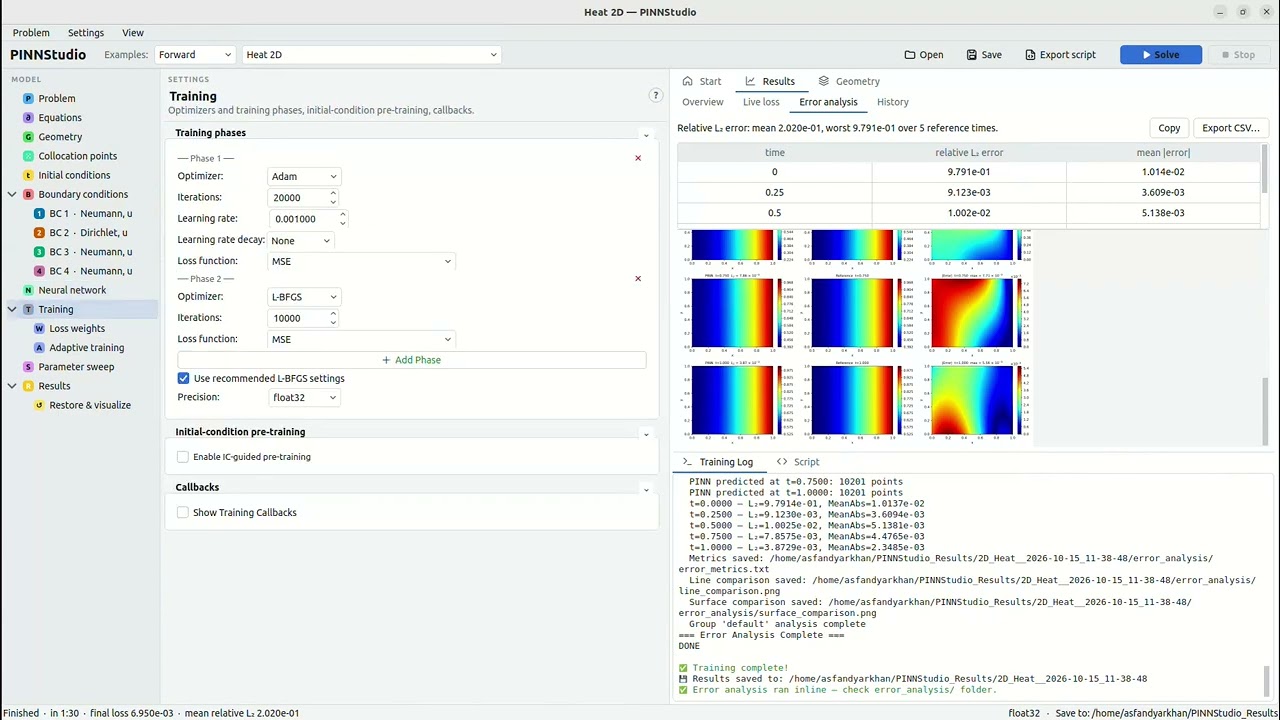
Heat 2D
-
Initial condition:
$u(x, y, 0) = 0$ -
Boundary conditions: Dirichlet
$u = 1$ on the$x = 1$ edge; Neumann (insulated) on the other three - Geometry: Rectangle
- In PINNStudio: Examples → Forward (or Inverse) → Heat 2D
Result (RTX 4090): reference_data/2D/heat (

Restore & visualize — the trained model restored from its saved checkpoint and re-animated without retraining:

Inverse mode — same template, switched to Inverse, recovering the diffusivity coefficient (fixed at
Inverse result (RTX 4090): diffusivity = 0.3999 (true 0.4).

Click an example to expand it.
Fractional Poisson 3D – sphere
DeepXDE example: fractional_Poisson_3d.py
-
Fractional settings: 8 × 8 directions, 100 points per unit length, dynamic mesh; constant
$C(\alpha, 3)$ written withgamma -
Geometry: unit sphere;
$u = 0$ on the sphere through$\hat u = (1 - |x|^2)N$ -
Exact solution:
$u = (1 - |x|^2)^{1 + \alpha/2}$ -
Constants:
alpha = 1.8 - Network: FNN [3, 20, 20, 20, 20, 1], tanh, Glorot normal
- Training: Adam 10,000; 256 domain points
- In PINNStudio: Examples → Forward → Fractional Poisson 3D – sphere
Result (RTX 4090):
PINN vs reference, error analysis

Poisson 3D – sphere
The Poisson equation on the unit ball, steady-state (no time axis) — the 3D companion to the 2D Poisson (Disk) template above.
-
Boundary conditions: Dirichlet,
$u = 0$ on the boundary sphere -
Geometry: Sphere, center
$(0,0,0)$ , radius$1$ - In PINNStudio: Examples → Forward (or Inverse) → Poisson 3D – sphere
Result (RTX 4090): reference_data/3D/poisson_sphere. Inverse mode: source term = 1.00005 (true 1).

Inverse mode — same template, switched to Inverse, recovering the source term (fixed at

Allen-Cahn 3D – Wight & Zhao
Benchmark problem after Wight & Zhao (2021), section 3.2 (eq. 3.13): a sphere that shrinks under its own curvature,
where
-
Initial condition:
$u(x, y, z, 0) = \tanh\left(\dfrac{0.35 - \sqrt{(x-0.5)^2 + (y-0.5)^2 + (z-0.5)^2}}{2\varepsilon}\right)$ (written with$+10^{-6}$ under the square root, which keeps its derivatives finite at the centre) - Boundary conditions: Periodic in x, y and z
- Geometry: Cuboid
-
Initial condition as a loss term (weight 100) and exact periodicity (inputs
$\cos 2\pi x$ ,$\sin 2\pi x$ , ... for each axis, and$t$ ) - Training: Adam 20,000 → L-BFGS 20,000; 30,000 domain points, 4 × 128 network
- In PINNStudio: Examples → Forward (or Inverse) → Allen-Cahn 3D – Wight & Zhao
Result (RTX 4090, about 15 minutes): reference_data/3D/allen_cahn_wight (made by tools/make_phase_field_reference_data.py). Building the initial condition into the output instead (
The figure is the slice

Inverse mode — same template, switched to Inverse, recovering the two coefficients as they are written in the PDE box, the reaction coefficient
Inverse result (RTX 4090):

Heat 3D
The 2D Heat problem extended with a
-
Initial condition:
$u(x, y, z, 0) = 0$ -
Boundary conditions: Dirichlet
$u = 1$ on the$x = 1$ face; Neumann (insulated) on the other five - Geometry: Cuboid
- In PINNStudio: Examples → Forward (or Inverse) → Heat 3D
Time-Adaptive Training is fully supported for this template if you turn it on — see the note on 3D grid resolution under Time-Adaptive training in Features before picking a large "IC grid resolution" value.
Result (RTX 4090): reference_data/3D/heat (

Restore & visualize — the trained model restored from its saved checkpoint and re-animated without retraining:

Inverse mode — same template, switched to Inverse, recovering the diffusivity coefficient (fixed at
Inverse result (RTX 4090): diffusivity = 0.4001 (true 0.4).

Navier-Stokes 3D – Beltrami flow
DeepXDE example: Beltrami_flow.py
-
Outputs:
$u, v, w, p$ ; Dirichlet BCs and initial conditions for the velocity (the exact Beltrami solution) - Loss weights: 1 for the four equations, 100 for the BCs and ICs
-
Exact solution: e.g.
$u = -\left(e^{x}\sin(y + z) + e^{z}\cos(x + y)\right)e^{-t}$ - Network: FNN [4, 50, 50, 50, 50, 4], tanh, Glorot normal
- Training: Adam 30,000 → L-BFGS 15,000; 50,000 domain, 5,000 boundary, 5,000 initial points
- In PINNStudio: Examples → Forward → Navier-Stokes 3D – Beltrami flow
Why the pressure error is large. This example is DeepXDE's script without changes: like the script, it gives boundary and initial conditions for the velocity
Result (RTX 4090):
u — PINN solution over time

v — PINN solution over time

w — PINN solution over time

p — PINN solution over time

u — PINN vs reference, error analysis

v — PINN vs reference, error analysis

w — PINN vs reference, error analysis

p — PINN vs reference, error analysis

Tips. What improves accuracy depends on the problem; the training methods study measured it on 14 of them. On hard time-dependent problems (sharp fronts, phase fields), first make periodicity and the initial condition exact, then try time-adaptive training, or causal training with a per-point weighting method; on a problem a plain PINN already solves well these can make the result worse, so compare with a plain run. More collocation points help where the solution changes sharply. For an inverse problem, measured data at several times usually pins the parameters down much better than one snapshot, and a parameter that is still moving when training stops needs more iterations: Allen-Cahn 2D – Mattey & Ghosh found its
$c_1^2$ 66% off from$u$ at$t = 1$ alone and 3% off from$u$ at four times with a longer L-BFGS phase. A sweep over the measured data (Measured data: grid points per axis) shows how much data the parameters need.Inverse problems with a lot of measured data: every measured point is used at every training step (the network is fitted to it, and the equation is checked there too), so a file with tens of thousands of points makes training much slower, above all on the CPU. A few hundred to a few thousand points spread over the domain are often enough to find a few parameters; if a run is too slow, set Use under Measured data to a coarser grid or fewer random points (see below), untick Check the equation at the measured points too, or train on a GPU. PINNStudio says so in the log when the data has 20,000 points or more.
ODE, 1D, 2D, and 3D problems
Source code: ODEs (codegen.py) · integrals (codegen.py) · fractional equations (codegen.py) · dimension switch (main_window.py)
Problems are defined over t (ODEs), (x, t), (x, y, t) or (x, y, z, t), or without the time axis for steady-state problems in x, (x, y) or (x, y, z). Changing the dimension rebuilds the related controls (geometry, boundary-condition rows, plot options), so no setting from the previous dimension is carried over by mistake.
ODEs have time as the only variable: derivatives are written du_t, du_tt (one equation per output for a system, e.g. dy1_t - y2|dy2_t + y1), initial values are set in the Initial Conditions panel, and Start/End in a boundary-condition row gives a condition at either end of the time range. An ODE can also contain integrals of the solution, integral(f) from t₀ to t with f written in the integration variable s, t and the outputs at s — for integro-differential equations such as du_t + u - integral(exp(s - t)*u).
Fractional equations: frac(u) is the fractional operator of order α applied to output u (DeepXDE's FPDE discretization — in 1D the sum of the left and right Riemann–Liouville derivatives, in 2D/3D the integral of the directional derivative over all directions). The fractional settings (α, resolution, mesh) appear under the equations as soon as frac(...) is used, and α can be an unknown to learn from data. See the ODE and fractional examples under Examples.
Forward and inverse problems
Source code: unknown parameters (codegen.py) · measured data (codegen.py) · Inverse panel (main_window.py)
Forward: every coefficient is known and PINNStudio solves for the field. Inverse: one or more coefficients — or a whole unknown field — are learned from measured data while the field is solved for at the same time. Any number of unknowns can be learned in one problem, each with its own initial guess and, when it is known, its true value for comparison. Measured data comes from one or more files, each with its own loss weight, and can be a single output or any expression of the outputs (e.g.
Fewer measured points can be used without changing the files (Measured data → Use): All points; Grid: points per axis, which keeps that many evenly spaced values along each space axis, the edges included (a 101 × 101 grid with 51 gives 51 × 51; each time in a file is reduced the same way); or Random points, that many picked with the run's random seed, so a run repeats. It applies to every measured-data file, and a line under it says what the files hold and what is kept (101 × 101 grid, 10,201 points → 51 × 51 = 2,601 points). A file that is not a grid (scattered points, or different grids at different times) gets random points in grid mode: the number per axis to the power of the axes, time counted as one (51 per axis for scattered (x, t) data keeps 51² points). Both the Solve script and the exported script do the reduction, so the exported script shows exactly which points were used. Allen-Cahn 3D's Inverse mode uses every second point of its 51³ grid (grid 26). A sweep over Measured data: grid points per axis or random points is a data-size study: how many points the parameters need (see Parameter sweep).
Every PINNStudio template except the two Cahn-Hilliard 1D ones, and several DeepXDE examples, have an Inverse mode that loads with its measured-data file already set — pick the example from the Inverse list of Examples.
Equation editor for single equations and coupled systems
Source code: equation inputs (main_window.py) · live equation preview (equation.py) · constants (constants.py)
Equations are typed as residuals, not chosen from presets. Derivatives use a plain d<output>_<variables> naming — du_x, du_xx, du_t, du_xy, up to mixed fourth-order terms such as du_xxyy — so anything from a diffusion equation to a coupled higher-order system can be written directly. Coupled systems work the same way: a second output v brings dv_x, dv_t and so on (the Burgers 2D – Mathias et al. and Schrödinger 1D examples are two-output systems).
The coordinates x, y, z and t can appear in an equation along with standard functions (sin, exp, cosh, ...), so source terms such as -du_xx - pi**2*sin(pi*x) are written as they read. The number of equations is set separately from the number of outputs: for example, three residuals for one output (DeepXDE's American put example), or one equation for two outputs when the second output is an unknown field to be learned.
Constants give names to numbers used across the problem — e.g. Re = 20, nu = 1/Re — and can be used in the equations, boundary and initial conditions, transforms and the exact-solution reference.
Boundary and initial conditions
Source code: boundary conditions in the script (codegen.py) · boundary-condition rows (main_window.py)
Boundary conditions are rows in a panel, each with its type, the output(s) it applies to, and where it applies:
-
Types: Dirichlet, Neumann, Robin, Periodic, Point Set (values at given points), Point Set Operator (an expression of the outputs and their derivatives at given points), Operator (any expression, applied on the boundary or at the initial time), and Interface 2D (DeepXDE's
Interface2DBC, pairing two matching boundary pieces). -
Where: Whole boundary, a side (Left, Right, Bottom, Top, and Front/Back in 3D), or Custom expression…, which opens a box for any true/false expression in
x,y,z. Periodic conditions need no Where: Periodic in: x ties the left and right sides together. The side names and the domain limits (x_min,x_max, ...) follow your domain, soleft or rightorx <= x_minstay correct if the domain changes; a curved boundary piece uses an expression such asnp.isclose(x**2 + y**2, 0.25). - Neumann and Robin values are the derivative along the outward normal,
$du/dn$ ($+du/dx$ on a right side,$-du/dx$ on a left side). - Operator conditions use the same
u,du_x,du_xxnotation as the equations. Applied at the initial time, they give a second initial condition such as$\partial u/\partial t = 0$ at$t = 0$ for a wave equation. - Point Set rows take their points from a file, a typed list (
1,0.2, 0.5,0,0; 1,0.5) or N random points, with values from the file or a formula; they can target several outputs at once and can be minibatched.
Initial conditions are given per output as an expression or loaded from a data file. Boundary and initial conditions can also be imposed exactly through an output transform (see Input and output transforms below).
Geometry, the Sketch and boundary edges
Source code: custom geometry (codegen.py) · Sketch (sketch_canvas.py) · boundary edges (sketch_edges.py) · DXF/SVG import (sketch_import.py)
1D problems use an interval; 2D problems a Rectangle, Disk, Ellipse, Triangle or any Polygon (given by its vertices); 3D problems a Cuboid or Sphere. Bounds accept expressions such as pi/2, and Custom geometry combines any number of shapes with Union, Subtract and Intersect.
A domain can also be sketched (Geometry → Shape → Sketch): rectangles, circles, ellipses and polygons drawn on a grid in 2D, boxes and spheres on x–y, x–z or y–z views in 3D, each added, cut out or intersected. Shapes can be typed exactly (0, 0, 2, 1 for a rectangle, 0.6, 0.5, 0.25 for a circle), imported from a DXF or SVG drawing (outlines inside others become holes, arcs stay arcs), moved, deleted, and undone with Ctrl+Z / Ctrl+Y. A sketch is stored as ordinary Custom-geometry rows, so it is saved with the problem and exported like any other domain.
Every 2D and 3D domain is drawn next to the settings with its boundary split into numbered edges (faces in 3D) — the straight sides and arcs that actually bound it — each coloured by the boundary condition that uses it. Select a boundary condition in the model tree and click edges to add them to it or take them out: its Where is written for you (np.isclose(x, 0) and 0 <= y <= 1, abs(np.hypot(x - 0.6, y - 0.5) - 0.25) < 3e-05, ...) and works the same in the exported script. A Where you type yourself (or one that came with an example) is shown and edited the same way: clicking an edge it picks takes the edge out, and the Where is written again from the edges it still picks (unless it picks only part of an edge, which you then change on the BC's page). Named constants are understood too (the hole of Helmholtz 2D, np.isclose(x**2 + y**2, R**2)), and sides that an output transform fixes exactly (Helmholtz 2D Dirichlet,
For a 3D domain the View list also has 3D: the whole domain as a shaded solid you can rotate and zoom, with Iso, Top, Front and Side buttons. Only the surfaces that bound the domain are drawn, so a cut-out shows as a hole; each face carries its label and the colour of its boundary condition, and the slice the flat views show is drawn as a translucent plane. Show points adds the training points, sampled by DeepXDE with the Collocation Points settings, to check that none fall inside a cut-out. Shapes are still drawn and faces picked in the flat views or the face list.
 Built-in shape — an L-shaped polygon, two re-entrant edges picked for BC 3
|
 2D Sketch — a plate with two holes, the holes' arcs as their own edges
|
 3D Sketch — boxes and a spherical hole, sliced at z = 0.5, every face in the list
|
 Imported drawing — an SVG bracket: its notch, bolt holes and slot come in as edges
|
 3D view — the same kind of domain as a solid: the spherical cut-out, a raised block, faces coloured by their boundary conditions
|
 3D view, Show points — DeepXDE's domain and boundary points; none land in the cut-out
|
Collocation points and domain preview
Source code: extra training points (codegen.py) · domain preview (main_window.py) · 3D view (view3d.py)
The numbers of domain, boundary, initial and test points are set independently, along with the sampling distribution (Hammersley, uniform, Halton, LHS, Sobol or pseudo-random). For a 2D or 3D domain, View domain & point distribution (on the Collocation points page) shows the actual training points — domain, boundary and initial points, colour-coded — on the geometry, with a second panel showing their spread in time:
 Rectangle — Hammersley sampling
|
 Disk
Disk
|
 Cuboid (3D)
|
Extra training points (anchors) can be added on top of the sampled ones, from a file or at random inside a box — for example to concentrate points near a front or a boundary layer.
Network architecture
Source code: networks (FNN, PFNN, MsFFN) (codegen.py) · Network panel (main_window.py)
The number of hidden layers, neurons per layer, activation function (tanh, sin, Sigmoid, ReLU, SiLU/Swish, ELU, GELU, SELU) and weight initializer (Glorot or He, uniform or normal) are all set in the panel. A network whose layers differ in width (e.g. 100 then 50) is set in Widths per layer (a list of numbers; empty uses the boxes above). Four network types are available:
- FNN — a fully connected network shared by all outputs (the default).
- PFNN — a separate sub-network for each output, useful when outputs have very different scales or behavior.
- MsFFN and STMsFFN — multi-scale Fourier feature networks, which pass the inputs through random Fourier features at several scales (e.g.
1, 10) so the network can capture slow and fast variations together.
Input and output transforms
Source code: input and output transforms (codegen.py)
Inputs and outputs can be rescaled (x*sin(y); x*cos(y) for polar coordinates), and an output formula rewrites each output — typically to satisfy boundary or initial conditions exactly, e.g. x*(1 - x)*u gives
Training phases, learning-rate schedules and loss weights
Source code: training phases (codegen.py) · IC-guided pre-training (codegen.py) · phase rows (main_window.py)
Training is a sequence of phases, each with its own optimizer (Adam, AdamW, L-BFGS or NNCG), number of iterations, learning rate and loss weights — for example the common Adam-then-L-BFGS recipe, or several Adam phases with decreasing learning rates. Each phase's learning rate can decay by a step, cosine, exponential or inverse-time schedule. L-BFGS uses DeepXDE's default options unless you set your own, and the run's precision can be set to float64 when L-BFGS needs the extra precision to converge (float32 is faster).
Loss weights can be set per term (each equation, boundary condition, initial condition and measured-data file) or automatically from the first evaluation (Scale by initial losses,
IC-guided pre-training first fits the network to the initial condition alone, before the equations are switched on, which helps problems where training from a random start struggles to find the right solution.
When a PINN struggles: exact constraints and automatic weighting
Source code: exact periodicity and initial condition (codegen.py) · causal training, RBA and SA-PINN (codegen.py)
A plain PINN fits the equation, the boundary conditions and the initial condition all as loss terms that compete with each other. On hard problems — sharp fronts, phase fields, long time ranges — it can settle on a wrong solution with a small loss. These settings help, in this order (each measured in the training methods study, about 180 runs on 14 problems):
-
Scale the equations so every residual is of order 1. If one equation's residual is naturally ~100× smaller than another's, it is barely enforced — this alone took the Cahn-Hilliard example from 40% to under 1% error. Divide that equation by its small coefficient, and scale the matching output (Network → Output transform → Scale).
-
Make the initial condition exact (Initial conditions → Exact (built into the network), per output): the output becomes
$\text{IC}(x) + \tau N$ with$\tau = (t - t_{min})/(t_{max} - t_{min})$ , so the initial condition holds exactly at the first time and needs no loss term (a hard constraint, after Lagaris et al., 1998). The initial condition should be a smooth formula, since a kink (from amaxor anabs) has derivatives the network cannot represent: in the 2D Cahn-Hilliard example the two bubbles did not merge until themaxin their initial condition was replaced by a smooth function. It is still worth comparing with the initial condition as a loss term. On 3D Allen-Cahn the loss term (weight 100) was 25× more accurate, because the profile changes quickly right after$t = 0$ and$\tau N$ has to represent that change. -
Make periodicity exact (Boundary conditions → Exact periodicity (periodic inputs)): each periodic axis enters the network as
$\cos(2\pi x/L)$ ,$\sin(2\pi x/L)$ , so values and derivatives are equal at both ends (Dong & Ni, 2021). -
Add one automatic weighting method (Loss weights → Automatic weighting). Each follows the paper cited with it:
- Per-point weights → RBA (residual-based attention, Anagnostopoulos et al., 2024): each training point's residual gets a weight that grows where the equation remains poorly satisfied, so training focuses on interfaces and fronts. It adds little cost and was the most reliable of the three.
-
Per-point weights → SA-PINN (self-adaptive weights, McClenny & Braga-Neto, 2023): the weights are trained by gradient ascent. With During L-BFGS: Keep the weights it was the best on Cahn-Hilliard (1D and 2D) and on 2D Allen-Cahn (Mattey & Ghosh). It should be used with an exact initial condition: it weights only the PDE points, so with the initial condition as a loss term (as in time-adaptive training) the PDE term can dominate it. On 2D Allen-Cahn (Wight & Zhao) this made every time window converge to
$u = 0$ . - Causal training (Wang, Sankaran & Perdikaris, 2024): the residual at later times is weighted in only once the earlier times are fitted, with ε increased in steps. With an MsFFN network (Network → Network type) it was the best on 1D Allen-Cahn and Klein-Gordon.
During L-BFGS: Keep the weights gave better results on the hard problems, and Plain loss (the default) is the safer choice otherwise. Causal training and per-point weights should not be combined; together they did worse than either one alone.
-
For long time ranges, or a very fast change right after the start, use time-adaptive training (Adaptive training → Time Adaptive Training; short windows over the fast part: the 1D Cahn-Hilliard (Mattey & Ghosh) example uses 10 windows of 0.01, then 9 of 0.1, and reaches 0.5% error, where every whole-interval setup failed). Per-point weights and exact periodicity can be used with it; an exact initial condition cannot yet.
Together, steps 2–4 took the 1D Allen-Cahn solution without time-adaptive training from 10% to 0.13% at
Residual-based adaptive refinement (RAR)
Source code: RAR loop (codegen.py)
RAR trains in rounds. After each round it evaluates the equation residual at a large set of candidate points, adds the points where the residual is largest to the training set, and trains again. This concentrates points in the hardest parts of the domain, such as a shock or a thin interface. It works for steady and time-dependent problems in every dimension. For a system of equations, the ranking can use the combined residual or a single equation (Points from), and RAR can stop once the mean residual drops below a set value.
Every round saves a checkpoint and two figures to solution_results/rar_rounds/round_NN/: the solution at that round (compared with reference data when it is available) and the training points, showing the original points, those added in earlier rounds and those added in this round. Together they show that the added points are placed where the error is largest:
 Burgers 1D, RAR round 2 — points added (red) vs. earlier and original points
|
 Burgers 1D, RAR round 2 — solution and error: the added points line up with the largest error
|
 Allen-Cahn 2D (Wight & Zhao), RAR round 1 — points added vs. original points
|
 Allen-Cahn 2D (Wight & Zhao), RAR round 1 — solution and error: the added points follow the largest error
|
Time-adaptive training
Source code: time-adaptive loop (codegen.py) · time-step groups (main_window.py)
Splits the time range into steps and trains through them in order, each step starting from the network of the previous one (transfer learning) and taking its initial condition from the previous step's solution. This suits problems over a long time window or with fast dynamics that are hard to fit with a single network in one pass; the time-adaptive Allen-Cahn 1D template, the 2D Allen-Cahn templates, Cahn-Hilliard 1D (Mattey & Ghosh) and Burgers 2D use it by default. It works in 1D, 2D and 3D, and each step is compared with any reference data that falls inside its time window.
The grid that passes the solution from one step to the next is set per axis (IC grid resolution), so its size grows with the dimension — PINNStudio picks a smaller default in 3D and warns when a chosen value would be very large.
Training callbacks and monitors
Source code: callbacks (codegen.py) · training monitors (codegen.py)
- Point resampling redraws the collocation points every N iterations.
- Early stopping ends training once the monitored loss stops improving.
- Model checkpoints save the model at regular intervals, or only when the loss improves.
- Training timer stops a run after a set wall-clock time.
- Training monitors track any expression of the outputs and their derivatives (
u,du_x, a flux, ...) at chosen points during training, alongside the loss.
Inverse parameters during training
Source code: convergence plots (codegen.py) · plots after training (main_window.py)
In an inverse problem, each unknown is saved at regular intervals throughout training, including the final value where training stops, and its convergence can be shown as a plot or an animation — with the true value drawn as a reference line when it is known, both after training and later in Restore & visualize.
Run many training configurations from one setup, varying any parameter
Source code: sweep runner (sweep_runner.py) · sweepable parameters (sweep_registry.py) · Bayesian optimization (bayes_opt.py)
Instead of changing a value and pressing Solve again for each case, Enable Parameter Sweep (the Parameter sweep node of the model tree) runs a whole set of configurations of the problem you have set up, one after another, each as a full training run. Run Sweep and Stop drive it, the Training Log sums up every run as it finishes, and the status bar follows the run in progress. Afterwards, Results → History lists every run of the sweep, and any of them can be compared on one plot.

Four ways to combine parameters:
- One at a time — vary each parameter separately, the others held at their current values (3 values of one parameter → 3 runs).
- All combinations — every value of every parameter (2 parameters with 3 and 2 values → 6 runs).
- Paired values — the i-th values of all parameters run together (lists of equal length).
-
Bayesian search — each run's settings are chosen by a Gaussian-process model of the results so far, to reach the lowest final loss, the lowest unweighted final loss (each term divided by its loss weight, for comparing runs with different weights) or the lowest
$L_2$ error in as few runs as possible. Each parameter's range (Linear or Log, from Min to Max) or list of choices is its search space; Runs sets the budget and Random first the number of random runs before the model takes over (see the Helmholtz hyperparameter-search example under Examples).
Each parameter's Values are a List, or a Linear or Log range; text settings (activation, point distribution, ...) take a list of choices. Almost any setting can be swept — the Parameter list shows everything available for the current problem, and updates itself as the problem changes:
- Network — hidden layers, neurons per layer, activation, initializer, weight decay.
- Collocation points — domain, boundary, initial and test points, sampling distribution.
- Training phases — each phase's iterations, learning rate and optimizer.
- Loss weights — every equation, boundary and initial-condition weight.
- Inverse — each unknown's initial guess, each measured-data file's weight, and the amount of measured data (grid points per axis, or random points). For an inverse problem the summary also lists each run's inferred parameters and, when the true value is known, their error in percent, plotted against the swept value above the solution error.
- RAR and time-adaptive training — rounds, candidate and added points, iterations; step counts, IC grid resolution.
- Input and output transforms — each scale value.
Also run the current settings (baseline) adds one run with the settings unchanged, as a reference point; it is on by default for One at a time with two or more parameters and for Bayesian search.
Results. The sweep saves to one folder (e.g. Poisson_1D-Dirichlet_sweep__2026-10-13_11-39-17) with a subfolder per run named after what it set (run_01__Phase-1-Iterations_1000, …), each with its model, plots and Error Analysis results. The folder also holds sweep_summary.csv (the swept values, final loss and error metrics of every run) and sweep_error_vs_parameter.png, a plot of the error (
Example — network size for Burgers 1D. Load Burgers 1D – Raissi et al., choose All combinations, and sweep Network: Hidden layers over 2, 4, 6, 8 and Network: Neurons per layer over 10, 20, 40 — the same study as Table 1 of Raissi et al. (2019). The 12 runs (everything else as the template sets it: Adam 15,000 + L-BFGS 10,000 iterations, 8,000 collocation points) took about 17 minutes on an RTX 4090:

Relative sweep_summary.csv:
| Hidden layers | 10 neurons | 20 neurons | 40 neurons |
|---|---|---|---|
| 2 | 2.7 × 10⁻² | 1.1 × 10⁻² | 4.4 × 10⁻³ |
| 4 | 1.3 × 10⁻³ | 7.0 × 10⁻⁴ | 3.0 × 10⁻⁴ |
| 6 | 5.2 × 10⁻⁴ | 4.0 × 10⁻⁴ | 2.3 × 10⁻⁴ |
| 8 | 7.2 × 10⁻⁴ | 5.9 × 10⁻⁴ | 1.5 × 10⁻⁴ |
Two hidden layers are too few for the shock at
Live training log and loss curves
Source code: progress (results.py) · live loss (results.py) · saved loss figure (codegen.py)
Training runs in the background and its output streams into the Training Log as it happens; Stop ends the run immediately. While it trains, Results → Live loss plots the training and test loss — or each loss term, named (PDE, BC 1, IC, ...) — with the training phases marked, and the status bar shows the phase, the iteration, the current loss and the time left. With time-adaptive training each time step starts its own plot. Untick Update while training above the plot to have it drawn once, when the run ends. The saved loss figure can show the total losses, each term, or both, on a log or linear axis (Plot settings → Loss on the Results page).
Run history and comparing runs
Source code: run history (results.py) · comparing runs (results.py)
Results → History lists every run saved in the Save-to folder (a sweep's runs included) with when it ran, its final loss and its relative
Copying and saving figures and tables
Source code: copy and save (export_tools.py)
Right-click any result figure to copy it, save it as PNG or JPEG, open it in a zoomable viewer, or show its folder. The live loss and the run comparison can be copied or saved as PNG, PDF or SVG. The error-analysis and history tables copy as tab-separated text that pastes straight into a spreadsheet, or export to CSV, at full precision.
Error analysis against reference data
Source code: error analysis (codegen.py) · exact-solution reference (codegen.py) · Error Analysis dialog (main_window.py)
A run can be compared with reference solution files at one or more times, or — when the problem has an exact solution — with a formula typed in (one per output, in x, y, z, t). For predicted values
with line and surface comparisons of the prediction, the reference and the error. The relative du_x), not only a raw output. All but two of the examples come with an exact solution or reference data, so the comparison works as soon as an example is loaded.
Plots and animations
Source code: result plots (codegen.py) · figure style (figure_style.py)
Results can be shown as surface or line plots, or as animations of either over time; the list offers only what the problem can have (one curve for an ODE or a steady 1D problem, no surface animation in 1D), and an inverse problem adds the parameter convergence plot and its animation, selected by default. How every figure looks is set in one place, Plot settings on the Results page (or Settings → Plot Settings): the colour map, contour levels, resolution, snapshots, figure size, font sizes and axis orientation, the line widths, the PINN and reference line colours and time steps, the |Error| panels' colour map, the panels per row in Error Analysis, the animation resolution, the legend font size, the grid of the 3D surfaces, grid lines on the line-type figures (on by default), whether the reference in a line comparison is a line or dots, the loss plot, and for an inverse problem the parameter convergence plot and animation (drawn as a line, a line with markers or markers only, with the marker shape and size; line colour and width; a dot on the current value in the animation; log axis; and the true-value and final-value lines). Solve, the exported script and Restore & visualize all use it, and it is saved with the problem. Besides the raw outputs, Custom... plots any expression of the outputs and their derivatives (sqrt(u**2 + v**2), du_x, ...), during training, in Error Analysis and in Restore & visualize. For problems with several outputs, Outputs to plot → All outputs (the default) saves a figure of each output; pick one output to save only its figure. Numbers written in figures follow one standard, set under Plot settings → General → Numbers: the significant digits (4 by default; inferred parameter values get two more), when to use scientific notation (Automatic: below 0.01 or from 100,000 up, with errors always written with a power of ten; Always; Never) and how it is written (1.23 × 10⁻⁴ or 1.23e-04). It applies to times in titles, errors, parameter values and the axis and colorbar tick labels, whose decimals matplotlib picks from the tick spacing. Files and the log keep full precision. In 2D and 3D a line plot follows
Data export and standalone scripts
Source code: standalone script (codegen.py) · data export (main_window.py)
The predicted solution can be saved as data on a grid of your choice, for your own analysis. Every problem can also be exported as a standalone DeepXDE/PyTorch script (Export script in the toolbar, or Ctrl+E) — to read, run on a cluster, share with a collaborator, or use as a starting point for your own code. The Script tab next to the Training Log shows that script for the current settings and updates as you change them.
Saving problems, reproducibility and hardware
Source code: problem settings (config.py) · save (main_window.py) · open (main_window.py) · GPU settings (main_window.py)
A whole problem setup can be saved and reopened later (Save and Open in the toolbar, Ctrl+S and Ctrl+O). Once a problem has a file, Save writes back to it. The examples themselves are never changed: saving an example you have edited asks for a name (suggesting “ (copy)”), choosing the example again gives its own settings, and the copy remembers which example it came from, so switching it between Forward and Inverse does what the example does. A problem saved before it was complete (Inverse with no measured-data file yet, say) opens again, with what is missing listed in the log. Problem → Open Recent and the Start tab list the last eight problems, the title bar marks unsaved changes, and PINNStudio asks before they would be lost. Runs use a fixed random seed by default, so a run can be repeated exactly, and each run saves its settings next to its results. The GPU to train on (or the CPU, which can be faster for a small 1D problem; see Speed), its memory share, the float precision, the random seed and the L-BFGS options are set under Settings.
Reload a trained model without retraining
Source code: Restore & visualize (main_window.py) · restore script (main_window.py)
Point Restore & visualize (Results → Restore & visualize in the model tree) at a saved model, and PINNStudio finds its model_config.json next to it, says what the model is (dimension, forward or inverse, outputs, parameters), rebuilds the trained network and produces any of the plots or animations above — including derivative expressions you did not plot during training, Error Analysis against the original reference data, and, for an inverse run, the convergence of the unknowns, whose files it finds in the run folder — without training again. Only the network's weights are loaded, so it does not matter which optimizer trained the model.
The examples above cover 65 specific problems, but PINNStudio is not limited to them, and every setting in an example can be changed. Below is a complete walkthrough for a PDE that is not one of the examples, to show the general path from "I have an equation" to "I have a trained PINN."
We use the Fisher-KPP equation, a classic reaction-diffusion model of a population (or concentration front) that diffuses and grows logistically toward a carrying capacity of 1:
with
Start from a clean problem: on the Start tab, click 1D problem (or Problem → New → 1D problem). Each step below is one node of the model tree.
- Problem. Leave the dimension on 1D and the problem Time Dependent and Forward.
-
Equations. Enter the residual (moving everything to one side) — it is typeset under the box as you type, so you can check it reads as intended:
This is the
du_t - 0.01*du_xx - 1.0*u*(1 - u)d<output>_<vars>convention described under Equation editor for single equations and coupled systems —du_tis$\partial u/\partial t$ ,du_xxis$\partial^2 u/\partial x^2$ , and the coefficients$D=0.01$ and$r=1$ are just written inline. -
Geometry. Set the interval to
0to1for x and the time interval to0to1. -
Initial conditions. A localized bump that will spread and saturate toward 1:
exp(-50*(x-0.5)**2) -
Boundary conditions. Right-click Boundary conditions → Add boundary condition (or use the button on its page): Neumann, value
0(no flux through either edge), and in Where pick Left and right sides from the list. Two rows, one on the left side and one on the right, would do the same. - Neural network & Training. The defaults (a handful of hidden layers, Adam then L-BFGS) are a reasonable starting point for a problem this size — adjust layer/neuron counts or add Time-Adaptive stepping later if training does not converge well.
- Solve. Click Solve and watch the loss fall in Results → Live loss; the loss and solution figures appear under Overview once training finishes. Save (Ctrl+S) keeps the setup for later. Try Swap axes in the Surface plot's settings on the result — see Plots and animations.
- Error Analysis (optional). Since this is not a bundled template, no reference data is loaded and Error Analysis is optional. If you have your own reference solution (from a separate FEM/FD solver, say), point the Error Analysis dialog at it the same way the built-in templates do automatically.
 Line snapshots over time
|
 Surface
|
 Animation
|
From here, the same eight steps apply to any PDE that can be written with the derivative syntax under Equation editor for single equations and coupled systems — swap in your own residual, domain, and conditions.
PINNStudio is built on DeepXDE and PyTorch. Rather than wrapping them at runtime, it generates code. Every setting you choose maps to a field on a PINNConfig dataclass (pinnstudio/core/config.py); clicking Solve passes that config to codegen.py, which writes out a complete, standalone DeepXDE/PyTorch script, and runner.py executes it as a subprocess, streaming stdout back into the Training Log panel in real time.
Because the output of every run is an ordinary Python script, you can take it and run it outside PINNStudio, hand it to a cluster job, or use it as a starting point for a hand-written DeepXDE project.
PINNStudio trains as fast as the plain exported script, on the GPU and on the CPU; a small 1D problem can be faster on the CPU.
Timing study: GPU and CPU times, and what was found
Solve writes a DeepXDE script and runs it in a Python process of its own; the window only reads what the script prints. To see how much PINNStudio adds to a run, five examples were trained in four ways, with the same settings and the same number of iterations, with benchmarks/timing_study.py:
- plain script: Problem → Export as DeepXDE Script, run with
python; - Solve's script: the script Solve runs, run with
python(no window); - PINNStudio window: Solve, with the live loss plot;
- live plot off: Solve, with Update while training unticked above the plot.
Training time per 1,000 steps on an RTX 4090 (5,000 Adam + 1,000 L-BFGS iterations, best of three runs; L-BFGS may stop before its limit, so the steps actually taken are counted). Python 3.11, PyTorch 2.6 with CUDA 12.4, DeepXDE 1.15:
| Example | Plain script | Solve's script | PINNStudio window | live plot off |
|---|---|---|---|---|
| Heat 1D | 2.10 s | 1.87 s (-11%) | 1.95 s (-7%) | 2.11 s (+0%) |
| Burgers 1D | 2.68 s | 2.70 s (+1%) | 2.74 s (+2%) | 2.68 s (-0%) |
| Navier-Stokes 2D (Kovasznay) | 5.78 s | 5.76 s (-0%) | 5.79 s (+0%) | 5.87 s (+2%) |
| Allen-Cahn 1D (causal training, MsFFN) | 7.21 s | 7.31 s (+1%) | 7.20 s (-0%) | 7.32 s (+2%) |
| Diffusion 1D, inverse | 2.50 s | 2.21 s (-12%) | 2.15 s (-14%) | 2.61 s (+4%) |
PINNStudio trains as fast as a plain script. The differences above are within the spread between identical runs (about ±2% for the larger examples, ±10% for the smallest, which train in a few seconds). The script trains in a separate process; the window redraws the live loss plot at most every 0.7 s, takes the log in batches every 0.5 s and pauses its settings checks while a run trains, so the live plot can stay on. The same study found that Solve's script used to train 5-10% slower on the GPU (Navier-Stokes 2D: 6.16 s per 1,000 steps against 5.67 s): a CUDA "warm-up" step before training made every step after it slower. It has been removed (benchmarks/timing_ab.py takes single parts of the script out to find such causes).
Start-up and saving cost the same either way: about 4 s per run to start Python and import PyTorch and DeepXDE, plus a few seconds to save the figures of a 2D example.
A small problem can be faster on the CPU. With a small network, a GPU step mostly waits for Python to hand it the next operation. The same examples on the CPU of the same PC (Core i9-13900KF, fewer iterations, best of three runs, plain script):
| Example | GPU (RTX 4090) | CPU (i9-13900KF, 8 threads) |
|---|---|---|
| Heat 1D | 2.10 s | 2.13 s (about the same) |
| Burgers 1D | 2.68 s | 3.62 s (GPU 1.4× faster) |
| Navier-Stokes 2D (Kovasznay) | 5.78 s | 22.77 s (GPU 3.9× faster) |
| Allen-Cahn 1D (causal training, MsFFN) | 7.21 s | 90 s (GPU 12× faster) |
| Diffusion 1D, inverse | 2.50 s | 1.14 s (CPU 2.2× faster) |
For a small 1D problem, Settings → GPU / Hardware → Train on: CPU can be the faster choice; 2D and 3D problems, larger networks and many points belong on the GPU.
On a Mac, PINNStudio trains on the CPU. Apple's GPU (MPS) was tried on an M1 MacBook Air with benchmarks/mac_gpu_check.py: it was half the speed of the CPU on Heat 1D (73 against 136 Adam iterations a second, and L-BFGS 7 times slower) and about the same on Poisson 2D and Heat 2D with 20,000 and 30,000 points (3 to 4 iterations a second either way), with the same accuracy. It also has no float64. A Mac with more GPU cores (an M-series Pro or Max) may do better on large problems; mac_gpu_check.py measures it. For comparison, an RTX 4090 ran the same 2D problems at 139 to 162 iterations a second (benchmarks/gpu_check.py, which also checks an NVIDIA GPU's setup on Windows or Linux).
Fewer CPU threads are faster. PyTorch uses one thread per core by default. On a processor with efficiency cores (recent Intel and Apple chips), the slow cores hold every step back: identical runs of Heat 1D took anywhere from 6.4 to 11.7 s with PyTorch's 24 threads, and 3.3 to 3.6 s with 8, one per performance core (Navier-Stokes 2D: 51-52 s against 45-46 s; Allen-Cahn 1D with causal training: 204-206 s against 135-136 s). PINNStudio's scripts therefore train on the CPU with half the logical processors, at most 8; setting OMP_NUM_THREADS overrides this.
A second measurement on the same i9-13900KF (8 performance and 16 efficiency cores, 32 threads) with benchmarks/gpu_check.py's three problems, Adam iterations a second on the CPU:
| CPU threads | Heat 1D (2k points) | Poisson 2D (20k points) | Heat 2D (30k points) |
|---|---|---|---|
| 4 | 312 | 5.7 | 8.1 |
| 8 (Automatic) | 364 | 7.8 | 10.9 |
| 12 | 280 | 6.2 | 9.2 |
| 16 | 259 | 6.8 | 9.9 |
| 24 (PyTorch's default) | 179 | 7.3 | 10.4 |
| 32 (every thread) | 13 | 0.7 | 0.6 |
Eight was the fastest for every size, and using every thread was 10 to 28 times slower. Settings → GPU / Hardware → CPU threads keeps Automatic (this rule) or takes a number of your own, for a processor where another count is faster.
pinnstudio/
├── pinnstudio/
│   ├── main.py            # Entry point
│   ├── ui/
│   │   ├── main_window.py   # PyQt6 interface — every page, dialog, and control
│   │   ├── workspace.py     # Model tree + settings pages (the three-panel layout)
│   │   ├── theme.py         # Studio Light, Studio Dark and Solarized Dark, built from colour tokens
│   │   ├── icons.py         # Line icons and the app icon
│   │   ├── start_page.py    # Start tab: new problem, recent files, example gallery
│   │   ├── results.py       # Live loss, status, error analysis, run history and comparison
│   │   ├── figure_style.py  # Plot settings (how every saved figure looks)
│   │   ├── export_tools.py  # Copy / save figures and tables
│   │   ├── equation.py      # Equations typeset as you type, unknown-name check
│   │   ├── sketch_canvas.py # Sketch and Geometry tabs (2D and 3D)
│   │   ├── sketch_edges.py  # A sketch's boundary edges and their Where: expressions
│   │   ├── sketch3d.py      # 3D sketch: views, sections, faces
│   │   ├── view3d.py        # The rotatable 3D view of a domain
│   │   └── sketch_import.py # DXF / SVG import
│   └── core/
│       ├── config.py          # PINNConfig — the full problem definition
│       ├── codegen.py         # PINNConfig -> standalone DeepXDE/PyTorch script
│       ├── constants.py       # Named constants in expressions
│       ├── line_slice.py      # Where 2D/3D line plots cut the domain
│       ├── example_catalog.py # The Examples list: order, names, categories
│       ├── pinnstudio_examples.py # PINNStudio's own templates
│       ├── deepxde_examples.py    # DeepXDE's documented examples
│       ├── bayes_opt.py       # Bayesian hyperparameter search
│       ├── runner.py          # Runs the generated script, streams output to the Training Log
│       ├── sweep_registry.py  # Parameter Sweep's list of sweepable parameters
│       └── sweep_runner.py    # Builds and runs each sweep configuration in turn
├── assets/
│   ├── Images/              # README figures of every example
│   └── screenshots/         # README screenshots
├── reference_data/          # Bundled ground truth for the built-in templates
│   ├── 1D/
│   ├── 2D/
│   ├── 3D/
│   └── deepxde/             # Reference/measurement data for the DeepXDE examples
├── benchmarks/              # Training methods study, timing study, anchors study
├── docs/                    # Project web page
├── tests/                   # Test suite (pytest)
├── tools/                   # Reference-data generators, example runners, window check
├── requirements.txt
├── setup.py, pyproject.toml
├── get-pinnstudio.sh       # One-command install with uv (macOS/Linux)
├── get-pinnstudio.ps1      # One-command install with uv (Windows)
├── install.sh              # Source install into ./venv (macOS/Linux)
├── install.bat             # Source install into ./venv (Windows)
├── CHANGELOG.md
└── README.md
If PINNStudio is useful in your work, please cite it — see CITATION.cff:
@software{khan2026pinnstudio,
  author  = {Khan, Asfandyar and Mamivand, Mahmood},
  title   = {PINNStudio: A No-Code Scientific Computing Environment for Forward and Inverse Physics-Informed Neural Networks},
  year    = {2026},
  url     = {https://github.com/AsfandyarKhan72/PINNStudio}
}- Lu, L., Meng, X., Mao, Z., & Karniadakis, G. E. (2021). DeepXDE: A deep learning library for solving differential equations. SIAM Review, 63(1), 208–228. https://doi.org/10.1137/19M1274067
- Raissi, M., Perdikaris, P., & Karniadakis, G. E. (2019). Physics-informed neural networks: A deep learning framework for solving forward and inverse problems involving nonlinear partial differential equations. Journal of Computational Physics, 378, 686–707. https://doi.org/10.1016/j.jcp.2018.10.045
- Mattey, R., & Ghosh, S. (2022). A novel sequential method to train physics informed neural networks for Allen-Cahn and Cahn-Hilliard equations. Computer Methods in Applied Mechanics and Engineering, 390, 114474. https://doi.org/10.1016/j.cma.2021.114474
- Wight, C. L., & Zhao, J. (2021). Solving Allen-Cahn and Cahn-Hilliard equations using the adaptive physics informed neural networks. Communications in Computational Physics, 29(3), 930–954. https://doi.org/10.4208/cicp.OA-2020-0086
- Mathias, M. S., de Almeida, W. P., de Barros, M. R., Coelho, J. F., et al. (2022). Augmenting a Physics-Informed Neural Network for the 2D Burgers Equation by Addition of Solution Data Points. Brazilian Conference on Intelligent Systems (BRACIS 2022). https://arxiv.org/abs/2301.07824
Training methods (When a PINN struggles, training methods study):
- Anagnostopoulos, S. J., Toscano, J. D., Stergiopulos, N., & Karniadakis, G. E. (2024). Residual-based attention in physics-informed neural networks. Computer Methods in Applied Mechanics and Engineering, 421, 116805. https://doi.org/10.1016/j.cma.2024.116805 (arXiv:2307.00379) — Per-point weights → RBA
- McClenny, L. D., & Braga-Neto, U. M. (2023). Self-adaptive physics-informed neural networks. Journal of Computational Physics, 474, 111722. https://doi.org/10.1016/j.jcp.2022.111722 (arXiv:2009.04544) — Per-point weights → SA-PINN
- Wang, S., Sankaran, S., & Perdikaris, P. (2024). Respecting causality for training physics-informed neural networks. Computer Methods in Applied Mechanics and Engineering, 421, 116813. https://doi.org/10.1016/j.cma.2024.116813 (arXiv:2203.07404) — Causal training
- Lagaris, I. E., Likas, A., & Fotiadis, D. I. (1998). Artificial neural networks for solving ordinary and partial differential equations. IEEE Transactions on Neural Networks, 9(5), 987–1000. https://doi.org/10.1109/72.712178 (arXiv:physics/9705023) — Exact (hard) initial condition
- Dong, S., & Ni, N. (2021). A method for representing periodic functions and enforcing exactly periodic boundary conditions with deep neural networks. Journal of Computational Physics, 435, 110242. https://doi.org/10.1016/j.jcp.2021.110242 (arXiv:2007.07442) — Exact periodicity
- Wang, S., Wang, H., & Perdikaris, P. (2021). On the eigenvector bias of Fourier feature networks: From regression to solving multi-scale PDEs with physics-informed neural networks. Computer Methods in Applied Mechanics and Engineering, 384, 113938. https://doi.org/10.1016/j.cma.2021.113938 — Network type MsFFN / STMsFFN
PINNStudio is built on DeepXDE (Lu et al., 2021), PyTorch and PyQt6. We are especially grateful to Lu Lu and the DeepXDE developers: DeepXDE is the physics-informed learning library that every script PINNStudio generates runs on, and its documented examples are included among PINNStudio's examples, each linked to its original script.
The examples that reproduce published benchmarks follow the problem setups of the original papers: Burgers 1D – Raissi et al. follows Raissi, Perdikaris & Karniadakis (2019); Burgers 2D – Mathias et al. follows Mathias et al. (2022); the Allen-Cahn and Cahn-Hilliard examples follow Wight & Zhao (2021) and Mattey & Ghosh (2022); and Poisson 2D – L-shape is the demonstration example of the DeepXDE paper (Lu et al., 2021). Full references are listed below.
Developed under the supervision of Prof. Mahmood Mamivand, Computational Materials Design Lab, Boise State University.
The authors appreciate the support of the National Science Foundation grant DMR-2142935. We would like to acknowledge the high-performance computing support of the Borah compute cluster (DOI: 10.18122/oit/3/boisestate) provided by Boise State University's Research Computing Department.
Bug reports, feature requests, and pull requests are welcome — see CONTRIBUTING.md.
Asfandyar Khan PhD Candidate, Materials Science and Engineering Boise State University Email: asfandyarkhan@u.boisestate.edu
Released under the MIT License. See LICENSE for details.