
Ethcode is a vscode extension that helps deploy and execute solidity smart contracts in EVM based blockchians. It supports multiple test networks.
VisualStudio Marketplace - https://marketplace.visualstudio.com/items?itemName=7finney.ethcode
- Linux, Mac, Windows
- Keyboard shortcut:
ctrl + alt + e - Command:
ethcode.activate(ctrl + shift + Pto open command palette)

- Open command palette
ctrl + shift + P Select ethereum network> Select your preferred network
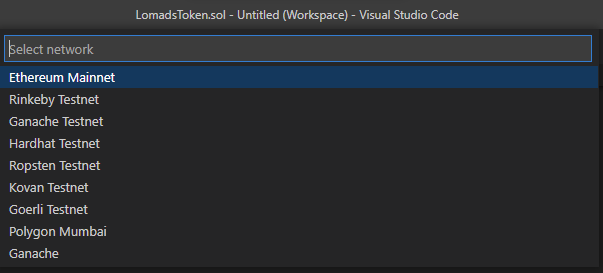
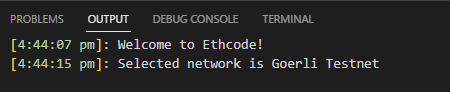
- Open command palette
ctrl + shift + P Select ethereum account> Select your preferred account


- Open command palette
ctrl + shift + P Get account balance
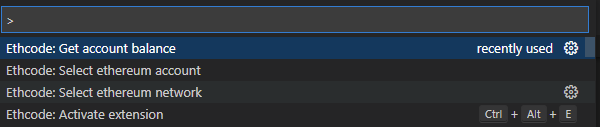

- Open command palette
ctrl + shift + P Load all compiled JSON output
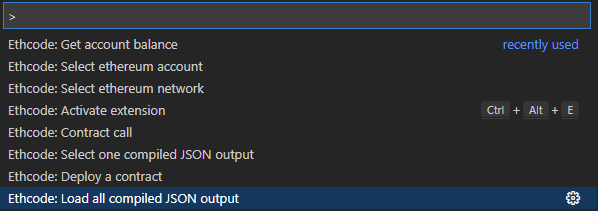
- Open command palette
ctrl + shift + P Select one compiled JSON output


- After selecting compiled
JSONoutput
-
If the contract requires any constructor parameter to be passed then extra 3 files will be created in your
artifacts → contracts → <contract name>folder<contract name>_constructor-input.json<contract name>_deployed-address.json<contract name>_functions_input.json -
If the contract does not require any constructor parameter to be passed extra then 2 files will be created in your
artifacts → contracts → <contract name>folder.<contract name>_deployed-address.json<contract name>_functions_input.json
- Open command palette
ctrl + shift + P Deploy a Contract- Enter password
- After successful contract deployment, you will get deployed contract address

- paste this address in
artifacts → contracts → <contract name> → <contract name>_deployed-address.jsonfile.
- Open command palette
ctrl + shift + P Contract callAll Functions or methods of the contract will be shown in the list- select preferred method
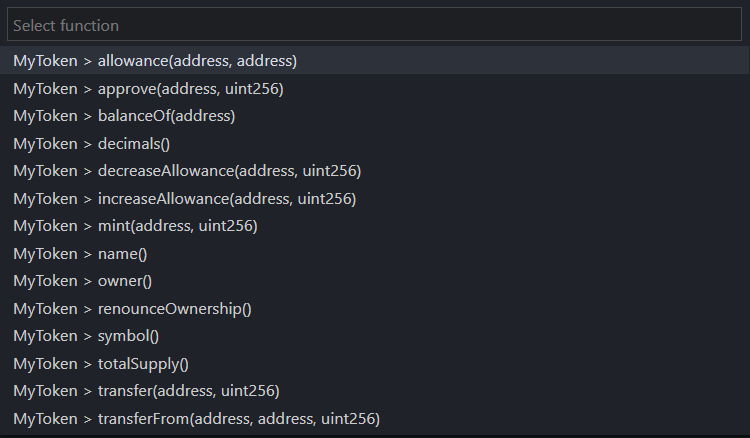
Note: Before selecting methods you should fill required values of that method in artifacts → contracts → <contract name> → <contract name>_functions_input.json file.
Vyper support
Please install vyper compiler for compiling vyper contracts in ethcode. Instructions for vyper compiler installation can be found on official vyper documentation - https://vyper.readthedocs.io/en/latest/installing-vyper.html
Please help ethcode developers continue their work.
Ethereum donation address: 0xd22fE4aEFed0A984B1165dc24095728EE7005a36
yarn install
yarn run build
And then press F5, in Extension Development Host session, run Ethereum: Solidity compile command from command palette.
PROTOC_GEN_TS_PATH="./node_modules/.bin/protoc-gen-ts"
OUT_DIR="./src/"
protoc --plugin="protoc-gen-ts=${PROTOC_GEN_TS_PATH}" --js_out="import_style=commonjs,binary:${OUT_DIR}" --ts_out="${OUT_DIR}" services/ethereum.protovsce package --yarnStep 1: Login to https://dev.azure.com/ and generate PAT for your user or organization
Step 2:
vsce login <publisher>
vsce publish 0.1.4 -p <access token> --yarn
git push origin v0.1.4
Things we did on top of Create React App TypeScript template
- We inline
index.htmlcontent insrc/extension.tswhen creating the webview - We set strict security policy for accessing resources in the webview.
- Only resources in
/buildcan be accessed - Only resources whose scheme is
vscode-resourcecan be accessed.
- Only resources in
- For all resources we are going to use in the webview, we change their schemes to
vscode-resource - Since we only allow local resources, absolute path for styles/images (e.g.,
/static/media/logo.svg) will not work. We add a.envfile which setsPUBLIC_URLto./and after bundling, resource urls will be relative. - We add baseUrl
<base href="${vscode.Uri.file(path.join(this._extensionPath, 'build')).with({ scheme: 'vscode-resource' })}/">and then all relative paths work.
Add following lines in vscode settings.json
"typescript.format.insertSpaceAfterOpeningAndBeforeClosingNonemptyBrackets": false,
"typescript.format.insertSpaceAfterOpeningAndBeforeClosingNonemptyBraces": true,
"typescript.format.semicolons": "insert"
- https://github.com/Microsoft/vscode-go/wiki/Building,-Debugging-and-Sideloading-the-extension-in-Visual-Studio-Code
- https://code.visualstudio.com/api/working-with-extensions/bundling-extension
- https://stackoverflow.com/questions/50885128/how-can-i-debug-a-child-process-fork-process-from-visual-studio-code
- https://code.visualstudio.com/docs/nodejs/nodejs-debugging#_automatically-attach-debugger-to-nodejs-subprocesses