| title | Administration |
|---|
Stellar Core is the program nodes use to communicate with other nodes to create and maintain the Stellar peer-to-peer network. It's an implementation of the Stellar Consensus Protocol configured to construct a chain of ledgers guaranteed to be in agreement across all participating nodes at all times.
This document describes various aspects of installing, configuring, and maintaining a stellar-core node. It will explain:
- why you should run a node
- what you need to set up
- how to install stellar core
- how to configure your node
- how quorum sets work
- how to prepare your environment before the first run
- how to join the network
- how logging works
- node monitoring and diagnostics
- how to perform validator maintenance
- how to perform network wide updates
You get to run your own Horizon instance:
- Allows for customizations (triggers, etc) of the business logic or APIs
- Full control of which data to retain (historical or online)
- A trusted entry point to the network
- Trusted end to end (can implement additional counter measures to secure services)
- Open Horizon increases customer trust by allowing to query at the source (ie: larger token issuers have an official endpoint that can be queried)
- Control of SLA
note: in this document we use "Horizon" as the example implementation of a first tier service built on top of stellar-core, but any other system would get the same benefits.
As a node operator you can participate to the network in multiple ways.
| watcher | archiver | basic validator | full validator | |
|---|---|---|---|---|
| description | non-validator | all of watcher + publish to archive | all of watcher + active participation in consensus (submit proposals for the transaction set to include in the next ledger) | basic validator + publish to archive |
| submits transactions | yes | yes | yes | yes |
| supports horizon | yes | yes | yes | yes |
| participates in consensus | no | no | yes | yes |
| helps other nodes to catch up and join the network | no | yes | no | yes |
| Increase the resiliency of the network | No | Medium | Low | High |
From an operational point of view "watchers" and "basic validators" are about the same (they both compute an up to date version of the ledger). "Archivers" or "Full validators" publish into an history archive which has additional cost.
Watcher nodes are configured to watch the activity from the network
Use cases:
- Ephemeral instances, where having other nodes depend on those nodes is not desired
- Potentially reduced administration cost (no or reduced SLA)
- Real time network monitoring (which validators are present, etc)
- Generate network meta-data for other systems (Horizon)
Operational requirements:
- a database
The purpose of Archiver nodes is to record the activity of the network in long term storage (AWS, Azure, etc).
History Archives contain snapshots of the ledger, all transactions and their results.
Use cases:
- Everything that a watcher node can do
- Need for a low cost compliance story
- Participate to the network’s resiliency
- Analysis of historical data
Operational requirements:
- requires an additional internet facing blob store
- a database
Nodes configured to actively vote on the network.
Use cases:
- Everything that a watcher node can do
- Increase the network reliability
- Enables deeper integrations by clients and business partners
- Official endorsement of specific ledgers in real time (via signatures)
- Quorum Set aligned with business priorities
- Additional checks/invariants enabled
- Validator can halt and/or signal that for example (in the case of an issuer) that it does not agree to something.
Operational requirements:
- secret key management (used for signing messages on the network)
- a database
Nodes fully participating in the network.
Full validators are the true measure of how decentralized and redundant the network is as they are the only type of validators that perform all functions on the network.
Use cases:
- All other use cases
- Some full validators required to be v-blocking (~ N full validators, M other validators on the network -> require at least M+1 threshold)
- Branding - strongest association with the network
- Mutually beneficial - best way to support the network’s health and resilience
Operational requirements:
- requires an additional internet facing blob store
- secret key management (used for signing messages on the network)
- a database
Regardless of how you install stellar-core (apt, source, docker, etc), you will need to configure the instance hosting it roughly the same way.
CPU, RAM, Disk and network depends on network activity. If you decide to collocate certain workloads, you will need to take this into account.
As of early 2018, stellar-core with PostgreSQL running on the same machine has no problem running on a m5.large in AWS (dual core 2.5 GHz Intel Xeon, 8 GB RAM).
Storage wise, 20 GB seems to be an excellent working set as it leaves plenty of room for growth.
- inbound: stellar-core needs to allow all ips to connect to its
PEER_PORT(default 11625) over TCP. - outbound: stellar-core needs access to connect to other peers on the internet on
PEER_PORT(most use the default as well) over TCP.
- outbound:
- stellar-core needs access to a database (postgresql for example), which may reside on a different machine on the network
- other connections can safely be blocked
- inbound: stellar-core exposes an unauthenticated HTTP endpoint on port
HTTP_PORT(default 11626)- it is used by other systems (such as Horizon) to submit transactions (so may have to be exposed to the rest of your internal ips)
- query information (info, metrics, ...) for humans and automation
- perform administrative commands (schedule upgrades, change log levels, ...)
Note on exposing the HTTP endpoint: if you need to expose this endpoint to other hosts in your local network, it is recommended to use an intermediate reverse proxy server to implement authentication. Don't expose the HTTP endpoint to the raw and cruel open internet.
In general you should aim to run the latest release as builds are backward compatible and are cumulative.
The version number scheme that we follow is protocol_version.release_number.patch_number, where
protocol_versionis the maximum protocol version supported by that release (all versions are 100% backward compatible),release_numberis bumped when a set of new features or bug fixes not impacting the protocol are included in the release,patch_numberis used when a critical fix has to be deployed
See the INSTALL for build instructions.
If you are using Ubuntu 16.04 LTS we provide the latest stable releases of stellar-core and stellar-horizon in Debian binary package format.
See detailed installation instructions
Docker images are maintained in a few places, good starting points are:
- the quickstart image
- the standalone image. Warning: this only tracks the latest master, so you have to find the image based on the release that you want to use.
Before attempting to configure stellar-core, it is highly recommended to first try running a private network or joining the test network.
All configuration for stellar-core is done with a TOML file. By default
stellar-core loads ./stellar-core.cfg, but you can specify a different file to load on the command line:
$ stellar-core --conf betterfile.cfg <COMMAND>
The example config is not a real configuration, but documents all possible configuration elements as well as their default values.
Here is an example test network config for connecting to the test network.
Here is an example public network config for connecting to the public network.
The examples in this file don't specify --conf betterfile.cfg for brevity.
Nodes are considered validating if they take part in SCP and sign messages pledging that the network agreed to a particular transaction set.
If you want to validate, you must generate a public/private key for your node. Nodes shouldn't share keys. You should carefully secure your private key. If it is compromised, someone can send false messages to the network and those messages will look like they came from you.
Generate a key pair like this:
$ stellar-core gen-seed
the output will look something like
Secret seed: SBAAOHEU4WSWX6GBZ3VOXEGQGWRBJ72ZN3B3MFAJZWXRYGDIWHQO37SY
Public: GDMTUTQRCP6L3JQKX3OOKYIGZC6LG2O6K2BSUCI6WNGLL4XXCIB3OK2P
Place the seed in your config:
NODE_SEED="SBAAOHEU4WSWX6GBZ3VOXEGQGWRBJ72ZN3B3MFAJZWXRYGDIWHQO37SY"
and set the following value in your config:
NODE_IS_VALIDATOR=true
If you don't include a NODE_SEED or set NODE_IS_VALIDATOR=true, you will still
watch SCP and see all the data in the network but will not send validation messages.
NB: if you run more than one node, set the HOME_DOMAIN common to those nodes using the NODE_HOME_DOMAIN property.
Doing so will allow your nodes to be grouped correctly during quorum set generation.
If you want other validators to add your node to their quorum sets, you should also share your public key (GDMTUTQ... ) by publishing a stellar.toml file on your homedomain following specs laid out in SEP-20.
A good quorum set:
- aligns with your organization’s priorities
- has enough redundancy to handle arbitrary node failures
- maintains good quorum intersection
Since crafting a good quorum set is a difficult thing to do, stellar core automatically generates a quorum set for you based on structured information you provide in your config file. You choose the validators you want to trust; stellar core configures them into an optimal quorum set.
To generate a quorum set, stellar core:
- Groups validators run by the same organization into a subquorum
- Sets the threshold for each of those subquorums
- Gives weights to those subquorums based on quality
While this does not absolve you of all responsibility — you still need to pick trustworthy validators and keep an eye on them to ensure that they’re consistent and reliable — it does make your life easier, and reduces the chances for human error.
When you add a validating node to your quorum set, it’s generally because you trust the organization running the node: you trust SDF, not some anonymous Stellar public key.
In order to create a self-verified link between a node and the organization that runs it, a validator declares a home domain on-chain using a set_options operation, and publishes organizational information in a stellar.toml file hosted on that domain. To find out how that works, take a look at SEP-20.
As a result of that link, you can look up a node by its Stellar public key and check the stellar.toml to find out who runs it. It’s possible to do that manually, but you can also just consult the list of nodes on Stellarbeat.io. If you decide to trust an organization, you can use that list to collect the information necessary to add their nodes to your configuration.
When you look at that list, you will discover that the most reliable organizations actually run more than one validator, and adding all of an organization’s nodes to your quorum set creates the redundancy necessary to sustain arbitrary node failure. When an organization with a trio of nodes takes one down for maintenance, for instance, the remaining two vote on the organization’s behalf, and the organization’s network presence persists.
One important thing to note: you need to either depend on exactly one entity OR have at least 4 entities for automatic quorum set configuration to work properly. At least 4 is the better option.
To create your quorum set, stellar cores relies on two arrays of tables: [[HOME_DOMAINS]] and [[VALIDATORS]]. Check out the example config to see those arrays in action.
[[HOME_DOMAINS]] defines a superset of validators: when you add nodes hosted by the same organization to your configuration, they share a home domain, and the information in the [[HOME_DOMAINS]] table, specifically the quality rating, will automatically apply to every one of those validators.
For each organization you want to add, create a separate [[HOME_DOMAINS]] table, and complete the following required fields:
| Field | Requirements | Description |
|---|---|---|
| HOME_DOMAIN | string | URL of home domain linked to a group of validators |
| QUALITY | string | Rating for organization's nodes: HIGH, MEDIUM, or LOW |
Here’s an example:
[[HOME_DOMAINS]]
HOME_DOMAIN="testnet.stellar.org"
QUALITY="HIGH"

[[HOME_DOMAINS]]
HOME_DOMAIN="some-other-domain"
QUALITY="LOW"
For each node you would like to add to your quorum set, complete a [[VALIDATORS]] table with the following fields:
| Field | Requirements | Description |
|---|---|---|
| NAME | string | A unique alias for the node |
| QUALITY | string | Rating for node (required unless specified in [[HOME_DOMAINS]]): HIGH, MEDIUM, or LOW. |
| HOME_DOMAIN | string | URL of home domain linked to validator |
| PUBLIC_KEY | string | Stellar public key associated with validator |
| ADDRESS | string | Peer:port associated with validator (optional) |
| HISTORY | string | archive GET command associated with validator (optional) |
If the node's HOME_DOMAIN aligns with an organization defined in the [[HOME_DOMAINS]] array, the quality rating specified there will apply to the node. If you’re adding an individual node that is not covered in that array, you’ll need to specify the QUALITY here.
Here’s an example:
[[VALIDATORS]]
NAME="sdftest1"
HOME_DOMAIN="testnet.stellar.org"
PUBLIC_KEY="GDKXE2OZMJIPOSLNA6N6F2BVCI3O777I2OOC4BV7VOYUEHYX7RTRYA7Y"
ADDRESS="core-testnet1.stellar.org"
HISTORY="curl -sf http://history.stellar.org/prd/core-testnet/core_testnet_001/{0} -o {1}"

[[VALIDATORS]]
NAME="sdftest2"
HOME_DOMAIN="testnet.stellar.org"
PUBLIC_KEY="GCUCJTIYXSOXKBSNFGNFWW5MUQ54HKRPGJUTQFJ5RQXZXNOLNXYDHRAP"
ADDRESS="core-testnet2.stellar.org"
HISTORY="curl -sf http://history.stellar.org/prd/core-testnet/core_testnet_002/{0} -o {1}"

[[VALIDATORS]]
NAME="rando-node"
QUALITY="LOW"
HOME_DOMAIN="rando.com"
PUBLIC_KEY="GC2V2EFSXN6SQTWVYA5EPJPBWWIMSD2XQNKUOHGEKB535AQE2I6IXV2Z"
ADDRESS="core.rando.com"
QUALITY is a required field for each node you add to your quorum set. Whether you specify it for a suite of nodes in [[HOME_DOMAINS]] or for a single node in [[VALIDATORS]], it means the same thing, and you have the same three rating options: HIGH, MEDIUM, or LOW.
HIGH quality validators are given the most weight in automatic quorum set configuration. Before assigning a high quality rating to a node, make sure it has low latency and good uptime, and that the organization running the node is reliable and trustworthy.
A high quality a validator:
- publishes an archive
- belongs to a suite of nodes that provide redundancy
Choosing redundant nodes is good practice. The archive requirement is programmatically enforced.
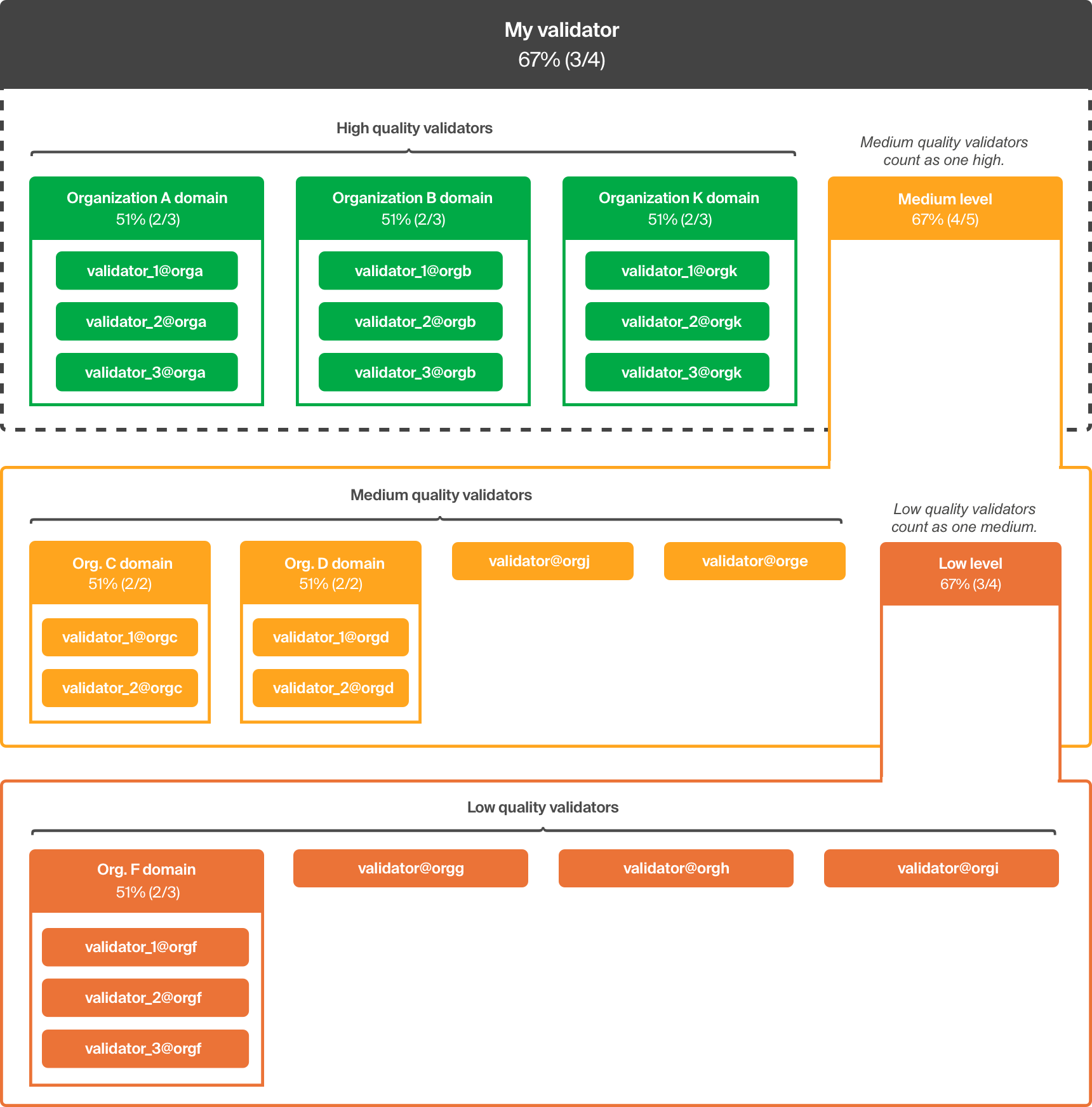
MEDIUM quality validators are nested below high quality validators, and their combined weight is equivalent to a single high quality entity. If a node doesn't publish an archive, but you deem it reliable, or have an organizational interest in including in your quorum set, give it a medium quality rating.
LOW quality validators are nested below medium quality validators, and their combined weight is equivalent to a single medium quality entity. Should they prove reliable over time, you can upgrade their rating to medium to give them a bigger role in your quorum set configuration.
Once you add validators to your configuration, stellar core automatically generates a quorum set using the following rules:
- Validators with the same home domain are automatically grouped together and given a threshold requiring a simple majority (2f+1)
- Heterogeneous groups of validators are given a threshold assuming byzantine failure (3f+1)
- Entities are grouped by QUALITY and nested from HIGH to LOW
- HIGH quality entities are at the top, and are given decision-making priority
- The combined weight of MEDIUM quality entities equals a single HIGH quality entity
- The combined weight of LOW quality entities equals a single MEDIUM quality entity
Here's a diagram depicting the nested quality levels and how they interact:
It is generally a good idea to give information to your validator on other validators that you rely on. This is achieved by configuring KNOWN_PEERS and PREFERRED_PEERS with the addresses of your dependencies.
Additionally, configuring PREFERRED_PEER_KEYS with the keys from your quorum set might be a good idea to give priority to the nodes that allows you to reach consensus.
Without those settings, your validator depends on other nodes on the network to forward you the right messages, which is typically done as a best effort.
Sometimes an organization needs to make changes that impact other's quorum sets:
- taking a validator down for long period of time
- adding new validators to their pool
In both cases, it's crucial to stage the changes to preserve quorum intersection and general good health of the network:
- removing too many nodes from your quorum set before the nodes are taken down : if different people remove different sets the remaining sets may not overlap between nodes and may cause network splits
- adding too many nodes in your quorum set at the same time : if not done carefully can cause those nodes to overpower your configuration
Recommended steps are for the entity that adds/removes nodes to do so first between their own nodes, and then have people reflect those changes gradually (over several rounds) in their quorum configuration.
Cross reference your validator settings, in particular:
- environment specific settings
- network passphrase
- known peers
- home domains and validators arrays
- seed defined if validating
- Automatic maintenance configured properly, especially when stellar-core is used in conjunction with a downstream system like Horizon.
After configuring your database and buckets settings, when running stellar-core for the first time, you must initialize the database:
$ stellar-core new-db
This command will initialize the database as well as the bucket directory and then exit.
You can also use this command if your DB gets corrupted and you want to restart it from scratch.
Stellar-core stores the state of the ledger in a SQL database.
This DB should either be a SQLite database or, for larger production instances, a separate PostgreSQL server.
Note: Horizon currently depends on using PostgreSQL.
For how to specify the database, see the example config.
Some tables in the database act as a publishing queue for external systems such as Horizon and generate meta data for changes happening to the distributed ledger.
If not managed properly those tables will grow without bounds. To avoid this, a built-in scheduler will delete data from old ledgers that are not used anymore by other parts of the system (external systems included).
The settings that control the automatic maintenance behavior are: AUTOMATIC_MAINTENANCE_PERIOD, AUTOMATIC_MAINTENANCE_COUNT and KNOWN_CURSORS.
By default, stellar-core will perform this automatic maintenance, so be sure to disable it until you have done the appropriate data ingestion in downstream systems (Horizon for example sometimes needs to reingest data).
If you need to regenerate the meta data, the simplest way is to replay ledgers for the range you're interested in after (optionally) clearing the database with newdb.
Some deployments of stellar-core and Horizon will want to retain meta data for the entire history of the network. This meta data can be quite large and computationally expensive to regenerate anew by replaying ledgers in stellar-core from an empty initial database state, as described in the previous section.
This can be especially costly if run more than once. For instance, when bringing a new node online. Or even if running a single node with Horizon, having already ingested the meta data once: a subsequent version of Horizon may have a schema change that entails re-ingesting it again.
Some operators therefore prefer to shut down their stellar-core (and/or Horizon) processes and take filesystem-level snapshots or database-level dumps of the contents of stellar-core's database and bucket directory, and/or Horizon's database, after meta data generation has occurred the first time. Such snapshots can then be restored, putting stellar-core and/or Horizon in a state containing meta data without performing full replay.
Any reasonably-recent state will do -- if such a snapshot is a little old, stellar-core will replay ledgers from whenever the snapshot was taken to the current network state anyways -- but this procedure can greatly accelerate restoring validator nodes, or cloning them to create new ones.
Stellar-core stores a duplicate copy of the ledger in the form of flat XDR files
called "buckets." These files are placed in a directory specified in the config
file as BUCKET_DIR_PATH, which defaults to buckets. The bucket files are used
for hashing and transmission of ledger differences to history archives.
Buckets should be stored on a fast local disk with sufficient space to store several times the size of the current ledger.
For the most part, the contents of both directories can be ignored as they are managed by stellar-core.
Stellar-core normally interacts with one or more "history archives," which are configurable facilities for storing and retrieving flat files containing history checkpoints: bucket files and history logs. History archives are usually off-site commodity storage services such as Amazon S3, Google Cloud Storage, Azure Blob Storage, or custom SCP/SFTP/HTTP servers.
Use command templates in the config file to give the specifics of which services you will use and how to access them. The example config shows how to configure a history archive through command templates.
While it is possible to run a stellar-core node with no configured history
archives, it will be severely limited, unable to participate fully in a
network, and likely unable to acquire synchronization at all. At the very
least, if you are joining an existing network in a read-only capacity, you
will still need to configure a get command to access that network's history
archives.
You can configure any number of archives to download from: stellar-core will automatically round-robin between them.
At a minimum you should configure get archives for each full validator referenced from your quorum set (see the HISTORY field in validators array for more detail).
Note: if you notice a lot of errors related to downloading archives, you should check that all archives in your configuration are up to date.
Archive sections can also be configured with put and mkdir commands to
cause the instance to publish to that archive (for nodes configured as archiver nodes or full validators).
The very first time you want to use your archive before starting your node you need to initialize it with:
$ stellar-core new-hist <historyarchive>
IMPORTANT:
- make sure that you configure both
putandmkdirifputdoesn't automatically create sub-folders - writing to the same archive from different nodes is not supported and will result in undefined behavior, potentially data loss.
- do not run
newhiston an existing archive unless you want to erase it.
In addition, your should ensure that your operating environment is also functional.
In no particular order:
- logging and log rotation
- monitoring and alerting infrastructure
After having configured your node and its environment, you're ready to start stellar-core.
This can be done with a command equivalent to
$ stellar-core run
At this point you're ready to observe core's activity as it joins the network.
Review the logging section to get yourself familiar with the output of stellar-core.
While running, interaction with stellar-core is done via an administrative
HTTP endpoint. Commands can be submitted using command-line HTTP tools such
as curl, or by running a command such as
$ stellar-core http-command <http-command>
The endpoint is not intended to be exposed to the public internet. It's typically accessed by administrators, or by a mid-tier application to submit transactions to the Stellar network.
See commands for a description of the available commands.
You can review the section on general node information;
the node will go through the following phases as it joins the network:
You should see authenticated_count increase.
"peers" : {
         "authenticated_count" : 3,
         "pending_count" : 4
},Until the node sees a quorum, it will say
"state" : "Joining SCP"After observing consensus, a new field quorum will be set with information on what the network decided on, at this point the node will switch to "Catching up":
      "quorum" : {
         "qset" : {
            "ledger" : 22267866,
            "agree" : 5,
            "delayed" : 0,
            "disagree" : 0,
            "fail_at" : 3,
            "hash" : "980a24",
            "missing" : 0,
            "phase" : "EXTERNALIZE"
         },
         "transitive" : {
            "intersection" : true,
            "last_check_ledger" : 22267866,
            "node_count" : 21
         }
      },
"state" : "Catching up",This is a phase where the node downloads data from archives. The state will start with something like
      "state" : "Catching up",
      "status" : [ "Catching up: Awaiting checkpoint (ETA: 35 seconds)" ]
and then go through the various phases of downloading and applying state such as
      "state" : "Catching up",
"status" : [ "Catching up: downloading ledger files 20094/119803 (16%)" ]When the node is done catching up, its state will change to
"state" : "Synced!"Stellar-core sends logs to standard output and stellar-core.log by default,
configurable as LOG_FILE_PATH.
Log messages are classified by progressive priority levels:
TRACE, DEBUG, INFO, WARNING, ERROR and FATAL.
The logging system only emits those messages at or above its configured logging level.
The log level can be controlled by configuration, the -ll command-line flag
or adjusted dynamically by administrative (HTTP) commands. Run:
$ stellar-core http-command "ll?level=debug"
against a running system. Log levels can also be adjusted on a partition-by-partition basis through the administrative interface. For example the history system can be set to DEBUG-level logging by running:
$ stellar-core http-command "ll?level=debug&partition=history"
against a running system.
The default log level is INFO, which is moderately verbose and should emit
progress messages every few seconds under normal operation.
Information provided here can be used for both human operators and programmatic access.
Run $ stellar-core http-command 'info'
The output will look something like
{
      "build" : "v11.1.0",
      "history_failure_rate" : "0",
      "ledger" : {
         "age" : 3,
         "baseFee" : 100,
         "baseReserve" : 5000000,
         "closeTime" : 1560350852,
         "hash" : "40d884f6eb105da56bea518513ba9c5cda9a4e45ac824e5eac8f7262c713cc60",
         "maxTxSetSize" : 1000,
         "num" : 24311579,
         "version" : 11
      },
      "network" : "Public Global Stellar Network ; September 2015",
      "peers" : {
         "authenticated_count" : 5,
         "pending_count" : 0
      },
      "protocol_version" : 10,
      "quorum" : {
         "qset" : {
            "agree" : 6,
            "delayed" : 0,
            "disagree" : 0,
            "fail_at" : 2,
            "hash" : "d5c247",
            "ledger" : 24311579,
            "missing" : 1,
            "phase" : "EXTERNALIZE"
         },
         "transitive" : {
            "critical" : null,
            "intersection" : true,
            "last_check_ledger" : 24311536,
            "node_count" : 21
         }
      },
      "startedOn" : "2019-06-10T17:40:29Z",
      "state" : "Catching up",
      "status" : [ "Catching up: downloading and verifying buckets: 30/30 (100%)" ]
   }
}
Some notable fields in info are:
buildis the build number for this stellar-core instanceledgerrepresents the local state of your node, it may be different from the network state if your node was disconnected from the network for example. Some important sub-fields:age: time elapsed since this ledger closed (during normal operation less than 10 seconds)num: ledger numberversion: protocol version supported by this ledger
networkis the network passphrase that this core instance is connecting topeersgives information on the connectivity to the networkauthenticated_countare live connectionspending_countare connections that are not fully established yet
protocol_versionis the maximum version of the protocol that this instance recognizesstate: indicates the node's synchronization status relative to the network.quorum: summarizes the state of the SCP protocol participants, the same as the information returned by thequorumcommand (see below).
The peers command returns information on the peers the instance is connected to.
This list is the result of both inbound connections from other peers and outbound connections from this node to other peers.
$ stellar-core http-command 'peers'
{
   "authenticated_peers" : {
     "inbound" : [
        {
           "address" : "54.161.82.181:11625",
           "elapsed" : 6,
           "id" : "sdf1",
           "olver" : 5,
           "ver" : "v9.1.0"
        }
     ],
     "outbound" : [
       {
          "address" : "54.211.174.177:11625",
          "elapsed" : 2303,
          "id" : "sdf2",
          "olver" : 5,
          "ver" : "v9.1.0"
       },
       {
          "address" : "54.160.175.7:11625",
          "elapsed" : 14082,
          "id" : "sdf3",
          "olver" : 5,
          "ver" : "v9.1.0"
        }
     ]
   },
   "pending_peers" : {
      "inbound" : [ "211.249.63.74:11625", "45.77.5.118:11625" ],
      "outbound" : [ "178.21.47.226:11625", "178.131.109.241:11625" ]
   }
}The quorum command allows to diagnose problems with the quorum set of the local node.
Run
$ stellar-core http-command 'quorum'
The output looks something like:
{
   "node" : "GCTSFJ36M7ZMTSX7ZKG6VJKPIDBDA26IEWRGV65DVX7YVVLBPE5ZWMIO",
   "qset" : {
      "agree" : 6,
      "delayed" : null,
      "disagree" : null,
      "fail_at" : 2,
      "fail_with" : [ "sdf_watcher1", "sdf_watcher2" ],
      "hash" : "d5c247",
      "ledger" : 24311847,
      "missing" : [ "stronghold1" ],
      "phase" : "EXTERNALIZE",
      "value" : {
         "t" : 3,
         "v" : [
            "sdf_watcher1",
            "sdf_watcher2",
            "sdf_watcher3",
            {
               "t" : 3,
               "v" : [ "stronghold1", "eno", "tempo.eu.com", "satoshipay" ]
            }
         ]
      }
   },
   "transitive" : {
      "critical": [
         [ "GDM7M262ZJJPV4BZ5SLGYYUTJGIGM25ID2XGKI3M6IDN6QLSTWQKTXQM" ]
      ],
      "intersection" : true,
      "last_check_ledger" : 24311536,
      "node_count" : 21
   }
}
This output has two main sections: qset and transitive. The former describes the node and its quorum set. The latter describes the transitive closure of the node's quorum set.
Entries to watch for in the qset section -- describing the node and its quorum set -- are:
agree: the number of nodes in the quorum set that agree with this instance.delayed: the nodes that are participating to consensus but seem to be behind.disagree: the nodes that were participating but disagreed with this instance.fail_at: the number of failed nodes that would cause this instance to halt.fail_with: an example of such potential failure.missing: the nodes that were missing during this consensus round.value: the quorum set used by this node (tis the threshold expressed as a number of nodes).
In the example above, 6 nodes are functioning properly, one is down (stronghold1), and
the instance will fail if any two nodes still working (or one node and one inner-quorum-set) fail as well.
If a node is stuck in state Joining SCP, this command allows to quickly find the reason:
- too many validators missing (down or without a good connectivity), solutions are:
- adjust quorum set (thresholds, grouping, etc) based on the nodes that are not missing
- try to get a better connectivity path to the missing validators
- network split would cause SCP to be stuck because of nodes that disagree. This would happen if either there is a bug in SCP, the network does not have quorum intersection or the disagreeing nodes are misbehaving (compromised, etc)
Note that the node not being able to reach consensus does not mean that the network as a whole will not be able to reach consensus (and the opposite is true, the network may fail because of a different set of validators failing).
You can get a sense of the quorum set health of a different node by doing
$ stellar-core http-command 'quorum?node=$sdf1 or $ stellar-core http-command 'quorum?node=@GABCDE
Overall network health can be evaluated by walking through all nodes and looking at their health. Note that this is only an approximation as remote nodes may not have received the same messages (in particular: missing for
other nodes is not reliable).
When showing quorum-set information about the local node rather than some other
node, a summary of the transitive closure of the quorum set is also provided in
the transitive field. This has several important sub-fields:
last_check_ledger: the last ledger in which the transitive closure was checked for quorum intersection. This will reset when the node boots and whenever a node in the transitive quorum changes its quorum set. It may lag behind the last-closed ledger by a few ledgers depending on the computational cost of checking quorum intersection.node_count: the number of nodes in the transitive closure, which are considered when calculating quorum intersection.intersection: whether or not the transitive closure enjoyed quorum intersection at the most recent check. This is of utmost importance in preventing network splits. It should always be true. If it is ever false, one or more nodes in the transitive closure of the quorum set is currently misconfigured, and the network is at risk of splitting. Corrective action should be taken immediately, for which two additional sub-fields will be present to help suggest remedies:last_good_ledger: this will note the last ledger for which theintersectionfield was evaluated as true; if some node reconfigured at or around that ledger, reverting that configuration change is the easiest corrective action to take.potential_split: this will contain a pair of lists of validator IDs, which is a potential pair of disjoint quorums that allowed by the current configuration. In other words, a possible split in consensus allowed by the current configuration. This may help narrow down the cause of the misconfiguration: likely the misconfiguration involves too-low a consensus threshold in one of the two potential quorums, and/or the absence of a mandatory trust relationship that would bridge the two.
critical: an "advance warning" field that lists nodes that could cause the network to fail to enjoy quorum intersection, if they were misconfigured sufficiently badly. In a healthy transitive network configuration, this field will benull. If it is non-nullthen the network is essentially "one misconfiguration" (of the quorum sets of the listed nodes) away from no longer enjoying quorum intersection, and again, corrective action should be taken: careful adjustment to the quorum sets of nodes that depend on the listed nodes, typically to strengthen quorums that depend on them.
The quorum endpoint can also retrieve detailed information for the transitive quorum.
This is an easier to process format than what scp returns as it doesn't contain all SCP messages.
$ stellar-core http-command 'quorum?transitive=true'
The output looks something like:
{
 "critical": null,
 "intersection" : true,
 "last_check_ledger" : 121235,
 "node_count" : 4,
 "nodes" : [
      {
         "distance" : 0,
         "heard" : 121235,
         "node" : "GB7LI",
         "qset" : {
            "t" : 2,
            "v" : [ "sdf1", "sdf2", "sdf3" ]
         },
         "status" : "tracking",
         "value" : "[ txH: d99591, ct: 1557426183, upgrades: [ ] ]",
         "value_id" : 1
      },
      {
         "distance" : 1,
         "heard" : 121235,
         "node" : "sdf2",
         "qset" : {
            "t" : 2,
            "v" : [ "sdf1", "sdf2", "sdf3" ]
         },
         "status" : "tracking",
         "value" : "[ txH: d99591, ct: 1557426183, upgrades: [ ] ]",
         "value_id" : 1
      },
      {
         "distance" : 1,
         "heard" : 121235,
         "node" : "sdf3",
         "qset" : {
            "t" : 2,
            "v" : [ "sdf1", "sdf2", "sdf3" ]
         },
         "status" : "tracking",
         "value" : "[ txH: d99591, ct: 1557426183, upgrades: [ ] ]",
         "value_id" : 1
      },
      {
         "distance" : 1,
         "heard" : 121235,
         "node" : "sdf1",
         "qset" : {
            "t" : 2,
            "v" : [ "sdf1", "sdf2", "sdf3" ]
         },
         "status" : "tracking",
         "value" : "[ txH: d99591, ct: 1557426183, upgrades: [ ] ]",
         "value_id" : 1
      }
   ]
}
The output begins with the same summary information as in the transitive block
of the non-transitive query (if queried for the local node), but also includes
a nodes array that represents a walk of the transitive quorum centered on
the query node.
Fields are:
node: the identity of the validatordistance: how far that node is from the root node (ie. how many quorum set hops)heard: the latest ledger sequence number that this node voted atqset: the node's quorum setstatus: one ofbehind|tracking|ahead(compared to the root node) ormissing|unknown(when there are no recent SCP messages for that node)value_id: a unique ID for what the node is voting for (allows to quickly tell if nodes are voting for the same thing)value: what the node is voting for
Maintenance here refers to anything involving taking your validator temporarily out of the network (to apply security patches, system upgrade, etc).
As an administrator of a validator, you must ensure that the maintenance you are about to apply to the validator is safe for the overall network and for your validator.
Safe means that the other validators that depend on yours will not be affected too much when you turn off your validator for maintenance and that your validator will continue to operate as part of the network when it comes back up.
If you are changing some settings that may impact network wide settings such as protocol version, review the section on network configuration.
If you're changing your quorum set configuration, also read the section on what to do.
We recommend performing the following steps in order (repeat sequentially as needed if you run multiple nodes).
- Advertise your intention to others that may depend on you. Some coordination is required to avoid situations where too many nodes go down at the same time.
- Dependencies should assess the health of their quorum, refer to the section "Understanding quorum and reliability".
- If there is no objection, take your instance down
- When done, start your instance that should rejoin the network
- The instance will be completely caught up when it's both
Syncedand there is no backlog in uploading history.
The network itself has network wide settings that can be updated.
This is performed by validators voting for and agreeing to new values the same way than consensus is reached for transaction sets, etc.
A node can be configured to vote for upgrades using the upgrades endpoint . see commands.md for more information.
The network settings are:
- the version of the protocol used to process transactions
- the maximum number of transactions that can be included in a given ledger close
- the cost (fee) associated with processing operations
- the base reserve used to calculate the lumen balance needed to store things in the ledger
When the network time is later than the upgradetime specified in
the upgrade settings, the validator will vote to update the network
to the value specified in the upgrade setting.
When a validator is armed to change network values, the output of info will contain information about the vote.
For a new value to be adopted, the same level of consensus between nodes needs to be reached as for transaction sets.
Changes to network wide settings have to be orchestrated properly between validators as well as non validating nodes:
- a change is vetted between operators (changes can be bundled)
- an effective date in the future is picked for the change to take effect (controlled by
upgradetime) - if applicable, communication is sent out to all network users
An improper plan may cause issues such as:
- nodes missing consensus (aka "getting stuck"), and having to use history to rejoin
- network reconfiguration taking effect at a non deterministic time (causing fees to change ahead of schedule for example)
For more information look at docs/versioning.md.
Example here is to upgrade the protocol version to version 9 on January-31-2018.
$ stellar-core http-command 'upgrades?mode=set&upgradetime=2018-01-31T20:00:00Z&protocolversion=9'$ stellar-core http-command info
At this point info will tell you that the node is setup to vote for this upgrade:
      "status" : [
         "Armed with network upgrades: upgradetime=2018-01-31T20:00:00Z, protocolversion=9"
]This section contains information that is useful to know but that should not stop somebody from running a node.
testnet.md is a short tutorial demonstrating how to configure and run a short-lived, isolated test network.
Stellar-core can be started directly from the command line, or through a supervision
system such as init, upstart, or systemd.
Stellar-core can be gracefully exited at any time by delivering SIGINT or
pressing CTRL-C. It can be safely, forcibly terminated with SIGTERM or
SIGKILL. The latter may leave a stale lock file in the BUCKET_DIR_PATH,
and you may need to remove the file before it will restart.
Otherwise, all components are designed to recover from abrupt termination.
Stellar-core can also be packaged in a container system such as Docker, so long
as BUCKET_DIR_PATH and the database are stored on persistent volumes. For an
example, see docker-stellar-core.
architecture.md describes how stellar-core is structured internally, how it is intended to be deployed, and the collection of servers and services needed to get the full functionality and performance.