If you don’t know what Sudoku is you can find a lot of good documentation on internet. For example here on Wikipedia.
A simple grid would look like this:
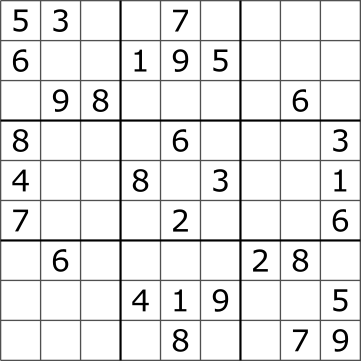
The black numbers are the initial values.

The red numbers are the numbers that solve the puzzle.
This program is built on a Grid (basically a 3 dimensions jagged array).

Every Value (1, 2, 3 …) has its own layer : the first dimension of the Grid.
Every Cell on the Grid is identified with its coordinates: (x, y),
the last two dimensions of the grid.

Every Cell is grouped by quadrant.

These arrays Values are picked from the CellStatus enum.
Initially all the cells have the CellStatus.EMPTY value.
Every time a number is entered at coordinate (x,y)
the corresponding layer is updated with the Value
(CellStatus.ONE, CellStatus.TWO…).
Every other cells on the same line (same x coordinate),
same column (same y coordinate)
and same quadrant are set as CellStatus.FORBIDDEN.

-
Empty cells are represented in white
-
Forbidden cells are represented in red.
-
Occupied cells are represented in blue.
An additional two dimensions array is maintained to memorize the original values.
This Grid ensure the integrity of the program.
The application launch the MainGui that will in turn choose between EmptyGui and SolvedGui.
At Startup you will see the EmptyGui.

The EmptyGui is the one that allows the user to fill the grid with the initial values.

The SolvedGui is the one displaying the puzzle solution. The values in red are the initial ones.

Both classes extends the AbstractGui that comes with the routine who build the Quadrants
and the inner cells and the bottom toolbar with the exit button. Two methods are to be implemented
by the subclasses.
-
The first one is used to fill the cells with:
-
TextFiled for the
EmptyGuiclass. -
colored value for the
SolvedGuiclass.
-
-
The second is used to add the action buttons:
-
'Solve' for the
EmptyGuiclass. -
'Reset' for the
SolvedGuiclass.
-
The GridSolverEngine has a set of solvers, currently two. It runs the two solvers
against the Grid to try to solve it.
Every solver extends GridSolver which contains the routine that goes through every cells
and then call the subclass overloaded findSolution method. The solver stops either
when the Grid is solved or when the Solver went through the whole Grid without being
able to find any solutions.
This solver checks if there is only one possible Value for the current cell. If true then it sets it.