







A comprehensive terminal emulator library written in Rust with Python bindings for Python 3.12+. Provides VT100/VT220/VT320/VT420/VT520 compatibility with PTY support, matching iTerm2's feature set.


-
Web Terminal Onscreen Keyboard: Mobile-friendly virtual keyboard for touch devices
- Special keys missing from iOS/Android keyboards: Esc, Tab, arrow keys, Page Up/Down, Home, End, Insert, Delete
- Function keys F1-F12 (toggleable), symbol keys (|, , `, ~, {, }, etc.)
- Modifier keys (Ctrl, Alt, Shift) that combine with other keys
- Quick Ctrl shortcuts: ^C, ^D, ^Z, ^L, ^A, ^E, ^K, ^U, ^W, ^R
- Glass morphism design, haptic feedback, auto-shows on mobile
-
OSC 9;4 Progress Bar Support (ConEmu/Windows Terminal style):
- Terminal applications can report progress that can be displayed in tab bars, taskbars, or window titles
- Five states:
Hidden,Normal,Indeterminate,Warning,Error - Progress percentage (0-100) for applicable states
- New
ProgressStateenum andProgressBarclass in Python - Terminal methods:
progress_bar(),has_progress(),progress_value(),progress_state(),set_progress(),clear_progress()
from par_term_emu_core_rust import Terminal, ProgressState

term = Terminal(80, 24)

# Receive progress from application
term.process(b"\x1b]9;4;1;50\x1b\\")  # Set progress to 50%

# Check progress state
if term.has_progress():
    pb = term.progress_bar()
    print(f"Progress: {pb.progress}%, State: {pb.state}")

# Programmatic control
term.set_progress(ProgressState.Warning, 75)  # Set warning at 75%
term.clear_progress()  # Hide progress bar
See CHANGELOG.md for complete version history.
-
Streaming Server Enhancements:
--sizeCLI option for specifying terminal size inCOLSxROWSformat (e.g.,--size 120x40or-s 120x40)--command/-cCLI option to execute a command after shell startup (with 1 second delay for prompt settling)initial_colsandinitial_rowsconfiguration options inStreamingConfigfor both Rust and Python APIs
-
Python Bindings Enhancements:
- New
MouseEncodingenum for mouse event encoding control (Default, Utf8, Sgr, Urxvt) - Direct screen buffer control:
use_alt_screen(),use_primary_screen() - Mouse encoding control:
mouse_encoding(),set_mouse_encoding() - Mode setters:
set_focus_tracking(),set_bracketed_paste(),set_title() - Bold brightening control:
bold_brightening(),set_bold_brightening() - Color getters for all theme colors (link, bold, cursor guide, badge, match, selection)
- New
- Terminal Reflow Improvements: Multiple fixes to scrollback and grid reflow behavior during resize
- Full Terminal Reflow on Width Resize: Both scrollback AND visible screen content now reflow when terminal width changes
- Previously, width changes cleared scrollback and clipped visible content
- Now implements intelligent reflow similar to xterm and iTerm2:
- Scrollback: Preserves all history with proper line wrapping/unwrapping
- Visible Screen: Content wraps instead of being clipped when narrowing
- Width increase: Unwraps soft-wrapped lines into longer lines
- Width decrease: Re-wraps lines that no longer fit
- Preserves all cell attributes (colors, bold, italic, etc.)
- Handles wide characters (CJK, emoji) correctly at line boundaries
- Significant UX improvement for terminal resize operations
-
Emoji Sequence Preservation: Complete support for complex emoji sequences and grapheme clusters
⚠️ vs ⚠ - Variation selectors (emoji vs text style)- 👋🏽 - Skin tone modifiers (Fitzpatrick scale)
- 👨👩👧👦 - ZWJ sequences (family emoji)
- 🇺🇸 🇬🇧 - Regional indicator flags
- é - Combining diacritics and marks
- New
graphememodule for Unicode cluster detection - Enhanced Python bindings export full grapheme clusters
-
Web Terminal Frontend: Modern Next.js-based web interface
- Built with Next.js, TypeScript, and Tailwind CSS v4
- Theme support with configurable color palettes
- Nerd Font support for file/folder icons
- New Makefile targets for web frontend development
-
Terminal Sequence Support:
- CSI 3J - Clear scrollback buffer command
- Improved cursor positioning for snapshot exports
- Graphics now properly preserved when scrolling into scrollback buffer
- Sixel content saved to scrollback during large scrolling operations
- Kitty Graphics Protocol animation parsing fixes (base64 encoding, frame actions)
Cellstruct no longer implementsCopy(nowCloneonly)- Required for variable-length grapheme cluster storage
- All cell copy operations now require explicit
.clone()calls - Python bindings are unaffected - no changes needed in Python code
- Performance impact is minimal due to efficient cloning
- Theme Rendering Fix: Fixed theme color palette application in Python bindings
-
Graphics Protocol Support: Comprehensive multi-protocol graphics implementation
- iTerm2 Inline Images (OSC 1337): PNG, JPEG, GIF support with base64 encoding
- Kitty Graphics Protocol (APC G): Advanced image placement with reuse and animations
- Sixel Graphics: Enhanced with unique IDs and configurable cell dimensions
- Unified
GraphicsStorewith scrollback support and memory limits - Animation support with frame composition and timing control
- Graphics dropped event tracking for resource management
-
Pre-built Streaming Server Binaries: Download ready-to-run binaries from GitHub Releases
- Linux (x86_64, ARM64), macOS (Intel, Apple Silicon), Windows (x86_64)
- No compilation needed - just download and run
- Includes separate web frontend package (tar.gz/zip) for serving the terminal interface
- Published to crates.io for Rust developers:
cargo install par-term-emu-core-rust --features streaming
See CHANGELOG.md for complete version history.
- VT100/VT220/VT320/VT420/VT520 Support - Comprehensive terminal emulation matching iTerm2
- Rich Color Support - 16 ANSI colors, 256-color palette, 24-bit RGB (true color)
- Text Attributes - Bold, italic, underline (5 styles), strikethrough, blink, reverse, dim, hidden
- Advanced Cursor Control - Full VT cursor movement and positioning
- Line/Character Editing - VT220 insert/delete operations
- Rectangle Operations - VT420 fill/copy/erase/modify rectangular regions (DECFRA, DECCRA, etc.)
- Scrolling Regions - DECSTBM for restricted scrolling areas
- Tab Stops - Configurable tab stops (HTS, TBC, CHT, CBT)
- Unicode Support - Full Unicode including complex emoji sequences and grapheme clusters
- Variation selectors (emoji vs text presentation)
- Skin tone modifiers (Fitzpatrick scale U+1F3FB-U+1F3FF)
- Zero Width Joiner (ZWJ) sequences for multi-emoji glyphs
- Regional indicators for flag emoji
- Combining characters and diacritical marks
- Alternate Screen Buffer - Full support with automatic cleanup
- Mouse Support - Multiple tracking modes and encodings (X10, Normal, Button, Any, SGR, URXVT)
- Bracketed Paste Mode - Safe paste handling
- Focus Tracking - Focus in/out events
- OSC 8 Hyperlinks - Clickable URLs in terminal (full TUI support)
- OSC 52 Clipboard - Copy/paste over SSH without X11
- OSC 9/777 Notifications - Desktop-style alerts and notifications
- Shell Integration - OSC 133 (iTerm2/VSCode compatible)
- Kitty Keyboard Protocol - Progressive keyboard enhancement with auto-reset on alternate screen exit
- Synchronized Updates (DEC 2026) - Flicker-free rendering
- Tmux Control Protocol - Control mode integration support
- Sixel Graphics - DEC VT340 compatible bitmap graphics with half-block rendering
- iTerm2 Inline Images - OSC 1337 protocol for PNG, JPEG, GIF images
- Kitty Graphics Protocol - APC G protocol with image reuse, animations, and advanced placement
- Unicode Placeholders - Virtual placements insert U+10EEEE characters for inline image display
- Unified Graphics Store - Protocol-agnostic storage with scrollback support
- Animation Support - Frame-based animations with timing and composition control
- Resource Management - Configurable memory limits and graphics dropped tracking
- Interactive Shell Sessions - Spawn and control shell processes
- Bidirectional I/O - Send input and receive output
- Process Management - Start, stop, and monitor child processes
- Dynamic Resizing - Resize with SIGWINCH signal
- Environment Control - Custom environment variables and working directory
- Event Loop Integration - Non-blocking update detection
- Cross-Platform - Linux, macOS, and Windows via portable-pty
- Standalone Server - Pure Rust streaming server binary (no Python required)
- Real-time Streaming - Sub-100ms latency terminal streaming over WebSocket
- Multiple Clients - Support for concurrent viewers per session
- Authentication - Optional API key authentication (header or URL param)
- Configurable Themes - Multiple built-in color themes (iTerm2, Monokai, Dracula, Solarized)
- Auto-resize - Client-initiated terminal resizing with SIGWINCH support
- Browser Compatible - Works with any WebSocket client (xterm.js recommended)
- Modern Web Frontend - Next.js/React application with Tailwind CSS v4 and xterm.js
- Multiple Formats - PNG, JPEG, BMP, SVG (vector), HTML
- Embedded Font - JetBrains Mono bundled - no installation required
- Programming Ligatures - =>, !=, >=, and other code ligatures
- True Font Rendering - High-quality antialiasing for raster formats
- Color Emoji Support - Full emoji rendering with automatic font fallback
- Session Recording - Record/replay sessions (asciicast v2, JSON)
- Export Functions - Plain text, ANSI styled, HTML export
- YAML Format - Human-readable macro storage format
- Friendly Key Names - Intuitive key combinations (
ctrl+shift+s,enter,f1, etc.) - Keyboard Events - Record and replay keyboard input with precise timing
- Delays - Control timing between events
- Screenshot Triggers - Trigger screenshots during playback
- Playback Controls - Play, pause, resume, stop, and speed control
- Macro Library - Store and manage multiple macros
- Recording Conversion - Convert terminal recording sessions to macros
- Text Extraction - Smart word/URL detection, selection boundaries, bracket matching
- Content Search - Find text with case-sensitive/insensitive matching
- Buffer Statistics - Memory usage, cell counts, graphics count and memory tracking
- Color Utilities - 18+ color manipulation functions (iTerm2-compatible)
- NTSC brightness, contrast adjustment, WCAG accessibility checks
- Color space conversions (RGB, HSL, Hex, ANSI 256)
- Saturation/hue adjustment, color mixing
- API Reference - Complete Python API documentation
- VT Sequences - Comprehensive ANSI/VT sequence reference
- Advanced Features - Detailed feature guides
- Architecture - Internal architecture details
- Security - PTY security best practices
- Building - Build instructions and requirements
- Configuration Reference - Configuration options
- Cross-Platform Notes - Platform-specific information
- VT Technical Reference - Detailed VT compatibility and implementation
- Fonts - Font configuration and rendering
- Macros - Macro recording and playback system
- Streaming - WebSocket terminal streaming
- Rust Usage - Using the library in pure Rust projects
- Graphics Testing - Testing graphics protocol implementations
uv add par-term-emu-core-rust
# or
pip install par-term-emu-core-rustRequires Rust 1.75+ and Python 3.12+:
# Install maturin (build tool)
uv tool install maturin

# Build and install
maturin develop --releasematurin build --release
uv add --find-links target/wheels par-term-emu-core-rust
# or
pip install target/wheels/par_term_emu_core_rust-*.whlThe library can be used in pure Rust projects without Python. Choose your feature combination:
| Use Case | Cargo.toml | What's Included |
|---|---|---|
| Rust Only | par-term-emu-core-rust = { version = "0.10", default-features = false } |
Terminal, PTY, Macros |
| Rust + Streaming | par-term-emu-core-rust = { version = "0.10", default-features = false, features = ["streaming"] } |
+ WebSocket/HTTP server |
| Python Only | par-term-emu-core-rust = "0.10" |
+ Python bindings |
| Everything | par-term-emu-core-rust = { version = "0.10", features = ["full"] } |
All features |
Download pre-built streaming server (recommended):
Pre-built binaries and web frontend packages are available from GitHub Releases:
# Download binary (Linux example)
wget https://github.com/paulrobello/par-term-emu-core-rust/releases/latest/download/par-term-streamer-linux-x86_64
chmod +x par-term-streamer-linux-x86_64

# Download web frontend
wget https://github.com/paulrobello/par-term-emu-core-rust/releases/latest/download/par-term-web-frontend-v0.10.0.tar.gz
tar -xzf par-term-web-frontend-v0.10.0.tar.gz -C ./web_term

# Run
./par-term-streamer-linux-x86_64 --web-root ./web_term
Available binaries: Linux (x86_64, ARM64), macOS (Intel, Apple Silicon), Windows (x86_64)
Or install from crates.io:
cargo install par-term-emu-core-rust --features streamingOr build from source:
cargo build --bin par-term-streamer --no-default-features --features streaming --release
./target/release/par-term-streamer --help
See docs/RUST_USAGE.md for detailed Rust API documentation and examples.
For optimal terminal compatibility, install the par-term terminfo definition:
# Install for current user
./terminfo/install.sh

# Or install system-wide
sudo ./terminfo/install.sh --system

# Then use
export TERM=par-term
export COLORTERM=truecolor
See terminfo/README.md for details.
Enhances terminal with semantic prompt markers, command status tracking, and smart selection:
cd shell_integration
./install.sh  # Auto-detects bash/zsh/fish
See shell_integration/README.md for details.
from par_term_emu_core_rust import Terminal

# Create terminal
term = Terminal(80, 24)

# Process ANSI sequences
term.process_str("Hello, \x1b[31mWorld\x1b[0m!\n")
term.process_str("\x1b[1;32mBold green text\x1b[0m\n")

# Get content and cursor position
print(term.content())
col, row = term.cursor_position()
print(f"Cursor at: ({col}, {row})")from par_term_emu_core_rust import PtyTerminal
import time
# Create PTY terminal and spawn shell
with PtyTerminal(80, 24) as term:
term.spawn_shell()
# Send commands
term.write_str("echo 'Hello from shell!'\n")
time.sleep(0.2)
# Get output
print(term.content())
# Resize terminal
term.resize(100, 30)
# Exit shell
term.write_str("exit\n")
# Automatic cleanupterm = Terminal(80, 24)
term.process_str("\x1b[1;31mHello, World!\x1b[0m\n")
# Save screenshot
term.screenshot_to_file("output.png")
term.screenshot_to_file("output.svg", format="svg") # Vector graphics!
term.screenshot_to_file("output.html", format="html") # Styled HTML
# Custom configuration
term.screenshot_to_file(
"output.png",
font_size=16.0,
padding=20,
include_scrollback=True,
minimum_contrast=0.5 # iTerm2-compatible contrast adjustment
)from par_term_emu_core_rust import (
perceived_brightness_rgb, adjust_contrast_rgb,
contrast_ratio, meets_wcag_aa,
rgb_to_hex, hex_to_rgb, mix_colors
)
# iTerm2-compatible contrast adjustment
adjusted = adjust_contrast_rgb((64, 64, 64), (0, 0, 0), 0.5)
# WCAG accessibility checks
ratio = contrast_ratio((0, 0, 0), (255, 255, 255))
print(f"Contrast ratio: {ratio:.1f}:1")
print(f"Meets WCAG AA: {meets_wcag_aa((0, 0, 0), (255, 255, 255))}")
# Color conversions
hex_color = rgb_to_hex((255, 128, 64)) # "#FF8040"
rgb = hex_to_rgb("#FF8040") # (255, 128, 64)
mixed = mix_colors((255, 0, 0), (0, 0, 255), 0.5) # Purplefrom par_term_emu_core_rust import Macro, PtyTerminal
import time
# Create a macro manually
macro = Macro("git_status")
macro.set_description("Check git status and show branch")
macro.add_key("g")
macro.add_key("i")
macro.add_key("t")
macro.add_key("space")
macro.add_key("s")
macro.add_key("t")
macro.add_key("a")
macro.add_key("t")
macro.add_key("u")
macro.add_key("s")
macro.add_key("enter")
macro.add_delay(500) # Wait 500ms
macro.add_screenshot("git_status.png") # Trigger screenshot
# Save to YAML
macro.save_yaml("git_status.yaml")
# Load and play back
term = PtyTerminal(80, 24)
term.spawn_shell()
# Load macro from file
loaded_macro = Macro.load_yaml("git_status.yaml")
term.load_macro("git_check", loaded_macro)
# Play the macro
term.play_macro("git_check", speed=1.0) # Normal speed
# Tick to execute macro events
while term.is_macro_playing():
if term.tick_macro(): # Returns True if event was processed
time.sleep(0.01) # Small delay for visual effect
# Check for screenshot triggers
triggers = term.get_macro_screenshot_triggers()
for label in triggers:
term.screenshot_to_file(label)
# Convert a recording to a macro
term.start_recording("test session")
term.write_str("ls -la\n")
time.sleep(0.5)
session = term.stop_recording()
# Convert and save
macro = term.recording_to_macro(session, "ls_command")
macro.save_yaml("ls_command.yaml")See the examples/ directory for comprehensive examples:
basic_usage_improved.py- Enhanced basic usagecolors_demo.py- Color supportcursor_movement.py- Cursor controltext_attributes.py- Text stylingunicode_emoji.py- Unicode/emoji supportscrollback_demo.py- Scrollback buffer usage
alt_screen.py- Alternate screen buffermouse_tracking.py- Mouse eventsbracketed_paste.py- Bracketed pastesynchronized_updates.py- Flicker-free renderingshell_integration.py- OSC 133 integrationtest_osc52_clipboard.py- SSH clipboardtest_kitty_keyboard.py- Kitty keyboard protocolhyperlink_demo.py- Clickable URLsnotifications.py- Desktop notificationsrectangle_operations.py- VT420 rectangle ops
display_image_sixel.py- Sixel graphicstest_sixel_simple.py- Simple sixel examplestest_sixel_display.py- Advanced sixel displayscreenshot_demo.py- Screenshot featuresfeature_showcase.py- Comprehensive TUI showcase
pty_basic.py- Basic PTY usagepty_shell.py- Interactive shellspty_resize.py- Dynamic resizingpty_event_loop.py- Event loop integrationpty_mouse_events.py- Mouse in PTYpty_custom_env.py- Custom environment variablespty_multiple.py- Multiple PTY sessionspty_with_par_term.py- Integration with par-term
streaming_demo.py- Python WebSocket streaming serverstreaming_client.html- Browser-based terminal client
demo.yaml- Example macro definition
Standalone Rust Server:
# Build and run (default: ws://127.0.0.1:8080)
make streamer-run

# Run with authentication
make streamer-run-auth

# Or use cargo directly
cargo build --bin par-term-streamer --no-default-features --features streaming --release
./target/release/par-term-streamer --port 8080 --theme dracula

# With authentication
./target/release/par-term-streamer --api-key my-secret --theme monokai

# Install globally
make streamer-install
par-term-streamer --help
Available Themes: iterm2-dark, monokai, dracula, solarized-dark
Using Pre-built Package (Recommended):
Download the pre-built static web frontend from GitHub Releases:
# Download and extract
wget https://github.com/paulrobello/par-term-emu-core-rust/releases/latest/download/par-term-web-frontend-v0.10.0.tar.gz
tar -xzf par-term-web-frontend-v0.10.0.tar.gz -C ./web_term

# Run streamer with web frontend
par-term-streamer --web-root ./web_term
# Open browser to http://localhost:8080
See web_term/README.md for detailed usage instructions.
Building from Source:
A modern Next.js-based web terminal frontend source is in web-terminal-frontend/:
cd web-terminal-frontend

# Install dependencies
npm install

# Development server (runs on port 8030)
npm run dev

# Build for production (outputs to out/)
npm run build

# Copy to web_term for serving
cp -r out/* ../web_term/
Features:
- Modern UI with Tailwind CSS v4
- xterm.js terminal emulator
- WebSocket connection to streaming server
- Theme selection and synchronization
- Responsive design
- Terminal resize support
See web-terminal-frontend/README.md for detailed setup and configuration.
A full-featured TUI (Text User Interface) application is available in the sister project par-term-emu-tui-rust.
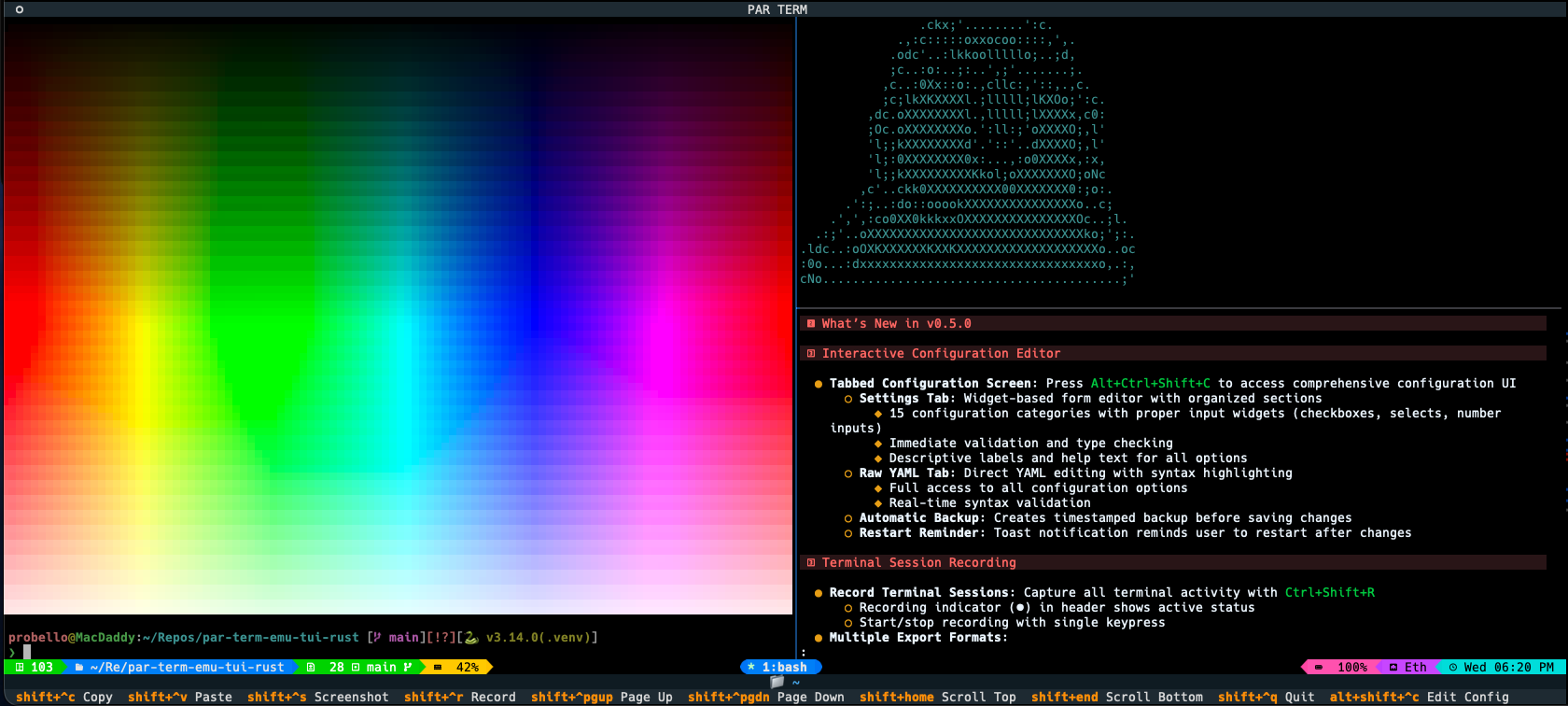
Installation: uv add par-term-emu-tui-rust or pip install par-term-emu-tui-rust
GitHub: https://github.com/paulrobello/par-term-emu-tui-rust
- Rust (1.75+) - Core library implementation
- Python (3.12+) - Python bindings
- PyO3 - Zero-cost Python/Rust bindings
- VTE - ANSI sequence parsing
- portable-pty - Cross-platform PTY support
# Run Rust tests
cargo test

# Run Python tests
uv sync  # Install dependencies including pytest
pytest tests/- Zero-copy operations where possible
- Efficient grid representation
- Fast ANSI parsing with VTE crate
- Minimal Python/Rust boundary crossings
See docs/ARCHITECTURE.md for implementation details.
When using PTY functionality, follow security best practices to prevent command injection and other vulnerabilities.
See docs/SECURITY.md for comprehensive security guidelines.
Contributions are welcome! Please submit issues or pull requests on GitHub.
git clone https://github.com/paulrobello/par-term-emu-core-rust.git
cd par-term-emu-core-rust
make setup-venv  # Create virtual environment
make pre-commit-install  # Install pre-commit hooks (recommended)
make dev  # Build library
make checkall # Run all quality checksAll contributions must pass:
- Rust formatting (
cargo fmt) - Rust linting (
cargo clippy) - Python formatting (
make fmt-python) - Python linting (
make lint-python) - Type checking (
pyright) - Tests (
make test-python)
TIP: Use make pre-commit-install to automate all checks on every commit!
See CLAUDE.md for detailed development instructions.
This project is licensed under the MIT License - see the LICENSE file for details.
Paul Robello - probello@gmail.com
- PyPI: https://pypi.org/project/par-term-emu-core-rust/
- Crates.io: https://crates.io/crates/par-term-emu-core-rust
- GitHub: https://github.com/paulrobello/par-term-emu-core-rust
- TUI Application: https://github.com/paulrobello/par-term-emu-tui-rust
- Documentation: See docs/ directory
- Examples: See examples/ directory