2023 version 2 #6

Replies: 2 comments 3 replies

-
|
Hi Eva, I was already using the previous version (JAN 23), it's really useful. Reviewing the new file I'm missing the correct order for the processes because in the new version the columns "End-to-end business process", "Business process area" and "Business process" are sort by name, but this is not the correct sort. Example, for Acquire to dispose --> Acquire assets, the first related process in the excel is "Accumulate acquisition cost" and this is not the real order. Could you please upload the file with the process order? Thanks in advance |
Beta Was this translation helpful? Give feedback.

-
|
Hi Clara, |
Beta Was this translation helpful? Give feedback.
-
|
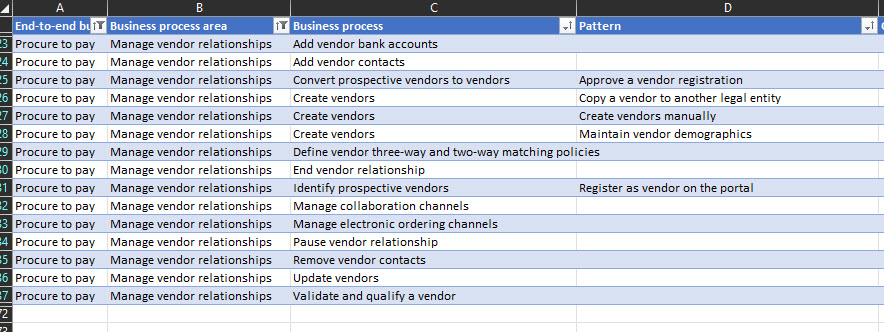
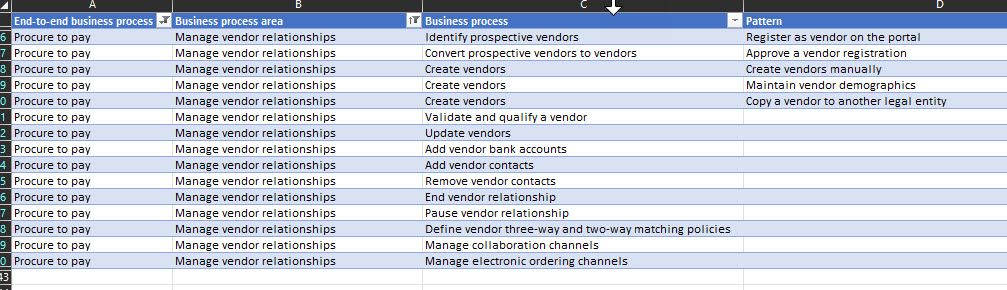
Hi Eva, Thanks for your answer! Yes, being an excel I understand I can sort as I like, but what I'm missing is the correct sequence in running the processes. For example, let me change the area to understand it easier; for Procure to pay > Manage vendor relationships in the new excel the first process is "Add vendor bank accounts" but the sequence order is:
That mean, I can create the vendor bank account but only if the vendor is created. So, if I need to follow the process in a flow or in the system I need to do it using this sequence. This order was included in the previous version without number but with the correct sort (without being sorted by name). This is the new version:
And this was the old one for the same processes area:
I hope my question is more clear now. Thanks again! |

Beta Was this translation helpful? Give feedback.
-
|
Thanks for the clarification! The new version is sorted alphabetically, not in order of sequence for the individual business processes. It also doesn't reflect the order in which we'll eventually publish the various articles at https://learn.microsoft.com/en-us/dynamics365/guidance/business-processes/overview |
Beta Was this translation helpful? Give feedback.

-
|
We are excited to announce that the latest version of the catalog now has a sequence ID added to the catalog. |
Beta Was this translation helpful? Give feedback.


Uh oh!
There was an error while loading. Please reload this page.
-
April 2023: Updated templates, updated business process catalog. Learn more at https://learn.microsoft.com/en-us/dynamics365/guidance/
This discussion was created from the release 2023 version 2.
Beta Was this translation helpful? Give feedback.
All reactions